Stefán Jökull Sigurðarson

15.4K posts

Stefán Jökull Sigurðarson banner
Stefán Jökull Sigurðarson

Stefán Jökull Sigurðarson

@stebets

Microsoft MVP, Code Wrangler/Chief Iceberg Rider and Employee 1.0 @haveibeenpwned, @dotnetfdn member, @[email protected]. He/him

Reykjavík, Iceland Katılım Şubat 2009
1.3K Takip Edilen2.3K Takipçiler
Stefán Jökull Sigurðarson
Except unless you have a very small system you will now be maintaining two hashes forever since migration will never be complete. A better way is to indeed double hash but make a note of which hashes were “rehashed” because keeping the old hash around is the real issue. For old hashes calculate the old + new hash and do the proper single hashing on login.
English
0
0
0
51
Milan Jovanović
Milan Jovanović@mjovanovictech·
Changing a password hashing algorithm sounds simple. Just replace the old one with the new one, right? Not quite. Password hashes are one-way. You can’t take an old PBKDF2 hash and convert it to Argon2. And if you replace the hasher implementation too aggressively, existing users can get locked out. New users work fine. Existing users enter the correct password. But the new hasher tries to verify an old hash. Verification fails. Now your “security improvement” is a production incident. The safer approach is migration on login: 1. Try the new algorithm first 2. If that fails, fall back to the legacy algorithm 3. If legacy verification succeeds, log the user in 4. Re-hash the password with the new algorithm 5. Save the upgraded hash Future logins now use the new path. No batch migration. No forced password reset for every user. No downtime. A few production details matter: - Store which algorithm was used - Track how many users still use the legacy format - Put the migration write behind a feature flag - Remove the legacy path once the migration is done The bigger lesson: A hashing upgrade is not just an auth change. It’s a zero-downtime data migration. I wrote a practical walkthrough using password hashing as the example: milanjovanovic.tech/blog/a-practic…
Milan Jovanović tweet media
English
5
9
63
3.8K
Alexandre Mutel
Alexandre Mutel@xoofx·
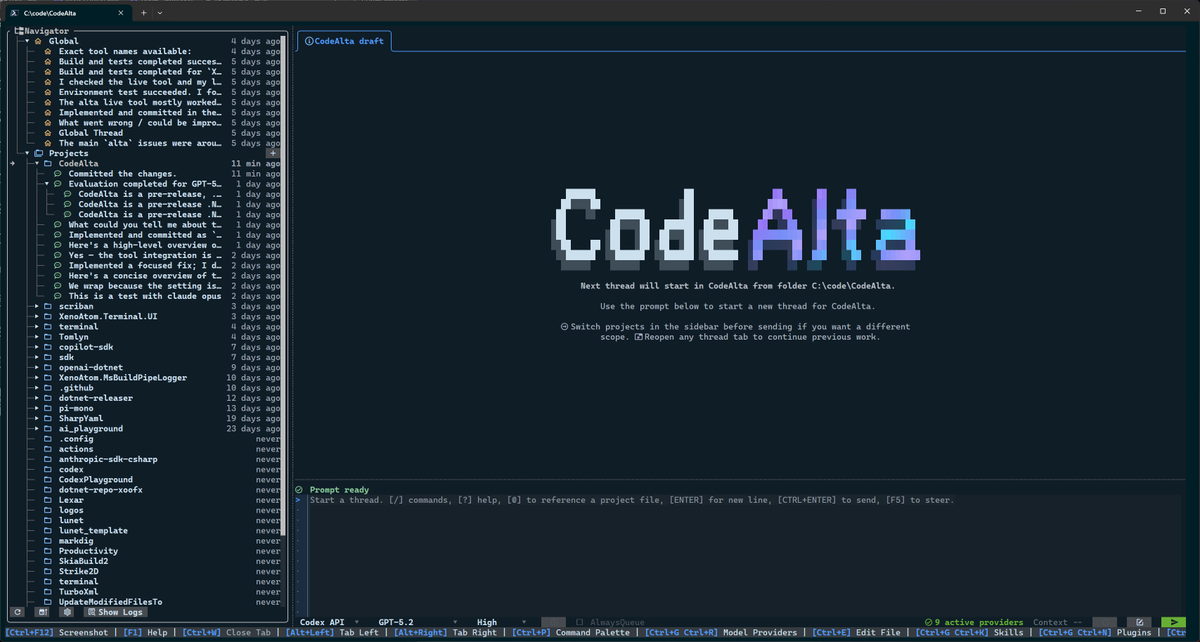
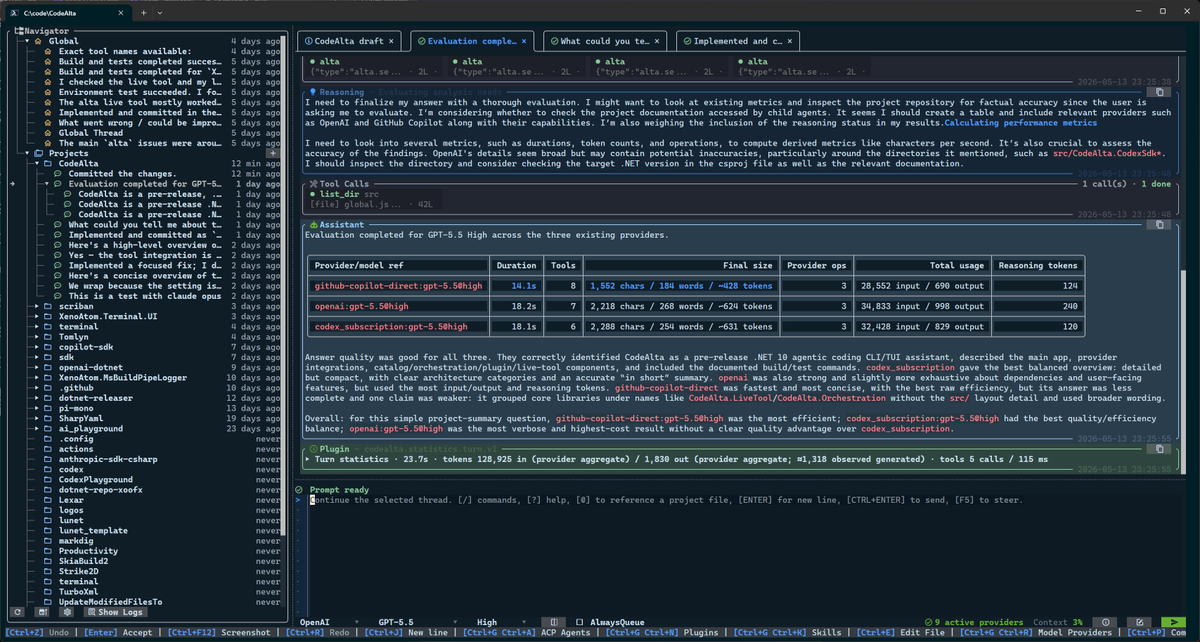
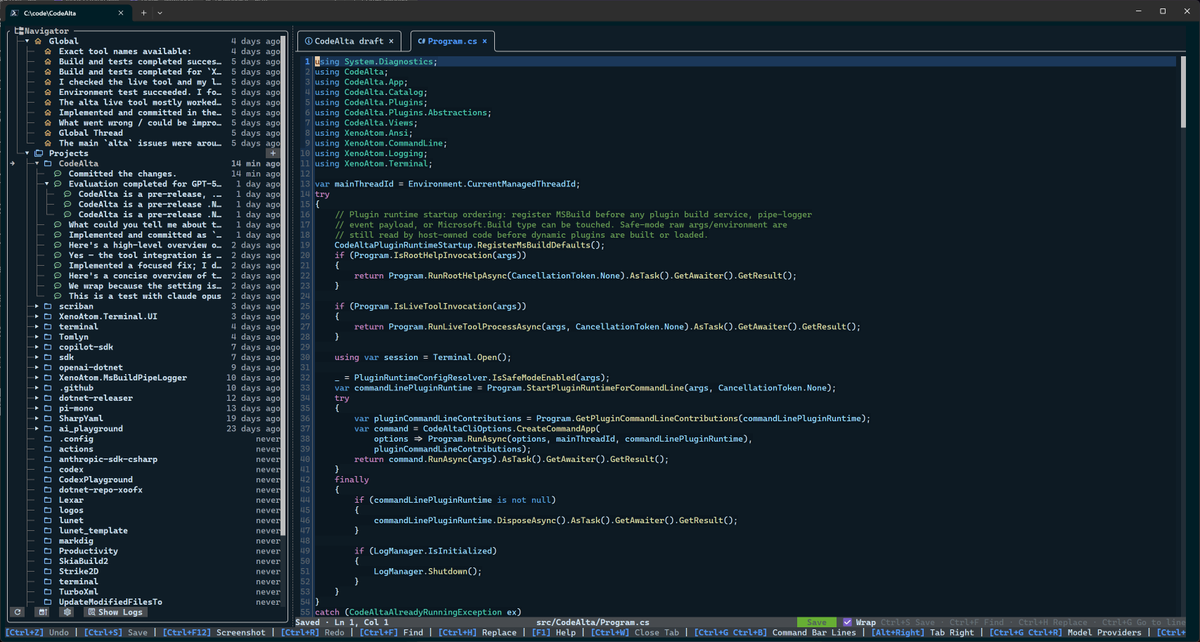
I'm thrilled to release CodeAlta - one of the first efficient AI coding-agent TUIs built entirely in C#/.NET 🚀 I've been developing and using it daily for the past 3 months, and I hope you enjoy it as much as I do! 🤗 Retweets are highly appreciated! 🙏 CodeAlta brings you a beautiful, colorful timeline interface, multiple threads in the same workspace, a real prompt editor experience, quick file viewing/editing with syntax highlighting, in-app model provider configuration, a multi-agent-ready environment, and much more! ✨
Alexandre Mutel tweet media
English
25
101
323
26.6K
Stefán Jökull Sigurðarson retweetledi
Scott Helme
Scott Helme@Scott_Helme·
Passkeys are supposed to be browser-enforced security. But what happens when a browser extension can step into the WebAuthn flow and bypass the rules your site explicitly set? I dug into 1Password, Permissions Policy, and a questionable edge case: scotthelme.co.uk/passkeys-permi…
English
0
3
12
1.5K
Stefán Jökull Sigurðarson retweetledi
Scott Helme
Scott Helme@Scott_Helme·
I didn't realise it was so trivial for an XSS vulnerability to allow an attacker to register their passkey on your account! scotthelme.co.uk/xss-is-deadly-…
English
2
17
80
29.9K
Stefán Jökull Sigurðarson retweetledi
Alexandre Mutel
Alexandre Mutel@xoofx·
@LukeParkerDev It's not OpenCode but it's called CodeAlta 😁 entirely written in C#, multi-sessions, multi-threaded, multi-model-providers, single file C# plugins, fast TUI, ... and fully OSS, coming soon! 🚀
Alexandre Mutel tweet mediaAlexandre Mutel tweet mediaAlexandre Mutel tweet mediaAlexandre Mutel tweet media
English
6
5
73
3.1K
Stefán Jökull Sigurðarson retweetledi
March Rogers
March Rogers@marchr·
Want to tell the product team what's missing in Windows before a feature ships, not after? We're opening that channel. Direct access, real research, your voice in the room. Sign up: aka.ms/windows-listens
English
9
13
71
18K
Milan Jovanović
Milan Jovanović@mjovanovictech·
SignalR works great with one server. Then you add a second instance behind a load balancer, and notifications start disappearing. The code can be perfectly fine. The problem is the connection map. Each SignalR server only knows about the clients connected to that specific process. So if an API request lands on Server 1, but the user is connected to Server 2, Server 1 has no idea that connection exists. The message goes nowhere. This is where a Redis backplane helps. Every server publishes outgoing SignalR messages to Redis. Every server subscribes to the same channel. When a message comes in, each instance checks whether it has the target connection locally. From your application code, `Clients.User(...)` still works the same. But now it works across instances. The setup is almost too simple: builder. Services.AddSignalR().AddStackExchangeRedis(connectionString); But there are two important things to remember: 1. You still need sticky sessions 2. SignalR does not buffer messages if Redis is down The Redis backplane solves routing. It does not make SignalR durable. For order updates, live dashboards, and most real-time UI notifications, that’s usually fine. For critical events, you need a reconciliation strategy or a durable queue alongside it. I wrote a full breakdown of how SignalR scale-out works, how Redis fixes the routing problem, and what can still go wrong: milanjovanovic.tech/blog/scaling-s…
Milan Jovanović tweet media
English
4
26
151
7.9K
Adam Basis
Adam Basis@AdamBasis·
Yes, because my cpu, up to 67,200,000,000 boosted core-cycles per second, with 12 cores, 24 threads, 134,400,000,000 logical thread-clock slots per second, 2,150,400,000,000 theoretical FP32 FMA operations per second, 80,478,208 bytes of cache is clearly not enough. It must run at 210% overclocked to do the ginormous task of showing a rounded rectangle. It's not just any rectangle mind you, it's a WHITE rectangle.
Windows Latest@WindowsLatest

Microsoft VP fires back at Windows 11's new speed trick critics: "Apple does this and you love it." Windows 11’s hidden Low Latency Profile is getting dragged online, but the criticism misses the point. Windows Latest has tested the Low Latency Profile, and it truly works. When you open the Start menu, a menu, or an app, Windows briefly boosts the CPU for 1–3 seconds so the task finishes faster. On budget PCs, that can make the whole OS feel much snappier. Some users called it a “band-aid,” but Microsoft's Scott Hanselman pushed back and explained that macOS and Linux already do similar things. Modern systems boost CPU speed for interactive tasks because responsiveness matters. "Let Windows cook," Microsoft's legendary dev Scott Hanselman argues in defense of Windows 11's upcoming feature. Of course, Windows 11 needs to be optimized at the code level, but the answer is not “don’t boost the CPU.” Microsoft needs to do the best of both worlds. That means it needs to optimize the code, reduce bloat, and use modern scheduling tricks to make Windows feel fast again.

English
48
250
5.2K
214.2K
Stefan Đokić | .NET
Stefan Đokić | .NET@TheCodeMan__·
I'm looking for fellow #dotnet developers! | ̄ ̄ ̄ ̄ ̄ ̄ ̄ ̄ ̄ ̄| | Let's #Connect ! | |__________| \ (•◡•) / \ / —— | | |_ |_ Let's grow together 💪
English
64
3
156
10K
vx-underground
vx-underground@vxunderground·
> new experimental windows feature > look inside > some files displayed as kb > some files displayed as gb > some files displayed as mb This confuses my little brain. I would like all files to be displayed in the same unit.
Jen Gentleman 🌺@JenMsft

We're rolling out a change in Experimental so file sizes in the File Explorer Details view now display using appropriate units (KB, MB, GB) instead of KB-only, to make them easier to understand at a glance Do you like it? 😊 learn.microsoft.com/windows-inside…

English
68
18
1.1K
115.3K
Stefán Jökull Sigurðarson retweetledi
Scott Hanselman 🌮
Scott Hanselman 🌮@shanselman·
@PdroPM There are actual things wrong and smart people are working to fix them, but a lot of this negativity is computer science enthusiasts without experience in computer science making assumptions based on their intuition
English
8
7
108
7.7K
🦆 SchizoDuckie 🦆
🦆 SchizoDuckie 🦆@SchizoDuckie·
Lmao. The solution to make Windows 11 "faster" is to boost the CPU clock 😂😂😂 Not optimizing the stack, not tracing bottlenecks and going down into performance flame graphs. Boosting the CPU when you click something. What in the fucking clown world
George Burduli@GeorgeBurduli

@mholt6 @WindowsCentral This mode temporarily boosts CPU clocks, in short bursts. Some users may not care about relative performance improvements and would rather maintain stable clocks. Also, it is not the most elegant solution. “Process too slow? Hmm, let’s throw more CPU at it instead of optimizing.”

English
2
1
11
845
Stefán Jökull Sigurðarson
Also, Microsoft can't fix 3rd party code, but they can do things like this to make them faster so everyone wins.
English
0
0
1
57
McEees
McEees@mc_ees·
@RamblingOnDeck @WindowsCentral Of course, they will optimize the load path in their apps. They can't do that for 3rd party apps. So, giving the full CPU attention for "app launch" is not a bad idea.
English
1
0
6
446
Windows Central
Windows Central@WindowsCentral·
Microsoft is working on a special new performance boost feature for Windows 11 that sources say will speed up app launches by up to 40%. According to our sources, Microsoft is now testing a new "Low Latency Profile" feature for Windows 11 that will max out CPU frequency in short bursts whenever users open an app or system flyout. This is said to make the OS much snappier, with some apps seeing up to a 40% performance improvement at launch, and system flyouts up to 70%. More info at the link. windowscentral.com/microsoft/wind…
English
36
18
259
298.6K