Tech with Mak

5.2K posts

Tech with Mak banner
Tech with Mak

Tech with Mak

@techNmak

AI, coding, software, and whatever’s on my mind. | 📩 for Collaborations

Katılım Temmuz 2024
830 Takip Edilen40.7K Takipçiler
Sabitlenmiş Tweet
Tech with Mak
Tech with Mak@techNmak·
It is dangerously easy to build a neural network today without actually understanding how it works. We live in an era of 'import torch'. You can train a model in three lines of code, but the moment you need to debug a collapsing loss function or a vanishing gradient, syntax won't save you. You need first principles. I recently went through this notebook collection by Simon J.D. Prince, and it is the antidote to tutorial hell. Instead of just showing you the code, it forces you to visualize the mechanics: 1./ The Math => It builds the intuition for shallow networks and regions before adding complexity. 2./ The Optimization => It doesn't just use an optimizer; it compares Line Search, SGD, and Adam so you see why they behave differently. 3./ The Modern Stack => It connects the dots from basic backpropagation all the way to Self-Attention and Graph Neural Networks. Move from running code to engineering systems => this is a goldmine. Here's the resource: udlbook.github.io/udlbook/
Tech with Mak tweet media
English
0
10
81
2.9K
Tech with Mak
Tech with Mak@techNmak·
That old laptop collecting dust can become your own private cloud with one command. CasaOS is a 37K-star open-source project that turns a Linux machine into a home server with an interface designed for people who do not want to become sysadmins first. Install it on: → an old computer → a Raspberry Pi → an Intel NUC → a ZimaBoard → almost any available x86 or ARM machine Then manage everything from a clean browser dashboard. Files. Storage. Network usage. System resources. Docker applications. Instead of manually configuring containers, ports and storage for every service, CasaOS provides one-click access to apps such as: → Jellyfin for your own media server → Home Assistant for smart-home control → AdGuard for network-wide blocking → Nextcloud for file storage → Vaultwarden for passwords → qBittorrent and the *arr ecosystem It can also install apps from the wider Docker ecosystem. Despite the name, CasaOS is not really a new operating system replacing Linux. It is a friendly management layer installed on top of systems such as Debian, Ubuntu Server and Raspberry Pi OS. The documented setup is literally a one-line shell command. The interesting part is what this does to self-hosting. Traditionally, running services at home meant: → learning Linux administration → writing Docker Compose files → configuring storage and networking → remembering which service lives on which port CasaOS does not remove the underlying complexity. It makes much of it approachable through a visual interface. Cloud products became successful because they made infrastructure disappear. But the tradeoff was that your files, applications and personal data moved onto someone else’s computers. CasaOS tries to preserve the convenience while moving the computer back into your home. The cloud made ownership inconvenient. Projects like CasaOS are trying to make it usable again. Here's the GitHub Repo: github.com/IceWhaleTech/C…
Tech with Mak tweet media
English
1
8
22
1.8K
Tech with Mak
Tech with Mak@techNmak·
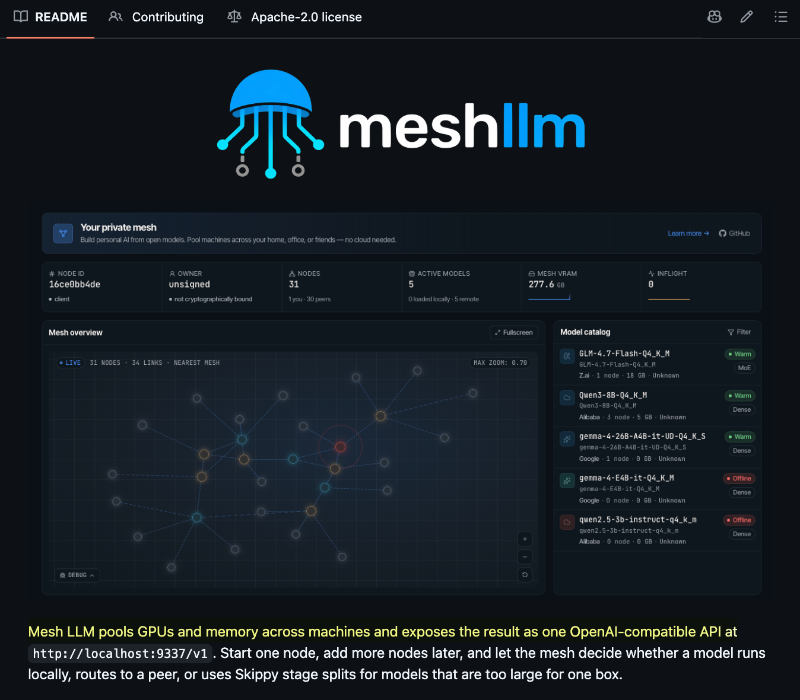
A GitHub repo is built around one painfully obvious idea: If a model cannot fit on one computer, several computers should be able to run it together. Mesh LLM pools GPUs and system memory across multiple machines, then exposes the whole setup through one OpenAI-compatible API. So instead of: → shrinking to a smaller model → quantizing it more aggressively → buying one enormous GPU → leaving spare hardware on other machines unused The system can choose between three paths: → run the model locally if one machine can host it → route the request to another peer that already has it → split the model across several machines when none can run it alone From the application’s perspective, none of this complexity exists. The interesting part is the third path. Mesh LLM uses a runtime called Skippy to divide supported large models into contiguous layer stages. > One computer might execute the early layers. > Another handles the middle. > A third runs the final layers. Each peer downloads only the GGUF fragments required for its assigned stage, while the coordinator connects them into one inference path. This is not ordinary load balancing. Load balancing sends different requests to different machines. Mesh LLM can send one request through several machines, because each machine executes a different portion of the same model. The application does not need to know: → where the model is hosted → how many computers are involved → which layers run on which peer → whether the topology changes later Every node exposes the same /v1 interface, while the mesh handles local execution, peer routing and model splitting underneath. You can start with one machine and add more later. Private meshes are joined through invite tokens. Public meshes can advertise themselves through Nostr discovery. There are obvious tradeoffs. Network latency still matters. A slow peer can bottleneck the pipeline. And not every model can simply be split without runtime support. But the underlying idea is powerful. Local inference has spent years asking: > What is the largest model this computer can run? Mesh LLM asks a better question: > What is the largest model all these computers can run together? Cloud computing stopped treating one server as the unit of compute. Local AI may be heading in the same direction. GitHub: github.com/Mesh-LLM/mesh-…
Tech with Mak tweet media
English
6
7
42
2.3K
Tech with Mak
Tech with Mak@techNmak·
This GitHub repo is a goldmine if you want to deeply understand AI/ML, not just use it. Maths, CS & AI Compendium. Free. Henry filled notebooks for years with intuition-first, no fluff explanations while working in AI/ML. Friends used them to prep for DeepMind, OpenAI, Nvidia interviews. All got in. Now it's public. 20 chapters from vectors to bleeding-edge AI. Written with intuition first, real-world context, no hand-waving. Not written to survive an exam. Written to actually understand the stuff. What's covered: → Maths foundations - vectors, matrices, calculus, statistics, probability → Classical ML through distributed training and RL → Computational linguistics - transformers, attention, MoE, SSMs, LLM architectures → Computer vision - diffusion, flow matching, ViTs, SLAM, VR/AR → Audio & speech - ASR, TTS, WaveNet, Conformer, diarisation, source separation → Multimodal learning - CLIP, VLMs, image/video tokenisation, world models → Autonomous systems - VLAs, self-driving cars, space robots → SIMD & GPU programming - CUDA, Triton, ARM NEON, AVX, TPUs, WebGPU → AI inference - quantisation, speculative decoding, edge inference, cost optimisation → ML systems design - feature stores, A/B testing, recommendation, search, ads, fraud → Graph neural networks - geometric deep learning, 3D equivariant networks Only needs elementary maths and basic Python to start. MCP server included - Claude Code, Cursor, VS Code can use it as a knowledge base. Here's the GitHub Repo: github.com/HenryNdubuaku/…
Tech with Mak tweet media
English
9
125
599
23.3K
Tech with Mak
Tech with Mak@techNmak·
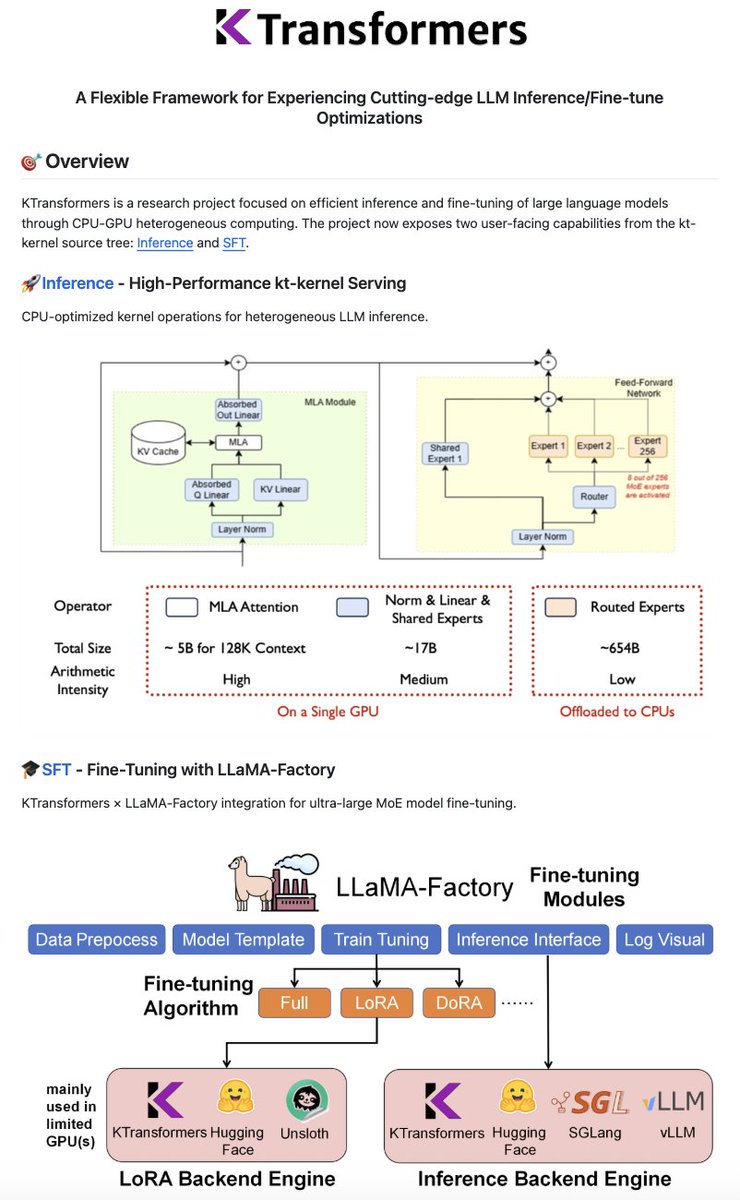
The smartest way to run a giant MoE model is not to add more GPUs. It is to stop treating every expert as GPU-worthy. Large Mixture-of-Experts models contain hundreds of specialized feed-forward networks called experts. But the model does not use all of them for every token. In the architecture shown by KTransformers, the router activates only 8 out of 256 experts at a time. So keeping the entire expert pool in expensive GPU memory makes little sense. KTransformers splits the work based on what the hardware is actually good at: → Attention and shared components stay on the GPU → The enormous routed-expert pool sits in CPU memory → Frequently used experts can be placed on the GPU → Colder experts continue running on the CPU → AMX and AVX kernels accelerate INT4/INT8 CPU inference → NUMA-aware scheduling reduces memory-access overhead The CPU is not treated as a slow overflow bin. It becomes an active part of the inference engine. The GPU handles operations with high arithmetic intensity and the experts that benefit most from fast memory. The CPU provides the capacity needed to hold the model’s long tail of experts. KTransformers is specifically designed for heterogeneous CPU–GPU inference and supports dynamic expert placement for large MoE models. That distinction matters. A dense model needs most of its weights for every token. A Mixture-of-Experts model needs only a small working set. So the real optimization problem is no longer: How do we fit the entire model onto the GPU? It becomes: Which parts of the model deserve GPU memory right now? KTransformers also integrates with SGLang for serving and with LLaMA-Factory for fine-tuning large MoE models using limited GPU memory. Its documented setup includes DeepSeek-V3/R1 fine-tuning at roughly 80GB total GPU memory across four RTX 4090s, and Qwen3-30B-A3B on one RTX 4090. The project now has 17K+ GitHub stars and supports models including GLM-5.2, MiniMax-M3, DeepSeek-V4-Flash and Kimi-K2.5. The larger idea: GPU memory should not be where the whole model lives. It should be where the model’s current working set lives. GitHub: github.com/kvcache-ai/ktr…
Tech with Mak tweet media
English
3
8
40
3.5K
Tech with Mak
Tech with Mak@techNmak·
An 82K-star GitHub repo is built around one painfully obvious idea: Your coding agent should map the codebase once, not grep it forever. Graphify turns an entire project into a queryable knowledge graph. Functions, classes, files, SQL schemas, infrastructure, docs, PDFs, images and videos become connected nodes that an agent can traverse instead of repeatedly opening files and reconstructing the architecture. So instead of: → search for authentication → open twelve files → follow imports manually → lose the trail as the context fills up The agent can ask: > What connects authentication to the database? > Trace the path from UserService to DatabasePool. > Explain RateLimiter. > Which concepts does everything flow through? Graphify returns the relevant subgraph and the path connecting the concepts, not another list of keyword matches. For source code, this is not RAG: → No embeddings → No vector database → No LLM required → Code is parsed locally using tree-sitter → Calls, imports and inheritance become graph edges Every relationship is also marked as EXTRACTED, INFERRED, or AMBIGUOUS, so the agent can distinguish what exists explicitly in the source from what Graphify resolved or guessed. The cleverest part is what happens next. Graphify can install hooks or persistent instructions for Claude Code, Codex, Cursor, Gemini CLI, Copilot and 20+ other assistants. Before the agent starts blindly grepping or reading files one by one, it is nudged to query the existing graph first. The graph can be committed to Git, automatically rebuilt after commits, shared across the team and exposed through MCP. Long context windows help agents read more code. A persistent knowledge graph helps them know where to look. The next improvement in coding agents may not come from stuffing more files into the prompt. It may come from making them stop rereading the repository. Here's the GitHub Repo: github.com/Graphify-Labs/…
Tech with Mak tweet media
English
47
274
2.4K
167.6K
Tech with Mak
Tech with Mak@techNmak·
Somewhere, an old Stack Overflow answer is still holding production together.
English
2
7
92
10K
Tech with Mak
Tech with Mak@techNmak·
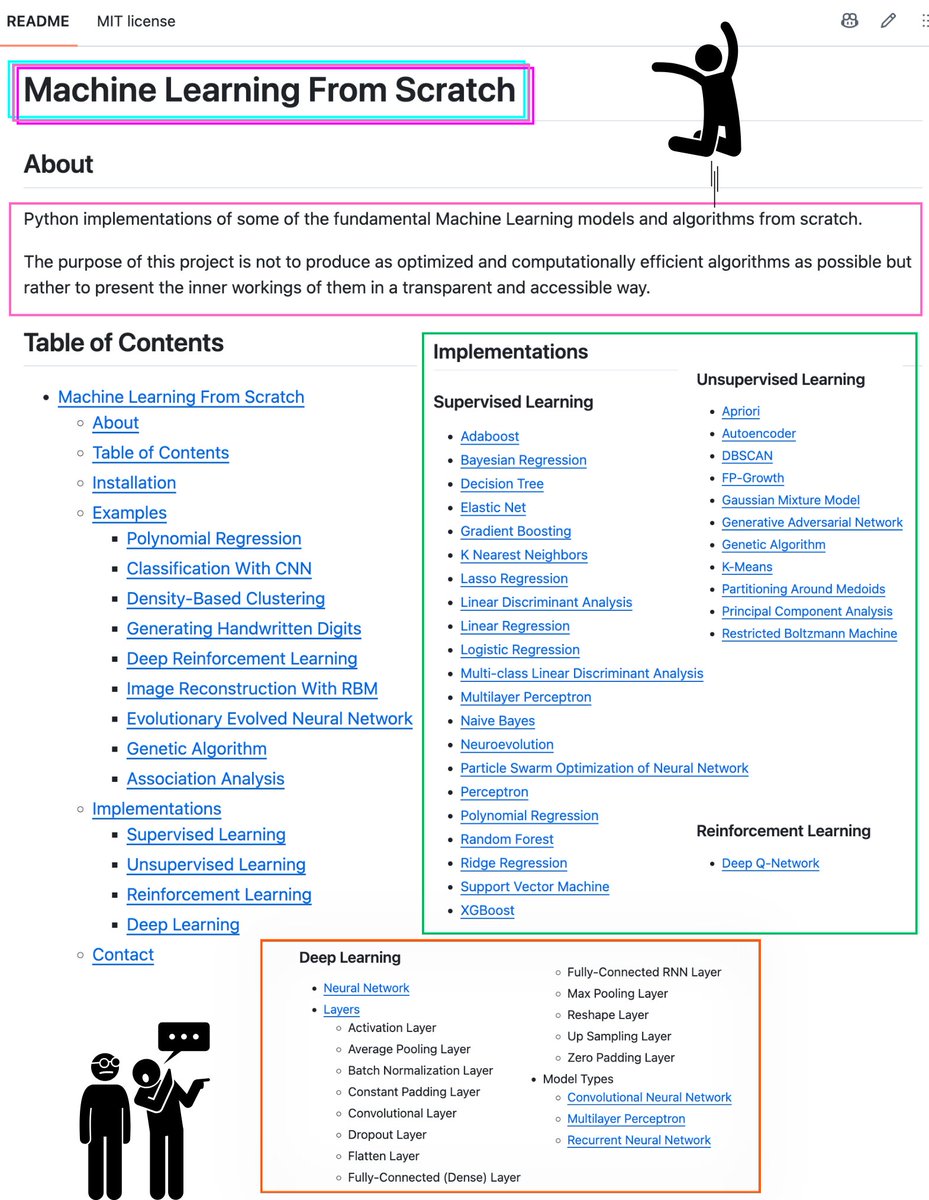
I want to highlight a resource that I think is genuinely valuable for anyone learning machine learning: ML-From-Scratch. Most of us learn ML by using libraries like scikit-learn or PyTorch, which is the right way to build things quickly, but it can leave gaps in understanding why an algorithm works. This repository takes the opposite approach => every algorithm is implemented in plain NumPy, prioritizing clarity over performance, so you can trace the underlying math directly. It covers a wide range of the curriculum you'd expect to see in an ML course - linear and logistic regression, decision trees, random forest, gradient boosting, XGBoost, SVM, and naive bayes on the supervised side; k-means, DBSCAN, PCA, and Gaussian mixture models on the unsupervised side. It also goes further, with a small deep learning framework (convolutional, pooling, batch normalization, dropout, and RNN layers), a working GAN, and a Deep Q-Network trained on CartPole-v1. If you've completed a course on these algorithms and want to solidify your understanding by reading working implementations end to end, I'd recommend spending time with this repository. It's a good complement to theory => 32k stars, MIT licensed, and entirely in Python. Here's the GitHub Repo: github.com/eriklindernore…
Tech with Mak tweet media
English
3
130
665
23.1K
Tech with Mak
Tech with Mak@techNmak·
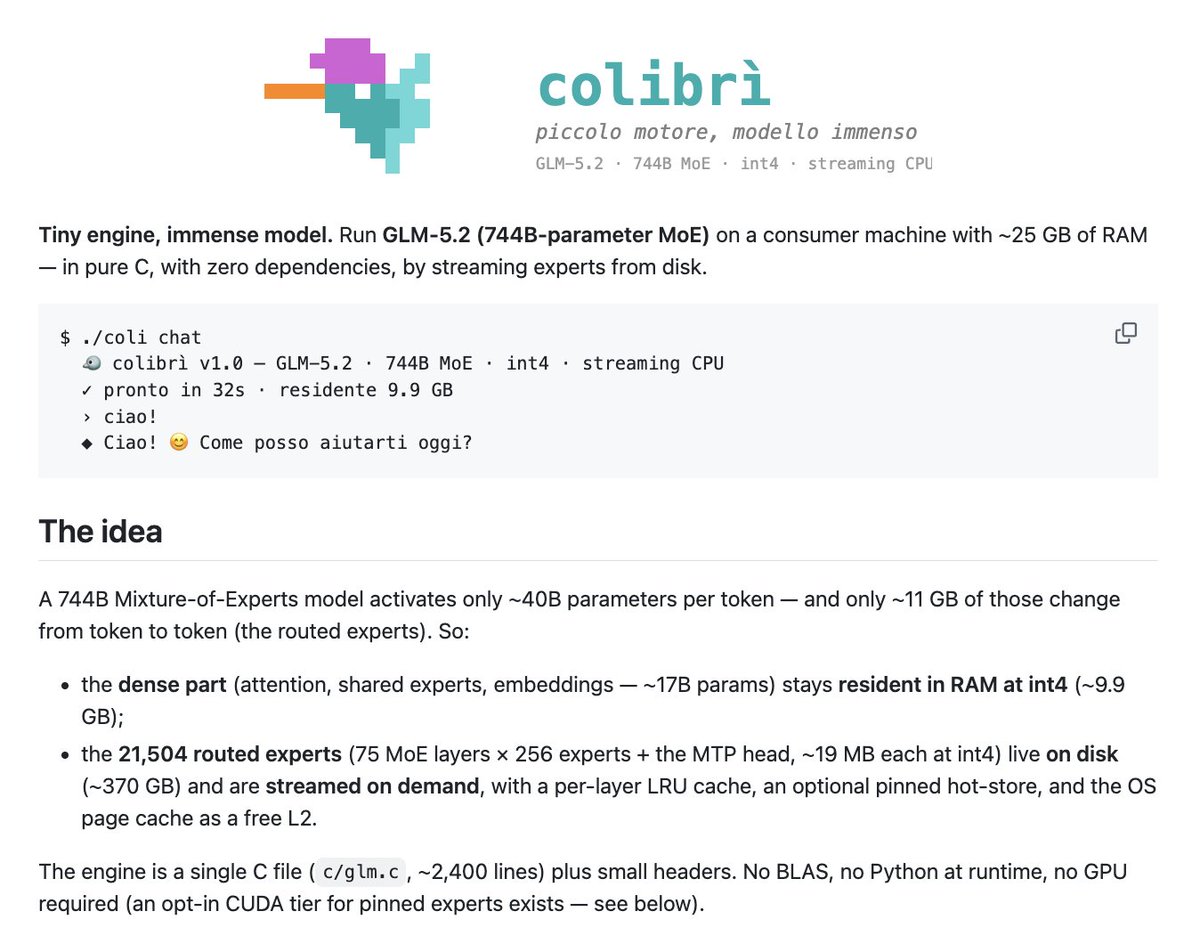
A 744B-parameter model is running on 25GB of RAM. No GPU required. The clever part is not making the entire model fit. It is making sure most of the model never enters RAM. GLM-5.2 is a Mixture-of-Experts model. It contains 744B parameters, but activates only around 40B for each token. Even those active weights do not need to be resident at the same time. Colibrì treats model execution like a memory hierarchy: → The always-needed weights remain in RAM → 21,504 routed experts stay on NVMe → The router selects which experts each layer needs → Those experts are streamed from disk on demand → Frequently used experts are cached in spare RAM The full int4 model still occupies roughly 370GB on disk. But only around 9.9GB remains permanently resident, with peak RAM usage during chat reported at approximately 20GB. A useful way to think about it: > RAM holds the hot weights. > NVMe holds the cold weights. > The router decides what must move next. The runtime also records which experts your prompts activate most often and automatically pins the hottest ones in spare RAM. So repeated use can make it faster, not because the model learns new weights, but because the system learns its weight-access pattern. But physics still wins. On the original 25GB machine, cold generation is only around 0.05–0.1 tokens per second, because each token can require roughly 11GB of disk reads. This is not fast production inference. It is a proof of something more interesting: For sparse models, model size and resident memory no longer need to match. Inference becomes a systems problem: > Load the right weights. > Cache the hot ones. > Move them before they are needed. One important open question remains: the project has not yet completed a full benchmark of how much its int4 quantization affects model quality. Pure C. No runtime dependencies. Built as a one-person project on a 12-core laptop. Very impressive systems engineering. [GitHub Repo in comments]
Tech with Mak tweet media
English
2
11
37
2.7K
Tech with Mak
Tech with Mak@techNmak·
This is literally the best video ever made to explain Kubernetes. Miss at your own risk. 😂
English
1
20
152
12.2K
Eli Berman🪁
Eli Berman🪁@eli_discovers·
Excited to share that I'm now leading the Growth team @CopilotKit Working alongside one of my best friends turned out to be much easier than I expected... @ulidabess We've come a long way & learned a LOT: 50k+ GitHub stars 3M+ weekly installs 10M+ social impressions 5+ times GitHub Trending 60k+ followers across platforms 40M weekly agent-user interactions ... Anything you see about CopilotKit- that's our growth team at work 🦾 If YOU: - want to showcase something - talk about open source - collab / comarket - work with us talk to me, @sofiiiiiasz, and @ulidabess 💜
Eli Berman🪁 tweet media
English
9
3
23
1.4K
RyanLee
RyanLee@RyanLeeMiniMax·
I’m incredibly excited to share this: MiniMax has just closed a new $2B funding round. 🚀 At the same time, our CEO, IO, shared three long-term commitments with the team: • No salary until we achieve AGI. • Over the next four years, he will dedicate shares equivalent to 4% of the company’s total equity from his personal holdings to reward employees who are building MiniMax for the long term. • Another 1% will be committed to supporting the open-source community. The funding is exciting. But what excites me even more is what it represents: a long-term commitment to AGI, to our people, and to the open-source ecosystem. We’re living through one of the most exciting moments in the history of AI, and we’re just getting started. If you’re passionate about frontier AI, open source, and building the future, we’d love to build with you. Intelligence with Everyone. 🚀
English
228
234
3.4K
883.1K
Tech with Mak
Tech with Mak@techNmak·
Nobody tells you this, but your README is doing more marketing for your repo than your actual code.
Tech with Mak tweet media
English
4
3
46
3.9K
Arsh Goyal
Arsh Goyal@arsh_goyal·
i've been on Fable for a while and the prose has actually worked well for me, though I can see the exhausting point for quick knowledge work. these examples for GPT 5.6 make it worth a proper test. big plus that @hyperagentapp ships new models this quickly, switching between them in one place removes all the friction. excited to test it out #HyperagentPartner
Arsh Goyal tweet media
Hyperagent@hyperagentapp

GPT-5.6 is a viable alternative to Fable for most knowledge work. GPT-5.6's writing is consistently well-structured and easy to read. Fable's prose can be exhausting. 5.6 also makes fresh design choices with clean hierarchy. Fable can struggle to maintain visual relationships and leans on worn-out AI tropes like eyebrow text. Examples in thread 👇 - Orbital objects explainer - Site plan for fitness resort - World Cup goals data viz GPT-5.6 is now available on Hyperagent

English
5
3
11
3K