Will Hu

1.1K posts

Will Hu banner
Will Hu

Will Hu

@traderwillhu

Catalysts/Liquid Leaders/ETFs. Sharing Qullamaggie Wisdoms & AI-Powered Trading System. No Financial Advice/No Product Sale

🇨🇦 🇨🇳 Katılım Ekim 2023
84 Takip Edilen4.7K Takipçiler
Sabitlenmiş Tweet
Will Hu
Will Hu@traderwillhu·
My Market Dashboard(Updated) My previous GitHub live site link experienced a sudden traffic surge from X (too popular?)and was flagged as bot activity, leading to a suspension. Without any reply from Github after 10 days, I decided to migrate the entire project to GitLab. Also, I added some new features to it, Multi-chart grid view, ETF Holdings and Market Breadth. The data will be updated automatically Mon–Fri at 16:30 US Eastern. The project is fully open-sourced. You can find the Live Site link and the Source Code on my GitLab homepage(link below). If you’d like to customize it, feel free to fork the repo. For more details, you can watch the demo video below. I'm happy to continue sharing this with the FinTwit community. GitLab homepage: gitlab.com/traderwillhu/m…
English
14
22
239
17.1K
Tom Crawford
Tom Crawford@tomcraw·
@traderwillhu Tradestation API is much better than Schwab. Tried both. Refresh token is permanent. Access token totally automated every 20 minutes. But if you want ToS have to stay with Schwab.
English
1
0
1
256
Will Hu
Will Hu@traderwillhu·
My Top 5 Free APIs and Libraries for Stock Screening & Trading Dashboards Many people have been asking about the specific APIs and libraries I use to build my stock screening tools and trading dashboards. After extensive testing, I’ve narrowed it down to a few reliable tools. Here is a breakdown of my current tech stack based on my personal experience. 1. TradingView Screener (Unofficial Library) For my Pre-market Gappers scan, I rely on a TradingView screener library. While this isn't an official API, it provides scanning results and criteria identical to the TradingView desktop software. GitHub: github.com/shner-elmo/Tra… Pros: Highly accurate; matches TradingView’s powerful UI filters. Cons: There is a 15-minute data delay. Unless you require sub-second real-time scanning, this is usually negligible for swing trading or early-day prep. 2. Finviz Finance Library I primarily use this to scrape news and market sentiment. It’s excellent for aggregating headlines and URLs directly from Finviz. GitHub: github.com/lit26/finvizfi… Use Case: Automatically fetching the latest news for specific tickers to understand the "catalyst" behind a price move. 3. TradingView Lightweight Charts & Tradingview Widgets This is my go-to for technical analysis visualization. GitHub: github.com/tradingview/li… Chart Widgets: tradingview.com/widget-docs/wi… The Difference: Lightweight Charts: Best for building custom tools. It’s high-performance and allows you to program any custom indicator you can imagine. Chart Widget: If you want a "plug-and-play" experience, this is easier but comes with a 15-minute delay and limits you to native indicators (no custom Pine Script/logic integration). 4. Brokerage APIs: Charles Schwab vs. IBKR I have integrated both, and here is how they compare: Charles Schwab API: Completely free. The only "catch" is that you need to manually refresh your tokens weekly. IBKR API: While the API is free, real-time data usually costs $1–$2/month. It also requires you to have TWS (Trader Workstation) or IB Gateway running in the background. My Verdict: I prefer Schwab for daily use. It’s more "lightweight" as long as you remember to update your tokens over the weekend. 5. Apache ECharts ECharts is the "all-rounder" of data visualization. I use it to complement TradingView’s charts. Official Website: echarts.apache.org Use Case: While TradingView is more professional for price action, ECharts is superior for Post-Trade Analysis in my trading journal. The interactivity and ability to visualize complex equity curves or win-rate distributions are top-tier. ------ Of course, there are plenty of superior paid resources out there. However, if you’re a trader just getting started with vibe coding, these free tools are perfect for getting your hands dirty and sharpening your skills first. Feel free to share more in the comments!
English
19
114
738
41.1K
Will Hu
Will Hu@traderwillhu·
The best part of building your own tools is the sheer speed of iteration. Someone told me ten minutes ago that pre/post-market prices on the chart is good just like TradingView, and ten minutes later, the feature is live. No complaining to customer service, no waiting for twenty meetings and a six-month roadmap. By the time the companies finally release a feature, you’ve usually already quit the platform. Building it yourself is the ultimate shortcut.
Will Hu tweet media
English
2
3
44
4K
TraderPrad
TraderPrad@traderprad·
Worst swing trader ever. I owned this stock at $5 and was so bullish about it and then I cut it at $10 and never visited again. Now it's $31. $PL
TraderPrad tweet media
English
5
0
10
837
Will Hu
Will Hu@traderwillhu·
Premarket Gappers today. Add to my screener some new features learned from @LoneStockTrader Sharing helps.
Will Hu tweet media
English
5
5
53
3.7K
Will Hu
Will Hu@traderwillhu·
Keeping my cursor working all day and the work load is beyond my expectation... This is like making a new trading platform.
Will Hu tweet media
English
5
2
32
3.5K
Jorge Sá
Jorge Sá@JorgeSaThoughts·
@traderwillhu I wonder how much have you invested in AI tokens spend
English
1
0
3
34
Jun
Jun@Neil_Jun·
@traderwillhu Damn that is amazing, lot of time gain , specially for people creating their model book. Will you make it available for people or is it a private project ?
English
1
0
0
577
Will Hu
Will Hu@traderwillhu·
Thanks to AI coding, a complex learning process is now much simpler. I filtered the top 7% YTD stocks from 2000–2026 (including delisted ones), get 1400+ stocks, and visualized them with TradingView Lightweight Charts, featuring auto-marked highs/lows and direct period displays. Browse by year or symbol, even delisted stocks from the last decade like $LVGO and $TWTR are fully accessible. Once I refine the charting and annotation features, I will open-source this learning project.
Will Hu@traderwillhu

The Path to Trading Mastery: Research and Pattern Recognition By Qullamaggie 1. Step-by-Step Market Research The easiest way to start is to research the markets thoroughly. First, get a platform like TC2000 and set your charts to the monthly timeframe. Create a watchlist of all US stocks and filter them by dollar volume instead of just share volume. Aim for liquid names—those with at least $1 billion to $10 billion in monthly dollar volume—to avoid "super thin" or illiquid stocks. 2. Identifying the Big Movers Go through the entire database (roughly 5,000 stocks) and identify the outliers. Look for stocks that: At least doubled in price within six months. Increased 200–300% within a single year. Gained 400–500% over three to four years. Create a separate watchlist for every single stock that has made these massive moves. You will likely end up with a few hundred highly liquid, historical winners. 3. Studying Chart Patterns Go back as far as the 80s or 90s and study their chart patterns. Stocks move in very specific ways. These same patterns occur over and over again—there is nothing truly new in the markets. While there are variations, the patterns that worked in the 90s are the same ones you see today. Focus primarily on price action. You can add a few indicators if you wish—I recommend moving averages—but don't use too many. "Too many indicators is for suckers." Study how these big winners acted during pullbacks: Which moving averages did the best stocks respect or "obey"? How did they behave before the breakout? How did they act once the move was underway? 4. Building Your Mental Database (The 2,000-Hour Rule) Your goal is to build a database in your head. Spend 1,000 hours doing exactly this: printing out charts, studying them, and saving them. (I personally use Evernote to store tens of thousands of these charts). Once you understand the price action, spend another 1,000 hours researching the fundamentals and the news behind those moves. What was driving them? What made a stock go up 500% in a year? If you put in those 2,000 hours of deep research, I promise you: before you know it, you’re going to have ten million dollars in your account.

English
22
31
326
34.1K
Will Hu
Will Hu@traderwillhu·
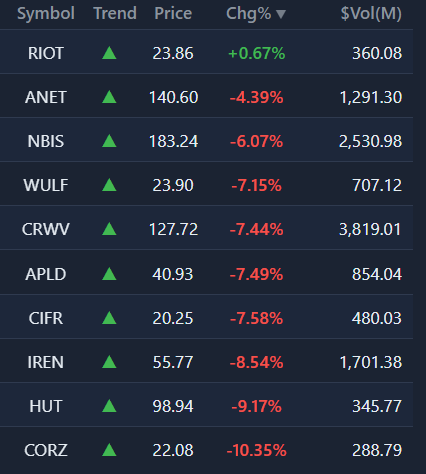
Best performing themes in my watchlist today.
Will Hu tweet media
English
1
3
41
2.8K
Nick Schmidt
Nick Schmidt@NickSchmidt·
This is what the weekly chart looks like on most of the stocks that are up big today
Nick Schmidt tweet media
English
23
5
201
13.2K