windbgtips

114 posts

windbgtips banner
windbgtips

windbgtips

@windbgtips

A collection of some tips & tricks for the world's best debugger

Know a cool trick ? Send me a DM ! Katılım Kasım 2018
1 Takip Edilen4.4K Takipçiler
windbgtips retweetledi
William R. Messmer
William R. Messmer@wmessmer·
If you update WinDbg today (1.2504.15001.0), you might notice another icon in the View tab of the ribbon, one called "Parallel Stacks". While incredibly useful in its own right, this isn't just a parallel stacks view. It's the introduction of graph visualization for extensions!
William R. Messmer tweet media
English
4
60
178
21K
windbgtips retweetledi
William R. Messmer
William R. Messmer@wmessmer·
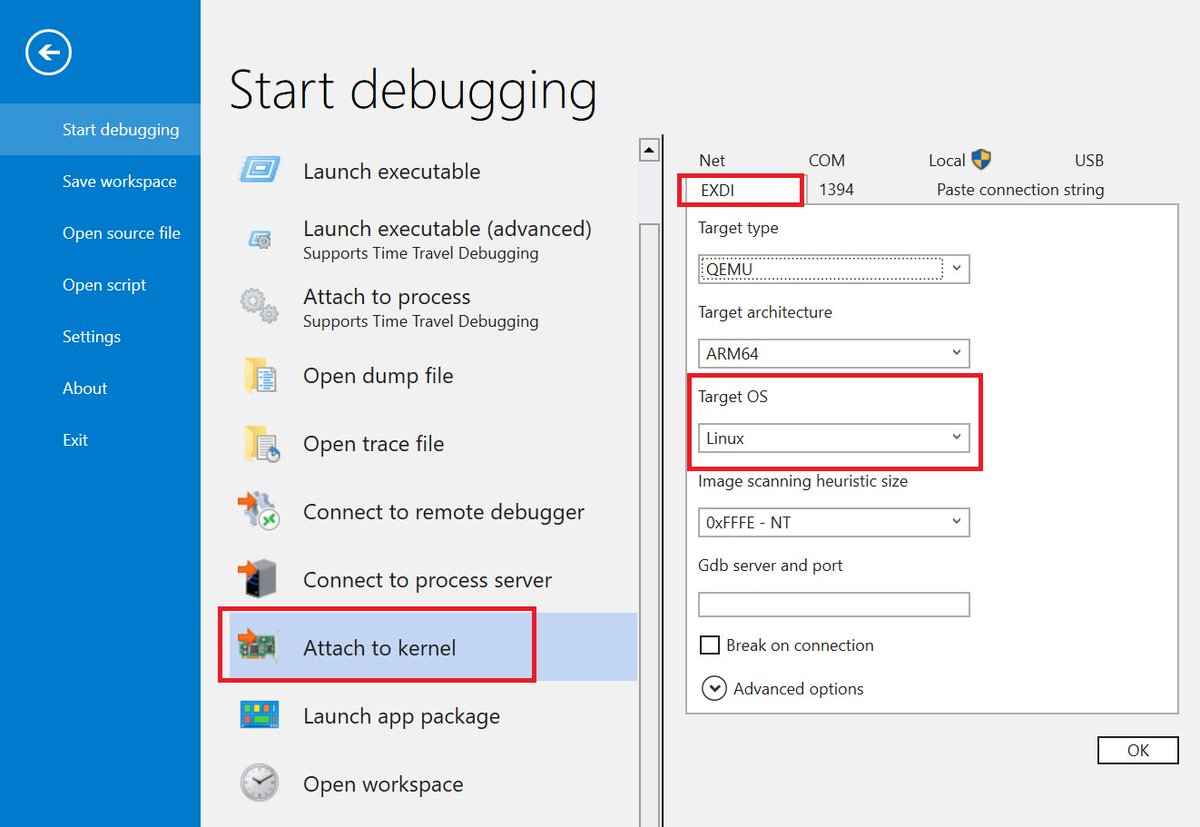
@jvert @markrussinovich Well... It's not quite KD, but WinDbg has supported debugging the Linux kernel via an EXDI connection for some time. Easiest setup is to enable the gdbserver on QEMU and use EXDI in WinDbg selecting "Linux" as the OS. I've source level stepped the Linux kernel doing that...
William R. Messmer tweet media
English
3
13
42
4.9K
windbgtips retweetledi
Ken Sykes
Ken Sykes@KensyAtMS·
It's been a minute since we have released a new version of TTD! New version is now available (1.11.410) which fixes module selective recording, enables large queries via .Calls() and fixes some emulator bugs reported by our customers. aka.ms/ttd
English
0
13
26
3.9K
windbgtips retweetledi
Connor McGarr
Connor McGarr@33y0re·
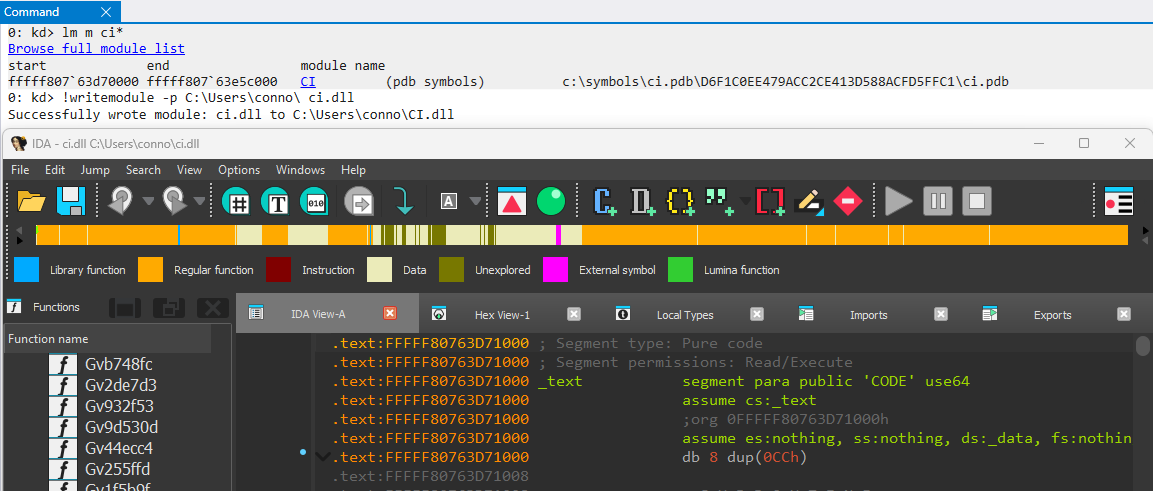
I know I'll catch flack for not knowing this, but the Mex WinDbg extension is so cool! During dynamic analysis I needed to grab the exact version of a module from a target but didn't want to resume execution to fetch it since hitting the breakpoint was tricky. !writemodule FTW!
Connor McGarr tweet media
English
4
8
86
10.3K
windbgtips
windbgtips@windbgtips·
This trick is particularly useful if you do not/cannot use `.ToDisplayString` 🙂
English
0
1
2
479
windbgtips
windbgtips@windbgtips·
WinDbg has a few but very useful (undocumented) intrinsics directly usable from `dx`, such as: __iserror, __ignoreerror, __isnovalue. Also some functions in dbgeng.dll can be used for quick (wstr, str, mem) comparison , like _wcsnicmp, _wcsicmp, _stricmp, memicmp, etc.
windbgtips tweet media
English
1
4
20
1.9K
windbgtips retweetledi
William R. Messmer
William R. Messmer@wmessmer·
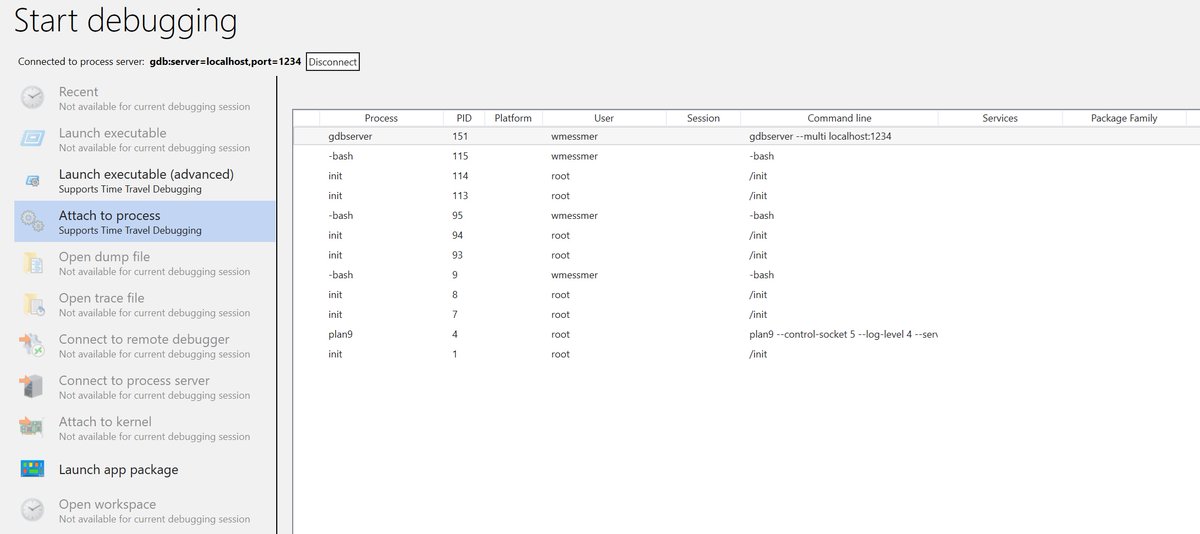
If you spin your gdbserver with --multi (e.g.: gdbserver --multi localhost:1234), you can connect to it via the "Connect to Process Server" (same protocol string) and then see the process list and attach...
William R. Messmer tweet media
English
1
1
11
2.5K
windbgtips retweetledi
William R. Messmer
William R. Messmer@wmessmer·
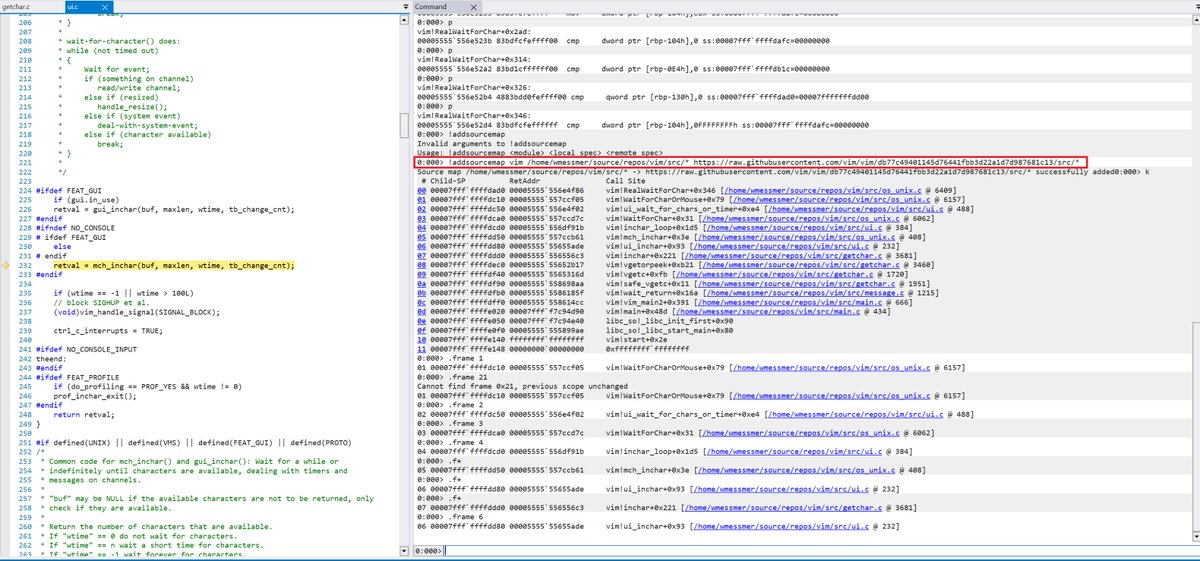
You can even tell us how to pull sources automatically from GitHub for your source level debugging... !addsourcemap <module> <local spec> <remote spec> as highlighted below. The db77...1c13 is the commit on master from which I built vim for this example.
William R. Messmer tweet media
English
2
7
35
8.8K
windbgtips retweetledi
William R. Messmer
William R. Messmer@wmessmer·
Once you've connected, things should work very similarly to what you expect debugging a live Windows process. You can set breakpoints, single step, get locals, etc...
William R. Messmer tweet media
English
2
5
26
4.1K
windbgtips retweetledi
William R. Messmer
William R. Messmer@wmessmer·
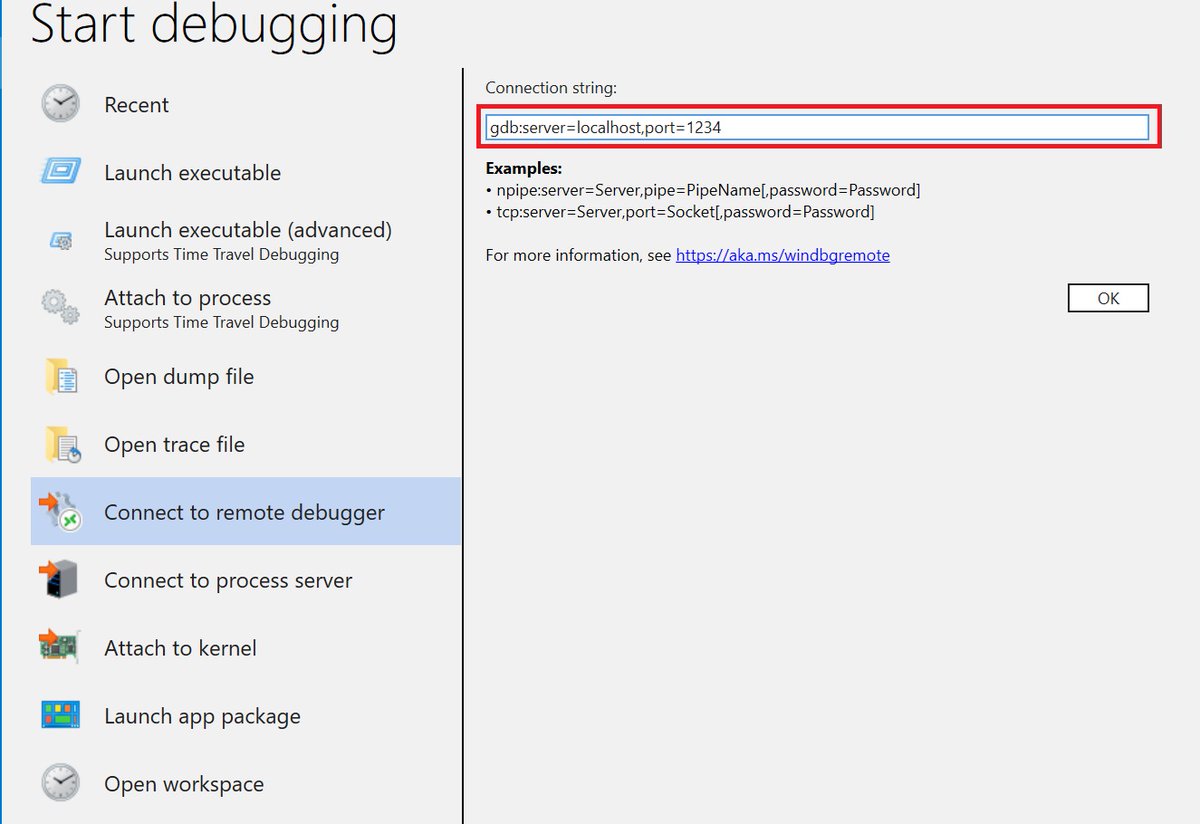
If you've ever wanted to live debug user mode Linux processes (e.g.: in WSL) from WinDbg, with 1.2402.24001.0, you can! Start up a gdbserver in WSL (e.g.: gdbserver localhost:1234 ./vim) and connect to it via WinDbg's "Connect to remote debugger"
William R. Messmer tweet media
English
15
96
305
81.8K
windbgtips retweetledi
Axel Souchet
Axel Souchet@0vercl0k·
Here is a small WinDbg extension written in Rust 🦀 I am hoping it can serve as a template for people to get started 💪 github.com/0vercl0k/snaps…
GIF
English
3
39
175
12.9K
windbgtips retweetledi
Ken Sykes
Ken Sykes@KensyAtMS·
Example (just record msvcrt.dll): ttd.exe -module msvcrt.dll ping.exe
Indonesia
2
4
11
2.8K
windbgtips retweetledi
Tim Misiak
Tim Misiak@timmisiak·
WinDbgX tip: If you press Ctrl+Shift+B, you can open a hex viewer for a file. The data is virtualized so that it can handle any size file. Like this 334MB Windows.UI.Xaml.pdb file. It's somewhat undocumented because it was just a test bed for the memory window, but still useful.
Tim Misiak tweet media
English
3
13
77
7.5K