🎯 PowerShell Tip: Understanding Arrays
Arrays are key to organizing data in PowerShell. 🖥️ In part 1 of the series, MVP Aleksandar Nikolić & Dr. Tobias Weltner explain how to master them.
🔗 Read here: hubs.ly/Q032ff_B0#PowerShell#ITAutomation#PowerShellTips
💻 PowerShell Tip:
Need to debug a script? Use `Set-PSDebug`! 🕵️♂️
Examples:
1.`Set-PSDebug -Trace`
2.`Set-PSDebug -Off`
Debug like a pro! 💪
#PowerShellTips#DebuggingHacks
🚀 PowerShell tip:
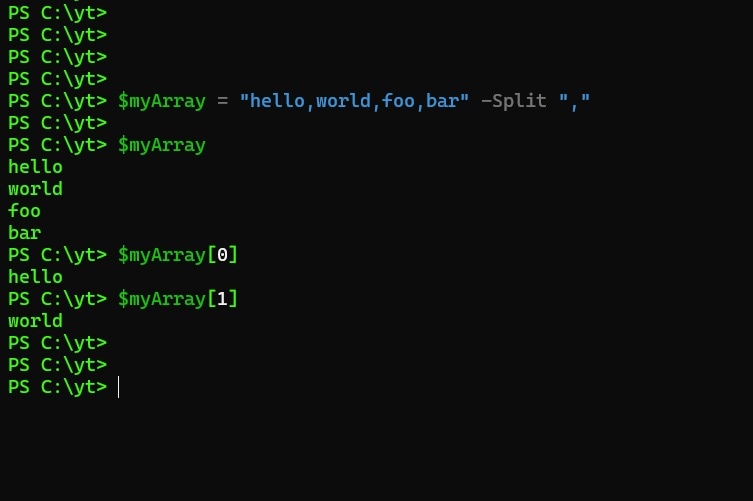
Use the `Split` function to split strings into arrays, without needing to use `regex`!
Example: `$myArray = "hello,world,foo,bar" -Split ","`
Level up your PowerShell game with this handy trick! 💻
#PowerShellTips#Productivity
💻 PowerShell Tip! 💡
Need to run a command as an administrator? 🤔
Use `Start-Process` with the `RunAs` verb! 👀
Example: `Start-Process -FilePath "cmd" -Verb RunAs`
Elevate your PowerShell game and take control of your scripts! 💻
#PowerShellTips#WindowsAutomation
🔥 Did you know that you can list all keyboard combinations available in the PowerShell prompt the following cmdlet ? 👇
❓ Get-PSReadLineKeyHandler
#PowerShell#PS1Tips#PowerShellTips
🔥 Did you know that you can list all keyboard combinations available in the PowerShell prompt the following cmdlet ? 👇
❓ Get-PSReadLineKeyHandler
#PowerShell#PS1Tips#PowerShellTips









![Damien Van Robaeys [MVP]](https://pbs.twimg.com/profile_images/1686796527799332894/JWEicRmW.jpg)
![Damien Van Robaeys [MVP] tweet media](https://pbs.twimg.com/media/Fd-Jfr-X0AElGtt.png)