Arama Sonuçları: "#iRealProTutorial"

20 sonuç
iReal Pro
iReal Pro@iRealProApp·
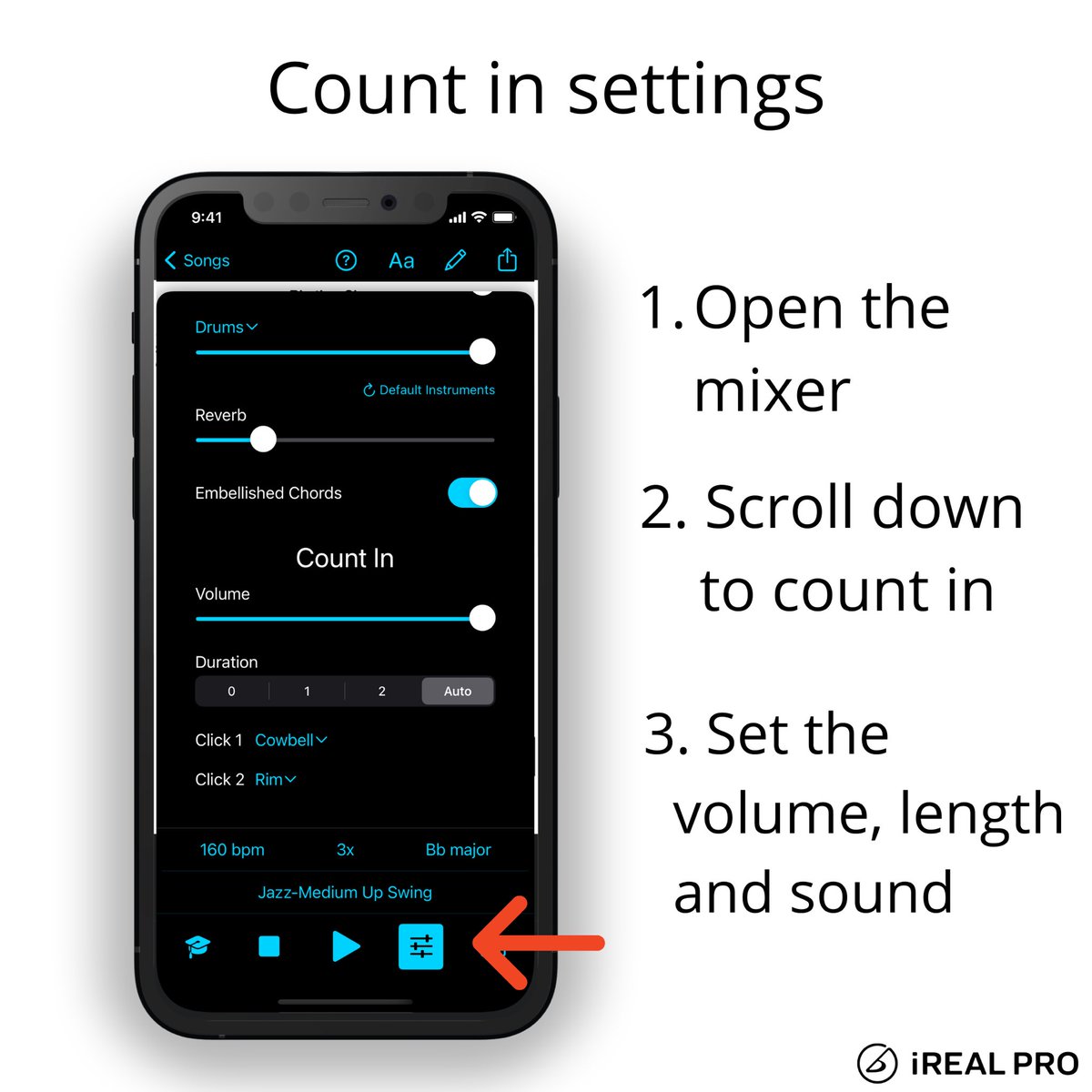
Do you want to change the Count-in settings? Select zero for No count-in, set the volume of the count in with the slider or change the click sounds. The Auto setting will automatically play 1 or 2 measures - depending on the tempo. #irealprotutorial
iReal Pro tweet media
English
2
0
4
1.2K
iReal Pro
iReal Pro@iRealProApp·
Did you know that you can change the backing track’s tempo during playback? Set the song’s tempo by tapping it out in the playback control. You can also drag the slider or tap the +/- buttons to change it. #irealprotutorial
English
0
1
8
1K
iReal Pro
iReal Pro@iRealProApp·
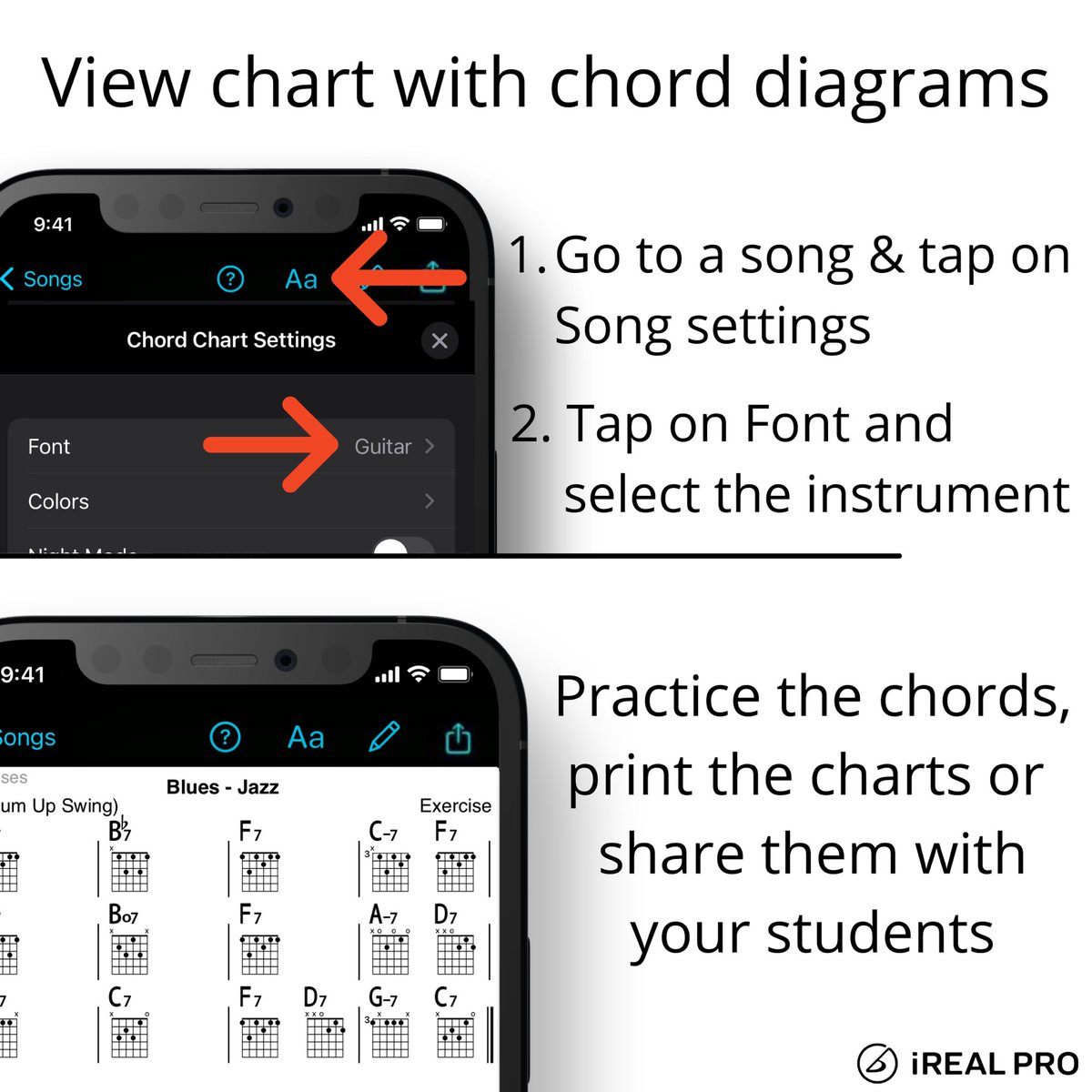
Do you want to work on the voicing in a song? Try the guitar, ukulele or piano fonts and view the chord diagrams in the song chart. Print it, share it, practice it! #irealprotutorial
iReal Pro tweet media
English
0
0
10
867
iReal Pro
iReal Pro@iRealProApp·
Getting ready for your gig? Have you sent the setlist to your band? It’s only a few steps to quickly share it from iReal Pro. #iRealProTutorial #MusicPractice
English
0
1
3
568
iReal Pro
iReal Pro@iRealProApp·
Do you want to add a 2nd verse to your chart? It’s easy to add a new line in iReal Pro’s Editor. #irealprotutorial
English
0
1
10
777
iReal Pro
iReal Pro@iRealProApp·
Do you want to work on a specific scale over a chord? Turn on the Chord Scales in iReal Pro’s playback control and select the scale you want to practice in song view. #irealprotutorial
English
0
1
9
0
iReal Pro
iReal Pro@iRealProApp·
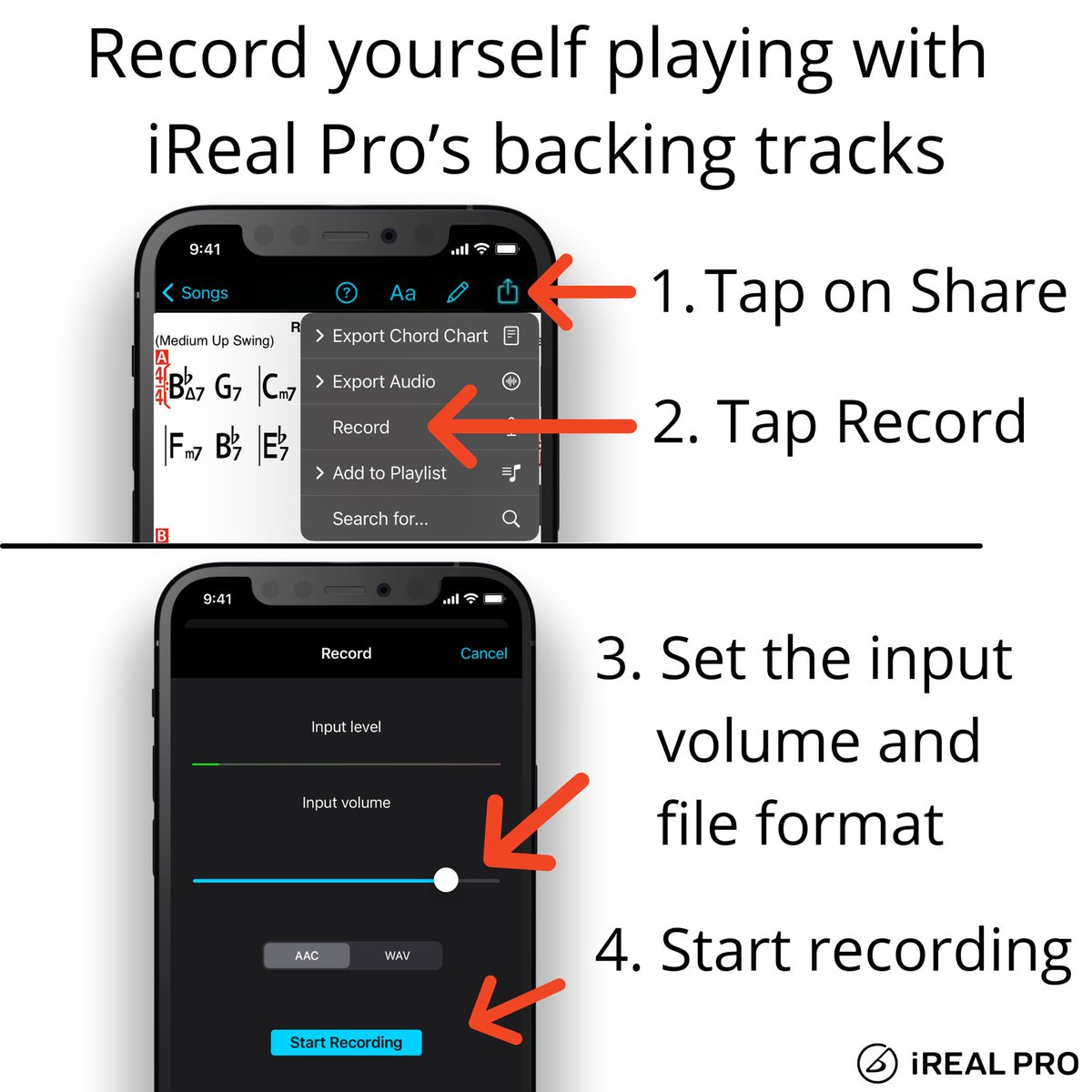
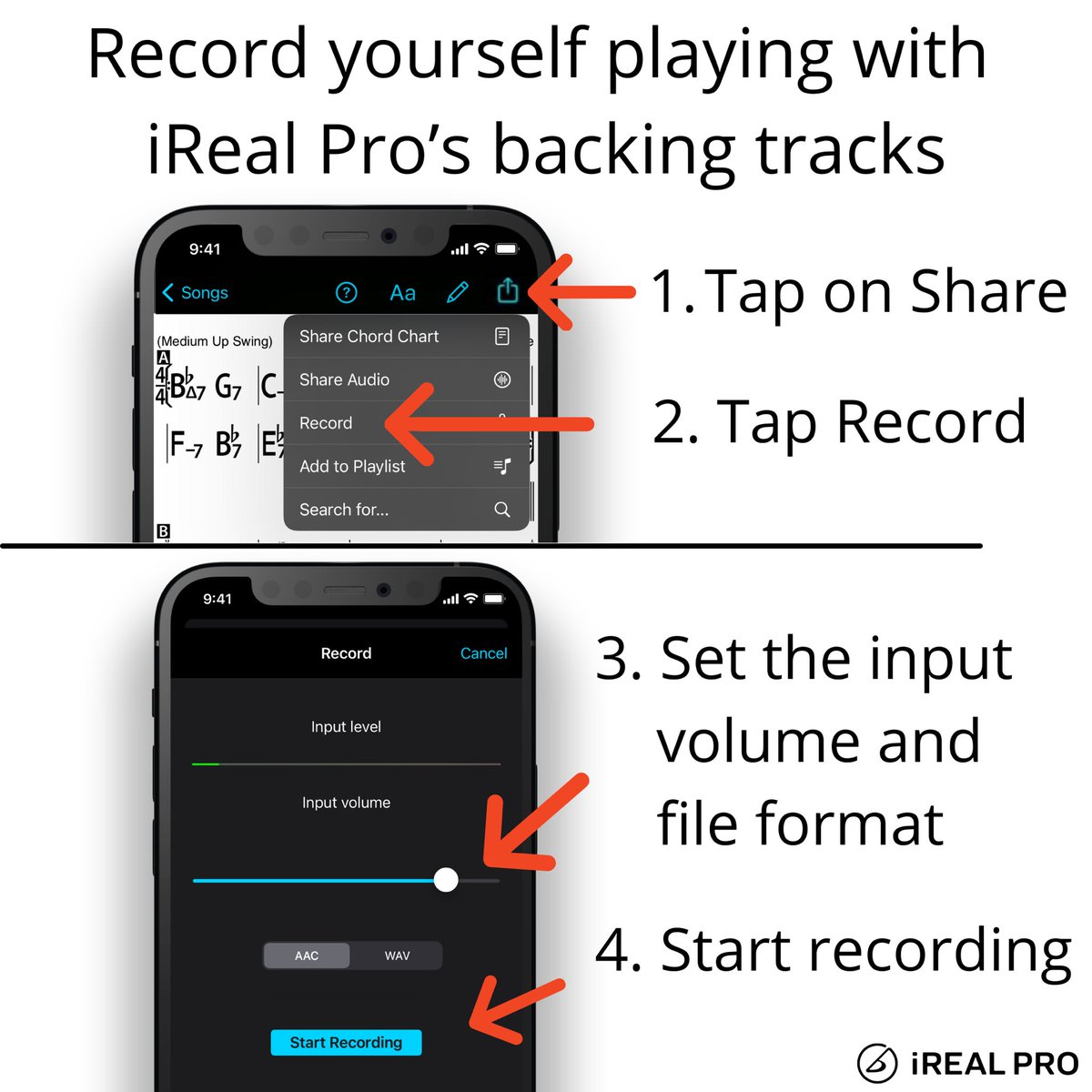
Record yourself playing or singing along with iReal Pro’s backing tracks. Have an idea for a solo or have to submit homework for your music class? Make a quick recording of it! #irealprotutorial #record #backingtrack
iReal Pro tweet media
English
0
2
10
0
iReal Pro
iReal Pro@iRealProApp·
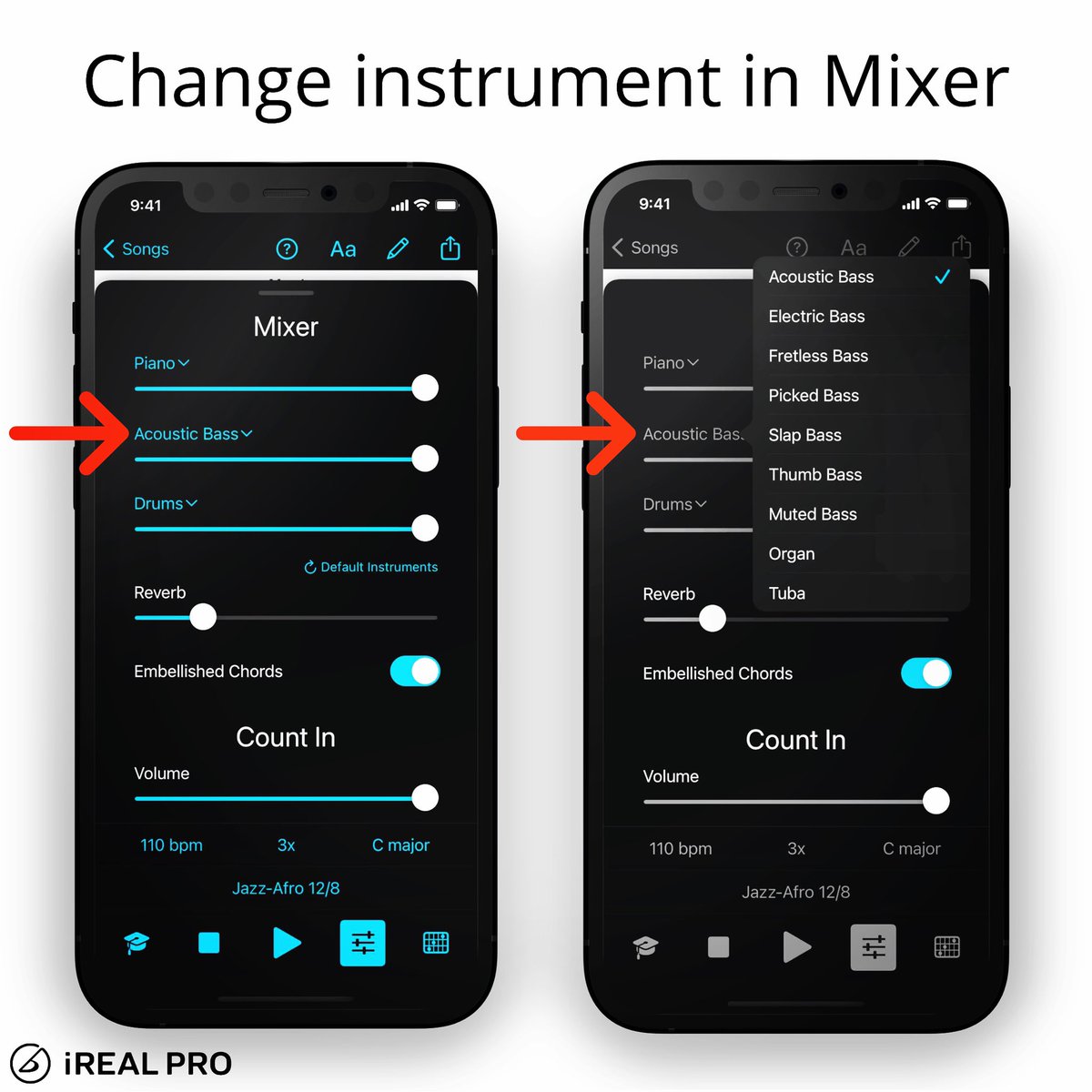
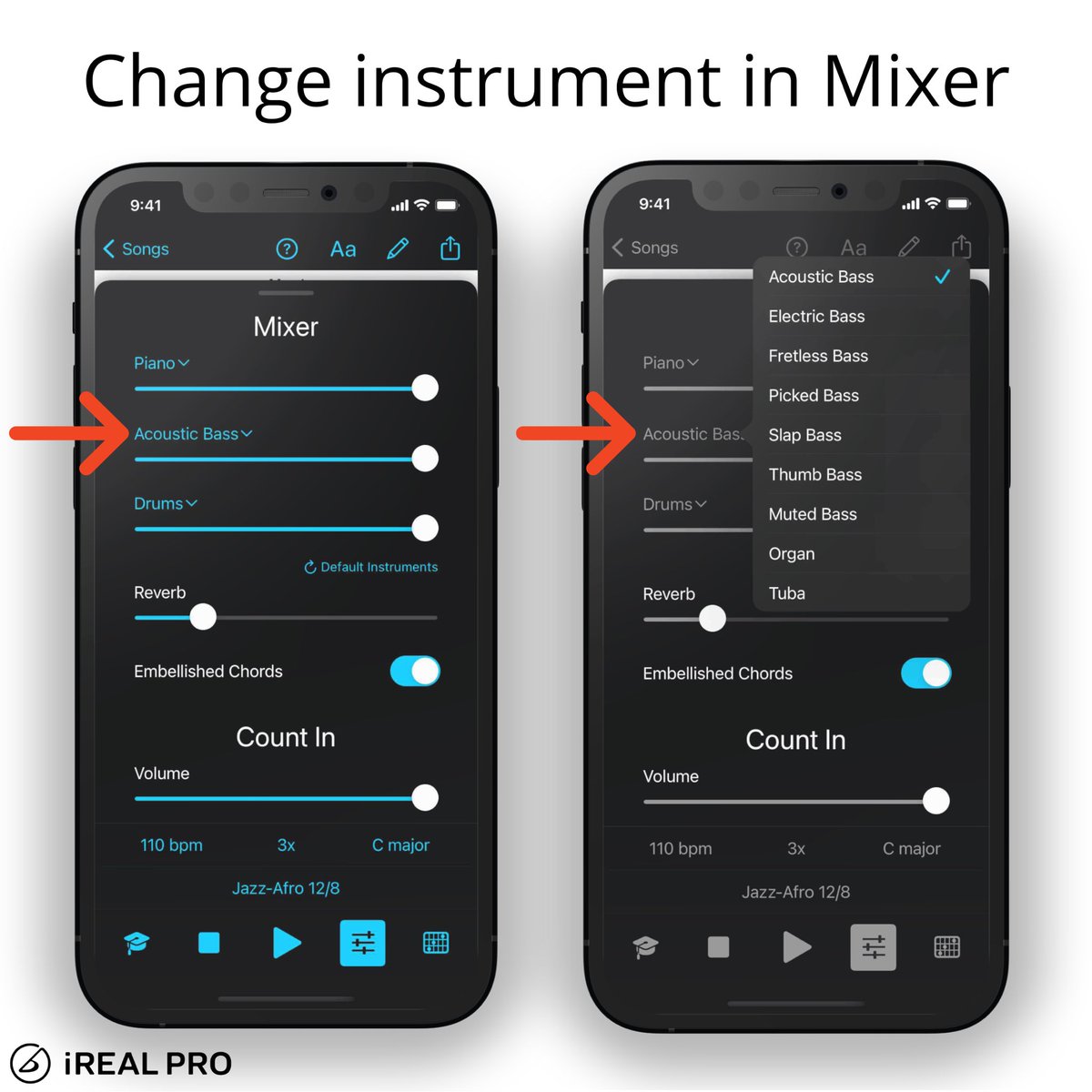
When you’re composing or practicing, it gives such a different feel to change an instrument and mute one. In the Mixer, tap on the name of the instrument and choose one of the sounds. Have fun personalizing your backing tracks! #irealprotutorial
iReal Pro tweet media
English
0
1
9
0
iReal Pro
iReal Pro@iRealProApp·
In case you need a ‘break’, here is a quick reminder how to use it in iReal Pro. Open the Editor and in the text field, add the word “Break” and use the double bar line to resume the drums again. #drumbreak #irealprotutorial #practice
iReal Pro tweet media
English
1
1
9
0
iReal Pro
iReal Pro@iRealProApp·
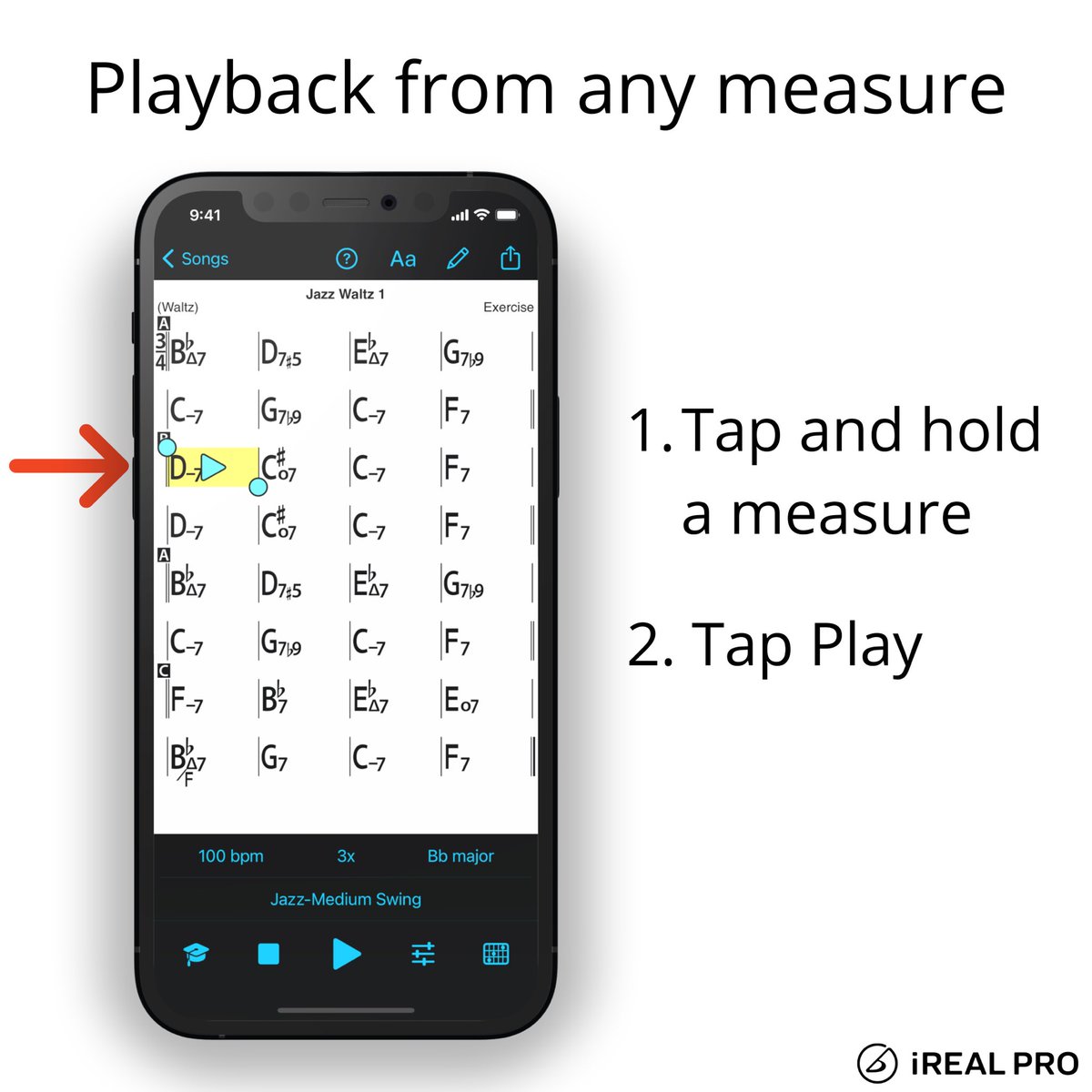
Still a recurring question from users if they can start the playback from any measures. You can simply tap and hold a bar to start from a specific measure in the chart. Add 1 more repeat in the playback and play from the last 4 bars to have an intro. #irealprotutorial
iReal Pro tweet media
English
0
0
2
0
iReal Pro
iReal Pro@iRealProApp·
Here is how you can quickly access the Transposition settings for horn players. #irealprotutorial
iReal Pro tweet media
English
0
0
1
0
iReal Pro
iReal Pro@iRealProApp·
In the Player controls, tap the Mixer button to change the Count-in settings. Select 0 for No count-in, set the volume of count in with the slider or change the click sounds. The Auto setting will automatically play one or two measures - depending on the tempo #irealprotutorial
iReal Pro tweet media
English
0
0
7
0
iReal Pro
iReal Pro@iRealProApp·
Here is an easy way to set the song’s tempo by tapping it out in the playback control. You can also drag the slider or tap the +/- buttons to change it. #irealprotutorial
English
0
0
6
0
iReal Pro
iReal Pro@iRealProApp·
Do you want to work on the voicing in a song? Try the guitar, ukulele or piano fonts and view the chord diagrams in the song chart. Print it, share it, practice it! #irealprotutorial
iReal Pro tweet media
English
0
0
2
0
iReal Pro
iReal Pro@iRealProApp·
Check out how simple it is to record yourself playing or singing along with iReal Pro’s backing tracks. Have an idea for a solo or have to submit homework for music class? Make a quick recording of it! #irealprotutorial #record #backingtrack
iReal Pro tweet media
English
0
3
9
0
iReal Pro
iReal Pro@iRealProApp·
In the Mixer, you can change the Drums track to Click track and set the sound of the clicks under Count In settings. #irealprotutorial
English
0
0
5
0
iReal Pro
iReal Pro@iRealProApp·
In the Mixer, tap on the name of the instrument and choose one of the sounds. Have fun exploring the different sounds! #irealprotutorial #mixer
iReal Pro tweet media
English
0
1
4
0