OneTab

137 posts

OneTab banner
OneTab

OneTab

@OneTab

The Chrome/Firefox extension cure for tab hoarding. Turns your open tabs into a list you can return to later. Visit https://t.co/iRMpKT7u0l to install

เข้าร่วม Nisan 2016
0 กำลังติดตาม469 ผู้ติดตาม

OneTab
OneTab@OneTab·
@atc12138 Hi, the data is stored in your Chrome profile folder. If you reinstalled, that would probably delete your old profile folder. If you go to chrome://version/ and look for Profile Path, you'll see generally where the profile folders are stored.
English
1
0
0
24
ATC
ATC@atc12138·
@OneTab Reinstalling chrome has caused all my favorite tabs to disappear, can you help me get them back?
English
1
0
0
15
OneTab
OneTab@OneTab·
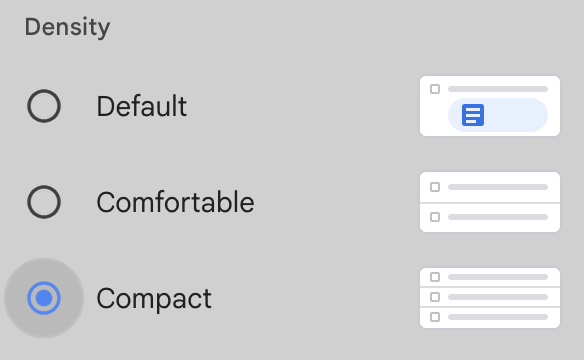
@8W7O7 Thanks for the feedback, we'll explore this in the future. Btw, it is partially an optical illusion that the new version is less dense - there is not that much difference between the number of tabs that can fit vertically.
English
0
0
1
14
Nadeem
Nadeem@8W7O7·
@OneTab Loving the new update. Initial feedback: a compact ui view mode for tab groups that is similar to old onetab / gmail's Compact view would be really nice. I feel like I spend more time scrolling through padding vs text per px in the new UI.
Nadeem tweet media
English
1
0
0
31
OneTab
OneTab@OneTab·
@8W7O7 @AgeOfProduct It's on the left for consistency, because now both the group and tab 'X' buttons are on the left. However, you can still use the right menu and choose 'Move to trash' there too.
English
0
0
1
11
Age of Product
Age of Product@AgeOfProduct·
@OneTab Who had the glorious idea of placing the "delete selection button" [x] directly to the left of the selection title? I already deleted two selections when I tried to change the selection's name. There is no way to recover the deleted selection… 😠
English

1
0
0
67
Goldy
Goldy@Gold_Invaluable·
@OneTab What an upgrade guys, Literally from the folder view to task, star, remove duplicates, and all. Literally amazed guys, just wanted to appreciate you guys first. Well done, who needs browser tabs now, maybe add onetab as a permanent sidebar in each of the browsers?? 😊
English

3
0
2
34
OneTab
OneTab@OneTab·
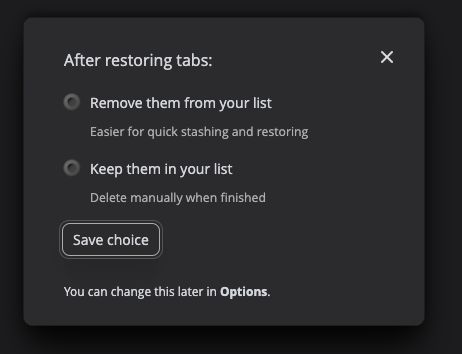
@TACJ Ah, you must have also been using the beta version first. When it went live to everyone, we prompted everyone with that simpler option. You can ignore that prompt or just choose 'archive' again in the Options page
English
0
0
1
12
Tom James
Tom James@TACJ·
@OneTab When I click a link it offers me this option dialogue, but in the Options (which I had already looked at) there is also the "mark as archived" (which I had already chosen).
Tom James tweet media
English
1
0
0
31
Uta-Yoshi
Uta-Yoshi@Uta_Yoshi0·
onetab、いきなり更新入ったと思ったらアプデ前のタブが全部消えちゃった トラブルシューティングを試しても復旧しないし最悪… 事前に予告なく行うとか酷いし、データ返してくれよ
日本語
1
0
0
85
Elliot
Elliot@elliotb68·
@OneTab I saw the instructions after posting the tweet. Followed them and still haven't gotten anything yet
English
1
0
0
52
Elliot
Elliot@elliotb68·
With the @OneTab update, I lost all of the tabs I had stored and wanted to get back to
English
2
0
0
71
OneTab
OneTab@OneTab·
@curemachwindy Hi, we posted instructions in the chrome web store listing for triggering the migration. There was an issue where huge number of tabs took so long to migrate that Chrome was "sleeping" the migration. You should be able to recover them all.
English
1
0
0
39
MJ aka Mitte Jane
MJ aka Mitte Jane@curemachwindy·
onetab just updated and i lost all my tabs again -_- (at least i backed them up this time)
English

2
0
0
117
OneTab
OneTab@OneTab·
@asiamoth こんにちは。おっしゃるとおりです。1クリックで動作する、これまでの古いバージョンに近い形に戻す予定です。また、新しいアイコンのゴチャつきも取り除きます。さらに、タブをサスペンドする他の拡張機能との互換性も修正します。
日本語
0
0
1
63
あじもす🍥
あじもす🍥@asiamoth·
いまGoogle ChromeのOneTab拡張機能をインストールするとベータ版になるらしいが、以下の改変がゴミすぎた! - 拡張機能でサスペンド(一次停止)状態にしたタブをOneTabに格納できない - タブを格納する際にいちいちダイアログで聞いてくる - UIがゴチャゴチャ 保存しておいた旧版を入れ直した😜
日本語
1
0
0
170
OneTab
OneTab@OneTab·
@xhiroga こんにちは、不具合を見つけた場合はぜひ教えてください。修正いたします。
日本語
0
0
0
38
さわら
さわら@xhiroga·
ChatGPT AtlasにしてからOneTabの挙動がなんか変だ...
日本語
2
0
2
348
OneTab
OneTab@OneTab·
@uxxxacto Hi, we've sent a DM. Downgrades aren't possible due to the way the Chrome Web Store works, but we should be able to fix the difficulties if we can understand the confusion.
English
2
0
0
41
ventropologic
ventropologic@uxxxacto·
@OneTab Hi, Can you please downgrade me back to the functioning version. Current model is 100% useless. I hate it. It's completely broken and unusable. Thank you.
English
1
0
0
49
OneTab
OneTab@OneTab·
OneTab has just been upgraded to support Chrome's tab groups feature. There is a new permission, which is necessary so that when you send your tabs to OneTab, we can tell if we also need to save the color and label of the tab group that the tab is within (if any)
English
9
2
5
1.8K
OneTab
OneTab@OneTab·
@uxxxacto @iamfeministbtw Hi, you were part of the preview. It was released to 2% of users to get feedback. Unfortunately, it's not possible with the Chrome Web Store to let people opt in or out of new versions. Is most of the problem solved by making the OneTab toolbar icon work the way it did before?
English
2
0
0
58
ventropologic
ventropologic@uxxxacto·
@iamfeministbtw @OneTab Please help me understand how I can miss it, too. It's a UX disaster. They didn't even *preview* it to users beforehand - just sprang it on us, like wow (!). OK, how do we turn off the new "feature" is all I want to know?
English

1
0
0
46
OneTab
OneTab@OneTab·
@tatsuoSakurai We will add back the option to make it work with 1 click
English
1
0
1
34
tatsuosakurai
tatsuosakurai@tatsuoSakurai·
あれ?onetabの挙動変わった?2回クリックしないといけなくなった??ショートカットキー割り当てるか
日本語
1
0
0
245
OneTab
OneTab@OneTab·
@iamfeministbtw It's just gone live in beta to a small proportion of users in the last few days. It will be rolling out to everyone as soon as we are sure there are no major bugs
English
1
0
1
34
OneTab
OneTab@OneTab·
@pamschwetz Thanks for mentioning us. Btw, that is an internal Chrome URL that won't work for anyone not already using OneTab :)
English
0
0
0
29
Pam Schwetz 🌳
Pam Schwetz 🌳@pamschwetz·
chrome-extension://chphlpgkkbolifaimnlloiipkdnihall/onetab.html
English
1
0
0
59
OneTab
OneTab@OneTab·
@msbellows Some web sites may embed images or very long text into a URL. It's not common, but if you are using a particular web site that does this, you might find that you've bookmarked lots of those types of URLs from that web site.
English
0
0
0
53
OneTab
OneTab@OneTab·
@msbellows Several hundred tabs is normally hardly anything, but it is technically possible that you've bookmarked very strange URLs that can be up to 2MB in size. Please try hovering over your stored links and check if this might be the case. Drop us an email at our web site for more help
English
0
0
0
39