SQL Info

406 posts

SQL Info

SQL Info

@SQLInfo

เข้าร่วม Şubat 2014
61 กำลังติดตาม10 ผู้ติดตาม
SQL Info
SQL Info@SQLInfo·
A login is part of two AD groups. One group has read access and other has sysadmin. When the user logged in, only the read access is applied. Sysadmin role is not applied. Is there a reason for this? But when the login was added directly as sysadmin, it got sysadmin role #sqlhelp
English

0
0
0
49
SQL Info
SQL Info@SQLInfo·
Sql server & Agent service account don’t have access to backup share. Running Ola’s T-sql backup job from sql agent. Job owner is sysadmin and has access to share.Backups are failing due to no access on share for service account. Any ideas on how to run as job owner? #sqlhelp
English
1
0
0
70
SQL Info
SQL Info@SQLInfo·
@DBAduck Thank you!! Any ideas on what could have made the DB get into “initializing/ in recovery” state. The dbs were in sync and redo queue was zero before failover. Post failover, the error log said “DB recovery completed” but it was still stuck in this state for over 5 hours #sqlhelp
English
1
0
1
61
Ben Miller
Ben Miller@DBAduck·
@SQLInfo You can remove it from the AG and then add it back in, but if log backups have happened, you will have to restore the logs to the secondary before adding it back in the AG. #sqlhelp
English
1
0
1
69
SQL Info
SQL Info@SQLInfo·
SQL 2019 AG DB stuck in “initializing/in recovery” state after failover. The DB is in secondary role. The error log said - “recovery completed for database <db name> in 30 seconds” an hour ago but DB still stuck in initializing/recovery state. Any help to recover the DB #sqlhelp
English
1
0
0
161
SQL Info
SQL Info@SQLInfo·
Getting this error - Database “abcde” already exists. Choose a different database name. But the db does not show up when queried sys.databases or in SSMS object explorer Any ideas how to fix the issue #sqlhelp
English
0
0
0
124
SQL Info
SQL Info@SQLInfo·
@AngryPets Thanks @AngryPets for the input. Yes, it could be plan cache issue but we did not notice difference in the query plan before and after the stats were updated that resolved the issue. We also tried evicting plans and it worked only when the query was not executing at that time
English
1
0
1
23
Michael K. Campbell
Michael K. Campbell@AngryPets·
@SQLInfo #sqlhelp Updating stats evicts plans from cache. Very good chance that this is fixing the problem (vs the stats somehow getting out of sync within 60 minutes). Commonly, problems like this can be caused by parameter sniffing or ... ugly SQL that doesn't account for cardinality.
English
2
0
1
90
SQL Info
SQL Info@SQLInfo·
On sql 2019 cu19, parameterized adhoc app query execution takes ~30 secs randomly. Updating stats fixes the issue. Hourly job updates stats for the table but even then noticing issues btw those runs. Manually updating statistics fixes. Table size range - 50 to 250GB. #sqlhelp
English
1
0
0
116
SQL Info
SQL Info@SQLInfo·
Have two log backup jobs set up using Ola’s scripts databases in parallel mode. Sometimes, one of the log backup job can take a while backing up one database and overlap with its next schedule. Does the second log backup job on its next run backup all the remaining dbs? #sqlhelp
English
1
0
0
0
L_  N___
L_ N___@sqL_handLe·
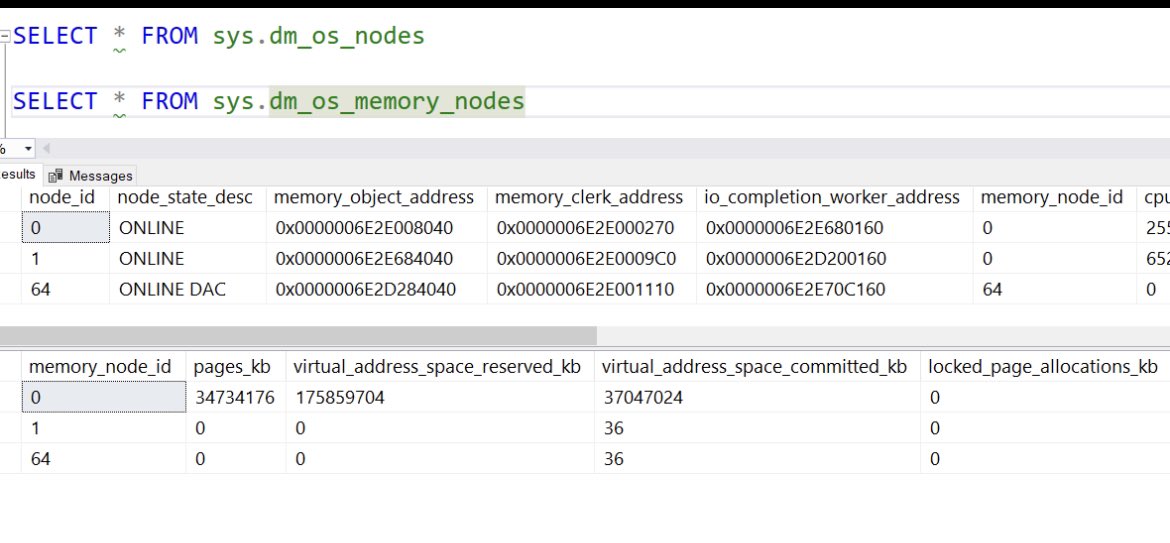
@SQLInfo @arvisam oh - wait. is it possible there is one row in dm_os_memory_nodes with memory_node_id < 64, but two rows in dm_os_nodes with node_id < 64? that would be one vNUMA node, one memory node, and 2 softNUMA nodes.
English
1
0
0
0
SQL Info
SQL Info@SQLInfo·
Noticing constant spike in “MEMOBJ_SOSNODE” clerk in SQL 2016 sp3. It is growing at 60 MB for every 15 mins. Any ideas what could be leading to this? #sqlhelp
English
1
0
0
0
SQL Info
SQL Info@SQLInfo·
@sqL_handLe @arvisam The Schedulers count is stable and has 16 cores. There is only one NUMA node and two memory nodes. Dm_Os_memory_node where memory_node<64 comes back with two rows but memory node id = 1 does not have pages allocated. Memory_node 0 is doing all the work. No,that dbcc did not help.
English
1
0
1
0
L_  N___
L_ N___@sqL_handLe·
@arvisam @SQLInfo is the number of schedulers per sqlos node_id in dm_os_schedulers constant or growing over time? several years ago there was a memory leak where certain operations would cause continuing creation of hidden schedulers over time, rather than at startup only. 1/
English
2
0
0
0
SQL Info
SQL Info@SQLInfo·
@arvisam fyi: This instance hosts SSIS, SSRS databases (not SSRS web server) and other user DB’s. We have lot of jobs that run SSRS subscriptions and SSIS packages. Could they be related? Thanks again for looking. Will open support ticket with MS. 2/2
English
1
0
0
0
SQL Info
SQL Info@SQLInfo·
@arvisam Thank you for looking into this. Do not have any profiler\trace\XEvents session enabled that’s collecting XML plan output. I disabled the default the trace and the system Xevent session. Still noticing constant growth in “SOSNODE” memory clerk. 1/2
English
1
0
0
0
SQL Info
SQL Info@SQLInfo·
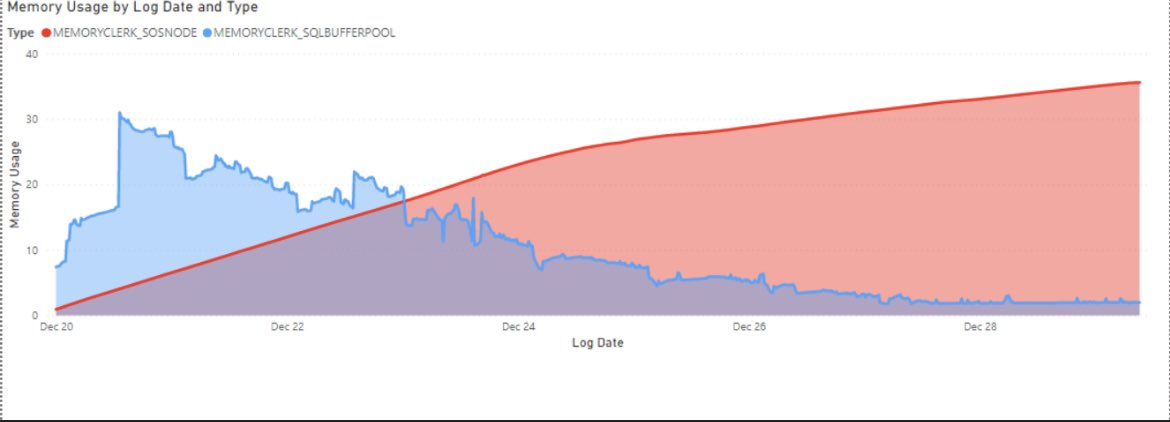
@arvisam Yes. It has been growing and eventually taking entire buffer pool. Restarting the instance is the only way to release that memory. Below is the graph that shows ever increasing “SOSNODE” memory clerk. Sys.dm_os_memory_objects show ever increasing “MEMOBJ_SOSNODE”
SQL Info tweet media
English
1
0
0
0
@arvisam@mstdn.social
@[email protected]@arvisam·
@SQLInfo Are you sure it is ever-growing? If this is impacting production, consider opening a support ticket to get it formally investigated. I can take an informal look if you can collect a set of histogram callstacks using the script here: #file-tracememobj-sql" target="_blank" rel="nofollow noopener">gist.github.com/arvindshmicros… 1/2
English
2
0
3
0
SQL Info
SQL Info@SQLInfo·
What’s causing the high memory usage for “MemoryClerk_SOSNode”. Server is SQL 2016 sp3 and hosts SSIS packages and executes them very frequently. “SOSNODE” memory usage keeps on increasing. Server has 40GB. Below pic shows how memory usage by clerks since restart #sqlhelp
SQL Info tweet media
English
1
0
0
0
SQL Info
SQL Info@SQLInfo·
Why is that the users cannot see an existing PowerBI subscription, if they are not the report/dataset owner. #PowerBI #sqlhelp
English
0
0
0
0
SQL Info
SQL Info@SQLInfo·
sys.syscerts table in SSISDB database is over 90 GB. What does it contain? Cannot query it because it’s internal table. Is it possible to clean it up? #sqlhelp
English
1
0
0
0
SQL Info
SQL Info@SQLInfo·
@jdanton Yes. We have lot of SSIS stuff. Is it possible to clear this content. Have not found any relevant info online. @jdanton #sqlhelp
English
1
0
0
0
Joey D'Antoni
Joey D'Antoni@jdanton·
@SQLInfo Also, upon further examination, each project, environment, and parameter, each get their own cert. So if you have an SSISDB with a lot of stuff, I can see how you could get that to 90GB. #sqlhelp
English
1
0
0
0