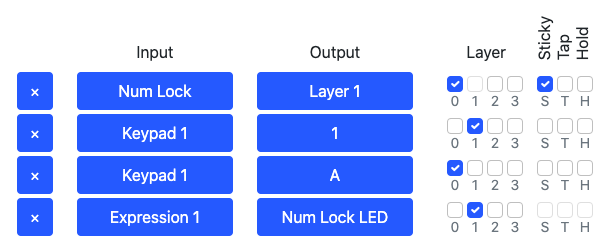
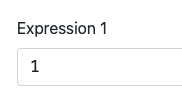
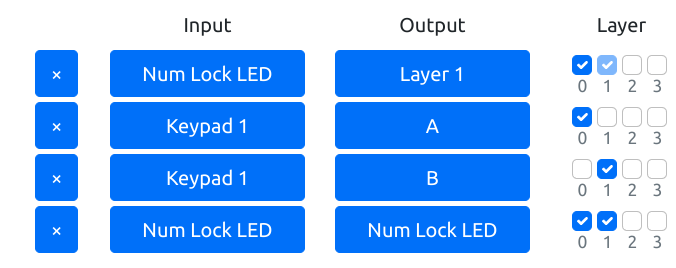
@alnat2 Alternatively, you could ignore what the computer thinks about the NumLock state and just make the NumLock key switch layers and map the numpad keys to whatever you want on each layer.
@jfedorynski My goal is simple, if NumLock is on
keypad1,k2,k3... output 1,2,3
if NL is off:
k1,k2,k3 ...➡️ctrl-c,-v,-a
I tried your example if NL is on:
nothing is printed, monitor tab only not numeric keys are displayed
if NL is off:
only "a" is printed, monitor tab all keys are displayed
@alnat2 Not sure if I understand you correctly, but you can make the NumLock LED activate a layer and have different mappings for the numpad keys on different layers.
@MyndexResearch If I understand correctly, the results can be interpreted as score5 - "sort of" like the 7:1, score4 - 4.5:1 and score1 - 3:1 in WCAG2, depending on the characteristics of the font.
@alnat2 "Sort of" — the Lc values are not nearly as far apart as 90 and 30, more like 85 to 55, and specifically relative to a weight 400 / 20px font.
Or put another way, Lc 68 is 32px for "Preferred" and 12px for Score1 "Poor" (also @ 400)
Font size and weight plays a bigger role.+
Did somebody say...better style management in @figmadesign?
Today we're shipping the ability to:
– Group styles in collapsible sections
– Reorder styles
– Create sub (!) groups of style
– Use the styles panel in its new collapsible beauty
🎨 #FigmaTip