DevopsCube

1.1K posts

DevopsCube banner
DevopsCube

DevopsCube

@devopscube

DevOps, MLOps, and Cloud tips & Deep Dives

Join 18000+ Readers → เข้าร่วม Kasım 2014
11 กำลังติดตาม10.6K ผู้ติดตาม
ทวีตที่ปักหมุด
DevopsCube
DevopsCube@devopscube·
Calico networking issue on AWS EC2. We ran into this issue in a kubeadm cluster running on EC2. The cluster was using Calico with VXLAN CrossSubnet mode. In this mode: - Traffic between different subnets uses VXLAN tunneling. - Traffic within the same subnet is sent directly without VXLAN. Because of this, some pod-to-pod traffic was sent directly using pod IPs. AWS EC2 has a security feature called Source/Destination Check, which expects traffic to come only from the instance’s own IP. So, when AWS saw traffic from pod IPs, it treated it as invalid and dropped the packets. This caused DNS resolution failures between pods. To fix it, disable Source/Destination check on the EC2 instances. Another option is to adjust the Calico networking configuration. If you need more details, 𝗖𝗵𝗲𝗰𝗸 𝗵𝗲𝗿𝗲: blog.techiescamp.com/docs/troublesh… Have you faced similar DNS issues in multi-subnet Kubernetes setups? Drop your experience in the comments. #devops #aws
DevopsCube tweet media
English
1
13
70
2.3K
DevopsCube
DevopsCube@devopscube·
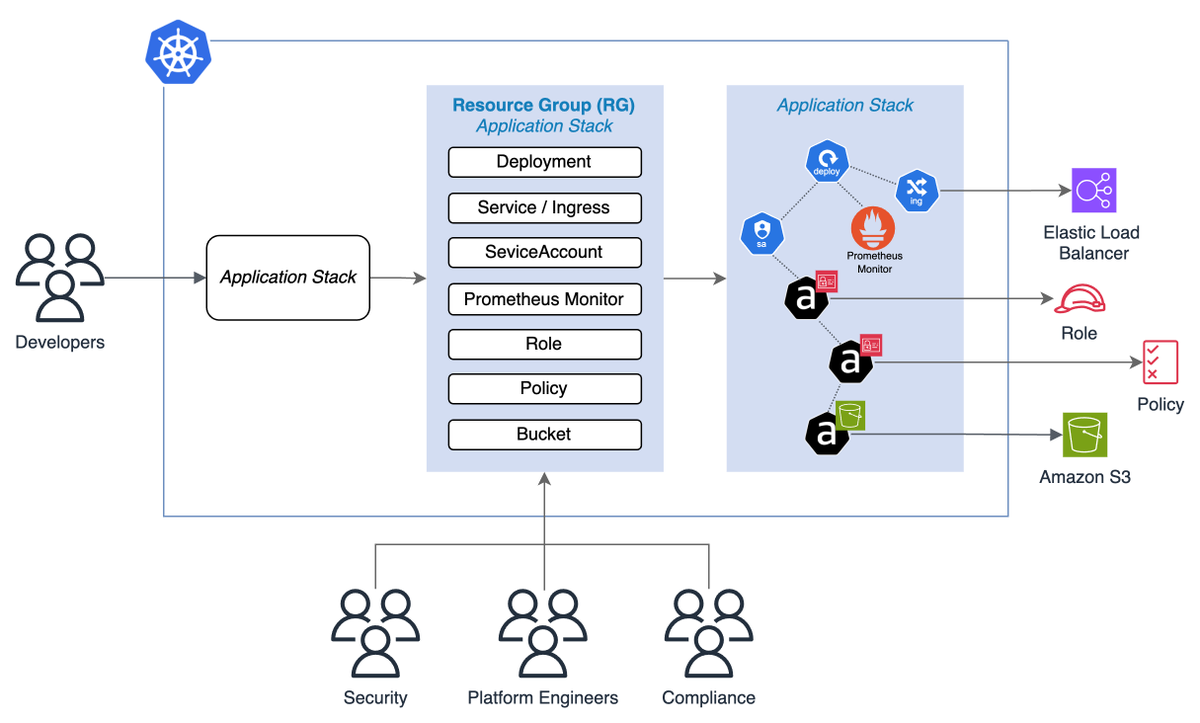
Developers often deploy apps like NGINX on Kubernetes But they must write many YAML files such as, Deployments, Services, Ingress, and ConfigMaps. Managing all of this can be complex. KRO (Kubernetes Resource Orchestrator) solves this by using reusable templates called ResourceGroups. Developers only provide simple inputs like app name, replicas, or image tag, and KRO automatically creates all the required Kubernetes resources. Here's how it works: - You create a ResourceGroup definition that bundles multiple Kubernetes resources together. - KRO's controller watches for these instances and automatically provisions all underlying resources in the correct order. - It handles dependencies between resources, ensuring everything is created in the right sequence. Unlike Helm or Kustomize, KRO works directly at the Kubernetes API level, making it easier to manage resources and integrate with GitOps workflows. 𝗚𝗶𝘁𝗵𝘂𝗯 𝗥𝗲𝗽𝗼: github.com/kubernetes-sig… #devopstools #devops
DevopsCube tweet media
English
0
3
5
124
DevopsCube
DevopsCube@devopscube·
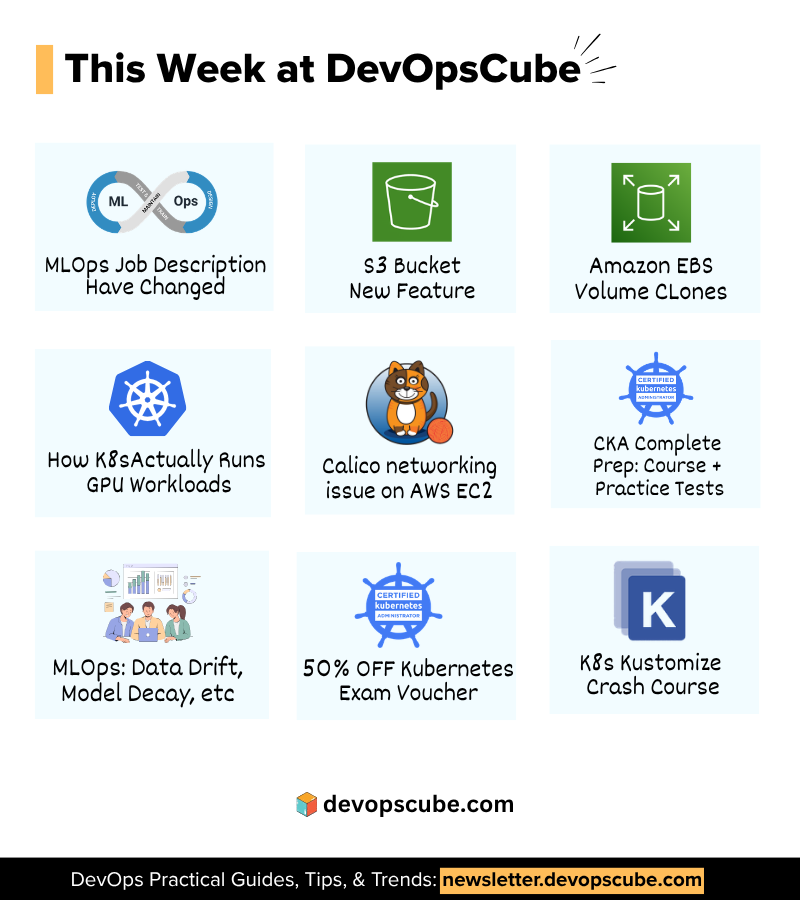
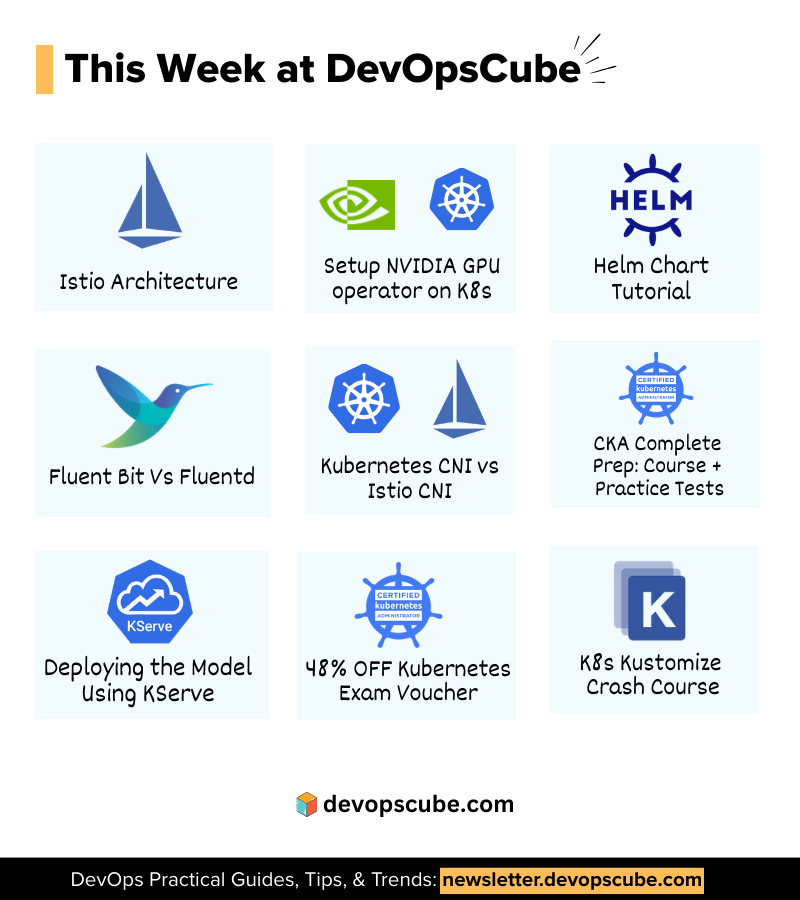
Practical Guides and resources this week at DevOpsCube. Read these 👇 1. MLOps Job Description has changed - linkedin.com/feed/update/ur… 2. S3 Bucket new feature - linkedin.com/feed/update/ur… 3. Amazon EBS volume clones - devopscube.com/clone-aws-ebs-… 4. How K8s actually runs GPU workloads - newsletter.devopscube.com/p/gpu-scheduli… 5. Calico networking issue on AWS EC2 - linkedin.com/feed/update/ur… 🎓 𝗖𝗲𝗿𝘁𝗶𝗳𝗶𝗰𝗮𝘁𝗶𝗼𝗻𝘀 & 𝗗𝗶𝘀𝗰𝗼𝘂𝗻𝘁𝘀 CKA, CKAD, CKS aspirants! This months deal is live! Use code 𝗗𝗖𝗨𝗕𝗘𝟯𝟬 at kube.promo/devops to save up to 𝟯𝟬% 𝗢𝗙𝗙 on individual certifications. and use code 𝗥𝟮𝗞𝗨𝗕𝗘𝗖𝗧 on bundles to save upto 𝟱𝟬% 𝗼𝗳𝗳. 👉 CKA course with 80+ practice questions: techiescamp.com/p/cka-complete…. Use code 𝗗𝗖𝗨𝗕𝗘𝟯𝟬 to get 𝟯𝟬% 𝗢𝗙𝗙 today 👉 K8s Kustomize Crash Course(Free) - courses.devopscube.com/p/kubernetes-k… 𝗧𝗵𝗶𝘀 𝗪𝗲𝗲𝗸'𝘀 𝗧𝗼𝗽 𝗘𝘅𝗽𝗲𝗿𝘁 𝗣𝗶𝗰𝗸👇 1. MLOps: Data Drift, Model Decay, and Dataset Versioning - newsletter.devopscube.com/p/mlops-data-d… Which resource are you diving into this week? Drop a comment! #DevOps #Learning #techtips
DevopsCube tweet media
English
1
8
36
1.1K
DevopsCube
DevopsCube@devopscube·
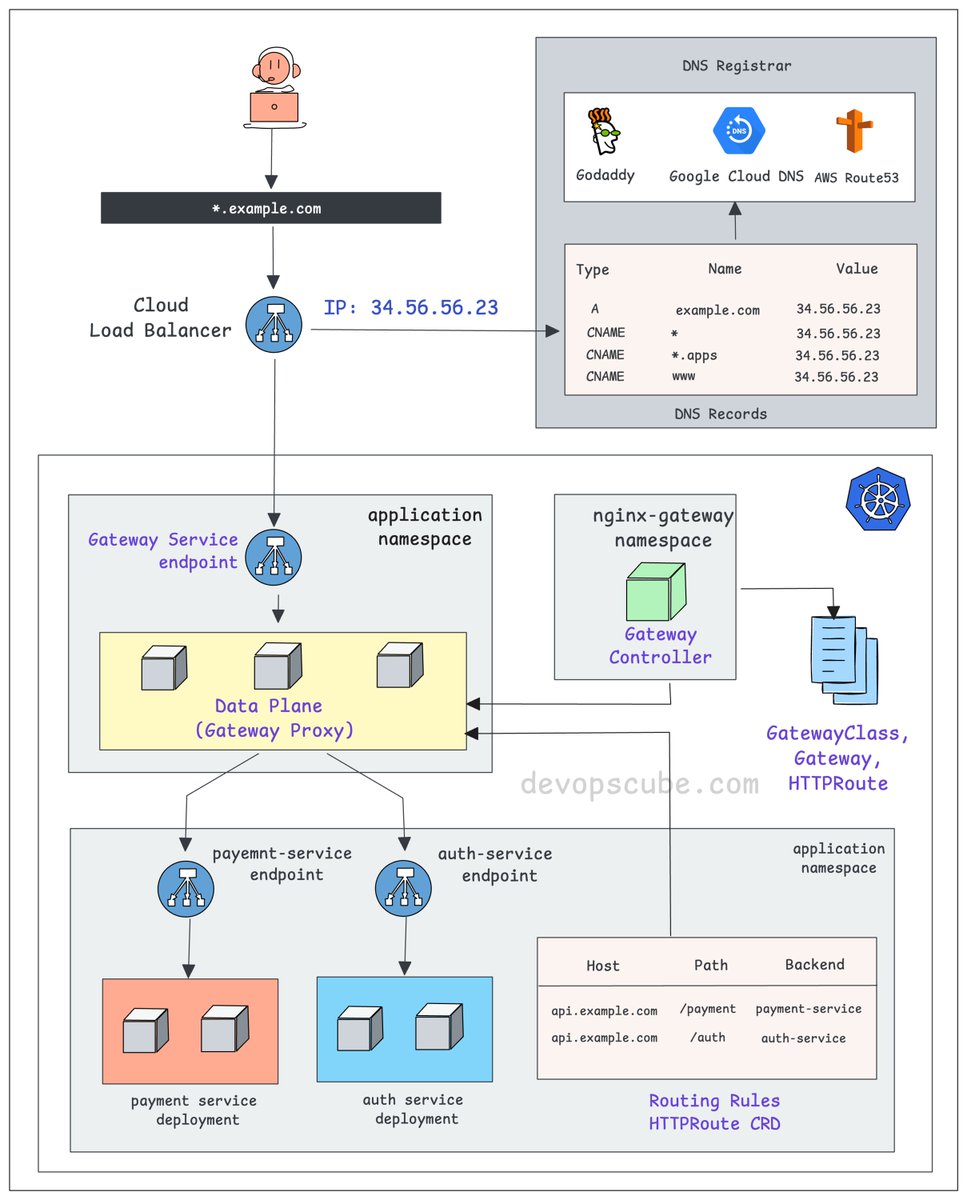
From DNS to Pod: How k8s Gateway API actually works. - You create a DNS record pointing to your cloud Load Balancer IP. - The Load Balancer forwards traffic to a Kubernetes Service, specifically the Gateway Service endpoint. - This Service points to the gateway proxy pods. These could be nginx, Envoy, or any compatible proxy. - The Gateway Controller (Ex: Nginx Fabric) watches for HTTPRoute, GRPCRoute, and similar resources. - When you apply these routes, the controller automatically configures the gateway proxy with the right configuration. - The HTTPRoute resource is what decides where your traffic actually goes. For example, /payment to payment-service, /auth to auth-service So the full traffic flow looks like this 👇 DNS to Cloud LB to Gateway Service to Gateway Proxy to your backend Service and finally to your Pod. If you understand the Ingress flow well, relating it to the Gateway API is very easy. A key difference is that in the classic Ingress model, the controller itself acts as the proxy. In the Gateway API, the controller configures and manages dedicated proxy instances (Gateways), creating a clear separation of concerns. We share such DevOps/MLOps concepts and deep dives in my newsletter. 𝗥𝗲𝗮𝗱 𝗶𝘁 𝗵𝗲𝗿𝗲 (𝟭𝟬𝟬% 𝗳𝗿𝗲𝗲): newsletter.devopscube.com Over to you… Are you using Gateway API in production? If yes, would love to hear your experience with it. ♻️ If this helped, repost it so others can learn too. #kubernetes
DevopsCube tweet media
English
6
87
421
14.8K
DevopsCube
DevopsCube@devopscube·
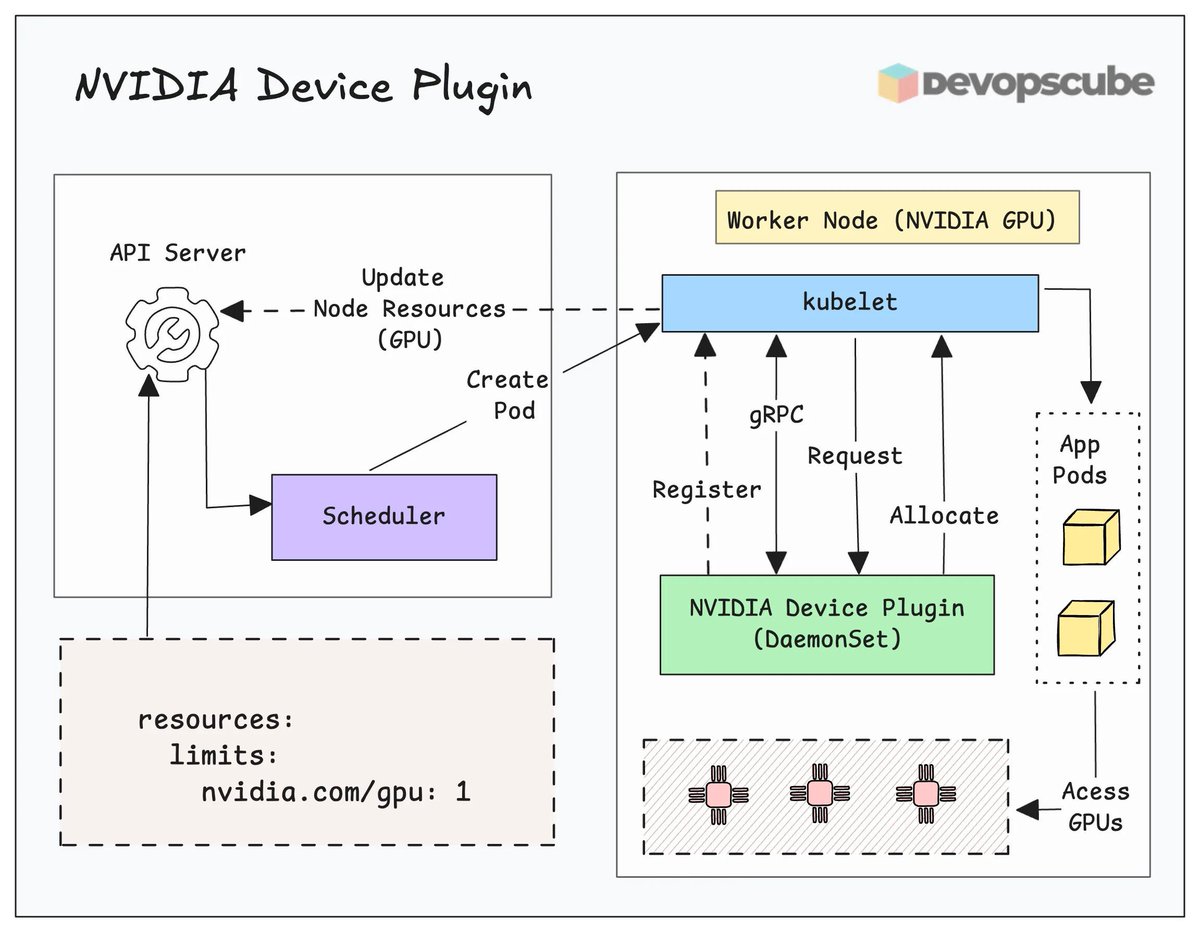
How does Kubernetes actually know your cluster has GPUs? Kubernetes cannot detect GPUs by itself. It relies on device plugins that run as DaemonSets on GPU nodes. When you install the NVIDIA GPU Operator or device plugin, it registers GPU resources with the kubelet on each node. The plugin advertises available GPUs as extended resources (like nvidia com/gpu: 1). Once registered, the kubelet reports these resources to the API server, making them schedulable. Your pods can then request GPUs using resource limits in their specs. Without the device plugin, Kubernetes has no idea GPUs exist on your nodes, even if the hardware is physically present. We have covered every detail in our newsletter. 𝗥𝗲𝗮𝗱 𝗶𝘁 𝗵𝗲𝗿𝗲: newsletter.devopscube.com/p/gpu-scheduli… Have you worked with GPU workloads in Kubernetes? Drop your thoughts in the comments below. 𝗡𝗼𝘁𝗲: Kubernetes 1.32 introduced Dynamic Resource Allocation (DRA) as the next evolution in hardware resource management. It provides fine-grained, flexible resource allocation that device plugins cannot handle. However, device plugins are still widely used in production today, and both models currently coexist. #kubernetes #gpu #devops
DevopsCube tweet media
English
0
13
69
2.1K
DevopsCube
DevopsCube@devopscube·
Clone an EBS volume in less than a minute. Previously, copying required creating a snapshot first and then restoring it. Now with EBS Volume Clone, we get instant, point-in-time copies using a single API call. The cloned volume is immediately available for mounting on EC2 instances. This is perfect for dev/test environments and database testing. Important limitations: - Cloning only works with encrypted volumes and stays within the same Availability Zone. - You cannot clone across AZs or Regions. Here is how to clone using AWS CLI: - Pause write operations - Run the clone command - Tag the new volume - Then attach it to your instance. 𝗗𝗲𝘁𝗮𝗶𝗹𝗲𝗱 𝗕𝗹𝗼𝗴: devopscube.com/clone-aws-ebs-… 𝗡𝗼𝘁𝗲: Cloning is NOT a replacement for snapshots.Use clones for fast, temporary copies in testing workflows. Use snapshots for disaster recovery and long-term backups. #ebs #aws #devops
DevopsCube tweet media
English
0
7
31
1.3K
DevopsCube
DevopsCube@devopscube·
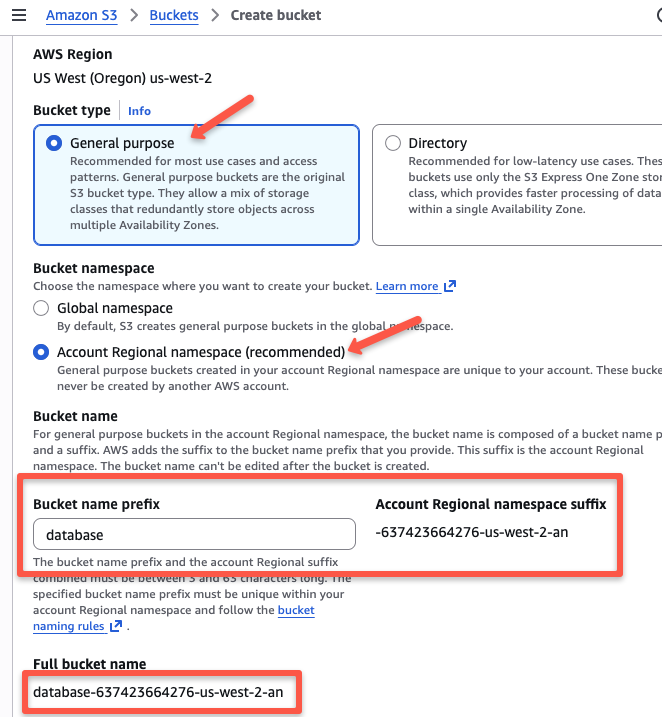
AWS just made S3 bucket naming simpler. Before the S3 bucket names had to be globally unique across all AWS accounts. So if you wanted a bucket, chances were someone else in the world had already taken it. Because of this, teams had to create complicated naming patterns just to avoid conflicts. Now, AWS has changed this with account regional namespace option which adds your account and region suffix, like: ---an Only your account can use bucket names with your unique suffix. If another account tries to use the suffix, AWS rejects it automatically. The feature works with the S3 console, AWS CLI, SDKs like Boto3, and IaC tools such as CloudFormation. A few things to note: - Existing global buckets cannot be renamed to use this namespace. - It does not apply to table, vector, or directory buckets. If you are managing large S3 deployments, this can make your bucket naming easier. ---- We cover one DevOps deep dive and one MLOps hands-on edition in our weekly newsletter. 𝗦𝘂𝗯𝘀𝗰𝗿𝗶𝗯𝗲 𝗵𝗲𝗿𝗲 (𝗶𝘁’𝘀 𝗳𝗿𝗲𝗲): newsletter.devopscube.com #aws #devops
DevopsCube tweet media
English
1
9
55
2.3K
DevopsCube
DevopsCube@devopscube·
How do you manage Kubernetes secrets today?
English
0
0
1
383
DevopsCube รีทวีตแล้ว
DevopsCube
DevopsCube@devopscube·
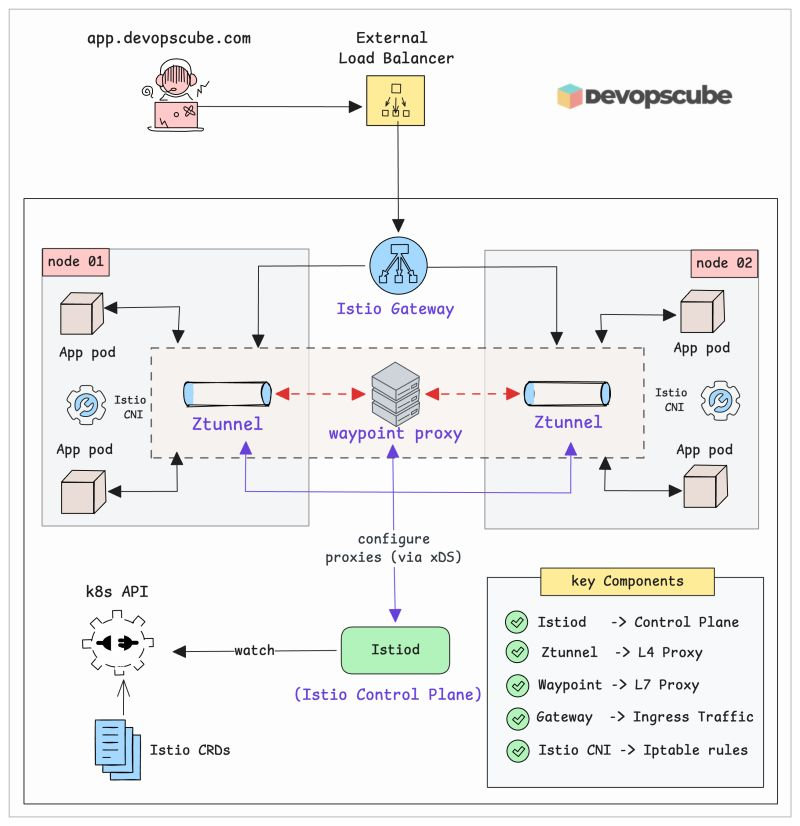
Master Istio Architecture in 12 Minutes (Illustrated Guide) If you want to understand Istio better, You need to understand its complete architecture and how the Istio components interact with each other. In our latest newsletter edition, we break this down with clear diagrams and simple explanations. Here is what you will learn 👇 - Why Istio needed a new architecture - Overview of Istio architecture - Deep dive into key components: Istiod, Ztunnel, Waypoint Proxy, and CNI - Is Ztunnel a single point of failure? - Business use cases of Ambient Mesh, including cost benefits. - Hands-on guide to setting up Istio Ambient Mesh 𝗥𝗲𝗮𝗱 𝗶𝘁 𝗵𝗲𝗿𝗲: newsletter.devopscube.com/p/istio-ambien… 𝗡𝗼𝘁𝗲: For better understanding, first set up the Ambient Mesh and then go through the architecture. You will be able to relate to all the concepts much better. #devops #istio
DevopsCube tweet media
English
3
32
146
5.4K
DevopsCube รีทวีตแล้ว
DevopsCube
DevopsCube@devopscube·
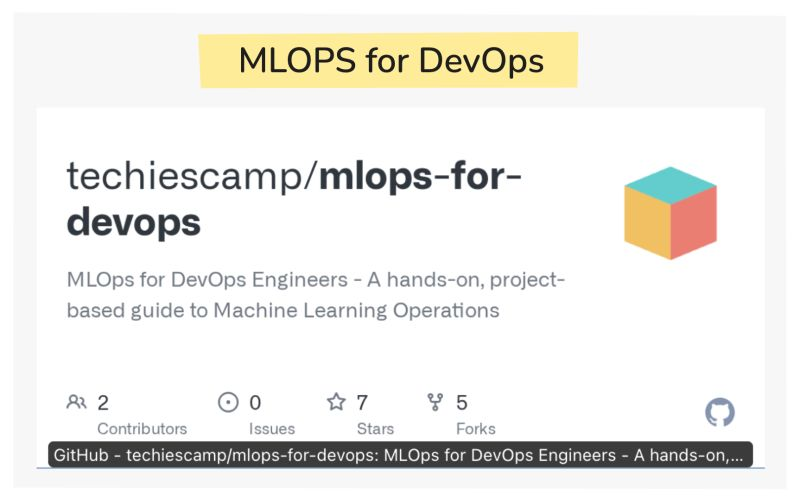
We created a GitHub repository to help DevOps engineers learn MLOps. 𝗚𝗶𝘁𝗛𝘂𝗯 𝗥𝗲𝗽𝗼𝘀𝗶𝘁𝗼𝗿𝘆: github.com/techiescamp/ml… Here is the thing. Most MLOps resources assume you already know machine learning. But what if you are coming from a DevOps background? That is exactly who we built this for. The repository focuses on ML operations using cloud-native tools on top of Kubernetes. So you are learning ML concepts while working with infrastructure you already understand. This approach lets you gain MLOps knowledge using your existing DevOps skills, or develop new ones along the way. The repo follows our MLOps newsletter series. We have already published three editions that are part of the repository. The latest edition is hands-on, where you perform data preparation using Python scripts. If you have any feedback on how the content is organized, please raise an issue in the repository. We can discuss it there. ♻️ PS: Repost and share this with DevOps engineers who want to expand into MLOps. #mlopsfordevops
DevopsCube tweet media
English
2
58
285
12.1K
DevopsCube
DevopsCube@devopscube·
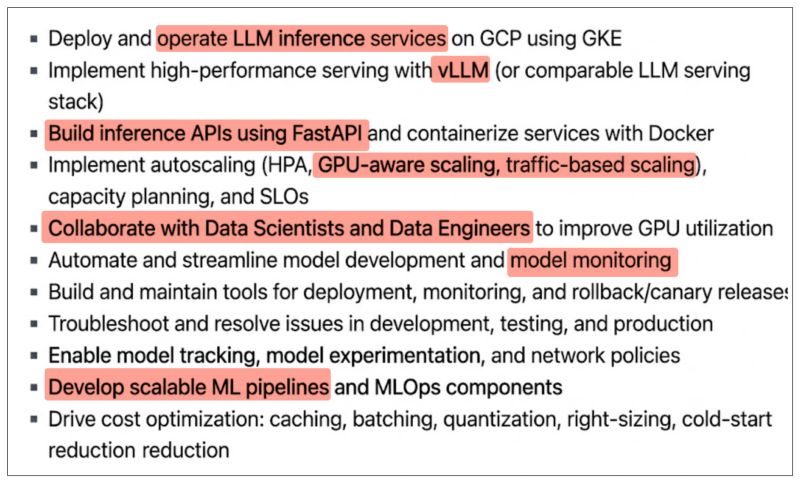
MLOps job descriptions have changed. And most DevOps engineers are not ready for it. Look at this real MLOps job description (image) vLLM, GPU-aware scaling, Model monitoring, ML pipelines, FastAPI inference APIs etc This is not a DevOps job with a new title. This is a role that expects you to understand the full model lifecycle. But here is the thing. A DevOps engineer does not write the Java app (Well, some do). Yet they need to understand how it is built, configured, and deployed to do their job well. MLOps works the same way. That is exactly why our MLOps series starts with model building. Not to turn you into an ML engineer. But to understand the core basics to collaborate well with Data Scientists, Data engineers and other in the team. So if you are looking to transition into MLOps or stay relevant, Learn the fundamentals, understand the ML lifecycle, Handling foundational models etc.. Every Saturday we send a hands-on MLOps deep dive built specifically for DevOps engineers. 𝗦𝘂𝗯𝘀𝗰𝗿𝗶𝗯𝗲 𝗵𝗲𝗿𝗲 (𝗶𝘁’𝘀 𝗳𝗿𝗲𝗲): newsletter.devopscube.com #mlops
DevopsCube tweet media
English
1
8
48
2.3K
DevopsCube
DevopsCube@devopscube·
Practical Guides and resources this week at DevOpsCube. Read these 👇 1. Istio Architecture - newsletter.devopscube.com/p/istio-ambien… 2. Setup the NVIDIA GPU Operator on Kubernetes - devopscube.com/setup-gpu-oper… 3. Helm Chart Tutorial - devopscube.com/create-helm-ch… 4. Fluent Bit Vs Fluentd - linkedin.com/feed/update/ur… 5. Kubernetes CNI vs Istio CNI - linkedin.com/feed/update/ur… 🎓 𝗖𝗲𝗿𝘁𝗶𝗳𝗶𝗰𝗮𝘁𝗶𝗼𝗻𝘀 & 𝗗𝗶𝘀𝗰𝗼𝘂𝗻𝘁𝘀 CKA, CKAD, CKS aspirants! This months deal is live! Use code 𝗣𝗜𝟮𝟲𝗖𝗧 at kube.promo/devops to save up to 𝟰𝟴% 𝗢𝗙𝗙 on individual certifications. and for bundles use code 𝗣𝗜𝟮𝟲𝗕𝗨𝗡𝗖𝗧. 👉 CKA course with 80+ practice questions: techiescamp.com/p/cka-complete…. Use code 𝗗𝗖𝗨𝗕𝗘𝟯𝟬 to get 𝟯𝟬% 𝗢𝗙𝗙 today 👉 K8s Kustomize Crash Course(Free) - courses.devopscube.com/p/kubernetes-k… 𝗧𝗵𝗶𝘀 𝗪𝗲𝗲𝗸'𝘀 𝗧𝗼𝗽 𝗘𝘅𝗽𝗲𝗿𝘁 𝗣𝗶𝗰𝗸👇 1. MLOps Step 4: Deploying the Model Using KServe - newsletter.devopscube.com/p/deploying-mo… Which resource are you diving into this week? Drop a comment! #DevOps #Learning #techtips
DevopsCube tweet media
English
0
13
82
2.4K
DevopsCube
DevopsCube@devopscube·
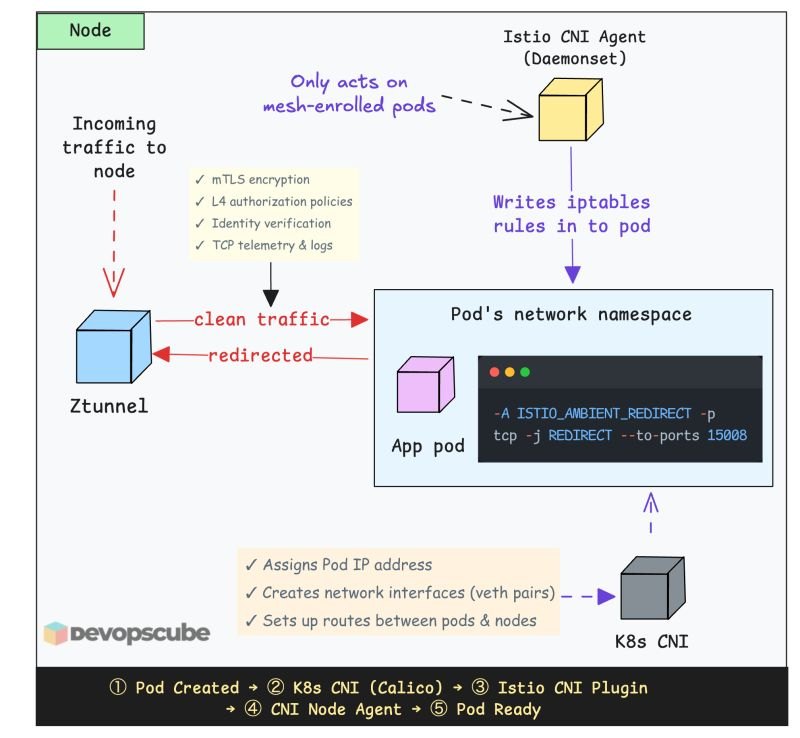
Kubernetes CNI vs Istio CNI Here is the key thing you need to understand 👇 When you deploy Istio, you need to run Istio CNI. This does not mean you replace your Kubernetes cluster CNI. It works together with your existing CNI like Calico or Cilium as a chaining plugin. Here is the key difference. When a pod starts, Kubernetes calls a CNI plugin to set up networking, assign an IP, create network interfaces, set up routes, etc. So it does the real networking work. Here is what Istio CNI does: - It acts only on pods that are part of the mesh (namespaces labeled as dataplane-mode=ambient) - When it detects new pods that are part of the mesh, it notifies the Istio CNI node agent - The CNI node agent then adds iptables rules in the pods network namespace to redirect pod traffic to the Ztunnel proxy. Overall, Istio CNI is a 𝗰𝗵𝗮𝗶𝗻𝗶𝗻𝗴 𝗽𝗹𝘂𝗴𝗶𝗻. This means multiple CNI plugins run in sequence on the same pod, each adding its own piece of networking logic. For example: - Pod starts - Calico (assigns IP, sets up routes) - Istio CNI (sets up iptables redirect rules) --- We share such DevOps/MLOps concepts and deep dives in our newsletter. 𝗥𝗲𝗮𝗱 𝗶𝘁 𝗵𝗲𝗿𝗲 (𝟭𝟬𝟬% 𝗳𝗿𝗲𝗲): newsletter.devopscube.com #istio #devops
DevopsCube tweet media
English
0
20
73
2.6K
DevopsCube
DevopsCube@devopscube·
EBS Clone Vs Snapshot 🚀 EBS Snapshot = Backup to S3 EBS Clone = Instant copy within the same AZ Use a Clone when you need a dev/test copy of prod data immediately. Use a Snapshot when you need cross-AZ or cross-Region DR We have a simple hands-on guide that explain the EBS clone option. 𝗥𝗲𝗮𝗱 𝗶𝘁 𝗛𝗲𝗿𝗲: devopscube.com/clone-aws-ebs-… Here is how it works under the hood AWS makes the clone available immediately and copies the data blocks from the source volume in the background. This is called background initialization.
DevopsCube tweet media
English
0
6
43
1.2K
DevopsCube
DevopsCube@devopscube·
What's your primary GitOps tool in 2026? (If the tool is not mentioned below, drop them in the comment:)
English
0
0
6
627
DevopsCube รีทวีตแล้ว
DevopsCube
DevopsCube@devopscube·
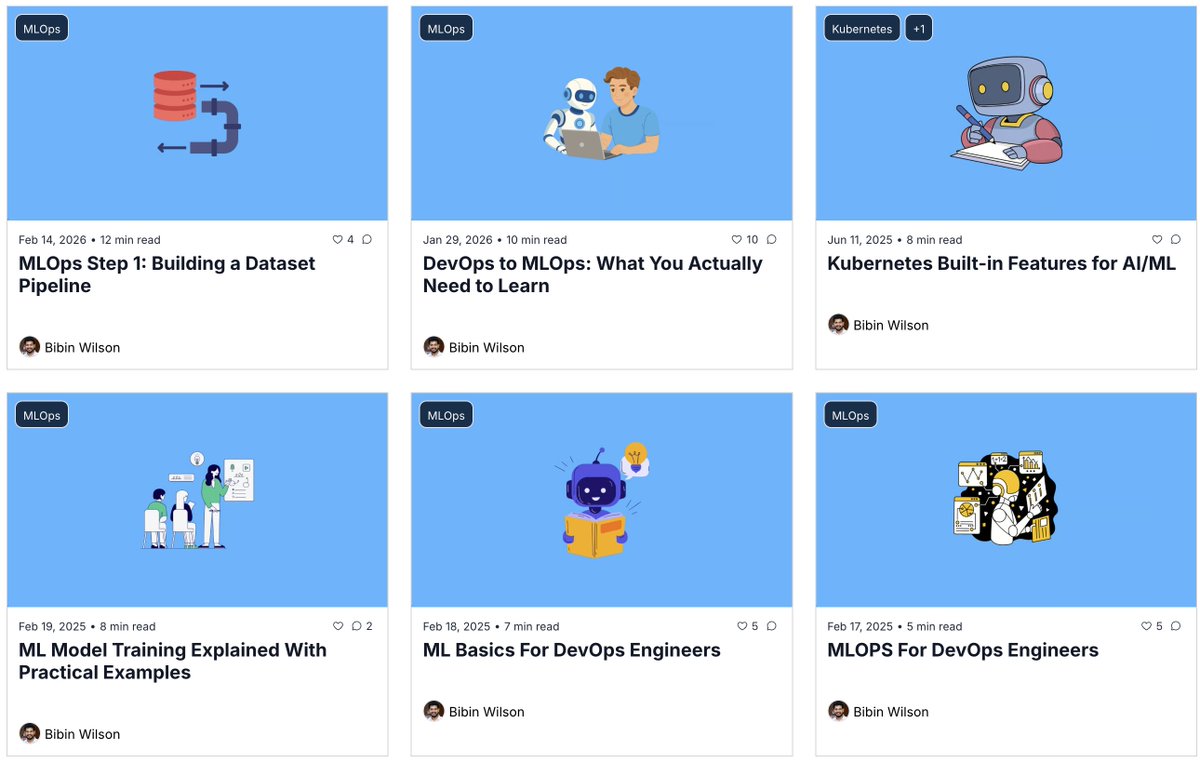
Most AI/ML production workloads today run on Kubernetes, yet many DevOps engineers lack MLOps expertise. We have started something new in our newsletter. Every Saturday, we are publishing a hands-on MLOps edition where we build everything from the ground up: model development, deployment, monitoring, LLMs, RAG, LLMOps, and Agents. Everything is primarily focused on Kubernetes, because that's where most AI/ML production workloads run today. Here is how it works 👇 Every Saturday, we send you a hands-on edition with complete code references and practical examples you can run in your own environment. Since it's Saturday, you have the weekend to work through the material yourself. The first edition is already out. 𝗦𝘂𝗯𝘀𝗰𝗿𝗶𝗯𝗲 𝗵𝗲𝗿𝗲 (𝟭𝟬𝟬% 𝗳𝗿𝗲𝗲): newsletter.devopscube.com Over to you… Are you currently working with MLOps or planning to get started?
DevopsCube tweet media
English
1
11
42
1.7K
DevopsCube
DevopsCube@devopscube·
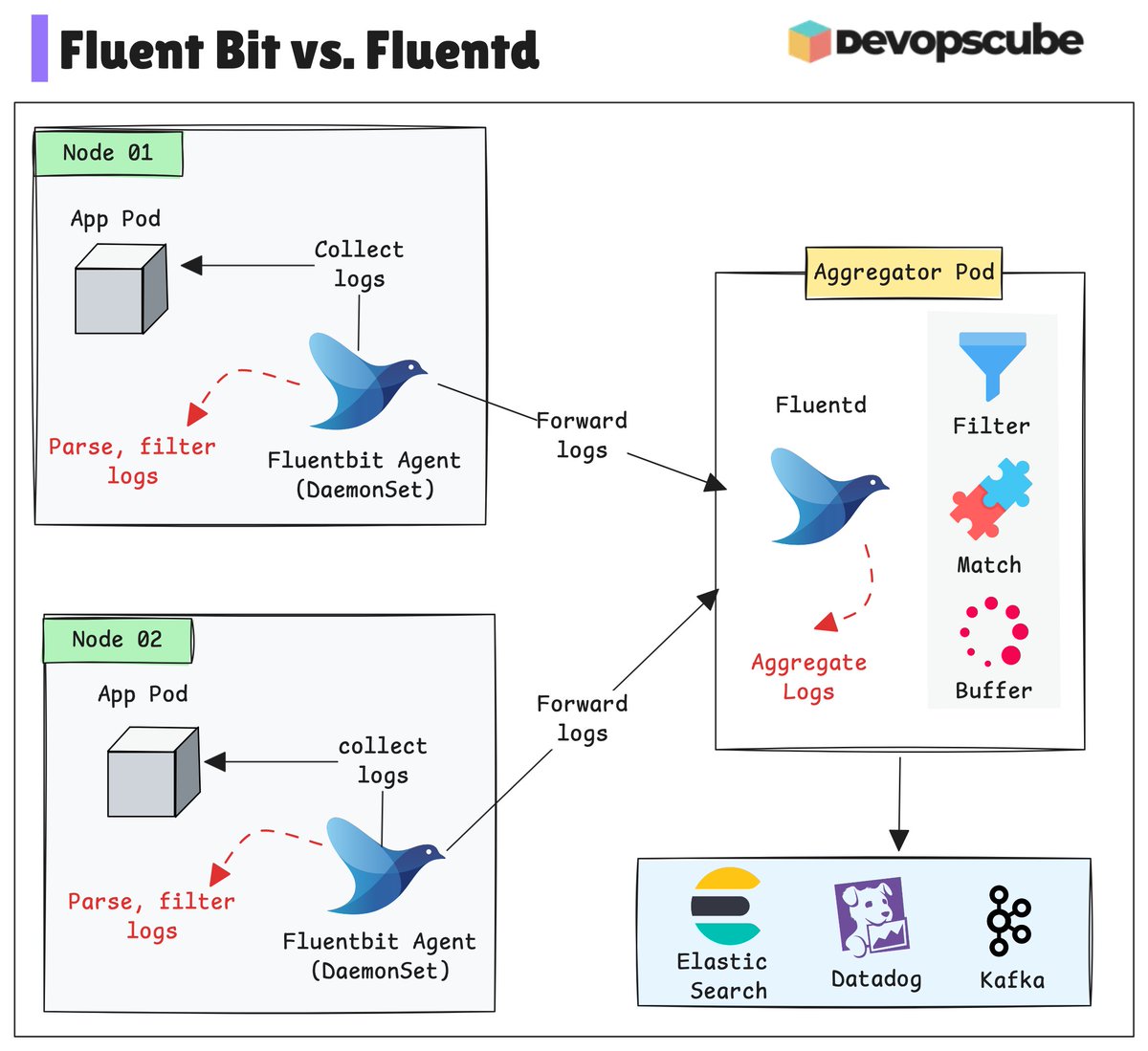
Don't know when to choose Fluent Bit or Fluentd? Here is the simple difference👇 Fluent Bit is lightweight and consumes minimal resources. You can use it when we need simple log collection from containers without heavy processing. Fluentd is more feature-rich with a larger plugin ecosystem. We can choose Fluentd when we need advanced filtering, complex transformations, or multiple output destinations. If you only need simple log forwarding, Fluent Bit alone is enough. If you need heavy transformations, go with Fluentd. A common best practice is: Use Fluent Bit as the log collector on nodes, then forward to Fluentd for processing. Start simple and add complexity only when necessary. ----- Get weekly DevOps and MLOps deep dives delivered to your inbox. 👉 𝗝𝗼𝗶𝗻 𝗛𝗲𝗿𝗲 (𝗜𝘁𝘀 𝗳𝗿𝗲𝗲): newsletter.devopscube.com
DevopsCube tweet media
English
1
9
46
1.2K
DevopsCube
DevopsCube@devopscube·
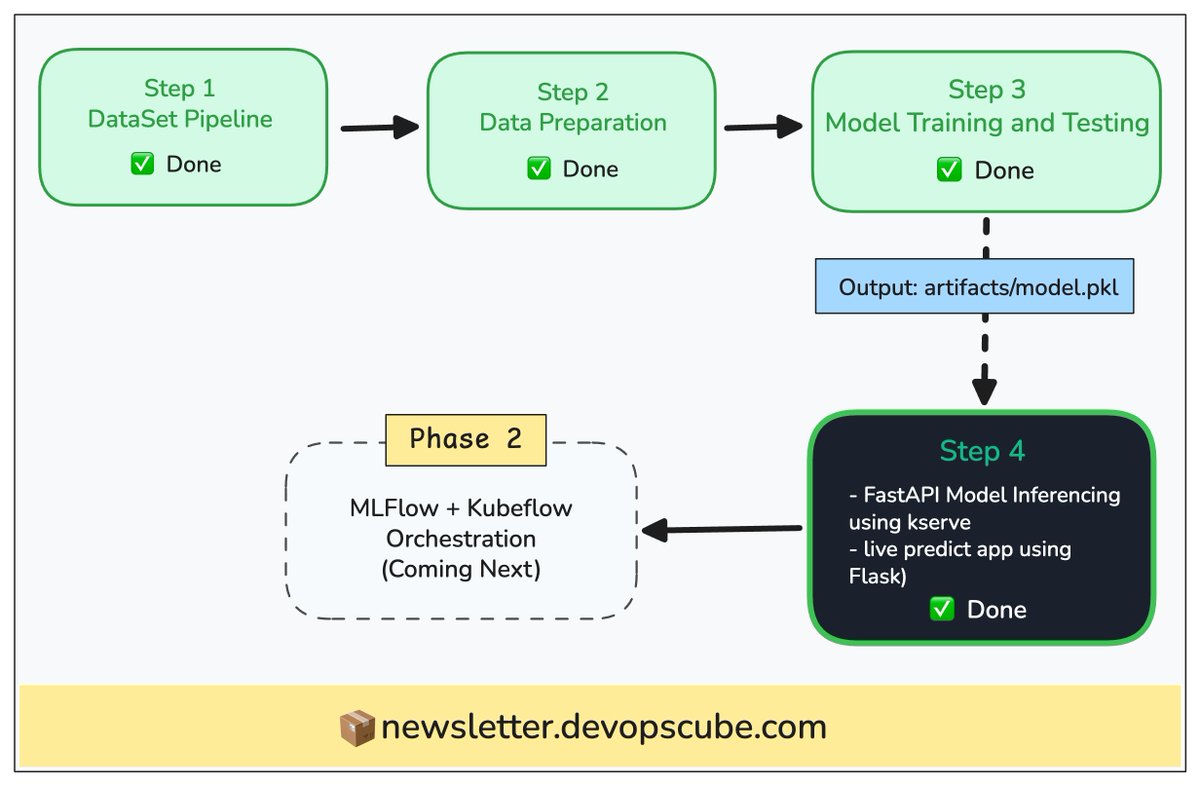
Turning a Model to running app on kubernetes 🚀 In the MLOps series, We completed Phase 1 by successfully deploying a machine learning model on KServe. The latest edition covers, - Dockerizing the inference service - Dockerizing the frontend application - Why we need KServe? Why not k8s deployment? - Serving the model using KServe - Deploying a frontend that interacts with the KServe inference endpoint - How large models are served in Kserve. The goal of Phase 1 was to help DevOps engineers understand the basic ML concepts required to get started with CNCF based AI/ML tools. 𝗥𝗲𝗮𝗱 𝗟𝗮𝘁𝗲𝘀𝘁 𝗘𝗱𝗶𝘁𝗶𝗼𝗻: newsletter.devopscube.com/p/deploying-mo… In the upcoming editions, we will dive deeper into key AI/ML tools and workflows. All the concepts we learned in Phase 1 will make those workflows much easier to understand. #mlops @CloudNativeFdn @kubernetesio
DevopsCube tweet media
English
0
5
25
833
DevopsCube รีทวีตแล้ว
DevopsCube
DevopsCube@devopscube·
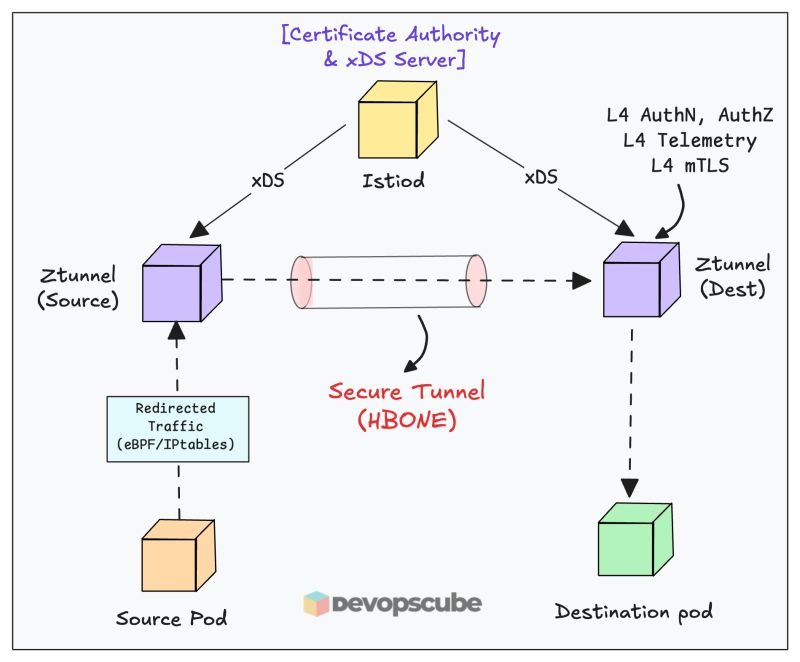
Ztunnel (The Istio component that changes everything) In Istio Ambient mode, ztunnel (zero trust tunnel) is the component that eliminates sidecars entirely. It is a Rust-based proxy running as a DaemonSet, one proxy per node. Here is how it works. - When traffic enters a node, ztunnel intercepts it using iptables by default ( You can also enable eBPF-based redirection) - Once intercepted it handles Layer 3 and 4 traffic - It then uses the HBONE protocol to create secure tunnels between services, ensuring zero trust communication. - Throughout this process, it collects Layer 4 telemetry including TCP metrics and access logs. - It also enforces Layer 3 and 4 authorization policies covering identity, IP addresses, and ports. - Behind the scenes, ztunnel communicates with the Istio daemon using xDS APIs to receive configuration updates dynamically. Two critical concepts enable this flow are, - xDS (for dynamic configuration) - HBONE (for secure tunneling) I have published detailed guides explaining both (check comment for references). -- Get weekly DevOps and MLOps deep dives delivered to your inbox. 👉 𝗝𝗼𝗶𝗻 𝗛𝗲𝗿𝗲 (𝗜𝘁𝘀 𝗳𝗿𝗲𝗲): newsletter.devopscube.com #devops #practicaldevops
DevopsCube tweet media
English
0
9
39
1.5K