Dan Martin

31 posts

Dan Martin banner
Dan Martin

Dan Martin

@danmartindev

one trick pony per craft

Buenos Aires, Argentina Sumali Ekim 2022
39 Sinusundan3 Mga Tagasunod
Dan Martin nag-retweet
Nandkishor
Nandkishor@devops_nk·
Everyone who wants to learn: - AWS - Linux - Docker - Terraform - Kubernetes - Automation - Cloud Computing - build a career in Tech - Projects & Real-World Skills I hope you found my Account
English
67
216
5.3K
215.2K
Dan Martin nag-retweet
yourclouddude
yourclouddude@yourclouddude·
10 AWS Projects That Make Your Resume Stand Out • Static Website – S3 + CloudFront • Serverless API – Lambda + API Gateway • Portfolio Backend – EC2 + RDS • Image Resizer – S3 + Lambda • Monitoring System – CloudWatch + SNS • Authentication Setup – Cognito + IAM • Data Pipeline – S3 + Glue + Athena • Auto Scaling App – EC2 + ASG • Secure VPC Network – public & private subnets • Domain Setup – Route 53 + SSL Forget labs and screenshots. Build these 10 → show real cloud skills
English
29
105
600
3.5M
Dan Martin nag-retweet
spidey
spidey@lochan_twt·
stop grinding 'FULLSTACK DEVELOPMENT" in big 26 : learn "PRODUCT DEVELOPMENT" instead > learn basic frontends that can be usable > learn building scalable backends > learn how to use and integrate ai > learn how to market your product online > learn how to get customers > learn how to make them come back > learn how to monetize ai's changing everything 🚢🚢🚢
English
44
44
739
35.1K
Lasse
Lasse@lassejv·
Rewrote my project from @nextjs to @tan_stack start Why: - Better performance - Better type-safety - Because I love Vite - No vercel vendor lock-in - 100% compatible with Bun Migration took about an hour
English
100
39
1.4K
99.5K
Dan Martin nag-retweet
TANSTACK
TANSTACK@tan_stack·
📣 TanStack AI Alpha is here! ✨ Framework agnostic 🤖 Provider agnostic 🧠 Type safe 🔧 Isomorphic tools 🛠 Devtools 🌐 Open protocol 📦 JS, Python, PHP ⚛️ React, Solid, Vanilla 🌀 OpenAI, Anthropic, Gemini, Ollama, ++ Official blog post: 🔗⬇︎🧵
English
133
274
2.6K
669.5K
Priyanka Lakhara
Priyanka Lakhara@codewithpri·
Following back everyone who replies to this post until I hit 3.5k 🫡
Priyanka Lakhara tweet media
English
166
1
173
15K
Dan Martin
Dan Martin@danmartindev·
@tannerlinsley great product Tanner! would mean the world if i get a follow from the react query og
English
0
0
1
33
Mateusz
Mateusz@rogson_dev·
It depends what do you mean by simpler? It has everything you need for basic application built-in. ORM, middlewares for checking user session, simple mechanisms for doing almost everything you need. Also Django Admin is powerful management UI. With HTMX you can have spa-like experience. Want to check how it works? Check my app prompts-keeper.com - its build with Django and htmx.
English
2
0
2
295
trish
trish@TrisH0x2A·
what’s everyone using for backend these days? node? go? spring boot? rust?
English
609
18
1K
228.9K
Dan Martin
Dan Martin@danmartindev·
@rogson_dev @hagen00 @_trish_xD Is django really that simpler compared to nest js for example? I could ask AI but given your experience i would love to hear your opinion
English
1
0
1
250
Mateusz
Mateusz@rogson_dev·
@hagen00 @_trish_xD I don't think any of JS devs will change to Python or other languages. They are too busy managing node_modules :D
English
1
0
10
1.5K
Dan Martin nag-retweet
Dhanian 🗯️
Dhanian 🗯️@e_opore·
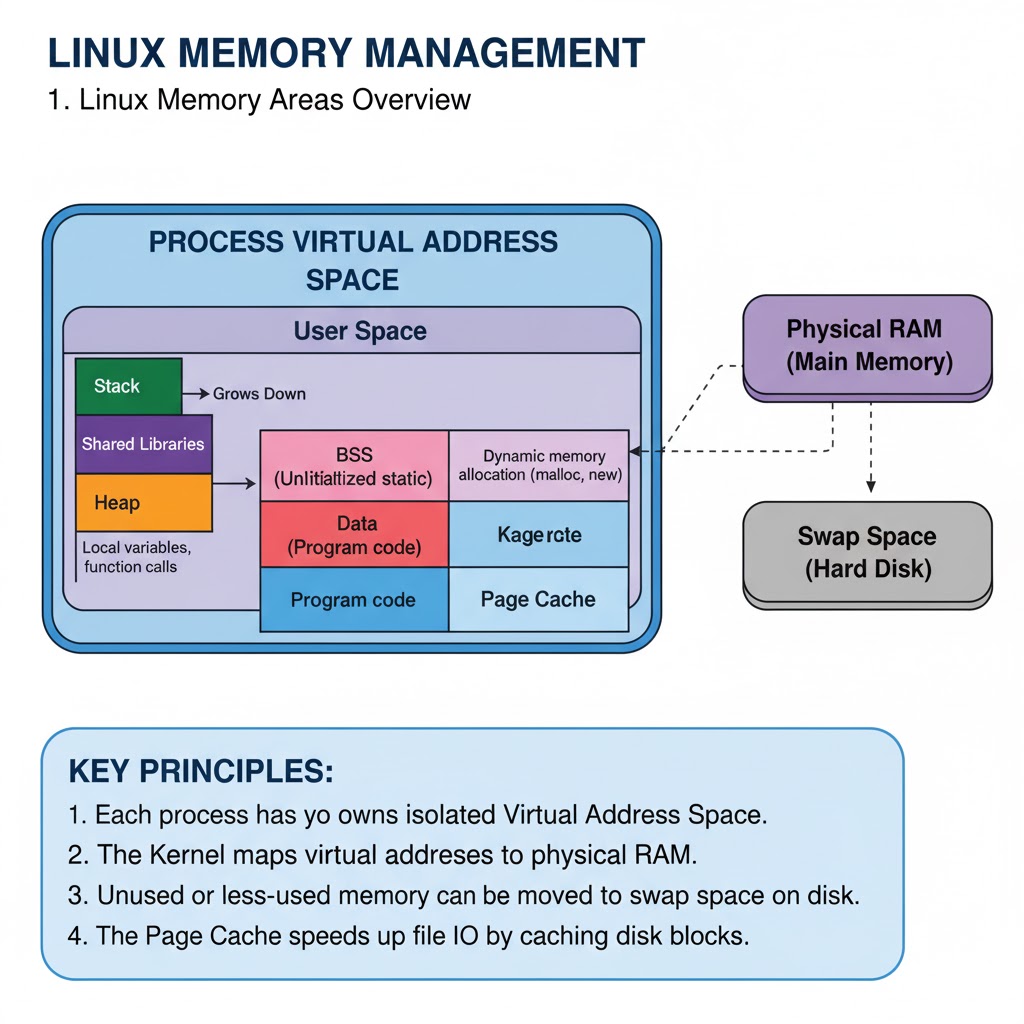
Linux Memory Management 1. Introduction. → Linux Memory Management controls how the operating system uses RAM, swap space, and virtual memory. → The kernel ensures every process gets the memory it needs while maintaining system stability and performance. → Linux uses a virtual memory system that gives each process its own isolated address space. 2. Virtual Memory → Virtual memory allows processes to act as if they have access to large continuous memory even if physical RAM is smaller. → Linux maps virtual memory to physical memory using page tables. → Ensures:  → Isolation between processes  → Efficient use of RAM  → Support for large applications 3. Paging → Memory is divided into small fixed-size blocks called pages (usually 4 KB). → The kernel loads pages of a program into RAM when needed. → If RAM is full, unused pages are moved to swap space. → Paging improves multitasking efficiency. 4. The Role of the MMU (Memory Management Unit) → The MMU is hardware that translates virtual addresses → physical addresses. → Stores translations in a cache called the TLB (Translation Lookaside Buffer). → Faster memory access depends on efficient MMU and TLB usage. 5. Physical Memory Allocation → Linux uses two main allocators:  → Buddy System – allocates large contiguous blocks of memory.  → Slab Allocator – allocates memory for kernel objects (inodes, file descriptors). → Ensures minimal fragmentation and faster memory allocation. 6. Swap Space → Swap is disk space used as an overflow area when physical RAM is full. → Pages that are inactive are moved to swap. → Helps keep the system running smoothly but is much slower than RAM. → Commands:  → swapon -s — view swap  → free -h — check swap usage 7. Memory Zones → Linux divides physical memory into zones based on hardware constraints:  → ZONE_DMA — memory used for direct memory access.  → ZONE_NORMAL — regular memory accessible by the kernel.  → ZONE_HIGHMEM — high memory not directly mapped by the kernel (32-bit systems). → Helps the kernel allocate memory depending on the system architecture. 8. Caching and Buffers → Linux uses free memory for caching to speed up performance. → Types:  → Page Cache — stores recently accessed files.  → Buffer Cache — stores metadata for faster disk access. → Cached data is released automatically when programs need more memory. 9. OOM Killer (Out-of-Memory Killer) → When memory and swap are fully used, Linux invokes the OOM Killer. → Selects and terminates memory-heavy processes to free RAM. → Prevents the system from freezing. 10. Memory Monitoring Tools → Common commands for checking memory usage:  → free -h — overview of RAM and swap  → top — real-time usage by processes  → htop — interactive memory monitor  → vmstat — virtual memory stats  → cat /proc/meminfo — detailed memory info 11. /proc Memory Interfaces → Linux exposes memory information using the proc filesystem:  → /proc/meminfo — memory overview  → /proc//maps — process memory layout  → /proc//smaps — detailed usage per memory segment → Useful for debugging memory leaks and analyzing process allocation. 12. NUMA (Non-Uniform Memory Access) → On multi-CPU servers, memory access time varies by CPU. → Linux supports NUMA-aware memory allocation to optimize performance. → Ensures processes use memory closest to the CPU running them. 13. Quick tip → Linux Memory Management is robust and efficient. → Uses virtual memory, paging, and caching to optimize system performance. → Ensures fairness, isolation, and stability across all running processes. → Understanding memory tools helps in tuning and troubleshooting the system. ✅ Learn More About Linux in This Ebook: codewithdhanian.gumroad.com/l/dynwdc
Dhanian 🗯️ tweet mediaDhanian 🗯️ tweet mediaDhanian 🗯️ tweet mediaDhanian 🗯️ tweet media
English
29
108
797
36.6K
kanav
kanav@kanavtwt·
@RealArsenije It feels very opinionated. And there’s no differentiation between backend and frontend. Also, plugging in my custom backend into it is kind of complex.
English
8
0
3
5.1K
Satur
Satur@mateamarrgo·
@Conanbatt Gabi, podés prestar atención 1 min? Escribiste "Vengo con posiciones de 150k hace años y encontre solo 2." Uno q cobre +200k no va a cambiar a otro puesto FE por menos de, ponele 270k? Si hubiera 1 en argentina buscando me sorprenderia.
Español
3
0
14
920
Gabriel ~ Silver.dev
Gabriel ~ Silver.dev@Conanbatt·
Muy dificil encontrar frontends S-Tier en argentina. Vengo con posiciones de 150k hace años y encontre solo 2. Y se me escurrieron los dos.
Español
24
3
163
34K
Dan Martin nag-retweet
Miguel Ángel Durán
Miguel Ángel Durán@midudev·
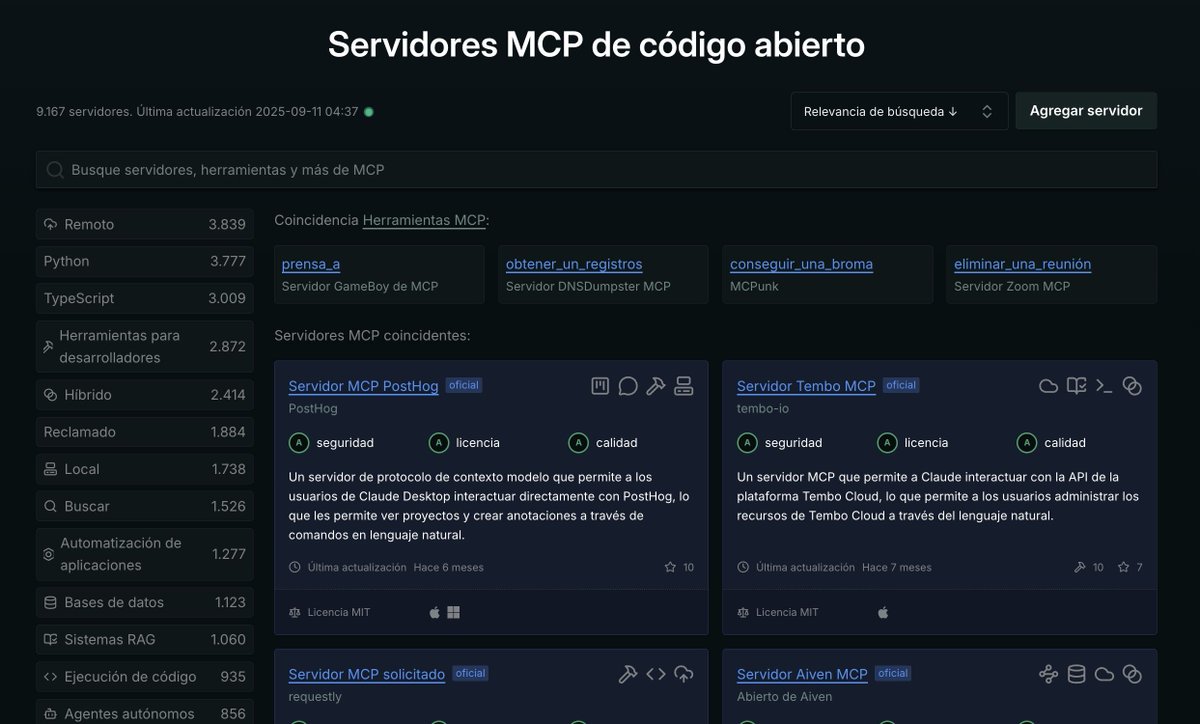
¡Brutal colección de servidores MCP open source! Son más de 9000 separados por categorías. Bases de datos, scrapping, agentes y más: github.com/punkpeye/aweso…
Miguel Ángel Durán tweet media
Español
6
161
1K
46.9K
Pranav
Pranav@pranav__lol·
I’ve hit 20 followers HI EVERYONE!!
English
2
0
2
87
Pranav
Pranav@pranav__lol·
@onur_developer Well now it's - The code works - Ask Claude Code/Cursor to add a new feature - The feature doesn't work - Fix the bugs - Breaks other parts of the codebase - Asks claude code to revert back - Claude code deletes extra code - Gone to shit
English
4
1
10
548
Dan Martin
Dan Martin@danmartindev·
Hey @X algorithm, I'm looking to #connect with the people who are interested in: ✅DSA 💻Leetcode | CP 🎨Frontend | UI Design 💼 Backend 🧑‍💻DevOps 📊Data Science 💸Freelancing 🫂Networking 🏆 Product 🔨 Startup #buildinpublic #letsconnect #people
English
2
0
0
110
Dan Martin
Dan Martin@danmartindev·
@nicoproducto recien me entero que es v0, entonces le escribo lenguaje natural y me genera una interfaz en react?
Español
0
0
0
8
Nico
Nico@nicoproducto·
Otras cosas interesantes de v0: Mantiene consistencia de lo que le pedis a medida que avanzas con algo grande Siento que no busca que gastes créditos, como si me pasa con otros. No sé como explicarlo pero algo hay ahí
Español
1
0
1
324
Nico
Nico@nicoproducto·
Lovable y los demás se están quedando atrás En la carrera de agregar valor a este segmento tan popular y con el hype en su pico máximo, no va a ganar el que saque más cosas nuevas sino el que tenga cosas que hagan sentido al caso de uso real del vibecoding, como esto del diseño o la seguridad. Para mi, la carrera viene así: v0 >> Replit >>> Lovable, Bolt, Windsurf >>> las demás
Amjad Masad@amasad

We’re tired of AI “slop” designs. You should be proud of what you build on @Replit—Introducing design systems: - Core customers: customize and re-use themes - Enterprise customers: import Figma design system or npm packages Say no to slop, ship quality

Español
9
4
49
7.5K
Dan Martin
Dan Martin@danmartindev·
@surekhatech I read the entire thing and the boilerplate is really minimal, do you have any guide to self host nextjs?
English
0
0
0
8