
پن کیا گیا ٹویٹ
Kritik
3.1K posts


Kritik
@Tech_Next_Gen
React • Next.js • Full-Stack Engineering - Clean code, real problems, practical solutions
India شامل ہوئے Ağustos 2022
694 فالونگ768 فالوورز


AWS Developer Roadmap
1. Learn Cloud & AWS Fundamentals
→ Understand what cloud computing is
→ Learn IaaS, PaaS, SaaS
→ Study AWS global infrastructure (Regions, AZs, Edge Locations)
→ Learn IAM basics: users, groups, roles, policies
→ Understand shared responsibility model
2. Core AWS Services for Developers
→ Compute
→ EC2 fundamentals
→ Autoscaling & Load Balancers
→ AWS Lambda for serverless applications
→ Storage
→ S3 fundamentals
→ Versioning & lifecycle rules
→ Glacier for archiving
→ Databases
→ DynamoDB
→ RDS
→ Aurora
→ ElastiCache
3. Networking & Security
→ VPC basics (subnets, route tables, NAT, IGW)
→ Security Groups & NACLs
→ API Gateway fundamentals
→ CloudFront for CDN
→ KMS for encryption
4. Application Development on AWS
→ Build serverless apps with Lambda
→ Use API Gateway + DynamoDB patterns
→ Event-driven apps using SNS, SQS, EventBridge
→ Use Step Functions for workflows
→ Implement CI/CD for serverless
5. Developer Tools
→ AWS CLI
→ AWS SDKs
→ AWS CloudShell
→ CloudFormation for IaC
→ CDK for infrastructure using TypeScript or Python
6. Monitoring & Logging
→ CloudWatch metrics & alarms
→ CloudWatch Logs
→ X-Ray for tracing
→ CloudTrail for auditing
7. Deploying & Managing Applications
→ Elastic Beanstalk
→ ECR + ECS (Fargate) for containers
→ EKS basics for Kubernetes on AWS
8. Advanced AWS Concepts
→ Multi-account strategies (AWS Organizations)
→ Cost optimization with Cost Explorer
→ High availability & fault tolerance
→ Disaster recovery (backup, multi-region replication)
→ Using AI/ML services (Comprehend, Rekognition, SageMaker basics)
9. Projects to Build
→ Serverless CRUD app
→ Real-time notifications system
→ Image upload & processing pipeline
→ Containerized microservice on ECS
→ Data ingestion pipeline using Kinesis
10. Mastery Phase
→ Prepare for AWS Developer Associate
→ Learn advanced CDK patterns
→ Design scalable & event-driven architectures
→ Apply best practices using AWS Well-Architected Framework
Get the complete AWS ebook here:
codewithdhanian.gumroad.com/l/cnwwr

English

At 33, I quit my job.
Since then, I've launched over 200 side projects and earned multiple 7 figures 💰EUR online.
❌ No CS degree.
❌ No Bootcamp.
❌ No internship.
❌ No certificates.
✅ Just self-taught programming skills and English.
Remember, nothing is impossible! Good luck to everybody!
English

TUF's new version to go live between 7th-9th Dec, 2025. You will love the experience.
English
@kirat_tw @viditchess Excited to see how a chess grandmaster's logic applies to programming logic.
English

Learning to code tomorrow with @viditchess at 07:00 PM IST.
youtube.com/live/iOx9GOt4D…

YouTube

English
@csaba_kissi Exactly. Comfort and productivity beat perceived best every time.
English
Coders arguing about the best stack.
React is better than Vue. Svelte is better than React. Python is better than NodeJs.
The best stack is the one that you are most comfortable with.
English
Linux User and Group Management
1. Introduction
→ Linux is a multi-user operating system, meaning multiple users can work on the same system with different permissions.
→ User and group management ensures security, access control, and proper organization of system resources.
2. User Types
→ Root User
→ The superuser with unrestricted access.
→ Username: root
→ Can perform system-wide operations.
→ Regular Users
→ Normal accounts with limited privileges.
→ Used for everyday tasks and applications.
→ System Users
→ Created by services (e.g., mysql, www-data).
→ Not meant for login.
→ Used for running background processes.
3. User Identification Files
→ Linux stores user information in:
→ /etc/passwd — basic user info (username, UID, GID, home directory, shell).
→ /etc/shadow — encrypted passwords and password policy.
→ /etc/group — group information.
4. Creating and Managing Users
→ Create a User
→ sudo adduser username
→ Creates home directory and prompts for password.
→ Add User Without Prompts
→ sudo useradd username
→ Use passwd to set password.
→ Delete a User
→ sudo deluser username
→ Remove with home directory:
→ sudo deluser --remove-home username
5. User IDs (UIDs)
→ Each user has a unique UID.
→ UID ranges:
→ 0 → root
→ 1–999 → system users
→ 1000+ → regular users
→ Check UID:
→ id username
6. Group Management
→ Groups define permissions for sets of users.
→ A user can belong to multiple groups.
→ Create a Group
→ sudo groupadd groupname
→ Add User to Group
→ sudo usermod -aG groupname username
→ Remove User from Group
→ sudo gpasswd -d username groupname
→ Delete a Group
→ sudo groupdel groupname
7. Primary vs Secondary Groups
→ Primary Group
→ Assigned when user is created.
→ Controls default ownership of files.
→ Secondary Groups
→ Additional groups for extra permissions.
→ Example: sudo group for admin privileges.
8. File Permissions and Ownership
→ Every file has:
→ Owner (user)
→ Group
→ Permission bits (read, write, execute)
→ Commands:
→ chown user:group file — change ownership
→ chmod 755 file — modify permissions
→ ls -l — view permissions
9. Password and Authentication Management
→ Change Password
→ passwd username
→ Password Policies stored in:
→ /etc/login.defs
→ /etc/shadow
→ Define:
→ Expiry
→ Minimum/maximum age
→ Complexity rules
10. Sudo Privileges
→ Grant admin rights using the sudo group.
→ Add user to sudoers:
→ sudo usermod -aG sudo username
→ Configure sudo rules:
→ visudo (edits /etc/sudoers safely)
11. Checking User and Group Info
→ id username — show UID, GID, groups
→ groups username — list groups
→ getent passwd — list users
→ getent group — list groups
12. Security Best Practices
→ Create separate users for different tasks.
→ Avoid using root for normal operations.
→ Strong password enforcement.
→ Regularly audit /etc/passwd, /etc/shadow, /etc/sudoers.
→ Remove inactive users.
13. Tip
→ Linux user and group management controls access, security, and permissions.
→ Commands like useradd, groupadd, chmod, and chown make managing users straightforward.
→ Proper organization ensures a stable and secure environment.
✅ Learn More About Linux System Administration in This Ebook:
codewithdhanian.gumroad.com/l/dynwdc


English
@striver_79 It's inspiring to see you embracing new responsibilities and enjoying the process. Best wishes for continued success.
English
Last 3 months
- Back to writing code
- Daily discussions on UX
- Minor details on every click
- Thinking around marketing campaigns
- Managing an International trip
- Upcoming feature planning
Just not an Engineer anymore. Enjoying this phase of my life again. New challenges everyday. 🤞
takeUforward@takeUforward_
Shipping faster than we can count commits.
English
@Hiteshdotcom @Site24x7 Yes, time to show everyone the real cost of an outage.
English




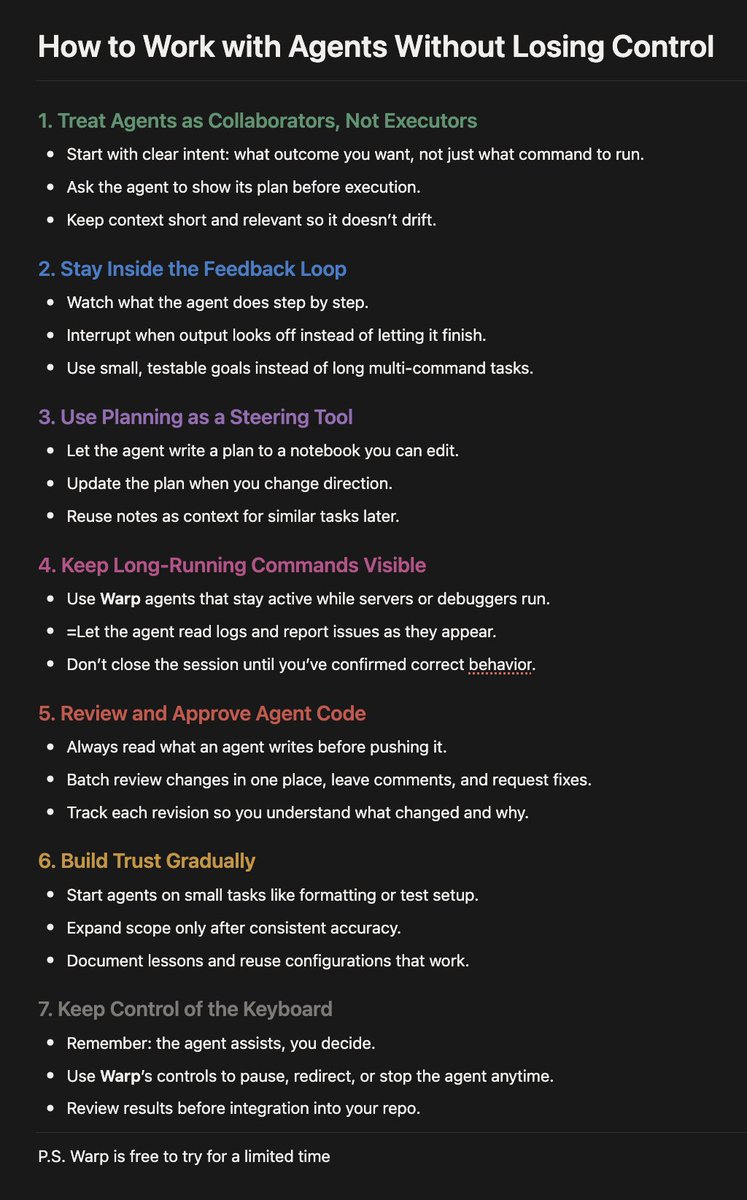
Most people use AI agents like tools.
The best use them like teammates.
One group gets automation.
The other gets intelligence.
Save this one.
English

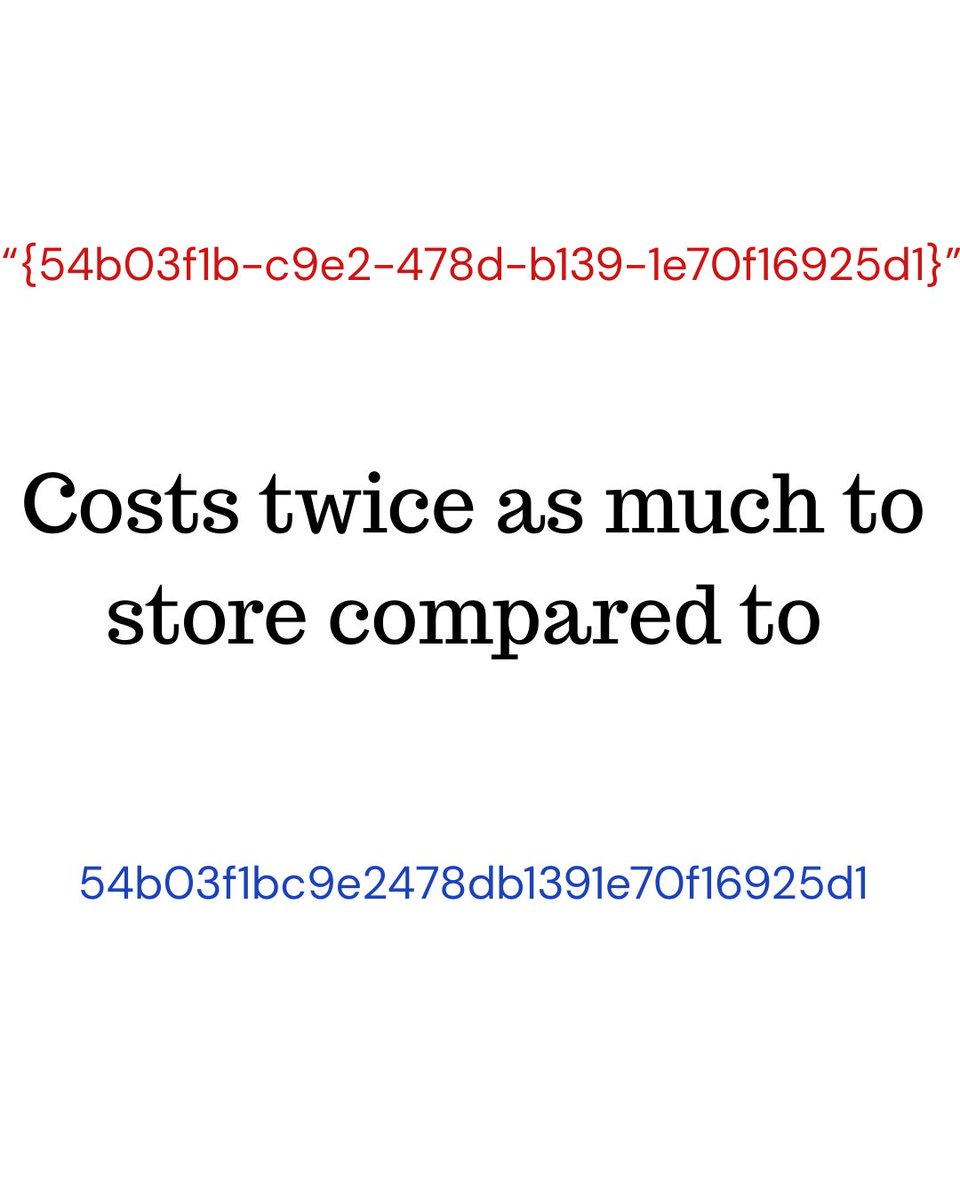
UUIDs are 128 bit (16 bytes), you can choose to store it natively as UUID costing 16 bytes per entry. You can also store them as ascii text costing 38 bytes per entry.
You may say why do I care about storage in 2025? I'd like to switch your attention from storage and space to IO and performance.
If you index the UUID field it makes a big difference if your key is 16 or 38 bytes. Every page in the index has fixed size, we subtract the constant page header size and the header per index entry. This leaves us with precious and scarce space per page to store our keys and values.
If you have 38 bytes keys you will be storing less keys per page compared to if you have a 16 bytes keys. A single page IO (physical or logical) will give you ~double the number of UUIDs in 16 bytes compared to 38 bytes, resulting in less IOs in general, translating to more performance.
This isn’t so bad if you're doing point queries, but it matters for range and full scan queries more, especially with UUIDv7 where range queries are more relevant.
English
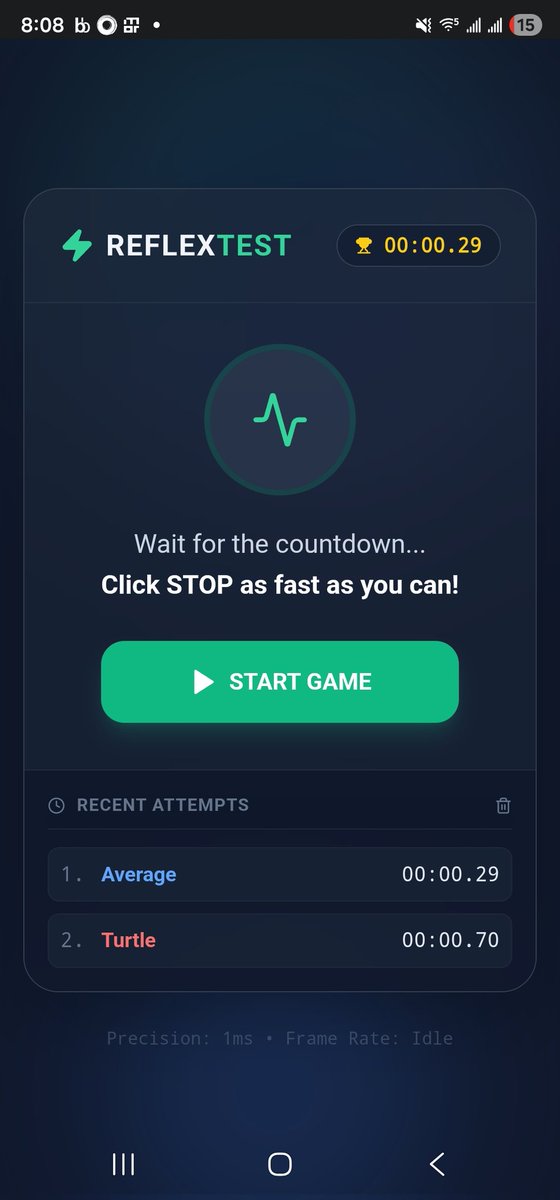
@_jaydeepkarale @GeminiApp 0.29s is pretty fast. Great job creating this.
English

Are you faster than your friends ?
Find out by playing this fun reflextest I created using @GeminiApp
g.co/gemini/share/d…
English
@arpit_bhayani I'm the designated guy to unplug the AI if it becomes sentient.
English

AI is coding
AI is reviewing
AI is optimizing
AI is writing tests
AI is suggesting best practices
AI is chewing through docs and PRs to produce a crisp review
Now it just needs to judge the work and give you the rating :)
So, remind me again... what exactly are you doing?
English
@swapnakpanda Thanks for the heads up. I'm totally gonna check this out for my own stuff.
English

Over the last 2 weeks I have been testing out a few AI tools for upgrading my homegrown "nicecanvas" project.
But this one tool caught my attentions - Trae.
This IDE with its TRAE SOLO feature took AI coding to a very different level.
Let me show you how efficient it was:
English
How Java's Garbage Collector Reclaims Memory
Java uses an automatic memory management system called the Garbage Collector (GC) to free memory occupied by objects that are no longer needed. This helps prevent memory leaks and keeps applications running efficiently.
At runtime:
→ The JVM continuously tracks object references to determine which objects are still reachable from active threads and running code.
→ Objects that can no longer be reached are marked as eligible for garbage collection.
→ The GC uses algorithms like Mark-and-Sweep, Copying, and Generational Collection to identify unused objects and reclaim their memory.
→ The Young Generation is collected frequently using fast, efficient minor GC cycles.
→ Objects that survive multiple cycles are moved to the Old Generation, where major GC cycles handle long-lived objects.
→ The GC compacts memory after cleanup to reduce fragmentation and improve allocation performance.
→ The entire process runs automatically, allowing Java developers to focus on writing code without manually freeing memory.
The result: Java ensures stable, efficient memory usage by automatically detecting unused objects and reclaiming their space through optimized garbage collection cycles.
Want to go deeper? Check out this ebook:
Mastering Java: From Fundamentals to Advanced Concepts
codewithdhanian.gumroad.com/l/vqwdte



English
@codewithhajra Great list. I'd also highly recommend The Odin Project and MDN Web Docs.
English
5 cool sites for web developers
gridjs.io – TypeScript table component
sevalla.com - Next gen full-stack hosting (JavaScript, PHP, Python...)
svgwave.in – Gradient SVG wave generator
tiny-helpers.dev – Tiny useful dev tools
hoppscotch.io – Open-source API testing client
English


I built a GitHub repository to help you learn system design:
"System Design Academy"
It gives you...
• System design fundamentals
• System design interview questions
• Deep dives into real-world architecture
• Simplified engineering case studies with visuals
English