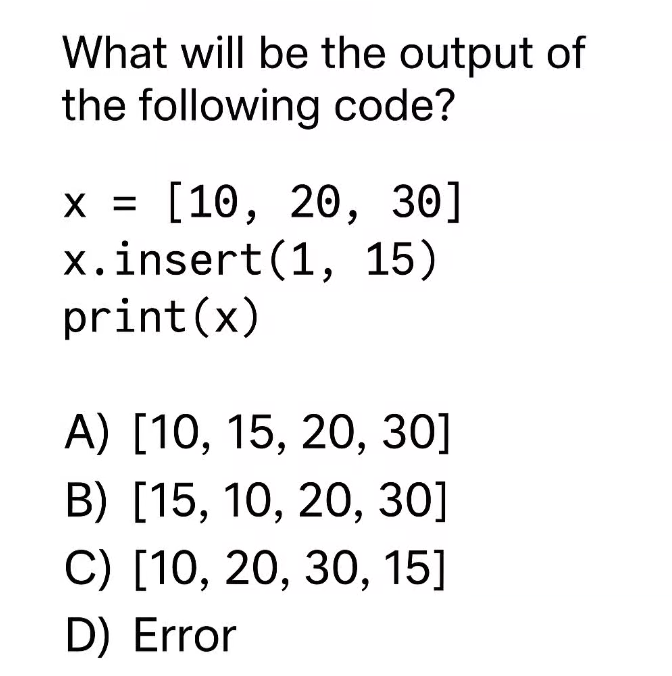
@PythonPr Answer: A) [10, 15, 20, 30]
The code defines a list x with elements [10, 20, 30]. The x.insert(1, 15) method call inserts the value 15 at index 1 in the list, shifting subsequent elements to the right. The list is modified in-place.
Initially, x is [10, 20, 30].
@PythonPr Insert() method is used to insert an element in a list at a specified position. append() methods add an element at the end of the list.
Resulting output: [10, 15, 20, 30]
@PythonPr Answer: A [10, 15, 20, 30]
insert(index, value) adds at that position!
› Original: [10, 20, 30]
› insert(1, 15) puts 15 at index 1
› Shifts everything right
› Result: [10, 15, 20, 30]
For beginners: insert() MODIFIES the list (doesn't return new one). x changes.
@PythonPr A) [10,15,20,30] why?: list.insert(index, value) insert the value at given index and shifts the existing element right. index starts : 0,1,2... place 15 at postion at 1 so answer will be: [10,15,20,20]
@PythonPr Answer: A) [10, 15, 20, 30]
list.insert(index, value) places the value before the given index.
Index 1 points to 20, so 15 goes between 10 and 20.
Result becomes:
[10, 15, 20, 30]
No new list is created. insert mutates the original list in place.
@PythonPr A)
insert(index, value) function
in Python is a built-in list method that adds a single element to the list at the specified index position.
- Modifies original list in-place
- Does not return any value
- Shifts elements to insert the value at a particular index
@PythonPr A) [10,15,20,30]
Is right ✅️
X.INSERT(1,15) list is mutable so qr can add the elements in existing list.
And insert statement (index,element)
@PythonPr A) [10, 15, 20, 30]
insert(1, 15) = put 15 at index 1
It doesn't replace - it shifts everything right.
The trick: insert() adds, it doesn't overwrite.
@PythonPr I'm not an IT guy, but I knew that the built-in function insert took two input the Index and the value, So the list start from index 0, Do it's B.
Am I right?