
Post

Code Monkey
Code Monkey@UnityCodeMonkey·
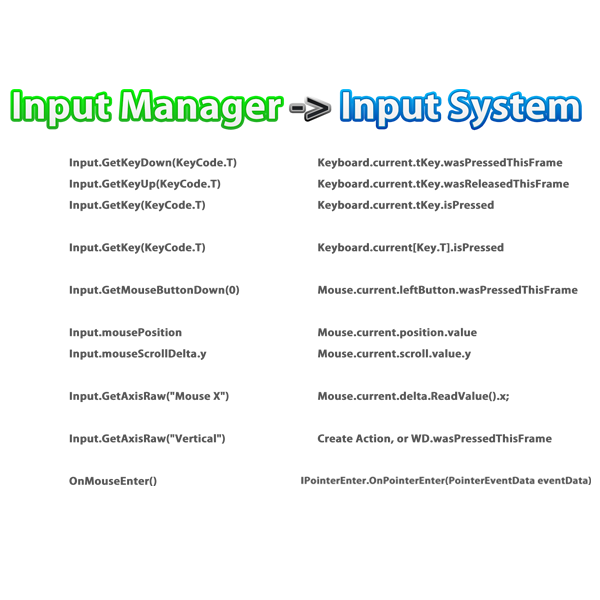
If you're updating to Unity 6.3 LTS, you'll see a big warning: Input Manager is being deprecated. The classic input API is finally on its way out. But don't panic! The Input System package is now way more approachable than when it was first launched. Common operations like key, mouse click, and scroll detection map directly to the new API, check out my cheat sheet to see how easy it is to convert your code to stay up to date.
Code Monkey tweet media
English
15
31
211
11K
Waldemar
Waldemar@DoubleU1986·
@UnityCodeMonkey What if I still use the old system, why should I change it, e.g. if I ship something on android, will there be problems
English
1
0
1
313
Johann Ungerer
Johann Ungerer@Kaegun·
@UnityCodeMonkey I’ve said this before, but this is not the way. It’s not that hard to set up done input maps and a few helpers that’ll stand you in good stead for any future project. Use it as intended and make your porting and multiple device support journey a breeze.
English
0
0
1
275
TheRedPixel
TheRedPixel@theredpix·
@UnityCodeMonkey The older input systems is generally better for programmers and it also performs better / has lower input lag. It shouldn't be removed
English
0
0
1
183
Record Studio Tycoon
Record Studio Tycoon@Record_Tycoon·
@UnityCodeMonkey Been using the "new" input system for so long it feels silly to call it the new system. Took some time to learn, but genuinely really like it now
English
0
0
0
141
Sui
Sui@sui_machine·
I must have lost count seeing how many games had just setup WASD controls and never offered a player an option to rebind and completely ignored the fact not everyone uses the same keyboard layout as they do! Input system for the most part is layout agnostic - you setup it for QWERTY, but that W will automatically end up being Z on AZERTY - you no longer have to think about it. It's great! Not to mention InputActions are such a game changer once you set them up. I took an axe in 2023 and moved everything to Input System, removing Input Manager completely from the project. I knew that it had to be done if SimRail was to ever support gamepads and be flexible enough with adding new keybindings without running into a ton of new issues. Beginning was rough, but now after entire foundation for displaying key rebindings is done and we have that combined with input processors that allow for modifier keys (that are a huge help with a train simulator that often requires key combinations) - it's so nice to work with if you are working on a PC game. I see this is now a huge problem for companies that haven't moved, but on the flip side - for a PC gamers this is just so long overdue.
English
0
0
0
209
Jonathan | Dev
Jonathan | Dev@JonDevX·
@UnityCodeMonkey Bad decision, I think the old input is super fantastic for debugging, + Many games still use it. R.E.P.O, Memesis, youtubers life, and more recent games I played still use it.
English
0
0
0
42
Paylaş