Dylan Meville

10.2K posts

Dylan Meville banner
Dylan Meville

Dylan Meville

@DMeville

Code/Art Wizard @ Everglow Interactive | I made @PartyPanicGame | Looking for 3D generalist to work with, DM me if you wanna work together (see pinned tweet!)

Canada انضم Temmuz 2009
798 يتبع8.4K المتابعون
Dylan Meville
Dylan Meville@DMeville·
@cranberryclock Praying that I don't open unreal tomorrow and everything is flickering again, seems to be how it goes lol
English
1
0
0
13
Dylan Meville
Dylan Meville@DMeville·
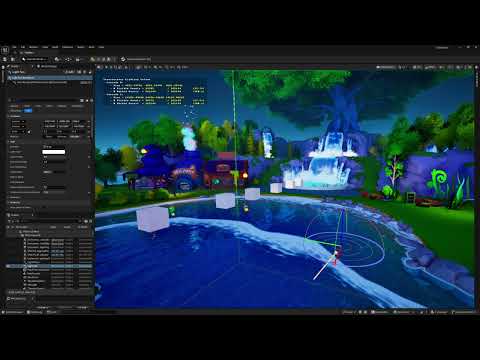
Something related to the Translucent Lighting Volume? Seems like when any translucent particle is outside the second TLV cascade the resolution of the lighting volume drops and is sampling imperfect shadow? (or VSM issues?)
Dylan Meville@DMeville

Does anyone know why my particles are flickering? I thought it was related to lumen, but it happens with lumen disabled. Only happens on the translucent particles (not the masked/dithered ones). Material is Volumetric Directional. I'm at my wits end!

English
2
0
3
1K
Dylan Meville
Dylan Meville@DMeville·
@cranberryclock Ya I just found this setting and it seems to help, there's a tiny bit of weirdness at the transition between cascade 0 and 1, but flickering stops now at least. Really weird that cascade 1 just has so many issues :\ but it's something. Thanks for helping my sanity with this today
English
1
0
1
21
CranberryClock
CranberryClock@cranberryclock·
@DMeville Disable TLV contribution from local lights , they share the same lighting cache. On point/rect lights try disable Affect Translucent Lighting (I think is the option, not at desk) Maybe this might help?
English
2
0
0
21
Dylan Meville
Dylan Meville@DMeville·
@cranberryclock I don't think it's actually the directional light. If I disable all other lights (all the point lights and rect lights) but keep the dir light enabled the flickering stops, and also the "outside all TLV cascades" particles are now properly lit too (and not super bright white)...
English
1
0
0
29
CranberryClock
CranberryClock@cranberryclock·
objects are stable inside the TLV inner region, and once the camera moves them into the outer/transition region the directional translucent lighting starts flickering on all of them together. So def not Niagara or random material behavior it looks like VolumetricDirectional sampling becoming unstable in the outer TLV band (per YouTube and voice). I’d treat it as a TLV coverage/resolution issue first: larger inner distance, then raise Dim, and if needed use a material/LOD fallback for mist once it leaves the stable inner zone. From there expand the outer chunk zone until satisfied and performance doesn’t tank. What you’re seeing is somewhere there the dir light has too much fall off for the translucency calc and the transparency to properly dingle the light. There’s a ton of other methods to achieve this but your right about it looking different if not done the way your attempting.
English
2
0
1
35
Dylan Meville
Dylan Meville@DMeville·
@jdcollado I don't think it's actually related to sorting or anything. If I take an empty Translucent Volumetric Directional material and stick it on a cube, the cube flickers too! youtube.com/watch?v=tbRSkN…
YouTube video
YouTube
English
0
0
0
13
Juan Collado 🇩🇴
Juan Collado 🇩🇴@jdcollado·
@DMeville What's your sorting set to in the emitters? I feel like I've dealt with this problem before and can't remember which version of the problem we're seeing.
English
1
0
0
27
Dylan Meville
Dylan Meville@DMeville·
Does anyone know why my particles are flickering? I thought it was related to lumen, but it happens with lumen disabled. Only happens on the translucent particles (not the masked/dithered ones). Material is Volumetric Directional. I'm at my wits end!
English
4
1
9
2.5K
CranberryClock
CranberryClock@cranberryclock·
Something like this should help keeping the tlv base so the particle of mist thingy still feels integrated but then adding your own stable directional-light accent in the material instead of relying fully on VolumetricDirectional to provide it. you can compute a soft light facing mask from a particle normal and the sun direction and boost color etc Maybe you can then keep TLV lighting, while your shader provides the sun-facing punch without depending on the unstable directional injection path you’re getting. God I hope I’m explaining this right lmao.🤣
English
1
0
0
14
Dylan Meville
Dylan Meville@DMeville·
@cranberryclock Only using the DirLight like that loses all additional lighting info that way though, ambient/lumen that grounds the effect nicely :\
English
0
0
0
22
CranberryClock
CranberryClock@cranberryclock·
I’m going to try throwing my deepest cranberry hack I can. bypass directional contribution lol. In the material Reduce reliance on VolumetricDirectional and Blend in your own directional terms maybe with: FakeDirectional = saturate(dot(Normal, LightDir)) FinalColor = TLV_Lighting * 0.5 + FakeDirectional * 0.5 Then you kind of just bypass it?
English
2
0
0
20
Dylan Meville
Dylan Meville@DMeville·
@jdcollado Both already set! And I was wrong, NonDirectional also flickers! :(
English
1
0
1
24
Dylan Meville
Dylan Meville@DMeville·
@cranberryclock 5) Fake lighting looks dumb, especially with a lot of tricks I'm using to boost color from env lighting to get a nicer looking misty particle. Changing to a non-directional lighting mode might be what has to happen though, makes the particles look flat and less cool though 🥲
English
1
0
1
29
Dylan Meville
Dylan Meville@DMeville·
@cranberryclock Thanks 1) Disabling dir light does make things stop flickering. Interesting. 2) Static vs Stationary both flicker, 3) Dir light intensity set to 0.01 still flickers at the same intensity, 4) Does nothing
English
1
0
0
22
Dylan Meville
Dylan Meville@DMeville·
@KanpekiSaru Good questions. If I make a simple material with no nodes, set the blend mode to TranslucentColoredTransmittance, and set the Lighting mode to "Volumetric Directional" and put it on a cube, yes, that flickers too! 🥹
English
1
0
0
16
Dylan Meville
Dylan Meville@DMeville·
@jdcollado I do notice that changing the material lighting mode to "Volumetric NONDirectional" It think the flickering stops. But particles look totally flat and less cool
English
1
0
0
26
Dylan Meville
Dylan Meville@DMeville·
@jdcollado Translucent matso _technically_ forward rendering I think? (Volumentric Directional lighting). Everything else is using the deferred standard deferred path. Yes two dir lights, but disabling one of them problem still persists. 🥲
English
1
0
0
26
Dylan Meville
Dylan Meville@DMeville·
@cranberryclock I've tried all these cvars, and can't make sense of them doing anything. Increasing the cascade sizes don't seem to improve or worsen the flickering, disabling TLV makes the particles permanently dark (so must be related). Will try and put together a screen recording
English
1
0
0
19
Dylan Meville
Dylan Meville@DMeville·
@cranberryclock Ya, still having troubles figuring out _exactly_ what causes this. Seems like it will be working fine for a while and then start flicking like crazy. There's no specific location I can put the camera to make it happen, or specifically move between cascades to trigger it
English
1
0
0
19
Dylan Meville
Dylan Meville@DMeville·
Can't get this to repro in a new scene though :/
English
1
0
0
125
Dylan Meville
Dylan Meville@DMeville·
@GameDevMicah Culling would just make the particles disappear entirely when out of bounds right? This looks like the particles are going from lit to shadowed (white, to dark blue). But I'll try it!
English
1
0
1
90
Dylan Meville
Dylan Meville@DMeville·
Just restarted the editor and now can't reproduce it. But it was happening in a build yesterday so it can't just be editor only! wtf
English
0
0
2
195
Dylan Meville
Dylan Meville@DMeville·
Clarification: The particles are TranslucentColoredTransmission with the lighting mode set to VolumetricDirectional. They are NOT a volumetric particle
English
1
0
1
264