Readwise

585.9K posts

Readwise banner
Readwise

Readwise

@readwise

Save your best highlights from Kindle, Twitter, Pocket, Instapaper, iBooks, and 30+ others. Then revisit, search, organize, and export them seamlessly.


انضم Ekim 2017
3.2K يتبع212.7K المتابعون
تغريدة مثبتة
Readwise
Readwise@readwise·
🐥 Want to start saving tweets and threads? ⮕ readwise.io/twitter_start 🖍 Want to save, review, and sync your highlights from books/articles/twitter/anywhere? ⮕ readwise.io 📚 Looking for our new app? ⮕ @ReadwiseReader
English
388
168
874
0
知识分享官
知识分享官@knowledgefxg·
这个开源项目是真屌,一比一复刻任何网站 可以配合Claude Code使用,我是用的cursor,给 Agent 提供目标网站的 URL,它会自动帮你克隆整个网站。它会自动去撸目标网站, 然后把整个网站一块一块地拆解重建。试了试我自己当时用Wordpress做的导航网站,一模一样🤡,数据都完完整整爬了下来。
中文
22
255
1.4K
124.9K
Readwise أُعيد تغريده
Tristan
Tristan@homsiT·
Introducing Wikiwise: an open-source Mac app for managing your own Karpathy-style LLM wiki. Set up a new wiki in a few clicks: all you need is Wikiwise + your agent. It's infinitely customizable, just markdown/html under the hood, and one click to share your wiki publicly. Here's how it works: * Install Wikiwise for mac (it's built in Swift so super minimal and performant). In Karpathy's framework, Wikiwise is your IDE. * Start a new Wiki: it generates a new folder on your machine that's scaffolded in the wiki structure @karpathy describes (index.md, raw folder, wiki folder, CLAUDE.md/AGENTS.md, although it tries to be as un-opinionated as possible). * Then just point your agent (Codex, Claude Code, Cursor, etc) at the folder and tell it what to import -- files on your machine, connect to your @readwise account, or urls from the web. * Your agent creates wthe wiki for you: Your agent will know how to ingest your raw sources (via the AGENTS.md) and will immediately start writing+linking wiki pages for you. * Go crazy on customization! The rendered wiki pages live as static html/css in your folder too so just tell your agent to change stuff, and if you need any more customization Wikiwise is fully open source :) * Ask questions about your research with your agent, ask it to bring in new sources, write new documents, etc. * (optionally) Hit the Publish button to share your wiki with friends/colleagues at a custom URL === I tried to walk the line on a couple constraints with Wikiwise: 1. I wanted it to be easy to spin up new wikis, especially without chaining together a bunch of different apps. It takes me a few minutes to spin up a new wiki on a topic -- I already have five! 2. Infinitely Customizable: one great aspect of building a wiki as Karpathy described is that you can modify any aspect of your wiki with your agent. Every new wiki styling+structure is self-contained in the local folder, which allows you to preserve this. Wikiwise is just an IDE that makes the setup easier and includes a nice un-opinionated starting state. 3. Minimal: Wikiwise is built mostly in Swift, and the DMG you install to download it is only 2.6MB (!) 4. Easy Publishing: my colleague @EleanorKonik has been building her own LLM wikis for months, but has always really struggled to actually share them with her book club. There are tools to do it, but figuring out hosting is always a huge headache. This seemed like an ideal usecase for a tool like Wikiwise to solve. The process of building wikiwise was also pretty interesting -- I "bootstrapped" the app in a way by first building my own wiki based on Karpathy's tweet and other notes I had, and slowly formed the shape of the project in collaboration with my LLM. This was all done in 3 days over the latest Readwise company hackathon we had. Truly an incredible time to be alive. Anyways, curious what you think! Links in next tweet.
Andrej Karpathy@karpathy

LLM Knowledge Bases Something I'm finding very useful recently: using LLMs to build personal knowledge bases for various topics of research interest. In this way, a large fraction of my recent token throughput is going less into manipulating code, and more into manipulating knowledge (stored as markdown and images). The latest LLMs are quite good at it. So: Data ingest: I index source documents (articles, papers, repos, datasets, images, etc.) into a raw/ directory, then I use an LLM to incrementally "compile" a wiki, which is just a collection of .md files in a directory structure. The wiki includes summaries of all the data in raw/, backlinks, and then it categorizes data into concepts, writes articles for them, and links them all. To convert web articles into .md files I like to use the Obsidian Web Clipper extension, and then I also use a hotkey to download all the related images to local so that my LLM can easily reference them. IDE: I use Obsidian as the IDE "frontend" where I can view the raw data, the the compiled wiki, and the derived visualizations. Important to note that the LLM writes and maintains all of the data of the wiki, I rarely touch it directly. I've played with a few Obsidian plugins to render and view data in other ways (e.g. Marp for slides). Q&A: Where things get interesting is that once your wiki is big enough (e.g. mine on some recent research is ~100 articles and ~400K words), you can ask your LLM agent all kinds of complex questions against the wiki, and it will go off, research the answers, etc. I thought I had to reach for fancy RAG, but the LLM has been pretty good about auto-maintaining index files and brief summaries of all the documents and it reads all the important related data fairly easily at this ~small scale. Output: Instead of getting answers in text/terminal, I like to have it render markdown files for me, or slide shows (Marp format), or matplotlib images, all of which I then view again in Obsidian. You can imagine many other visual output formats depending on the query. Often, I end up "filing" the outputs back into the wiki to enhance it for further queries. So my own explorations and queries always "add up" in the knowledge base. Linting: I've run some LLM "health checks" over the wiki to e.g. find inconsistent data, impute missing data (with web searchers), find interesting connections for new article candidates, etc., to incrementally clean up the wiki and enhance its overall data integrity. The LLMs are quite good at suggesting further questions to ask and look into. Extra tools: I find myself developing additional tools to process the data, e.g. I vibe coded a small and naive search engine over the wiki, which I both use directly (in a web ui), but more often I want to hand it off to an LLM via CLI as a tool for larger queries. Further explorations: As the repo grows, the natural desire is to also think about synthetic data generation + finetuning to have your LLM "know" the data in its weights instead of just context windows. TLDR: raw data from a given number of sources is collected, then compiled by an LLM into a .md wiki, then operated on by various CLIs by the LLM to do Q&A and to incrementally enhance the wiki, and all of it viewable in Obsidian. You rarely ever write or edit the wiki manually, it's the domain of the LLM. I think there is room here for an incredible new product instead of a hacky collection of scripts.


English
7
8
77
10.7K
meng shao
meng shao@shao__meng·
Claude Code 源码意外“开源”后,Github 一度出现了几十个复刻和不同语言实现版本,也有人整理成类似 DeepWiki 的文档分享,但把 Claude Code 源码解读写成书的,还是第一次见到: Claude Code from Source claude-code-from-source.com 可以肯定是 100% AI 读源码生成的,不过作者也很费心 (token) 整理出 18 章,想了解 Claude Code 工程架构和其中细节的朋友不妨看看。
中文
3
49
143
12.6K
响马
响马@xicilion·
这是我自己用了很久的语言检测模块,靠 LLM 自己选择回应语言是很不靠谱的,如果加上大量语料上下文就更容易出现幻觉。 我的做法是严格检测用户提问的语种,并且强制要求必须以检测到的语种回复。一直很稳定。 最近添加了一些新语种参数进去。 github.com/querycatai/fib…
中文
4
6
45
6.2K
GitHubDaily
GitHubDaily@GitHub_Daily·
对 AI 和大语言模型感兴趣,想了解它到底是怎么工作的,但一看那些动辄几十亿参数的模型,根本不知道从哪下手。 不妨看看 GuppyLM 这个项目,用不到 900 万参数从零训练一个会说话的「小鱼」,五分钟就能跑通整个流程。 从数据生成、分词器训练、模型搭建到推理对话,每个环节都能亲手操作一遍,把大模型的神秘感彻底拆开。 GitHub:github.com/arman-bd/guppy… 整个模型小到可以直接在浏览器里运行,也能在 Google Colab 上一键训练。 如果你一直好奇大语言模型内部到底怎么运转,这个项目是个很好的起点,门槛低,五分钟出结果,玩着玩着就懂了。
GitHubDaily tweet media
中文
12
114
514
33.4K
nash_su - e/acc
nash_su - e/acc@nash_su·
llm-wiki v0.3.0 版本更新发布啦 🎉 新增检索优化,搜索问答更加准确: - 检索增强:BM25 + 意图分类 + RRF 融合(benchmark 验证)+ 向量搜索(benchmark: 58.2% → 71.4% recall) - LanceDB 向量存储后端 文件夹导入,批量导入更加方便: - 文件夹递归导入 + 保留目录结构 - 文件夹路径作为 LLM 分析上下文 - 持久化摄入队列(串行处理、断点恢复、失败重试) - Activity Panel 队列可视化(进度条、取消、重试) llm-wiki 是一个基于 karpathy 大神分享的知识库管理方法论的落地实现,全平台支持,并且新增了非常多的功能和算法优化,会持续更新,欢迎 Star🌟 项目地址:github.com/nashsu/llm_wiki
中文
20
43
240
17.3K
Pablo Malo
Pablo Malo@pitiklinov·
En relación a este tema del capital erótico hay un artículo clásico de Roy Baumeister y Kathleen Vohs titulado “Sexual Economics: Sex as Female Resource for Social Exchange in Heterosexual Interactions” (2004, publicado en Personality and Social Psychology Review). journals.sagepub.com/doi/10.1207/s1… 0pubmed Es un artículo provocador donde plantean una teoría económica del sexo brutalmente pragmática. Muy resumida: -El sexo se puede analizar como un mercado. -Las mujeres son las vendedoras de sexo. -Los hombres son los compradores. -El sexo es tratado como un recurso femenino que las mujeres poseen y que los hombres desean más intensamente. Por eso, en las relaciones heterosexuales, los hombres suelen ofrecer otros recursos (compromiso, atención, estatus, dinero, protección, amor, etc.) a cambio de acceso sexual.
Antonio Ortiz@antonello

Capital erótico, de Catherine Hakim. tenía interés por leer la fuente directa y completa. Qué enorme el desfase entre lo poco que son consideradas las tesis de la autora desde el discurso feminista y cómo aparecen implícitas en el discurso popular en redes


Español
15
51
367
24.1K
GrisA
GrisA@grisasexual·
Las feministas son analfabetas de sus propias ideas, son incapaces de ganar un debate. pero ¿por que? El feminismo no va de igualdad, trata de destrucción social. ¿Conoces la "teoría critica"? si entiendes eso entenderás por que el feminismo nunca puede ser bueno te explico: +
Español
5
20
115
2.3K
Shann³
Shann³@shannholmberg·
how to build your own content engine Ronin runs 10 social accounts without writing a single post, no content team, just 17 markdown files and one AI agent here's how it works 🧵
Shann³ tweet media
Ronin@DeRonin_

x.com/i/article/2041…

English
17
57
530
88.7K
Mayank Agarwal 💡
Mayank Agarwal 💡@TheAIWorld22·
Skip Netflix tonight. Give yourself just 60 minutes of this instead. A complete Claude AI course that shows you how to create, build, and automate anything from scratch. The ones who dive in today will wake up tomorrow with a skill most people won’t figure out for years. The ones who scroll past will still be in the same spot next year, wondering why nothing changed. Your move.
Mayank Agarwal 💡@TheAIWorld22

x.com/i/article/2043…

English
15
26
88
15.6K
Kirill
Kirill@kirillk_web3·
🚨do you understand what two Anthropic engineers just explained in 16 minutes. Barry and Mahesh built Claude Skills from scratch. here's the part nobody is talking about: > Skills are just folders. > folders that teach Claude your job. > your workflow. your expertise. your domain. Claude on day 30 is a completely different tool than day one. watch this before you write another prompt. before you build another agent. before you touch another tool. 16 minutes. bookmark it. watch it today. and if you want to learn everything about Claude from scratch the full 4 hour guide is waiting below.
Kirill@kirillk_web3

CLAUDE FULL COURSE 4 HOURS This is the most detailed Claude guide I’ve seen online. Bookmark this before you forget. 4 hours. Build tools. Automate work. Learn how people build bots and systems. Claude → Tools → Automation → Products → Money


English
24
465
3.1K
544.4K
Nicolas Cole 🚢👻
Nicolas Cole 🚢👻@Nicolascole77·
My free guide to building a massive online audience: Write: • 300 words per day • Create with your reader Publish: • Practice in public • Double down on what works Expand: • Turn high-performing topics into longer-form pieces • Turn longer-form pieces into Intellectual Capital you can sell
English
13
3
65
2.3K
Ruben Hassid
Ruben Hassid@rubenhassid·
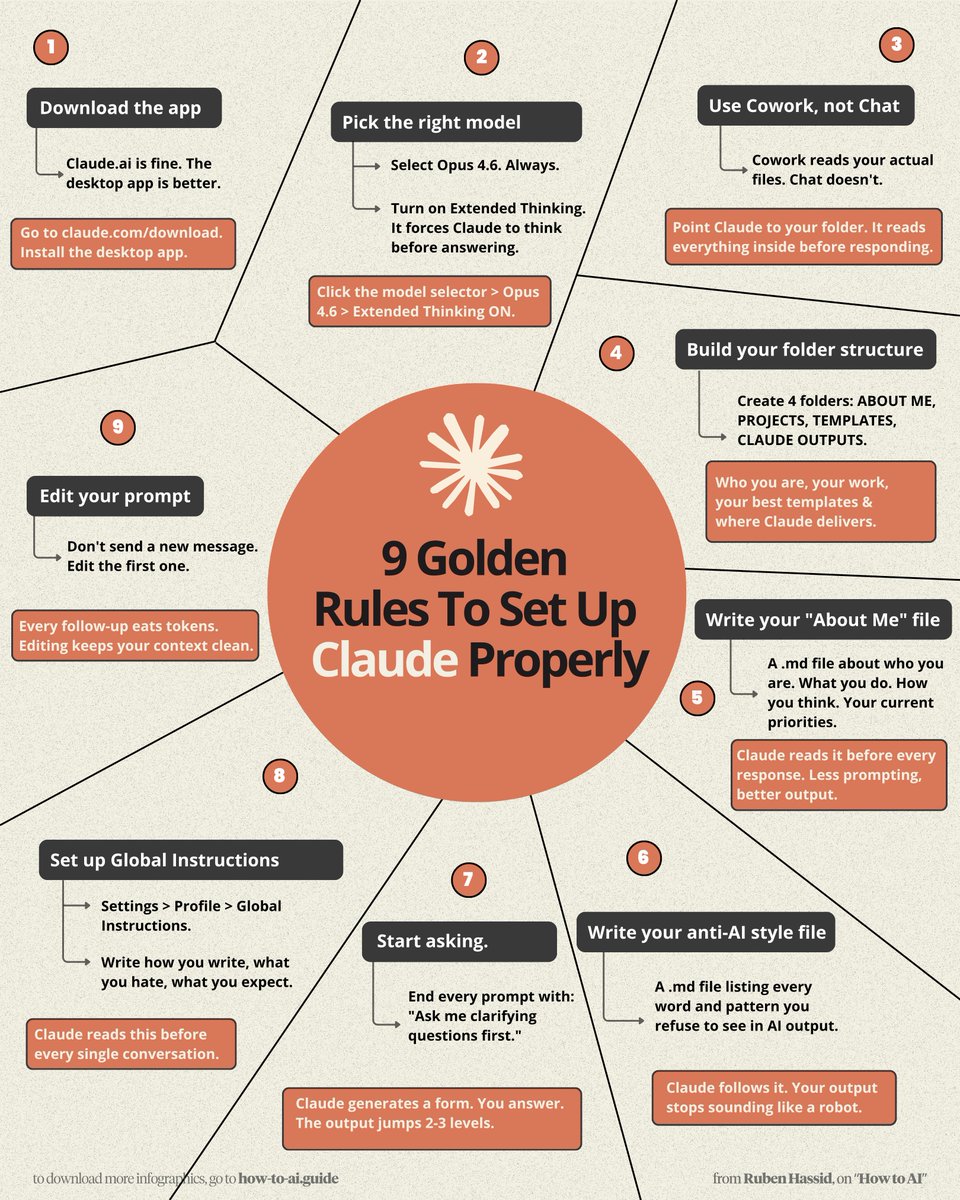
Don't type another prompt into Claude. Do these 9 simple things first: 1. Download the Claude app Claude .ai works. But the desktop app is better. Go to claude .com/download. Install it now. 2. Pick the Right Model Select Opus 4.6. Turn on Extended Thinking. Click models → Opus 4.6 → Extended Thinking ON. 3. Use Cowork, Not Chat Cowork reads your actual files. Chat doesn't. Point Claude to your project folder. It reads everything before responding. 4. Build Your Folder Structure Create 4 folders: ABOUT ME, PROJECTS, TEMPLATES, CLAUDE OUTPUTS. Example: Who you are, your work, your best templates & where Claude delivers. 5. Write Your "About Me" md File .md file about who you are, your work, thinking. Example: Claude reads it before every response. Less prompting, better output. 6. Write Your Anti-AI Style File A .md file listing every word & pattern you refuse. Example: Ban "delve," "landscape," "leverage." Claude follows it. You stop sounding like a robot. To download mine, go here: how-to-ai.guide. Don't pay anything. It's free in the welcome email. 7. Start Asking End prompt with: "Ask me clarifying questions first." Example: Claude generates a form. You answer. The output jumps 2–3 levels. 8. Set Up Global Instructions Go to Settings → Profile → Global Instructions. Example: Write how you write, what you hate & like. Claude reads this before every single conversation. 9. Edit Your Prompt Don't send a new message. Edit the first one. Example: Every follow-up eats tokens. Editing keeps your context clean. I made over 100+ infographics like this. If you want to download all of them, just: 1. Go to how-to-ai.guide. 2. Then enter your work email. 3. It will ask you to pay or not. Don't pay. 4. Wait 2 min. Then open the welcoming email. 5. Click on my Notion library with everything in it. Disclaimer: you will be subscribed to my newsletter. It's free, and always will be. Some people pay only to join my community & get answers faster. 400,000 readers enjoy it twice a week. To always stay ahead of the AI curve. To master AI, before it masters you. ♻️ Help others get better at Claude.
Ruben Hassid tweet media
Ruben Hassid@rubenhassid

x.com/i/article/2041…

English
23
139
952
110.4K
Bishal Nandi
Bishal Nandi@LearnWithBishal·
I gave Perplexity my salary. It gave me a plan. Use these 7 prompts to turn your income into a complete wealth plan: (Save this)*
English
3
32
143
51.1K
Raisul Islam
Raisul Islam@rsraisul_islam·
CLAUDE can trade stocks like a pro. But 99% of users aren’t tapping its real potential. Here are 7 prompts to put your trading on autopilot:
English
28
86
447
55.7K
Mr Nikola
Mr Nikola@nikola_mr64990·
🚨BREAKING: Anthropic just dropped free courses to master AI with certificates. No tuition. No waitlist. No BS. Here're 10 courses that will replace a $50K degree👇
Mr Nikola tweet media
English
33
47
141
11.5K
Leonard Rodman
Leonard Rodman@RodmanAi·
🚨BREAKING: Your startup idea is probably trash. Claude now thinks like Paul Graham… for FREE. Most ideas feel smart. Almost all fail brutal reality checks. Run these 6 prompts BEFORE you waste months: (Save before you build)
Leonard Rodman tweet mediaLeonard Rodman tweet media
English
14
22
112
12.4K
James Shields
James Shields@scaling_shields·
i killed 4 business ideas in under a week last year WITHOUT building a single one of them each one sounded great on paper each one wouldve taken me 3-6 months to build out properly instead i spent $50 and 48 hours on each and knew exactly which ones were dead heres what i did: i wrote a 3 line email describing an offer that didnt exist yet sent it to 5,000 people and waited 48 hours offer 1: ai cold email writing tool for agencies - sent 5,000 emails - 11 replies - dead offer 2: done for you linkedin outreach service - sent 5,000 emails - 7 replies - dead offer 3: cold email training community with weekly calls - sent 5,000 emails - 4 replies - very dead offer 4: database subscription service for agency leads - sent 5,000 emails - 9 replies - dead i killed all 4 in 6 days total no website built, team hired or sales page written then i tested offer 5 free cold email buildout where you only pay for qualified calls that show up sent 5,000 emails day 1: 12 interested replies day 2: 19 more day 3: inbox going mental 43 people wanted details on something that DIDNT exist yet thats when i knew built it that week thats the offer doing $50k/mo right now and it started as a 3 line email to strangers asking if theyd be interested in something i hadnt made most agency owners do this backwards spend 3 months building a website 2 months designing a brand 6 weeks writing case studies 4 weeks setting up a funnel then launch and find out NOBODY wants it bro you couldve found that out in 48 hours for $50 cold email isnt just a client acquisition tool its the fastest market research on earth and nobody uses it that way every campaign that gets zero replies isnt a failure its a $50 study that just told you what the market doesnt want that information wouldve cost you 6 months and $10K to learn any other way stop building offers in your head start testing them in peoples inboxes 5,000 emails 48 hours $50 and the market will tell you exactly what it wants simples
English
7
5
40
3.8K