

SRIKANTH YADAV
432 posts

ప్రస్తుతం హయత్నగర్లోని నీలాధ్రి మల్టీస్పెషాలిటీ హాస్పిటల్ లో చికిత్స పొందుతున్నాడు. శస్త్రచికిత్స ఖర్చు సుమారు ₹5-6 లక్షలు అవుతుంది. కానీ, నరేష్ కుటుంబం ఆర్థికంగా బలహీనంగా ఉంది (నిరుపేద కుటుంబం).
📌 parent కాంటాక్ట్ నంబర్: 6304 802 188 మారయ్య ఎర్ర
తెలుగు

@TGSRTCHQ @tgsrtcmdoffice గారు
Womens ki ఆధార్ అప్డేట్ లేదు అని టికెట్ కొడుతున్నారు ,ఇది వాస్థవమెన ఇలా మీ దగ్గర నుండే ఆర్డర్స్ ఉన్నాయా. ఆధార్ లో తెలంగాణ అడ్రస్ ఉంది.
తెలుగు
@vaibhav_lifts @javarevisited Intellij for better than eclipse
Nederlands

@javarevisited Eclipse.
Do I need to learn IntelliJ ? am I missing something?
English


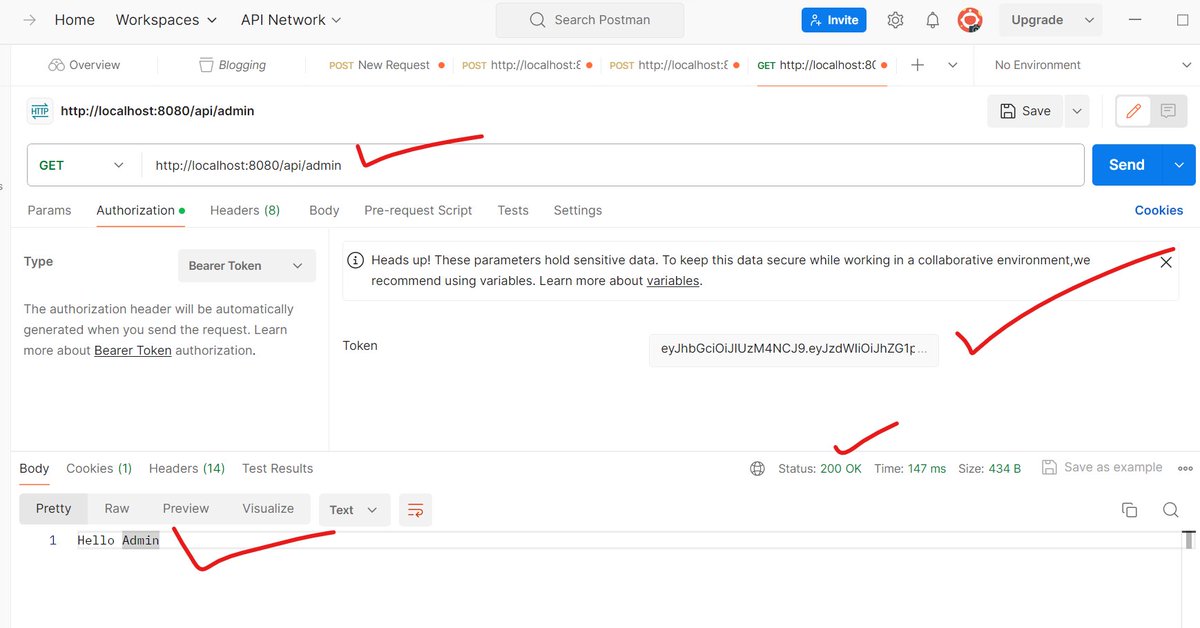
Spring Boot JWT Authentication and Authorization Example
sourcecodeexamples.net/2024/01/spring…
#springboot #jwt #springsecurity #mysql
English

My Favorite Courses to Learn Spring Boot in 2024 — Best of Lot
medium.com/p/6ffce88a1b6e
English

What does API gateway do?
The diagram below shows the detail.
Step 1 - The client sends an HTTP request to the API gateway.
Step 2 - The API gateway parses and validates the attributes in the HTTP request.
Step 3 - The API gateway performs allow-list/deny-list checks.
Step 4 - The API gateway talks to an identity provider for authentication and authorization.
Step 5 - The rate limiting rules are applied to the request. If it is over the limit, the request is rejected.
Steps 6 and 7 - Now that the request has passed basic checks, the API gateway finds the relevant service to route to by path matching.
Step 8 - The API gateway transforms the request into the appropriate protocol and sends it to backend microservices.
Steps 9-12: The API gateway can handle errors properly, and deals with faults if the error takes a longer time to recover (circuit break). It can also leverage ELK (Elastic-Logstash-Kibana) stack for logging and monitoring. We sometimes cache data in the API gateway.
Over to you: 1) What’s the difference between a load balancer and an API gateway?
2) Do we need to use different API gateways for PC, mobile and browser separately?
–
Subscribe to our weekly newsletter to get a Free System Design PDF (158 pages): bit.ly/3KCnWXq
GIF
English
Difference between API Gateway and Load Balancer in System Design buff.ly/498WnOT
English

What is Kafka, and how does it work?
Apache Kafka is an open source distributed streaming platform designed for building real-time data pipelines and streaming applications.
Kafka operates as a 𝗱𝗶𝘀𝘁𝗿𝗶𝗯𝘂𝘁𝗲𝗱 𝗽𝘂𝗯-𝘀𝘂𝗯 𝗺𝗲𝘀𝘀𝗮𝗴𝗶𝗻𝗴 𝘀𝘆𝘀𝘁𝗲𝗺. Allowing applications to publish and subscribe to real-time or near-real-time data feeds.
The 𝗵𝗶𝗴𝗵 𝘁𝗵𝗿𝗼𝘂𝗴𝗵𝗽𝘂𝘁, 𝘀𝗰𝗮𝗹𝗮𝗯𝗶𝗹𝗶𝘁𝘆, 𝗳𝗮𝘂𝗹𝘁-𝘁𝗼𝗹𝗲𝗿𝗮𝗻𝗰𝗲, 𝗱𝘂𝗿𝗮𝗯𝗶𝗹𝗶𝘁𝘆, and 𝗲𝗰𝗼𝘀𝘆𝘀𝘁𝗲𝗺 𝗞𝗮𝗳𝗸𝗮 𝗽𝗿𝗼𝘃𝗶𝗱𝗲𝘀 have made it a very 𝗽𝗼𝗽𝘂𝗹𝗮𝗿 𝗰𝗵𝗼𝗶𝗰𝗲 𝗳𝗼𝗿 use cases where 𝗿𝗲𝗮𝗹-𝘁𝗶𝗺𝗲 𝗱𝗮𝘁𝗮 𝗳𝗲𝗲𝗱𝘀 are required.
The key components of Kafka include:
🔸 Producer
Producers publish (write) messages to a Kafka topic.
🔸 Consumer
Consumers/subscribers subscribe to topics and process (read) the feed of published messages.
🔸 Broker
Brokers are Kafka servers that store data and serve clients. Multiple brokers form a cluster.
🔸 Topic
Topics are a feed name or message category to which messages are published by producers.
🔸 Partition
Messages are organized into topics, which can then be further divided into partitions. This increases parallelism and scalability allowing consumers to read different partitions at the same time.
𝗞𝗮𝗳𝗸𝗮 𝗰𝗮𝗻 𝗯𝗲 𝘂𝘀𝗲𝗱 𝗳𝗼𝗿 𝗺𝗮𝗻𝘆 𝘂𝘀𝗲 𝗰𝗮𝘀𝗲𝘀. A few of the more common 𝘂𝘀𝗲 𝗰𝗮𝘀𝗲𝘀 𝗶𝗻𝗰𝗹𝘂𝗱𝗲:
🔹 𝗔𝗴𝗴𝗿𝗲𝗴𝗮𝘁𝗶𝗻𝗴 𝗱𝗮𝘁𝗮 𝗳𝗿𝗼𝗺 𝗱𝗶𝗳𝗳𝗲𝗿𝗲𝗻𝘁 𝘀𝗼𝘂𝗿𝗰𝗲𝘀
Whether it's ETL pipelines, data lakes, or log aggregation; ingesting, organizing, transforming, and distributing data are core functions of Kafka.
🔹 𝗦𝘁𝗿𝗲𝗮𝗺 𝗽𝗿𝗼𝗰𝗲𝘀𝘀𝗶𝗻𝗴
Kafka can be used to build real-time analytics applications.
🔹 𝗘𝘃𝗲𝗻𝘁 𝗽𝗿𝗼𝗰𝗲𝘀𝘀𝗶𝗻𝗴
Systems or applications that rely on processing events in real-time such as IoT devices.
🔹 𝗠𝗼𝗻𝗶𝘁𝗼𝗿𝗶𝗻𝗴
Kafka is well suited for storing logs and metrics, allowing for real-time monitoring and alerts.
Designed for fault tolerance, high throughput, durability, and scalability, Kafka serves as an intermediary service for handling large data.
While Kafka provides many advantages for building real-time data pipelines and streaming applications, it's not without its drawbacks. The most noteworthy being the layers of complexity it adds to the system architecture.
In saying that, if real-time data feed is required, Kafka is a popular choice.
~~~
📩 If you found this helpful, I write an email every Thursday to help you level up your engineering and system design skills. Sign up here: drp.li/luc-newsletter…
A big thank you to our partner Postman who keeps our content free to the community.
🚀 POST/CON, Postman's biggest API conference ever is on April 30 - May 1. Check it out: drp.li/post-con-z7tk
GIF
English


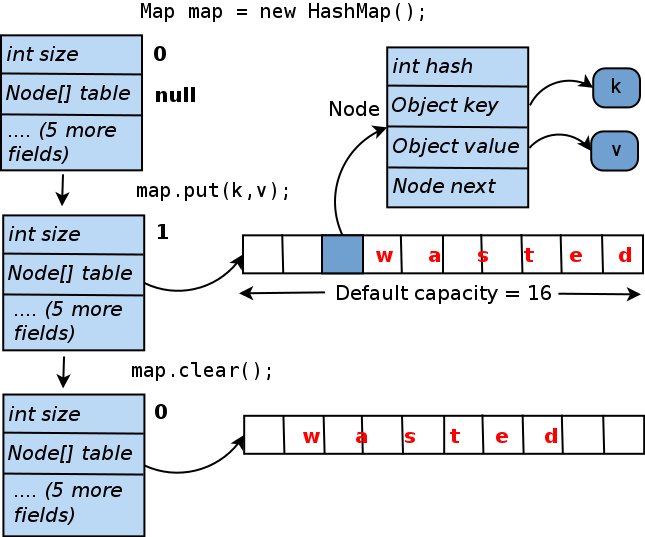
How HashMap work in Java?
1. internal working - javarevisited.blogspot.com/2010/02/how-ha…
2. get and put working -java67.com/2013/06/how-ge…
3. core java courses - javarevisited.blogspot.com/2020/04/5 Best-10-advanced-core-java-courses-for-experienced-developers.html
English

12 Design Patterns You Must Know
1. Factory Pattern 🏭
Imagine a factory that produces different products. Similarly, this pattern creates objects without specifying their exact class, making code flexible and easy to extend. 🧩
2. Observer Pattern 🔍
Like subscribing to updates! Objects (observers) register to watch changes in a subject. When the subject changes, observers are notified automatically. 📡🔔
3. Singleton Pattern 🕊️
The one and only! Ensures a class has only one instance globally accessible. Useful for managing shared resources like databases. 🌐🔒
4. Builder Pattern 🛠️
Building complex objects step by step. Think of it as assembling Lego bricks to create something intricate without the mess! 🧱🏗️
5. Adapter Pattern 🌉
Bridging the gap! Converts the interface of one class into another interface clients expect. Makes incompatible components work together. 🔌🔌
6. Decorator Pattern 🎈
Like adding toppings to your pizza! Dynamically adds responsibilities to objects without changing their code. A flexible alternative to subclassing. 🍕✨
7. Proxy Pattern 🕶️
Virtual representative! Controls access to an object, acting as a stand-in with additional functionality, like lazy loading. 🔒🔍
8. Strategy Pattern 🎯
Switching strategies seamlessly! Allows selecting algorithms during runtime. Useful when you want to provide multiple ways to accomplish a task. 🎮🔄
9. Command Pattern ⌨️
Encapsulates requests as objects, allowing parameterization of clients with different requests and queuing of requests. Think of it as a to-do list for your program. 📋📌
10. Template Pattern 📄
Standardized process steps! Defines the structure of an algorithm, letting subclasses override specific steps. Ideal for reusable workflows. 📊📈
11. Iterator Pattern 🔄
Tour guide for collections! Provides a way to access elements of a collection without exposing its underlying representation. 🚶♂️🗺️
12. State Pattern 🚦
Like a traffic light! Allows an object to change its behavior when its internal state changes. Keeps your code organized as states pile up. 🚥🔄
🚨 Join Waiting List for New 10+ Hour Linux Course - bit.ly/44CI2bK
#systemdesign #coding #interviewtips

English
The 12 Factor App is a methodology for building scalable and maintainable web applications. It provides a set of guidelines for developing modern, cloud-native, and containerized applications. Here are the 12 factors explained in bullet points:
1. Codebase:
- One codebase per application.
- Use version control to manage code changes.
2. Dependencies:
- Explicitly declare and isolate dependencies.
- Avoid relying on system-wide packages.
3. Config:
- Store configuration in environment variables.
- Keep configuration separate from code.
4. Backing Services:
- Treat external services (databases, caches, etc.) as attached resources.
- Connect to them via URLs or environment variables.
5. Build, Release, Run:
- Strictly separate the build, release, and run stages of the application.
- Use consistent and repeatable build processes.
6. Processes:
- Execute the application as stateless processes.
- Avoid storing session data locally; use external services.
7. Port Binding:
- Export services via a port and communicate over the network.
- Web applications should bind to a port defined by the environment.
8. Concurrency:
- Scale out via the process model.
- Utilize multiple stateless processes to handle requests.
9. Disposability:
- Maximize robustness with fast startup and graceful shutdown.
- Terminate unneeded processes without impact.
10. Dev/Prod Parity:
- Keep development, staging, and production environments as similar as possible.
- Use the same dependencies and configuration.
11. Logs:
- Treat logs as event streams.
- Write application logs to standard output and allow log aggregation.
12. Admin Processes:
- Run administrative tasks as one-off processes.
- Use the same codebase and environment for administrative tasks.
Adhering to these 12 factors helps create applications that are easier to develop, deploy, and maintain, making them well-suited for cloud-native and containerized environments.
👍🏿 Subscribe to our newsletter - bit.ly/45ucZPf
#systemdesign #coding #interviewtips
GIF
English