Mustafa

4K posts

Mustafa banner
Mustafa

Mustafa

@mustafa_2vec

Agents @agnoagi | Polyagentamorous

Miami, FL Beigetreten Nisan 2013
2K Folgt1.2K Follower
Angehefteter Tweet
Mustafa
Mustafa@mustafa_2vec·
For my recent followers here's a bit about me: - Current working on AI X Agents🤖. - Finish grad school and figuring out future plans🤔 - Moved to US from India to attend grad school in sunny Miami (FIU) - Had 2 internships and worked 3 full-time SWE jobs all while in college!!! - Lived in Pune and had the best time! - Worked on 5 projects while still in college from my bedroom and scaled it to thousands on users - Built a localized Covid cases tracker that went viral - Love playing Soccer and Tennis🎾 - Gym freak🤸 I live by "Talk is cheap. Show me the code". DM's open📥. Feel free to reach out!
Mustafa tweet media
English
1
1
22
4.5K
Mustafa retweetet
Ashpreet Bedi
Ashpreet Bedi@ashpreetbedi·
Sharing my learnings on human in the loop / approval flows for agents. Whether you implement them today or not, these concepts are critical to understand and will shape how you design your system. There are three types of actions an agent can take: 1. No approval needed 2. User approval needed 3. Admin approval needed And then separately, a related concept is tracing vs audit logs. Let's walk through each case: 1) No approval needed This is where 99% of agent actions live. Reading a file. Searching a knowledge base. Querying a database. Looking up calendar events. Summarizing a document. Running a web search. Think about how you use Claude Code or Cursor. Most of what they do (reading files, searching code, generating diffs) requires no approval. The agent just does it. This is the default mode, and it should stay the default. If you’re putting approval gates on read-only operations, you’re slowing your agent down for no reason. 2) User approval needed This is where most coding agents live today. Claude Code asks “Can I run this command?” before executing shell commands. Cursor asks before applying file changes. An email agent should confirm before sending. A calendar agent should confirm before creating events with external attendees. This covers things like: executing shell commands, sending messages, writing files, making API calls with side effects, creating or modifying records. Anything where the agent is doing something that changes state in the real world. 3) Admin approval needed This is the one almost nobody has built yet. And it’s the one that matters most for production agents in enterprises. User approval means the person using the agent confirms. Admin approval means a designated administrator (who may not be the user) reviews and approves the action before it executes. Examples: issuing a refund. Approving a purchase order. Modifying production infrastructure. Deleting data. Granting access permissions. Any action where the business needs an authorized human (with specific role permissions) to sign off, not just the person who asked. This is where audit logs become essential (more on this below). When an admin approves a $10K refund triggered by an agent, that approval, who approved it, when, and the full context of the request needs to be retained for the life of your product. In Agno, this is a built-in primitive. You decorate a tool with @approval and the action gets routed to an approval system with full audit trail. Most frameworks don’t have this. On Tracing vs Audit Logs Traces are observability logs. They record the flow of execution: model calls, tool calls, latency, token usage. Traces are for debugging and optimization. Most third-party observability tools will recommend deleting traces after 90-120 days because they cost money to store. Audit logs are accountability data. They record actions the agent took that were approved by a human. An admin approved a refund. A user confirmed a data deletion. A manager signed off on a purchase order. These are business transactions, and they need to be retained for the life of your product. You should be able to go back seven months and see: what action was proposed, who approved it, and what happened. Side note: you should always own your traces. Your traces are your training data. If you’re sending them to a third-party observability platform, you’re handing over the most valuable data you have for improving your agents. Own your database. Own your traces. The distinction matters because if you design your system treating traces and audit logs as the same thing, you’ll either delete audit logs too early (compliance risk) or retain all traces forever (cost explosion). They need different storage, different retention policies, and different access patterns. TLDR: Three types of agent actions: no approval (most actions, keep it fast), user approval (commands, sends, writes), admin approval (financial, destructive, privileged). Traces are for debugging and should be owned, not outsourced. Audit logs are for accountability and should be retained forever. Design for both from day one.
English
3
3
14
1.2K
Mustafa retweetet
Ashpreet Bedi
Ashpreet Bedi@ashpreetbedi·
Building a Personal Knowledge Agent I've been using a personal knowledge agent called Pal (Personal Agent that Learns). It runs locally, talks to me over Slack, and tries to get better over time (still tuning this part). I posted about it a few weeks ago and wanted to share some key design decisions. The goal is that I feed it raw data (URLs, papers, notes, meeting context, tidbits about people) and it organizes everything into two layers: a compiled wiki for text-heavy knowledge (concepts, summaries, research), and a SQL database for structured data (notes, people, projects, decisions). It should connect to my email, calendar, and slack. Here are some details: 1) Markdown + SQL Markdown is great until you need to query across dimensions. "Everything related to Project X from the last two weeks across all sources". "Prep me for my meeting with Sarah" (pull her notes, recent emails, project context, calendar history). This is relational data, not document retrieval. SQL handles this well. 2) Navigation over Search The key insight behind Pal is navigation over search. Each data source keeps its native query interface. Databases get SQL. Email gets queried by sender and date. Files get navigated by directory structure. The wiki gets navigated by its index. No flattening everything into one vector store. The agent picks the right source for the right question through a metadata routing layer, not through embedding similarity. 3) Structured data (SQL) When I say "save a note: met with sarah from acme, she's interested in a partnership". Pal creates a row in a notes table, tags it with ['sarah', 'acme', 'partnership'], and links it to sarah's entry in a people table. When I later ask "what do I know about sarah?" it queries across notes, people, projects, emails, and calendar. Tags are the cross-table connector. A note about a meeting with sarah about Project X gets tagged so it shows up in both contexts. The agent owns the schema. It creates tables on demand. Notes, people, projects, decisions all emerged from natural conversation. "Save a note" creates a note. "Track this project" creates a project. The schema grows with usage. 4) Knowledge base (Wiki) The other half is a compiled knowledge base for things that need depth. Research, technical concepts, reference material. 4.1) Ingest: I feed it URLs, papers, articles, meeting notes. It fetches the content, converts to clean markdown, and saves to a raw/ directory with YAML frontmatter (title, source, date, tags). A manifest tracks what's been ingested and what's been compiled. 4.2) Compile: A dedicated Compiler agent reads uncompiled raw files and produces structured wiki articles. It breaks each source into concept articles, writes summaries, cross-links related concepts, and maintains a master index. Compilation is incremental. Only new files get processed, never the whole wiki. New information enriches existing articles rather than replacing them, and every claim links back to the raw source. 4.3) Query: The wiki index is designed to fit in one LLM call (~100 articles). When I ask a knowledge question, the agent reads the index first, picks relevant articles, then falls back to raw sources and live tools. I expected to need vector search for this. Turns out an auto-maintained index with brief summaries works surprisingly well at this scale. The LLM navigates it like a table of contents. 5) Learnings I'm still working on this part. The pieces are there but it's not where I want it yet. Because Pal is a team of agents, they all share a common learning store. Every time a retrieval strategy works, it gets saved. Every time I correct the agent, that correction gets saved with highest priority. Over time, the agent should route to the right source faster and give better answers without me tuning anything. 6) Architecture: Pal is a team of five specialist agents. Navigator is the workhorse. Researcher gathers sources from the web. Compiler turns raw into wiki. Linter checks quality. Syncer pushes everything to GitHub. Pull the wiki locally, read it in your IDE of choice, push changes back. 7) Scheduled tasks: Eight scheduled tasks run themselves between conversations: daily briefings, wiki compilation, inbox digests, weekly reviews, wiki linting, context re-indexing, and git sync. Results post to Slack. TLDR: raw data from any source gets ingested and organized into two layers: a compiled wiki for knowledge depth and SQL tables for structured breadth. Five context systems get navigated (not searched) to answer questions. A learning loop compounds every interaction. The wiki is just markdown backed by git.
English
10
19
210
16.6K
Yohei
Yohei@yoheinakajima·
agents can do everything*, which causes a UX problem, your users have vastly different experiences, some better and some worse thinking like an RPG can help here when you start an RPG game, you start with one weapon, and you learn to fight with it. as you progress, you pick up and learn new weapons. and by the final boss, you can wield all the weapons to defeat him. very rewarding if you'd started the game with all the weapons, it would be too overwhelming, you wouldn't know which weapon to learn first, and you'd probably stop this isn't a new idea, but i've used a few tools recently that reminded me of this latter experience *not everything of course, but you get the point
English
26
4
133
16.2K
Mustafa retweetet
Ashpreet Bedi
Ashpreet Bedi@ashpreetbedi·
If you're looking for an open-source version of this, checkout Pal (Personal Agent that Learns) github.com/agno-agi/pal Same idea: ingest sources, compile a structured wiki, navigate across it. Pal also connects to gmail, slack, and self-maintains a SQL database so the knowledge is my whole work context. Excited to see more of these in the wild!
Andrej Karpathy@karpathy

LLM Knowledge Bases Something I'm finding very useful recently: using LLMs to build personal knowledge bases for various topics of research interest. In this way, a large fraction of my recent token throughput is going less into manipulating code, and more into manipulating knowledge (stored as markdown and images). The latest LLMs are quite good at it. So: Data ingest: I index source documents (articles, papers, repos, datasets, images, etc.) into a raw/ directory, then I use an LLM to incrementally "compile" a wiki, which is just a collection of .md files in a directory structure. The wiki includes summaries of all the data in raw/, backlinks, and then it categorizes data into concepts, writes articles for them, and links them all. To convert web articles into .md files I like to use the Obsidian Web Clipper extension, and then I also use a hotkey to download all the related images to local so that my LLM can easily reference them. IDE: I use Obsidian as the IDE "frontend" where I can view the raw data, the the compiled wiki, and the derived visualizations. Important to note that the LLM writes and maintains all of the data of the wiki, I rarely touch it directly. I've played with a few Obsidian plugins to render and view data in other ways (e.g. Marp for slides). Q&A: Where things get interesting is that once your wiki is big enough (e.g. mine on some recent research is ~100 articles and ~400K words), you can ask your LLM agent all kinds of complex questions against the wiki, and it will go off, research the answers, etc. I thought I had to reach for fancy RAG, but the LLM has been pretty good about auto-maintaining index files and brief summaries of all the documents and it reads all the important related data fairly easily at this ~small scale. Output: Instead of getting answers in text/terminal, I like to have it render markdown files for me, or slide shows (Marp format), or matplotlib images, all of which I then view again in Obsidian. You can imagine many other visual output formats depending on the query. Often, I end up "filing" the outputs back into the wiki to enhance it for further queries. So my own explorations and queries always "add up" in the knowledge base. Linting: I've run some LLM "health checks" over the wiki to e.g. find inconsistent data, impute missing data (with web searchers), find interesting connections for new article candidates, etc., to incrementally clean up the wiki and enhance its overall data integrity. The LLMs are quite good at suggesting further questions to ask and look into. Extra tools: I find myself developing additional tools to process the data, e.g. I vibe coded a small and naive search engine over the wiki, which I both use directly (in a web ui), but more often I want to hand it off to an LLM via CLI as a tool for larger queries. Further explorations: As the repo grows, the natural desire is to also think about synthetic data generation + finetuning to have your LLM "know" the data in its weights instead of just context windows. TLDR: raw data from a given number of sources is collected, then compiled by an LLM into a .md wiki, then operated on by various CLIs by the LLM to do Q&A and to incrementally enhance the wiki, and all of it viewable in Obsidian. You rarely ever write or edit the wiki manually, it's the domain of the LLM. I think there is room here for an incredible new product instead of a hacky collection of scripts.

English
6
35
296
24.6K
𝚟𝚒𝚎 ⟢
𝚟𝚒𝚎 ⟢@viemccoy·
if you are making an agent harness and want to be in a signal group chat, please let me know! I'll select pretty heavily for power users since I really want a place to discuss Excalibur with people who are doing something similar.
English
118
3
302
15.6K
Mustafa
Mustafa@mustafa_2vec·
Slack is where the coding happens🫡
English
0
0
3
103
Mustafa
Mustafa@mustafa_2vec·
@neural_avb Share results? I am sure it’s be the worst investment every
English
0
0
0
125
AVB
AVB@neural_avb·
People are officially automating harness optimization > Define task and boundaries > Agent updates code, run evals > Logs all traces and results from ALL expts directly into the filesystem. No discards. > Keeps pushing the pareto frontier The Model + The Harness = The Product
AVB@neural_avb

x.com/i/article/2039…

English
11
33
463
69.2K
Mustafa
Mustafa@mustafa_2vec·
@jaltma Sell to Anthropic lol
English
0
0
0
110
Jack Altman
Jack Altman@jaltma·
Sam did the offer to buy Uncapped get lost in the mail?
English
87
39
3.1K
687.5K
Saai Arora
Saai Arora@SaaiArora·
big day. I just raised a $10M seed round to solve one of humanity’s hardest problems. for the past few months I’ve been pushing the boundaries of what’s possible in AI categorization determining whether something is a hot dog or not a hot dog we’ve built a state of the art model that can classify any object in real time with unprecedented accuracy it’s simple. you upload an image and we tell you whether it’s a hot dog or not a hot dog. backed by some incredible investors who also agree this needs to exist excited to scale the team, expand into adjacent categories, and push the boundaries of binary food intelligence dm if you want access
English
16
2
63
6.3K
Mustafa
Mustafa@mustafa_2vec·
@davj Let claude code handle your Slack lol
English
0
0
5
1K
Mustafa
Mustafa@mustafa_2vec·
@p0 @Opendoor Isn’t this just an agent doing lot of tool calls?
English
0
0
1
104
Parallel Web Systems
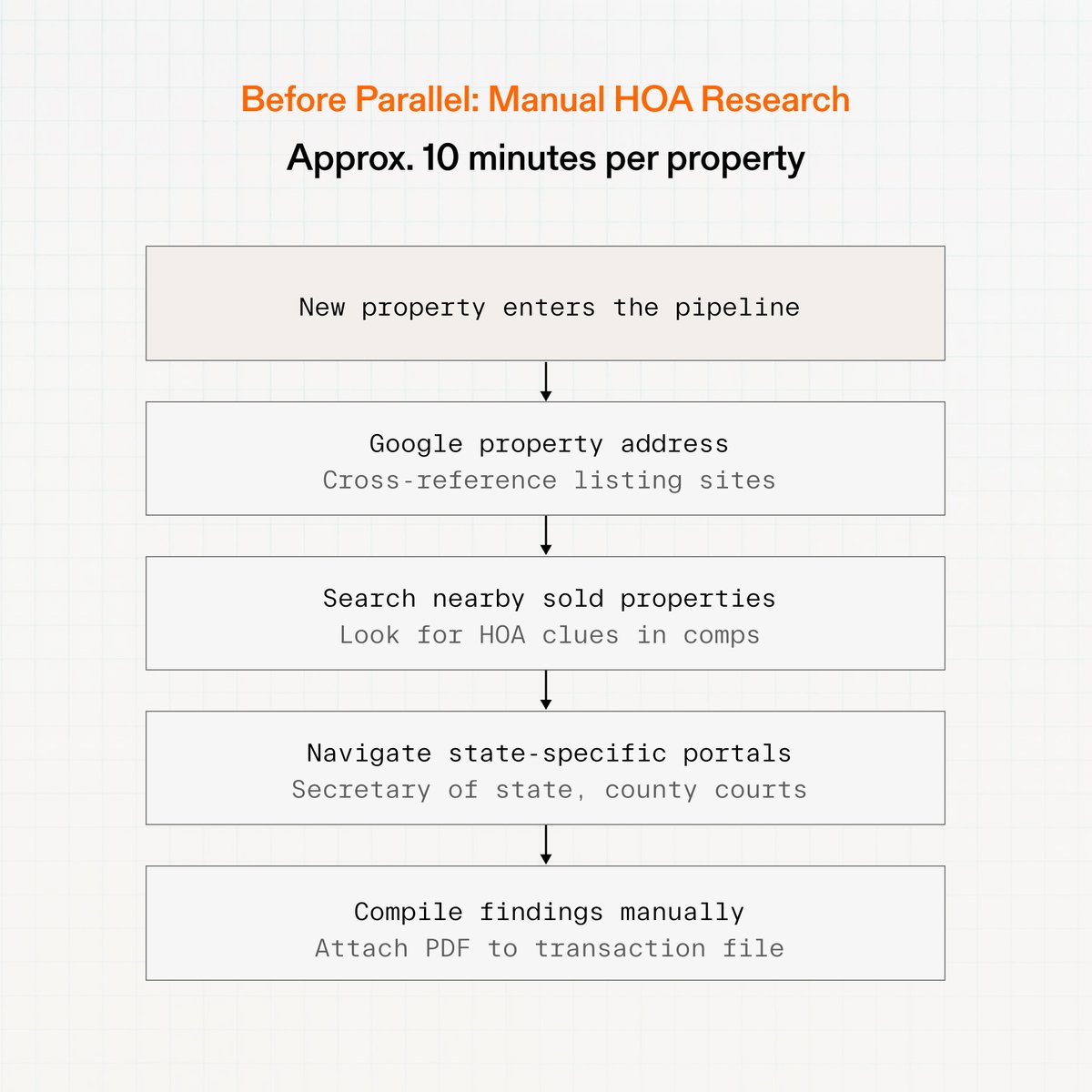
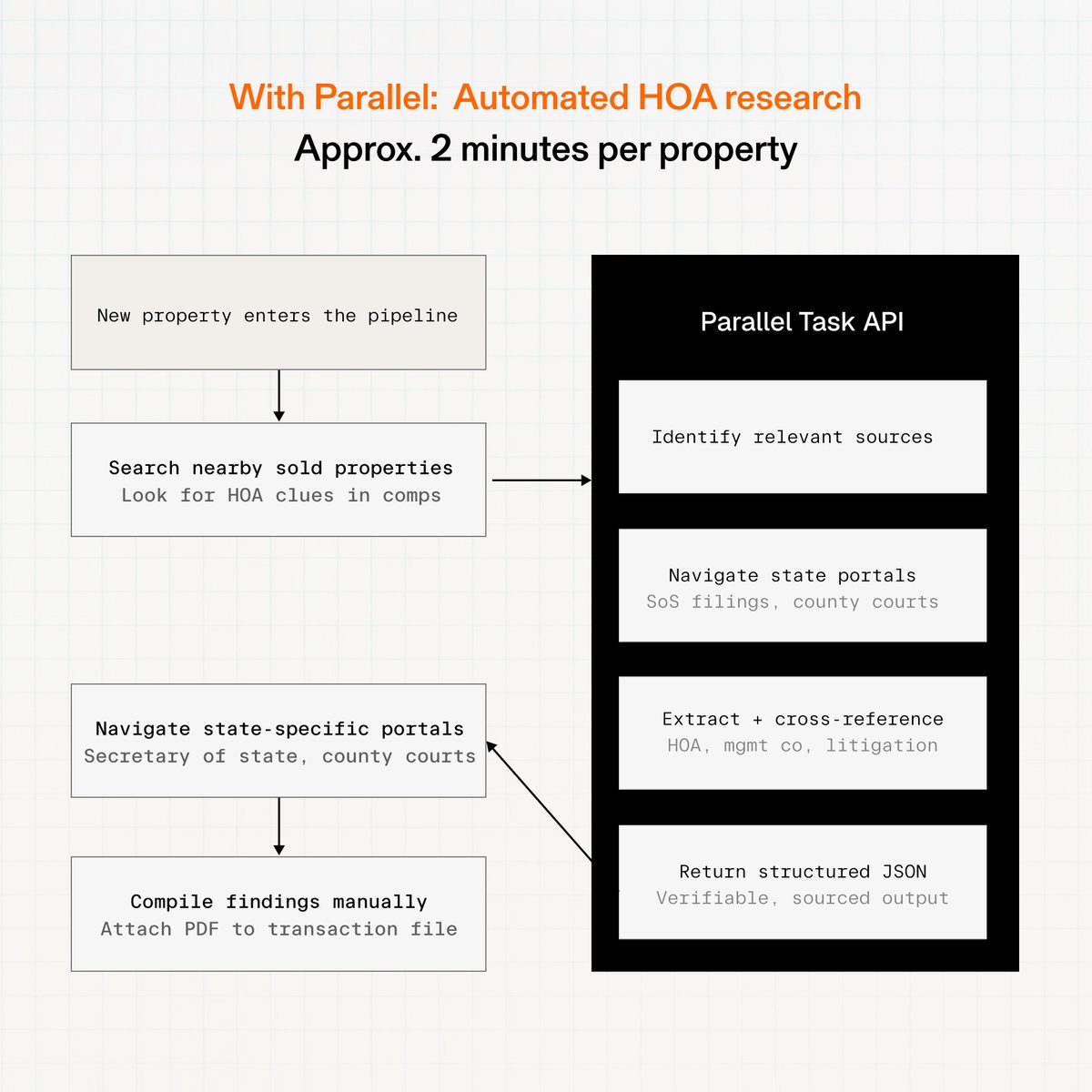
Every transaction @Opendoor makes requires HOA research: Does this property have an HOA? Who manages it? Any active lawsuits? Before Parallel, each property took ~10 minutes of manual investigation. Now it takes ~2.
Parallel Web Systems tweet mediaParallel Web Systems tweet media
English
3
0
41
5.1K
Ihar Mahaniok
Ihar Mahaniok@mahaniok·
Is there a good, AI-first, modern (2026) email client? Superhuman was good in 2024. But it feels extremely obsolete today.
English
54
1
58
39.4K
Mustafa
Mustafa@mustafa_2vec·
@gitlawb Can I use Opusc 4.6 1M context?
English
2
0
27
58.6K
GitLawb
GitLawb@gitlawb·
We forked the leaked Claude Code source and made it work with ANY LLM: GPT, DeepSeek, Gemini, Llama, MiniMax. Open source. The name is OpenCode
English
383
1.8K
21.3K
1.8M
Frederik Jacques
Frederik Jacques@thenerd_be·
Today is my first day at Anthropic. Super excited I shipped my first change today, added source maps so debugging is easier. Can’t wait to show you all what I’ve been working on! cc: @AnthropicAI
Frederik Jacques tweet media
English
594
547
18.3K
785.1K