
पिन किया गया ट्वीट
RD
318 posts


RD रीट्वीट किया

1995: PHP is dead, learn ColdFusion
2001: PHP is dead, learn ASP .NET
2003: PHP is dead, learn Django
2005: PHP is dead, learn Ruby on Rails
2010: PHP is dead, learn Flask
2011: PHP is dead, learn AngularJS
2015: PHP is dead, learn React
2016: PHP is dead, learn Next.js
2018: PHP is dead, learn Serverless (FaaS)
2020: PHP is dead, learn Jamstack
2022: PHP is dead, learn Python (again)
2024: PHP is dead, learn AI generated backends
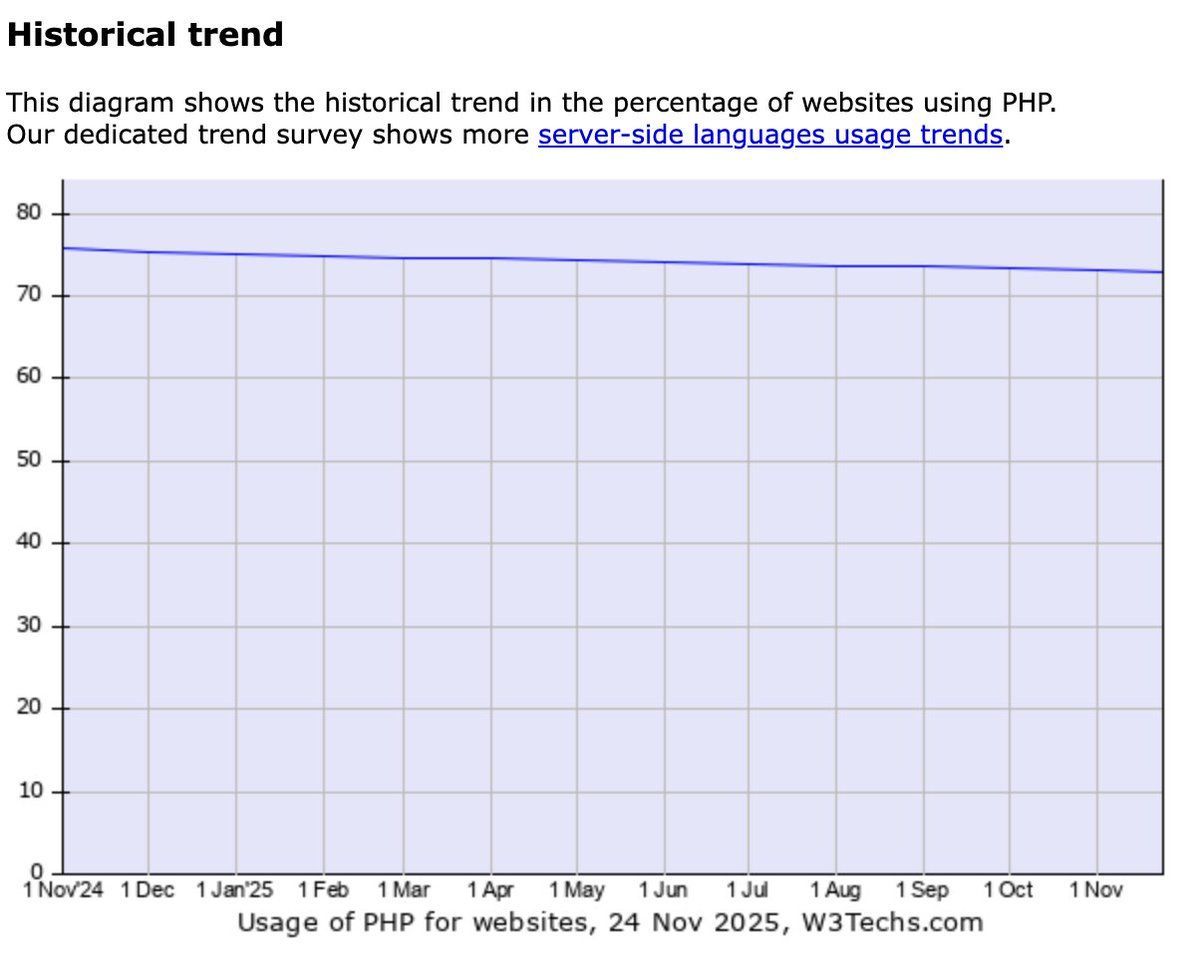
2025: PHP is still used by ~73% of the internet
English

Database Migration Strategies in Backend
→ Database migration is the process of moving data, schemas, or database systems from one environment to another.
→ It is commonly required during system upgrades, cloud migration, database engine changes, or application redesigns.
→ A good migration strategy ensures data integrity, minimal downtime, and smooth backend operations.
✓ 1. Types of Database Migration
→ Schema Migration → Changing table structures, columns, indexes, or constraints.
→ Data Migration → Moving actual records from source to target databases.
→ Database Engine Migration → Switching databases (e.g., MySQL → PostgreSQL).
→ Environment Migration → Moving data from on-premise to cloud or between servers.
✓ 2. Big Bang Migration Strategy
→ Entire database is migrated in one single operation.
→ Old system is shut down, data is moved, and new system goes live.
✓ Advantages
→ Simple to execute
→ Less synchronization complexity
✓ Disadvantages
→ High downtime
→ Risky for large or critical systems
✓ 3. Trickle (Phased) Migration Strategy
→ Data is migrated in small batches over time.
→ Old and new systems run in parallel during migration.
✓ Advantages
→ Minimal downtime
→ Lower risk of failure
✓ Disadvantages
→ More complex to manage
→ Requires data synchronization logic
✓ 4. Blue-Green Migration Strategy
→ Two identical database environments exist (Blue = old, Green = new).
→ Traffic switches to the new database once migration is verified.
✓ Advantages
→ Easy rollback
→ Near-zero downtime
✓ 5. Hybrid Migration Strategy
→ Combination of bulk migration followed by incremental updates.
→ Often used in large-scale production systems.
✓ 6. Migration Steps in Backend Systems
→ Assessment → Analyze data size, schema, dependencies.
→ Planning → Choose migration strategy and tools.
→ Backup → Always back up data before migration.
→ Execution → Perform migration based on selected approach.
→ Validation → Verify data accuracy and consistency.
→ Cutover → Switch application traffic to the new database.
✓ 7. Migration Tools & Automation
→ ORM migration tools (Prisma Migrate, Sequelize, Flyway).
→ Cloud tools (AWS DMS, Azure Data Factory).
→ Custom scripts for complex transformations.
✓ 8. Best Practices
→ Always test migrations in staging environments.
→ Version-control database migrations.
→ Log and monitor migration processes.
→ Plan rollback strategies before execution.
→ Secure data during transfer using encryption.
✓ 9. Common Challenges
→ Data loss or corruption
→ Schema incompatibility
→ Long downtime
→ Performance degradation during migration
→ Grab the Backend Development with Projects Ebook to learn real-world database migrations, backend architecture decisions, and hands-on projects that apply these strategies in production systems.
codewithdhanian.gumroad.com/l/juuzy

English
RD रीट्वीट किया

From Commit to Production: This Diagram Explains CI/CD Better Than Most Tutorials

English

RD रीट्वीट किया
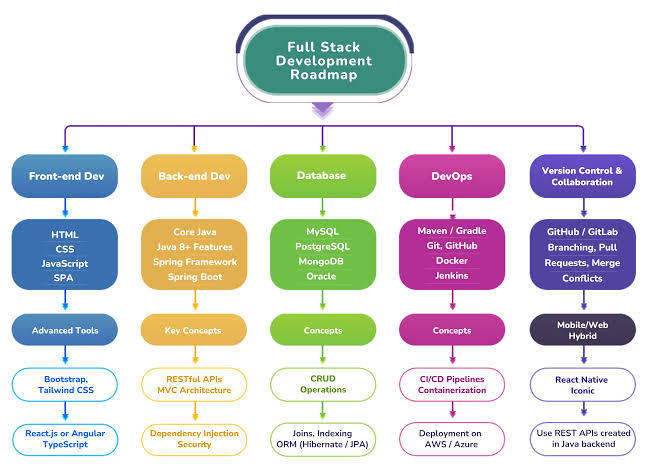
FULL-STACK_DEVELOPER ROADMAP
│
├── 0_FOUNDATIONS
│ ├── Learn_HTML
│ ├── Learn_CSS
│ ├── Learn_JavaScript_ES6+
│ ├── Understand_HTTP_Requests
│ ├── Build_Project: "Personal_Portfolio_Site"
│ └── Build_Project: "Responsive_Landing_Page_for_AI_Tool"
│
├── 1_FRONTEND_ENGINEERING
│ ├── Pick_Framework
│ │ ├── React
│ │ ├── Next.js_15
│ │ └── Vue_3
│ ├── Concepts
│ │ ├── Components
│ │ ├── State_Management
│ │ ├── Routing
│ │ ├── Async_Data_Fetching
│ │ └── UI_Accessibility
│ ├── Build_Project: "AI_Image_Gallery_Frontend"
│ ├── Build_Project: "News_Aggregator_Using_Live_APIs"
│ └── Build_Project: "Dashboard_UI_with_Charts_and_Analytics"
│
├── 2_BACKEND_ENGINEERING
│ ├── Choose_Backend_Language
│ │ ├── Node.js_Express
│ │ ├── Python_FastAPI
│ │ └── Go_Fiber
│ ├── Learn
│ │ ├── REST_APIs
│ │ ├── GraphQL
│ │ ├── Middleware
│ │ └── Error_Handling
│ ├── Build_Project: "AI_Prompt_API"
│ ├── Build_Project: "RealTime_Notification_Server"
│ └── Build_Project: "File_Upload_Service_for_AI_Models"
│
├── 3_DATABASES_AND_STORAGE
│ ├── SQL
│ │ ├── PostgreSQL
│ │ └── MySQL
│ ├── NoSQL
│ │ ├── MongoDB
│ │ └── Firebase
│ ├── Cloud_Databases
│ │ ├── Supabase
│ │ └── PlanetScale
│ ├── Build_Project: "AI_Chat_History_Storage"
│ ├── Build_Project: "User_Profile_DB_with_Role_Based_Access"
│ └── Build_Project: "Vector_Store_Integration_for_AI_Search"
│
├── 4_AUTHENTICATION_AND_SECURITY
│ ├── Learn
│ │ ├── JWT
│ │ ├── OAuth2
│ │ ├── Role_Based_Access_Control
│ │ └── API_Rate_Limiting
│ ├── Build_Project: "Secure_Login_&_Signup_System"
│ ├── Build_Project: "Admin_Dashboard_with_Access_Control"
│ └── Build_Project: "API_Key_System_for_AI_Endpoints"
│
├── 5_AI_INTEGRATION_LAYER
│ ├── Learn
│ │ ├── How_to_Call_AI_APIs
│ │ ├── Prompt_Design
│ │ ├── Embeddings
│ │ └── RAG_(Retrieval_Augmented_Generation)
│ ├── AI_Services
│ │ ├── OpenAI_API
│ │ ├── Gemini
│ │ └── Local_LLMs_(Ollama)
│ ├── Build_Project: "AI_Generated_Content_Tool"
│ ├── Build_Project: "Smart_AI_Search_with_VectorDB"
│ ├── Build_Project: "AI_Code_Review_Assistant"
│ └── Build_Project: "AI_Automated_Email_Responder"
│
├── 6_FULLSTACK_INTEGRATION/
│ ├── Combine_Frontend_Backend_Database
│ ├── Learn
│ │ ├── API_Orchestration
│ │ ├── RealTime_Data_(WebSockets)
│ │ └── Server_Actions_(Next.js_15)
│ ├── Build_Project: "FullStack_Task_Manager_with_AI_Task_Suggestions"
│
├── 7_DEVOPS_AND_DEPLOYMENT
│ ├── Hosting
│ │ ├── Vercel
│ │ ├── Render
│ │ ├── Netlify
│ │ └── AWS_EC2
│ ├── Learn
│ │ ├── Docker
│ │ ├── CI_CD
│ │ ├── Environment_Variables
│ │ └── Load_Balancing
│ ├── Build_Project: "Deployed_AI_API_on_Cloud"
│
├── 8_RELIABILITY_AND_SCALING
│ ├── Caching
│ │ ├── Redis
│ ├── Monitoring
│ │ ├── Grafana
│ │ └── Sentry
│ ├── Build_Project: "Caching_AI_Responses_with_Redis"
├── 9_ADVANCED_ARCHITECTURE
│ ├── Explore
│ │ ├── Microservices
│ │ ├── Event_Driven_Systems
│ │ ├── Webhooks
│ │ └── Serverless_Functions
│ ├── Build_Project: "Event_Driven_Email_Automation_System"
│
└── 10_CAPSTONE_PROJECT
├── Build_Project: "Full_AI_SaaS_Platform"
Grab this Ebook to become a Full Stack Developer:
codewithdhanian.gumroad.com/l/gzjvj
English

10 GitHub repos that will level up your AI Agent skills (SAVE THIS)🔖
1. Hands-On Large Language Models
Complete code notebooks from basics to advanced fine-tuning.
🔗 lnkd.in/dxaVF86w
2. AI Agents for Beginners
A free 11-part intro course to build your first agents.
🔗 lnkd.in/dHvTmJnv
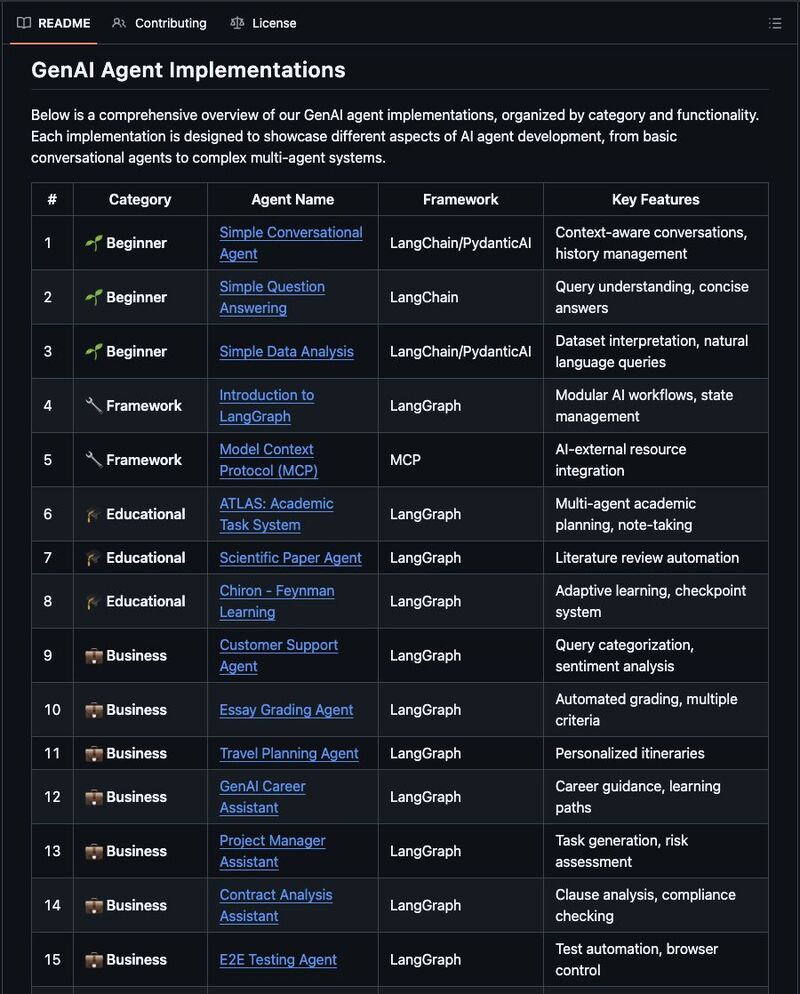
3. GenAI Agents
Tutorials and code for building generative AI agents.
🔗 lnkd.in/dEt72MEy
4. Made with ML
Learn to design, build, and deploy real ML apps.
🔗 lnkd.in/d2dMACMj
5. Prompt Engineering Guide
Learn to write powerful and effective prompts.
🔗 lnkd.in/dBUCsVJ8
6. Hands-On AI Engineering
Practical LLM-powered apps and agent examples.
🔗 lnkd.in/dgQtRyk7
7. Awesome Generative AI Guide
Curated hub for genAI research and tools.
🔗 lnkd.in/dJ8gxp3a
8. Designing Machine Learning Systems
Summaries and resources from the popular ML systems book.
🔗 lnkd.in/dEx8sQJK
9. ML for Beginners (Microsoft)
Free beginner-friendly ML curriculum.
🔗 lnkd.in/dBj3BAEY
10. LLM Course
Roadmaps and hands-on notebooks to build LLM apps.
🔗 lnkd.in/diZgGACG
I'm curating 50+ AI Agent resources on my profile worth checking out 👋
English


RD रीट्वीट किया
Kubernetes Resource Management
Kubernetes Resource Management ensures that applications use compute resources,CPU, memory, and storage,efficiently and predictably across the cluster. It helps maintain performance, prevent resource starvation, and enforce fair usage among workloads running in shared environments.
Why Resource Management Matters
→ Prevents one workload from consuming all system resources.
→ Ensures applications run smoothly under varying loads.
→ Supports scaling decisions and cluster stability.
→ Allows teams to enforce policies and control costs.
Resource Requests
→ The minimum amount of CPU or memory a container needs to run reliably.
→ Kubernetes uses requests during scheduling.
→ A Pod is placed on a node only if the node has enough free requested resources.
Characteristics
→ CPU requests are measured in millicores (e.g., 250m = 0.25 CPU).
→ Memory requests are measured in MiB or GiB.
→ Ensures guaranteed baseline performance.
Resource Limits
→ The maximum amount of CPU or memory a container can use.
→ Prevents containers from exceeding allowed usage.
→ Protects the node from overload and avoids OOM (Out Of Memory) issues.
Behavior
→ If a container exceeds memory limit → it gets terminated.
→ If it exceeds CPU limit → it gets throttled but not terminated.
Quality of Service (QoS) Classes
Kubernetes assigns Pods a QoS class based on their resource configuration.
Guaranteed
→ Both requests and limits set equally for all containers.
→ Highest priority during resource pressure.
Burstable
→ Requests are lower than limits.
→ Better flexibility for variable workloads.
BestEffort
→ No requests or limits defined.
→ Lowest priority and most vulnerable to eviction.
Resource Quotas
→ Applied at the Namespace level.
→ Restrict total CPU, memory, and object counts.
→ Prevent teams or applications from over-consuming cluster resources.
Common Quotas
→ CPU and memory limits.
→ Number of Pods, Services, PVCs, and ConfigMaps.
→ Storage limitations.
LimitRanges
→ Set default and maximum resource requests/limits within a Namespace.
→ Enforce consistency across all Pods.
→ Ensure applications follow organizational resource policies.
Horizontal Pod Autoscaler (HPA)
→ Automatically adjusts the number of Pod replicas based on metrics.
→ Common metrics: CPU usage, memory usage, custom application metrics.
→ Helps applications scale under load and reduce resources when idle.
Vertical Pod Autoscaler (VPA)
→ Automatically adjusts CPU and memory requests/limits for Pods.
→ Ideal for stateful or long-running workloads.
→ Ensures optimal container sizing over time.
Cluster Autoscaler
→ Adjusts the number of nodes in the cluster.
→ Adds nodes when Pods cannot be scheduled.
→ Removes nodes when underutilized.
Best Practices
→ Always define resource requests and limits for every container.
→ Avoid BestEffort Pods in production environments.
→ Use autoscaling where workloads fluctuate.
→ Apply Quotas and LimitRanges in shared clusters.
→ Monitor usage with tools like Prometheus, Metrics Server, and Grafana.
→ Start with conservative values and adjust based on observation.
Quick tip
Kubernetes Resource Management ensures fair, efficient, and reliable use of compute resources across the cluster. Through requests, limits, quotas, autoscalers, and policies, you can maintain predictable performance and cost-effective workloads.
For a complete guide on Kubernetes performance, scaling, and cluster operations, get this ebook:
→ codewithdhanian.gumroad.com/l/jwjls


English
If you are into tech, follow these guys:
@techyoutbe
@e_opore
@yourclouddude
Their posts are super useful and will help you learn new things everyday.
Also please tag others who provide educational posts about tech.
English




RD रीट्वीट किया

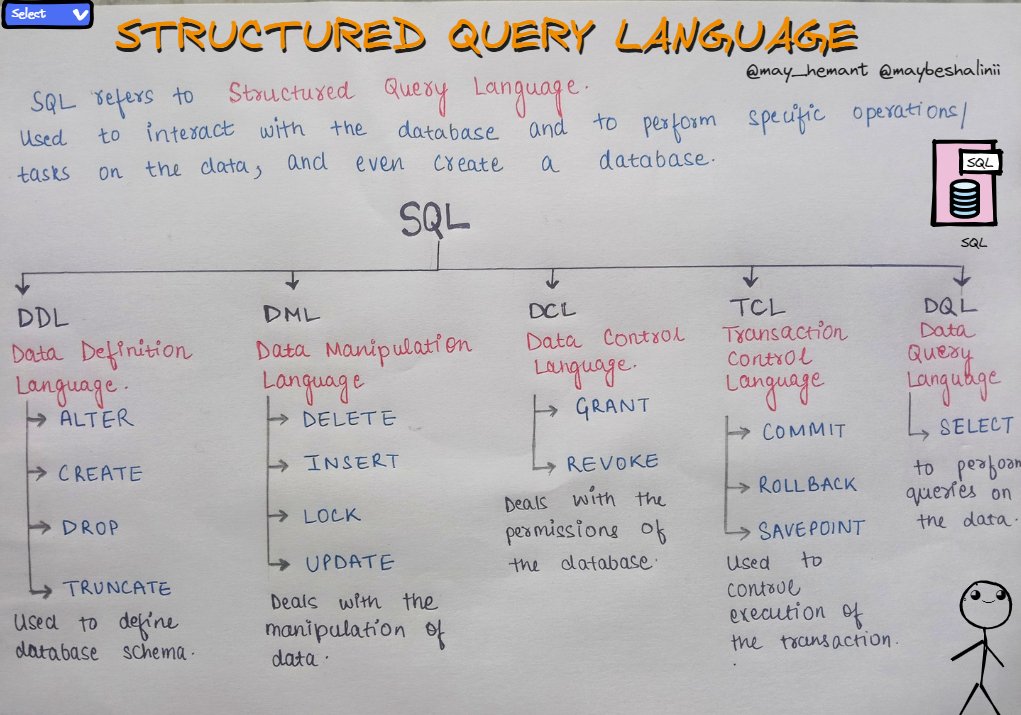
Don't forget to understand these essential SQL topics if you're just starting out.
1. SQL Basics
- SELECT Statement:
It's like asking the database for specific information.
- FROM Clause:
Tells the database where to look for that information.
- WHERE Clause:
Filters out the stuff you don't need.
- ORDER BY Clause:
Arranges the results in a specific order.
2. Data Manipulation
- INSERT: Adds new data.
- UPDATE: Changes existing data.
- DELETE: Removes data.
- MERGE: Combines these actions.
3. Data Definition
- CREATE TABLE: Makes a new table.
- ALTER TABLE: Edits an existing table.
- DROP TABLE: Deletes a table.
- INDEXES: Helps with finding data quickly.
4. Constraints
- PRIMARY KEY: Ensures each row is unique.
- FOREIGN KEY: Keeps data relationships intact.
- UNIQUE: Ensures values are unique.
- DEFAULT: Sets a value if none is given.
5. Joins (Really Important)
- INNER JOIN: Combines data from different tables.
- LEFT JOIN: Gets all data from one table and matching data from another.
- RIGHT JOIN: Opposite of LEFT JOIN.
- FULL JOIN: Gets data if it's in either table.
- SELF JOIN: Links data within the same table.
6. Subqueries:
- Correlated Subqueries: Subqueries connected to the main query.
- Scalar Subqueries: Subqueries that return a single value.
- Subquery in FROM Clause: Using a subquery as a table.
7. Aggregation Functions:
- SUM, COUNT, AVG, MAX, MIN: Math on groups of data.
- GROUP BY: Groups data before doing math.
- HAVING: Filters groups based on math results.
8. Views:
- CREATE VIEW: Makes a pretend table.
- ALTER VIEW: Changes the pretend table.
- DROP VIEW: Deletes the pretend table.
9. Transactions:
- BEGIN TRANSACTION, COMMIT, ROLLBACK: Ensures data stays safe and consistent.
- ACID Properties (Important): Rules for safe transactions.
10. Database Security:
- GRANT and REVOKE: Decides who can do what.
- Roles: Groups of permissions for users.
11. Normalization (Important):
- 1NF, 2NF, 3NF, BCNF, 4NF:
Ways to organize data for efficiency and accuracy.
12. Indexes:
- Clustered vs. Non-Clustered Indexes: Different ways to find data quickly.
13. Database Management Systems (DBMS):
- Different software tools for working with databases, like MySQL etc.
SQL has many more things to learn, but these topics will give you a strong starting point if you're new to it.
English


RD रीट्वीट किया

Devops in Plain English :
Git – Tracks changes in code
Jenkins – Automates build and deploy
Docker – Packages apps into containers
Kubernetes – Runs & scales containers
Terraform – Creates resources on cloud
Ansible – Automates configurations.
Prometheus – Collects system metrics
Grafana – Visualizes metrics and logs
AWS – Provides cloud services.
AWS CLI – Controls AWS from terminal

English

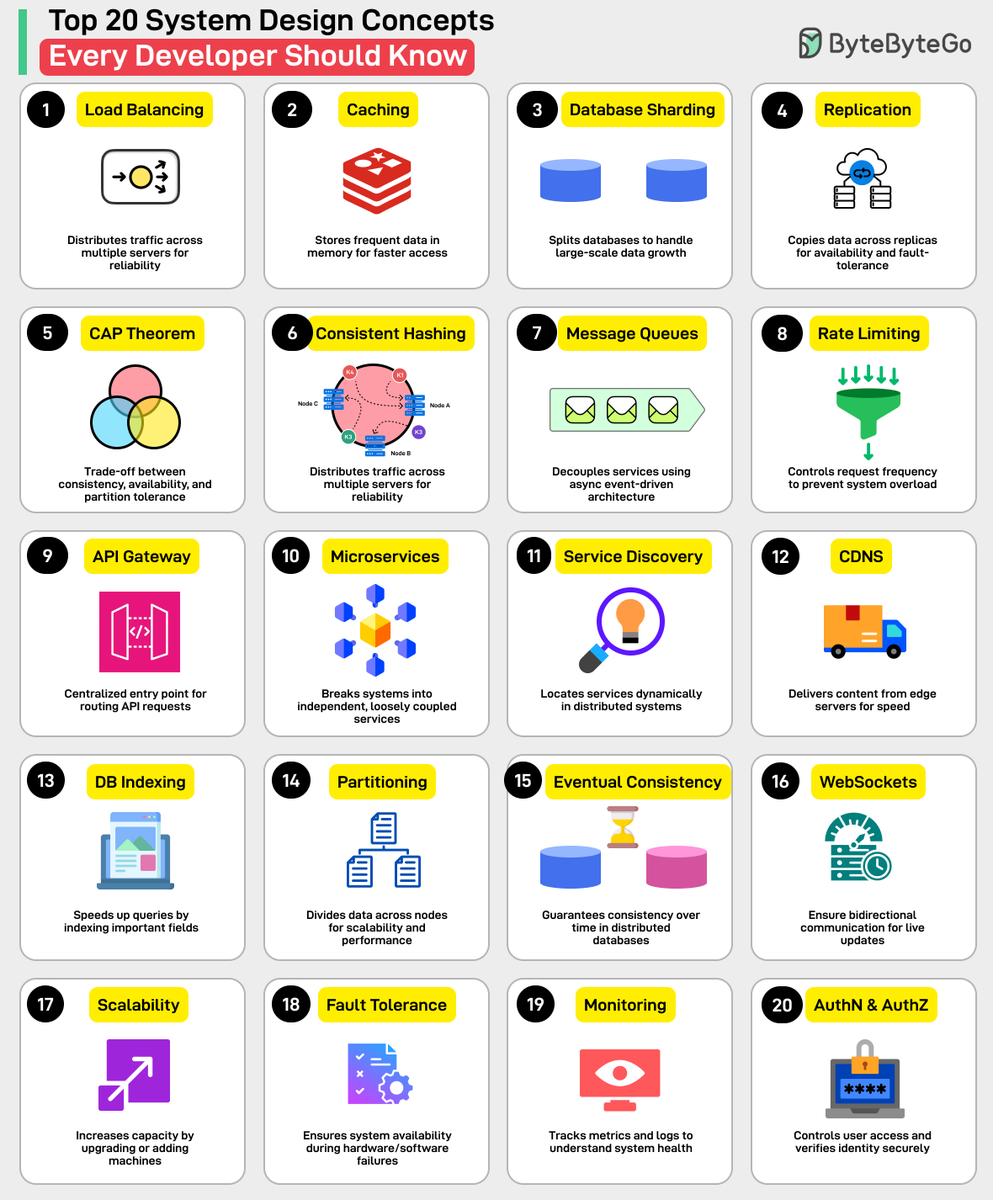
RD रीट्वीट किया
API DESIGN IN SYSTEM DESIGN
→ API Design defines how different parts of a system communicate reliably, securely, and efficiently.
→ A well-designed API ensures scalability, consistency, maintainability, and great developer experience.
→ 1. WHAT AN API IS
→ API (Application Programming Interface) allows one service to communicate with another
→ Defines endpoints, methods, data formats, authentication, and response structures
→ Used in microservices, mobile apps, web apps, and third-party integrations
→ 2. PRINCIPLES OF GOOD API DESIGN
→ Consistency in naming, responses, and behavior
→ Simplicity → easy to understand and use
→ Predictability → same input produces same output pattern
→ Scalability → handles high traffic
→ Security → protects sensitive data
→ Documentation → makes integration easy
→ 3. REST API DESIGN BASICS
→ Uses HTTP methods to perform CRUD operations
→ Standardized communication over HTTP/HTTPS
→ Resource-based architecture
Common methods:
→ GET → read data
→ POST → create data
→ PUT → update entire resource
→ PATCH → update partial resource
→ DELETE → remove resource
→ 4. ENDPOINT STRUCTURE
→ Should be clean, readable, and resource-based
→ Use nouns → not verbs
→ Use plural forms
Examples:
→ /api/v1/users
→ /api/v1/users/{id}
→ /api/v1/orders/{orderId}/items
→ 5. REQUEST & RESPONSE FORMATS
→ Use JSON as the standard format
→ Keep responses consistent
Response example:
{ "status": "success", "data": { "id": 4, "name": "Dhanian" } }
→ On errors, return structured responses with messages
→ 6. VERSIONING
→ Ensures backward compatibility
→ Helps introduce new features without breaking clients
→ Approaches:
→ URI versioning → /api/v1/users
→ Header versioning → Accept: application/vnd.api.v2
→ 7. PAGINATION, FILTERING & SORTING
→ Critical for large datasets
→ Prevents overloading server with heavy responses
Pagination example:
→ /api/v1/products?page=1&limit=20
Filtering example:
→ /api/v1/products?category=phones&brand=samsung
Sorting example:
→ /api/v1/products?sort=price_asc
→ 8. AUTHENTICATION
→ Verifies the identity of the client
→ Common methods:
→ API Keys
→ JWT (JSON Web Tokens)
→ OAuth 2.0
→ Session-based authentication
→ 9. AUTHORIZATION
→ Determines what the authenticated user can access
→ Role-based access:
→ admin, editor, user
→ Permission-based:
→ read, write, delete, update
→ 10. RATE LIMITING
→ Prevents abuse and protects infrastructure
→ Limits number of requests per minute/hour
→ Techniques:
→ Token Bucket
→ Leaky Bucket
→ Fixed Window Counter
→ 11. IDEMPOTENCY
→ Recommended for safe and reliable APIs
→ Same request executed multiple times should have same effect
→ GET, PUT, DELETE → idempotent by nature
→ POST → not idempotent unless specially designed
→ 12. API GATEWAY
→ Single entry point for all API requests in microservices
→ Handles routing, caching, throttling, logging, authentication
→ Tools:
→ Kong, Nginx, AWS API Gateway, Apigee
→ 13. DOCUMENTATION & DEVELOPER EXPERIENCE
→ Use OpenAPI/Swagger for clear documentation
→ Provide examples, status codes, request/response schemas
→ Easy onboarding → fewer support issues
→ Tip
→ API design is essential for scalable, secure, and maintainable systems
→ Focus on clarity, consistency, proper versioning, and strong security
→ Use API Gateways for advanced microservice architectures
→ Apply pagination, rate limits, and structured responses for smooth performance
Grab the full System Design Handbook:
codewithdhanian.gumroad.com/l/fywkaw


English


Hey @X 👋
I’m looking to #connect with people who are into:
✅ DSA
💻 Leetcode / CP
🎨 Frontend
💼 Backend
✨ Full Stack
🧑💻 DevOps
🧠 AI/ML
🧱 Web3
📊 Data Science
💸 Freelancing
🐍 Python
🫂 Networking
🏆 Product
🔨 Startups
Let’s build, learn & grow together
#LetsConnect
English