Textastic

2.8K posts

Textastic banner
Textastic

Textastic

@Textastic

Textastic / Alexander Blach. Text, code, and markup editor for iOS and Mac. @[email protected]

Bergabung Eylül 2010
3 Mengikuti3.8K Pengikut
Textastic me-retweet

Enid
Enid@ios_dev_alb·
My friend @Lextar just released a new version of the @Textastic code editor for iPhone and iPad 🚀 If you’ve been waiting to download this well-known app, now it’s free to download! 🎉 apps.apple.com/us/app/textast…
English
4
4
40
6.6K
Textastic
Textastic@Textastic·
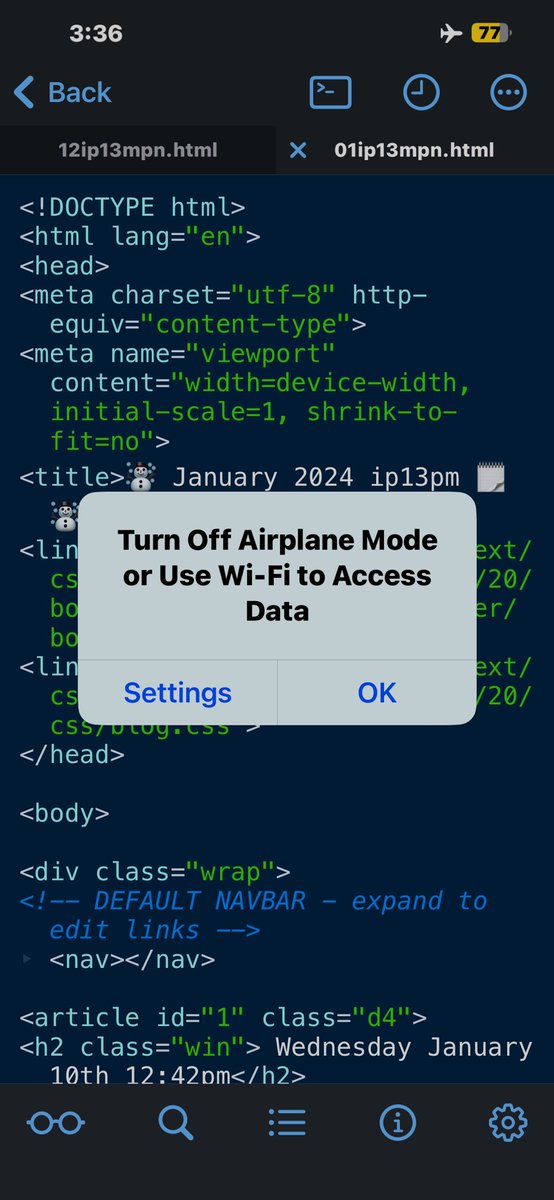
@jorge22 The alert is shown by the OS because of "UIRequiresPersistentWiFi" in Textastic's Info.plist. This was originally added so that the WebDAV server can bind to the device's Wifi interface. I would need to check if it works without it.
English
0
0
1
25
jorge22🇺🇦📸
jorge22🇺🇦📸@jorge22·
@Textastic my app keeps crashing after I write with ending with an emoji 😭 but luckily it seems to be saving what I wrote 😅. I've been using the app for years for my journal app and other than it crashing would love it if it had a toggle to turn off its desire to go online.
jorge22🇺🇦📸 tweet media
English
2
0
0
38
Textastic
Textastic@Textastic·
@jorge22 Can you please send me a screen recording video of the Emoji crash so I can see the steps to reproduce the issue?
English
0
0
0
20
Textastic
Textastic@Textastic·
Textastic Code Editor 10 for iPad and iPhone is now available on the App Store! 🚀 It features a refreshed user interface, improved Swift support and easier file upload.
Textastic tweet mediaTextastic tweet mediaTextastic tweet mediaTextastic tweet media
English
0
12
34
5.4K
Textastic
Textastic@Textastic·
Textastic is now also on Mastodon at @textastic" target="_blank" rel="nofollow noopener">social.blach.io/@textastic
English
0
0
7
1.7K
Textastic
Textastic@Textastic·
Textastic 9.9 for iOS is now available. It supports the iPhone 14 Pro and iPhone 14 Pro Max display sizes. It also fixes issues with text selection when using an external keyboard on iOS 16 and fixes problems when entering Korean text on iOS 16.
English
1
3
11
2.8K
Textastic
Textastic@Textastic·
@moonlitmurray Yeah. Maybe I can also improve it so that previewing external files in Safari is actually possible.
English
0
0
1
0
Murray By Moonlight
Murray By Moonlight@moonlitmurray·
@Textastic Ah, I think that is the solution. Although, maybe something that pops up and says, ‘To preview in Safari, please open the file directly in Textastic’ rather than hiding it entirely? Otherwise, I wouldn’t have been aware of the function at all. Just a thought.
English
1
0
0
0
Murray By Moonlight
Murray By Moonlight@moonlitmurray·
@Textastic Hi, it appears open in Safari is no longer working? Can you confirm? (iOS 15.6.1, Textastic 9.8.9). To reproduce: Open html file, click on glasses icon, click on ‘…’ button, click on ‘Open in Safari’ == nothing happens. I’m pretty sure this was working a few weeks ago
English
1
0
0
0
Textastic
Textastic@Textastic·
@moonlitmurray The first two options disappear when an external file open. It looks like the third option is still there when it shouldn’t. Thanks for letting me know about this issue. I’ll fix it in an update.
English
1
0
1
0
Textastic
Textastic@Textastic·
@moonlitmurray Oh, I see now! There are several ways to open the preview in Safari: 1. When the code editor is open, tap "…" and choose "Preview in Safari" 2. Tap and hold the preview button and choose "Preview in Safari" 3. What you used: in the preview screen, tap "…" and "Open in Safari"
English
2
0
0
0
Textastic
Textastic@Textastic·
@moonlitmurray Interesting. For external files there should not even be a "Preview in Safari" option. It would be great if you could send me screen recording video (to support@textasticapp.com) of how you are opening the file using the share sheet and how opening in Safari then fails.
English
2
0
0
0
Murray By Moonlight
Murray By Moonlight@moonlitmurray·
@Textastic I think I figured this out (tho I don’t know why the behaviour changed). Previously I was opening the html file in Textastic via the iOS share menu. However, when I move the file into the Textastic folder and open ‘internally’, the ‘Open in Safari’ works. Does that make sense?
English
1
0
0
0