

Michael Murr - Coding Instructor
440 posts

Michael Murr - Coding Instructor
@2MPythonDev
👨🎓 32k Students on Skillshare & Udemy ⏳️ 45k Paid Hours Watched 🔥 100+ Private Tutoring Students 👇 Follow to start your Python learning Journey
Schedule a call ➜ Katılım Şubat 2020
84 Takip Edilen48 Takipçiler

Delete Sales Navigator.
Delete your manual LinkedIn tab-switching.
Delete the spreadsheet you're using to track who you messaged last week.
You can book more qualified meetings using Claude and the LinkedIn MCP.
It's not glamorous... but if you start today, you could have a fully automated lead-finding and messaging system running by the end of this week.
Here is what it actually does:
Claude connects directly to LinkedIn via LinkNav MCP. No scraping. No exports. No third-party tools.
You tell it your ICP. It finds leads who have been active on LinkedIn in the last 24 hours. Not a stale list. Live signals.
It reads their recent posts and activity. It writes a connection request or opening message built around what they actually just did.
Then it either sends it or enrols them in an automated campaign. You choose.
And when the campaign runs, Claude reads the performance data and tells you exactly what to change for the next one.
The whole thing can be packaged into a single Claude skill. One command. Claude scrapes, filters, scores, campaigns, and reports back.
No Sales Navigator subscription. No SDR. No list buying.
I'll send you the complete build showing exactly how to set it up, including the LinkNav MCP connection, the lead-finding prompt, the messaging workflow, the campaign analyser, and the full skill file.
Just like this post and comment "MCP."
(Make sure you follow.)
English

everything i know about Google Ads.
19 guides. one notion doc. completely free.
from $0 to $7M. PMax. Shopping. YouTube. Competitor Traffic. GMC Unbans...
took me 7 years to learn this.
takes you 5 minutes to get it.
like, RT + comment "GOOGLE" and i'll send it over.
(must be following)
English

Claude + Reddit intelligence + LinkedIn data = Content OS that replaced a $14,500/month team.
(48K followers. 500+ booked calls. $387K in attributed revenue)
This 6-skill system eliminates writers, strategists, researchers, and schedulers using brand memory + real audience intelligence + calibrated AI writers...
→ No more $14,500/month payroll for a 4-person content team
→ No more 20+ hours weekly building content calendars from scratch
→ No more guessing which hooks actually stop the scroll
→ No more AI slop that sounds nothing like you
→ No more starting every post from a blank page
Just 1 topic in → a finished month of content out.
Here's how it works:
→ Brand Memory (your voice, proof, and exact buyer in one file. every skill runs off it. nothing generic ships.)
→ Reddit Intelligence (mines your ICP's subreddits for the exact phrases they use. posts start from real words, not blank pages.)
→ LinkedIn Viral Signal (hooks already stopping the scroll in your niche, last 30 days, ranked by real engagement.)
→ Four Calibrated Writers (thought leadership, lead magnet, story, value. one writer per stage of the buyer journey.)
→ Voice Firewall (7-dimension QA that scores and rewrites every draft before it ships under your name.)
→ Finished Board (every post handed over with its visual and first comment. ready to approve.)
Built on real content infrastructure.
Zero payroll. Consistent output. Enterprise-grade quality.
Results from the system:
- $14,500/month content team eliminated
- 48K LinkedIn followers
- 500+ calls booked from content
- $387K in attributed revenue
Want the complete 6-skill build?
Like + comment "OS" + repost, and I'll DM it to you.
(must be following)
English

I cracked the code to ranking #1 in ChatGPT
companies are still wasting months on Google SEO with zero traction
all while there’s a faster opportunity hiding in plain sight:
LLMs scrape answers out of Reddit discussions
which means you can influence what ChatGPT recommends by posting there
I spent months figuring out:
- what kind of posts actually get picked up
- what subreddits show up the most
- what formats AI keeps pulling from
and how to make your brand show up inside those answers
i put it all together into one simple guide so you can just steal it
inside you’ll learn:
→ the exact type of Reddit posts AI uses
→ how to structure answers so they get picked up
→ where to post so it actually gets picked up
→ why most SEO advice doesn’t work here
→ how to post without sounding like you’re selling
want it?
1. like + follow
2. comment “LLM”
and I’ll send it straight to your DMs

English

NEW OFFER for SaaS / AI companies
• 20 LinkedIn Posts Monthly
• 6-8 Custom Designs (infographics/carousels)
• 3 Lead Magnet Assets
• AI news agent integration (you go viral more often)
• 100% DFY engagement management
• Entire profile set up (new designs & copy)
• 3 Funnel Building CTAs
Comment "AI" and I'll send over the details
ONLY comment if you are a SaaS / AI company that is recently funded or established (this is not free or cheap)
(added $10ks ARR and over $100k+ in pipeline for @LeadpoetAI past 30 days using this system)
English

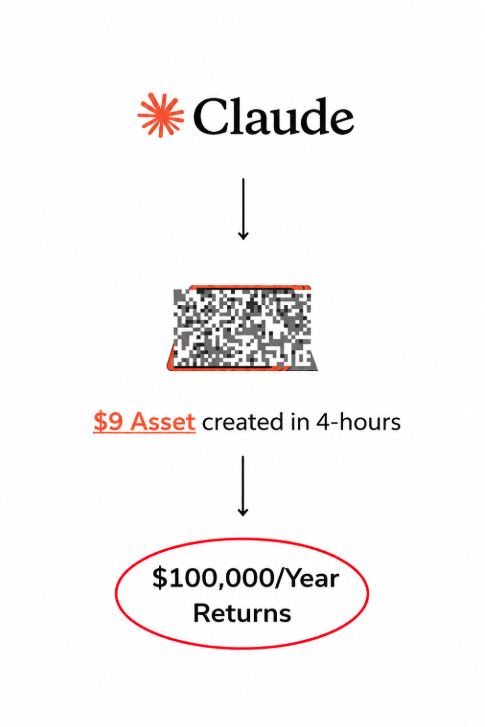
This $9 digital asset makes more than most MBAs and software engineers.
You just need Claude and Ideogram AI to create it.
I shared this with a banker, he's now making $60,000/year.
Comment "Asset" and I'll send you a free course breaking down:
• The asset
• All my prompts
• How to create it with AI
• Additional $199 bonus
Free for the next 48 hours.
English

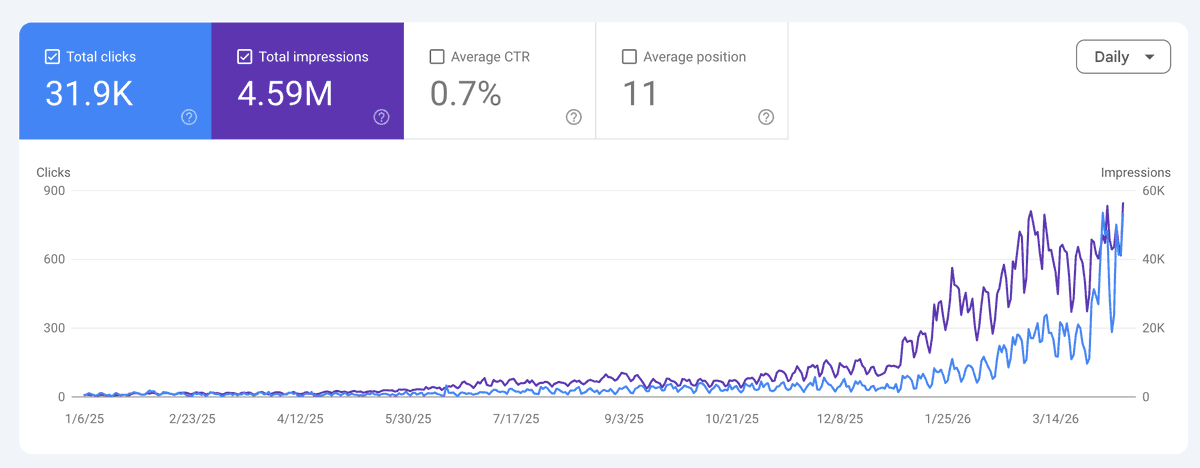
Most SEO agencies will never tell you this:
You can take a website to 100K visits/month in under a year.
Without backlinks, a massive team nor ads.
Just some YOLO SEO.
Do these 7 moves and you'll be playing in easy mode, I swear.
1. Topical map first: know what you're allowed to rank for before even getting started.
2. Rewrite the existing pages before writing new ones, and make sure you comply with your topical map.
3. 90-day editorial calendar, low-hanging fruit only in the beginning. We'll scale that later.
4. 100-200 pSEO pages on a real strategy (not spam). Preferably, you have proprietary data.
5. 3-5 free tools where the market has gaps. You know the ones "Free AI generators" of all types
6. 20-50 commercial pages that match buyer intent. Landings, commercial pages, etc.
7. Weekly optimization on content + internal links. Don't stop optimizign until you see that needle moving. Ok?
Want the full play?
Comment "YOLO SEO" + like this post, and I'll DM the link to the full playbook.
English
Reddit is the EASIEST way to rank #1 on ChatGPT
and it’s much faster than regular SEO
while everyone’s busy competing for the first page of Google, we’ve noticed something strange:
ChatGPT is literally pulling answers straight from Reddit threads
180M+ people are using ChatGPT to search for answers as we speak
this opportunity is getting saturated fast so i put together a simple system to help you rank #1 in ChatGPT fast using Reddit
here’s what you’ll get inside the Reddit Guide:
• the best times to post for faster indexing
• why normal SEO doesn’t fully work for ChatGPT
• the exact post formats ChatGPT tends to pick up
• how to write comments that actually get picked up
• the subreddits that keep showing up in ChatGPT answers
Want the full Reddit guide?
1. like + follow
2. comment “REDDIT”
and I’ll send it over.

English
I just built a Claude Code skill that writes, schedules, and publishes your LinkedIn posts every week while you sleep.
Feed it your profile, your hooks, and a topic or script → it studies your voice and your best-performing formats → generates three post drafts matched to the right photo and scheduled to LinkedIn automatically.
All inside Claude Code.
Perfect for GTM engineers and founders who are still writing posts from scratch every week, spending an hour editing AI drafts that sound nothing like them, and manually uploading content to LinkedIn one post at a time.
If you're posting on LinkedIn in 2026, you already know the math - the accounts that build pipeline aren't the ones with the cleverest copy, they're the ones posting consistently in a voice that sounds genuinely human. Most people ship two posts a week if they're lucky.
This skill solves it:
→ Drop your profile.md with personal stories, professional context, and voice rules into the skill so Claude writes like you from session one
→ The skill reads your hooks.md file of proven formats and no-go openers so Claude never produces the lines saturating your space
→ Pulls from your approved drafts, YouTube scripts, or plain language topic descriptions to generate three options per post
→ Matches each post to the right photo by reading filenames so every visual fits the post's feeling without manual selection
→ Fires directly to LinkedIn via Playwright MCP - pastes, uploads, resizes, and schedules to your preferred time automatically
→ Drops a full week of scheduled posts into LinkedIn from one Sunday morning session
No briefing a ghostwriter. No editing AI slop for an hour. No manually uploading posts one at a time.
What you get:
- profile.md setup guide so Claude learns your voice, stories, and professional context permanently
- hooks.md file structure with proven formats and a no-go list built for your specific space
- Full skill file that generates, reviews, and approves three drafts per topic in seconds
- Playwright MCP setup so Claude publishes and schedules directly to LinkedIn without you touching the platform
- One skill you install once and run every week forever
Built 100% in Claude Code.
I put together a full playbook with the skill file, the profile.md template, the hooks.md structure, and the exact Playwright MCP setup to get this publishing on a schedule.
Want it for free?
> Like this post
> Comment "SKILL"
And I'll send it over (must be following so I can DM)

English

REPEAT AFTER ME
This is what happens when you blast a site with over 3k LISTICLES
Zero traffic from Google
1.4m impressions from CHATGPT (srs)
Comment INDEXCHEX + like this post and I'll DM you the full SOP (must be following)

English

I just built a Claude skill that audits your entire Google Ads account in under 5 minutes 🤯
One prompt → a full account score, wasted spend breakdown, and a prioritized fix list telling you exactly what to change this week.
All inside Claude Cowork.
Perfect for DTC brands and agencies who are running Google Ads but have no idea how much budget is leaking.
If you're managing Google Ads and your "optimization" process is logging in, staring at the dashboard, sorting by cost, and hoping you spot the problem before it costs you another $500...
This audit skill finds it for you:
→ Connects to your live Google Ads data via MCP
→ Scores your account across 6 dimensions: wasted spend, search term quality, keyword health, quality scores, budget allocation, and creative performance
→ Calculates your exact wasted spend in dollars — search terms burning budget with zero conversions
→ Flags quality score issues dragging up your CPCs
→ Identifies keyword cannibalization across campaigns
→ Surfaces your top 5 highest-priority fixes ranked by budget impact
→ Generates a clean audit report you can hand to a client or share with your team
No CSV exports.
No pivot tables.
No guessing where the money went.
What you get:
→ A single Claude skill file you install once
→ An account health score (0-100) every time you run it
→ Exact dollar amount of wasted spend identified
→ Prioritized action list — not "optimize your account," but "pause these 12 search terms and save $847/month"
→ Works with any Google Ads account connected
I'm giving away the full audit skill — the actual .md file you drop into Claude and run against your own account.
Want it?
Like this post
Comment "SKILL"
And I'll send it over (must be following so I can DM)
English

I built 7 Claude Skills that replaced 6+ hours of weekly marketing work.
Now I’m giving them all away.
The Founder Skills Vault:
→ Viral Content Generator
→ Content Pillar Generator
→ LinkedIn Content Analyzer
→ Lead Magnet Idea Generator
→ LinkedIn-to-X Converter
→ Warm DM Strategist
→ Lead Qualifier
This isn’t a prompt pack.
These are production-grade tools that run inside Claude.
It’s the same system I used to grow 7,000+ followers in 3 months.
Want it?
→ Like + RT
→ Comment “FOUNDER”

English
@PaulSolt Hey Paul I need help. I've been trying to use Codex CLI on Windows 10 VS code but it's very slow at running commands and looking through files. Claude and gemini work perfectly fine.
I tried WSL but barely made any improvements any suggestion? Thank you
English

👋 If you’re new to Codex, here are 7 beginner tips for apps with Codex. (Bookmark it and use it tonight)
1. Start with: GPT-5.4 high
That is high reasoning. It is enough. Don’t be tempted by "xhigh" unless working on something really tricky. It uses more tokens and will be slower to finish.
2. Sometimes, more reasoning may not help. You may need to give your agents better docs that are up to date. I prefer to have my agents create Markdown docs from DocSet that are local, instead of web scraping.
I use DocSetQuery to create docs from Apple DocSet bundles. github.com/PaulSolt/DocSe…
3. Read @steipete's post to get started.
Bookmark his blog and follow him. Read his post, it’s gold, and so are his other workflow posts.
steipete.me/posts/2025/shi…
4. Copy aspects from Peter’s agents .md file and make it your own. There are thousands of hours of learning in his open-source projects.
github.com/steipete/agent…
Use the scripts too, things like committer for atomic commits are super powerful when multiple agents work in one folder.
5. Just talk to Codex. You don't need complex rules. You don't need to create huge Plan .md files.
You can get really good results by just working on one aspect of a feature at a time, handing it off, and then letting Codex do it.
If you get bored waiting, start up another project. Ask it to do something and then go back to the original one. Most likely, it will be done unless you're doing a huge refactor.
6. If you're making an iOS or macOS app, check out my App-Creator skill: super-easy-apps.kit.com/app-creator
It's based on Makefiles and will give your agent eyes into your Xcode build failures and test failures. It needs this feedback loop to write working code and fix bugs.
7. You can always ask your agent to copy something from another project. Peter does this all the time and has agents leveraging work they’ve already done for new projects.
I have my agents refer to previous project documentation or code patterns.
See my app workflow video: How I use Codex GPT 5.4 with Xcode (My Complete Workflow): youtube.com/watch?v=ls9QaD…
Enjoy your next app!

YouTube
English
@bridgemindai Hey I have a question been trying to run codex on Windows 10 VS Code but it's extremely slow. Any solutions. I've tried WSL and barely any improvement. Sanboxing didn't work permission and YOLO mode also barelt anything. It's mainly reading files and bash commands powershell
English

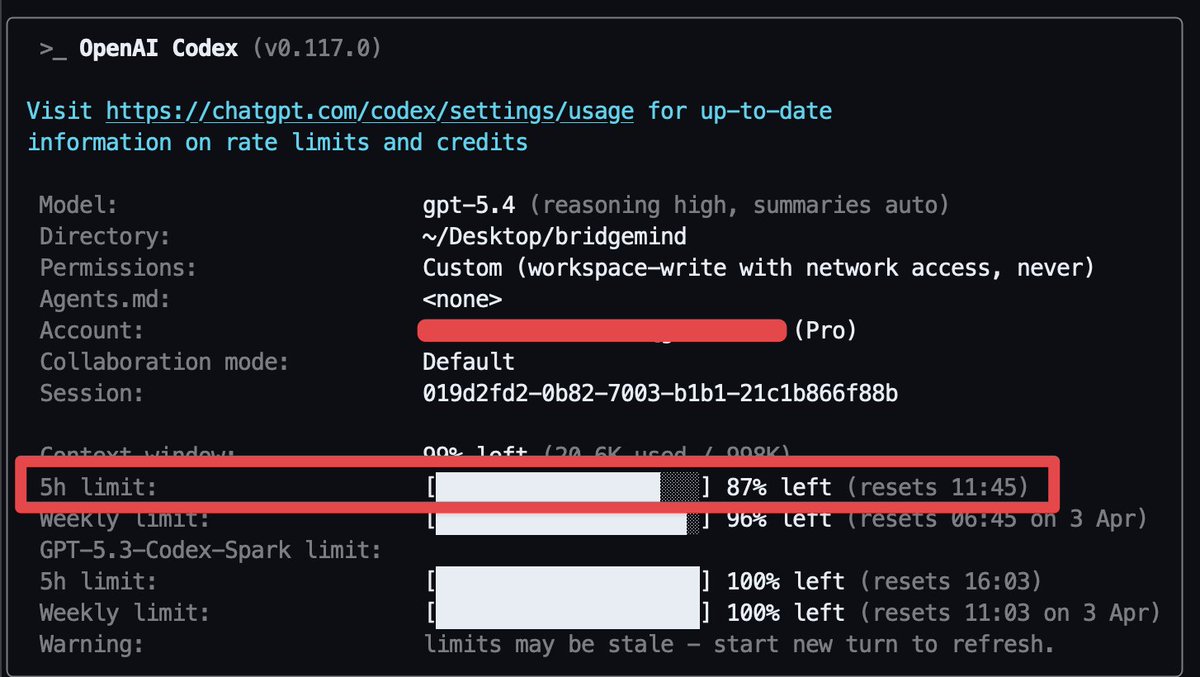
Been running Codex with GPT 5.4 High all morning.
87% of my 5 hour limit still left.
On Claude Code I'd be at 0% by now.
OpenAI gives you limits you can actually work with.
I've been shipping all day without a single rate limit or 529 error.
This is what $200/month gets you on Codex.
English
@thsottiaux Hi Tibo I've been having an issue Codex on Windows 10 in VS Code. It seems to take a huge amount of time running Bash commands and finding files in directories. I tried using it through WSL but the problem only slightly improved. Any suggestions? I really want to test it vs Claud
English

Claude Cowork just got computer use and it's absolutely insane 🤯
Schedule a task once → Claude opens your browser, logs into Meta Ads Manager, pulls your performance data, analyzes your creatives, and saves a finished brief to your computer.
Every morning, while you sleep.
All inside Claude Cowork.
Perfect for DTC brands and agencies who are still manually pulling ad reports, screenshotting competitor ads, and copy-pasting data between tools every week.
If you're running Meta Ads and your weekly workflow looks like this — log into Ads Manager, export a CSV, open it in a spreadsheet, try to figure out why CPAs spiked, screenshot competitor ads from the Ad Library, paste everything into a doc, write a brief from scratch ...
Claude Cowork now does the entire thing without you touching your keyboard:
→ Opens Chrome and navigates to your Meta Ads Manager
→ Pulls performance data across every active creative
→ Opens the Meta Ad Library and checks 5 competitors for new ads
→ Analyzes hook performance, fatigue signals, and winning angles
→ Writes a creative brief in your brand voice
→ Saves everything as real files directly to your computer
→ Runs on a schedule — daily, weekly, whatever you set
No CSV exports.
No copy-pasting between tools.
No sitting at your desk pulling reports.
What you get:
→ A daily performance snapshot without opening Ads Manager
→ Competitor ad monitoring on autopilot
→ Creative fatigue signals before CPAs blow up
→ A data-backed brief your creative team can execute immediately
→ All of it running while you're getting coffee, at the gym, or on your phone
Send a task from your phone. Claude picks it up on your desktop. You get the finished deliverable.
I put together a full playbook with the exact setup, the prompts, the scheduled task configuration, and 5 DTC workflows that use computer use.
Want it for free?
> Like this post
> Comment "CLAUDE"
And I'll send it over (must be following so I can DM)
English
Claude DESTROYS ChatGPT for marketing on LinkedIn.
I put together the Claude LinkedIn Marketing Funnel (below)
Claude is by FAR the best at building building marketing funnels.
I use my info combined with my prompts to build out marketing strategies, assets, and funnels.
My prompts are INSANE and replace entire marketing teams.
I compiled ALL my Claude prompts into one doc:
• Lead Magnet Generator Prompt
• Lead Magnet Asset Prompt
• Lead Magnet Funnel Build Out Prompt
• Claude Landing Page Prompt
• Personal Content Database Prompt
• The Premium LinkedIn Profile Prompt
• Competitor Analysis Prompt
• ICP Analysis Prompt
• Tech Stack
Want access to the doc?
→ COMMENT "Claude"
→ FOLLOW me and I'll DM the doc!

English
R.I.P 9 to 5.
You don’t need a job anymore.
You need 2 tools to earn 10x more than your salary:
Claude + Ideogram AI.
How? By creating AI eBooks.
I make $50K/month publishing 90-page books on Amazon.
Here’s the exact system:
• Find topics people are already buying
• Use ChatGPT to outline in minutes
• Let Claude write the full book
• Use Ideogram to design covers
• Publish on Amazon KDP
• Scale with ads
That’s it.
Just execution and a predictable strategy.
I usually charge $199 for this.
But for the next 24 hours, I’m sharing my entire AI Publishing strategy for free.
To get it... Comment “AI” and I’ll send it.
(First 500 only).

English

I built 31 automations for clients last year.
Every single business - from solo founders to 50-person teams - needed some version of the same workflows.
So I documented all of them. Every workflow. Every department. And the exact plain-English prompt that builds each one in minutes.
Sales & CRM: lead capture, follow-up sequences, deal tracking, proposal generation, pipeline alerts
Marketing: social scheduling, email sequences, content repurposing, UTM tracking, review requests
Operations: invoice generation, payment reminders, inventory alerts, automated reporting
Customer Success: onboarding emails, NPS surveys, churn detection, support routing
Admin: meeting scheduling, expense tracking, document generation, approval workflows
Each one includes the specific prompt I use to build it - not vague instructions, the actual sentence I type.
Plus which 3 to start with if you want to save 10+ hours/week immediately.
Comment "PLAYBOOK" and I'll DM you the full PDF for free.
English

Claude can now run your entire content operation from end to finish.
These are the 5 top agents for GTM and social media teams:
I used to spend HOURS trying to figure out content.
What to write.
Who to target.
Which topics are gaining traction.
How to turn a post into a lead magnet.
Whether anything was actually working.
Now?
I run everything through a squad of Claude agents that do the heavy lifting for me.
Here's my team:
→ 1. LEAD MAGNET ENGINEER
Connects to your Notion workspace and reads your ICP docs, brand guidelines, and tool database.
Finds the exact gaps your audience needs filled.
Outputs:
• Complete Notion-formatted playbook
• Toggle sections with setup steps
• Tool recommendations from YOUR stack
• Copy-paste templates ready to publish
→ 2. SOCIAL MEDIA EXPERT
Takes your top 50+ posts and engagement data as input and builds a hook framework.
Scores each angle by:
• Scroll-stopping power in 150 characters
• Specificity of tools and outcomes
• CTA response likelihood
• Contrarian or pattern-interrupt potential
• ICP fit for GTM professionals
• Tone match against your brand voice
Then ranks them - so you know which angle wins before you post.
→ 3. CREATIVE DIRECTOR
Searches your past visual assets and brand guidelines showing what converts.
Looks at:
• LinkedIn preview image performance
• Lead magnet cover formats
• Workflow diagram structures
• Before/After comparisons
• Tool stack visualizations
• Competitor visual benchmarks
Even gives you a complete Midjourney prompt and designer brief ready to execute.
(yes, you get a literal production-ready brief for every asset)
→ 4. RESEARCH ANALYST
Monitors trending GTM topics and surfaces rising opportunities before they peak.
→ 5. PERFORMANCE TRACKER
Takes all your post data and builds a 7-day forward calendar:
• Which hook types outperform 2.3x baseline?
• When to space lead magnet posts?
• Which topics to double down on vs kill?
• Optimal Tue-Thu 8-10am ET rhythm?
Result:
✅ Lead magnets created directly in Notion - zero copy/paste
✅ Posts written to a 500+ reaction standard
✅ Visual briefs ready for designers or AI tools
✅ Content gaps identified before the feed saturates
✅ Calendar optimized weekly based on real engagement data
If you're running content to attract new prospects, this is the cleanest system to operationalize it.
Reply AGENTS
and I'll send you the full 2026 Social Media Agents setup guide - including all 5 Claude project instructions you can copy straight in.
English