AI's Nest

1.3K posts

AI's Nest banner
AI's Nest

AI's Nest

@AINestHub1

AI & Tech Educator. Sharing Insight on AI tools/ Marketing🔦 AI automation and Workflows for businesses to make lives easy. Learn AI from here🫵

DM For Collaboration Katılım Ağustos 2025
1.1K Takip Edilen25.2K Takipçiler
Sabitlenmiş Tweet
AI's Nest
AI's Nest@AINestHub1·
ChatGPT Images 2.0 is not just image generation. It introduces: • UI-like screenshots • accurate text inside images • structured layouts (posters, apps, diagrams) 👉 AI is learning how software looks and functions 🌐 OpenAI announcement page: openai.com/index/introduc…⁠�
English
5
2
3
231
kamran Hassan
kamran Hassan@Rana_kamran43·
💥BREAKING: Happy Horse + GPT-IMAGE-2 just dropped on GlobalGPT and it’s completely free to try. Realistic physics, native audio-video generation, and next-level image control. No caps. No geo-blocks. No invites. ↓
English
5
7
32
3.9K
Muhammad Ayan
Muhammad Ayan@socialwithaayan·
AI is changing how short dramas are made. Pippit's AI Short Drama Agent can turn a plain script into a short drama with 3D environments, consistent characters, and professional lighting in one batch. What used to need a full production workflow can now start with one script. Let's break it down:
English
18
18
66
29.5K
Muhammad Ayan
Muhammad Ayan@socialwithaayan·
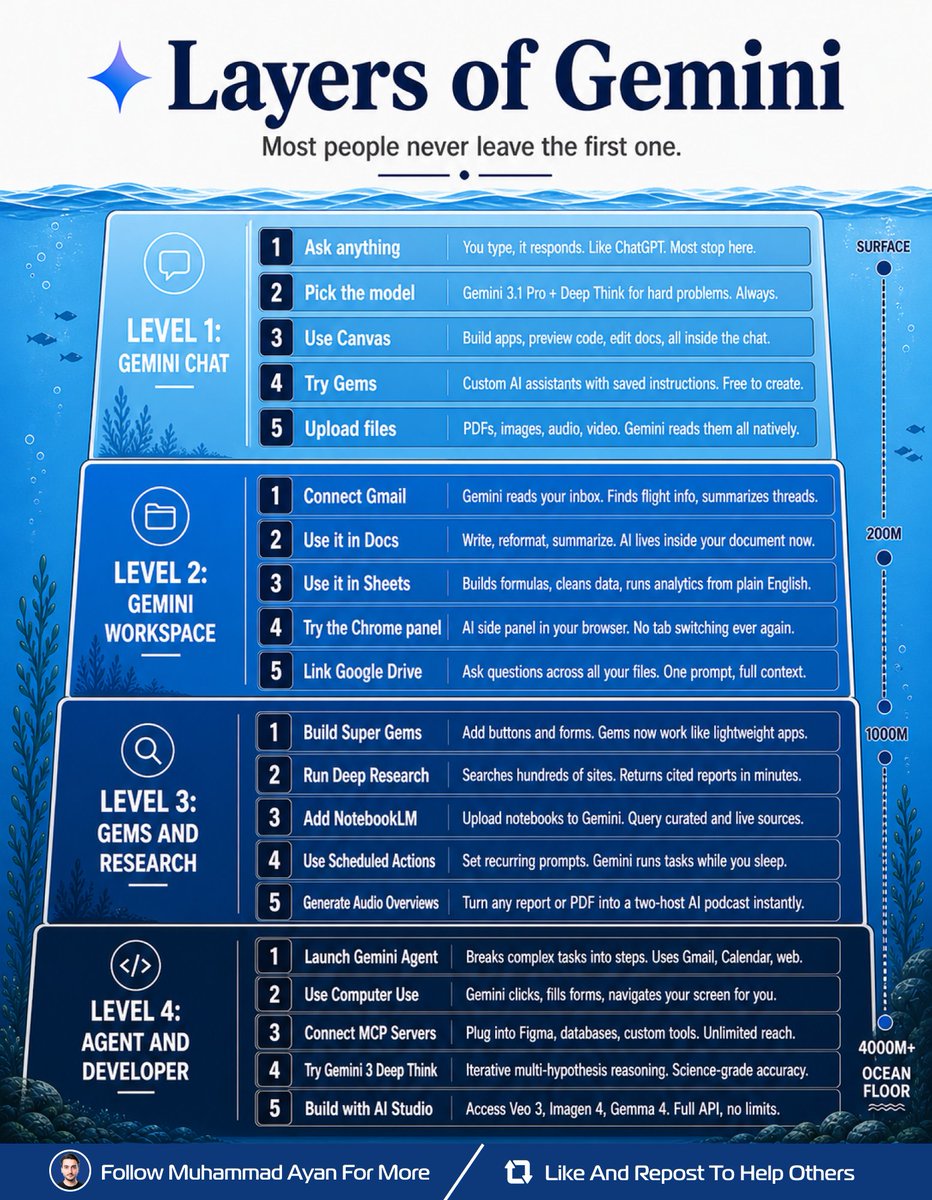
Gemini has 4 layers. Most people never leave the first one. Here's every level and how I use them: Layer 1: Gemini Chat This is where everyone starts. You type, it responds, and you move on. ↳ Ask anything and get instant answers ↳ Switch to 3.1 Pro for hard problems ↳ Use Canvas to build and edit docs ↳ Create Gems as custom AI assistants ↳ Upload PDFs, images, audio, video 90% of users think this is it. They're using Gemini at 25% power. Layer 2: Gemini Workspace Gemini moves inside your actual work. ↳ Gmail connected. Reads your inbox. ↳ Docs connected. AI writes with you. ↳ Sheets connected. Formulas from text. ↳ Chrome panel. Never switch tabs again. ↳ Drive connected. Full file context. No more copy-pasting into a chatbot. Gemini lives where you already work. Layer 3: Gems and Research This is where Gemini becomes a team that thinks, researches, and delivers. ↳ Super Gems work like lightweight apps ↳ Deep Research scans hundreds of sites ↳ NotebookLM adds curated sources ↳ Scheduled Actions run on autopilot ↳ Audio Overviews turn docs to podcasts I run research reports overnight. They're waiting for me every morning. Layer 4: Agent and Developer Most people don't even know this exists. ↳ Gemini Agent breaks complex tasks down ↳ Computer Use navigates your screen ↳ MCP Servers connect to any tool ↳ Deep Think runs science-grade reasoning ↳ AI Studio unlocks the full API Gemini stops assisting at this level and starts executing on your behalf. 4 layers. 20 features. Surface level → chatbot Workspace → assistant Research → analyst Agent → operator The deeper you go. The more it replaces. Which layer are you stuck on? Save this. Go one level deeper today. Follow Muhammad Ayan ♻️ Repost to help others. P.S Try the AI Short Drama Agent on Pippit right now: pippit.ai/?utm_medium=Me…
Muhammad Ayan tweet media
Muhammad Ayan@socialwithaayan

AI is changing how short dramas are made. Pippit's AI Short Drama Agent can turn a plain script into a short drama with 3D environments, consistent characters, and professional lighting in one batch. What used to need a full production workflow can now start with one script. Let's break it down:

English
13
20
63
9.3K
Alamin
Alamin@iam_chonchol·
💥JUST IN: Happy Horse and GPT-IMAGE-2 are now officially live on GlobalGPT — free to try! Create AI videos with realistic physics, native audio-video generation, and advanced image control. No limits. No regional barriers. No invite codes. 👇
English
8
14
19
14.9K
Arcane Ai
Arcane Ai@Arcane_Aii·
Claude can now coach your body transformation like a $500/hour personal trainer from Equinox. Now you don't have to spend on the gym membership, the meal prep service, or the $200/month online coach. Here are 8 prompts that design your workouts, fix your nutrition, and build a lean, strong body in 90 days: Save this thread 🧵👇
Arcane Ai tweet media
English
18
45
73
3.8K
Kyronis
Kyronis@kyronis_talks·
🚨do you understand what Fig just did.. most marketers are still living in tab hell — jumping between 8 different tools, losing context every time they switch, running ads that don’t talk to their landing pages, optimizing in the dark. meanwhile Fig dropped One Workflow. one single flow where the AI actually sees the entire funnel — ads, creatives, pages, testing, optimization — with full context from start to finish. no more fragmented stack. no more “it worked in the ad account but died on the page.” no more starting from zero every time you make a change. the food is still made by humans… but the entire marketing engine that brings customers in might never be fragmented again. One Workflow. One brain. One Fig. Marketing just got dangerously simple.
Fig@figfunnels

Introducing One Workflow by Fig: Run your entire marketing system in one place. Powered by Fig’s full-funnel context, build, launch, and optimize your ads, pages, and actions inside a single workflow.

English
6
13
17
3.3K
Sharbel
Sharbel@sharbel·
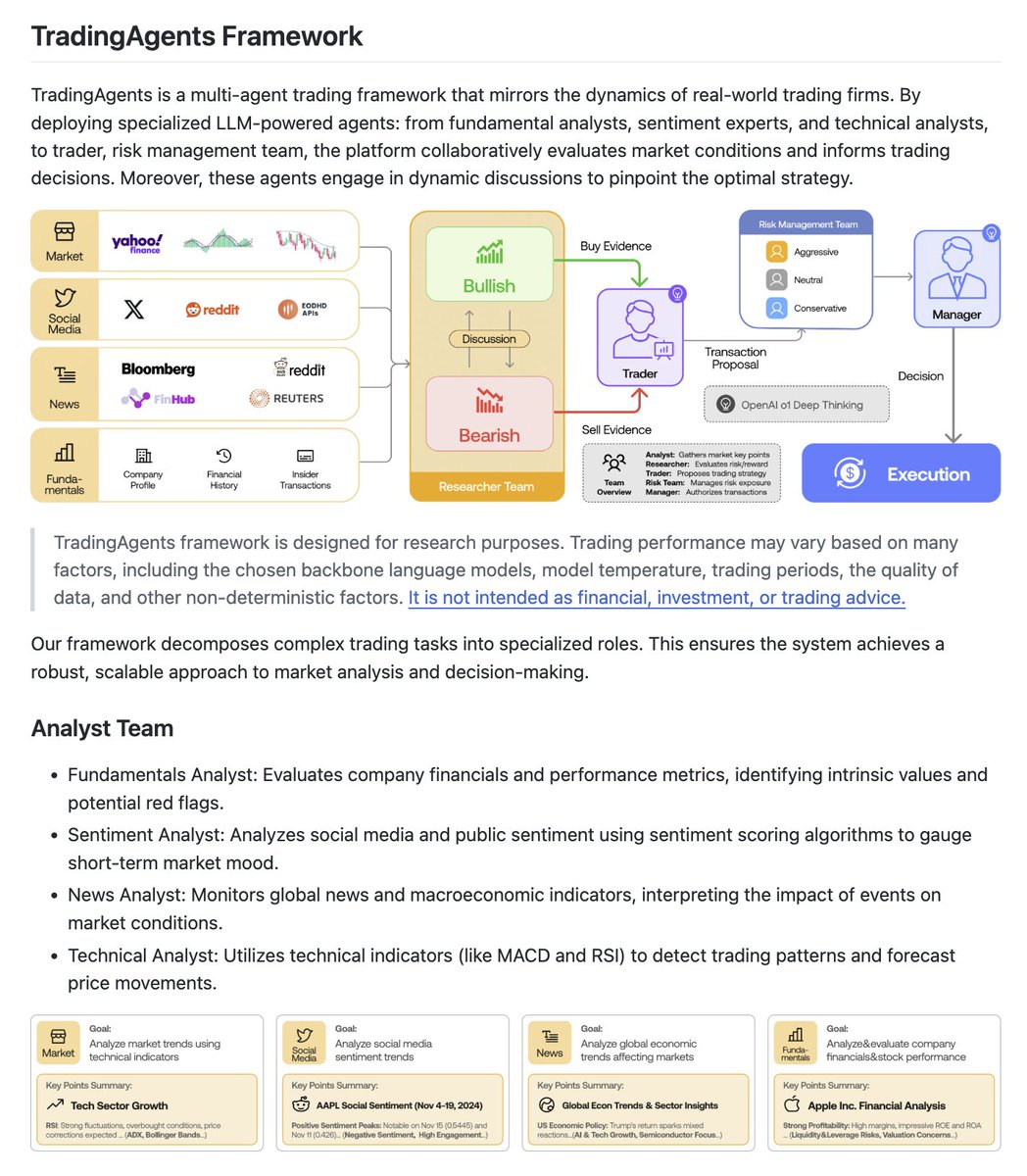
Bloomberg Terminal costs $24,000 a year. Per seat. FactSet starts at $12,000 a year. Per analyst. And every one of those platforms gives you data. Not decisions. You still have to think. Someone built a multi-agent LLM framework that deploys an entire trading desk of AI analysts. Working together. On your machine. For free. It's called TradingAgents. 59,000+ stars on GitHub. You point it at a ticker. A team of specialized AI agents gets to work. One reads the news. One analyzes fundamentals. One reads the charts. One manages risk. A portfolio manager synthesizes everything and makes a call. You watch it happen in real time. Here's what it does: → Multiple specialized agents working in parallel. Fundamentals analyst. Technical analyst. News analyst. Sentiment analyst. Each focused on one job. → Research Manager agent synthesizes all analyst reports before anything reaches the trader. → Trader agent receives the synthesis and places a structured decision with reasoning attached. → Portfolio Manager agent reviews the trade against existing positions and approves or vetoes. → Risk Management agent runs a separate evaluation layer before anything is finalized. → Supports GPT-5.x, Gemini 3.x, Claude 4.x, Grok 4.x, DeepSeek, Qwen, GLM, and Azure providers. Mix and match models per agent. → LangGraph checkpoint resume. If a run fails mid-way, pick up exactly where it stopped. → Persistent decision log. Every trade decision, every agent's reasoning, stored and auditable. → Backtesting with date fidelity. Run the full agent team against historical dates. → Docker support. One command to spin up the entire stack. → REST API and CLI. Automate everything or run it interactively. → Built on a peer-reviewed research paper. arXiv 2412.20138. Here's the wildest part: A single Bloomberg Terminal seat costs $24,000 a year. It gives you data and charts. You still need a human analyst to interpret them. You still need a portfolio manager to weigh the risk. You still need a trader to make the call. TradingAgents deploys all of those roles as AI agents. Simultaneously. On your own hardware. With every decision logged and every reasoning chain auditable. The entire research team. The entire trading desk. Running on your laptop. For $0. Bloomberg Terminal: $24,000/year. Per seat. FactSet: from $12,000/year. Per analyst. Refinitiv Eikon: from $22,000/year. Per user. TradingAgents: $0. Unlimited tickers. Unlimited runs. Your hardware. Your decisions. Forever. 59,017 stars. 11,275 forks. Backed by peer-reviewed research from TauricResearch. Active development since December 2024 with releases through April 2026. Apache-2.0 licensed. Self-hosted. Free forever. 100% Open Source.
Sharbel tweet media
English
11
4
25
1.4K
AI's Nest retweetledi
AI's Nest
AI's Nest@AINestHub1·
🚨 STOP scrolling if you care about the future of laptops. Apple didn’t just release a new machine… They just dropped an AI monster. Apple just made every Windows laptop look outdated. Meet the MacBook Pro M5 Follow @AINestHub1 Like/repost 🧵👇 🔗 apple.com/macbook-pro/
English
4
3
3
340
AI's Nest
AI's Nest@AINestHub1·
@levie The agent “seat” idea is interesting, but as you pointed out, it breaks quickly at scale. One company with 1 powerful agent vs another with 1,000 lightweight agents shouldn’t be priced wildly differently if the output/value is similar.
English
0
0
0
23
Aaron Levie
Aaron Levie@levie·
As agents become the biggest users of software, then all software has to be available in a headless fashion. Agents won’t be using your UI, they’ll be talking to your APIs. So the question becomes what is the business model of software and this headless approach in the future? Here are a few thoughts on how everything plays out based on what we’re seeing and doing at Box, but also conversation with other platforms. 1) Seats don’t go away for *people*. Seats are still a convenient and efficient way to have a customer use technology predictably for a set of users within a baseline set of usage. The key, though, is that when the customer pays for a seat, it has to come with a set of usage of APIs on behalf of that user that the agent can use on their behalf. The user will need to be able to interact with their data and the underlying tool via any agent they work with, and an embedded amount of usage will come with the seat. I would imagine most software -Box included- will enable seats to work with their data at a relatively high volume via systems like ChatGPT, Codex, Claude, Gemini, Cursor, Copilot, Perplexity, Factory, Cogniton, et al. quite seamlessly. If you don’t do this, you’re DOA. 2) Agents may have “seats” if they are doing stateful work in the system, but they will be priced very differently than people. Seats (or the equivalent) can make sense when you have an agent that has its own workspace, stores its own data, needs a different set of permissions compared to the user, and so on. If a company wants this agent to be around for long period of time, that may very well look like another “user” in the system. Openclaw-style agents highlight what this future could look like. The only issue on pricing here is that one customer could decide to do all their work in 1 agent, and another might split it into 1,000 agents. So pricing like a human seat is nearly impossible and impractical; each company will have a different approach for this as it gets tricky perfectly trying to capture all the value within an agent seat. 3) The dominant pricing for headless use that goes above the seat allotment, or when an agent is firmly acting on their own, will be a consumption model. Many enterprises software platforms have previously operated like this with PaaS options, and agents will look like another machine user of their system. In some cases the APIs might get priced just as they did previously, but in other cases there may need to be new types of APIs that represent the work an agent would do in one go -more akin to an outcome- instead of a series of API calls. This is especially germane when the headless software also has an agentic use-case embedded within in, such as orchestrating the process within their own system via AI. Overall the growth of this usage pattern is effectively unbounded as the use-cases for agents operating on data in these systems will dramatically exceed what people do with their data and tools today. Every platform that goes headless (which will be anyone that wants to take advantage of agents) will need to adopt a model like this. Some may fight it initially but it’s an inevitably as there will always be more and more agents outside your platform than people. Overall, there’s a lot of really interesting changes left to come in software due to headless use of these systems. Early days.
English
94
77
759
105.2K
ChatGPT
ChatGPT@ChatGPTapp·
ChatGPT Images 2.0™️
English
260
120
4.7K
366.1K
ユナ│AI副業
ユナ│AI副業@yuna_ai115·
まとめ ❶ 役割を決める ❷ 状況を説明する ❸ 要件を具体的に伝える ❹ 制約を明示する ❺ 出力形式を指定する この5ステップを習慣にするだけで、毎回もらってた「なんか薄いな…」っていう回答がゼロになります❣️
日本語
7
91
817
348.3K
ユナ│AI副業
ユナ│AI副業@yuna_ai115·
ぶっちゃけ言っちゃうんだけど、 ChatGPT・Claude・Gemini 使い方、9割の人が間違えてるんです。 指示の順番が逆なんだよね🤔 「〜して」って丸投げしてるだけだと、性能がとんでもなく下がっちゃいます。 今日からこの順番で指示してみてください👇🏻
日本語
261
1.3K
9.6K
4.7M
Utkarsh Sharma
Utkarsh Sharma@techxutkarsh·
52 websites worth more than most college degrees: 1. Coursera. org – University courses completely free to audit 2. Brilliant. org – Interactive math and science learning 3. GitHub. com – Learn coding from real world projects 4. Wolfram Alpha – Answers any mathematical or factual question 5. Investopedia. com – Finance and investing explained simply 6. Archive. org – Access millions of free books and old websites 7. Project Gutenberg – 70000 free classic books 8. Duolingo. com – Learn any language for free 9. Notion. so – Organise your entire life and learning 10. Our World in Data – Every global statistic visualised 11. Statista. com – Data and statistics on everything 12. OpenLibrary. org – Borrow millions of books online free 13. Hemingwayapp. com – Write clearer and simpler instantly 14. NASA. gov – Space science and research for free 15. PubMed. gov – Access real scientific research papers 16. Edx. org – Free courses from Harvard MIT and more 17. TED. com – Best ideas from the world's best thinkers 18. Anki – The most powerful memory tool ever built 19. Canva. com – Design anything without being a designer 20. Skillshare. com – Creative and practical skill learning 21. Readwise. io – Remember everything you ever read 22. Google Scholar – Search real academic papers 23. Codecademy. com – Learn to code completely free 24. ChatGPT – AI tutor available 24 hours a day 25. Figma. com – Learn professional design for free 26. Replit. com – Code anything from your browser 27. Huberman Lab Podcast – Science based health education 28. Mindmeister. com – Mind mapping for better thinking 29. NerdWallet. com – Personal finance made simple 30. Quizlet. com – Study smarter with flashcards 31. Gapminder. org – See the real state of the world 32. PhET Simulations – Interactive science experiments online 33. Numbeo. com – Cost of living data for every city on earth 34. 23andMe. com – Understand your own genetics 35. Zapier. com – Automate your work without coding 36. Lesswrong. com – Deep rational thinking and decision making 37. Documentaryheaven. com – Thousands of free documentaries 38. Trading Economics – Economic data for every country 39. Stanford Encyclopedia of Philosophy – Every philosophical idea explained 40. Perplexity. ai – AI powered research tool 41. Librivox. org – Free audiobooks of classic literature 42. Zooniverse. org – Participate in real scientific research 43. Futurelearn. com – Free short courses from top universities 44. Typing. com – Learn to type properly and fast 45. Drawabox. com – Learn to draw from absolute scratch 46. Grammarly. com – Write better in every situation 47. Khanacademy. org – Free world class education for everyone 48. Stellarium. org – Explore the night sky from your screen 49. Desmos. com – The most powerful free graphing calculator 50. Psychologytoday. com – Mental health and psychology explained 51. Notion. so/ templates – Free templates to organise your entire life 52. Worldometers. info – Real time global statistics on everything
Utkarsh Sharma tweet media
English
6
19
63
2.6K
Gina Acosta
Gina Acosta@ginacostag_·
This changes everything studios charge $5,000 for. Pre-production used to take a director, a concept artist, and a cinematographer. Smart Shot replaced that entire package. One sentence. Under a minute. Watch exactly what it produced 👇
English
6
5
16
6.1K
Kanika
Kanika@KanikaBK·
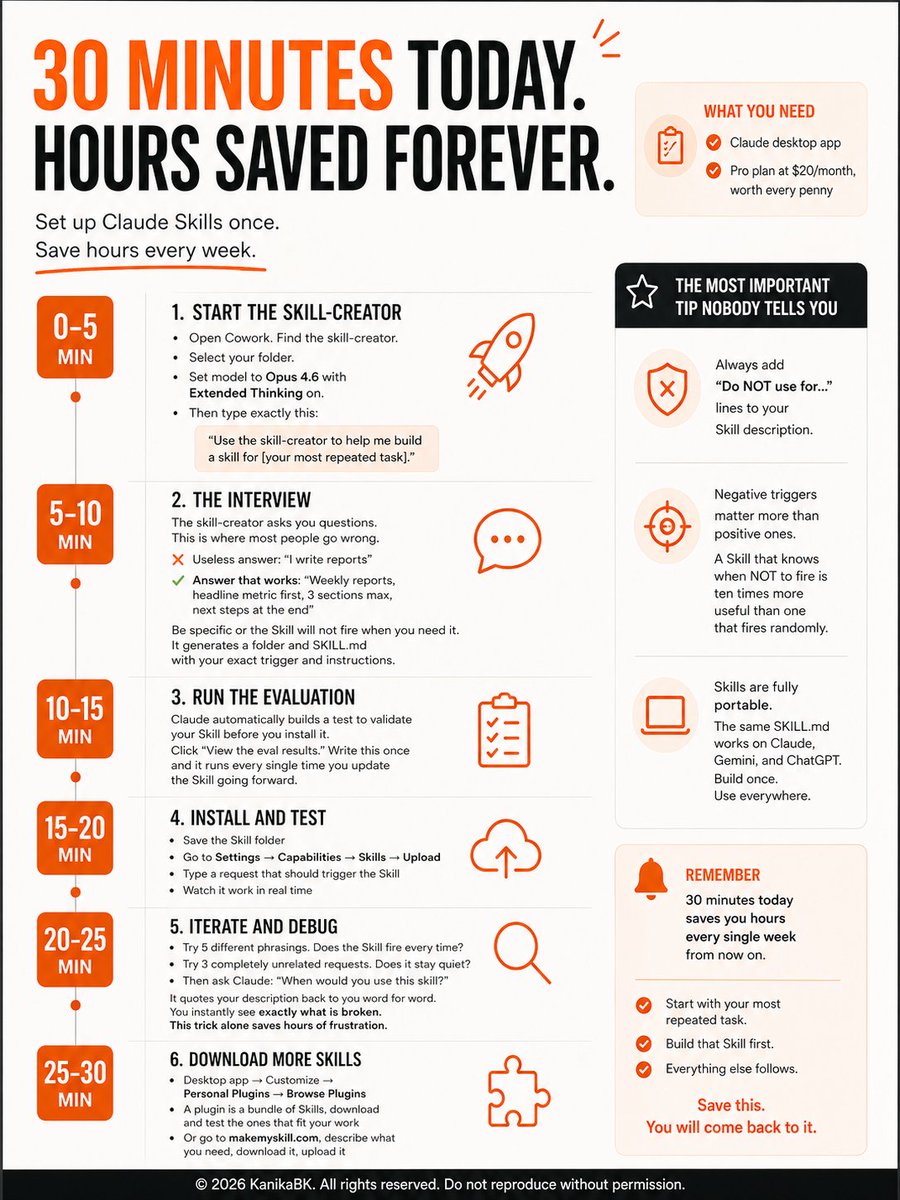
YOU ARE USING CLAUDE WRONG IF YOU ARE NOT USING SKILLS YET. Here is how to set yours up in exactly 30 mins. Duplicate my skills, and my prompts. What you need before you start: ↳ Claude desktop app ↳ Pro plan at $20/month, worth every penny 0 to 5 minutes: Start the skill-creator Open Cowork. Find the skill-creator. Select your folder. Set model to Opus 4.6 with Extended Thinking on. Then type exactly this: "Use the skill-creator to help me build a skill for [your most repeated task]." 5 to 10 minutes: The interview The skill-creator asks you questions. This is where most people go wrong. ↳ Useless answer: "I write reports" ↳ Answer that works: "Weekly reports, headline metric first, 3 sections max, next steps at the end" Be specific or the Skill will not fire when you need it. It generates a folder and SKILL.md with your exact trigger and instructions. 10 to 15 minutes: Run the evaluation Claude automatically builds a test to validate your Skill before you install it. Click "View the eval results." Write this once and it runs every single time you update the Skill going forward. 15 to 20 minutes: Install and test ↳ Save the Skill folder ↳ Go to Settings → Capabilities → Skills → Upload ↳ Type a request that should trigger the Skill ↳ Watch it work in real time 20 to 25 minutes: Iterate and debug Try 5 different phrasings. Does the Skill fire every time? Try 3 completely unrelated requests. Does it stay quiet? Then ask Claude: "When would you use this skill?" It quotes your description back to you word for word. You instantly see exactly what is broken. This trick alone saves hours of frustration. 25 to 30 minutes: Download more Skills ↳ Desktop app → Customize → Personal Plugins → Browse Plugins ↳ A plugin is a bundle of Skills, download and test the ones that fit your work ↳ Or go to makemyskill.com, describe what you need, download it, upload it The most important tip nobody tells you: ↳ Always add "Do NOT use for..." lines to your Skill description. ↳ Negative triggers matter more than positive ones. A Skill that knows when NOT to fire is ten times more useful than one that fires randomly. ↳ And Skills are fully portable. The same SKILL.md works on Claude, Gemini, and ChatGPT. Build once. Use everywhere. 30 minutes today saves you hours every single week from now on. Start with your most repeated task. Build that Skill first. Everything else follows Save this. You will come back to it.
Kanika tweet media
English
13
13
42
2K
Ihtesham Ali
Ihtesham Ali@ihtesham2005·
Apple built AirDrop. Then locked the best version of it inside their ecosystem. So a developer on GitHub said: “What if every phone, laptop, and OS could send files like AirDrop for free and also locally?” Its called LocalSend. You can share files with no account, no cloud, no subscription, and no company sitting in the middle. This is what Tien Do Nam built for us. Just device to device file sharing over your local network. Works on Windows, macOS, Linux, Android, and iOS. The billion-dollar version is locked. The open-source version is free: github.com/localsend/loca… localsend.org
Ihtesham Ali tweet media
English
10
39
159
6.8K