

Ayman Sid
488 posts

Ayman Sid
@AymanRTFM
Passionate web dev🧑💻 && game dev 🕹️| https://t.co/N1414QePnR
Katılım Aralık 2015
250 Takip Edilen34 Takipçiler

Spain’s PM at Columbia University:
“Defending your country is one thing. But killing 60,000 civilians, bombing hospitals, and starving children to death is something else entirely.”
“We are witnessing one of the darkest tragedies of the 21st century unfold before our eyes.”
🇪🇸
English
Ayman Sid retweetledi

This idea that “a band won’t end a war” is such a foolish way to view using platforms of visibility. If you have a level of reach that not everyone is afforded, maybe you should use it in a way that is beneficial to the world? Even if only to show others that it’s ok to speak up.
English
Ayman Sid retweetledi


@AymanRTFM the closest thing I know to that is Twelve Minutes 🤔
google.com/search?q=12+mi…
English

Ayman Sid retweetledi

English

@TrollFootball Morocco footballers always show up.🇲🇦
twitter.com/CfcFactos1/sta…
English


How hard is it to find a senior devops engineer in Morocco 😭 - folks that have contact with any senior devops let me know, we're offering a competitive package and a sign in bonus if their skills exceed expectations, also, for whoever makes the acquaintance, l3cha 3la 7sabi 👍
English
Ayman Sid retweetledi

Monolithic VS Microservices Architecture. Which one are you using? 🤔
In the realm of software architecture, the choice between Monolithic and Microservices can shape the destiny of your application. Let's break down the key differences in a nutshell! 🧩
1. Monolithic Architecture 🏰
- One Big Castle: Monoliths are like a majestic castle, where all components (database, server, user interface) are tightly knit into a single structure.
- Unified & Simple: Easy to develop and deploy due to its unified structure. Changes are made in one place, making coordination a breeze.
- Scaling Challenges: Scaling can be a challenge. When one aspect needs upgrading, the entire application must be scaled, even if only a small part requires more resources.
2. Microservices Architecture 🌐
- City of Specialized Buildings: Microservices resemble a bustling city, with each service as a specialized building handling a distinct function.
- Scalability & Flexibility: Offers scalability on a per-service basis. If one part of the application needs more resources, you can scale just that service.
- Increased Complexity: As the number of services grows, managing the communication between them can become complex. Decentralization brings its own set of challenges.
Choosing Your Path 🛤️
- Start Simple: Monoliths are great for small to medium-sized projects where simplicity is key.
- Modular Growth: Microservices shine when you anticipate the need for independent scaling or if you have a large and complex application with multiple teams.
Conclusion 🎯
- No One-Size-Fits-All: There's no silver bullet. The choice between Monolithic and Microservices depends on the nature and future goals of your project.
- Hybrid Approaches: Some find success in hybrid approaches, combining the best of both worlds.
Remember, the right architecture can be a game-changer for your project. Assess your needs, weigh the pros and cons, and embark on the architectural journey that aligns with your vision! 🚢✨
👍🏿 Subscribe to our newsletter - bit.ly/45ucZPf
#systemdesign #coding #interviewtips
GIF
English
Ayman Sid retweetledi

Explaining 8 Popular Network Protocols in 1 Diagram.
You can find the link to watch a detailed video explanation at the end of the post.
Network protocols are standard methods of transferring data between two computers in a network.
1. HTTP (HyperText Transfer Protocol)
HTTP is a protocol for fetching resources such as HTML documents. It is the foundation of any data exchange on the Web and it is a client-server protocol.
2. HTTP/3
HTTP/3 is the next major revision of the HTTP. It runs on QUIC, a new transport protocol designed for mobile-heavy internet usage. It relies on UDP instead of TCP, which enables faster web page responsiveness. VR applications demand more bandwidth to render intricate details of a virtual scene and will likely benefit from migrating to HTTP/3 powered by QUIC.
3. HTTPS (HyperText Transfer Protocol Secure)
HTTPS extends HTTP and uses encryption for secure communications.
4. WebSocket
WebSocket is a protocol that provides full-duplex communications over TCP. Clients establish WebSockets to receive real-time updates from the back-end services. Unlike REST, which always “pulls” data, WebSocket enables data to be “pushed”. Applications, like online gaming, stock trading, and messaging apps leverage WebSocket for real-time communication.
5. TCP (Transmission Control Protocol)
TCP is designed to send packets across the internet and ensure the successful delivery of data and messages over networks. Many application-layer protocols are built on top of TCP.
6. UDP (User Datagram Protocol)
UDP sends packets directly to a target computer, without establishing a connection first. UDP is commonly used in time-sensitive communications where occasionally dropping packets is better than waiting. Voice and video traffic are often sent using this protocol.
7. SMTP (Simple Mail Transfer Protocol)
SMTP is a standard protocol to transfer electronic mail from one user to another.
8. FTP (File Transfer Protocol)
FTP is used to transfer computer files between client and server. It has separate connections for the control channel and data channel.
–
Watch and subscribe here (YouTube video): youtube.com/watch?v=P6SZLc…

YouTube
English
Ayman Sid retweetledi

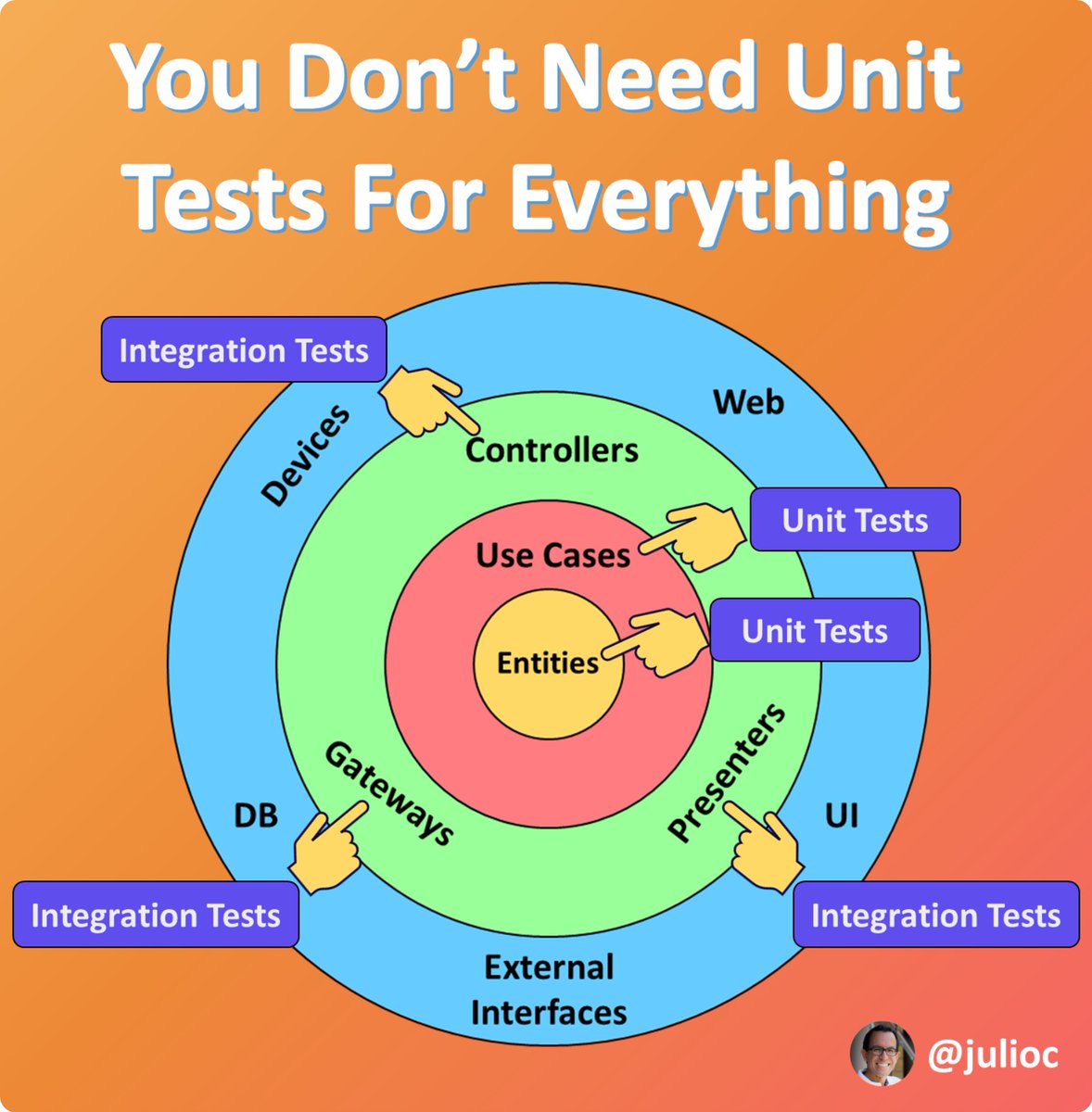
Unit testing every layer of your app is a waste.
The goal is not to achieve 100% code coverage.
English


Ayman Sid retweetledi

Startups are hard as hell so laugh often, eat healthy, exercise, sleep well, don’t take yourself too seriously and enjoy the ride.
English
Ayman Sid retweetledi


Ayman Sid retweetledi

Ayman Sid retweetledi

HOW TO STRUCTURE YOUR BACKEND CODE IN EXPRESS JS (with detailed folder explanations)
📁
├── 📄 app.js
├── 📁 bin
├── 📁 config
├── 📁 controllers
│ ├── 📄 customer.js
│ ├── 📄 product.js
│ └── ...
├── 📁 middleware
│ ├── 📄 auth.js
│ ├── 📄 logger.js
│ └── ...
├── 📁 models
│ ├── 📄 customer.js
│ ├── 📄 Product.js
│ └── ...
├── 📁 routes
│ ├── 📄 api.js
│ ├── 📄 auth.js
│ └── ...
├── 📁 public
│ ├── 📁 css
│ ├── 📁 js
│ ├── 📁 images
│ └── ...
├── 📁 views
│ ├── 📄 index.ejs
│ ├── 📄 product.ejs
│ └── ...
├── 📁 tests
│ ├── 📁 unit
│ ├── 📁 integration
│ ├── 📁 e2e
│ └── ...
├── 📁 utils
│ ├── 📄 validation.js
│ ├── 📄 helpers.js
│ └── ...
└── 📁 node_modules
app.js : It's like the control center of your web application. It's where you set up and manage everything.
bin : Think of this as a place for starting your web server. It's where you have scripts that make your website work.
config : These are like settings for your website, such as where your database is or how your website should behave.
controllers : This is where you put the brains of your website explains the name controllers. Each file here handles a different part of your site, like customer stuff or product stuff.
middleware : Imagine these as helpers that help your website do things like checking if you're logged in or keeping a record of what people do on your site.
models : This is where you describe what your data looks like. If your website is a store, this is where you say what a product is or what a customer is.
routes : These are like the paths to different parts of the website. If the website is a city, these are the streets and highways.
public : Think of this as your storage room for things everyone can see, like images, styles, and scripts.
views : If your website is like a book, these are the pages. This is where you put together what people see on the screen.
tests : These are like exams for your website to make sure it works correctly. You create different kinds of tests to check different parts of your site.
utils : These are like handy tools you use to make your website better, like checking if someone's email is valid or formatting dates nicely.
node_modules : This is like your toolbox filled with tools (libraries and code) that you use to build your website. It's automatically filled with things your project needs.
Alright. that's a wrap. Follow me @mysticwillz for more tips like this.🙌🙌
English
Ayman Sid retweetledi

Malcolm X: "You don't get freedom peacefully. Freedom is never safeguarded peacefully. Anyone who is depriving you of freedom isn't deserving of a peaceful approach by the ones who are being deprived of their freedom."
English