Sabitlenmiş Tweet
Primus inter pares
15K posts

Primus inter pares
@BEARD__ED
LIFELONG STUDENT || SYSTEMS ENGINEER| DATA CENTER ADMIN || LINUX/UNIX & WIN ADMIN || STORAGE ADMIN || SUPPORT IT INFRASTRUCTURE,H2 SOLUTIONS @MTNGH DATA CENTER.
Greater Accra, Ghana Katılım Ocak 2016
2K Takip Edilen370 Takipçiler

@GodsonKankani Get me a moto bike....and let see how beautiful it will become.
English

@KwekuBorn @GodsonKankani Which place is that, and what is the name of the store?
English

@GodsonKankani That’s not 10k on the table . That’s 40k I see . Anaaa mebodam ?
There’s this place in Accra wer you can get wholesale items (provisions). Someone can actually start a business with that . You get the items , package them and sell online . Like an online market
English

@ayuba79609 @GodsonKankani Any idea of how to get these goats to purchase at a whole sale price.
English

@GodsonKankani Oh yes of course
These are factory prices so the margin for you is huge
English
Primus inter pares retweetledi

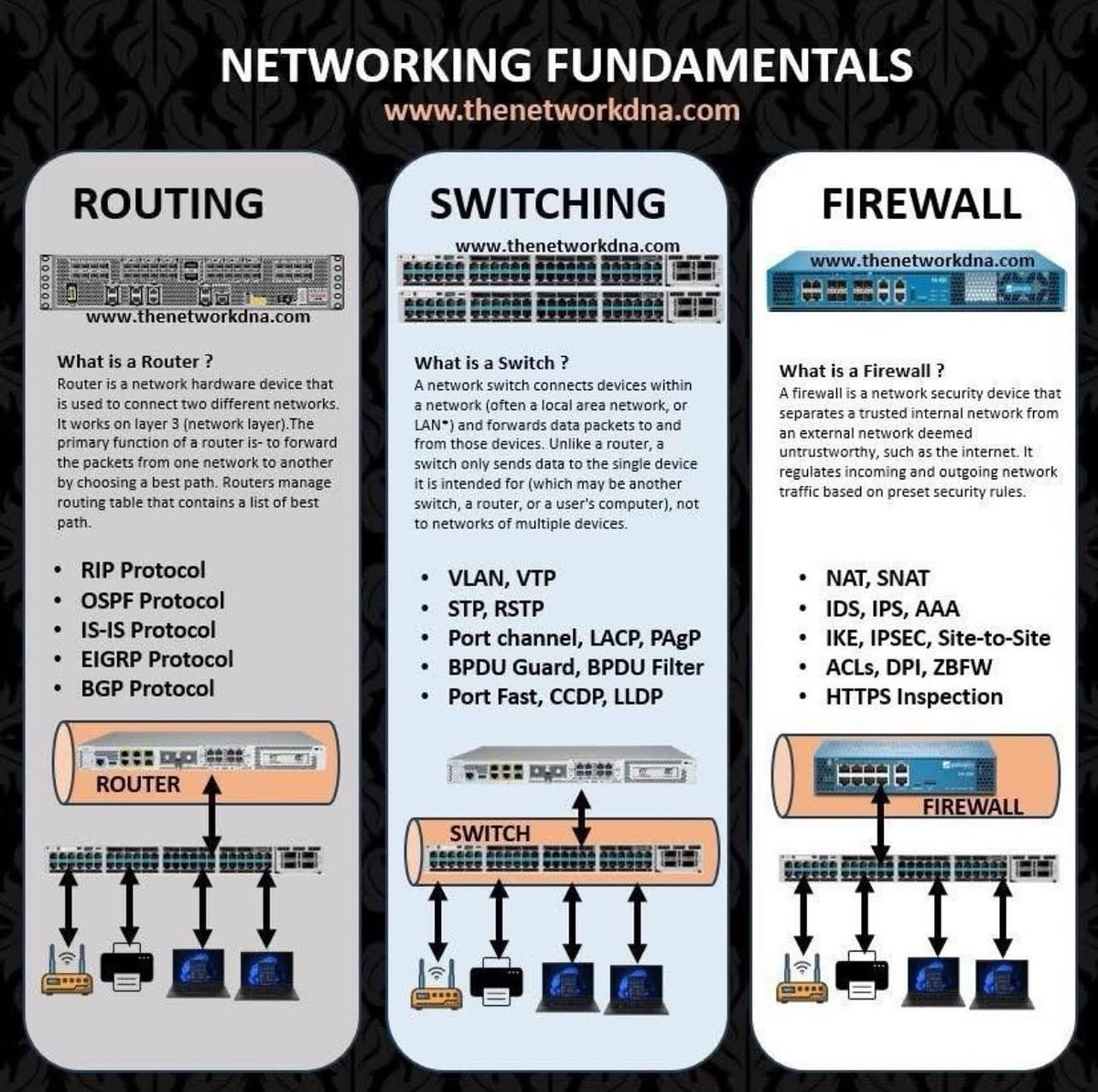
@cyber_razz @cyber_razz Are the individual devices within an ISP network assigned a single Public IP for internet access?
English
Primus inter pares retweetledi

@markontechcom 👍 u couldn’t have done it better than this.
English

56. How do you terminate an ongoing process in Linux?
Answer: Use kill PID or pkill process_name, e.g., kill 1234 or pkill firefox.
57. How do you apply command grouping in Linux?
Answer: Use parentheses, e.g., (cmd1; cmd2) runs commands as a group.
58. How do you set up password aging in Linux?
Answer: Use chage (e.g., chage -M 90 user for 90-day max) or edit /etc/login.defs (e.g., PASS_MAX_DAYS 90).
59. How do you list all processes running in Linux?
Answer: Use ps aux (detailed list), top (real-time), or htop (interactive, color-coded).
60. What is the rsync command, and how do you use it?
Answer: rsync synchronizes files between locations, e.g., rsync -av /source /dest copies with attributes preserved.
61. How do you format a disk in Linux?
Answer: Use mkfs, e.g., mkfs.ext4 /dev/sdb1 after unmounting (umount /dev/sdb1) and identifying the partition (lsblk).
62. How do you change the password for a user account?
Answer: Use passwd username, e.g., passwd john, then enter and confirm the new password.
63. What is the ulimit command, and how do you use it?
Answer: ulimit sets resource limits, e.g., ulimit -u 50 limits a user to 50 processes.
64. What is the find command, and how do you use it?
Answer: find searches for files, e.g., find /path -name "file.txt" locates file.txt in /path.
65. What is the /proc filesystem?
Answer: /proc is a virtual filesystem providing runtime info on system and kernel data (e.g., processes, memory).
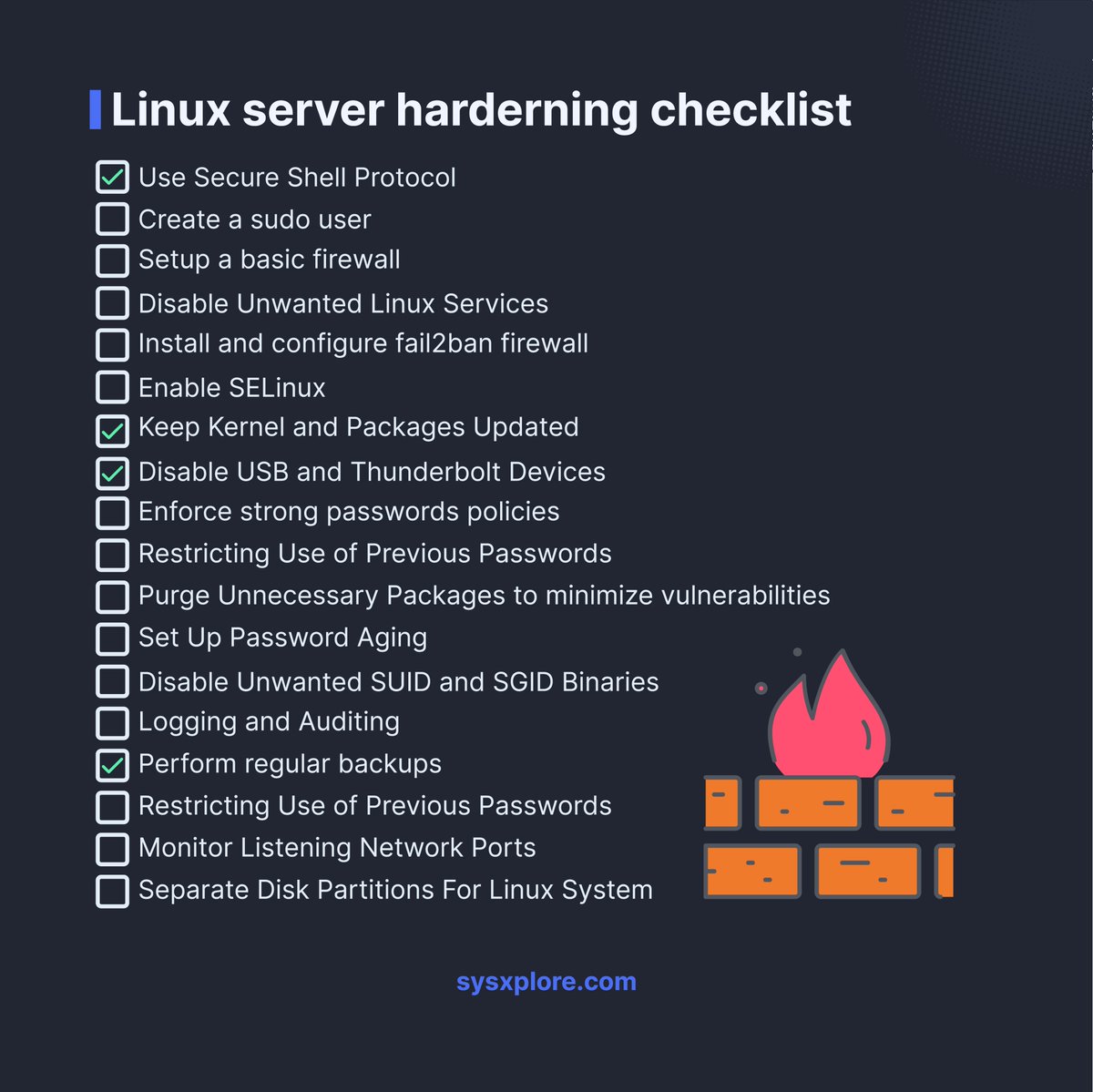
66. How do you secure a Linux server?
Answer: Use strong passwords, update software, configure SSH with key authentication, set up firewalls, disable unused services, disable root login, secure SSH brute force attacks with tools like fail2ban, encrypt traffic, and monitor logs.
67. How do you troubleshoot a Linux OS that fails to boot?
Answer: Check boot logs, error messages, GRUB options, hardware, and try an older kernel or recovery mode.
68. What is the init process in Linux?
Answer: init (PID 1) is the first process at boot, initializing the system; modern systems use systemd.
69. What is LVM in Linux?
Answer: LVM (Logical Volume Manager) manages disk space dynamically, supporting resizing, mirroring, and snapshots.
70. What is the /etc/resolv.conf file?
Answer: /etc/resolv.conf configures DNS settings, listing servers and search domains.
71. What is the difference between absolute and relative paths in Linux?
Answer: Absolute paths start from root (e.g., /home/user/file), while relative paths are from the current directory (e.g., ./file).
72. How do you check the status of a service or daemon?
Answer: Use systemctl status service_name, e.g., systemctl status apache2.
73. How do you compress and decompress files in Linux?
Answer: Compress with tar -czvf archive.tar.gz files, decompress with tar -xzvf archive.tar.gz.
74. What is the difference between a process and a daemon?
Answer: A process is any running program (foreground/background); a daemon is a background service running independently, often started at boot.
75. What is the sed command in Linux?
Answer: sed (stream editor) transforms text, e.g., sed 's/old/new/g' file.txt replaces “old” with “new”.
76. What is sudo in Linux?
Answer: sudo (Superuser Do) runs commands with administrative privileges, requiring user authentication.
77. What is umask in Linux?
Answer: umask sets default permission restrictions for new files, e.g., umask 022 removes write for group/others.
78. What is the sudoers file, and how do you configure it?
Answer: /etc/sudoers controls sudo privileges; edit with visudo, e.g., user ALL=(ALL) ALL grants full sudo access.
79. How do you change ownership of a file or directory?
Answer: Use chown, e.g., chown user:group file.
80. How do you recursively copy files and directories?
Answer: Use cp -R source dest, e.g., cp -R /src /dst.
81. How do you set up a static IP address in Linux?
Answer: Edit /etc/network/interfaces, e.g., iface eth0 inet static address 192.168.1.100, then restart networking.
82. How do you copy a file to multiple directories?
Answer: Use a loop or xargs, e.g., echo dir1 dir2 | xargs -n 1 cp file.
83. How do you find the IP address of a Linux system?
Answer: Use ip addr show or ifconfig to display network interface details.
84. How do you check system logs in Linux?
Answer: View logs in /var/log, e.g., tail /var/log/syslog or less /var/log/messages.
85. How do you troubleshoot a slow-performing Linux server?
Answer: Use top/htop for resource usage, check disk I/O, network traffic, and logs for bottlenecks.
86. How do you identify and terminate a CPU-intensive process?
Answer: Use top to find the PID, then kill PID, e.g., kill 1234.
87. What is the route command in Linux?
Answer: route manages the IP routing table, e.g., route -n shows routes.
88. How do you configure a Linux system as a router?
Answer: Enable IP forwarding (echo 1 > /proc/sys/net/ipv4/ip_forward), configure interfaces, and set routing rules.
English

** 88. Linux interview questions with answers: Extensive list **
1. What is the chmod command in Linux, and how do you use it?
Answer: The chmod command changes file or directory permissions. It uses symbolic (e.g., chmod u+wx file adds write and execute for the user) or numeric modes (e.g., chmod 644 file sets read/write for owner, read-only for group/others).
2. How do you create a new directory in Linux?
Answer: Use the mkdir command, e.g., mkdir /path/to/new_directory.
3. What is the difference between a soft link and a hard link in Linux?
Answer: A soft (symbolic) link points to a file’s path, uses a different inode, can link directories, and breaks if the original is moved. A hard link points directly to the file’s data, shares the same inode, cannot link directories, and persists if the original is renamed/moved.
4. How do you create a symbolic link in Linux?
Answer: Use the ln -s command, e.g., ln -s /path/to/source /path/to/link.
5. What are standard streams in Linux?
Answer: Standard streams are stdin (input), stdout (output), and stderr (error), used for communication between programs and their environment.
6. How do you list all files in a directory in Linux?
Answer: Use the ls command with options like ls -a (show hidden files) or ls -l (detailed list), e.g., ls -la /path/to/directory.
7. How do you check memory usage in Linux?
Answer: Use free to show total, used, and free memory (e.g., free -h for human-readable format) or cat /proc/meminfo for detailed memory stats.
8. What is a swap partition in Linux?
Answer: A swap partition is disk space used as virtual memory when RAM is full, temporarily storing inactive data. It’s typically twice the RAM size or equal to it as a minimum.
9. How do you mount a filesystem in Linux?
Answer: Use the mount command, e.g., sudo mount /dev/sda1 /mnt, after identifying the partition (e.g., with lsblk) and creating a mount point (e.g., mkdir /mnt).
10. How do you unmount a filesystem in Linux?
Answer: Use the umount command, e.g., sudo umount /mnt, ensuring the filesystem isn’t in use.
11. How do you check disk space usage in Linux?
Answer: Use df -h for a human-readable overview of used and available space, or du -sh /path to estimate usage of a specific directory.
12. What is a Linux daemon?
Answer: A daemon is a background process that runs continuously, performing tasks like managing network services (e.g., httpd for Apache) without user interaction.
13. How do you start and stop a daemon in Linux?
Answer: Use systemctl, e.g., sudo systemctl start httpd to start, sudo systemctl stop httpd to stop, or sudo systemctl restart httpd to restart.
14. What is a cron job in Linux?
Answer: A cron job is a scheduled task that runs at specific times or intervals, managed via the crontab file for automating system maintenance or scripts.
15. How do you schedule a cron job in Linux?
Answer: Edit the crontab with crontab -e, then add a line like 0 2 * * * /path/to/script to run daily at 2 AM (format: minute, hour, day, month, weekday).
16. What is SSH in Linux?
Answer: SSH (Secure Shell) is a protocol for secure remote access, providing encrypted communication and authentication (often via public-key cryptography) for terminal access or file transfers.
17. How do you connect to a remote server using SSH in Linux?
Answer: Use ssh username@remote_ip, e.g., ssh user@192.168.0.1, and enter the password when prompted.
18. What is SELinux?
Answer: SELinux (Security-Enhanced Linux) is a security framework that enforces mandatory access control policies to enhance system security and prevent unauthorized access.
19. How do you troubleshoot SELinux issues in Linux?
Answer: Check logs with sealert -a /var/log/audit/audit.log, temporarily disable enforcement with setenforce 0, or generate custom policies with audit2allow.
20. How do you add a new user in Linux?
Answer: Use adduser username (interactive) or useradd username (basic), then set a password with passwd username.
21. What is the difference between su and sudo in Linux?
Answer: su switches to another user (typically root) with their password, while sudo runs a command with elevated privileges using the user’s own password, offering finer control and auditing.
22. What is the difference between /etc/passwd and /etc/shadow files in Linux?
Answer: /etc/passwd stores user info (username, UID, home directory, shell) and is world-readable; /etc/shadow stores encrypted passwords and security details, readable only by root.
23. How do you configure a network interface in Linux?
Answer: Use ip commands, e.g., sudo ip addr add 192.168.1.100/24 dev eth0, or edit config files like /etc/network/interfaces, /etc/netplan.
24. What is the netstat command in Linux?
Answer: netstat displays network connections, routing tables, and statistics, e.g., netstat -tuln shows listening TCP/UDP ports.
25. How do you check network connectivity in Linux?
Answer: Use ping to test connectivity, tracepath for path details, or nslookup for DNS resolution.
English
Primus inter pares retweetledi

(شَهۡرُ رَمَضَانَ ٱلَّذِيٓ أُنزِلَ فِيهِ ٱلۡقُرۡءَانُ هُدٗى لِّلنَّاسِ وَبَيِّنَٰتٖ مِّنَ ٱلۡهُدَىٰ وَٱلۡفُرۡقَانِۚ) [البقرة: 185]
زادت عظمة #رمضان بالقرآن فكن أنت عظيماً بالقرآن افتح قلبك للقرآن ومن صاحب القرآن كان آمناً ومطمئناً.
youtube.com/shorts/ocJgdna…

YouTube
العربية

@LinuxHandbook Always Have below tools under your sleeves.
Df -h
Top
Du -h
Also don’t forget “googling”.
English
Primus inter pares retweetledi

Raising kids is tough-GRA is here to ease your burden.
Learn more about tax reliefs.
gra.gov.gh/domestic-tax/p…
#GRAcares #TaxReliefs #GhanaFIRST

English

Ask Me Anything! I’m a Sr. Cybersecurity Consultant @CrowdStrike*. I have a Masters degree in Cybersecurity, a CISSP & the CCSP. I’m on ISC2’s DEI task force, have spoken at several conferences, and make cyber content online. What can I answer?
*not sponsored by my employer
English
Primus inter pares retweetledi