Shivam Gupta

2.3K posts

Shivam Gupta banner
Shivam Gupta

Shivam Gupta

@CodeGeniee

Daily updates about AI | 300k+ AI Community • AI Content & Marketing for your Brand • Influencer Marketing • Personal Branding. [email protected] 📨

Office Katılım Kasım 2020
163 Takip Edilen3.4K Takipçiler
Sabitlenmiş Tweet
Shivam Gupta
Shivam Gupta@CodeGeniee·
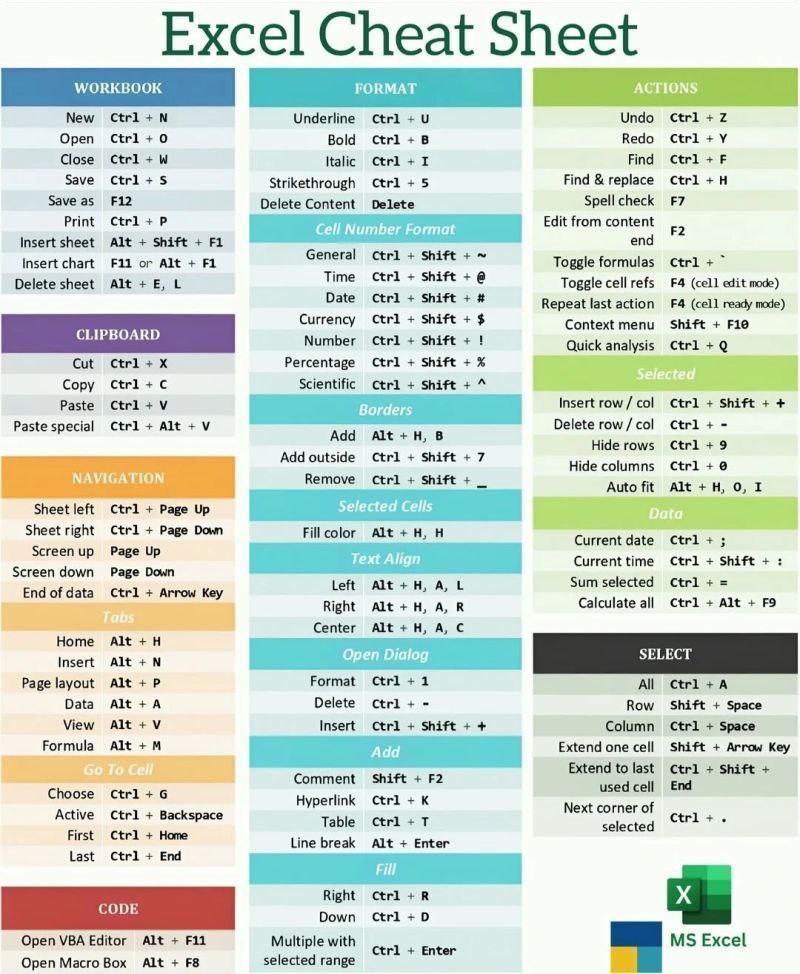
📊 Excel Cheat Sheet Shortcuts = Speed + Productivity ⚡ Save this 🔖 Master Excel faster with essential keyboard shortcuts. Like ❤️ | Comment 💬 | Share 🔁 Follow for more tips 👉 @CodeGeniee
Shivam Gupta tweet media
English
4
1
7
474
Shivam Gupta
Shivam Gupta@CodeGeniee·
@sonalshukla3377 Appreciate you putting this together. The tips and cautions help beginners understand Codex quickly without feeling overwhelmed by too much information
English
0
0
1
42
Shivam Gupta retweetledi
Sonal Shukla
Sonal Shukla@sonalshukla3377·
🔷️How to Use Codex Codex becomes powerful only when you use it the right way. Here’s a simple guide to help you work smarter, code faster, and avoid common mistakes: 🟢 AGENTS.md This is your project rules file. Codex reads it before starting work. ➡️ Pro tip: Keep it short, clear, and repo-specific. ❌ Common mistake: Writing long, generic instructions Codex won’t follow well. ➖️➖️➖️➖️➖️➖️➖️➖️➖️➖️➖️➖️ 🟢 Codex CLI Run Codex directly from your terminal for coding tasks. ➡️ Pro tip: Use it inside the repo you want Codex to understand. ❌ Common mistake: Giving tasks without letting Codex inspect the project first. ➖️➖️➖️➖️➖️➖️➖️➖️➖️➖️➖️➖️ 🟢 Codex Web Delegate coding tasks to Codex in the cloud. ➡️ Pro tip: Use it for background tasks, bug fixes, and repo exploration. ❌ Common mistake: Expecting perfect results without reviewing the final diff. ➖️➖️➖️➖️➖️➖️➖️➖️➖️➖️➖️➖️ 🟢 Planning First Ask Codex to explain its plan before editing files. ➡️ Pro tip: Review the plan, correct it, then ask it to implement. ❌ Common mistake: Letting Codex code immediately with unclear requirements. ➖️➖️➖️➖️➖️➖️➖️➖️➖️➖️➖️➖️ 🟢 Isolated Worktrees Let Codex work in separate environments for separate tasks. ➡️ Pro tip: Run multiple tasks in parallel without breaking your main branch. ❌ Common mistake: Mixing unrelated changes in one working branch. ➖️➖️➖️➖️➖️➖️➖️➖️➖️➖️➖️➖️ 🟢 Code Review Use Codex to review pull requests, diffs, and risky changes. ➡️ Pro tip: Ask it to check logic, edge cases, tests, and security. ❌ Common mistake: Only asking for “bugs” and missing architecture issues. ➖️➖️➖️➖️➖️➖️➖️➖️➖️➖️➖️➖️ 🟢 Test-Driven Tasks Give Codex failing tests before asking for implementation. ➡️ Pro tip: Tests act like clear specs for what Codex should build. ❌ Common mistake: No tests, then confusion when output doesn’t match expectations. ➖️➖️➖️➖️➖️➖️➖️➖️➖️➖️➖️➖️ 🟢 Subagents Use specialized agents for parallel research, coding, and review. ➡️ Pro tip: Assign separate agents to separate parts of a complex task. ❌ Common mistake: Doing everything sequentially when tasks can run in parallel. ➖️➖️➖️➖️➖️➖️➖️➖️➖️➖️➖️➖️ 🟢 Skills Reusable workflows for tasks your team repeats often. ➡️ Pro tip: Create skills for reviews, migrations, debugging, and release checks. ❌ Common mistake: Every developer prompting differently for the same workflow. ➖️➖️➖️➖️➖️➖️➖️➖️➖️➖️➖️➖️ 🟢 MCP Connect Codex to external tools, data, and developer systems. ➡️ Pro tip: Use MCP when Codex needs controlled access to your stack. ❌ Common mistake: Giving broad tool access without clear permission boundaries. ➖️➖️➖️➖️➖️➖️➖️➖️➖️➖️➖️➖️ 🟢 Config Files Control model behavior, permissions, environments, and defaults. ➡️ Pro tip: Standardize config for teams so Codex behaves consistently. ❌ Common mistake: Relying only on prompts for repeatable engineering workflows. ❤️ Like 🔁 Retweet 🔖 Bookmark Follow @sonalshukla3377 for more such posts
Sonal Shukla tweet media
English
23
25
93
1.7K
Shivam Gupta
Shivam Gupta@CodeGeniee·
@sonalshukla3377 Such an informative post filled with actionable points. Thanks for sharing these thoughtful hacks that actually help users get more from Claude daily.
English
0
0
1
41
Sonal Shukla
Sonal Shukla@sonalshukla3377·
🎯21 hacks to never hit Claude's limit. ✨ Stop wasting your daily window and get maximum output with minimum tokens.Use these power-moves to make Claude faster, cheaper, and more accurate. 👉 HACK #1: Convert files before uploading Don’t upload PDFs, screenshots, or PPTX files raw. Copy-paste the text into a Google Doc, download it as .md, upload that instead. 👉 HACK #2: Plan in Chat, build in Cowork Don’t open Cowork & say “Create a financial model.” Open Chat first. Plan the structure. Then move to Cowork with “Build this exact file.” 👉 HACK #3: Say “Ask me questions” Write this: “I want you to [task] to accomplish [criteria]. Read my folder. Ask me questions using AskUserQuestion before you start.” 👉 HACK #4: Stop redoing the whole thing When section 3 is wrong, say “Only redo section 3. Keep everything else.” Add “No commentary. Just the output.” 👉 HACK #5: Edit your original message In Chat, click Edit on your original message instead of writing a new one. Change the text. Hit send. It regenerates. The old exchange gets replaced. (Works in Chat only, not Cowork.) 👉 HACK #6: Batch tasks into one message Instead of 3 separate prompts (“Summarize this” + “Then edit this” + “Suggest a headline”), send one prompt: “Summarize, list points, suggest a headline.” 👉 HACK #7: Reuse the same prompt structure I keep a prompt library. Swap only the variable part. I use the same 30-word prompt for 80% of my Cowork sessions. 👉 HACK #8: Pick the right model Grammar check? Reformat? Use Sonnet or Haiku. Save Opus + Extended Thinking for the real work. 👉 HACK #9: Keep your files short Cowork reads your folder before every task. Keep it under 2,000 words. Too many words = burning tokens. 👉 HACK #10: Restart, don’t follow up When Cowork gets it wrong, don’t type “No, I meant…” Click Restart the conversation from here on an earlier message. 👉 HACK #11: Summarize every 15–20 messages Ask Claude to summarize the conversation every 20 prompts. Copy the summary. Open a new session. Paste it as your first message. 👉 HACK #12: Use Projects for recurring files Stop uploading the same PDF to five different chats. Use Projects instead. Upload the file once. 👉 HACK #13: Turn off features you don’t need Web search, connectors, Explore mode — they all add tokens. Default: everything off. Turn features on per task. 👉 HACK #14: New topic = New chat You asked about a LinkedIn post. Then a proposal. Keep it clean. The same chat confuses the model. New topic, new chat. Always. 👉 HACK #15: Don’t dump your whole folder Only include files Claude needs for this specific task. For tasks that don’t need files, select 0 folders. 👉 HACK #16: Schedule your recurring tasks Don’t run the same weekly digest. Use the /schedule plugin. Set it once. It runs on its own. 👉 HACK #17: Stop using Claude for things it can’t do Claude can’t make images. Need images? ChatGPT. Need real-time search? Grok. 👉 HACK #18: Speak your prompts for more context Use wispr.ai to speak your prompts for richer context in one take. Fewer follow-ups, fewer reloads. 👉 HACK #19: Set Up Preferences Go to Settings → General → Personal Preferences. Turn off Memory. 👉 HACK #20: Prompt Claude Code tightly Use very specific prompts: “Build a chart from this CSV. Save as chart.png.” 👉 HACK #21: Spread across the day Claude uses a rolling 5-hour window. Split it. Morning, afternoon, night. Stop using all your window before usage has rolled off. ❤️ Like 🔁 Retweet 🔖 Bookmark Follow @sonalshukla3377 for more such posts
Sonal Shukla tweet media
English
28
32
112
1.6K
Shivam Gupta
Shivam Gupta@CodeGeniee·
So instead of restarting conversations from scratch, teams can revisit decisions intentionally with full context already available. No outdated docs. No disconnected memories. No repeating the same engineering debates again and again.
English
1
0
0
11
Shivam Gupta
Shivam Gupta@CodeGeniee·
AI agents are getting smarter. But most teams are still losing context between sessions. One developer makes a decision today. Another teammate unknowingly revisits the same discussion next week. AI agents keep suggesting ideas that the team already rejected months ago.
English
1
0
0
55
Shivam Gupta retweetledi
Ruchir Baronia
Ruchir Baronia@BaroniaRuchir·
Introducing Frontdesk: The world’s first AI COO Enter your website and get a whole team of AI agents that grow your business. The way businesses operate is being rewritten in real time. Frontdesk gives you an AI workforce that calls, texts, and emails all of your customers 24/7. Those workers use their own CRM, ticketing system, and even website to reach out at the right time. How it works: 1. Drop your website URL 2. Next, Frontdesk IMMEDIATELY rebuilds your entire business with a team of AI workers trained to drive revenue It creates all the AI workers and software needed to grow quickly 📞 AI voice agent that calls every lead 📧 AI email agent that drafts replies and organizes your inbox 💬 AI chatbot that responds to everyone on a website 💻 AI website that’s SEO optimized and drives more traffic 👤AI CRM that keeps track of all the leads your AI workers generate Much more… One platform, one brain, all your AI workers. Because Frontdesk’s AI workers share a brain, they can form relationships, remember, and follow up at the right time. Each interaction updates the AI brain, which triggers the next outreach, creating a compounding loop of customer context. Big companies used to have whole teams to do this. But today, It’s free. No credit card required. -- SMB used to stitch together a website, CRM, chatbot, lead forms, and a receptionist across 12 different tools; paying thousands a month to GoHighLevel, HubSpot, agencies and others. Yet, they were still missing calls and leaking revenue. Frontdesk is the new customer stack that replaces all of that. Calls that used to go to voicemail get answered. Leads that used to slip through get followed up with. Websites that used to take weeks to ship in minutes. Emails that used to pile up get drafted before you open the tab. Customers that used to fall through the cracks get remembered. Sign up here: myaifrontdesk.com Join the 10k+ companies that have already rebuilt their business with Frontdesk – Comment “Frontdesk” with your website URL and we will reply to your comment with a personalized AI voice agent, website, and chatbot. The way you run your business is about to change.
English
25
4
54
30.1K
Yeta AI
Yeta AI@yeta_ai·
There’s a little over an hour left until we go live on Product Hunt! Please support our project and let’s keep things as transparent as possible 🙏 producthunt.com/products/yeta-…
English
3
0
5
29
Web Speed
Web Speed@GetWebSpeed·
The autonomous web requires deterministic infrastructure. Web Speed cuts agentic token costs by 90%, accelerates execution, and supports any LLM via native MCP. Build faster. Waste fewer tokens. getwebspeed.io
Web Speed tweet media
English
2
0
2
46
PaceBar
PaceBar@PaceBarApp·
PaceBar is live on Product Hunt today. It's a quiet menu-bar instrument for Mac that helps you notice when your work pace is rising. producthunt.com/products/paceb…
English
6
0
18
40.3K
Shivam Gupta retweetledi
Luma
Luma@LumaLabsAI·
Define the concept. Set the direction. Let Luma Agents turn your ideas into a full ad system. See the concept → lumalabs.ai/app
English
5
5
41
4.9K
Shivam Gupta
Shivam Gupta@CodeGeniee·
Reduce drop-offs before day 1 Get workers ready faster What this really means is simple. Less waiting. More people are showing up ready to work. If you're hiring frontline teams, this is worth a look. Support the launch on Product Hunt:
English
2
0
1
43
Shivam Gupta
Shivam Gupta@CodeGeniee·
You don’t have a hiring problem. You have an onboarding problem. Offers go out, then everything slows down with paperwork, compliance, and endless coordination. That’s where Firstwork comes in.
English
1
0
0
40