

iamfaysal
5K posts

iamfaysal retweetledi

$5k Accounts for Less than $20 🤯
That's right!
70% OFF ALL $5k Accounts 🔥
Use CODE: NLF70 at Checkout to Save today!
Prop Trading has never been this easy to Enter...
Only with nextlevelfunded.com

English
English
iamfaysal retweetledi
Another NLF $1,000,000 Account Giveaway 🔥
The Rules are Simple...
1. Follow both @NextLvlFunded & @SpencerNLF
2. Engage with our Pinned Post
3. Like, Share & Tag 3 Traders on this Post
Giveaway Ending in 72-Hours!

Next Level Funded@NextLvlFunded
$5k Accounts for Less than $20 🤯 That's right! 70% OFF ALL $5k Accounts 🔥 Use CODE: NLF70 at Checkout to Save today! Prop Trading has never been this easy to Enter... Only with nextlevelfunded.com
English
@Khldfx @fundingpips Consistency is necessary for free account from funding pips ?
English
iamfaysal retweetledi

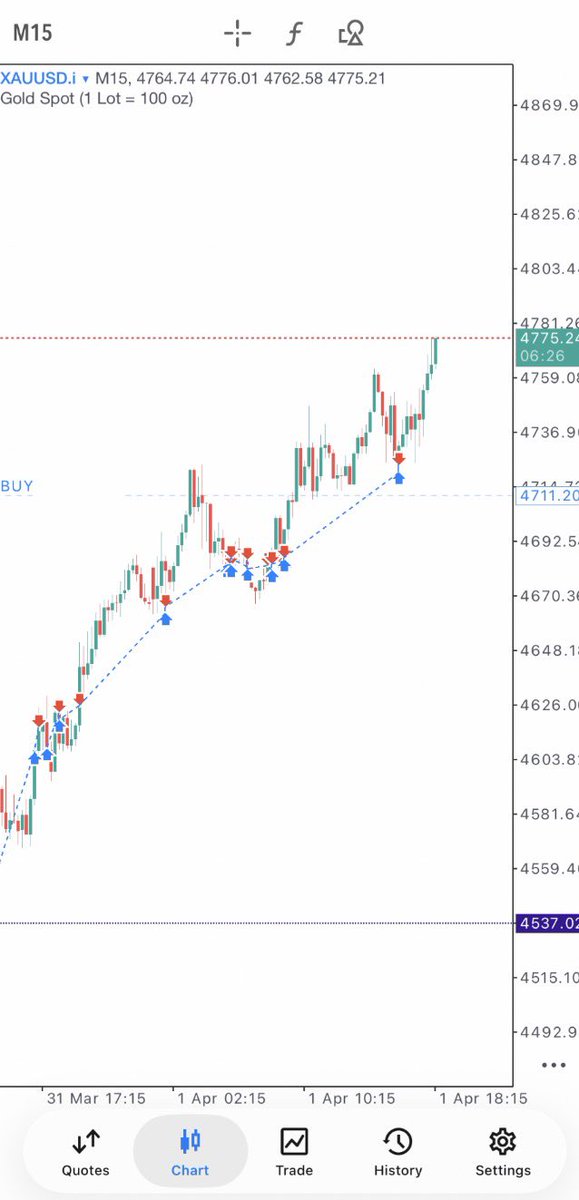
When I say @fundingpips makes money trading.
Soon enough we will share more data & records about this.
Netting
#newera
English
What I love most about GFT is the simplicity and transparency clear rules, smooth process, and a trader-first environment.
Shoutout to @GoatFunded & @EdwardXLreal for building something truly valuable for the trading community
English
iamfaysal retweetledi

🔥 BOGO + 40% OFF IS STILL LIVE 🔥
Get 40% OFF + receive a FREE account once you reach your first reward.
Start with any of these:
• 5K Challenge — $17
• 25K Challenge — $88
• 50K Challenge — $172
• 100K Challenge — $274
It will expire soon 🚨
Use code BOGO40 at checkout.
GoatFundedTrader.com

English
Goat Funded Trader@GoatFunded
🔥 BOGO + 40% OFF IS STILL LIVE 🔥 Get 40% OFF + receive a FREE account once you reach your first reward. Start with any of these: • 5K Challenge — $17 • 25K Challenge — $88 • 50K Challenge — $172 • 100K Challenge — $274 It will expire soon 🚨 Use code BOGO40 at checkout. GoatFundedTrader.com
QAM
iamfaysal retweetledi
🚨📱 GFT APP NEWS:
Over 60,000+ GOAT traders
are already using the Goat Funded Trader app to track, manage, and improve their performance.
📊 21K+ on iOS
📊 39K+ on Android
Join the traders already leveling up with GFT.
goatfundedtrader.com 🐐

English
iamfaysal retweetledi
🚨 REMINDER: cTrader IS LIVE AT GFT 🚨
We integrated cTrader a few months ago..
and it’s here to stay.
Trade the way you prefer, on the platform that fits you best:
✅ cTrader
✅ MT5
✅ TradeLocker
✅ MatchTrader
✅ Volumetrica FX
Choose your platform and focus on performance.
🌐 goatfundedtrader.com 🚀

English
Great experience with the GFT support team fast responses, professional, and always helpful when needed.
Big respect to @Goatfunded & @EdwardXLreal for maintaining such high-quality support for traders 🙌
English
iamfaysal retweetledi

🎥 Vertical Horizontal Filter (VHF) in cTrader - how it works and how to use it
In this video, we explore the Vertical Horizontal Filter (VHF) in cTrader - an indicator used to assess trend strength and help distinguish between trending and ranging market conditions.
You’ll learn where to find the VHF in cTrader, how to customise its levels and appearance, and how traders use it to evaluate whether market conditions are strengthening or weakening.
We also look at how the VHF compares the price range over a selected period with the cumulative price movement over that same period, helping traders understand whether the market is showing stronger directional movement or moving into weaker, more ranging conditions.
The video also shows how traders may use the VHF to:
• Identify stronger trending conditions when the indicator rises
• Spot weakening or ranging conditions when the indicator falls
• Apply different levels depending on the instrument and market behaviour
• Combine the VHF with other indicators, such as RSI, for additional context
• Consider market conditions when thinking about stop-loss placement
📍 Timecodes
00:09 - Introduction: what is the vertical horizontal filter (VHF)
01:18 - Where to find the VHF in cTrader and how to adjust its settings
02:31 - Using the VHF to identify trending and ranging market conditions
03:12 - Combining the VHF with other indicators and using it in practice
04:21 - Using VHF breakouts to read market conditions
05:05 - Using VHF levels for different instruments and market conditions
- Learn more about the Vertical Horizontal Filter - help.ctrader.com/knowledge-base…
- Join Discord - go.spotware.com/discordX
Don’t forget to like and share your thoughts in the comments!
_____________________________________
👉 Start Trading with cTrader - sptwr.link/aog01TI 👈
English
iamfaysal retweetledi
🎥 Historical Volatility (HV) in cTrader - how it works and how to use it
In this video, we explore Historical Volatility (HV) in cTrader - an indicator that measures past price fluctuations over a specific period, helping traders understand market variability and risk.
You’ll learn where to find the Historical Volatility indicator in cTrader, how it is calculated using logarithmic price returns, standard deviation and annualisation, and how to customise settings such as standard deviation and bar history.
We also look at how traders use HV to:
• Identify rising volatility and expanding market swings
• Recognise falling volatility and quieter market conditions
• Confirm breakout conditions and trend continuation
• Adjust protection and stop-loss placement based on market volatility
• Combine HV with indicators such as ADX or moving averages
• Use HV in cBots
📍 Timecodes
00:09 – Introduction: what is Historical Volatility (HV)
01:14 – Where to find Historical Volatility and how to customise its settings
01:34 – How Historical Volatility helps identify changing market conditions
02:29 – Using HV to confirm breakouts and trend continuation
03:39 – Using volatility to adjust protection and stop-loss placement
05:08 – Combining HV with other indicators and using it in cBots
- Learn more about the Historical Volatility - help.ctrader.com/knowledge-base…
- Join Discord - go.spotware.com/discordX
Don’t forget to like and share your thoughts in the comments!
_____________________________________
👉 Start Trading with cTrader - sptwr.link/aog01TI 👈
English
iamfaysal retweetledi
cTrader: How the forex and gold trading platform protects you from scam
Built on the Traders First™ principle, cTrader sets trusted, reputable brokers and prop firms apart from scammers. This video explains 10 ways cTrader protects traders from manipulative practices and promotes fair, transparent trading.
👉 Start safe trading with cTrader - sptwr.link/aog01TI
English
iamfaysal retweetledi
🎥 Polynomial Regression Channels (PRC) in cTrader
In this video, we explore the Polynomial Regression Channels (PRC) in cTrader - an indicator that fits a polynomial regression line to recent price data and creates a channel around it to help identify market direction and potential dynamic support and resistance levels.
You’ll learn where to find the PRC in cTrader, how to adjust its settings and appearance, and how the indicator plots a curved, non-linear channel based on recent price data.
We also look at how traders use the PRC to interpret different market conditions. The video shows how the indicator can help identify bullish, bearish and ranging markets, spot overbought and oversold conditions when price moves outside the channel, and analyse pullbacks in trending conditions when price retraces towards the opposite band.
The walkthrough also includes a breakout example, showing how traders may watch for a shift in the channel direction together with price breaking above a prior high.
📍 Timecodes
00:09 – Introduction: what are Polynomial Regression Channels (PRC)
02:00 – Where to find the PRC in cTrader and how to customise its settings
02:27 – Using the PRC to identify bullish, bearish and ranging market conditions
03:07 – Spotting overbought and oversold conditions with the PRC
03:56 – Using the PRC to analyse pullbacks in trending markets
04:30 – Reviewing a breakout example with the PRC
- Learn more about the Polynomial Regression Channels - help.ctrader.com/knowledge-base…
- Join Discord - go.spotware.com/discordX
Don’t forget to like and share your thoughts in the comments!
_____________________________________
👉 Start Trading with cTrader - sptwr.link/aog01TI 👈
English
iamfaysal retweetledi
🎥 Fractal Chaos Bands in cTrader - how they work and how to use them
In this video, we explore Fractal Chaos Bands (FCB) in cTrader - a volatility-based indicator designed to help identify price trends and potential reversals by marking key high and low points in the market using fractals.
You’ll learn where to find Fractal Chaos Bands in cTrader, how to customise their appearance and visibility, and how the indicator forms upper and lower bands using fractal highs and fractal lows.
The video also shows how traders use Fractal Chaos Bands to:
• Identify bullish and bearish market conditions based on the slope of the bands
• Recognise sideways or consolidating market conditions when the bands move flat
• Spot potential breakout opportunities after narrow band conditions
• Interpret price breaks above or below the bands as signs of possible bullish or bearish momentum
📍 Timecodes
00:09 - Introduction: what are Fractal Chaos Bands
00:49 - Where to find Fractal Chaos Bands in cTrader and how to customise the settings
01:10 - How Fractal Chaos Bands are formed using fractal highs and fractal lows
01:44 - Using the bands to identify trending and sideways market conditions
02:54 - Spotting bullish breakout opportunities with narrow bands
03:37 - Identifying bearish breakout signals with Fractal Chaos Bands
- Learn more about the Fractal Chaos Bands help.ctrader.com/knowledge-base…
- Join Discord - go.spotware.com/discord
Don’t forget to like and share your thoughts in the comments!
_____________________________________
👉 Start Trading with cTrader - sptwr.link/aog01TI 👈
English
iamfaysal retweetledi
🎥 Cyber Cycle in cTrader - how it works and how to use it
In this video, we take a closer look at the Cyber Cycle - a momentum oscillator developed by John Ehlers that helps traders spot cyclical behaviour and potential reversal points.
You’ll see where to find Cyber Cycle in cTrader, how to add it to your chart, and how to customise its look
We also walk through what the cycle line and trigger line represent, how traders read their crossovers for momentum clues, and how Cyber Cycle can be used alongside other tools -especially when markets move sideways. The video finishes with a quick look at how these signals can be applied in cBots.
📍 Timecodes
00:09 - Introduction: what is the Cyber Cycle
01:11 - Where to find and customise the Cyber Cycle in cTrader
01:43 - Cycle line vs trigger line: what they represent + reading cycle/trigger crossovers for bullish and bearish momentum
04:23 - Divergence signals and potential momentum shifts + using Cyber Cycle signals in cBots for automated entries/exits
- Learn more about the Cyber Cycle - help.ctrader.com/knowledge-base…
- Join Discord - go.spotware.com/discord
Don’t forget to like and share your thoughts in the comments!
_____________________________________
👉 Start Trading with cTrader - sptwr.link/aog01TI 👈
English

