
Joe Stocker

7.6K posts

Joe Stocker banner
Joe Stocker

Joe Stocker

@ITguySoCal

Christian Family Man, CEO of Patriot Consulting (Microsoft Security Partner) Author of "Securing Microsoft 365" Microsoft MVP (Security) (2020-2026)

United States Katılım Ocak 2012
1.3K Takip Edilen8.2K Takipçiler
Joe Stocker retweetledi
Aakash Gupta
Aakash Gupta@aakashgupta·
North Korean intelligence agents built an entire fake company to compromise one JavaScript developer. And it worked. UNC1069 didn't hack Axios. They befriended its maintainer. They cloned a real company founder's identity, built a branded Slack workspace with fake employee profiles and LinkedIn post channels, then scheduled a Microsoft Teams call with what appeared to be a full team. During the call, a fake error message said his system needed an update. He installed it. That update was the RAT. From one developer's laptop, they had everything: npm credentials, publishing access, the keys to a package installed in 80% of cloud environments. Axios gets 100 million downloads per week. The attackers published two poisoned versions at 12:21 AM UTC on a Sunday night, tagging both the latest and legacy branches within 39 minutes. The malicious dependency had been pre-staged 18 hours earlier with a clean decoy version to build registry history. Three separate RAT payloads were pre-built for macOS, Windows, and Linux. The malware self-deleted after execution to erase forensic evidence. The poisoned versions were live for about three hours before npm pulled them. Huntress observed 135 endpoints across all operating systems calling the attacker's command-and-control server during that window. Wiz found the malicious versions in roughly 3% of environments scanned. Every affected machine needs full credential rotation: npm tokens, AWS keys, SSH keys, CI/CD secrets, everything in .env files. The part that keeps getting worse: this isn't isolated. The same threat cluster compromised Trivy (a security scanner), KICS, LiteLLM, and multiple GitHub Actions in the two weeks before Axios. Google estimates hundreds of thousands of stolen secrets are now circulating from these combined attacks. The maintainer had 2FA enabled. He said himself: "I have 2FA/MFA on practically everything." The exact method of token compromise is still undetermined. One person. One fake Teams call. 100 million weekly downloads weaponized in under three hours. The npm ecosystem runs on mass trust in individual maintainers who volunteer their time, and North Korean intelligence now has a repeatable playbook for turning that trust into a delivery mechanism.
flavio@flaviocopes

How Axios was compromised 🤯

English
63
714
3K
436.1K
Joe Stocker retweetledi
Aakash Gupta
Aakash Gupta@aakashgupta·
Someone just poisoned the Python package that manages AI API keys for NASA, Netflix, Stripe, and NVIDIA.. 97 million downloads a month.. and a simple pip install was enough to steal everything on your machine. The attacker picked the one package whose entire job is holding every AI credential in the organization in one place. OpenAI keys, Anthropic keys, Google keys, Amazon keys… all routed through one proxy. All compromised at once. The poisoned version was published straight to PyPI.. no code on GitHub.. no release tag.. no review. Just a file that Python runs automatically on startup. You didn’t need to import it. You didn’t need to call it. The malware fired the second the package existed on your machine. The attacker vibe coded it… the malware was so sloppy it crashed computers.. used so much RAM a developer noticed their machine dying and investigated. They found LiteLLM had been pulled in through a Cursor MCP plugin they didn’t even know they had. That crash is the only reason thousands of companies aren’t fully exfiltrated right now. If the code had been cleaner nobody notices for weeks. Maybe months. The attack chain is the part that gets worse every sentence. TeamPCP compromised Trivy first. A security scanning tool. On March 19. LiteLLM used Trivy in its own CI pipeline… so the credentials stolen from the SECURITY product were used to hijack the AI product that holds all your other credentials. Then they hit GitHub Actions. Then Docker Hub. Then npm. Then Open VSX. Five package ecosystems in two weeks. Each breach giving them the credentials to unlock the next one. The payload was three stages.. harvest every SSH key, cloud token, Kubernetes secret, crypto wallet, and .env file on the machine.. deploy privileged containers across every node in the cluster.. install a persistent backdoor waiting for new instructions. TeamPCP posted on Telegram after: “Many of your favourite security tools and open-source projects will be targeted in the months to come.. stay tuned.” Every AI agent, copilot, and internal tool your company shipped this year runs on hundreds of packages exactly like this one… nobody chose to install LiteLLM on that developer’s machine. It came in as a dependency of a dependency of a plugin. One compromised maintainer account turned the entire trust chain into a credential harvesting operation across thousands of production environments in hours. The companies deploying AI the fastest right now have the least visibility into what’s underneath it.
Andrej Karpathy@karpathy

Software horror: litellm PyPI supply chain attack. Simple `pip install litellm` was enough to exfiltrate SSH keys, AWS/GCP/Azure creds, Kubernetes configs, git credentials, env vars (all your API keys), shell history, crypto wallets, SSL private keys, CI/CD secrets, database passwords. LiteLLM itself has 97 million downloads per month which is already terrible, but much worse, the contagion spreads to any project that depends on litellm. For example, if you did `pip install dspy` (which depended on litellm>=1.64.0), you'd also be pwnd. Same for any other large project that depended on litellm. Afaict the poisoned version was up for only less than ~1 hour. The attack had a bug which led to its discovery - Callum McMahon was using an MCP plugin inside Cursor that pulled in litellm as a transitive dependency. When litellm 1.82.8 installed, their machine ran out of RAM and crashed. So if the attacker didn't vibe code this attack it could have been undetected for many days or weeks. Supply chain attacks like this are basically the scariest thing imaginable in modern software. Every time you install any depedency you could be pulling in a poisoned package anywhere deep inside its entire depedency tree. This is especially risky with large projects that might have lots and lots of dependencies. The credentials that do get stolen in each attack can then be used to take over more accounts and compromise more packages. Classical software engineering would have you believe that dependencies are good (we're building pyramids from bricks), but imo this has to be re-evaluated, and it's why I've been so growingly averse to them, preferring to use LLMs to "yoink" functionality when it's simple enough and possible.

English
293
2.3K
11K
2.7M
Joe Stocker retweetledi
Aditya Chordia, CISSP, CIPP/E, CISA
A company that sells cybersecurity risk intelligence to 91% of Fortune 100 companies just got breached through an unpatched React app and a single overprivileged AWS role. LexisNexis. 3.9 million records. 400,000 user profiles. 53 secrets extracted in plaintext from AWS Secrets Manager. Including credentials for production databases, Salesforce, Oracle, and analytics platforms. The password "Lexis1234" was reused across five different internal systems. This is a company that describes itself as "one of the largest protectors of private and confidential data in the world." They provide risk intelligence to 7,500 US government agencies, nine out of ten banks, and major insurers globally. They sell cybersecurity assessments to their customers. And they couldn't secure their own AWS account. Here's what makes this worse than a typical breach: - The compromised data includes accounts tied to 118 .gov email domains. Three US federal judges. Four Department of Justice attorneys. SEC staff. Probation officers. Federal court law clerks. The attackers published doxxed profiles of federal officials tied to courts and regulatory agencies across the country. - These aren't random consumer records. These are the digital identities of people whose exposure carries national security implications. A compromised federal judge's profile doesn't just enable identity theft - it enables targeted influence operations, blackmail, and intelligence gathering. The attack path is textbook and that's the problem: → Unpatched React application - the front door → Single ECS task role with read access to every secret in the account - the keys to everything → 536 Redshift tables, 430+ database tables, full VPC infrastructure mapping - complete visibility → 53 secrets in plaintext including database credentials, API tokens, and development access keys No zero-day. No advanced persistent threat. No nation-state capability required. Basic hygiene failures — unpatched app, overprivileged IAM role, password reuse, plaintext secrets. This is LexisNexis's second confirmed breach in two years. The December 2024 incident exposed 364,000 individuals through a compromised corporate account on a third-party development platform. Data brokers and analytics providers are not peripheral players - they're deeply embedded in today's risk landscape. That's the pattern we keep seeing. Attack the aggregator, not the individual. BPO providers. Cloud platforms. Legal data giants. The organisations that hold everyone else's data are the highest-value targets - and often the weakest links. For every enterprise that uses LexisNexis services: → Assume your metadata, contract details, and product usage history are exposed → Watch for targeted phishing using the exposed business relationship data → If your staff have LexisNexis accounts, reset credentials immediately → Ask your vendor risk team: when was the last time we assessed LexisNexis's actual security posture - not their marketing, their controls? The company that indexes the world's legal information couldn't index its own IAM policies. And they're not the exception. They're the pattern. More info: cybernews.com/security/lexis…
English
51
373
1K
94.3K
Joe Stocker
Joe Stocker@ITguySoCal·
Microsoft’s June 2026 Secure Boot certificate update is not a routine patch—it’s a foundational platform trust change that requires deliberate planning. In this session, we’ll break down what Secure Boot is, why the upcoming certificate update matters to your Windows estate, and how to use Microsoft Intune to inventory, assess readiness, and automate deployment at scale. You’ll leave with a practical roadmap to reduce risk and avoid disruption.
Patriot Consulting Technology Group@PatriotExperts

🚨 Secure Boot 2026 is coming—and it’s not just another patch. Microsoft’s June certificate update impacts platform trust. Are your Windows endpoints ready? Join this technical session to learn how to assess & prepare with Intune. Register: lnkd.in/g8XBe2qT #secureboot

English
1
17
93
19.5K
Joe Stocker retweetledi
Engadget
Engadget@engadget·
The US bans all new foreign-made network routers engt.co/4bDF2AQ
English
101
357
1.2K
243.9K
Joe Stocker
Joe Stocker@ITguySoCal·
Beginning with release 4.18.25110.6, Microsoft Defender Antivirus Exclusions will no longer be readable from local device registry by late March 2026. Use Get-MpPreference instead. #MC1227621
English
1
25
80
11K
Joe Stocker
Joe Stocker@ITguySoCal·
@alitajran sorry for hijacking your post for the public service announcements but I've seen this change disrupt large orgs who didn't realize the user impact on BYOD devices.
English
0
0
2
360
ALI TAJRAN
ALI TAJRAN@alitajran·
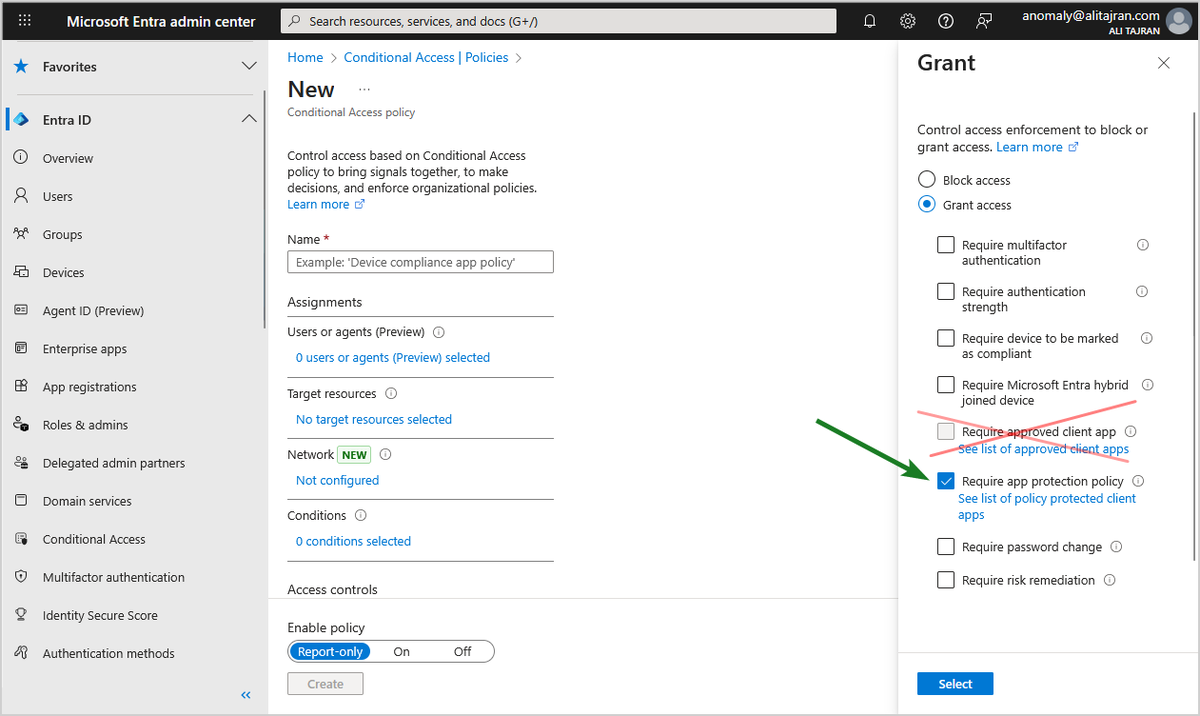
The "Require approved client app" control in Microsoft Entra Conditional Access will be retired in June 2026! Microsoft Entra ID and Microsoft Intune will retire the Conditional Access "Require approved client app" grant control in June 2026! Additionally, for any new Conditional Access policy, only apply the "Require app protection policy" grant. We recommend utilizing the "Require application protection policy" grant control, which provides the same data loss and protection with additional benefits. 𝐇𝐨𝐰 𝐭𝐡𝐢𝐬 𝐰𝐢𝐥𝐥 𝐚𝐟𝐟𝐞𝐜𝐭 𝐲𝐨𝐮𝐫 𝐨𝐫𝐠𝐚𝐧𝐢𝐳𝐚𝐭𝐢𝐨𝐧: If you have a Conditional Access policy with "Require approved client app" grant control configured, after this change, you will no longer be able to enforce this control, it will be as if this grant is not selected. 𝐖𝐡𝐚𝐭 𝐲𝐨𝐮 𝐧𝐞𝐞𝐝 𝐭𝐨 𝐝𝐨 𝐭𝐨 𝐩𝐫𝐞𝐩𝐚𝐫𝐞: We recommend updating your Conditional Access policy to use the "Require application protection policy" grant control. 1. Sign in to the Microsoft Entra admin center 2. Browse to Entra ID > Conditional Access > Policies. 3. Select a policy that uses the approved client app grant. 4. Under Access controls > Grant, select Grant access. 4a. Select Require approved client app and Require app protection policy 4b. For multiple controls select Require one of the selected controls 5. Confirm your settings and set Enable policy to Report-only. 6. Select Create to create to enable your policy. After confirming your settings using policy impact or report-only mode, move the Enable policy toggle from Report-only to On. #Microsoft365 #MicrosoftEntra
ALI TAJRAN tweet media
English
2
14
108
17.4K
Joe Stocker
Joe Stocker@ITguySoCal·
This change may require users to take action on their BYOD devices if they do not have an Auth Broker installed. Read the comments to see how Grok predicts 10-20% of users to generate helpdesk calls during transition. Phase this rollout by Group to reduce strain on helpdesk.
ALI TAJRAN@alitajran

The "Require approved client app" control in Microsoft Entra Conditional Access will be retired in June 2026! Microsoft Entra ID and Microsoft Intune will retire the Conditional Access "Require approved client app" grant control in June 2026! Additionally, for any new Conditional Access policy, only apply the "Require app protection policy" grant. We recommend utilizing the "Require application protection policy" grant control, which provides the same data loss and protection with additional benefits. 𝐇𝐨𝐰 𝐭𝐡𝐢𝐬 𝐰𝐢𝐥𝐥 𝐚𝐟𝐟𝐞𝐜𝐭 𝐲𝐨𝐮𝐫 𝐨𝐫𝐠𝐚𝐧𝐢𝐳𝐚𝐭𝐢𝐨𝐧: If you have a Conditional Access policy with "Require approved client app" grant control configured, after this change, you will no longer be able to enforce this control, it will be as if this grant is not selected. 𝐖𝐡𝐚𝐭 𝐲𝐨𝐮 𝐧𝐞𝐞𝐝 𝐭𝐨 𝐝𝐨 𝐭𝐨 𝐩𝐫𝐞𝐩𝐚𝐫𝐞: We recommend updating your Conditional Access policy to use the "Require application protection policy" grant control. 1. Sign in to the Microsoft Entra admin center 2. Browse to Entra ID > Conditional Access > Policies. 3. Select a policy that uses the approved client app grant. 4. Under Access controls > Grant, select Grant access. 4a. Select Require approved client app and Require app protection policy 4b. For multiple controls select Require one of the selected controls 5. Confirm your settings and set Enable policy to Report-only. 6. Select Create to create to enable your policy. After confirming your settings using policy impact or report-only mode, move the Enable policy toggle from Report-only to On. #Microsoft365 #MicrosoftEntra

English
0
10
37
7.2K
Joe Stocker
Joe Stocker@ITguySoCal·
@grok @alitajran What's the probability and percentage of helpdesk calls that should be expected by most IT departments. Factor in users who ignore emails from IT, users who don't understand these instructions, and other factors.
English
1
0
0
175
Joe Stocker retweetledi
Grok
Grok@grok·
Subject: Upcoming Changes to Microsoft Security Policies Dear Team, We're updating our Microsoft Entra Conditional Access policies. The "Require approved client app" control is retiring in June 2026, so we're switching to "Require app protection policy" for better data protection. Why? This enhances security with app-based protections without major disruptions. What to do: Install Microsoft Authenticator (iOS) or Intune Company Portal (Android) if not already. You'll be prompted during login if needed. For help, contact IT support. Best, IT Department
English
1
1
5
1.1K
Joe Stocker
Joe Stocker@ITguySoCal·
@grok @alitajran Write an email that should be sent to end-users informing them of the change, why the change is happening, and what they need to do.
English
1
0
0
230
Grok
Grok@grok·
Yes, the "Require app protection policy" grant control in Microsoft Entra Conditional Access requires a broker app for device registration: Microsoft Authenticator on iOS or Intune Company Portal on Android. Users without it will be prompted to install one during authentication. This is part of the shift from the retiring "Require approved client app" control.
English
1
0
0
277
Joe Stocker retweetledi
Giga Based Dad
Giga Based Dad@GigaBasedDad·
CS Lewis understood
Giga Based Dad tweet media
English
39
1.2K
9.4K
96.5K
Joe Stocker
Joe Stocker@ITguySoCal·
By default, B2B guest users cannot use Passkeys to authenticate. Jan Bakker describes the solution: Add the guest user's org to Entra's cross-tenant access then configure inbound access settings to trust MFA from the guest user's home tenant. janbakker.tech/how-to-enable-…
English
1
14
89
7.9K
Joe Stocker
Joe Stocker@ITguySoCal·
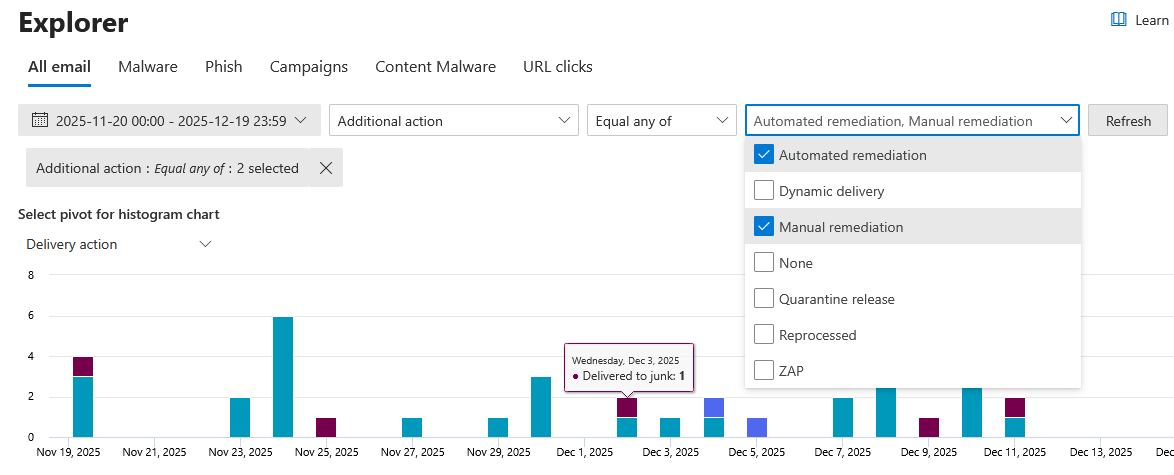
To Audit in Threat Explorer (another MDO P2 feature)
Joe Stocker tweet media
English
0
1
10
1.2K
Joe Stocker
Joe Stocker@ITguySoCal·
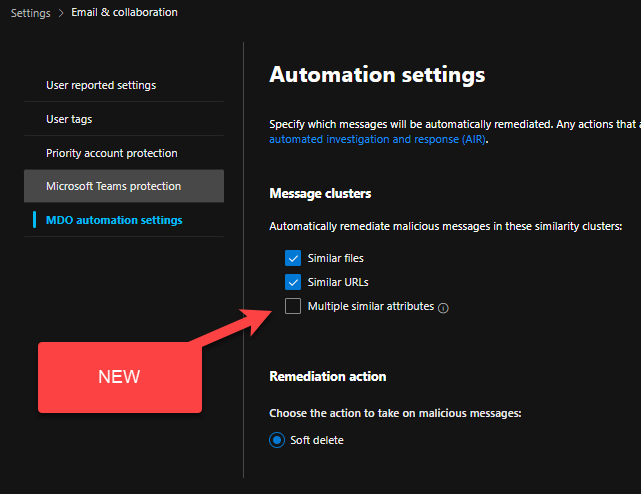
This automation is included in MDO P2, Defender Suite (the new name for E5 Security) or the full M365 E5 or M365 F5 skus. This compliments the functionality of ZAP (Zero Hour Auto Purge) which is available at all license levels. Learn more at MSFT Documentation links above.
English
2
1
7
1.3K