


Sam

2.7K posts

Sam banner
Sam

Sam

@Itsaforest

See you in the ⒻⓊⓉⓊⓇⒺ

SYD Katılım Mart 2009
3.4K Takip Edilen311 Takipçiler
Nathan Baschez
Nathan Baschez@nbaschez·
Do you spend a lot of time reviewing markdown docs written by AI? Wish it were a better experience? Say hi if you wanna try a new (free, open source) thing
English
341
1
353
55.2K
Sam retweetledi
Yung Lean Brasil
Yung Lean Brasil@yungleanbrasil·
This is already being considered the music video of the year
English
191
1.2K
14.5K
1.3M
Jacob Klug
Jacob Klug@Jacobsklug·
Claude Design is the biggest shift in product design since Figma. Most outputs look like shit. Generic containers, no brand consistency, nothing you'd actually ship. I spent the past week testing it inside a real agency workflow and figured out the exact prompts that change that. What's inside: • The design system prompt that locks Claude to your brand • The 3 part workflow: system, product UI, branded deck • How to layer features like dark mode, search, and filters mid build • The exact slideshow prompt for case study decks • Common pitfalls and the fastest fixes • A full prompt library you can paste into any project tomorrow Comment DESIGN and follow. I'll DM it to you. P.S. Going out to everyone who comments within the hour.
Jacob Klug tweet media
English
144
5
108
11.9K
Alfie Carter
Alfie Carter@AlfieJCarter·
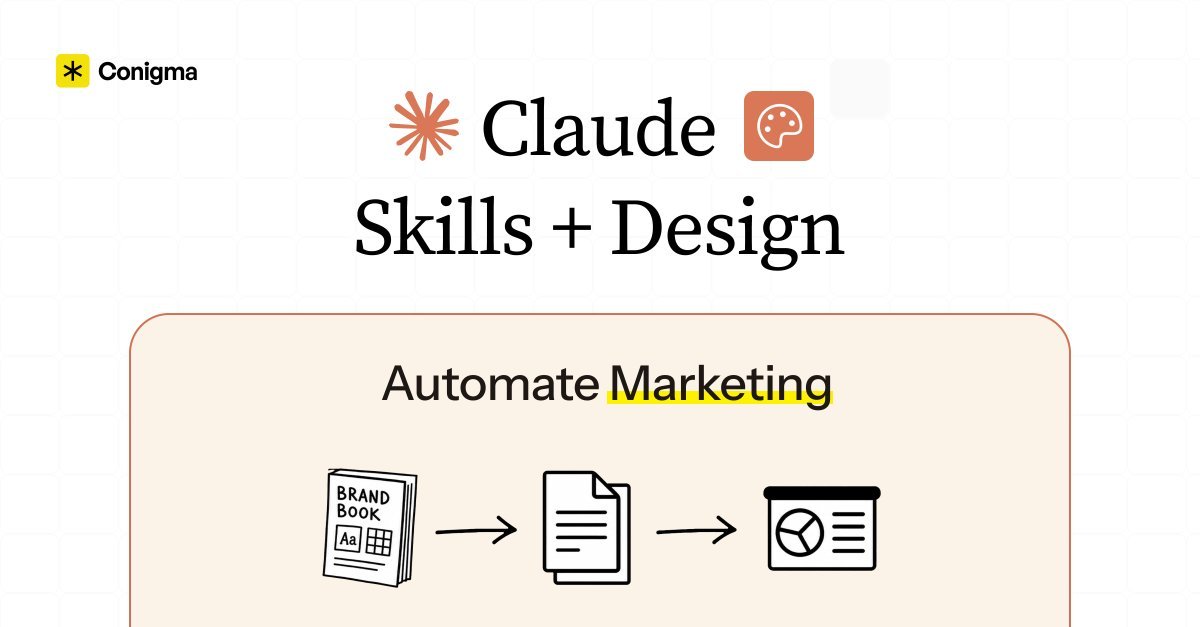
If you don't have my "Claude Design and Claude Skills Marketing Playbook" yet... The one I built to run every repeated marketing task from one brief with skill files across brand extraction, campaign planning, social content, carousel design, animated video, multi-skill orchestration, Notion library sync, and Kanban task board setup... Just comment "MARKETING" and I'll DM it to you for free (must follow)
Alfie Carter tweet media
English
394
18
246
24.6K
Jack J.
Jack J.@jack_9947·
I just built a Claude Code marketing skill stack that plans campaigns, writes social posts, designs carousels, and produces animated videos from a single brief every week. Feed it your brand design system, your best-performing content, and a campaign brief → it studies your voice and visual identity → generates on-brand assets across every format while you review and approve. All inside Claude Code and Claude Design. Perfect for marketing teams and agency owners who are still briefing designers on assets Claude Design produces in minutes, calling skills one at a time when one brief should trigger the whole sequence, and manually pushing skill updates to teammates who need the same system running on their machine. If you're running marketing in 2026, you already know the math - the teams that produce at volume aren't the ones with the biggest budgets, they're the ones with a skill stack that handles execution while humans handle strategy. Most teams ship three assets a week if they're lucky. This skill stack solves it: → Drop your branded landing page into Claude Design and it extracts colours, typography, components, and spacing into a portable skill file every other skill calls automatically → The campaign planning skill reads the brief, researches the market via Perplexity MCP, and builds a branded slide deck with KPIs, persona, funnel map, and roadmap → Pulls from your best-performing posts and storytelling framework as reference files so social content matches what actually works in your space → Routes complex tasks to sub-agents running in parallel and simple executional tasks directly to skills based on routing rules in CLAUDE.md → Fires completed skills to a Notion library automatically every week at 9am so your team always has the latest version without manual uploads → Drops finished campaigns, posts, carousels, and videos into dated project folders ready to publish No briefing designers on assets Claude produces in minutes. No calling skills one at a time when a brief should run the whole sequence. No manually distributing skill files to teammates every time something updates. What you get: - Brand design system extraction guide: 10-15 minutes to a portable skill file every other skill calls automatically - Four function skills: campaign planning, social content, carousel design, and animated video each triggered by a slash command - Multi-skill orchestration setup so one brief triggers research, content, creatives, and landing page in the right order automatically - Notion skills library with auto-sync routine so your team always installs the current version from one place - One skill stack you install once and run across every marketing workflow forever Built 100% in Claude Code and Claude Design. I put together a full playbook with all skill files, the brand extraction guide, the Notion library setup, and the exact CLAUDE.md routing rules to get the full stack running from one brief. Want it for free? > Like this post > Comment "MARKETING" And I'll send it over (must be following so I can DM)
Jack J. tweet media
English
1.5K
109
2.1K
134K
Jordan Ross
Jordan Ross@jordan_ross_8F·
The agency owners who fix their AI tech stack in the next 90 days are going to look like geniuses in 2027. The problem is every tool markets itself with the same words.. Agents Copilots. Memory. Automation Read about three and you can't tell which one to pick. So my team built a 105-page field manual that does the categorization for you. Inside: — The 8 software roles every modern agency stack collapses into (brand names change, roles don't) — The 5-question decision model that ends every "which tool should we buy" debate in under a minute — Specific picks by revenue band — what to run at $1M, $5M, $10M, and $20M+ — A task-to-tool matrix across marketing, sales, ops, fulfillment, reporting, and exec — 6 setup quickstarts including the $400/mo warehouse you can stand up in a weekend Comment STACK and I'll send it.
GREG ISENBERG@gregisenberg

how to set up hermes agent step by step. built-in memory, 40+ tools, works on your phone, and what to think of hermes vs openclaw: 1. hermes is a personal AI agent that runs in your terminal. think of it like open claw but with built-in memory, 40+ tools out of the box, and 90% cheaper token costs. you install it with one command. 2. the 3 problems with open claw that hermes solves: no memory (you keep repeating yourself), constant gateway restarts, and zero visibility into what you're spending on tokens. 3. hermes remembers everything. every completed task gets saved to memory. it searches through past logs to find solutions. over time it literally gets smarter at your specific workflows. 4. connect it to open router. you see exact costs per model per task. free models rotate weekly. one founder went from $130 every five days on open claw to $10 on hermes. same output. 5. it comes preloaded with skills. apple notes, imessage, find my, browser, web search, image generation, cron jobs. no hunting for plugins. 6. connect it to obsidian so it reads your entire vault. connect it to gstack for your dev environment. create custom skills for your specific workflows. 7. the biggest money saver: have it write code once for recurring tasks. then it runs without burning tokens every time. stop paying an LLM to do the same scrape or report daily. 8. run it on android via telegram. name your agents. talk to them like coworkers. in this episode imran shows you how to set this up. 9. you can run it bare metal, in docker, or serverless on modal. pick your risk level. i begged @imranye to come on @startupideaspod and walk through the full installation live. he made it impossibly clear. if you've heard of Hermes Agent and want the clearest explanation of how to get set up like a pro let me know what you want me to cover on the next ep this is the best personal agent setup video on the internet right now. watch
English
247
13
192
33.3K
Alfie Carter
Alfie Carter@AlfieJCarter·
I put the entire Claude Code and Claude Design B2B GTM Scaling Playbook into ONE Notion doc. 8 sections. No fluff. - The full Co-work prospect research workflow: project folder setup, web search, site screenshots, and cold email drafts via Chrome extension without leaving Claude or touching a spreadsheet - CRM and Gmail connected in one session: 15 personalised follow-up drafts in your inbox referencing actual call notes in under 10 minutes - The DBS skill structure that turns any repeatable GTM workflow into a slash command: Direction, Blueprints, Solutions, and the five GTM skills worth building first including qualify, enrich, and personalise - Five GTM routines that run without you: morning email brief, sales follow-up bot, LinkedIn content scheduler, meeting prep assistant, and weekly expense tracker - The post-call proposal routine that turns meeting notes into a researched proposal in Slack before your next call starts - What Claude Design actually builds and how to start: prototypes, animated decks, videos, and landing pages from plain language with three editing modes - The animated video trick that produces more polished pitch decks than building from copy directly and the 90/10 rule for final edits - How to go from Claude Design output to a live campaign page: export options mapped to every use case and the Claude Code handoff that gets any design to a live URL in under 2 minutes This is the setup I would have KILLED for before spending hours manually researching prospects, briefing designers on assets Claude Design produces in minutes, and building GTM workflows from scratch every session instead of triggering them with a slash command. Like + comment "CLAUDE" and I'll send it over (must be connected for priority access)
Alfie Carter tweet media
English
653
59
978
80.3K
Josh Pigford
Josh Pigford@Shpigford·
🚨 BREAKING: CLAUDE JUST MURDERED EVERY DESIGNER. THIS IS A GAME CHANGER. IT'S OVER FOR ALL DESIGNERS EVERYWHERE ON EARTH. THIS CHANGES EVERYTHING. I CAN'T BELIEVE IT. HERE'S MY SYSTEM FOR SAVING YOUR CAREER: REPLY "ILOVEAI" + RT AND I'LL DM YOU.
Claude@claudeai

Introducing Claude Design by Anthropic Labs: make prototypes, slides, and one-pagers by talking to Claude. Powered by Claude Opus 4.7, our most capable vision model. Available in research preview on the Pro, Max, Team, and Enterprise plans, rolling out throughout the day.

English
40
2
101
28.3K
Dan Rosenthal
Dan Rosenthal@dan__rosenthal·
This social selling framework has generated well over 8-figures in pipeline for us. (I’m giving it away FREE) Still, most companies are posting: - without an audience strategy. - without a content funnel. - without a capture system. They’re spending HOURS on content going out 3-4x a week... …with nothing coming back. That’s why we put this playbook together. Inside, I’ve included: 1. 7-step system from audience engineering to closed-won conversion 2. 70/20/10 content ratio with exact post types per funnel stage 3. 5 buyer signal capture methods for routing warm leads into CRM 4. Audience warming sequences that compound algorithmic reach over time 5. 4 conversion channels: newsletter, landing pages, warm outbound, retargeting This is the exact system we implement for every client. Reply “SOCIALS” and I'll send you the link. (must be following)
GIF
English
54
2
45
2.8K
Romàn
Romàn@romanbuildsaas·
Connect Claude to LinkedIn in 1 click It can find leads, write messages, and run your outreach 👇 We created a 1-click connector with 300+ built-in skills now Claude actually manages your pipeline One URL, 30 seconds to set up then Claude becomes your outbound team Here’s what’s possible once it’s connected 1/ Find high-intent leads Claude scans the web for signals job changes, funding, hiring, engagement and surfaces people ready to buy 2/ Identify the best opportunities “show me leads who engaged with competitors in the last 7 days” 3/ Enrich leads instantly Claude pulls company data, role, context and builds a clean, qualified list 4/ Write hyper-personalized messages each message is based on real signals not generic templates 5/ Handle conversations Claude replies, qualifies prospects and pushes them toward a call 6/ Launch campaigns at scale run LinkedIn outreach across accounts with timing optimized for replies 7/ Improve performance over time Claude learns what works and continuously boosts reply rates Connect “Connector” and I’ll send the setup guide
English
363
29
360
32.3K
Jordan Ross
Jordan Ross@jordan_ross_8F·
I fully reverse-engineered Ramp's internal AI operating system. Their system — called Glass — is how they got 99% of their entire company using AI every single day. 350+ reusable workflows. Every tool connected at first login. Memory that refreshes every 24 hours. Automations running while everyone sleeps. I partnered with my engineering team and we broke down every component inside it. Then we rebuilt the whole thing for marketing agencies. 76 pages. Every system. Every layer. Every step. Steal it. Comment "OS" and I'll send it directly. Must be a following to receive auto DM
Eric Glyman@eglyman

99% of Ramp uses ai daily. but we noticed most people were stuck — not because the models weren't good enough, but because the setup was too painful and unintuitive for most. terminal configs, mcp servers, everyone figuring it out alone. so we built Glass. every employee gets a fully configured ai workspace on day one — integrations connected via sso, a marketplace of 350+ reusable skills built by colleagues, persistent memory, scheduled automations. when one person on a team figures out a better workflow, everyone on that team gets it and gets more productive. the companies that make every employee effective with ai will compound advantages their competitors can't match. most are waiting for vendors to solve this. we decided to own it.

English
971
26
601
159K
Shiv
Shiv@shivsakhuja·
Introducing Gooseworks — AI coworkers that can do real GTM work. Over the last few months, we've been obsessed with turning AI into actual coworkers for our team. And it's working. Goose is now our most valuable teammate – it finds high-intent leads, runs outbound campaigns, coordinates with influencers, tracks SEO / AEO and a ton more. Today we're launching this publicly so everyone can create their own AI coworkers. Each coworker (or Goose) has its own computer, filesystem, mailbox, memory, and tools. Goose can work autonomously for hours, communicates over Slack, iMessage, WhatsApp or email, and gets smarter as you give it more context. It's not just a personal assistant — your whole team can talk to Goose from anywhere, and schedule it to run on autopilot. And here's the best part – we've already given Goose 100+ skills and data APIs for GTM work: – map your TAM – search people databases with natural language – find leads from X and LinkedIn posts – monitor intent signals from your ICPs – update your CRM and generate reports – find influencers and run outreach campaigns – track visibility in search and answer engines – connect to all the SaaS tools your business runs on +++ lots more. We also open-sourced every skill as a toolkit you can install directly in Claude Code. Comment "Goose" and follow and I'll send you the install link.
English
269
52
663
171.7K
Alfie Carter
Alfie Carter@AlfieJCarter·
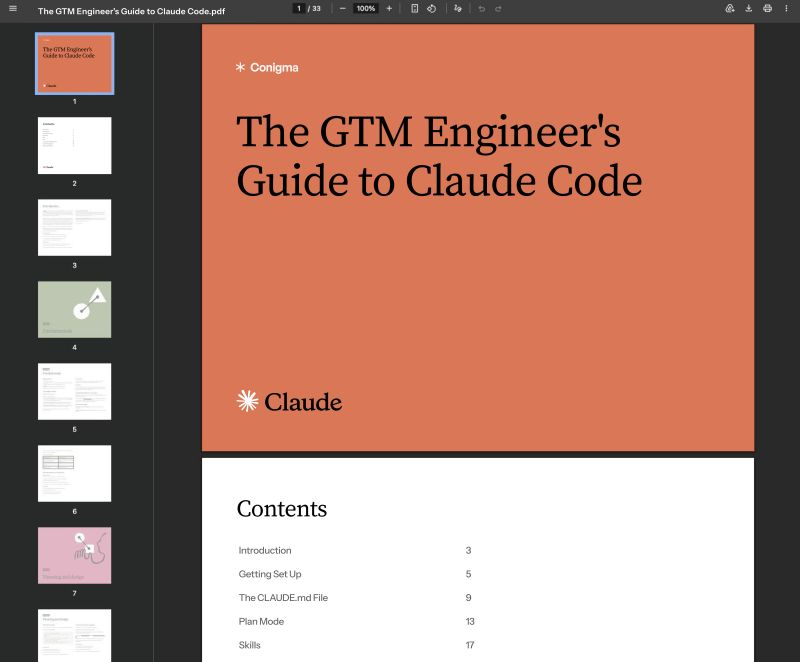
I put the entire Claude Code GTM Engineering Playbook into ONE Notion doc. 8 sections. No fluff. - How to get set up correctly from day one: Pro plan, terminal install across Mac, Linux, and Windows, GUI install via Antigravity or VS Code, and bypass permissions mode - What to put in your project brain file, what to leave out, and how to get Claude to update it automatically when it keeps making the same mistake - How to run plan mode step by step and when to skip it for simple tasks - How to build a skill file from scratch, fix one that keeps failing, and install 5 GTM skills worth building first: lead scraping, email labeling, proposal generation, outbound sequence writing, and client onboarding - MCP install process, token cost checks after every install, the best MCPs for GTM work, and how to cut token usage by 50 to 100x by converting MCPs into skills - Sub-agents and agent teams: the 3 cases where they earn their cost, reliability math for parallel runs, and how to enable parallel variant exploration - What is eating your context before you type anything, how to use /compact and /clear correctly, and model selection for parent vs sub-agents - Modal deployment: any skill as a live URL in under 2 minutes, form interface setup, and connection to n8n, Make, or Zapier This is the setup I would have KILLED for before spending months piecing together how to actually get productive in Claude Code from documentation, YouTube tutorials, and scattered GitHub threads. Like + comment "CODE" and I'll send it over (must be connected for priority access)
Alfie Carter tweet media
English
2K
197
2.9K
175.5K
Sam
Sam@Itsaforest·
@auren Skillz
English
0
0
1
47
Auren Hoffman
Auren Hoffman@auren·
AIs using the browser is insanely inefficient my colleague Nimna created a claude skill for cowork to make it 800% faster - and open sourcing it comment “skillz” here and i will get you to browser-optimizer skill kicker: it even reverse-engineers any web app's hidden API in under 2 minutes … extending claude’s chrome extension the problem: people will set up a sophisticated AI agent and then have it click through a web app one item at a time. like hiring a Formula 1 driver and making them push the car. every modern web app is a thin UI layer over an API. the data you want is one fetch() call away. but most people -- and most AI agents -- default to the human path: navigate, click, wait, read, repeat. the speed difference is NOT marginal. bulk API calls vs. manual page navigation is routinely 5-50x faster. i watched a workflow go from 2+ hours of manual clicking to 3 minutes by just intercepting the app's own API calls and reproducing them programmatically. It also includes workarounds for common blockers like PII filters on browser extensions, infinite scroll pages, and apps that use WebSockets instead of REST. the hierarchy is simple. if the app has a direct API, use it. if not, check if the data is already sitting in the browser's memory (most React and Next.js apps dump everything into window globals on page load). if not, open the network tab, click ONE thing, find the API pattern, then bulk-fetch everything. DOM scraping is the last resort, not the first instinct. this matters because AI agents are doing most of the repetitive work inside web apps. the agents that figure out the programmatic shortcut will be 10-50x more productive than the ones that simulate a human clicking around. same as how revenue per employee is about to go up 3-10x -- the gap between good and bad automation is enormous. manual clicking is the new manual data entry. it's a failure state NOT a strategy. (comment “skillz” here and i will get you to browser-optimizer skill)
English
73
2
52
34.1K
Felix Haas
Felix Haas@felixhhaas·
Ultimate AI Founder Playbook 🔥 Over the past few years I've invested in 30+ startups and worked inside one of the fastest growing AI companies in the world. I distilled everything I've learned about building something people love into one playbook. Here's what you'll get: 👉 My framework for building products people love 👉 What makes a great founder in the age of AI 👉 How to go from idea to working product in hours 👉 How to turn users into your best growth channel Super excited to be giving a lecture about this tomorrow at our Stockholm HQ. Come join us if you're in town! Can't make it in person? Comment "Lovable" and I’ll send you a link to the playbook! LFG 🚀
English
420
26
406
38.3K
Guillermo Flor
Guillermo Flor@guilleflorvs·
𝗧𝗵𝗲 𝗠𝗰𝗞𝗶𝗻𝘀𝗲𝘆 𝗦𝗹𝗶𝗱𝗲 𝗣𝗹𝗮𝘆𝗯𝗼𝗼𝗸 𝗳𝗼𝗿 𝗖𝗹𝗮𝘂𝗱𝗲 🔥 McKinsey charges $300k for a strategy engagement. A big part of what you're buying is the deck: the structure, the logic, the way the argument unfolds so that a senior partner can read it in four minutes and understand exactly what you're recommending. That framework has a name. Five rules. Most founders build decks that feel convincing while they're presenting and fall apart the moment someone reads them alone. The five rules fix that at the structural level, not the aesthetic one: → Pyramid Principle: the conclusion on slide one, proof after → SCQA: situation, complication, question, answer, in that order → Action titles: every heading is a thesis, readable top to bottom → MECE: no slide duplicates another, no logical step is missing → One message per slide, and one only I built a Claude Code project that runs all five automatically. Feed it your startup brief. Get back a McKinsey-style outline. Inside you'll find: 1. The Five McKinsey Rules That Make a Deck Impossible to Misread 2. How to Set Up the Claude Project 3. How to Make Claude Apply the Five Rules 4. How to Input Your Startup the Right Way Comment MCKINSEY and I'll send you the link.
Guillermo Flor tweet media
English
494
80
637
62K
Alfie Carter
Alfie Carter@AlfieJCarter·
I put my entire GTM engineering system into ONE Notion doc. 5 sections. No fluff. - The three-tool stack and exactly what each one does: thinking partner, execution assistant, and internal triage layer - The 10-step daily routine across morning setup, in-day note processing, and end-of-day reflection - A ready-to-copy Claude system prompt that accumulates context across sessions so you never start from scratch - The four delegation tasks worth doing first: pipeline pulls, QBR slides, call briefs, and quota planning - What Claude can actually do today and where it still needs a human in the loop This is the setup I would have KILLED for before spending weeks figuring out which AI tool does what and why using the wrong one for the wrong task costs you the leverage entirely. Like + comment "CLAUDE" and I'll send it over (must be connected for priority access)
Alfie Carter tweet media
English
105
3
116
8.3K
Liam
Liam@iamliamsheridan·
we use AI across the full sales process. not just for copy. for research, for sales assets, for pitch decks, for pre-call prep. the SWIPE file is the prompt library: -> pre-call research prompt: structured intelligence pack before every discovery call -> one-pager builder: inputs their problem, your proof, their objections — outputs a closing one-pager -> pitch deck narrative: structures the argument for a specific buyer type -> objection handler: inputs common objections, outputs the most credible responses -> case study formatter: turns raw results into a case study that closes deals these are the exact prompts running across our client work. not theoretical. in production. like + comment 'SWIPE' and i'll DM you. (must be following)
English
16
1
18
790
Alfie Carter
Alfie Carter@AlfieJCarter·
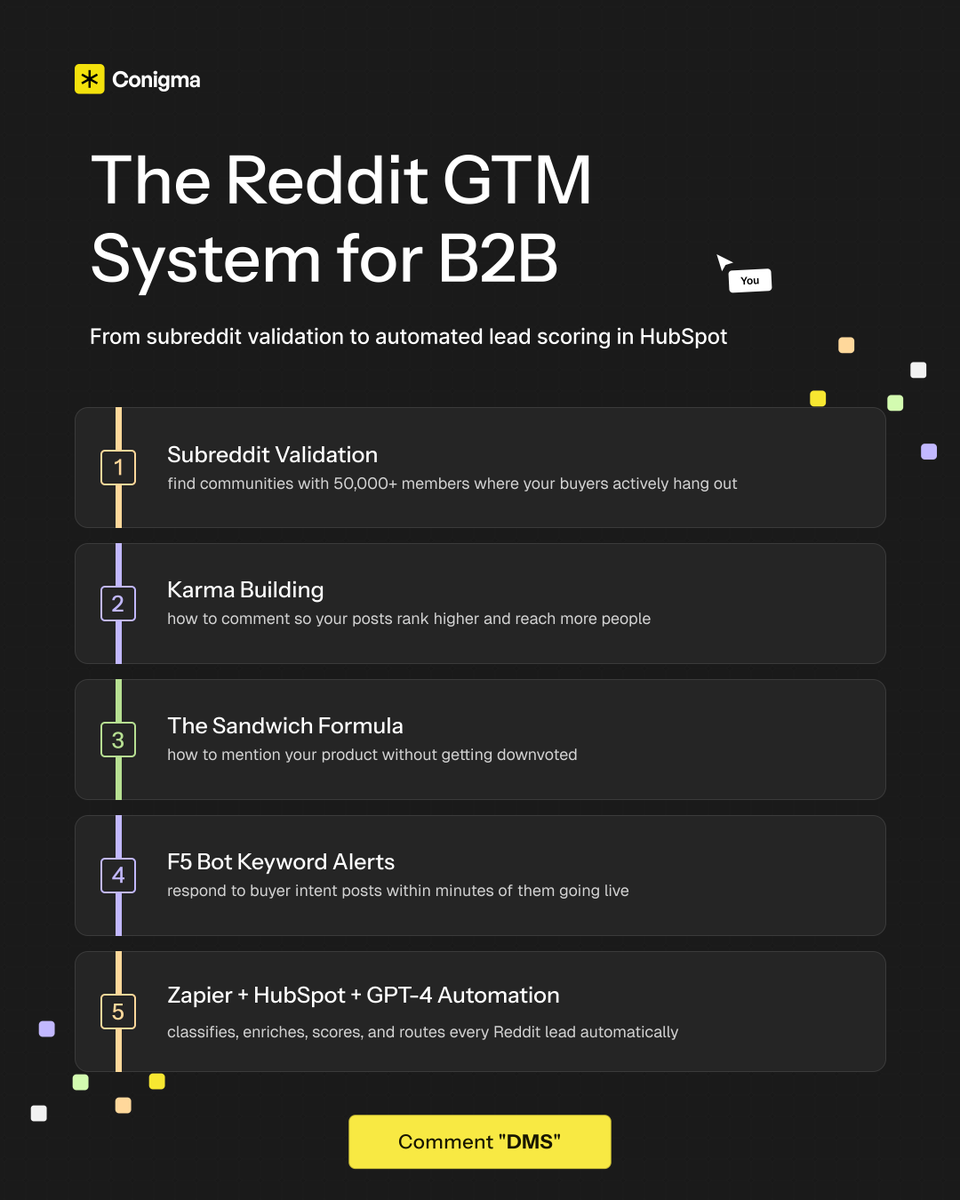
Most GTM teams ignore Reddit completely. That's exactly why it works. I spent weeks building a full Reddit GTM system - from finding the right subreddits to automating lead scoring in HubSpot. Here's the short version of what's inside: (Step-by-step playbook + Zapier automation + AI lead scoring system) Get access below Comment "REDDIT" and I'll send you access This system isn't advice - it's an execution playbook: → How to find and validate subreddits with 50,000+ members where your buyers actually hang out → How to build karma the right way so your comments rank higher and reach more people → The Sandwich Formula for mentioning your product without getting downvoted into oblivion → How to set up F5 Bot keyword alerts so you respond to buyer intent posts within minutes → A full Zapier + HubSpot + GPT-4 automation that classifies, enriches, scores, and routes every Reddit lead automatically We've run this with GTM teams doing outbound, inbound, and everything in between. Pain points: no Reddit presence, no organic pipeline, no system for capturing demand. After running the system: demo requests coming in minutes after commenting on a post. Reddit GTM still works - but only if it's concrete: Subreddit validation - comment strategy - lead capture automation Want access? 1/ Like this tweet 2/ Reply "REDDIT" and I'll send you the full system
Alfie Carter tweet media
English
137
7
137
7.3K
Alfie Carter
Alfie Carter@AlfieJCarter·
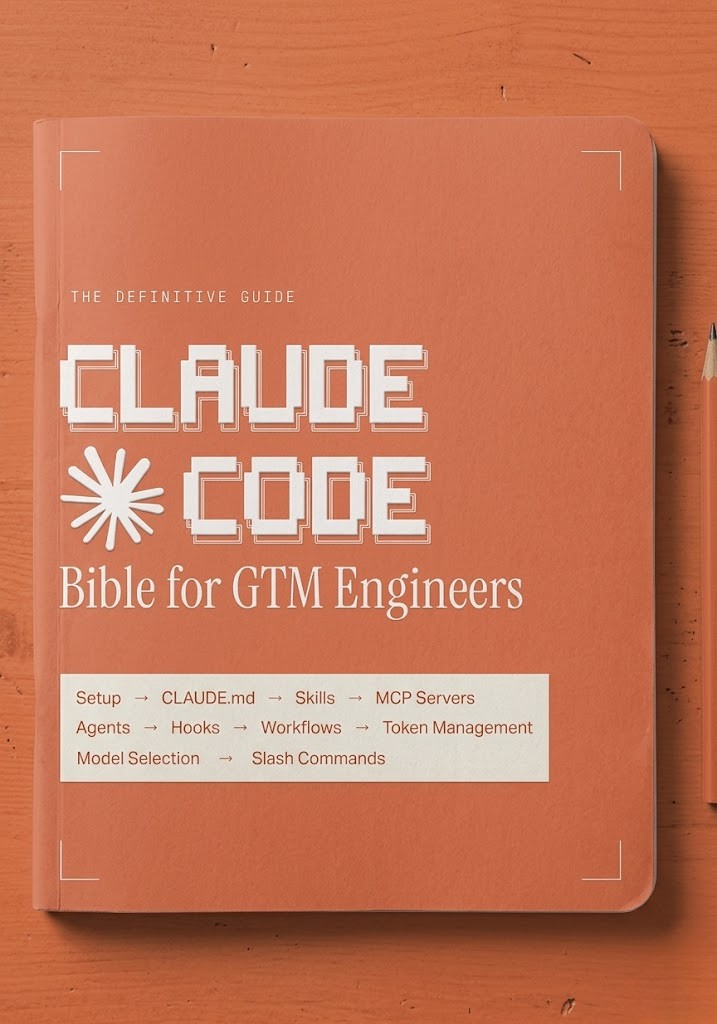
I put my entire Claude Code setup for GTM engineering into ONE Notion doc 10 modules. No fluff. - How to install Claude Code and run your first GTM session in under 10 minutes - How to build a CLAUDE. md that acts as your project brain and never loses context - How to install GTM skills that chain together and run autonomously - How to connect your full stack via MCP servers without writing custom wrappers - How to run parallel agents and subagents across GTM workflows simultaneously - How to manage context and token usage across long research sessions - How to choose between Sonnet, Opus, and Haiku based on the task - How to hook Claude Code into external triggers so workflows run without you - The exact GTM workflows to build first: signal detection, lead scoring, outreach sequencing - Full slash command reference for every repeatable GTM task This is the setup I would have KILLED for before spending months piecing it together from documentation, YouTube tutorials, and scattered GitHub threads. Like + comment "BIBLE" and I'll send it over (must be connected for priority access)
Alfie Carter tweet media
English
974
80
1.2K
80.4K