The Startup Ideas Podcast (SIP) 🧃

286 posts

The Startup Ideas Podcast (SIP) 🧃 banner
The Startup Ideas Podcast (SIP) 🧃

The Startup Ideas Podcast (SIP) 🧃

@startupideaspod

Get startup ideas and practical tutorials on AI tools will make you more money and build your business. Host: @gregisenberg Available on Spotify, Apple and YT

Get ideas → Katılım Temmuz 2025
8 Takip Edilen31.5K Takipçiler
The Startup Ideas Podcast (SIP) 🧃
"Why does my OpenClaw forget everything?" Because nothing was saved in the first place. Here's the 3-layer memory fix: memory.md: - Your agent's long-term brain. - High-level learnings, preferences, insights. - If this file doesn't exist yet, tell your agent to create it. Daily memory folder: - Granular logs created every day. - More detailed than memory.md. - This is where session-level context lives. Compaction flush: - Before your agent summarizes and compresses a long session, force it to write everything to memory first. - Otherwise context gets lost when the window fills up. Then add a 30-minute auto-save heartbeat: - Check if today's memory file exists - Create it if missing - Log a summary of the current session Fix your memory system before you touch anything else. That's where it clicks.
GREG ISENBERG@gregisenberg

THE ULTIMATE GUIDE TO OPENCLAW (1hr free masterclass) 1. fix memory so it compounds add MEMORY.md + daily logs. instruct it to promote important learnings into MEMORY.md because this is what makes it improve over time 2. set up personalization early identity.md, user.md, soul.md. write these properly or everything feels generic. this is what makes it sound like you and understand your world 3. structure your workspace properly most setups break because the foundation is messy. folders, files, and roles need to be clean or everything downstream degrades 4. create a troubleshooting baseline make a separate claude/chatgpt project just for openclaw. download the openclaw docs (context7) and load them in. when things break, it checks docs instead of guessing this alone fixes most issues!! 5. configure models and fallbacks set primary model to GPT 5.4 and add fallbacks across providers. this is what keeps tasks running instead of failing mid-way 6. turn repeat work into skills install summarize skill early. anything you do 2–3 times → turn into a skill. this is how it starts executing real workflows 7. connect tools with clear rules add browser + search (brave api). use managed browser for automation. use chrome relay only when login is neededthis avoids flaky behavior 8. use heartbeat to keep it alive add rules to check memory + cron healthif jobs are stale, force-run themthis prevents silent failures 9. use cron to schedule real work set daily and weekly tasksreports, follow-ups, content workflowsthis is where it starts acting without you 10. lock down security properly move secrets to a separate env file outside workspace. set strict permissions (folder 700, file 600). use allowlists for telegram access. don’t expose your gateway publicly 11. understand what openclaw actually is it’s a system that remembers, acts, and improves. basically, closer to an employee than a tool this ep of @startupideaspod is now out w/ @moritzkremb it's literally a full 1hr free course to take you from from “i installed openclaw”to “this thing is actually working for me” most people are one step away from openclaw working they installed it, they tried it and it didn’t click this ep will make it click all free, no advertisers, i just want to see you build your ideas with ideas with this ultimate guide to openclaw watch
English
3
5
35
3.7K
Wiz 👨‍🚀
Wiz 👨‍🚀@WizLikeWizard·
Have been using OpenClaw for ~a month and it kinda sucks? I spend more time battling it to get basic crons fired reliably, remember things, and not repeat itself. Am I doing it wrong or are we just still very early on all of this?
English
130
1
122
17.4K
The Startup Ideas Podcast (SIP) 🧃 retweetledi
GREG ISENBERG
GREG ISENBERG@gregisenberg·
THE ULTIMATE GUIDE TO OPENCLAW (1hr free masterclass) 1. fix memory so it compounds add MEMORY.md + daily logs. instruct it to promote important learnings into MEMORY.md because this is what makes it improve over time 2. set up personalization early identity.md, user.md, soul.md. write these properly or everything feels generic. this is what makes it sound like you and understand your world 3. structure your workspace properly most setups break because the foundation is messy. folders, files, and roles need to be clean or everything downstream degrades 4. create a troubleshooting baseline make a separate claude/chatgpt project just for openclaw. download the openclaw docs (context7) and load them in. when things break, it checks docs instead of guessing this alone fixes most issues!! 5. configure models and fallbacks set primary model to GPT 5.4 and add fallbacks across providers. this is what keeps tasks running instead of failing mid-way 6. turn repeat work into skills install summarize skill early. anything you do 2–3 times → turn into a skill. this is how it starts executing real workflows 7. connect tools with clear rules add browser + search (brave api). use managed browser for automation. use chrome relay only when login is neededthis avoids flaky behavior 8. use heartbeat to keep it alive add rules to check memory + cron healthif jobs are stale, force-run themthis prevents silent failures 9. use cron to schedule real work set daily and weekly tasksreports, follow-ups, content workflowsthis is where it starts acting without you 10. lock down security properly move secrets to a separate env file outside workspace. set strict permissions (folder 700, file 600). use allowlists for telegram access. don’t expose your gateway publicly 11. understand what openclaw actually is it’s a system that remembers, acts, and improves. basically, closer to an employee than a tool this ep of @startupideaspod is now out w/ @moritzkremb it's literally a full 1hr free course to take you from from “i installed openclaw”to “this thing is actually working for me” most people are one step away from openclaw working they installed it, they tried it and it didn’t click this ep will make it click all free, no advertisers, i just want to see you build your ideas with ideas with this ultimate guide to openclaw watch

English
39
54
419
25K
Drew Miko
Drew Miko@xdrewmiko·
@startupideaspod Mind borrowing me a few ideas? I am already working on 2, but I can handle a few more !
English
1
0
0
28
The Startup Ideas Podcast (SIP) 🧃
So many ideas to build not enough time
Google AI@GoogleAI

We’re launching a brand new, full-stack vibe coding experience in @GoogleAIStudio, made possible by integrations with the @Antigravity coding agent and @Firebase backends. This unlocks: — Full-stack multiplayer experiences: Create complex, multiplayer apps with fully-featured UIs and backends directly within AI Studio — Connection to real-world services: Build applications that connect to live data sources, databases, or payment processors and the Antigravity agent will securely store your API credentials for you — A smarter agent that works even when you don't: By maintaining a deeper understanding of your project structure and chat history, the agent can execute multi-step code edits from simpler prompts. It also remembers where you left off and completes your tasks while you’re away, so you can seamlessly resume your builds from anywhere — Configuration of database connections and authentication flows: Add Firebase integration to provision Cloud Firestore for databases and Firebase authentication for secure sign-in This demo displays what can be built in the new vibe coding experience in AI Studio. Geoseeker is a full-stack application that manages real-time multiplayer states, compass-based logic, and an external API integration with @GoogleMaps 🕹️

English
5
4
36
4.8K
The Startup Ideas Podcast (SIP) 🧃
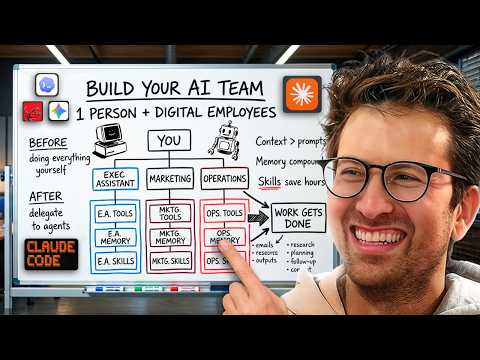
I've built a team of AI agents to run my business. Here's the exact order I follow: Step 1: Pick a role (executive assistant, head of marketing, etc.) Step 2: Open Claude Code and interview your way into context files "Ask me questions to build this out" Step 3: Build skills through daily use - Daily briefs - Meeting prep - Custom workflows Step 4: Get it all working reliably first. Step 5: THEN migrate to autonomous harnesses like OpenClaw. Most people jump straight to Step 5. That's why their agents break. Start with one agent. One role. Get it right. Then scale
GREG ISENBERG@gregisenberg

AI AGENTS 101 (58 minute free masterclass) send this to anyone who wants to understand ai agents, claude skills, md files, how to get the most out of AI etc in plain english: 1. chat vs agents - chat models answer questions in a back and forth while agents take a goal, figure out the steps, and deliver a result 2. agents don’t stop after one response. they keep running until the task is actually finishedno babysitting required 3. everything runs on a loop. they gather context, decide what to do, take an action, then repeat until done 4. the loop is the system. they look at files, tools, and the internet. decide the next step. execute and then feed that back into the next step. over and over until completion 5. the model is just one piece. gpt, claude, gemini are the reasoning layer. the key is model + loop + tools + context 6. mcp is how agents use tools. it connects things like browser, code, apis, and your internal software. once connected, the agent decides when to use them to get the job done 7. context beats prompt all day. you don't need to write perfect prompts. load your agent with context about your business, style, and goals and then simple instructions work 8. claude.md or agents.md is the onboarding doc it tells the agent who it is, how to behave, what it knows, and what tools it can use. this gets loaded every time before it starts 9. memory.md is how it improves. agents don’t remember by default. this file stores preferences, corrections, and patterns you tell the agent to update it, and it gets better over time 10. skills + harnesses make it usable. skills are reusable tasks like writing, research, analysis the harness is the environment like claude code or openclaw that runs everything. basiclaly, different interfaces, same system underneath this episode with remy on @startupideaspod was one of the clearest ways of understanding a lot of the core concepts of ai agents could be the best beginners course for ai agents 58 mins. all free. no advertisers. i just want to see you build cool stuff. im rooting for you. send to a friend watch

English
18
16
163
23.7K
Elkay
Elkay@realElkayAI·
@startupideaspod Great share! Yeah it def takes time to get the process right and explain each aspect thoroughly to get it smooth sailing
English
1
0
1
33
The Startup Ideas Podcast (SIP) 🧃
Your AI agent isn't broken. You just never trained it. Here's the 2-file system that fixes it: File 1: agents.md (your onboarding doc) This is the context file your agent loads every session. Put in here: - Your role and business - Tools you use and what for - How you like things done - Communication preferences Think: everything you'd tell a new hire on day one. One file. Always on. Loaded automatically. File 2: memory.md (the self-improving loop) This is where your agent saves what it learns over time. You say "never sign off emails with cheers, use warm regards." Without memory.md → it forgets tomorrow. With memory.md → it writes it down, never repeats the mistake. The setup takes 30 seconds: In your agents.md, add one line: "When I correct you or you learn something new, update memory.md" Create a blank memory.md in your folder. That's it. What happens next: - Week 1 → constant corrections - Week 4 → it knows your business better than most employees The corrections compound. The errors disappear. Prompt engineering is dead. Context engineering is the game now.
GREG ISENBERG@gregisenberg

AI AGENTS 101 (58 minute free masterclass) send this to anyone who wants to understand ai agents, claude skills, md files, how to get the most out of AI etc in plain english: 1. chat vs agents - chat models answer questions in a back and forth while agents take a goal, figure out the steps, and deliver a result 2. agents don’t stop after one response. they keep running until the task is actually finishedno babysitting required 3. everything runs on a loop. they gather context, decide what to do, take an action, then repeat until done 4. the loop is the system. they look at files, tools, and the internet. decide the next step. execute and then feed that back into the next step. over and over until completion 5. the model is just one piece. gpt, claude, gemini are the reasoning layer. the key is model + loop + tools + context 6. mcp is how agents use tools. it connects things like browser, code, apis, and your internal software. once connected, the agent decides when to use them to get the job done 7. context beats prompt all day. you don't need to write perfect prompts. load your agent with context about your business, style, and goals and then simple instructions work 8. claude.md or agents.md is the onboarding doc it tells the agent who it is, how to behave, what it knows, and what tools it can use. this gets loaded every time before it starts 9. memory.md is how it improves. agents don’t remember by default. this file stores preferences, corrections, and patterns you tell the agent to update it, and it gets better over time 10. skills + harnesses make it usable. skills are reusable tasks like writing, research, analysis the harness is the environment like claude code or openclaw that runs everything. basiclaly, different interfaces, same system underneath this episode with remy on @startupideaspod was one of the clearest ways of understanding a lot of the core concepts of ai agents could be the best beginners course for ai agents 58 mins. all free. no advertisers. i just want to see you build cool stuff. im rooting for you. send to a friend watch

English
6
3
44
5.7K
The Startup Ideas Podcast (SIP) 🧃 retweetledi
GREG ISENBERG
GREG ISENBERG@gregisenberg·
AI AGENTS 101 (58 minute free masterclass) send this to anyone who wants to understand ai agents, claude skills, md files, how to get the most out of AI etc in plain english: 1. chat vs agents - chat models answer questions in a back and forth while agents take a goal, figure out the steps, and deliver a result 2. agents don’t stop after one response. they keep running until the task is actually finishedno babysitting required 3. everything runs on a loop. they gather context, decide what to do, take an action, then repeat until done 4. the loop is the system. they look at files, tools, and the internet. decide the next step. execute and then feed that back into the next step. over and over until completion 5. the model is just one piece. gpt, claude, gemini are the reasoning layer. the key is model + loop + tools + context 6. mcp is how agents use tools. it connects things like browser, code, apis, and your internal software. once connected, the agent decides when to use them to get the job done 7. context beats prompt all day. you don't need to write perfect prompts. load your agent with context about your business, style, and goals and then simple instructions work 8. claude.md or agents.md is the onboarding doc it tells the agent who it is, how to behave, what it knows, and what tools it can use. this gets loaded every time before it starts 9. memory.md is how it improves. agents don’t remember by default. this file stores preferences, corrections, and patterns you tell the agent to update it, and it gets better over time 10. skills + harnesses make it usable. skills are reusable tasks like writing, research, analysis the harness is the environment like claude code or openclaw that runs everything. basiclaly, different interfaces, same system underneath this episode with remy on @startupideaspod was one of the clearest ways of understanding a lot of the core concepts of ai agents could be the best beginners course for ai agents 58 mins. all free. no advertisers. i just want to see you build cool stuff. im rooting for you. send to a friend watch
English
109
259
2.2K
254.7K
The Startup Ideas Podcast (SIP) 🧃
"OpenClaw is the new computer." — Jensen Huang This is the early PC era all over again. A few power users see it. Everyone else hasn't even started. "It's the most popular open source project in the history of humanity, and it did so in just a few weeks. It exceeded what Linux did in 30 years." A solo founder with OpenClaw can now build what used to take a 50-person team. The leverage is absurd.
GREG ISENBERG@gregisenberg

i heard about a guy in a small town in england who turned his openclaw into a short form video marketing machine millions of views, steady app downloads, and revenue coming in every day i needed to find out how he was doing it 1. spin up an ai “employee” using openclaw 2. give it one job like grow your app with tiktokk 3. give it access to tiktokk analytics, a browser to research and image/video tools to create content 4. the openclaw studies your niche and starts generating slideshows and videos 5. every post feeds performance data back into the system views → hook quality downloads → CTA quality revenue → funnel quality the openclaw then iterates on - new hooks - new formats - new CTAs until it finds winners one of his posts hit 170k+ views and the system keeps improving because the analytics loop feeds back into the content generation so the agent slowly learns what works what i like about this is the framing most people think about ai tools this is different you spin up an ai employee you give it a job and let it run the loop thanks to @oliverhenry for coming on the @startupideaspod today more like this soon, i will share the most interesting stories and gatekeep nothing this episode was dripping in sauce i gotta try this and see if it works kinda wild if it does watch

English
204
570
4.9K
1.5M
The Startup Ideas Podcast (SIP) 🧃
Obsidian + Claude Code is quietly becoming the best creator workflow. Here's the setup: 1) Build templates for everything → Storyboard template. Editor template. Style guide. 2) Write your raw script in Obsidian 3) Point Claude Code at your vault → "Turn this script into my storyboard template" It formats the whole thing into a structured table. First pass done. The key insight: AI doesn't replace your process. It runs your process faster. - Templates = how you want it done - Style guides = the standards it follows - Claude Code = the engine that executes Document your systems first. Then let AI scale them.
English
28
61
824
40.1K
The Startup Ideas Podcast (SIP) 🧃 retweetledi
GREG ISENBERG
GREG ISENBERG@gregisenberg·
Full ep on @startupideaspod
GREG ISENBERG@gregisenberg

how to use obsidian + claude code to build a 24/7 personal operating system and build your startup: 1. write everything in markdown (daily notes, projects, beliefs, people, meetings) 2. link your notes together so they mirror how your brain actually thinks. 3. install obsidian cli so claude code can read your entire vault + the relationships. 4. stop reexplaining projects every session. use reference files instead. 5. build custom slash commands: /context → load your full life + work state /trace → see how an idea evolved over months /connect → bridge two domains you’ve been circling /ideas → generate startup ideas from your vault /graduate → promote daily thoughts into real assets 6. keep a strict rule: human writes the vault. agents read it, suggest, execute. 7. let claude aka clode surface patterns you’ve been unconsciously circling for years. 8. delegate from inside your notes. one sentence in obsidian → agent handles the rest. 9. treat writing as leverage.the more you write, the more context your agents have. 10. understand this:markdown files are the oxygen of llms. i really enjoyed seeing how to use obsidian thanks to @internetvin vin uses ai like a thinking partner wired into his life’s work. 99.99% of people won’t do this because it requires reflection + setup. but once the vault exists, the agent stops being generic. it starts thinking in your voice. episode is live on @startupideaspod (more there) this one is different. send this tweet to a friend. im still processing how game changer obsidian + claude code is, maybe you too watch

English
9
7
152
44.6K