JVertebrBiol

269 posts

JVertebrBiol banner
JVertebrBiol

JVertebrBiol

@JVertebrBiol

The Journal of Vertebrate Biology is an Open Access international journal for all fields of vertebrate zoology.

Brno, Czech Republic Katılım Mayıs 2024
83 Takip Edilen21 Takipçiler
Sabitlenmiş Tweet
JVertebrBiol
JVertebrBiol@JVertebrBiol·
The Journal of Vertebrate Biology is non-commercial, Diamond Open Access and provides free English language correction for accepted manuscripts. It has an Impact Factor of 1.5, a CiteScore of 3.4, and is ranked in the Q2 quartile in Animal Science and Zoology.
English

0
0
0
84
JVertebrBiol retweetledi
Joachim Schork
Joachim Schork@JoachimSchork·
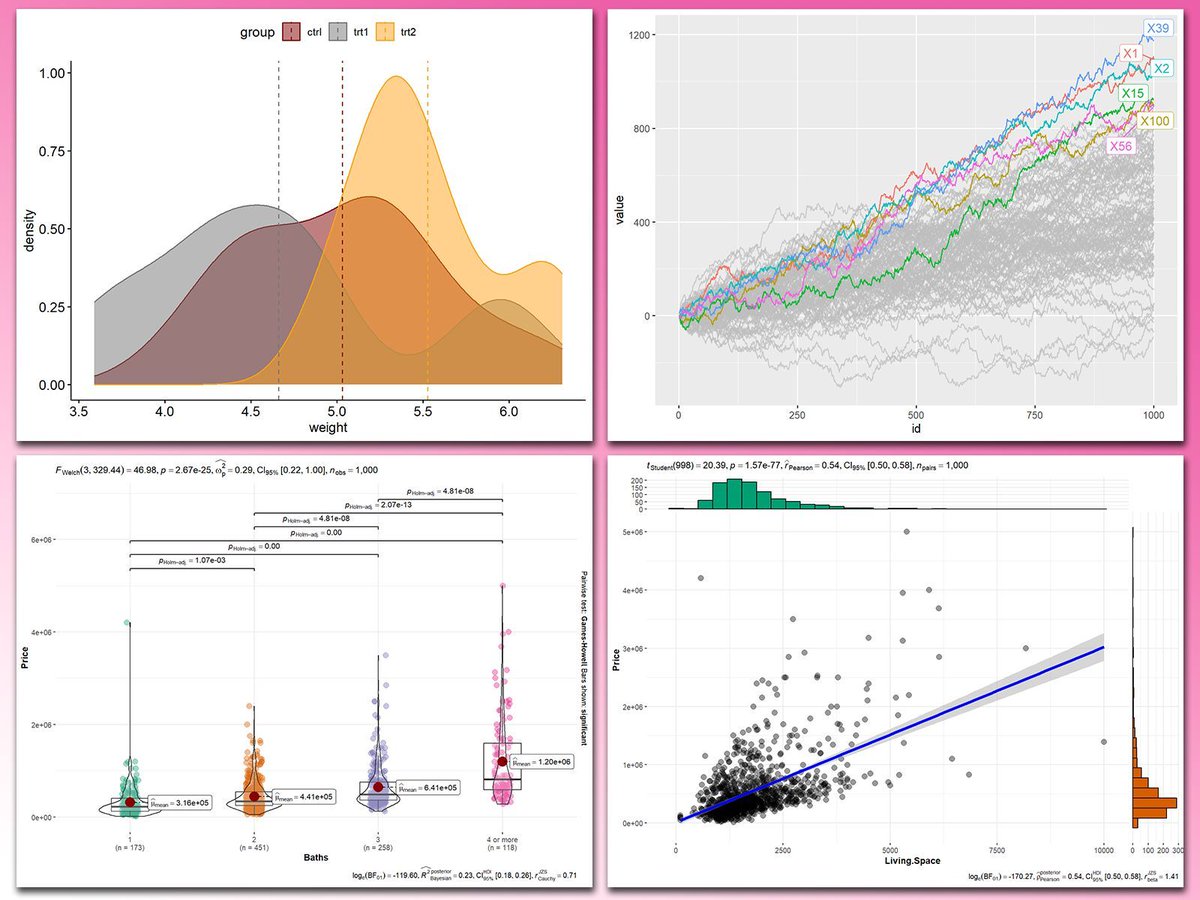
Adding statistical metrics to your plots can transform your visualizations from basic to highly informative. With ggplot2 in R and its versatile extensions, incorporating features like p-values, confidence intervals, and regression lines becomes both straightforward and visually appealing. These are my top 5 packages for adding statistical metrics in ggplot2: 1️⃣ ggstatsplot: Combines statistical analysis and visualizations, displaying p-values, confidence intervals, and effect sizes directly on your plots. 2️⃣ ggpubr: Simplifies the process of adding p-values, statistical comparisons, and summaries to boxplots, bar charts, and more. 3️⃣ ggsignif: Adds significance brackets with p-values to plots like boxplots and bar charts, making statistical comparisons easy to interpret. 4️⃣ stat_poly_eq: Annotates regression equations, R² values, and p-values on scatter plots, ideal for showcasing relationships in linear models. 5️⃣ gghighlight: Highlights specific data points or groups in plots, drawing attention to key statistical trends or outliers while maintaining context. With these tools, integrating statistical insights into your ggplot2 visualizations becomes both effective and effortless. In the graph shown here, you can see examples of how these packages enhance your plots: a density plot with group means marked by vertical lines, a crowded line plot with selected series highlighted for clarity, a violin-boxplot hybrid with p-values annotated for group comparisons, and a scatter plot featuring a regression line, confidence intervals, and marginal histograms for added context. These enhancements demonstrate the power of ggplot2 extensions for making statistical insights visually accessible. If you’d like to learn how to use ggplot2 and these extensions, join my online course, Data Visualization in R Using ggplot2 & Friends. I’ll guide you step-by-step to create visualizations packed with statistical insights! Check out this link for more details: statisticsglobe.com/online-course-… #DataScience #RStats #DataVisualization #ggplot2 #tidyverse #Python
Joachim Schork tweet media
English
2
24
134
5K
JVertebrBiol retweetledi
Joachim Schork
Joachim Schork@JoachimSchork·
The gghalves package is a handy extension for ggplot2 that enables you to create half-geometries, such as half-violin plots, half-dot plots, and more. It allows you to compare two data sets side-by-side, using one plot instead of two, for clearer and more compact visualizations. ✔️ Efficient Data Comparison: gghalves makes it easy to compare two groups by displaying their data in a single, merged plot, saving space and reducing clutter. ✔️ Flexible Plotting Options: Supports various geometries, including half-violin and half-box plots, making it versatile for different kinds of visual comparisons. ✔️ Smooth Integration: Works seamlessly with ggplot2, allowing you to enhance your existing visualizations without major code changes. Whether you’re analyzing experimental results, survey responses, or any other type of grouped data, gghalves helps to keep your visualizations clean and insightful. The example visualization shown here is taken from the package website: cran.r-project.org/web/packages/g… If you’re eager to improve your data visualization skills, consider joining my online course, Data Visualization in R Using ggplot2 & Friends. We’ll cover ggplot2 and its extensions, helping you create clearer, more effective visuals. Click this link for detailed information: statisticsglobe.com/online-course-… #datastructure #coding #DataVisualization #DataViz #tidyverse #Python #RStats
Joachim Schork tweet media
English
1
4
52
3.4K
JVertebrBiol retweetledi
Jakub Žák
Jakub Žák@fish_jakub_zak·
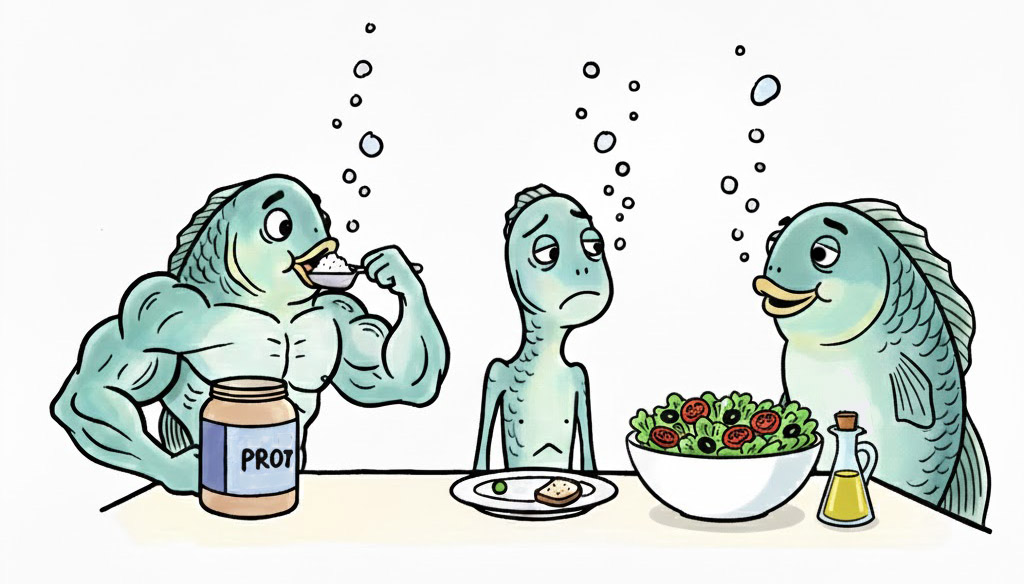
New paper! We challenge the universality of dietary restriction for lifespan extension! It works for inbred but not for genetically diverse populations. In outbred Nothobranchius furzeri, neither protein nor caloric restriction delayed actuarial senescence #AgingResearch
Jakub Žák tweet media
English
1
1
1
43
JVertebrBiol retweetledi
Joachim Schork
Joachim Schork@JoachimSchork·
Model-based clustering uses statistical models, most commonly Gaussian mixtures, to identify patterns and group data points based on probability rather than just distance. Each cluster is represented by a probability distribution, and the algorithm estimates both the parameters of these distributions and the likelihood that each point belongs to each cluster. Unlike simpler methods such as k-means, it provides a probabilistic view of group membership and can model clusters of different shapes, sizes, and orientations. ✔️ Can reveal hidden patterns in complex data ✔️ Works well even when clusters overlap ✔️ Uses statistical criteria like BIC to choose the number of clusters objectively ✔️ Accounts for varying cluster shapes and orientations ❌ Can lead to overfitting if too many clusters are chosen without proper model selection ❌ May produce misleading results if model assumptions, such as Gaussian-shaped clusters, do not hold ❌ Computationally more demanding than simpler methods ❌ Not ideal for highly irregular clusters, where approaches like DBSCAN or spectral clustering might work better In the example below, the first plot shows all data points in black. The next view assigns each point to a cluster and colors it accordingly. Ellipses represent the estimated Gaussian components of the model, illustrating the probability-based grouping and the variability within each cluster. 🔹 In R, the mclust package fits Gaussian mixture models, selects the optimal number of clusters using BIC, and offers tools for uncertainty visualization, which is important for interpreting ambiguous points. 🔹 In Python, the sklearn.mixture.GaussianMixture class supports Gaussian mixture modeling, with BIC or AIC for model selection, and results can be visualized using matplotlib or seaborn. For more insights into statistics, data science, R, and Python, join my email newsletter for practical tips delivered directly to your inbox. For more information, visit this link: eepurl.com/gH6myT #DataViz #DataAnalytics #Python #R4DS #programmer #RStats #database
GIF
English
1
24
90
5.4K
JVertebrBiol retweetledi
Joachim Schork
Joachim Schork@JoachimSchork·
The wide range of ggplot2 extensions for data visualization in R is truly impressive. Even better, these extensions usually work seamlessly together, making it easy to enhance your plots. Below is an example of an animated ggplot2 plot created using the gganimate and ggblend extensions. Just brilliant! The visualization shown below is taken from the ggblend package website. You can also find the code there: mjskay.github.io/ggblend/ If you’re interested in mastering data visualization in R with ggplot2 and its extensions, you might want to explore my online course on "Data Visualization in R Using ggplot2 & Friends"! Take a look here for more details: statisticsglobe.com/online-course-… #datastructure #DataScience #Python #RStudio #DataAnalytics #ggplot2 #VisualAnalytics #DataVisualization #RStats #datasciencetraining #tidyverse
GIF
English
0
29
173
7.1K