no, my game is NOT going to have a feature with floppies just because it takes place in the 80s, I'm a responsible indie game dev, only working on marketable features, wdym I'm overscoping THIS IS STILL ME UNDERSCOPING
@perforce Be sure not to confuse "P4 Sync Desktop Client" (found on Page 1 of downloads) with "P4 Visual Client" (found on page 2 of downloads.
50+ software packages and not a single UX designer in sight.
If you can navigate Perforces' website, and find the latest version of P4V in less than 30 seconds I will send you a crisp "congratulations".
Apparently they also rebranded "Helix Core (formally P4)" to "P4 (formerly Helix Core)"?
Almost 50% of the frame time is spent updating the AABB tree. Not surprised at all. Deep tree structures are cache-miss magnets. Also AABB culling accesses objects to read some flags. This kind of data should be embedded to the culling data structure. This is our next rewrite.
btw my proudest achievement in UE 5.4 is having introduced drop-downs for Name/String function params, no more hand-typed profile names in trace nodes! :D
and now you can do this for your own nodes too super simply: UPARAM(Meta=(GetOptions="FunctionName"))
@DirtyCajunRice Hmmm I'm unsure, it *should* work for FString params too (with string array GetOptions). The drop-down doesn't show up, or the GetOptions field is not visible, or...?
@KristofMorva@KristofMorva Love this add in. After testing it seems like it only works on FName params with FName array GetOptions. Did 5.5 break part of this feature?
did you know that if you want to place some icon next to your text in unreal editor, you don't need to build any custom slate code with an image, you can just put unicode emojis in your string? ⚠️
@TobiasTobasco@GhislainGir For GameplayTags you probably want to use the "Categories" meta tag to restrict the selection to a given subset. There's a PR for this (link needs UE repo access): github.com/EpicGames/Unre…
@KristofMorva@GhislainGir Any chance that this could be extended for gameplay tags as well? I assume I could already hack it in by using a Name variable?
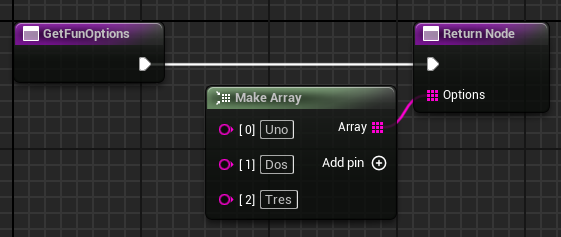
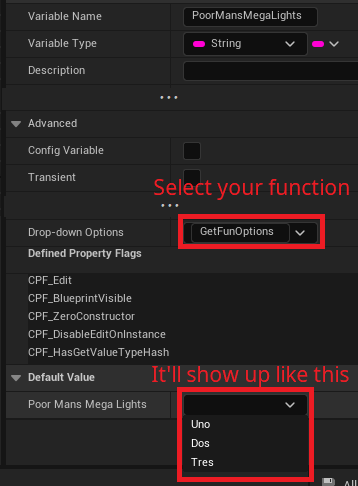
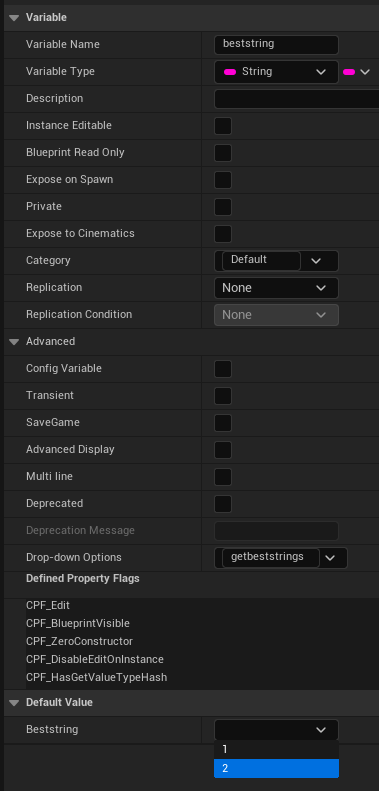
Not as exciting as MegaLights, but my contribution to UE 5.5 is that now you can define drop-down options for your String / Name variables in BPs! :D
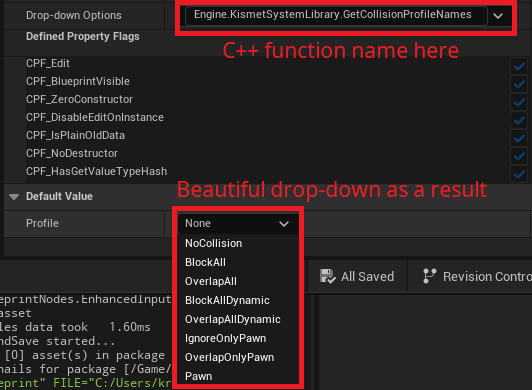
Just create a function that returns an array, and select it in the Advanced panel. You can even use static C++ methods! 🌟
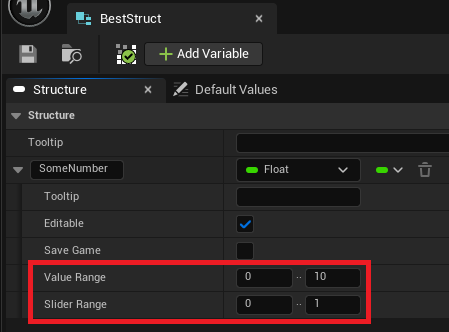
Another UE 5.5 feature of mine is Value / Slider Ranges in Blueprint Structs!
They were made in a generalized way, so adding other meta-tag driven property data here should be fairly simple in the future 🪄
@meatAndWuxia@SeithCG That sounds about the right - since this feature is visual only, it'd definitely not modify existing values. Maybe you can overcome it in Construction Script, e.g. if the selected value is not valid, then set the default (first?) valid value 🤔
@SeithCG Not as part this feature per se, but I wonder if it's updated automatically anyway when you change the first property (as EditConditions and whatnot would have to be reevaluated too) 🤔 One of us would have to try
@KristofMorva Right, but would the second dropdown update itself just after a new selection has been made in the first dropdown? Is there a way to mimic that behaviour somehow?
@SeithCG You can try to achieve that by using the former variable in the drop-down function of the latter variable. I haven't tried it tbh, but it could work.
@KristofMorva That excellent!!! Is there a built-in callback so you can synchronize multiple dropdowns? Like choosing "animal" from a first dropdown would populate a second dropdown with the proper animal list? In other words dynamic updating based on user choice...
@Darkere99 I'm glad if it's helpful! :D it works for Strings and Names (just return string / name array respectively), and you can type fully-qualified UFUNCTION names to display an array returned by a C++ function.
@KristofMorva Very exciting to me :D
Does this only work for strings or also other types like Names?
Also can you type something else than the suggested options?
@ChrisZukoArt I get why they did it - but apart from being annoying to type, why is "Yes" the default.
Why would you want to potentially reallocate an array everytime you remove an item by default!?
Unreal 5.5 bAllowShrinking for SetNum on arrays was deprecated in favor of an Enum with the options
"No", "Yes"
Trying real hard to think of what a possible 3rd options would be XD
"Maybe" "If you feel like it"
#UnrealEngine
Anyone knows if its possible to make Rider or Visual Studio display the assembly of a function without triggering an exception?
Or is there any way to automate a reverse engineering tool to find and display the function from PDB? (ideally with py or c#)