
Yb123

1.5K posts

Yb123 banner
Yb123

Yb123

@Lemonad3_

stay woke

Katılım Şubat 2017
1.2K Takip Edilen22 Takipçiler
Yb123 retweetledi
Viking
Viking@vikingmute·
很棒的一篇文章:《Using AI to write better code more slowly》 nolanlawson.com/2026/05/25/usi… 很多人认为 AI 就是快速生成一大堆代码然后直接 merge。 但是作者认为完全可以用来写高质量代码,只是过程会更慢,这才是可持续的方式。 他推荐的一个工作流: 使用多个不同模型(Claude sub agents + Codex + Cursor Bugbot 等)并行审查 PR。 让它们分别找出 bug 并按严重程度排序。 人类再去验证,去伪存真,减少幻觉。 让 Agent 修复所有 Critical 和 High 严重等级的问题,然后重复这个过程,直到没有 Critical 和 High 为止。 如果一个 PR 有太多 Critical 问题,以至于我意识到整个实现思路都错了,那就直接放弃这个 PR 文章中还有他日常的工作流,作者的一些建议,都很受用,很棒。
中文
20
16
99
7.8K
Yb123 retweetledi
nini
nini@nini_incrypto_·
Google 把内部工程师的代码审查(Code Review)规范公开啦 这几乎是目前业界最顶级的标准 很多程序员只会写代码,但不知道怎么审代码,可以看看 Google 是怎么做的 1.双向指南:不仅教审查者怎么挑毛病,还教作者怎么写出容易通过的代码 2.术语科普:解释了 Google 内部常用的 LGTM(看起来不错)和 CL(变更列表)到底意味着什么 3.实战价值:这套规范不是理论,而是 Google 每一位工程师都在用的实际操作准则 如果你想提升团队的代码质量,或者想知道顶级大厂的开发门槛,这份文档必读! github.com/google/eng-pra…
中文
31
608
3.8K
268.1K
Yb123 retweetledi
Google Gemma
Google Gemma@googlegemma·
We are entering a new era of on-device automation. ✨ Watch Gemma 4 E4B navigate and drive an iOS simulator directly using Argent. Local models can handle complex interactions and software navigation autonomously.
English
115
552
6.1K
467.3K
Yb123 retweetledi
JetBrains
JetBrains@jetbrains·
Participate in our survey for the chance to win a MacBook Pro. Your insights can help drive the next wave of coding innovation.
English
18
19
252
2.7M
Yb123 retweetledi
超级个体|柿子
超级个体|柿子@yaohui12138·
Karpathy 发布了一个github开源项目,狠狠让我惊艳到了 这个项目叫 andrej-karpathy-skills,GitHub 13 万+ star,我愿称之为2026 最有用的 AI 工程项目 它解决的问题极其精准:让 Claude Code 不再瞎写代码 这个项目到底有多厉害? 先说结论:一个 4KB 的文本文件,让 AI 写代码的错误率暴降 90% Karpathy 自己说,他现在 80% 的代码都让 Claude 写,但 AI 经常犯几个典型错误: 不问就瞎猜需求 过度设计,写一堆用不上的抽象 改 A 顺手把 B、C、D 也重构了 代码能跑就行,不管目标达成没有 这个项目就是专门给 Claude Code 戴上guardrails,用 4 条行为准则约束 AI 的编码行为 核心亮点:4 条准则改变一切 整个项目就是一个 CLAUDE.md 文件,里面只有 4 条规则,但每一条都直击 AI 编码的痛点 1. Think Before Coding - 先思考再动手 AI 最大的问题是“太听话”,你说啥它就写啥,从不质疑 这条准则要求:明确说明假设、权衡 tradeoffs,不确定就直接问 不再是“我猜你想要这个”,而是“我理解你的需求是 A,但 B 方案可能更合适,你要哪个?” 2. Simplicity First - 极简实现优先 AI 天生爱炫技,你要一个登录功能,它给你写个完整的 OAuth 2.0 + JWT + 刷新令牌 + 权限系统 这条准则强制:只写刚好能解决当前问题的最小代码 不搞 speculative abstractions,不写未来功能,不过度工程 一个用户反馈:用了这条规则后,代码 diff 从动辄几百行缩减到几十行,review 轻松太多 3. Surgical Changes - 手术式精准修改 这是我最爱的一条 AI 有个恶习:你让它改个 bug,它顺手把整个文件的命名风格、缩进、注释全优化了 这条准则要求:只改用户要求的部分,严格匹配原有代码风格 不碰无关文件,不顺手 refactor,不加“看起来更好”的改动 有开发者实测:启用这条后,git diff 从“满屏红绿”变成“3 行精准修改” 4. Goal-Driven Execution - 目标驱动执行 AI 经常写完代码就交差,但代码能跑 ≠ 任务完成 这条准则要求:把任务转化为可验证的目标/测试/成功标准,然后 loop 执行、验证、迭代 直到真正达成目标才停止 这让 AI 从“代码生成器”变成“问题解决者” 真实效果:社区反馈炸裂 X 上这个项目刷屏了,开发者反馈高度一致: 代码质量飞跃:diff 更紧凑、干净,overbuild 和 side changes 大幅减少 错误率暴降:有人实测从 41% 掉到 11%,继续优化后低至 3% 中文社区评价:“必备 skills”“Claude/Cursor 实用技能 Top1”“直接扔项目里就完事了” 很多人直接 @ 朋友推荐:“把这个 CLAUDE.md 放进去,Claude 立刻像换了个人,写代码更靠谱、不乱改、不瞎猜“ 使用方式:简单到离谱 这是我见过最简单的 AI 工程优化方案: 方法一:直接 curl 把 CLAUDE.md 下载到项目根目录 curl -o CLAUDE.md raw.githubusercontent.com/forrestchang/a… 方法二:用 Claude Code / Cursor 的 plugin 一键安装 支持 Claude Code、Cursor 等主流 AI coding 工具 完全开源(MIT 协议),拿来就用 作为产品经理出身的开发者,我看到的不只是 4 条规则,而是对 AI 编码行为的深刻洞察 Karpathy 做的事情本质上是:给 AI 建立编码的第一性原理,他把他对于AI编程的理解写入了文件中 不是教 AI 怎么写代码(它已经会了),而是教 AI 什么时候该问、什么时候该停、什么时候该简化 这 4 条准则就像产品经理给开发团队定的 PRD 原则: 需求不清楚? 先问 功能够用就行? 别过度设计 改需求? 只改需求相关的 做完了? 先验证目标达成没有 它能帮到我们什么? 如果你是独立开发者或小团队,这个项目能直接提升你的 AI 协作效率: 减少返工:AI 不再瞎猜需求,写出来的代码更符合预期 降低 review 成本:改动精准,不用在一堆无关修改里找真正的变更 提升代码质量:极简实现意味着更少的 bug、更好的可维护性 加速迭代:目标驱动让 AI 真正解决问题,而不是生成代码 对于中大型项目,这是让 Claude Code 真正“生产可用”的关键一步 我的使用体会 我在自己的几个项目里部署了这个 CLAUDE.md,最直观的感受是: AI 变聪明了 以前它是个听话的实习生,你说啥它做啥,经常做错 现在它像个有经验的同事,会主动问“你确定要这么做吗? 我有个更简单的方案” 代码 diff 变干净了 以前一个小需求能改几十个文件,现在精准到只改 3-5 行 我的工作重心变了 以前 60% 时间在 review AI 的代码、修 bug 现在 80% 时间在思考产品逻辑,AI 真正成了生产力工具 最后 这个项目被誉为 2026 年 AI coding 领域的“现象级”黑魔法工具 小文件,大作用 如果你在用 Claude Code / Cursor 写代码,强烈建议直接把这个 CLAUDE.md 扔进项目根目录 GitHub 地址:github.com/forrestchang/a… 试过的人基本都是“已全项目部署”的状态 作为一个天天和 AI 协作的开发者,我的建议是:别犹豫,直接用
中文
50
104
519
50.1K
Yb123 retweetledi
Elon Musk
Elon Musk@elonmusk·
Reminder that Grok Build is iterating extremely fast and we are highly responsive to critical feedback. Fixes & upgrades are dropping every day.
Brivael Le Pogam@brivael

Just started testing the @grok Build beta. First feel: UX is nice, still some rough edges, but model speed is genuinely cool. If task quality on hard stuff matches opus 4.7 (or even slightly below) at this speed, it's a game-changer. Good chance they steamroll the competition.

English
2.6K
3.8K
19.2K
5.1M
Yb123 retweetledi
骨头
骨头@senob_·
🔐 macOS开发者必知:Keychain不只是存密码的地方!它是系统级加密键值数据库,解决了磁盘加密、进程隔离、跨设备同步等核心问题。Claude Code就把OAuth凭据存这里。一行`security`命令搞定token管理,比自己造轮子安全太多!💻 #macOS #开发 全文:luy.li/2026/05/14/key…
中文
1
15
172
60.3K
Yb123 retweetledi
Andrej Karpathy
Andrej Karpathy@karpathy·
This works really well btw, at the end of your query ask your LLM to "structure your response as HTML", then view the generated file in your browser. I've also had some success asking the LLM to present its output as slideshows, etc. More generally, imo audio is the human-preferred input to AIs but vision (images/animations/video) is the preferred output from them. Around a ~third of our brains are a massively parallel processor dedicated to vision, it is the 10-lane superhighway of information into brain. As AI improves, I think we'll see a progression that takes advantage: 1) raw text (hard/effortful to read) 2) markdown (bold, italic, headings, tables, a bit easier on the eyes) <-- current default 3) HTML (still procedural with underlying code, but a lot more flexibility on the graphics, layout, even interactivity) <-- early but forming new good default ...4,5,6,... n) interactive neural videos/simulations Imo the extrapolation (though the technology doesn't exist just yet) ends in some kind of interactive videos generated directly by a diffusion neural net. Many open questions as to how exact/procedural "Software 1.0" artifacts (e.g. interactive simulations) may be woven together with neural artifacts (diffusion grids), but generally something in the direction of the recently viral x.com/zan2434/status… There are also improvements necessary and pending at the input. Audio nor text nor video alone are not enough, e.g. I feel a need to point/gesture to things on the screen, similar to all the things you would do with a person physically next to you and your computer screen. TLDR The input/output mind meld between humans and AIs is ongoing and there is a lot of work to do and significant progress to be made, way before jumping all the way into neuralink-esque BCIs and all that. For what's worth exploring at the current stage, hot tip try ask for HTML.
Thariq@trq212

x.com/i/article/2052…

English
1K
2K
19K
3.7M
Yb123 retweetledi
Akring
Akring@ddflj3310·
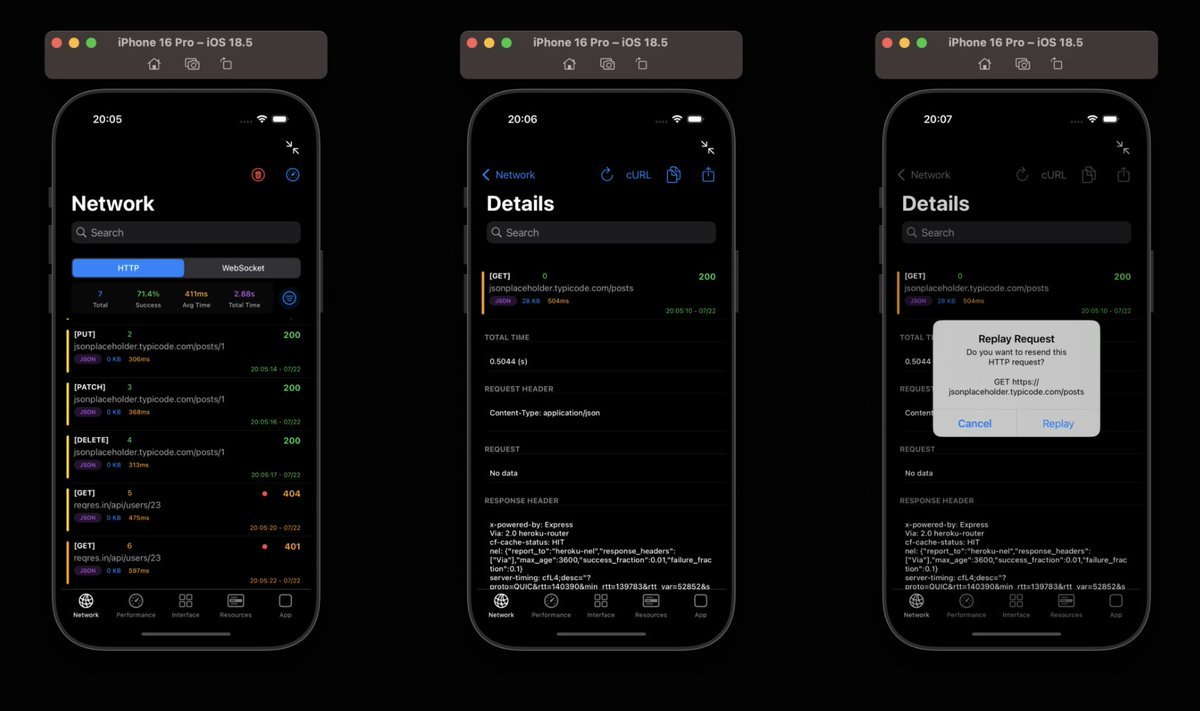
给各位独立开发者们推荐一下 DebugSwift 这个 GitHub 仓库,可以理解成给 iOS App 内置了一套「开发者控制台」,直接帮你在本机上看日志找问题。 它能在 App 里直接看 HTTP / WebSocket 请求、响应、状态码、格式化 JSON;还能实时查看 CPU、内存、FPS,排查卡顿和内存泄漏。 另外,崩溃日志、控制台日志、设备信息、APNS Token、UserDefaults、Keychain、SQLite、Realm、SwiftData、本地文件这些,也都能在 App 内查看,部分数据还能编辑或导出。 UI 调试也挺全:网格线、触摸点、动画减速、View 边框、3D 视图层级,甚至还有 SwiftUI 重渲染跟踪。 接入方式很简单:Swift Package / CocoaPods 引入后,在 AppDelegate 里调用 debugSwift.setup() 和 debugSwift.show(),调试环境会出现一个悬浮球,也支持摇一摇唤出。 github.com/DebugSwift/Deb…
Akring tweet media
中文
5
30
252
19.4K
Yb123 retweetledi
kepano
kepano@kepano·
File over app File over app is a philosophy: if you want to create digital artifacts that last, they must be files you can control, in formats that are easy to retrieve and read. Use tools that give you this freedom. File over app is an appeal to tool makers: accept that all software is ephemeral, and give people ownership over their data. In the fullness of time, the files you create are more important than the tools you use to create them. Apps are ephemeral, but your files have a chance to last. The pyramids of Egypt contain hieroglyphs that were chiseled in stone thousands of years ago. The ideas hieroglyphs convey are more important than the type of chisel that was used to carve them. The world is filled with ideas from generations past, transmitted through many mediums, from clay tablets to manuscripts, paintings, sculptures, and tapestries. These artifacts are objects that you can touch, hold, own, store, preserve, and look at. To read something written on paper all you need is eyeballs. Today, we are creating innumerable digital artifacts, but most of these artifacts are out of our control. They are stored on servers, in databases, gated behind an internet connection, and login to a cloud service. Even the files on your hard drive use proprietary formats that make them incompatible with older systems. Paraphrasing something I wrote recently: > If you want your writing to still be readable on a computer from the 2060s or 2160s, it’s important that your notes can be read on a computer from the 1960s. You should want the files you create to be durable, not only for posterity, but also for your future self. You never know when you might want to go back to something you created years or decades ago. Don’t lock your data into a format you can’t retrieve. These days I write using an app I help make called Obsidian (@obsdmd), but it’s a delusion to think it will last forever. The app will eventually become obsolete. It’s the plain text files I create that are designed to last. Who knows if anyone will want to read them besides me, but future me is enough of an audience to make it worthwhile.
kepano tweet mediakepano tweet media
English
193
1.4K
9.9K
3.2M
Yb123 retweetledi
Andrej Karpathy
Andrej Karpathy@karpathy·
LLM Knowledge Bases Something I'm finding very useful recently: using LLMs to build personal knowledge bases for various topics of research interest. In this way, a large fraction of my recent token throughput is going less into manipulating code, and more into manipulating knowledge (stored as markdown and images). The latest LLMs are quite good at it. So: Data ingest: I index source documents (articles, papers, repos, datasets, images, etc.) into a raw/ directory, then I use an LLM to incrementally "compile" a wiki, which is just a collection of .md files in a directory structure. The wiki includes summaries of all the data in raw/, backlinks, and then it categorizes data into concepts, writes articles for them, and links them all. To convert web articles into .md files I like to use the Obsidian Web Clipper extension, and then I also use a hotkey to download all the related images to local so that my LLM can easily reference them. IDE: I use Obsidian as the IDE "frontend" where I can view the raw data, the the compiled wiki, and the derived visualizations. Important to note that the LLM writes and maintains all of the data of the wiki, I rarely touch it directly. I've played with a few Obsidian plugins to render and view data in other ways (e.g. Marp for slides). Q&A: Where things get interesting is that once your wiki is big enough (e.g. mine on some recent research is ~100 articles and ~400K words), you can ask your LLM agent all kinds of complex questions against the wiki, and it will go off, research the answers, etc. I thought I had to reach for fancy RAG, but the LLM has been pretty good about auto-maintaining index files and brief summaries of all the documents and it reads all the important related data fairly easily at this ~small scale. Output: Instead of getting answers in text/terminal, I like to have it render markdown files for me, or slide shows (Marp format), or matplotlib images, all of which I then view again in Obsidian. You can imagine many other visual output formats depending on the query. Often, I end up "filing" the outputs back into the wiki to enhance it for further queries. So my own explorations and queries always "add up" in the knowledge base. Linting: I've run some LLM "health checks" over the wiki to e.g. find inconsistent data, impute missing data (with web searchers), find interesting connections for new article candidates, etc., to incrementally clean up the wiki and enhance its overall data integrity. The LLMs are quite good at suggesting further questions to ask and look into. Extra tools: I find myself developing additional tools to process the data, e.g. I vibe coded a small and naive search engine over the wiki, which I both use directly (in a web ui), but more often I want to hand it off to an LLM via CLI as a tool for larger queries. Further explorations: As the repo grows, the natural desire is to also think about synthetic data generation + finetuning to have your LLM "know" the data in its weights instead of just context windows. TLDR: raw data from a given number of sources is collected, then compiled by an LLM into a .md wiki, then operated on by various CLIs by the LLM to do Q&A and to incrementally enhance the wiki, and all of it viewable in Obsidian. You rarely ever write or edit the wiki manually, it's the domain of the LLM. I think there is room here for an incredible new product instead of a hacky collection of scripts.
English
2.9K
7.2K
59.3K
21.2M
Yb123 retweetledi
Paul Hudson
Paul Hudson@twostraws·
Recently I launched four agent skills for Swift developers, but I left the best power up for last. Today I'm finally revealing exactly how to teach your AI to write Swift the Hacking with Swift way! #Boom hackingwithswift.com/articles/284/t…
English
11
17
162
12.8K
Yb123 retweetledi
fox hsiao
fox hsiao@pirrer·
Cheng Lou 剛開源了 Pretext,一個純 JavaScript 的多語言文字測量與排版函式庫,解決的是網頁前端一個存在超過二十年的底層問題。 網頁上每次要知道一段文字有多高(虛擬捲動、動態排版、瀑布流),瀏覽器的標準做法是把文字塞進 DOM 再用 `getBoundingClientRect` 量,這會觸發 layout reflow,是瀏覽器最貴的操作之一。Pretext 的做法是繞過 DOM,用瀏覽器的字型引擎當基準,純數學算出文字高度和斷行位置,實測 500 段文字的批次排版只要 0.09 毫秒。 這件事聽起來簡單,但牽涉到所有語言的斷詞規則、emoji、雙向文字(阿拉伯文、希伯來文混排英文),Cheng Lou 在推文裡說他「爬過了地獄的深處」才做出來。 Pretext 解鎖了幾個以前在網頁上很難做到的事:不靠猜測的虛擬捲動(因為能預算每段文字的高度)、純 JS 驅動的瀑布流和彈性排版、文字繞圖排列、以及開發階段就能驗證文字不會溢出容器。可以輸出到 DOM、Canvas、SVG,未來還會支援伺服器端渲染。 Cheng Lou ,目前在 Midjourney 負責前端工程,GitHub 上 Pretext 發布不到一天已經超過 1,300 顆星。對前端工程師來說,這可能是今年最值得關注的基礎設施級函式庫。 ⚙️ --- 📱 Threads / Facebook / 電子報「狐說八道」 #Pretext #前端開發 #JavaScript #UI工程 #WebDev #Midjourney
Cheng Lou@_chenglou

My dear front-end developers (and anyone who’s interested in the future of interfaces): I have crawled through depths of hell to bring you, for the foreseeable years, one of the more important foundational pieces of UI engineering (if not in implementation then certainly at least in concept): Fast, accurate and comprehensive userland text measurement algorithm in pure TypeScript, usable for laying out entire web pages without CSS, bypassing DOM measurements and reflow

中文
4
25
204
25.3K
Yb123 retweetledi
fox hsiao
fox hsiao@pirrer·
Google TurboQuant 讓 AI 推理成本崩盤:記憶體省 6 倍、速度快 8 倍 你跟 ChatGPT 或 Gemini 聊天的時候,AI 每回一句話都要做一件很耗資源的事:記住你前面講過的所有東西。 這個「記住」的機制叫做 KV cache(key-value 快取),它是大型語言模型在推理時最大的記憶體瓶頸之一。Google Research 發表了一系列壓縮演算法,統稱為 TurboQuant,把這個瓶頸的記憶體佔用縮小 6 倍以上,注意力運算速度提升最高 8 倍,而且在基準測試中達到零精準度損失。 其中 TurboQuant 將在 ICLR 2026 發表,核心元件 PolarQuant 發表於 AISTATS 2026,另一個元件 QJL 則已發表於 AAAI。以下用白話解釋它們在做什麼。 先搞懂 KV cache 是什麼 想像你在跟一個人開會,你們講到第 30 分鐘了,這時候對方問你一個問題,你需要回想前面 30 分鐘所有人說過的話、做過的決定,才能給出一個合理的回答。 AI 模型也一樣,當你跟它對話到第 50 句的時候,模型需要「回想」前面 49 句的內容才能理解第 50 句的語境。KV cache 就是那個「會議紀錄」,它把每一句話處理過的中間結果(key 和 value 向量)存起來,讓模型不用每次都重新讀一遍所有對話。 問題是這份會議紀錄非常佔空間,每一句話都要存成高維度的向量(想像成一個有幾千個數字的清單),對話越長,KV cache 越大。一個長對話下來,KV cache 可能佔掉整個 GPU 記憶體的大部分。 這就是為什麼你跟 AI 聊太久,它有時候會「忘記」前面的內容,或者回覆速度變慢,因為記憶體不夠了。 TurboQuant 怎麼壓縮這份會議紀錄 TurboQuant 的做法可以想成兩個步驟,一個負責壓縮,一個負責修正誤差。 第一步(PolarQuant):換一種方式記錄。 原本 KV cache 裡的每個向量都用「直角座標」存(想成 X、Y、Z 三個軸的距離),這種存法需要很多位元才能精確。PolarQuant 先對向量做隨機旋轉(preconditioning),再轉成「極座標」(想成距離加上角度)。 為什麼這樣比較好壓?因為旋轉後,角度的分布會變得高度集中且可預測,可以直接映射到一個固定的「圓形網格」上壓縮,不需要傳統方法中額外的正規化(normalization)步驟,也不需要依賴資料本身來建立編碼簿。 第二步(QJL):用 1 個位元修正誤差。 壓縮一定會有誤差,PolarQuant 壓完之後還是有一些微小的偏差。QJL(Quantized Johnson-Lindenstrauss,名字來自一個數學定理)用一種很聰明的方式來修正:它只用 1 個位元(正或負,+1 或 -1)來記錄殘差,幾乎不佔額外空間,但能把誤差消除到可以忽略的程度。 兩步加在一起,TurboQuant 可以把 KV cache 從 32 位元壓到只剩 3 位元,實際記憶體節省 6 倍以上(位元數的壓縮比和實際記憶體節省不完全等價,因為有額外開銷,Google 原文一致使用 6 倍這個數字),而且不需要重新訓練模型,直接套用就好。 數字有多誇張 Google 在 Llama-3.1-8B-Instruct、Gemma、Mistral 三個開源模型上測試,用了 LongBench、Needle In A Haystack、ZeroSCROLLS 等多個基準測試。結果: - KV cache 記憶體縮小 6 倍以上 - 在 NVIDIA H100 GPU 上,4 位元 TurboQuant 的注意力運算比 32 位元快 8 倍 - 在測試的所有下游任務中精準度 零損失 - 在 Needle In A Haystack(大海撈針)測試中,特定模型和配置下達到 完美分數 - 不需要訓練、不需要微調 - 執行時額外的計算開銷 可忽略不計 「零損失」這三個字是最關鍵的,過去很多壓縮方法都會在壓縮和精準度之間做取捨,壓得越小答案越不準。TurboQuant 在基準測試中壓到 3 位元還是零損失(原文對 PolarQuant 的描述是「nearly loss-less」,近乎無損),這如果在更大規模的部署中被驗證,對整個 AI 推理產業的影響會非常大。 這對你有什麼影響 講幾個直接的後果,每一個都跟你有關。 對話可以更長。 目前很多 AI 產品的對話長度受限於 KV cache 的記憶體大小。記憶體縮小 6 倍代表同樣的硬體可以支持更長的對話、更大的上下文視窗。 推理成本下降。 AI 公司最大的成本之一就是 GPU 記憶體。同樣的 GPU 可以同時服務更多使用者(因為每個使用者的 KV cache 更小了),單位成本下降。 邊緣裝置上跑 AI 變得更可行。 手機、筆電上的 AI 最大的限制就是記憶體不夠。KV cache 縮小 6 倍代表更大的模型可以塞進更小的裝置。 搜尋引擎變快。 Google 在論文中特別提到 TurboQuant 對搜尋和 AI 應用有「深遠影響」。KV cache 壓縮不只用在聊天機器人,任何需要處理長序列的 AI 任務都會受益,包括搜尋引擎的排名和摘要生成。 一句話總結 Google 找到了一種方法,讓 AI 的「短期記憶」佔用的空間縮小 6 倍、注意力運算快 8 倍,而且在測試中不忘任何細節。這是把 AI 從資料中心推向每個人手上的關鍵一步。
Shay Boloor@StockSavvyShay

$MU and $SNDK are getting hit hard at the open from the release of $GOOGL TurboQuant. The market is reading it as a potential headwind for memory names because long-context AI inference may now need far less memory per workload.

中文
11
81
557
75.7K
Yb123 retweetledi
Tantan Fu
Tantan Fu@luckytantanfu·
推荐 Ghostty 作者的这篇文章,是如何慢慢采用 AI 的。 看多了“卧槽前端死了设计死了” 这才是接地气的真实感受。 mitchellh.com/writing/my-ai-…
中文
3
60
485
46.8K
Yb123 retweetledi
fox hsiao
fox hsiao@pirrer·
不會設計也能做出好產品:一個工程師用 AI 打造的三層設計系統 AI 正在把跨界探索的門檻壓到前所未有的低。以前一個工程師想學設計,要花好幾年培養眼力和手感。現在有了 AI 的輔助,這件事可以壓縮到幾個月。Neethan Wu 的故事就是一個很具體的例子。 三個月前,他完全不會做 UI 設計,像素、間距、字型、配色這些東西,他沒有碰過。他之前在 TikTok 和 Amazon 當工程師,寫程式是強項,設計完全空白。三個月後,他每週都在交付可上線的設計成品,品質不是那種一眼看出 AI 做的粗糙感。 他寫了一篇文章叫「Design Without Designing」,記錄他怎麼組裝了一套稱為「harness」的三層系統,把 AI Agent 變成自己的設計團隊。以下是他的探索過程和心得。 第一層:Skills(專業知識) Skills 是安裝到 AI Agent 裡的指令檔案,Claude Code、Cursor、Codex 都適用,作用是把資深設計師的判斷標準轉移到你的工作流裡。 他最常用的叫 Impeccable,jQuery UI 原始創作者 Paul Bakaus 做的,超過 20 個指令(/audit、/polish、/typeset、/animate),專門抓 AI 生成介面最常犯的錯:濫用字型、低對比灰字、純黑背景、巢狀卡片。等於把一個資深設計師十幾年的「這個看起來不對」的直覺,編碼成可執行的規則。 另一個常用的是 Emil Kowalski 的 Design Engineer Skill(他在 Linear 和 Vercel 都待過),把動畫節奏、微互動、UI 細節的琢磨都編碼成規則。還有 Interface Design 這個 skill,解決 AI Agent 每次開新對話就忘記設計決策的問題,把你的設計系統存進持久化的 system.md,Agent 啟動時自動載入。 第二層:Agent Canvas(工作介面) Canvas 是設計畫布,但跟 Figma 不同,這些工具不綁定特定 AI,讓你自己的 Agent 來操作。 Paper 是他最近最常用的。畫布直接用 HTML 和 CSS 建構,設計出來就是程式碼,不需要格式轉換。透過 MCP 開放 24 個工具給 AI Agent,Agent 可以讀取、修改設計,甚至直接轉成 React 和 Tailwind 推上 GitHub。 Pencil 走另一條路,用 JSON 格式的 .pen 檔案做版本控制,設計檔跟程式碼用同一套 Git 管理。它的 Swarm Mode 可以同時跑最多六個 Agent 在同一塊畫布上平行工作,一個管字型、一個管排版、一個更新設計系統。 第三層:Inspiration(審美訓練) Skills 給專業知識,Canvas 給工作介面,但你還需要知道什麼是好看的,才能告訴 Agent 你要什麼。 Variant 是他訓練眼光的主力,輸入一個想法就生成無限多不重複的設計詮釋。最強的功能叫 Style Dropper,指向任何設計就能吸取它的視覺 DNA(配色、字型節奏、空間密度),套用到另一個設計上。他每天花 20 分鐘在 Variant 上滑設計當暖身,搭配 Mobbin(看頂級 App 怎麼做)和 Awwwards(看最前沿的網頁設計)。 同一天,Google Stitch 讓 Figma 跌了 8.8% 就在 Neethan 發文的同一天,Google 發布 Stitch 重大更新,加入 AI 原生畫布、語音設計、即時原型、DESIGN.md 等功能,Figma 股價當天跌了 8.8%。 Google Stitch 是大公司用 AI 重新定義設計工具,Neethan 的三層裝備是個人用 AI 擴展自己的能力圈。兩件事同一天發生,指向同一個方向:設計的門檻正在被快速拉低。 Neethan 自己說得很清楚,他不是設計師,品味還在發展中,每天都在學。但 AI 讓他有能力帶著工程師的邏輯,去探索設計這個領域,做出可以用的東西。而他用的那些 Skills 之所以有效,正是因為背後有 Bakaus、Kowalski 這些真正的設計專家把隱性知識編碼了出來。 三層架構是通用的 Neethan 的三層框架跟設計無關,跟「怎麼用 AI 探索一個新領域」有關:找到最好的 Skills(借用專家判斷力)、選一個 Canvas(工作介面)、持續用 Inspiration 訓練品味。 三個月,從零到每週交付設計。你下一個想探索的方向是什麼?
Neethan Wu@neethanwu

x.com/i/article/2034…

中文
1
31
162
24.7K