Microsoft OneNote

61.7K posts

Microsoft OneNote banner
Microsoft OneNote

Microsoft OneNote

@msonenote

News and tips from the Microsoft #OneNote team Help: https://t.co/Z8PM4lp4fV or @MicrosoftHelps Edu Help: @MicrosoftEdu


Redmond, WA, USA Katılım Mart 2009
31 Takip Edilen130.2K Takipçiler
Sabitlenmiş Tweet
Microsoft OneNote
Microsoft OneNote@msonenote·
Your digital notebook for everything. Keep your notes, ideas, and plans all in one place with OneNote: msft.it/6017Ua5Fd
English
23
17
96
15.4K
Microsoft OneNote
Microsoft OneNote@msonenote·
@patzutki Hi, to better assist you, could you please send us a direct message with more details so we can look into this for you?
English
0
0
0
16
Microsoft OneNote
Microsoft OneNote@msonenote·
You wrote it down for a reason, now Copilot Notebooks can use your OneNote to help you move forward.
English
3
2
13
2.5K
Microsoft OneNote
Microsoft OneNote@msonenote·
@kalyanAtWork Hi, apologies for the inconvenience you’re experiencing. To help us assist you better, please send us a DM with details of the issue.
English
0
0
0
4
Caleb Jenkins
Caleb Jenkins@CalebJenkins·
Dear @msonenote , You are the best.. my favorite even. Here is my feature request: Ability to mark Notes / Pages as a Favorite ⭐ Plus a built-in Favorites Section that would span all open Notebooks. 🤔 Give it some thought. This would be amazing. // @OneNotePM
GIF
English
2
0
0
414
Freedom Land
Freedom Land@Fatichar_ji·
@msonenote devnagri composite ligatures don't render correctly in OneNote android. Any solution? This is unacceptable in 2025.
English
1
0
0
135
Jigar Joshi
Jigar Joshi@jigarjoshi09·
@msonenote facing issues with login. Text on screen too many request. Can you please help me
English
1
0
0
112
Microsoft OneNote
Microsoft OneNote@msonenote·
@LeseHierNur Hey there, we appreciate your feedback. Check out our Microsoft 365 Roadmap for information on upcoming features and updates on OneNote, and other apps: msft.it/6014s1hls
English
1
0
0
201
IchLeseNur
IchLeseNur@LeseHierNur·
@msonenote Is it planned to add Advanced Knowledge Management Features to OneNote like information lifecycle Features like retention period, tools that help to curate content, Review/approval Steps for Enterprise use. There is currently no good KM Tool in MS OOTB.
English
1
0
7
180
Microsoft OneNote
Microsoft OneNote@msonenote·
🧠 Work smarter with Copilot Notebooks in OneNote — your new AI-powered space to think, organize, and create. Bring all your content together and let Copilot help you get to insights, faster. Learn more: msft.it/6010S2I5K
English
8
12
63
7.6K
Microsoft OneNote
Microsoft OneNote@msonenote·
@_msafi Hi there, thanks for reaching out, we appreciate your suggestion and encourage you to create a post, on which other users can vote, in our Feedback Portal, here: msft.it/6016SL2Hq
English
0
0
1
71
Wokeologist Fixes Woke HR Departments
@msonenote When using OneNote on a browser, say on a Linux laptop, users should be able to select Dark Mode. Currently, it seem to me that such ability does not exists, or is not easily accessible.
English
1
0
0
55
Microsoft OneNote
Microsoft OneNote@msonenote·
What are your favorite methods for eliminating distractions when taking notes?
English
11
3
23
0
Microsoft OneNote
Microsoft OneNote@msonenote·
🎉 Say hello to Copilot Notebooks in OneNote! Pull in Word documents, PowerPoint decks, and Copilot chats to craft summaries and meeting agendas without leaving the app. 🔗 Learn more about Copilot Notebooks here: msft.it/6019SIEhN
English
4
8
35
6.3K
Jeremy Pierre
Jeremy Pierre@jeremypierre·
Advice needed. I’m done with Evernote. It’s buggy and unreliable. It seems the best option is to go with the Notes app native to Apple OS. My main uses are (1) task-related info & (2) initial writing ideas/planning. Any warnings, advice, or alternatives?
English
47
0
22
10.7K
Microsoft OneNote
Microsoft OneNote@msonenote·
@Nieb77 Thanks for sharing, Kim! Looks like a really fun conference, we're excited to hear you got a chance to delve deeper into the ways OneNote can be used by educators to facilitate student collaboration. Very cool indeed 😎
English
0
0
1
35
Kim Niebauer, M.Ed. ➡️ISTE 🦥
Just finished an incredible two days at the @LeonSchools Tech It Out Conference, where I had the chance to dive into all things Microsoft and Minecraft! It was a blast sharing how educators can leverage OneNote for organization, Class Notebooks for student collaboration, Bookings, Forms, and more. Plus, seeing teachers explore game-based learning with #MinecraftEDU was truly inspiring. Excited to see how these tools transform classrooms next school year! #TechItOut @i2eEDU @MicrosoftEDU @PlayCraftLearn #EdTech #GameBasedLearning
Kim Niebauer, M.Ed. ➡️ISTE 🦥 tweet media
English
1
2
7
352
Microsoft OneNote
Microsoft OneNote@msonenote·
@dpog76 Hey Swi, thanks for your feedback. We recommend upvoting this post on our Feedback Forum, as our developers will take this on board. Have a great day! msft.it/6011Stk8P
English
0
0
0
48
Swi🌞
Swi🌞@dpog76·
@msonenote I mainly use the iPad version of One Note. When I make a note by hand and try to make a PDF, it becomes a single page PDF, how can I split it into multiple pages?
English
2
0
1
69
X01
X01@X01_a·
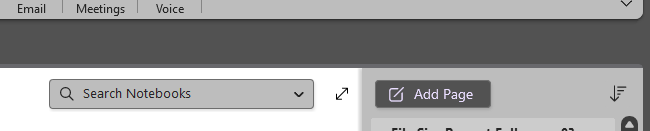
@msonenote I am astounded you move the search field from its perfectly fine position to now be inside your notes which leads you to belive its for searching the note not the notebook. Not only that you add an additional search and the search now returns less results. Why?
X01 tweet media
English
1
0
0
27
Microsoft OneNote
Microsoft OneNote@msonenote·
@khamir We're glad to hear that worked! Great point. Making guidance more accessible within the app is something we are always looking to improve, your feedback is noted. Thanks for sharing, Khamir 🚀
English
0
0
0
48
Khamir Bhatia
Khamir Bhatia@khamir·
@msonenote that worked. shouldn't this guidance be available within the help function of the app or some ai/copilot assistance instead of on x?
English
1
0
0
29
Khamir Bhatia
Khamir Bhatia@khamir·
@msonenote not getting the option to "make subpage" or "promote subpage" in onenote for mac app. drag n drop not working either. created new notes, placed them next to each other but still unable to perform this action. help!?
English
1
0
0
49
Microsoft OneNote
Microsoft OneNote@msonenote·
Hey there! Here are a few ways to recover your deleted page in OneNote: If your notebook is stored in OneDrive, you can go to the View tab and select Deleted Notes to see if your page is still recoverable. Additionally, OneNote automatically creates backups. You can check for backups by going to File > Info > Open Backups.
English
0
0
0
52
Galaxy
Galaxy@DaDaPhoton·
hello @msonenote @OneNoteEDU i accidentally deleted a page now, how can i restore it or atleast view it. please help, its very important
English
2
0
0
34