
Filip
746 posts


Filip
@MartinssonFM
Prev. Founder @ Moralis
Stockholm Katılım Temmuz 2011
317 Takip Edilen2K Takipçiler

✅ Done
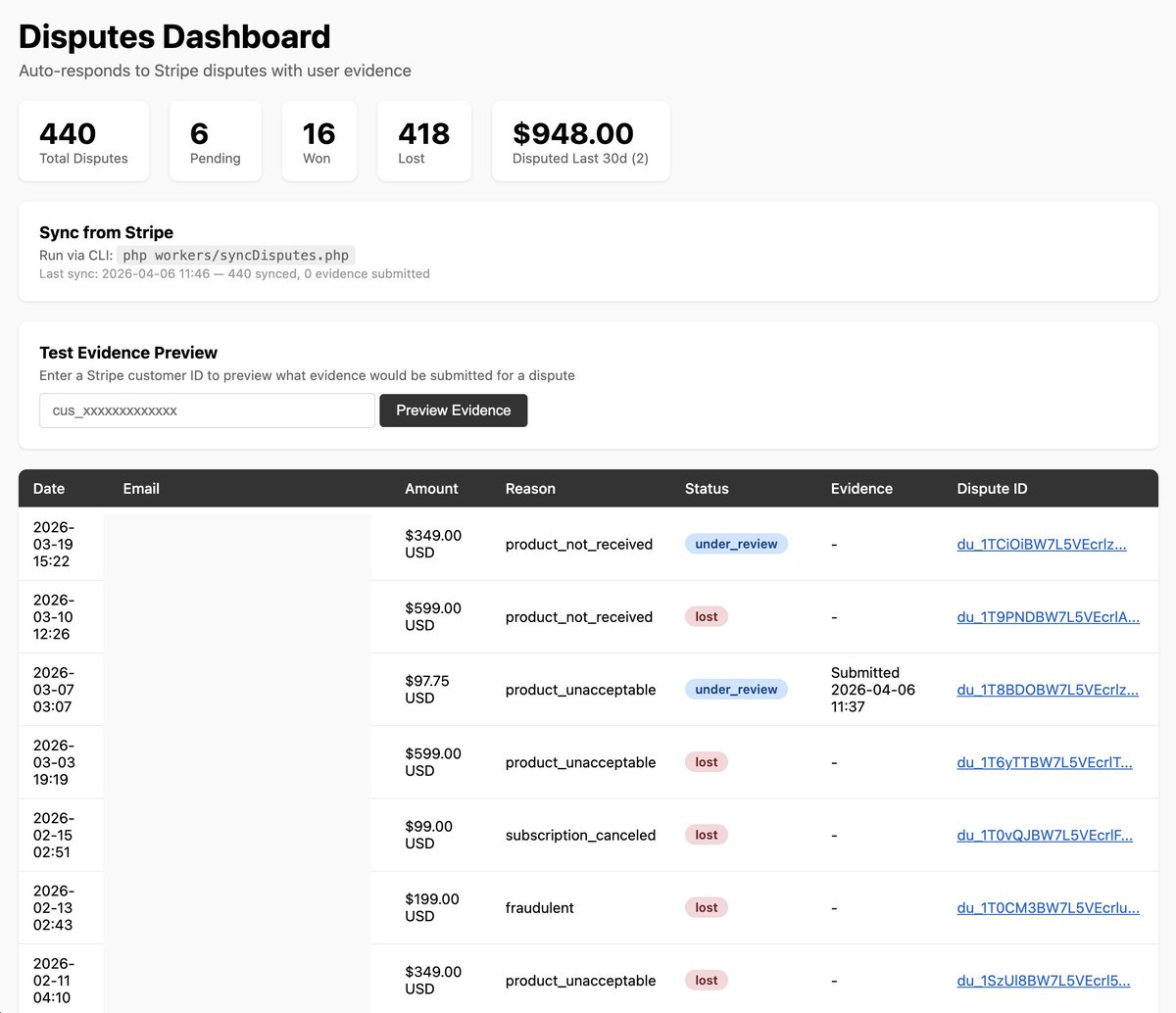
💳 Made an auto-dispute response system for Interior AI to see how easy it'd be
It syncs old disputes but also catches new disputes via Stripe webhook and then auto submits evidence to try win them, it even includes the interior designs they generated in the evidence PDF to prove they used it!
Here's the prompt/skill I made:
----
Build an auto-dispute-response system for Stripe that:
1. Shared evidence collection (app/dispute_evidence.php)
Create a shared file with functions used by both the webhook and sync worker. This avoids duplicating evidence logic.
Key functions:
- getDisputeUserPlan($user, $stripe) — pulls the user's subscription plan from Stripe API (source of truth, since local DB plan field gets cleared on cancellation). Falls back to local DB fields if Stripe call fails. Maps product IDs to plan names and includes price/interval and canceled status.
- collectDisputeEvidence($stripe, $user, $email, $charge, $photosDb) — collects all text and file evidence, returns an array ready to submit to Stripe.
- generateServiceDocPdf($stripe, $user, $email, $photos_done, $recent_photos, $total_amount_paid) — generates a PDF with customer info, usage summary, recent activity table, and up to 6 actual product images (resized to JPEG at 500px wide / quality 75 to stay under Stripe's 5MB file upload limit). Returns both the Stripe file ID and raw PDF data.
Important: pull total_amount_paid from Stripe charges API (sum of succeeded, non-refunded charges) instead of trusting the local DB which can be null/stale.
2. Webhook handler (in stripe_webhook.php)
Catch `charge.dispute.created` events. When a dispute comes in:
- Get the dispute, charge, and customer objects from Stripe
- Look up the user in the local database by stripe_customer_id
- Save the dispute to a `disputes` SQLite database (fields: dispute_id, charge_id, payment_intent_id, stripe_customer_id, user_id, email, amount, currency, reason, status, epoch_created, epoch_evidence_submitted, evidence_json, stripe_response, epoch_resolved, outcome)
- Call collectDisputeEvidence() to collect all evidence (text + file uploads)
- Submit evidence to Stripe via $stripe->disputes->update($dispute_id, ['evidence' => $evidence])
- Send a Telegram notification that a new dispute came in and evidence was auto-submitted
Also catch `charge.dispute.updated` and `charge.dispute.closed` events to track dispute outcomes (won/lost) in the database and send Telegram notifications with the result (with emoji: checkmark for won, x for lost, warning for other).
3. Evidence fields submitted to Stripe
TEXT fields (write strings directly):
- product_description — describe what the product/service is
- customer_name — from Stripe customer object
- customer_email_address — from Stripe customer object
- access_activity_log — detailed usage log: signup date, number of items/actions done, last active date, subscription plan (from Stripe), platform, total amount paid (from Stripe), recent activity with timestamps
- uncategorized_text — the "why we should win" argument: customer signed up on X, actively used the service doing Y things, total amount paid, service was delivered digitally/instantly, customer never contacted us for a refund before disputing
- refund_policy_disclosure — when the refund policy was presented (during checkout, always accessible at /legal)
- cancellation_policy_disclosure — when cancellation policy was shown (during checkout, accessible at /legal, can cancel anytime from dashboard)
- refund_refusal_explanation — customer didn't contact us for a refund before filing the dispute
- cancellation_rebuttal — proof customer actively used the service and never requested cancellation
- service_date — date of the charge (Y-m-d format)
FILE UPLOAD fields (upload file to Stripe first via $stripe->files->create(['purpose'=>'dispute_evidence', 'file'=>fopen($path,'r')]), then pass the returned file_xxxxx ID):
- receipt — pull the invoice PDF directly from Stripe ($stripe->invoices->retrieve($charge->invoice)->invoice_pdf gives a ready-made PDF URL, just download it and upload as dispute evidence)
- service_documentation — generate a PDF containing: customer info section, service usage summary, recent activity table, and up to 6 actual product images/screenshots the customer received. Resize images before embedding (500px wide, JPEG quality 75) to stay under Stripe's 5MB file upload limit.
Also save both PDFs to your file storage (e.g. Cloudflare R2, S3) with hashed filenames so they're not guessable but viewable from the admin dashboard.
Store the storage URLs in the evidence_json as _receipt_r2_url and _service_doc_r2_url (underscore prefix so they're easy to identify as internal fields).
DO NOT use these fields for text — they expect file upload IDs only:
service_documentation, cancellation_policy, refund_policy, customer_communication, customer_signature, receipt, shipping_documentation, duplicate_charge_documentation, uncategorized_file
4. CLI sync worker (workers/syncDisputes.php)
A script that pulls ALL existing disputes from Stripe's API (paginated with $stripe->disputes->all(['limit' => 100]) and starting_after for pagination), saves them to the local disputes database, and for any that still have needs_response or warning_needs_response status and haven't had evidence submitted yet — auto-submits evidence using the shared collectDisputeEvidence() function. This is needed because the webhook only catches future disputes, not existing ones. Too heavy to run on frontend — run via CLI only (php workers/syncDisputes.php). Saves a JSON cache file with sync results so the dashboard can show last sync time.
5. Mini dashboard (disputes.php with ?key= auth)
A simple HTML page protected by ?key= query parameter that shows:
- Stats boxes: total disputes, pending, won, lost, disputed last 30 days (amount + count), disputed last 12 months (amount + count), total $ disputed
- A note showing the CLI sync command and last sync time from cache
- A test form where you enter a stripe_customer_id to preview what evidence would be submitted (without actually submitting) — useful for debugging
- A table of all disputes: date, email, amount, reason, status (color-coded badges), evidence submission status, links to both detail view and Stripe dashboard
Detail view (action=view&id=dispute_id):
- Shows all dispute info, link to Stripe, and a "Regenerate Evidence" button
- Shows PDF file links (receipt + service documentation) if available
- Shows Stripe file upload IDs
- Shows all text evidence fields
Regenerate Evidence (action=regen&id=dispute_id):
- Regenerates the receipt and service documentation PDFs and uploads to file storage
- Updates the evidence_json in the database with new PDF URLs
- IMPORTANT: Use fastcgi_finish_request() to send the HTTP response immediately (redirect back to detail page with "regenerating in background" notice), then continue generating PDFs in the background. This prevents frontend timeouts since downloading images and generating PDFs can take 30+ seconds.
Add an nginx rewrite for the page (e.g. rewrite ^/disputes/?$ /disputes.php). Make sure it's in the correct nginx config file (check which one the symlink in sites-enabled actually points to).
6. Telegram notifications
- New dispute: "{site name} - New dispute from {email} for ${amount} ({reason}). Evidence auto-submitted to Stripe. {stripe_dashboard_link}"
- Evidence failed: "{site name} - New dispute from {email} for ${amount} ({reason}). Evidence submission FAILED: {error}"
- Dispute won: "{site name} - Dispute WON (checkmark) for {email} - ${amount} ({reason}) {stripe_dashboard_link}"
- Dispute lost: "{site name} - Dispute LOST (x) for {email} - ${amount} ({reason}) {stripe_dashboard_link}"
- DB permission error: "{site name} - DISPUTE DB ERROR: {error} - check permissions on data/disputes.db"
7. Make sure these Stripe webhook events are enabled in the Stripe dashboard:
- charge.dispute.created
- charge.dispute.updated
- charge.dispute.closed
8. Database permissions
The disputes.db file must be writable by the web server user (e.g. www-data). If you create it from CLI as root, fix ownership to match your other DB files. PHP-FPM runs as a different user than root.
9. Dependencies
- FPDF (setasign/fpdf) for PDF generation — install via composer require setasign/fpdf
- GD extension for image resizing (usually already installed)
- Stripe PHP SDK (already installed if you have Stripe webhooks)
- AWS S3 SDK for R2/S3 uploads (already installed if using Cloudflare R2)


@levelsio@levelsio
Okay I'll try to vibe code an automatic Stripe dispute responder that: 1) receives disputes via webhook 2) collects evidence of user sign up and activity 3) puts it in a beautiful PDF 4) submits it back to Stripe for the banks to review Once it works I'll ask it to summarize it and share the prompt/skill here Codebase is too unique per project so prompt/skill makes more sense!
English
@adamscochran @nikitabier All I see on my feed are complaints like this
English

Not sure what @nikitabier did to the algo, but the feed is 90%:
* Viral videos
* Japanese people trying peanut coke
* Ragebait posts
Can we not just look at a posts virality, but also the type of post?
I don’t give a fuck about TikTok cat videos, no matter how viral.
I do want *written* in-depth news, politics and economics posts that are viral for that content type.
That’s what I spent years curating who I follow, and using this platform.
If I wanted TikTok or Instagram I’d go use them. They are better at that.
Twitter is best for what I care about, in my niche, not ramming another viral trend video down my throat.
English











Sri Lanka is great for travelling but literally every place I stayed at has terrible internet - not a great spot for digital nomads
English

Boys I have a date with this girl on Friday, where do I take her?

English

Why Iranian Protests Fail and Will Continue to Fail
English
@rob_mcrobberson Same. I don't even get the water weight. Should i stop taking it?
English

fun fact: creatine has never done anything for me except increase my water weight. i take 5g every day because smart ppl say i should but ive literally never noticed a single improvement other than water retention. in the back of my head i think its kind of a scam
English