
Pradeep Neela 🇮🇳

28.5K posts

Pradeep Neela 🇮🇳 banner
Pradeep Neela 🇮🇳

Pradeep Neela 🇮🇳

@PradeepNeela

...

मुंबई & హైదరాబాద్ Katılım Haziran 2009
2.4K Takip Edilen2.4K Takipçiler
Sabitlenmiş Tweet
Pradeep Neela 🇮🇳
Pradeep Neela 🇮🇳@PradeepNeela·
Two years ago, a simple conversation set me on a path I did not fully anticipate. Today, as I complete my EMBA and receive my postgraduate degree, I am not closing a chapter, I am opening a new one centered on growth, curiosity, and continuous learning (1/13)
English

1
0
0
33
Pradeep Neela 🇮🇳 retweetledi
Vaibhav Sisinty
Vaibhav Sisinty@VaibhavSisinty·
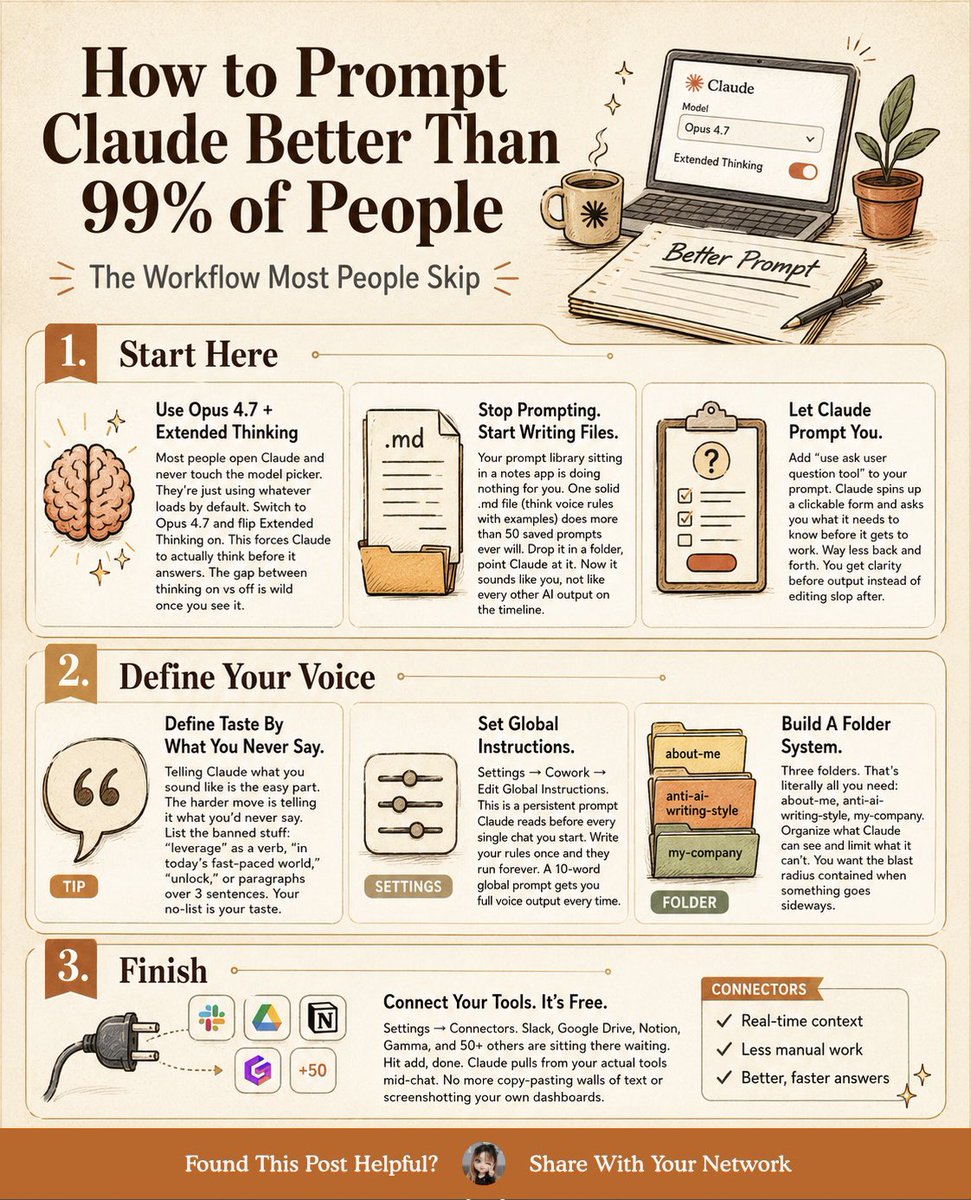
someone on reddit just posted 11 claude things after 18 months of daily use, and most people using claude have never touched half of them 🤯 went through the whole list. these 5 are the ones that actually change how you use it 👇 → Custom Styles. make one called "skeptical senior engineer" that pushes back on your code instead of agreeing with everything. 3 minutes to set up. honestly the single biggest output jump there is. → Projects. drop your context, style guide, past work in once as project knowledge. stop re-pasting the same thing into every chat. people burn 100+ hours before they figure this out. → default to Sonnet 4.6, not Opus 4.7. it's faster and most tasks don't need Opus. save Opus for the gnarly architectural stuff. the limit complaints just stop. → Artifacts can call the API now. you can build a working ai tool inside an artifact. people call it Claudeception. a client-brief generator that calls Sonnet from inside an html artifact, built in an hour. wild. → subagents in Claude Code. "spin off a subagent to run the tests while i keep coding." parallel work that used to only happen in your head. almost nobody uses them. the realest line in the whole post: generic output means a generic prompt. that's a skill issue, not a model issue. what's the one claude thing that took you way too long to find? 👇
Vaibhav Sisinty tweet media
English
6
84
555
17.9K
Kotak Neo Support
Kotak Neo Support@kotakneosupport·
@PradeepNeela Hello Pradeep, we understand our team has connected with you and shared all the details on your registered email ID dated April 02, 2026. We request you to refer the same.
English
1
0
0
14
Pradeep Neela 🇮🇳
Pradeep Neela 🇮🇳@PradeepNeela·
⛔⚠️ My dad uses @kotakneo Android app & even after denying SMS read permissions,app still seems to access incoming SMS to capture OTPs. Attaching video for reference. How is this possible? How is @GooglePlay allowing such an app to remain on their platform? Cc @jay_kotakone
English
3
0
0
149
Pradeep Neela 🇮🇳 retweetledi
Krishna Agrawal
Krishna Agrawal@Krishnasagrawal·
Build an AI Agent 📘📚
Krishna Agrawal tweet media
English
6
27
94
1.7K
Pradeep Neela 🇮🇳
Pradeep Neela 🇮🇳@PradeepNeela·
@zerodha - Waiting for NSE EBG support to buy gold directly via Zerodha. Any tentative ETA for rollout on the platform? #Kite
English
0
0
1
44
Pradeep Neela 🇮🇳
Pradeep Neela 🇮🇳@PradeepNeela·
This is must for every person.
smrati tiwari@smratitiwa86867

How to learn Claude in 5 days: (this will save you 2 hours a day) ☀️ DAY 1: Set up the basics Goal: Get Claude to give you personalized answers. → Pick your mode (Chat, Code, or Cowork) → Turn on Memory → Write 3–5 lines about your role in Personal Preferences Now Claude knows who it's talking to. ☀️ DAY 2: Build your first project Goal: Stop repeating yourself. → Create a project for one recurring task → Write your instructions once → Upload your reference files Claude now knows your context before you say a word. ☀️ DAY 3: Build your first Skill Goal: Stop re-explaining yourself every single chat. → Go to Settings → Customize → Skills → Click "+" and describe a task you repeat often → Upload it — Claude loads it automatically from now on Write it once. Claude runs it every time. ☀️ DAY 4: Connect your tools Goal: Stop copy-pasting between apps. → Connect Gmail, Google Drive, or Slack via Connectors → Let Claude work inside those apps directly No more switching tabs. No more manual handoffs. ☀️ DAY 5: Delegate your work Goal: Set up an automation. → Schedule a recurring task (weekly Slack summary, daily brief) → Let Claude read, work, and deliver — on its own That's not a tool. That's a system. Five days. One setup. Then it runs itself. Do this instead of scrolling: 1. Save this post (you'll come back to it) 2. Start Day 1 today (takes 10 minutes) 3. Run the full 5 days this week Structured. Compounding. No excuses.

English
0
1
0
6
Pradeep Neela 🇮🇳 retweetledi
Rishi
Rishi@RishiUvaach·
𝗦𝘁𝗼𝗽 𝘂𝘀𝗶𝗻𝗴 𝗖𝗹𝗮𝘂𝗱𝗲 𝗹𝗶𝗸𝗲 𝗶𝘁’𝘀 𝟮𝟬𝟮𝟰. “Write in short sentences. My audience is founders. No bullet points. Match my voice.” You should not be typing this every single time. Claude now lets you store your preferences, context, workflows, and recurring instructions so it works more like a trained collaborator, not a blank chatbot. Here are the 𝟭𝟵 𝗿𝘂𝗹𝗲𝘀 𝘁𝗼 𝗴𝗲𝘁 𝗳𝗮𝗿 𝗺𝗼𝗿𝗲 𝗼𝘂𝘁 𝗼𝗳 𝗖𝗹𝗮𝘂𝗱𝗲: ━━━━━━━━━━━━━━ 𝟭. 𝗦𝗲𝘁𝘂𝗽 ⚙️ ➤ 𝗧𝘂𝗿𝗻 𝗼𝗻 𝗠𝗲𝗺𝗼𝗿𝘆 So Claude does not start from zero every time. ➤ 𝗨𝘀𝗲 𝗢𝗽𝘂𝘀 𝗳𝗼𝗿 𝗺𝗼𝘀𝘁 𝘀𝗲𝗿𝗶𝗼𝘂𝘀 𝘄𝗼𝗿𝗸 Unless you are truly optimizing for speed. ➤ 𝗘𝗻𝗮𝗯𝗹𝗲 𝗘𝘅𝘁𝗲𝗻𝗱𝗲𝗱 𝗧𝗵𝗶𝗻𝗸𝗶𝗻𝗴 Especially for complex, multistep reasoning. ➤ 𝗖𝗵𝗼𝗼𝘀𝗲 𝘁𝗵𝗲 𝗿𝗶𝗴𝗵𝘁 𝗺𝗼𝗱𝗲 Chat to think. Code to build. Cowork to automate. ━━━━━━━━━━━━━━ 𝟮. 𝗖𝗼𝗻𝘁𝗲𝘅𝘁 🧠 ➤ 𝗨𝗽𝗹𝗼𝗮𝗱 .𝗠𝗗 𝗳𝗶𝗹𝗲𝘀 Style guides, customer profiles, brand rules, positioning notes. ➤ 𝗖𝗼𝗻𝗻𝗲𝗰𝘁 𝘆𝗼𝘂𝗿 𝘁𝗼𝗼𝗹𝘀 Let Claude work directly with Notion, Gmail, and more. ➤ 𝗖𝗿𝗲𝗮𝘁𝗲 𝗣𝗿𝗼𝗷𝗲𝗰𝘁𝘀 𝗳𝗼𝗿 𝗿𝗲𝗰𝘂𝗿𝗿𝗶𝗻𝗴 𝘄𝗼𝗿𝗸 Add your rules, examples, and context once. ➤ 𝗢𝗻𝗲 𝗣𝗿𝗼𝗷𝗲𝗰𝘁 = 𝗼𝗻𝗲 𝗰𝗹𝗲𝗮𝗿 𝗷𝗼𝗯 “Client proposals” works. “Marketing” is too broad. ━━━━━━━━━━━━━━ 𝟯. 𝗣𝗿𝗼𝗺𝗽𝘁𝗶𝗻𝗴 ✍️ ➤ 𝗦𝗵𝗼𝘄 𝗖𝗹𝗮𝘂𝗱𝗲 𝘄𝗵𝗮𝘁 𝗴𝗼𝗼𝗱 𝗹𝗼𝗼𝗸𝘀 𝗹𝗶𝗸𝗲 Give examples of successful outputs and outcomes. ➤ 𝗔𝘀𝘀𝗶𝗴𝗻 𝗮 𝗿𝗼𝗹𝗲 “You are a senior recruiter.” “You are a sharp product marketer.” ➤ 𝗨𝘀𝗲 𝗽𝗿𝗲𝗰𝗶𝘀𝗲 𝗰𝗼𝗻𝘀𝘁𝗿𝗮𝗶𝗻𝘁𝘀 “Ask no more than 5 questions” beats “don’t ask too many questions.” ➤ 𝗔𝘀𝗸 𝗳𝗼𝗿 𝟱 𝗼𝗽𝘁𝗶𝗼𝗻𝘀 Do not force one “perfect” answer too early. ━━━━━━━━━━━━━━ 𝟰. 𝗜𝘁𝗲𝗿𝗮𝘁𝗶𝗼𝗻 🔁 ➤ 𝗜𝗳 𝗖𝗹𝗮𝘂𝗱𝗲 𝗰𝗮𝗻’𝘁 𝗲𝘅𝗽𝗹𝗮𝗶𝗻 𝗶𝘁 𝗹𝗶𝗸𝗲 𝘆𝗼𝘂’𝗿𝗲 𝟭𝟬, 𝗶𝘁’𝘀 𝗻𝗼𝘁 𝗿𝗲𝗮𝗱𝘆 Clarity is the real quality check. ➤ 𝗖𝗿𝗲𝗮𝘁𝗲 𝗲𝗱𝗶𝘁𝗮𝗯𝗹𝗲 𝗱𝗼𝗰𝘀 𝗼𝗿 𝘁𝗿𝗮𝗰𝗸𝗲𝗿𝘀 𝗶𝗻𝘀𝗶𝗱𝗲 𝘁𝗵𝗲 𝗰𝗵𝗮𝘁 Use Artifacts instead of scattered back-and-forth. ➤ 𝗡𝗲𝘃𝗲𝗿 𝗮𝗰𝗰𝗲𝗽𝘁 𝘁𝗵𝗲 𝗳𝗶𝗿𝘀𝘁 𝗱𝗿𝗮𝗳𝘁 The second or third pass is usually where the value appears. ➤ 𝗧𝗲𝗮𝗰𝗵 𝗶𝘁 𝘁𝗼 𝗰𝗵𝗮𝗹𝗹𝗲𝗻𝗴𝗲 𝘆𝗼𝘂 Claude agrees too easily by default. Tell it to push back, question assumptions, and flag weak thinking. ━━━━━━━━━━━━━━ 𝟱. 𝗦𝘆𝘀𝘁𝗲𝗺𝘀 🧩 ➤ 𝗦𝗮𝘃𝗲 𝘆𝗼𝘂𝗿 𝗯𝗲𝘀𝘁 𝗽𝗿𝗼𝗺𝗽𝘁𝘀 Good prompts are reusable assets. ➤ 𝗜𝗻𝘀𝘁𝗮𝗹𝗹 𝗖𝗹𝗮𝘂𝗱𝗲 𝗦𝗸𝗶𝗹𝗹𝘀 Use them for research, writing, analysis, and repeatable workflows. ➤ 𝗕𝘂𝗶𝗹𝗱 𝘆𝗼𝘂𝗿 𝗼𝘄𝗻 𝗰𝘂𝘀𝘁𝗼𝗺 𝗦𝗸𝗶𝗹𝗹𝘀 For recurring tasks like: “Anti-AI content checklist” “Founder post sharpener” “Investor update reviewer” ➤ 𝗦𝗲𝘁 𝗖𝗹𝗮𝘂𝗱𝗲 𝘂𝗽 𝗽𝗿𝗼𝗽𝗲𝗿𝗹𝘆 𝗼𝗻𝗰𝗲 So you stop wasting time repeating yourself forever. ━━━━━━━━━━━━━━ Most people are still using Claude as a chatbot. The real leverage begins when you use it as a 𝗽𝗲𝗿𝘀𝗼𝗻𝗮𝗹𝗶𝘀𝗲𝗱 𝘄𝗼𝗿𝗸 𝘀𝘆𝘀𝘁𝗲𝗺.
Rishi tweet media
English
21
46
154
4.2K
Pradeep Neela 🇮🇳 retweetledi
Anuj
Anuj@anujcodes_21·
Claude just dropped 13 free AI courses (with certificates). No $500 course needed. No “guru” required. Just real skills, straight from Anthropic. Here’s the full list: 1. Claude 101 lnkd.in/gCPUQsRg 2. AI Fluency: Frameworks & Foundations lnkd.in/gS6ceZ_M 3. Introduction to Agent Skills lnkd.in/g_wWNiEb 4. Building with the Claude API lnkd.in/gDr5K_B4 5. Claude Code in Action lnkd.in/g9wWZbK9 6. Introduction to Model Context Protocol lnkd.in/gAj5HqMY 7. MCP: Advanced Topics lnkd.in/g3eDwBFY 8. AI Fluency for Students lnkd.in/gKKujHGG 9. AI Fluency for Educators lnkd.in/gVcKnuhA 10. Teaching AI Fluency lnkd.in/g9P4gJFM 11. AI Fluency for Nonprofits lnkd.in/gpsm_BVf 12. Claude with Amazon Bedrock lnkd.in/gbfPjSFt 13. Claude with Google Vertex AI lnkd.in/gvVgB4Ub If you go through even half of these, you’ll be ahead of 95% of people using AI. Most people won’t. Because they’re still watching random YouTube videos, buying overpriced courses, or “learning AI” without actually building. Don’t be that person. Do this instead: 1. Bookmark this post (you’ll come back) 2. Pick 1 course and start today 3. Share it with someone who needs this Comment "Course" for more resources. Free. Practical. No excuses.
Anuj tweet media
English
28
193
665
49.6K
Pradeep Neela 🇮🇳 retweetledi
Neo Kim
Neo Kim@systemdesignone·
If you want to become good at system design (in 30 days), learn these 30 case studies: 1 How Stock Exchange Works → tinyurl.com/ycx3epw7 2 How YouTube Works → tinyurl.com/b2u5sjmt 3 How Google Docs Works → tinyurl.com/mtjvjs8j 4 How Kafka Works → tinyurl.com/3j2e7aas 5 How URL Shorteners Work → tinyurl.com/4k8939fz 6 How WhatsApp Works → tinyurl.com/y4745cs3 7 How Airbnb Works → tinyurl.com/2cjt2uw3 8 How Spotify Works → tinyurl.com/y536xyfy 9 How Slack Works → tinyurl.com/4p8v8huh 10 How Reddit Works → tinyurl.com/9r4uz8nd 11 How Bluesky Works → tinyurl.com/4z9283sd 12 How Tinder Works → tinyurl.com/mrnyyet3 13 How Twitter Timeline Works → tinyurl.com/2s696cxf 14 How Uber Finds Nearby Drivers → tinyurl.com/5e5e9xbe 15 How Amazon S3 Works → tinyurl.com/3k75m8dp 16 How Apple AirTags Work → tinyurl.com/4aambp3w 17 How LLMs Actually Work → tinyurl.com/24k2dh6k 18 How ChatGPT Apps Work → tinyurl.com/39f4arfc 19 How Uber Computes ETA → tinyurl.com/bddhr8j7 20 How Meta Serverless Works → tinyurl.com/yc6dtbvs 21 How Live Comments Work → tinyurl.com/2h8np3tk 22 How Real-Time Leaderboards Work → tinyurl.com/2mnaw4w2 23 How Live Presence Works → tinyurl.com/4cc7tv7b 24 How YouTube Scales MySQL → tinyurl.com/54mkkd2a 25 How Vector Databases Work → tinyurl.com/ypb4cvmx 26 How Pastebin Works → tinyurl.com/3ub9ymxy 27 How ChatGPT Works → tinyurl.com/mwpp9vf9 28 How Nginx Works → tinyurl.com/3jkkr2ve 29 How Lyft Works → tinyurl.com/ykvsy2uk 30 How Google Search Works → tinyurl.com/mujjt3zp What else should make this list? === 👋 PS - Want my System Design Playbook for FREE? Try the link below to join my newsletter right now: → newsletter.systemdesign.one/join (200K+ software engineers are already inside.) === 💾 Save & RT to help others learn system design. 👤 Follow @systemdesignone + turn on notifications.
Neo Kim tweet media
English
12
98
355
14.1K
Pradeep Neela 🇮🇳 retweetledi
Sandeep Jain
Sandeep Jain@sjsandeep_jain·
Most AI engineers know how to use MCP. Very few understand the server patterns that make production AI systems actually scalable. ⚡ This breakdown of the top 5 MCP server architectures is pure gold for anyone building serious AI agents in 2026. 👇 1️⃣ Tool Server Lets AI agents perform actions using APIs & external tools. Think: • sending emails • database queries • triggering workflows • automation tasks 2️⃣ Resource Server Feeds structured context into the LLM. Perfect for: 📂 files 🗄️ databases 📑 documents 📚 knowledge systems 3️⃣ Prompt Server Reusable prompts as infrastructure. Versioned. Parameterized. Shareable. This is where prompt engineering starts turning into software engineering. 4️⃣ Gateway Server One endpoint controlling multiple MCP servers. Handles: ✅ routing ✅ auth ✅ rate limiting ✅ orchestration 5️⃣ Proxy / Bridge Server Connects legacy systems to modern AI agents without rewriting everything. Huge for enterprise AI adoption. 🚀 The biggest shift happening right now: AI systems are moving from: “single chatbot apps” to “modular AI infrastructure.” The engineers who understand MCP architecture early will have a massive edge building: • AI copilots • autonomous agents • enterprise AI systems • multi-agent workflows Bookmark this. One of the cleanest MCP architecture references I’ve seen so far.
Sandeep Jain tweet media
English
12
82
286
9.2K
Pradeep Neela 🇮🇳 retweetledi
Alex Xu
Alex Xu@alexxubyte·
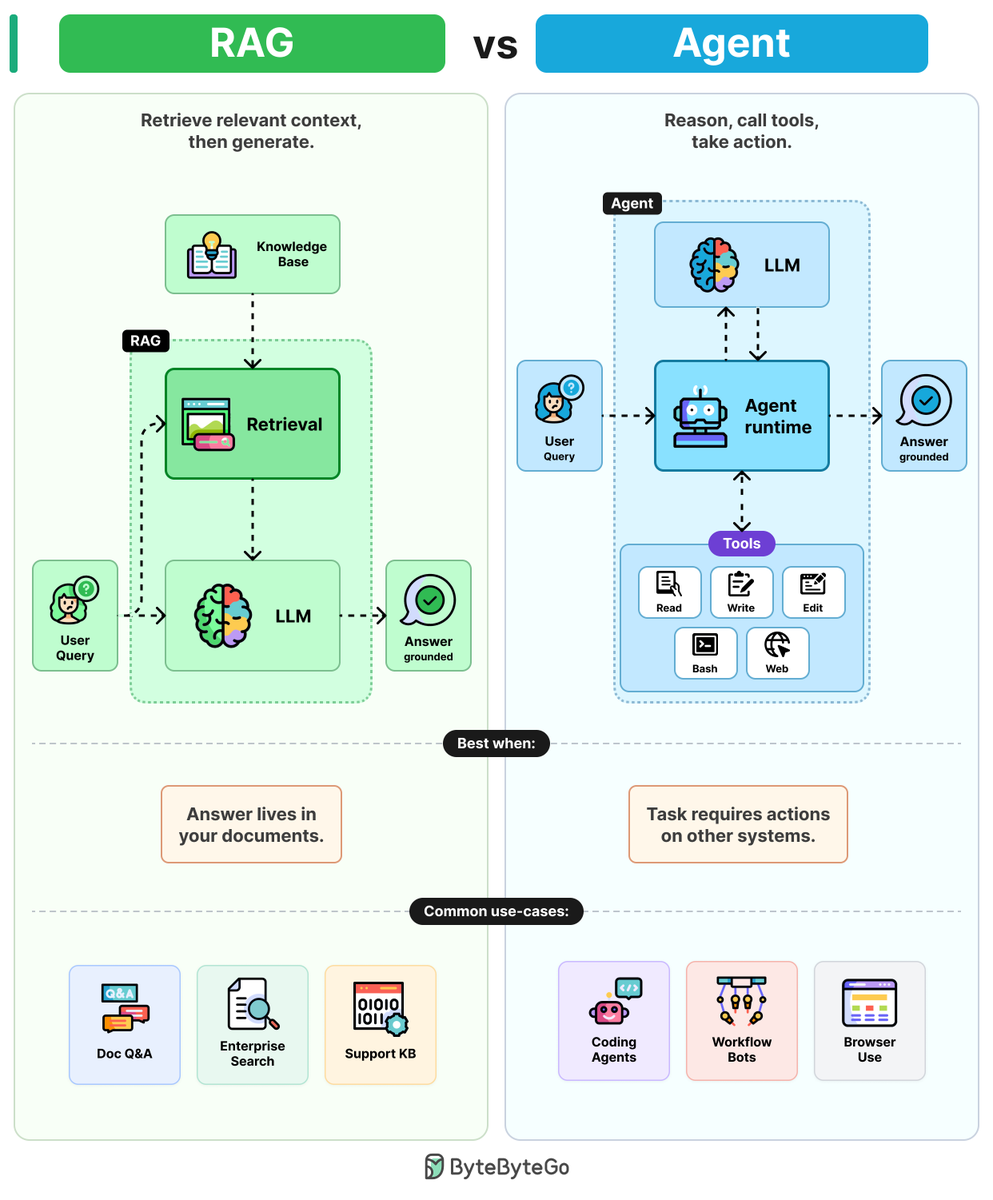
RAGs vs Agents Ask an LLM about your company's data and it will guess. The two patterns that fix this are RAG and agents, and they solve different problems. RAGs: RAGs combine LLMs with retrieval to ground answers in 4 steps. Step 1: The user query is embedded and sent to a retrieval step. Step 2: Retrieval pulls the most relevant chunks from a knowledge base (PDFs, wikis, etc.) Step 3: Those chunks are pasted into the prompt as context. Step 4: The LLM writes the answer, grounded in the retrieved text. One retrieval. One generation. Cheap, predictable, and easy to debug. Agents: Agents wrap LLMs in a reasoning loop with tools to take action. Step 1: The user query goes into the agent runtime. A reasoning loop wrapped around an LLM. Step 2: The LLM reads the goal and picks a tool (Read, Write, Edit, Bash, etc.) Step 3: The runtime executes the tool and feeds the result back to the LLM. Step 4: The LLM reasons again, picks the next tool, and loops until the task is done. More flexible. More tokens. Harder to debug because errors drift across steps. The rule of thumb: Use RAG when the answer lives in your documents. Use an agent when the answer requires action on other systems. Over to you: When do you prefer RAG over agent?
Alex Xu tweet media
English
13
117
631
30.7K
Pradeep Neela 🇮🇳 retweetledi
Dhairya
Dhairya@dkare1009·
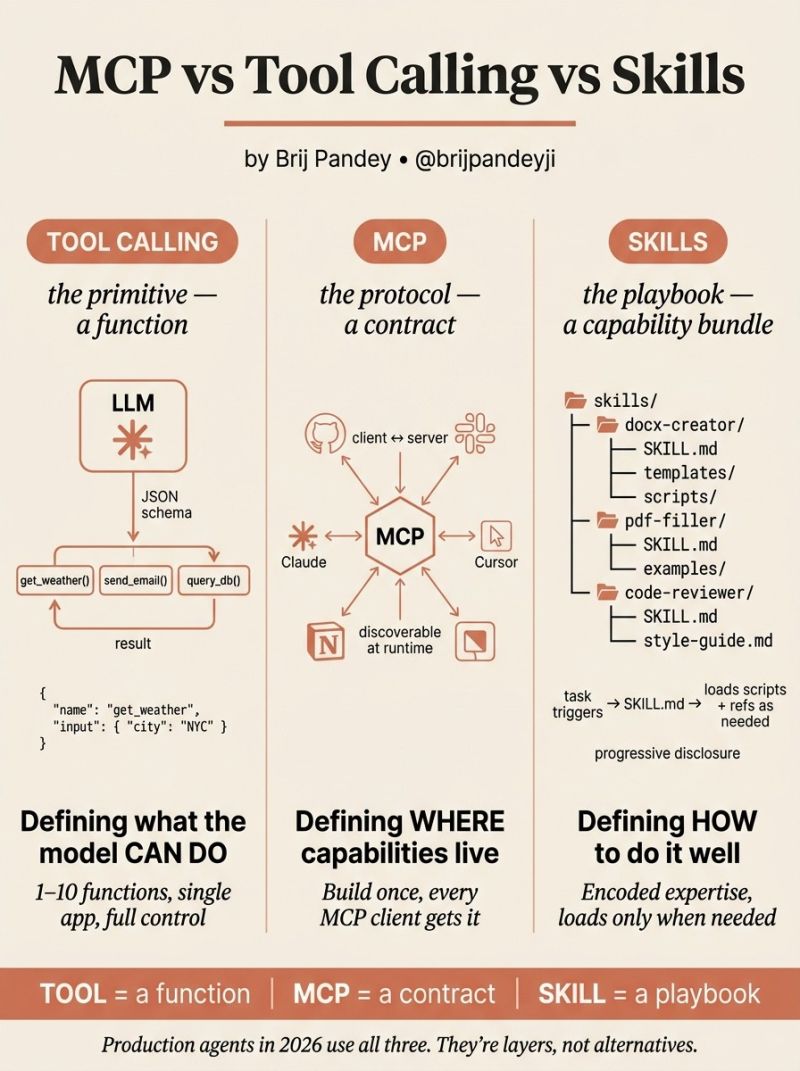
MCP vs Tool Calling vs Skills 3 ways to extend an LLM — not interchangeable. Tool Calling = Function → Model triggers APIs/code Best: small, controlled setups MCP = Protocol → Connect models to tools dynamically Best: cross-app, scalable systems Skills = Playbook → Instructions + workflows bundled Best: complex, repeatable tasks Mental model: Tool → what MCP → where Skill → how They’re not competitors. They’re layers. The mistake? Forcing one to solve everything. #AI #LLM #AIAgents
Dhairya tweet media
English
6
67
290
10.3K
Pradeep Neela 🇮🇳 retweetledi
Sonal Shukla
Sonal Shukla@sonalshukla3377·
🎯 100 AI Tools to Boost Productivity. Unlock smarter workflows, automate tasks, and get more done in less time. Here’s a curated list of the best AI tools across every category. 🔷 Generative AI • ChatGPT • Claude • Gemini • Mistral • Meta AI 🔷 AI Tools • Perplexity • NotebookLM • You • Copilot • Poe 🔷 Creative Suite • Suno • Udio • Viggle • Remix • Grok 🔷 Sales • Jason AI • Clay • Folk • Reply.io • Sendspark 🔷 Voice & Text • ElevenLabs • Murf AI • Speechify • Superwhisper • Whisp Flow 🔷 Support • Fin AI • Decagon • Sierra • Pylon • Duckie 🔷 Text to Image • Midjourney • Ideogram • DALL·E 3 • Imagen 3 • Firefly 🔷 Video • HeyGen • Klap • OpusClip • Submagic • VEED 🔷 Text to Video • OpenAI Sora • Google Veo • Runway • Luma AI • Pika 🔷 Content • Cohesive • Beehiv • Easygen • Supermeme • Descript 🔷 Marketing • Jasper.ai • Writesonic • Coframe • Blaze • AdCreative 🔷 SEO & Blog • Surfer • Rankai • Seobot • Byword • Macaw 🔷 Design • Uizard • Playground • Lasqo • Canva • Galileo AI 🔷 Website • Gamma • Framer • Webflow • Durable • Dora 🔷 Website Chat • Reply Chat • Dante • Chatbase • Chatbit • Tidio 🔷 Code • Cursor • v0 • Replit • Lovable • Devin 🔷 Meetings • Bluedot • tl;dv • Noty • Grain • Fireflies 🔷 Productivity • Notion AI • Airtable AI • Superhuman • Loom • Raycast 🔷 Operations • Juicebox • PolyAI • CrewAI • Respell • Slite 🔷 Workflows • Zapier • Lindy • Beam • Cassidy • Magical Your all-in-one cheat sheet to work faster, think better, and automate anything. ✅️Save this it’s a productivity goldmine. ❤️ Like 🔁 Retweet 🔖 Bookmark Follow @sonalshukla3377 for more such posts
Sonal Shukla tweet media
English
28
36
103
1.5K
Pradeep Neela 🇮🇳 retweetledi
Samir Arora
Samir Arora@Iamsamirarora·
No:1 over last 30 months( basically the entire life of the fund) in SIP returns. Wow. @IndiaHelios
Ankit | FinAlpha@AnkitFinAlpha

CAGR is great for comparison, but it rarely reflects the actual journey of a retail investor. Most people invest via monthly #SIPs. To see the true real-world performance, we have to also look at SIP XIRR. Here is a comparison of #FlexiCap funds SIP across identical time horizons, all measured up to May 15, 2026 : #FinAlpha1Pager Key Insights: 🔹Short-term: 1Y to 2Y periods are brutal. Nifty 500 TRI is at -2.98% for 1Y, leaving most funds flat or negative. 🔸Mid-term: A handful of outlier funds have managed to generate massive alpha, completely dominating the 1Y to 5Y performance charts. 🔹Long-term: The multi-year compounding story remains perfectly intact. Over the 7Y and 10Y horizons, the top-tier legacy funds are delivering a highly impressive 17% to 18%+ XIRR. Evaluating funds on the right metric matters. How is your Flexi Cap SIP holding up against the benchmark ? #MutualFunds #StockMarket #FinAlpha

English
14
15
190
58.7K
Pradeep Neela 🇮🇳 retweetledi
Rishi
Rishi@RishiUvaach·
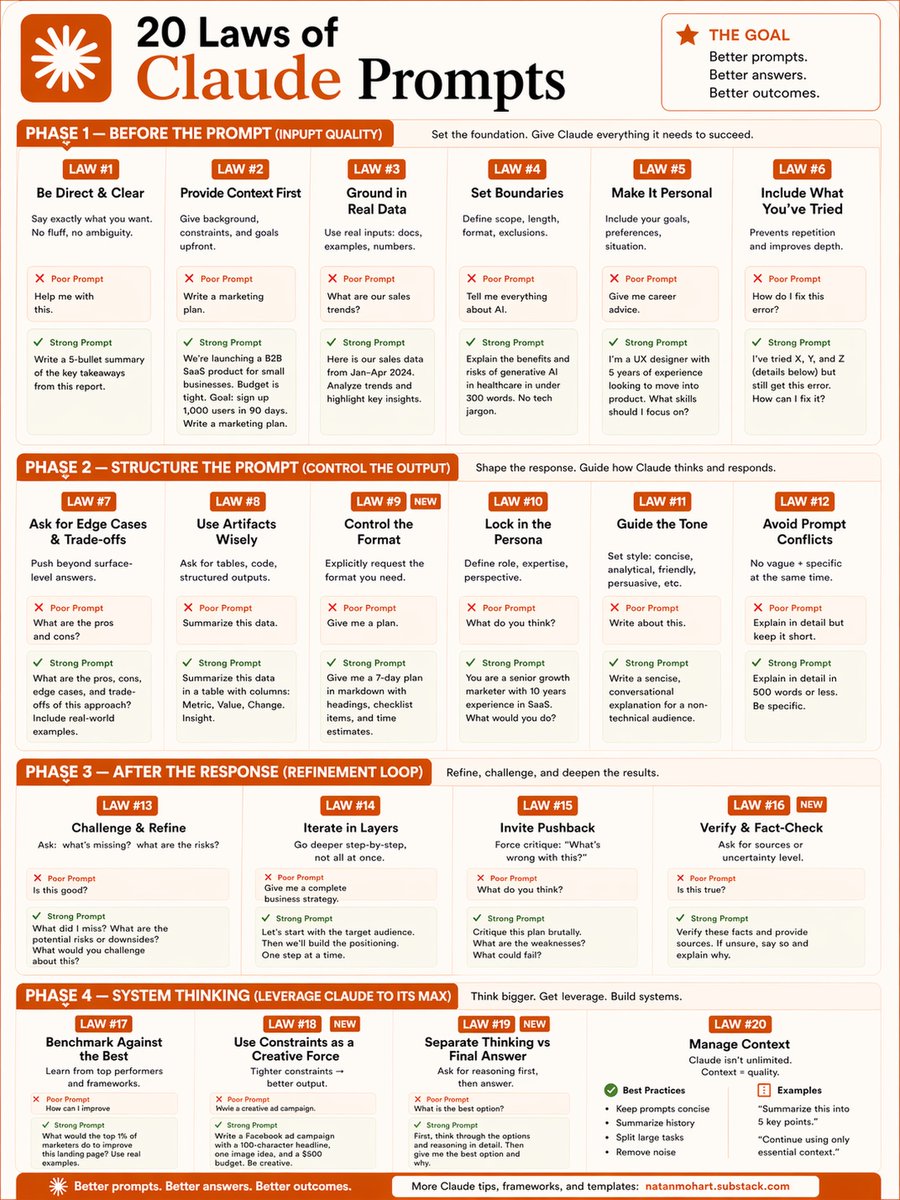
🚀 Most people treat Claude like a search engine. But the quality of your output is not Claude’s problem. It is your prompt’s problem. Here are 20 laws that can completely change how you use AI forever. I break it into 4 phases👇 --- 🧠 Phase 1 — Before the Prompt ✔️ Be direct ✔️ Give context ✔️ Use real data ✔️ Set boundaries > Garbage input = average output. --- 🏗️ Phase 2 — Structure the Prompt ✔️ Control the format ✔️ Lock in a persona ✔️ Guide the tone 🎯 The model performs better when the role, structure, and expectations are crystal clear. --- 🔁 Phase 3 — After the Response ✔️ Challenge the output ✔️ Iterate in layers ✔️ Invite pushback ⚡ The first response is usually a draft, not the destination. --- 🌐 Phase 4 — System Thinking ✔️ Benchmark against the best ✔️ Manage context properly ✔️ Think in systems, not one-off prompts 📌 Advanced AI usage is less about prompting tricks and more about workflow design. --- 💾 Save this infographic. Apply just one law today.
Rishi tweet media
English
18
132
400
14.2K
Pradeep Neela 🇮🇳 retweetledi
Nainsi Dwivedi
Nainsi Dwivedi@NainsiDwiv50980·
𝐖𝐡𝐚𝐭 𝐢𝐬 𝐌𝐂𝐏 (𝐌𝐨𝐝𝐞𝐥 𝐂𝐨𝐧𝐭𝐞𝐱𝐭 𝐏𝐫𝐨𝐭𝐨𝐜𝐨𝐥)? Most AI agents are trapped inside their own walls. MCP is the protocol that connects them to the outside world data sources, tools, and workflows. 𝐖𝐡𝐚𝐭 𝐢𝐬 𝐌𝐂𝐏? • MCP is an open-source standard that connects AI applications to external systems like data sources, tools, and workflows. • It enables seamless integrations, allowing AI models like ChatGPT to access data, use tools, and perform tasks like web app creation or database queries. • MCP simplifies development, reducing complexity and time by providing a standardized way to connect AI systems to various resources. • It enhances AI capabilities, making models more powerful and personalized by allowing them to interact with external systems and data on behalf of users. 𝐁𝐞𝐟𝐨𝐫𝐞 𝐌𝐂𝐏 LLM → Slack, Google Drive, GitHub (separate connections for each). Every integration is custom. Every tool requires its own API client. Every agent reinvents the wheel. 𝐀𝐟𝐭𝐞𝐫 𝐌𝐂𝐏 LLM → Unified API (MCP) → Slack, Google Drive, GitHub. One protocol. One connection layer. Every tool accessible through a standardized interface. 𝐇𝐨𝐰 𝐌𝐂𝐏 𝐖𝐨𝐫𝐤𝐬? User → User Query → MCP Client → Invoke Graph → LangGraph → Route Request → OpenAI GPT → Tool Decision → Call MCP Tool → MCP Server → External API Call → External APIs → API Response → MCP Server → Tool Result → OpenAI GPT → Generate Response → MCP Client → Natural Language Response → Final Result User → Agent Response → User. 𝐓𝐡𝐞 𝐅𝐥𝐨𝐰 1. User sends a query to the MCP Client. 2. MCP Client invokes LangGraph to route the request. 3. OpenAI GPT makes a tool decision and calls the MCP Tool. 4. MCP Server makes an external API call to the appropriate service (Slack, Google Drive, GitHub, etc.). 5. External API returns a response to the MCP Server. 6. MCP Server sends the tool result back to OpenAI GPT. 7. OpenAI GPT generates a natural language response. 8. MCP Client delivers the final result to the user. Before MCP, every agent built its own integrations. After MCP, every agent shares the same connection layer. MCP is the protocol that turns isolated AI models into connected AI agents. 𝐀𝐫𝐞 𝐲𝐨𝐮 𝐛𝐮𝐢𝐥𝐝𝐢𝐧𝐠 𝐀𝐈 𝐚𝐠𝐞𝐧𝐭𝐬 𝐰𝐢𝐭𝐡 𝐜𝐮𝐬𝐭𝐨𝐦 𝐢𝐧𝐭𝐞𝐠𝐫𝐚𝐭𝐢𝐨𝐧𝐬 𝐨𝐫 𝐰𝐢𝐭𝐡 𝐌𝐂𝐏? ♻️ Repost this to help your network get started Cc : respective author.
Nainsi Dwivedi tweet media
English
21
97
388
12.8K
Pradeep Neela 🇮🇳 retweetledi
Charly Wargnier
Charly Wargnier@DataChaz·
🚨 New AI guides drop every single day, yet these 9 official guides from OpenAI, Google, and Anthropic are still the definitive foundation you need. Bookmark these: 🧵 ↓
Charly Wargnier tweet media
English
5
30
145
8K
Pradeep Neela 🇮🇳 retweetledi
Nainsi Dwivedi
Nainsi Dwivedi@NainsiDwiv50980·
The guy who BUILT Claude Code is running 10–15 parallel AI agents like an engineering team. Not prompts. Systems. His secret isn’t some hidden feature. It’s a simple file: CLAUDE.md And it changes everything. Every time Claude makes a mistake → it writes a rule. Every correction → permanent memory. Every session → smarter than the last. > “Update your CLAUDE.md so you don’t make that mistake again.” That’s the loop. No repeated errors. No wasted tokens. No babysitting. Just compounding intelligence inside your own codebase. While most people: Rewrite the same prompts Fix the same bugs Start from zero every time He’s building a self-improving engineering system. And it gets crazier: • 10+ agents running in parallel • Research, coding, testing — all split into sub-agents • Clean context, zero clutter • Complex problems = more agents, not more thinking He hasn’t written SQL in 6+ months. Claude just pulls from BigQuery via CLI. This isn’t “AI-assisted coding.” This is AI orchestration. And the gap is already showing. Claude Code is now contributing to ~4% of all public GitHub commits. If you’re still using AI like a chatbot… You’re not behind. You’re playing a completely different game.
Nainsi Dwivedi tweet media
Suryansh Tiwari@Suryanshti777

x.com/i/article/2056…

English
31
141
723
103.5K
Kotak Neo Support
Kotak Neo Support@kotakneosupport·
@PradeepNeela Hello Pradeep, we understand your frustration. This is not the service standard we aim for. We’ll prioritise connecting with you and ensure your concerns are addressed at the earliest. Thank you for your patience.
English
1
0
0
7