Craig Hadden

1.3K posts

Craig Hadden banner
Craig Hadden

Craig Hadden

@RemotePoss

Big fan of presenting well. See videos, tips and examples on my blog about presenting and data-storytelling: https://t.co/BaKlIQX16h


Sydney – Australia Katılım Haziran 2012
33 Takip Edilen230 Takipçiler
Craig Hadden
Craig Hadden@RemotePoss·
I'm using DataDamp to learn the world's most in-demand data and AI skills for free! You can too—access 440+ courses and real-life projects until Sep. 3, no strings attached. datacamp.com/freeweek?utm_m… via @DataCamp
English
0
0
0
19
Craig Hadden
Craig Hadden@RemotePoss·
Thanks to @DorisandBertie, I just discovered the work of @Crescenzo. And to me, you can’t beat the practical, down-to-earth communication advice they both share. For instance, Steve says “Be conversational, not corporate.” I agree 100%. (After all, bei…lnkd.in/gqrsf4pM
English
0
0
0
30
Craig Hadden
Craig Hadden@RemotePoss·
@TheJoelTruth BTW, coincidentally, I posted about the TM video on that page a while back. For instance, did you notice that the speaker used over 20 distinct gestures and facial expressions? I also suggested 2 ways to make her opening line much more attention-grabbing… bit.ly/3BUNGcL
English
0
0
1
9
Craig Hadden
Craig Hadden@RemotePoss·
@TheJoelTruth Great tips Joel. Loved the emphasis on pausing and on strong eye contact. Re point 5, you might be interested in this almost-unknown PPT feature that lets you customize an existing presentation to fit into various timeslots (without duplicating your file) bit.ly/41Yj0C9
English
0
0
1
9
Craig Hadden
Craig Hadden@RemotePoss·
@WilmariDeJesus Still looking? I JUST discovered the tut below. “Budget 1 to 3 hours to complete…” (SO much Tab content – makes good stuff hard to find!) I like how it introduces concepts gradually, and explains new terms when they come up. See what you think bit.ly/cj-data-Get-St…
English
0
0
0
0
Wilmarí
Wilmarí@WilmariDeJesus·
Any good #Tableau tutorials out there? Just changed from Windows/PowerBi to Mac/Tableau. Not particularly liking the interface at this moment... #Data #DataVisualization
GIF
English
4
0
2
0
Craig Hadden
Craig Hadden@RemotePoss·
@ktkilroy Thanks for your great post Katie. Been using Tableau for about a year, and am still just slowly getting to understand it. (Very helpful that you explained the order of fields in the View Data dialog, as am very often mystified WHY it does stuff!) datakatie.com/2022/08/26/how…
English
0
0
0
0
Craig Hadden
Craig Hadden@RemotePoss·
@maf2k Since my original reply, I've found out that (like Microsoft Office files) .TWBX files are zips, so you can rename them as such to then access the .TWB file that they contain. Bingo!
English
0
0
0
0
Craig Hadden
Craig Hadden@RemotePoss·
@maf2k Thanks Michelle – this looks *extremely* handy. Had no idea it was possible. For anyone who's wondering, it seems the workbook needs to be a .TWB file, not .TWBX (and please take a backup copy before hacking away!)
English
1
0
0
0
Craig Hadden retweetledi
Michelle Frayman
Michelle Frayman@maf2k·
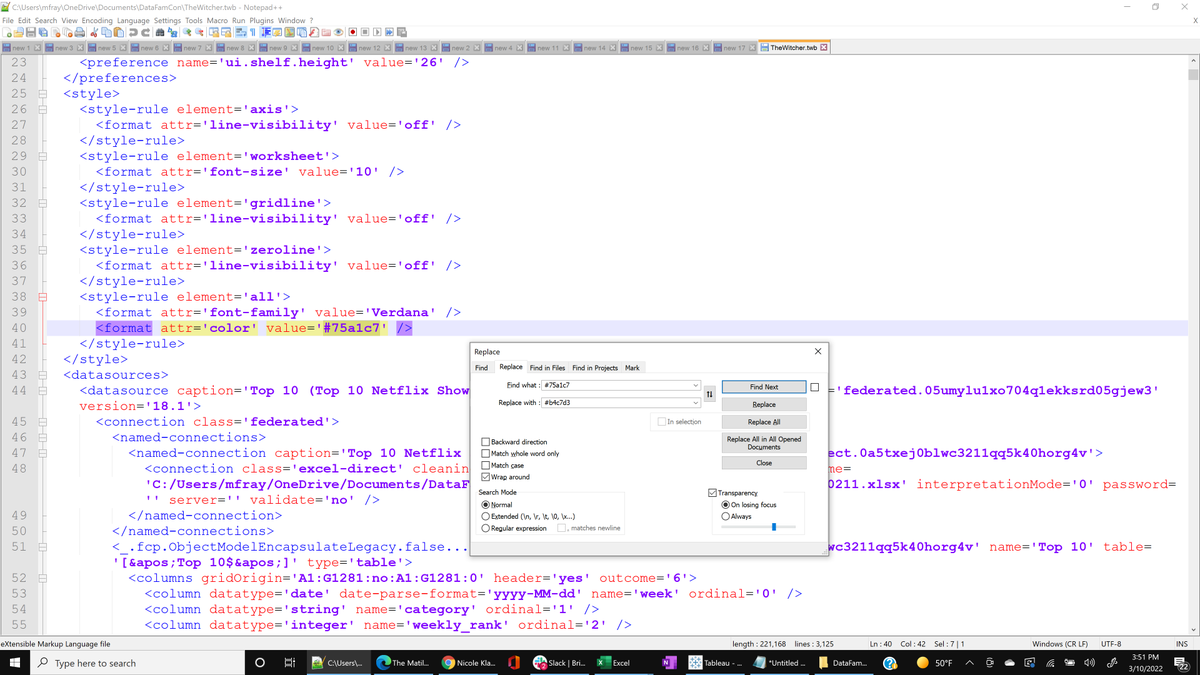
#TinyTableauTip Did you ever want to change your color palette across your viz? The workbook file can be opened in a text editor like Notepad++ and you can search and replace the existing hex codes with your new color codes. Make sure you replace all.
Michelle Frayman tweet media
English
17
18
112
0
Marc Schønwandt
Marc Schønwandt@MarcSchonwandt·
@maf2k I once added the “Add apply button” to +100 filters across multiple workbooks in <5 sec. Absolutely one of my best aha moments with XML editing in tableau⌛️
English
2
1
6
0
Craig Hadden
Craig Hadden@RemotePoss·
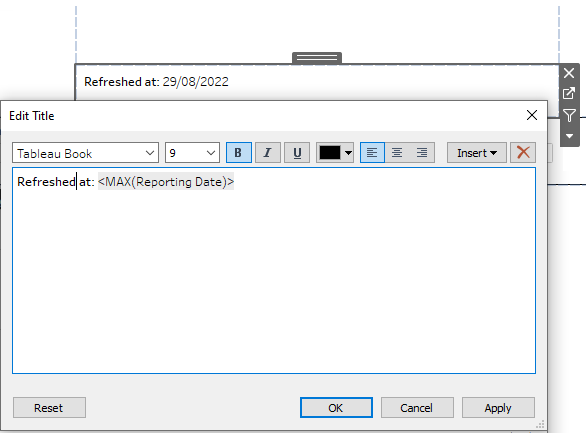
#TinyTableauTip It can be FAR easier to edit text with fields in it if you put them in a sheet’s Title (not its body). You can double-click the title to edit it – right on the dash! (No need to HUNT down the right sheet, THEN click Text, THEN click the ellipsis...) #Tableau #UX
Craig Hadden tweet media
English
0
1
1
0
Craig Hadden
Craig Hadden@RemotePoss·
@FlerlageKev Thanks Kevin! (What version of SQL are you using in the GIF? Most of the time, I use an old version of MS SQL Server that doesn't support this tip. But when I tried in a later version, it worked beautifully!)
English
1
0
0
0
Kevin Flerlage
Kevin Flerlage@FlerlageKev·
Well, there is a #TinyTableauTip hashtag, but here is a #SmallSQLSuggestion. If you press and hold ALT while pressing the up/down arrow keys, you can move that line up or down within your code. Pretty handy for rearranging the order within a SELECT statement.
GIF
English
7
2
72
0