Text Case

120 posts

Text Case

Text Case

@TextCaseApp

Automatable Text Transformations. An app for iOS and macOS by @ChrisHannah

App Store Katılım Şubat 2019
26 Takip Edilen320 Takipçiler
Text Case retweetledi
Chris 💻
Chris 💻@chrishannah·
One more feature added to @TextCaseApp ! ✨Format text with your custom Flows and favourite Formats directly from the menu bar.
Chris 💻 tweet media
English
1
1
0
58
Text Case retweetledi
Chris 💻
Chris 💻@chrishannah·
Let's see how this goes... 🚀 Text Case, the app to help you transform text, with 70+ different formats, ability to create custom transformations (flows), support for macOS Services, and the Shortcuts ecosystem, is now FREE to download on all supported platforms. (macOS, iOS, and iPadOS) textcase.app
Chris 💻 tweet media
English
1
3
5
828
Text Case
Text Case@TextCaseApp·
@npcorbett No, none of formats support regular expressions at the moment.
English
0
0
0
6
Nathan Corbett
Nathan Corbett@npcorbett·
@TextCaseApp can your app handle regular expressions? E.g. in a replace all expressions format.
English
1
0
0
15
Text Case
Text Case@TextCaseApp·
@nathanhaines Thanks! There’s no one format that can achieve this. But you can combine formats into a flow to achieve that. Would you want to wrap an entire string of text in quotations? Or individual words?
English
0
0
0
16
Text Case
Text Case@TextCaseApp·
As for the bugs, the first was that not all formats were appearing in the formats list, and also the macOS app had an issue where it was constantly asking for reviews. Both should now be fixed!
English
1
0
1
0
Text Case
Text Case@TextCaseApp·
@mb Definitely, great suggestion!
English
0
0
3
0
mb
mb@mb·
@TextCaseApp would you consider adding ̶S̶t̶r̶i̶k̶e̶ ̶t̶h̶r̶o̶u̶g̶h̶ in a future update?
Manhattan, NY 🇺🇸 Español
1
0
1
0
Text Case
Text Case@TextCaseApp·
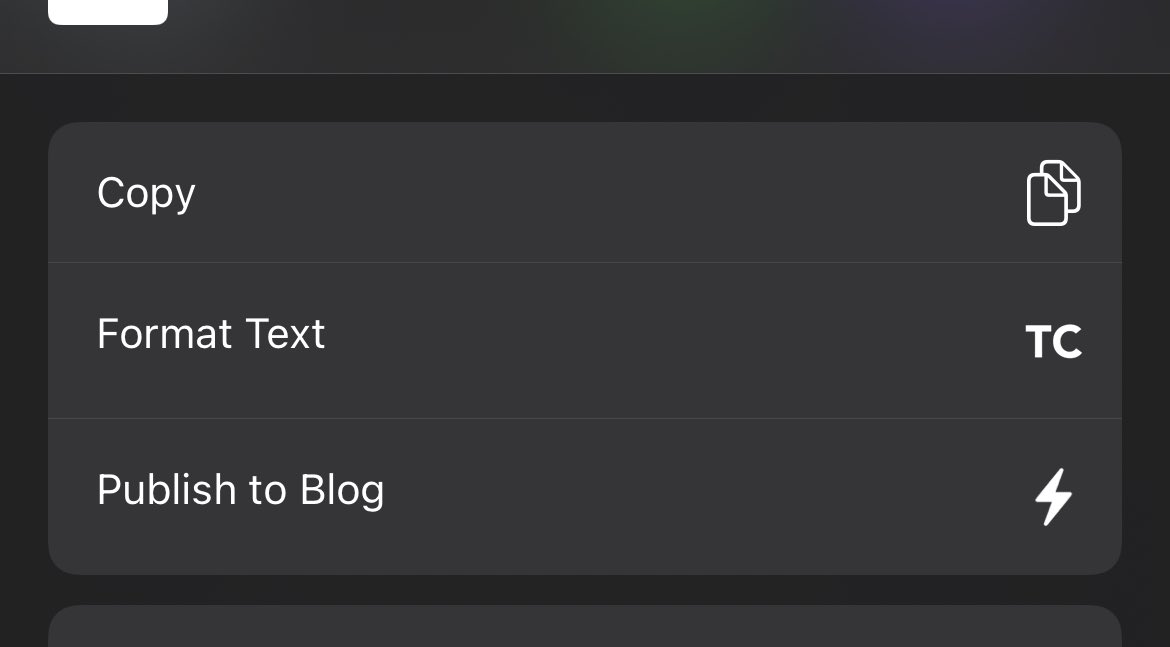
@nlucchesi The action in the share sheet is called “Format Text”. This is what it should look like.
Text Case tweet media
English
2
0
0
0
Nello Lucchesi
Nello Lucchesi@nlucchesi·
@TextCaseApp I don’t see Text Case’s “Convert Text” action listed among my iOS Share options. Yes, I tapped both “More” and “Edit Action” and can’t find it. What might I be doing wrong?
English
1
0
0
0
Text Case
Text Case@TextCaseApp·
@nlucchesi Unfortunately there’s currently no way to do this in Text Case.
English
3
0
0
0
Nello Lucchesi
Nello Lucchesi@nlucchesi·
@TextCaseApp I see “Remove Line Breaks” but I can’t figure out how to add line breaks as either a prefix or suffix.
English
1
0
0
0
Text Case
Text Case@TextCaseApp·
@nlucchesi As far as I know, yes. I’m not too familiar with Family Sharing.
English
0
0
0
0
Text Case
Text Case@TextCaseApp·
@nlucchesi There isn’t an explicit plain text transformation, however Text Case only deals with plain text, so this transformation will happen by default with any format.
English
0
0
1
0
Nello Lucchesi
Nello Lucchesi@nlucchesi·
@TextCaseApp Is there a plain text transformation (that transforms styled text to plain text)? Sorry if I missed it.
English
1
0
1
0
Text Case
Text Case@TextCaseApp·
⚙️ And what's better, is that the macOS version finally supports Shortcuts! So you can use Text Case in your shortcuts on iOS, iPadOS, and macOS!
English
0
0
3
0
Text Case
Text Case@TextCaseApp·
💻 Of course, all of thee changes also apply to the macOS version.
Text Case tweet media
English
1
0
0
0
Text Case
Text Case@TextCaseApp·
@BKrnk Sorry for the delay, but yes there is a format that will do just that!
Text Case tweet media
English
0
0
0
0
Bastian Krickow
Bastian Krickow@BKrnk·
@TextCaseApp Good evening. I have a question. Is it possible to partially replace a text with emojis with your app? For example, the word beer through the beer glass emoji?
English
1
0
0
0