Visual Studio Debugger

618 posts

Visual Studio Debugger banner
Visual Studio Debugger

Visual Studio Debugger

@VS_Debugger

We are the Microsoft Visual Studio Debugger team. You can reach us through: Tweets, comments on our blogs, VS Developer Community and at [email protected]

Redmond, WA Katılım Aralık 2013
52 Takip Edilen5.5K Takipçiler
Visual Studio Debugger
Visual Studio Debugger@VS_Debugger·
@wstaelens Sorry you're running into this. Could you please file a feedback ticket with details about the memory usage and your setup? That’ll help us investigate what’s going on and figure out the root cause. We’d really appreciate it.
English
0
0
0
175
Visual Studio Debugger retweetledi
Visual Studio
Visual Studio@VisualStudio·
In today's Visual Studio Toolbox highlight, Marco shows us how Visual Studio has a new, upgraded, guided workflow within the existing Debugger Agent to help you fix issues. Check it out: buff.ly/hSDYWpX
English
0
5
32
4.8K
Visual Studio Debugger
Visual Studio Debugger@VS_Debugger·
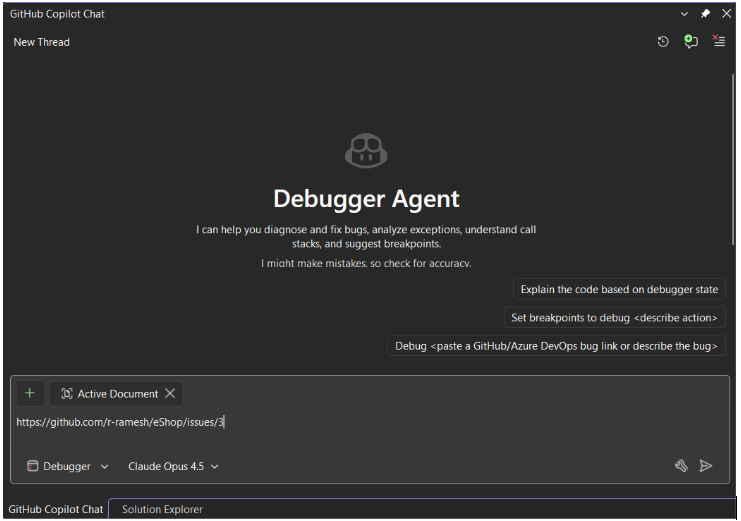
@archiecoder Love this 🙌 Getting the agent to reason through the bug with you instead of jumping to conclusions was a big focus for us. Thanks for trying it out and sharing 🙏
English
0
0
1
233
Sébastien Lachance
Sébastien Lachance@archiecoder·
I just did my very first debugging session with the new Developer Agent @VS_Debugger and wow, oh wow 🤯 I started with a screenshot and a vague description of where the bug could be. The agent asked me to reproduce the bug 4 times. It made assumptions and put breakpoints along the way. It eventually understood the whole scenario and gave me the fix. I would probably have spent an entire day without this. Thank you @VisualStudio 🙏
English
1
0
2
367
Visual Studio Debugger retweetledi
Mads Kristensen
Mads Kristensen@mkristensen·
Here's how to profile unit tests in Visual Studio and have Copilot help optimize your code youtu.be/9zcg206kEoI?si…
YouTube video
YouTube
English
0
10
48
6.3K
Visual Studio Debugger
Visual Studio Debugger@VS_Debugger·
Got a slow LINQ query? Now you can catch it and fix it while debugging. Perf Tips + Profiler Agent in Visual Studio surface real runtime data as you step, and GitHub Copilot helps you optimize instantly. Currently supported in C# .NET. #VS2026 Insiders
GIF
English
1
2
20
1.2K
Visual Studio Debugger retweetledi
Mads Kristensen
Mads Kristensen@mkristensen·
A super easy way for me to optimize performance of my .NET application using my existing unit tests, the built-in profiler, and Copilot to tie it all together into a single click of a button. Coming to Visual Studio 2026 very soon...
English
5
7
107
8K
Visual Studio Debugger retweetledi
Mads Kristensen
Mads Kristensen@mkristensen·
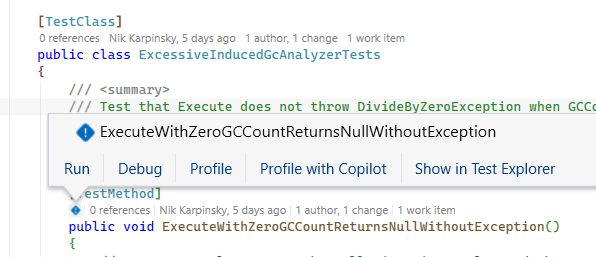
You'll soon be able to run the Visual Studio profiler agent against your unit tests. I'm very excited for this feature
Mads Kristensen tweet media
English
4
15
101
4.8K
Visual Studio Debugger
Visual Studio Debugger@VS_Debugger·
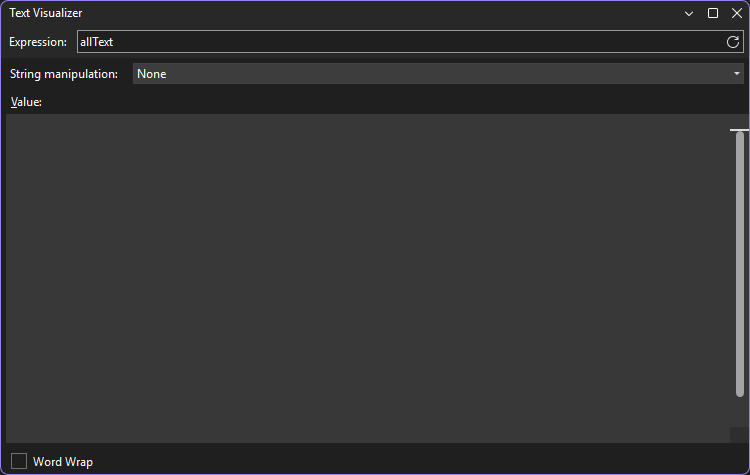
@mkristensen @wstaelens Unfortunately, the Text Visualizer doesn't currently support strings with embedded null characters (\0) in the middle it essentially stops rendering at the first one.
English
1
0
0
34
Wouter Staelens
Wouter Staelens@wstaelens·
@mkristensen text visualiser shows "\0\0..." over my "ref allText" parameter but in the dialog (when clicking View) nothing to see or to select... any improvement to make here? #VS2026
Wouter Staelens tweet mediaWouter Staelens tweet media
English
1
0
0
32
Visual Studio Debugger retweetledi
Mads Kristensen
Mads Kristensen@mkristensen·
What features or extensions make you jump from Visual Studio to other IDEs and editors to perform certain tasks?
English
105
9
32
11.6K
Visual Studio Debugger
Visual Studio Debugger@VS_Debugger·
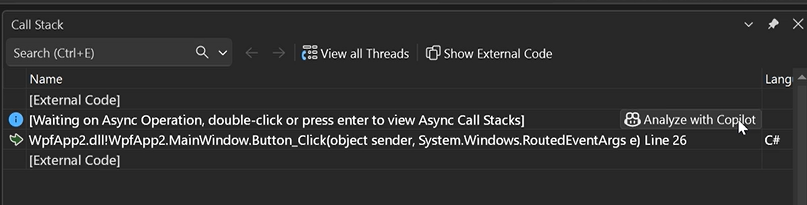
Ever stared at a call stack thinking “okay… but why?” Analyze Call Stack with Copilot is coming soon bringing instant clarity to sync & async debugging.
Visual Studio Debugger tweet media
English
1
2
17
2.5K
Visual Studio Debugger retweetledi
Visual Studio
Visual Studio@VisualStudio·
Finding the real issue often means tracing deep call chains. From Live! 360 Orlando, see how GitHub Copilot analyzes context, builds hypotheses, and helps uncover root causes 🧩 Watch to learn more: youtu.be/iFjQghRbJUw
YouTube video
YouTube
English
1
5
34
6.3K
Visual Studio Debugger retweetledi
Visual Studio
Visual Studio@VisualStudio·
📁 Quick Add Files 🖼️ File Explorer Image Optimizer ⌨️ A Keyboard Hero to streamline navigation and improve code quality In this #VSLive! 360 session replay, we get a wide collection of practical Visual Studio features and workflows that can make everyday development smoother, faster, and more enjoyable. 🎥 msft.it/6011tfhfW
Visual Studio tweet media
English
0
6
29
4.7K
Visual Studio Debugger
Visual Studio Debugger@VS_Debugger·
@mkristensen @johnzabroski @HarshadaHC looks like you have some 3rd-party extensions installed, and we can see inline variables coming from it. We suspect this may be specific to your setup, as we haven’t received any other reports of this issue. Could you please file a feedback ticket so we can take a closer look?
English
3
0
0
26
John Zabroski
John Zabroski@johnzabroski·
@mkristensen We have noticed that since Visual Studio 17.14.21 or 22, data tips no longer really work. It doesn't depend on whether I have "Keep expanded data tips open until clicked away" or "Enable property evaluation and other implicit function calls" is enabled/disabled.
English
1
0
1
51
Visual Studio Debugger
Visual Studio Debugger@VS_Debugger·
@Sam75614812 @mkristensen The profiler agent can help here too. Even if you don’t know anything about benchmarking, that’s completely fine. It can automatically add a new benchmark suite and generate benchmarks for you if your project doesn’t already have them. See this example youtu.be/u8kPpwvI1AI?si…
YouTube video
YouTube
English
1
0
2
95
Sam
Sam@Sam75614812·
@mkristensen Could you make a YouTube video showing this process? I’d like to see it in practice on real code. I’m not even sure how you to even begin to benchmark UI code like you’re doing.
English
1
0
2
191
Mads Kristensen
Mads Kristensen@mkristensen·
I’ve been having a blast adding benchmarks to my Visual Studio extensions and letting the Profiler Agent work its magic. The optimizations are incredible. Stuff I’d never pull off on my own. It often boosts performance by 5x and slashes allocations.
English
8
3
48
4.7K
Visual Studio Debugger retweetledi
Visual Studio
Visual Studio@VisualStudio·
Debugging, minus the drama. In #VisualStudio2026, #Copilot helps with exception insights from your repo, honest inline values, and condition analysis that shows exactly what failed—so you move faster when tests flake. Get details, real examples, and quick walkthroughs: msft.it/6011tmf4W
Visual Studio tweet media
English
0
11
58
5.5K
Visual Studio Debugger retweetledi
Visual Studio
Visual Studio@VisualStudio·
Debug smarter with GitHub Copilot in Visual Studio! Learn AI-powered breakpoints & deadlock detection in this Live360 session: msft.it/6015tc7tL #VisualStudio
Visual Studio tweet media
English
2
8
43
4.5K
Mads Kristensen
Mads Kristensen@mkristensen·
We’ve been dogfooding the Profiler Agent in Visual Studio, and today it shaved off 800K allocations during VS startup, saving about 50MB of heap right out of the gate.
English
10
5
124
6.7K