

Victon 🐾
782 posts
Victon 🐾
@Vic_Nons
A young hustler | Deltan | coding instructor | Sales Rep
Somewhere Katılım Mayıs 2024
141 Takip Edilen36 Takipçiler


Tag someone to send you 3k for dinner, you might be lucky🍲

English

which of these would make a better Easter gift for you ?

English

How much money you'll make in 2026 based on your birth month:
January: $210K
February: $0
March: $450K
April: $38K
May: $12
June: $47K
July: $806K
August: $820K
September: $28K
October: $575K
November: $159K
December: $122K
Tag your birth month below and claim it in the comments—2026 is loading... 🚀🤑 Who's winning this year?
English


EPL 4/4 correct scores
Aston Villa 🏴 1:1 Chelsea 🏴
Newcastle 🏴 1:1 Man United 🏴
Brighton 🏴 1:2 Arsenal 🏴
Man City 🏴 2:0 Nottingham forest 🏴
3000 odds
English

If 5k is not too small for breakfast
Please drop your acct.
Please don't use it to play bet, Strictly for Breakfast 🤍🙏
English
Victon 🐾 retweetledi

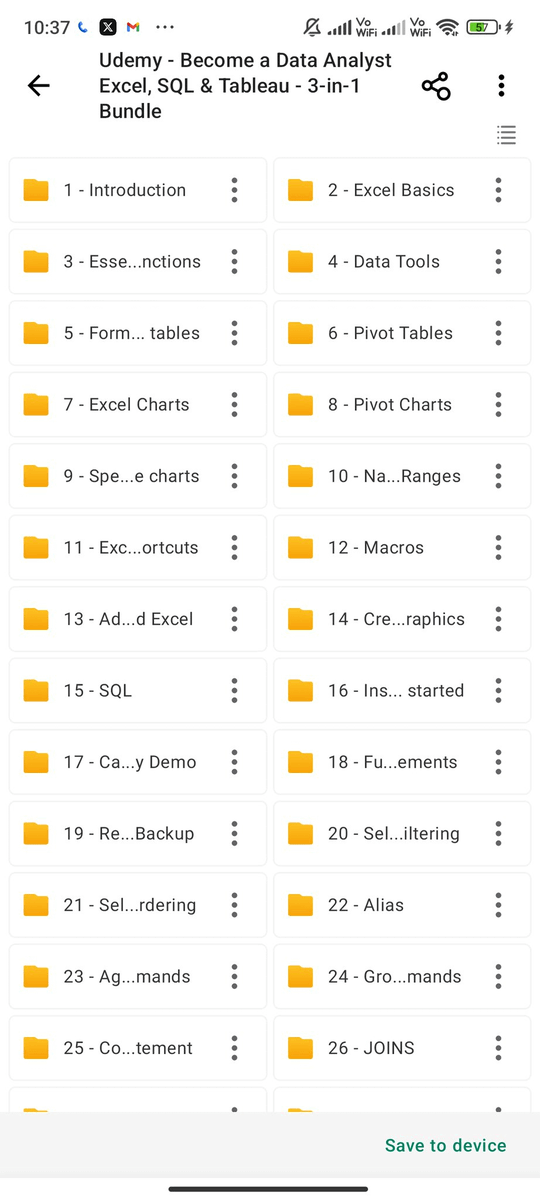
Data Analytics from Zero to Expert
A Udemy Complete Paid Course for Free for 24 Hours
Applicable for First 500 People
This Free Course Covers:
- Excel
- SQL
- Python
- R
Like , Retweet & Reply "Data" to get it for free
Must be following me so that I DM you
Crafters Warrior@tech_crafters
Most developers are barely scratching the surface of AI agents — using them to chat instead of letting them run real workflows. With Claude MCP connectors, you can already automate multi-app tasks end-to-end. Here’s how I turned a Linear issue list into a live presentation and shared it with my team in under 5 minutes: First, set up these connectors in Claude: • Linear — project management • Gamma — presentations • Slack — team communication Each one takes about 30 seconds to connect. Step 1: Pull project data from Linear I asked Claude to fetch all sub-issues from our “Migration to Multi-Agent Architecture” project. It returned 23 issues with statuses: 9 completed, 14 still in progress. Step 2: Convert the data into a presentation Next, I asked Claude to generate a project overview deck using Gamma. It automatically structured everything into 8 clean slides — including the summary, progress metrics, and all 7 phases from foundation to production rollout. Step 3: Share it instantly with the team Finally, I told Claude to post the live presentation link to our “shipped-today” Slack channel. One prompt — the entire team had access immediately. No exporting files. No copy-pasting between tools. No manual updates. Linear → Gamma → Slack All handled in a single conversation. This is what AI agents actually look like in practice. Not complicated frameworks that require weeks of setup — just connected tools executing real tasks. Want to try it yourself? Connect Linear, @gammaapp , and Slack to Claude and start automating your project updates today. Start here → gamma.app/?utm_medium=cr…
English


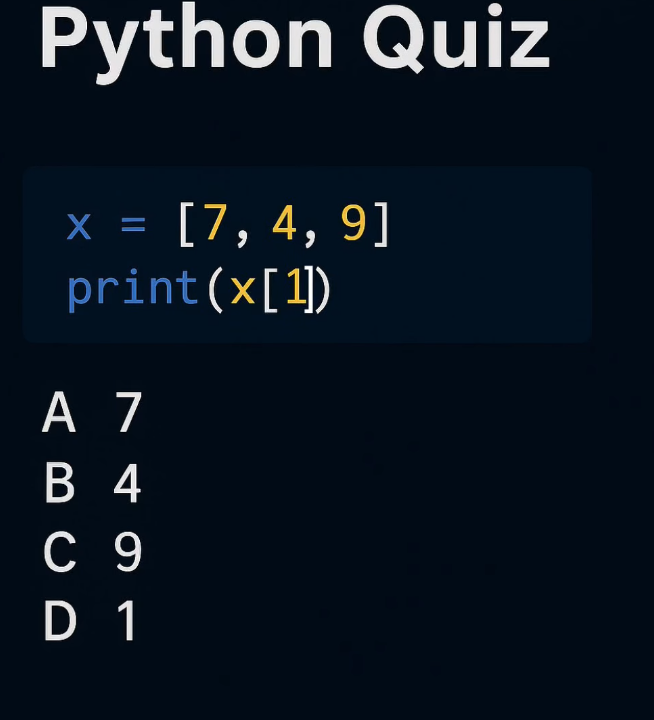
Python Question / Quiz; What is the output of the following Python code, and why? Comment your answers below!

English


Python Question / Quiz; What is the output of the following Python code, and why? Comment your answers below!
English


HLSESE
K60RE7
Z4TQ9B
M7L2X8
Q1A9F6
B8ZK4M
T9X6A2
F7Q8L1
K2M9Z6
X4A7B8
Q6T1M9
Z8F2K7
L9X4A
M6B8Q2
A7T9Z4
X1K6F8
Q9M7A4
B2Z8L6
T4F1Q9
K8X7M2
Z6A9Q1
L4B7F8