Sabitlenmiş Tweet
WATCHHOLLIE
11.9K posts

WATCHHOLLIE
@WATCHHOLLIE
I post motivational streaming advice & educational content || Youtube & Twitch Partner || Stream 3pm PT Sat/Sun 💌: [email protected] || California 🌴
San Diego, CA Katılım Eylül 2018
178 Takip Edilen12.6K Takipçiler

@WATCHHOLLIE I had a similar issue for a while and it was my (non-powered) USB hub that was causing the issues
Sounds like you’ve got it fixed - will keep everything crossed it stays that way for you, Hollie 🤞🏻
English

Ive gotten some DMs and comments about this and the last 2 months I have not crashed at all.
If youre experiencing the same thing I did, here are the two things I did that seemed to have fixed it entirely:
- Switched my brand new 5080 Graphics Card back to the 3080GPU
- Switched my usb hub to a powered USB hub
Ive had no crashes in 2 months, which is insane for my track record. I hope this is helpful to others experiencing the same thing. I had worked for a year on fixes, moved houses, Switched internet, spent lots of money, a whole new build... and nothing worked until this.
WATCHHOLLIE@WATCHHOLLIE
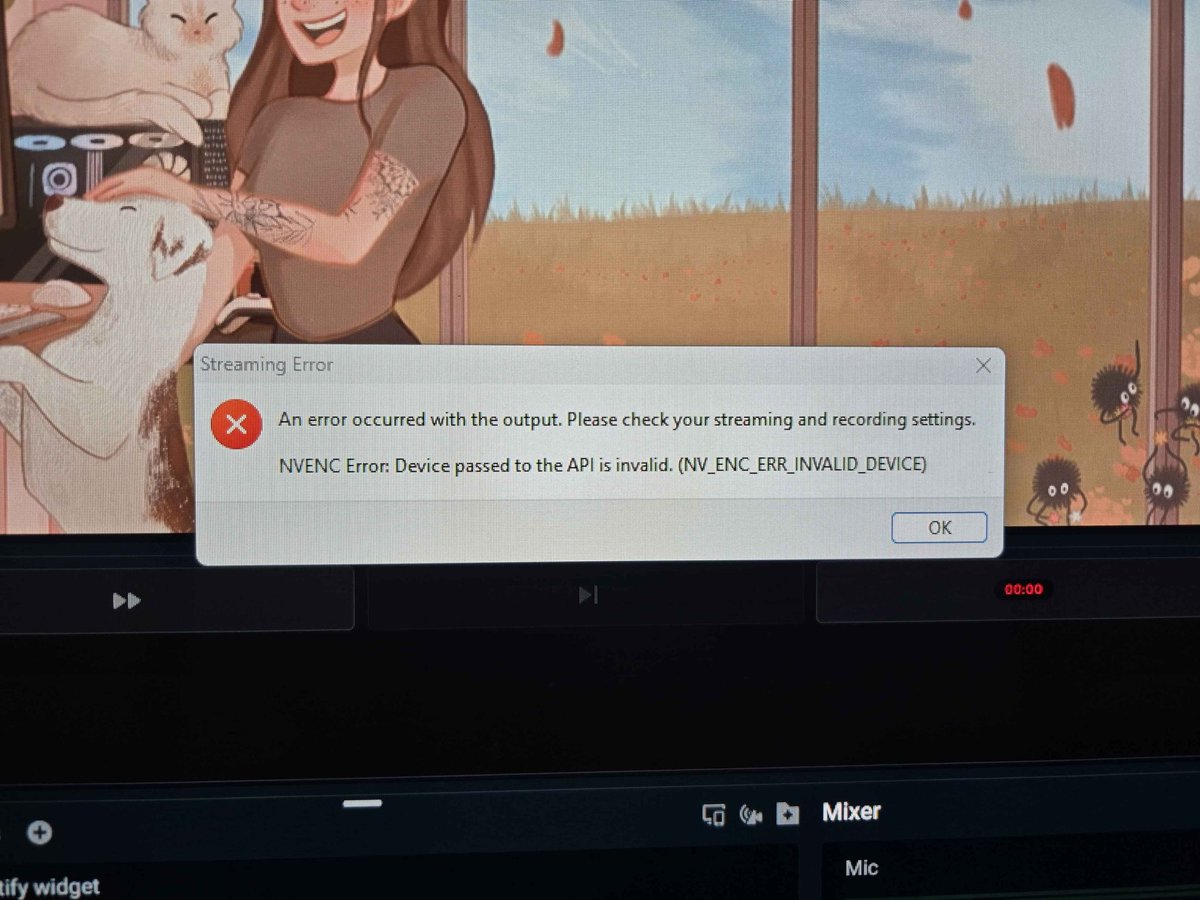
My stream has crashed for a year and a half every day. I am about to give up and quit streaming. I dont know what to do. I have gotten a brand new PC as well. Nothing seems to work. Specs below. Please help 😭
English

@xNocturnus It was exchanged and the new one also crashed. Its a known issue with most 5080s
English

@WATCHHOLLIE Damn so it seems you ended up with a bad 5080 at this point. Hopefully you can still have it sent back for exchange or something.
English

@WATCHHOLLIE Glad you fixed the issue, what was the problem as you said it was on your previous setup as well?
English

@chronopixelgame Its fixed now! Thank you! (Btw before this I got a whole new set up with fresh windows install and that didnt solve it)
English

@WATCHHOLLIE @No_Lollygaggin @itsmestoopler @doodybeardLIVE try connecting the usb devices to the motherborad at the back then the hub of it still crashes it not the hub, i would suggest updating the bios, and a fresh install of windows , also double check every thing is like ram and cpu are in properly
English

@Velion I got a brand new GPU and same issues. My 3080 has been perfect
English

@WATCHHOLLIE I had this same problem happen to me.. Its because your NVENC chip is broken.. My card did that a shit ton and I got a refund for the card and it fixed all my issues.
English

@WATCHHOLLIE Forever hyped to see you at this point. Long gone are the days of streaming alien isolation with zero audio coming to your headset 🫶🏻
English

@WATCHHOLLIE Yeesh, your problems were THAT bad on a new 50 Series card?
Good Gods.
English

@OrionFireBlade Dont worry, I tested this. Still crashes. Taking out the 5080 was the LAST thing I wanted to do because it's so beefy.
Upgraded PSU to handle more than a 5080.
5080s are known to cause crashes
English

@saga2K9 NVIDIA sent me a brand new one and same issue. No issue on the stress test. Its a known issue the 5080 series crash streams.
English

@WATCHHOLLIE That 5080 probably failed, run a stress test on it and see if it crashes in the future
English

@hailewhy Yep, the 5080 series is known to crash streams unfortunately. Its definitely not for streamers ):
English

@WATCHHOLLIE good to know!! tysm for the response, i’ve been searching for an answer for so long… i’ve also swapped back to my 3080 and it stopped crashing, but it’s a bit of a downgrade 😭 glad ur no longer crashing, i can relate to how stressful the whole situation is sorry u went thru it
English

People who have commented on my daily stream crashes that have been happening for 1.5 years
Things I have tried with no fix:
- New wifi / new Home
- New BEEFY PC (100% new everything EXCEPT 5080gpu)
- New cables (inside and outside of pc)
- New streaming software
- New monitors
- Fresh windows install
- Bios update
- Drivers update/retroactive drivers
- Clean OBS scenes to run bare minimum
- OBS logs and windows activity checked (shows NOTHING)
- Furmark stress test
- Switched output from GPU to CPU (solves the nvec error)
- Obviously theres more but those are the main ones
COUNTLESS tech teams have reached out to help with no prevail.
What we know:
- Happens when streaming/chatting/gaming/NOT streaming with obs/slobs open
- Can't play games on PC without major droped frames.
- Can't output on GPU only CPU
- Memory leak IS happening on 5080 series with OBS/slobs
- Can't change scenes sometimes
- Can't have any other programs running during stream
- tiktok never crashes when I mutlistream. Only twitch
I have been troubleshooting for 1.5 years and I'm almost about to quit.

English

@Burner1652818 Switched out my gpu from a 5080 to a 3080 and switched my USB hub to a powered hub!
English

@WATCHHOLLIE Did you ever solve this problem, really curious and if so what’s the problem currently experiencing the same thing :(
English

@hailewhy Yes! I changed my GPU from a 50 series to a 30 series
Then I switched out my USB hub to a powered hub and I stopped crashing!
English

@WATCHHOLLIE Hi, i’m currently experiencing the same exact issue(s).. found this thread by searching the problems i’m having. did you happen to find a fix? 😭
English

@WATCHHOLLIE Yeah I had it yell at me.
English

"Ugh but it says I have to stream 3x for 30 minites to unlock virtual camera" on Tiktok Studio to Mutlistream
Im afraid if you wont do something purely based on an extremely easy barrier, you might be a casual streamer not focused on growing your brand, and that's ok. (I think more streamers should do this)
For those of you who want to grow your brand:
Hit go-live, walk away for 30 minutes then end stream. Repeat for 1.5 hours.
Multistreaming and not being confined to one platform is the way you grow now
English

@RynnaAeon Hmmm it didn’t yell at me. I walked away and after an hour and a half I was set
English

@WATCHHOLLIE TikTok does unfortunately detect if you’re not. On camera. As a vtuber I found I had that issue since I don’t use my face.
English

@WATCHHOLLIE It was super annoying but I got through it. they make you do it on three separate days as well
English