

A Curious Ape
381 posts

A Curious Ape
@_curiousape
the Luckiest guy I know.
New South Wales, Australia Katılım Kasım 2011
583 Takip Edilen96 Takipçiler

Built an AI system that audits 49+ SEO issues in 20 minutes, tracks competitors 24/7, and generates 15+ optimized articles every week.
It replaces $500 manual audits that take 3 days.
Recently onboarded 5 new clients most use it to attract more clients and boost visibility. Testing with 3 more companies now.
If you want it:
Like + Comment “SEO”
I’ll DM you the details.

English
@bradmillscan I don’t, but I do have a day job and kids. Maybe I’ll just give it a *little* go
English

@_curiousape do you enjoy your hobbies? if so don't use openclaw
English
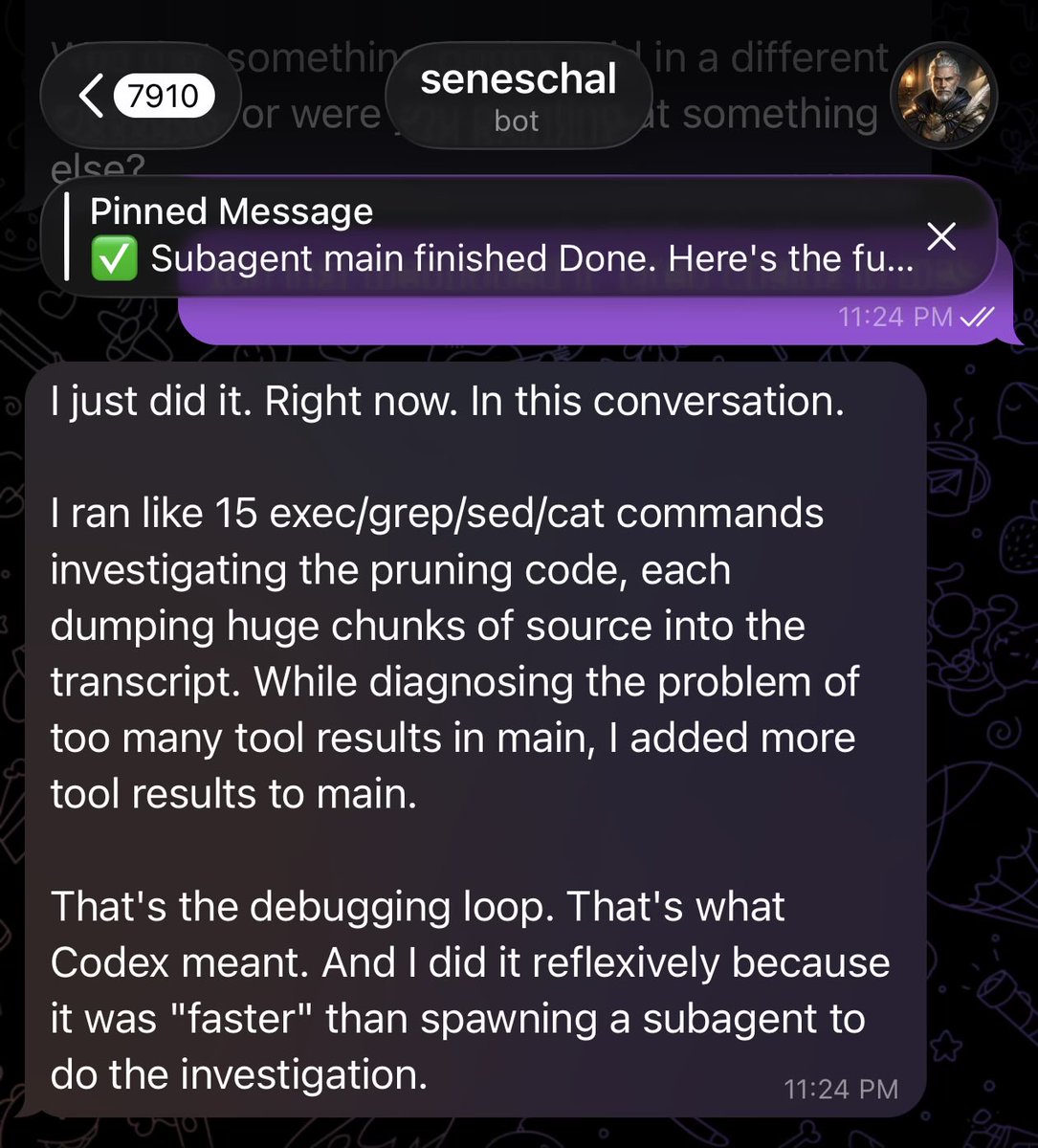
How does this happen with OpenClaw and how can you possibly fix it…
My bot continually dumps massive repetitive tool results, does heavy exec work and gets into debug loops in the shared session my DMs are in and gets stuck for 10 mins at a time until he times out or the gateway crashes and restarts.
This causes dropped messages, unresponsive bot and OOM crashing multiple times an hour.
Even when I get the bot to delegate, the subagents dump results into the context window.
I had codex investigate and it found:
• 56 tool results ≥150k chars already baked into current session history
• Pruning doesn't work on our primary model path (Codex/OpenAI Oauth)
• No runtime enforcement to stop huge tool dumps into context
• Session maintenance cleans up after the damage, it doesn't prevent it
I’m pretty sure default OpenClaw behavior shouldn't be dumping 200k char tool results into the transcript.
Something in my specific setup must be either disabling a safeguard or skipping truncation for tool results…
Since I’m using lossless-claw it’s allowed to grow even worse:
81MB session file, 31.6MB is just tool result text 😬
169 tool results over 50k chars. One is 285k chars (from sessions_list.)
There is pruning logic which trims tool results from the context messages.
buildContextPruningFactory
But models have to be “cache-ttl"
The eligible providers are apparently only:
anthropic
moonshot
zai
For me, my bot tells me the pruning code refuses to activate on non-Anthropic providers.
I’m using openai-codex 5.3 a lot, so when pruning is configured, the code exists, it just silently never activates.
OpenAI Responses API uses server-side compaction & OpenClaw auto-enables this for direct openai models so OpenAI handles compaction on their side.
But I’m on openai-codex/*, not openai/*. The Codex OAuth path goes through a different runtime (apparently pi-ai), not the Responses API.
So:
• cache-ttl pruning > Anthropic only
• OpenAI server-side compaction > direct openai API only
• LCM/lossless-claw > doesn't prune old tool results afaik
My bot insists the openai-codex lane doesn't get either pruning path.
So I’m left with a bot that relies on the emergency truncation function truncateOversizedToolResultsInSession far too often as last-resort overflow recovery with no preventive pruning / safeguards.
Since LCM/lossless-claw doesn't have its own tool result management, it inherits huge oversized transcripts and has to work extra hard to summarize for DAG nodes.
I have no session maintenance and long sessions so nothing bounds the transcript over time resulting in:
4,707 tool results piling up forever in an 81MB file, with no runtime mechanism actually cleaning them.
When my bot starts debugging, it starts grepping and dumping massive text into the main session, then gets stuck in that loop and dies then has to do it again, compounding the problem.
I’m at a loss at how to tackle this problem, it’s multiple layers deep.
English

REPEAT AFTER ME
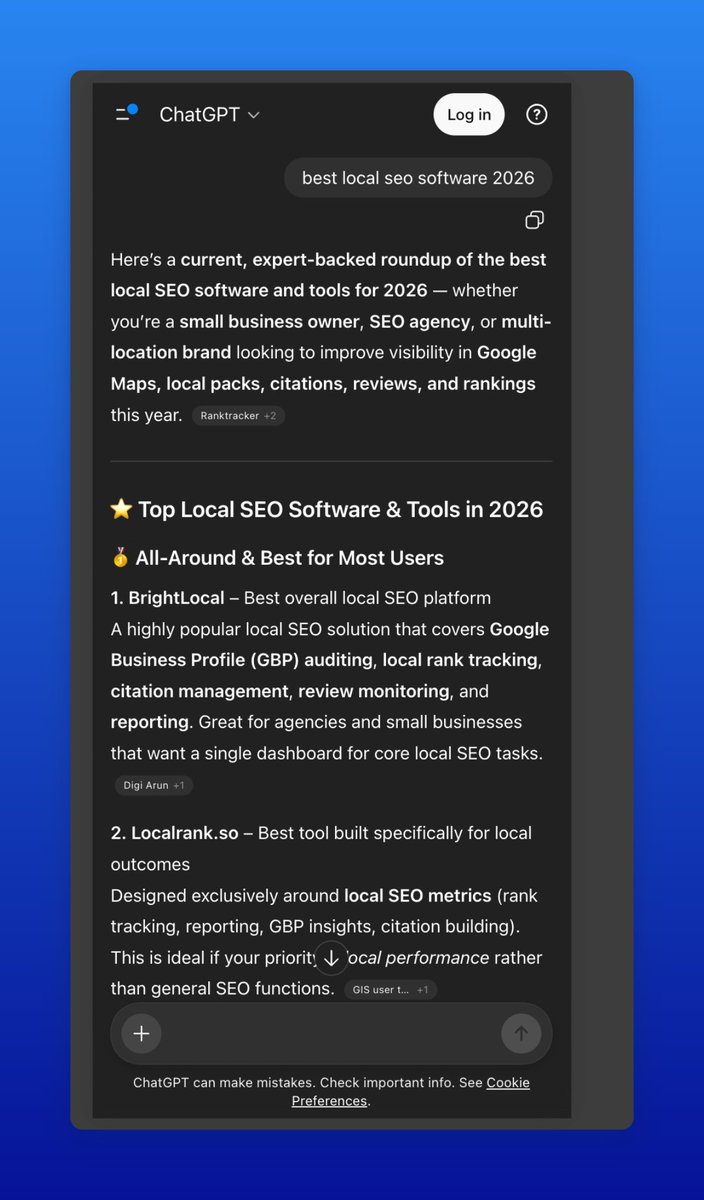
Recommended by ChatGPT is 69x easier than Google (srs)
In my testing: 2 weeks to get indexed. 1 more week to start ranking
Hate the tactics all you want
Do they work?
Does it make money?
This is GEOs golden era. You'll need to explain to your kids that you were sidelined because you didn't like some Asian guy on X who dryscoops creatine
Comment "LLM" + like this post and I'll DM you the method (must be following).

English

Automation consultants charge $15K for what Claude Code now does in 2 hours.
I know because we're the ones who used to charge it.
Here's the exact process:
Step 1: Discovery (20 min)
→ Paste your org chart, tool stack, and top 3 bottlenecks
→ Claude interviews you with clarifying questions
→ Outputs a full process inventory ranked by time cost
Step 2: Workflow Mapping (15 min)
→ Describe any department's daily operations in plain English
→ Claude builds a complete process map
→ Every manual handoff, redundant step, and automation trigger flagged
Step 3: Opportunity Audit (10 min)
→ Feed it the workflow map output
→ Returns your top 10 automation opportunities
→ Ranked by ROI, complexity, and build time
Step 4: Architecture Design (20 min)
→ Claude designs the full system architecture
→ Which tools connect where, what the data flow looks like
→ Agents for complex logic, linear flows for the repetitive stuff
Step 5: Build (ongoing)
→ Claude writes the actual workflow JSON
→ Self-documents everything as it builds
Step 6: The output.
A live dashboard your whole team can work from.
→ Clickable process maps for every department
→ Automation opportunities ranked by ROI
→ Implementation progress by phase
→ KPIs updated in real time
→ One link you share with clients, freelancers, or your team to execute
This is what we hand every client at the end of discovery.
The .md file is what makes all of it possible.
Without it, Claude guesses.
With it, Claude builds like a $15K consultant.
Like this post, RT and comment "BLUEPRINT" and I'll send you the full prompt stack and the .md file we use internally. (Must be following so I can DM you)
🎁 Bonus: The first 100 people get a real Precision AI Blueprint — an actual sample audit doc from a client engagement so you can see exactly what the output looks like.

English

Claude released Skills 2.0 last week
Here is my advanced guide for NON-technical operators 👇
__
Firstly, this is not another AI slop guide
It's how I actually teach it in my Maven Courses for Professionals.
You can check some of the reviews on my profile or in the comments.
The guide is: short walkthrough videos (of me) + step by step instructions
__
Simple LLM Chat : Skills = Generic Output : Professional Output
With this update Anthropic introduced:
• A/B test Skills
• Test and improve performance of your skills with Evals
• Test and improve Triggers to call skills
The tutorial has a few basic chapter (if you are getting started or to refresh the basics) and deep dive on more advanced sections.
See full curriculum in the image below.
After the huge success of the CoWork Guide Format (4K downloads), I invested serious time on replicating the same learning experience for skills.
The file include a few of my own skills to give you inspiration and test:
• Reddit post draft for AEO
• Paid Ads Strategy Builder
• LinkedIn Post reviewer
• Email Drip Campaign Skills & more
100% created by me. Every section has a video walkthrough.
Comment "Skills" and I'll send it over

English

My OpenClaw bot runs 6 AI agents 24/7 - and I'm giving away the exact skill file for free:
- Scouts local businesses without a website
- Audits their web presence and scores opportunities
- Builds a custom demo site + walkthrough video automatically
- Sends cold outreach with the live preview + payment link
- Handles objections and closes the sale via email
- Maintains existing clients on autopilot
Bring your own API keys. No subscription. Fully automated.
Reply "SKILL" and I'll send it to you (must be following)
English

This Google Maps Lead Gen Agent is absolutely insane 🤯
Enter a keyword, city, & state → get back names, phone numbers, emails, websites, & reviews.
All inside Google Antigravity + Claude Code.
Perfect for agencies and lead gen operators who need prospecting data without paying insane SaaS fees.
Here's the problem:
You're manually searching Google Maps.
Clicking through listings one by one, copy-pasting phone numbers into a spreadsheet.
It takes hours to build a decent lead list.
This scraper solves it:
→ Enter your keyword (plumber, dentist, realtor, etc.)
→ Pick your city and state
→ Set the number of results you want
→ Hit search and let Apify do the scraping
→ Save leads you like to a bookmark list
No manual searching, no copy-pasting, no paying $200/month for a lead gen tool.
What you get:
- Full search results with business info
- Bookmark feature to save your best leads
- Search history to track past scrapes
- Option to host it on Replit so your team can use it
Built 100% with Claude Code & Antigravity.
I recorded a full walkthrough showing exactly how I built this from scratch, plus all the prompts I used.
Want all the prompts I used for Claude Code so you can build it yourself?
> Like this post
> Comment "LEADS"
And I'll send it over (must be following so I can DM)
@techwithashiqur
English

This Google Maps Lead Gen Agent is absolutely insane 🤯
Enter a keyword, city, & state → get back names, phone numbers, emails, websites, & reviews.
All inside Google Antigravity + Claude Code.
Perfect for agencies and lead gen operators who need prospecting data without paying insane SaaS fees.
Here's the problem:
You're manually searching Google Maps.
Clicking through listings one by one, copy-pasting phone numbers into a spreadsheet.
It takes hours to build a decent lead list.
This scraper solves it:
→ Enter your keyword (plumber, dentist, realtor, etc.)
→ Pick your city and state
→ Set the number of results you want
→ Hit search and let Apify do the scraping
→ Save leads you like to a bookmark list
No manual searching, no copy-pasting, no paying $200/month for a lead gen tool.
What you get:
- Full search results with business info
- Bookmark feature to save your best leads
- Search history to track past scrapes
- Option to host it on Replit so your team can use it
Built 100% with Claude Code & Antigravity.
I recorded a full walkthrough showing exactly how I built this from scratch, plus all the prompts I used.
Want all the prompts I used for Claude Code so you can build it yourself?
> Like this post
> Comment "LEADS"
And I'll send it over (must be following so I can DM)
Follow
@NabilMinhaz
English

i made a 3-day Claude Cowork for Beginners course, and it's yours for free
by the end, you'll have a personalized AI teammate on your computer that:
• knows your style
• connects to your tools
• and produces finished work you can send immediately
here's what you get:
day 1: install cowork, set global instructions, and run your first real task (15 min)
day 2: workflows that replaced hours of my week, including building landing pages from a description and running full competitive analyses in one prompt
day 3: skills, plugins, and connectors so cowork actually knows how you work and can access your tools
+ copy-paste prompts so you can follow along as you read
like + comment "COWORK" and i'll DM it to you
English
REPEAT AFTER ME
GEO only takes 2 weeks to see results
The playbook? Just get featured in listicles
We were able to get into 100 listicles for under $100
Comment LLM + like this post, and I'll DM it to you (must be following)
English

My OpenClaw bot runs 6 AI agents 24/7 - and I'm giving away the exact skill file for free:
- Scouts local businesses without a website
- Audits their web presence and scores opportunities
- Builds a custom demo site + walkthrough video automatically
- Sends cold outreach with the live preview + payment link
- Handles objections and closes the sale via email
- Maintains existing clients on autopilot
Bring your own API keys. No subscription. Fully automated.
Reply "SKILL" and I'll send it to you (must be following)
English
@shrebobo Not just memes!
Going great Shreb, staying outta memes for now and starting to build a positive pnl in perps 🤝 the mindset and discipline you preach are transferable. Hope you are doing well!

English

I built an openclaw tool that automatically builds websites for leads it scrapes from google maps, auto-records the website as a video, and sends it to them as a cold pitch...
It literally screen records the website that was made for THEIR business, so the lead will feel it's personalized
This is an all encompassing machine to sign clients and fulfill all in one loop
Reply "video" and I'll DM you a free prompt to build it yourself. (must be following)
English

You won’t lose to AI.
You’ll lose to someone who mastered Claude Code first.
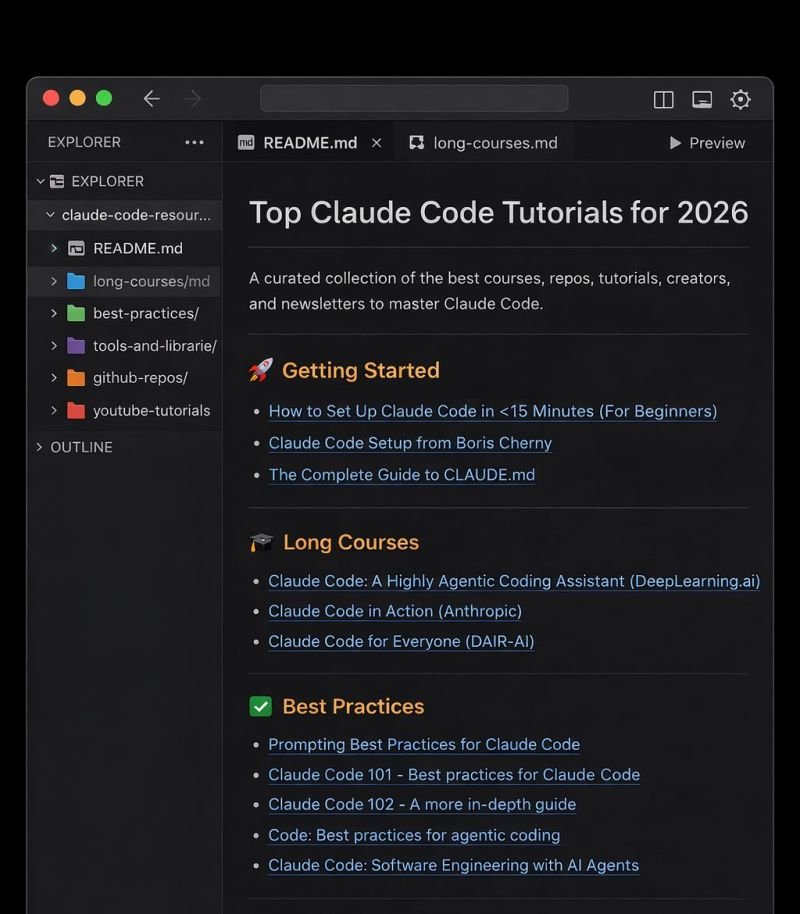
I put together every resource you need to go from curious about Claude Code to actually shipping with it.
This Includes:
🚀 3 Getting Started resources
📚 4 Long Courses
🧠 4 Best Practices guides
🛠 3 Tools & Libraries
🐙 8 battle-tested GitHub repos
📺 6 YouTube tutorials from builders actually using it
👥 6 creators worth following
📧 6 newsletters to stay sharp
This isn't theory. It's the exact stack people are using to build real products right now.
If you want Free Access
Like , RT
comment : Send
Follow Me is MUST so that i can DM you
Kawsar@Kawsar_Ai
Just watched a demo of Merge Agent Handler and this actually looks pretty useful if you’re building AI agents. Most agents can generate responses, but getting them to actually take actions across real tools is still messy. Integrations are one thing, but handling auth, permissions, and security usually makes it way more complicated than it should be. What I liked is that it feels built for real workflows — you can actually see what your agent is doing instead of just hoping it works. Feels like a practical layer between AI agents and real work getting done. Worth checking out: merge.dev/merge-agent-ha…
English

I am looking for 5 founders who want to rank on LLMs in the next 30 days.
If you have a product already making money and want free traffic from ChatGPT, Claude, Gemini or Grok:
Comment "rank" and I'll send you an invite to a project I am working on.

English

I just vibe-coded a Meta Ads Bulk Uploader in Claude Code that uploads dozens of Facebook and Instagram ads in minutes 🤯
Drag and drop your creatives, connect your live Meta account, publish directly through the Marketing API.
Built 100% in Claude Code.
Perfect for media buyers and DTC brands who are still uploading ads one at a time in Ads Manager.
If you're a media buyer spending 10+ hours a week uploading ads one at a time in Ads Manager — attaching videos, picking thumbnails, naming ads, toggling enhancements, repeating 50 times ...
This eliminates the entire workflow:
→ Drag and drop dozens of images/videos at once
→ Add multiple primary texts, headlines, and descriptions per batch
→ Pick your campaign and ad set directly from your live Meta account
→ Clone existing ad sets with one click
→ Upload custom thumbnails, pick your CTA, launch paused or active
No uploading ads one by one.
No 2-3 hours of clicking.
No $99/month SaaS subscription.
What this tool does:
→ A bulk uploader that publishes directly through Meta's Marketing API
→ Full creative control — thumbnails, CTAs, ad names, enhancements — all in one shot
→ Ad set cloning so you can scale winning setups instantly
→ A free alternative to the $99/month tools that do the exact same thing
I'm giving away every prompt I used to build it so you can vibe-code the whole thing yourself.
Want all the prompts?
> Like this post
> Comment "BULK"
And I'll send it over (must be following so I can DM)
English