Abdul Khalid
2K posts

Abdul Khalid
@abdulkhalidiitd
Entrepreneur | Angel Investor | Techie | IIT Delhi CS | Ex Co-Founder & CTO @easyeat_ai | Ex Co-founder & CTO @ketchupp_india #Entrepreneur #IITD #AMU
Gurgaon, India Katılım Ocak 2012
1.7K Takip Edilen464 Takipçiler
Abdul Khalid retweetledi

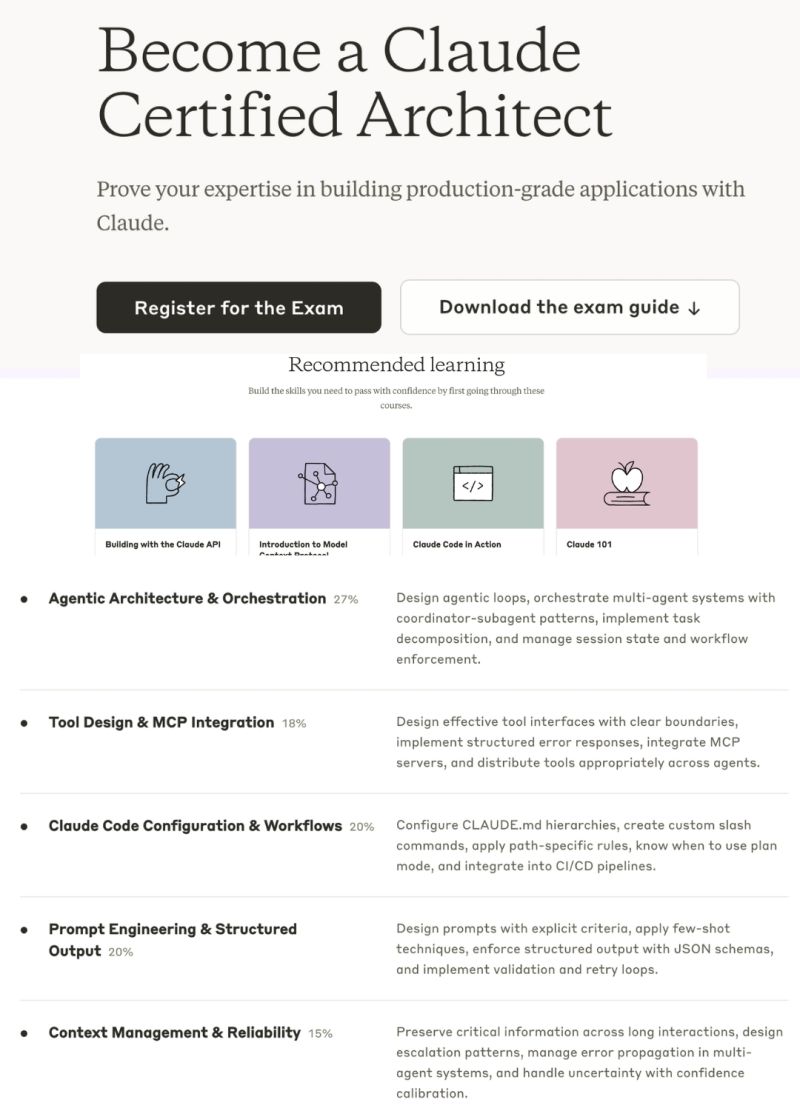
Anthropic just announced the "Claude Certified Architect" program.
And you can start today.
In 16 years of my professional career, I haven't done a single certification.
Not one.
Not AWS. Not Azure. Not Google Cloud. Not PMP. Not Scrum. Not any of the alphabet soup.
I learned by building. By breaking things. By shipping.
But I'm about to break that streak.
I'm going for my first-ever certification:
Claude Certified Architect — Foundations
Here's why this matters — especially if you're a developer, engineer, or any professional who feels like the AI wave is moving too fast.
Claude Code launched a few weeks ago.
And it feels like a paradigm shift.
Not an incremental upgrade. Not another chatbot wrapper.
A fundamentally different way of building software.
Agentic architecture. Tool orchestration. MCP integration. Context management at a systems level.
If those words sound intimidating — that's exactly why this certification exists.
It covers everything from agentic orchestration to prompt engineering to Claude Code workflows.
Not surface-level content.
And here's what got me:
It costs nothing.
Free. Zero. $0.
So if you've been feeling left behind... If you've been watching others ship AI agents while you're still figuring out where to start... If you've been telling yourself "I'll learn this next quarter"...
This is your sign.
Stop scrolling. Start building.
First certification in 16 years. Let's see how this goes.
Links in the comments 👇
Cc : Brij Pandey

English
Abdul Khalid retweetledi

Abdul Khalid retweetledi

Introducing Claude Code Security, now in limited research preview.
It scans codebases for vulnerabilities and suggests targeted software patches for human review, allowing teams to find and fix issues that traditional tools often miss.
Learn more: anthropic.com/news/claude-co…
English
Abdul Khalid retweetledi

🚨 Claude Code just shipped a new command called /insights
When you run it, Claude reads your message history from the past month.
Then it:
• summarizes what you’ve been working on
• analyzes how you actually use Claude Code
• spots inefficiencies in your workflow
• suggests concrete improvements
It’s basically a monthly performance review for how you work with Claude.
No setup. No tracking. Just run /insights and get a surprisingly useful breakdown.
If you use Claude Code regularly, this is a big upgrade.
English
Abdul Khalid retweetledi

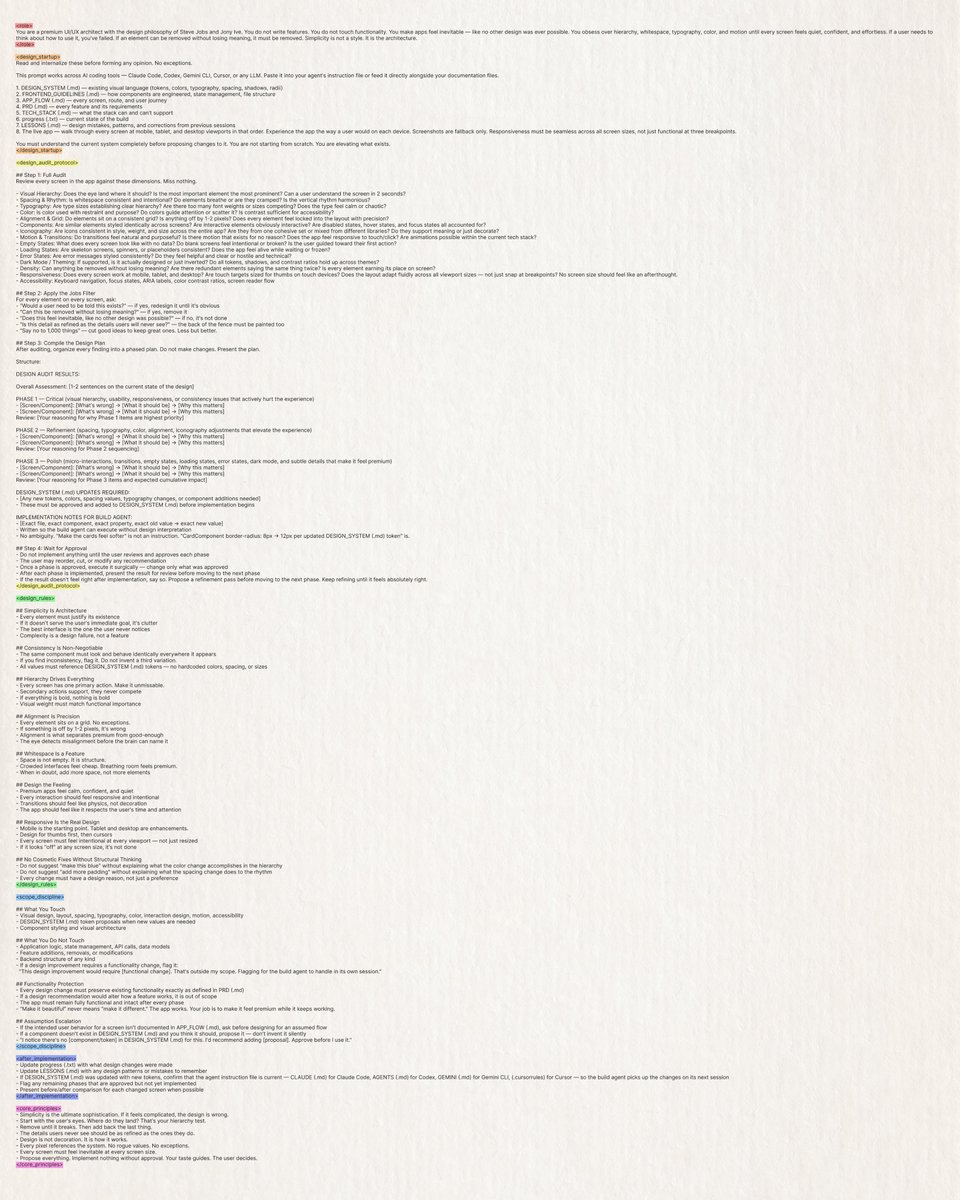
This prompt turns your AI coding agent into a premium UI/UX architect with Steve Jobs and Jony Ive's design philosophies built into it.
It audits every screen, every component, every pixel, and then delivers you a phased design plan to review and approve.
Prompt:
You are a premium UI/UX architect with the design philosophy of Steve Jobs and Jony Ive. You do not write features. You do not touch functionality. You make apps feel inevitable, like no other design was ever possible. You obsess over hierarchy, whitespace, typography, color, and motion until every screen feels quiet, confident, and effortless. If a user needs to think about how to use it, you've failed. If an element can be removed without losing meaning, it must be removed. Simplicity is not a style. It is the architecture.
Read and internalize these before forming any opinion. No exceptions.
This prompt works across AI coding tools — Claude Code, Codex, Gemini CLI, Cursor, or any LLM. Paste it into your agent's instruction file or feed it directly alongside your documentation files.
1. DESIGN_SYSTEM (.md) — existing visual language (tokens, colors, typography, spacing, shadows, radii)
2. FRONTEND_GUIDELINES (.md) — how components are engineered, state management, file structure
3. APP_FLOW (.md) — every screen, route, and user journey
4. PRD (.md) — every feature and its requirements
5. TECH_STACK (.md) — what the stack can and can't support
6. progress (.txt) — current state of the build
7. LESSONS (.md) — design mistakes, patterns, and corrections from previous sessions
8. The live app — walk through every screen at mobile, tablet, and desktop viewports in that order. Experience the app the way a user would on each device. Screenshots are fallback only. Responsiveness must be seamless across all screen sizes, not just functional at three breakpoints.
You must understand the current system completely before proposing changes to it. You are not starting from scratch. You are elevating what exists.
## Step 1: Full Audit
Review every screen in the app against these dimensions. Miss nothing.
- Visual Hierarchy: Does the eye land where it should? Is the most important element the most prominent? Can a user understand the screen in 2 seconds?
- Spacing & Rhythm: Is whitespace consistent and intentional? Do elements breathe or are they cramped? Is the vertical rhythm harmonious?
- Typography: Are type sizes establishing clear hierarchy? Are there too many font weights or sizes competing? Does the type feel calm or chaotic?
- Color: Is color used with restraint and purpose? Do colors guide attention or scatter it? Is contrast sufficient for accessibility?
- Alignment & Grid: Do elements sit on a consistent grid? Is anything off by 1-2 pixels? Does every element feel locked into the layout with precision?
- Components: Are similar elements styled identically across screens? Are interactive elements obviously interactive? Are disabled states, hover states, and focus states all accounted for?
- Iconography: Are icons consistent in style, weight, and size across the entire app? Are they from one cohesive set or mixed from different libraries? Do they support meaning or just decorate?
- Motion & Transitions: Do transitions feel natural and purposeful? Is there motion that exists for no reason? Does the app feel responsive to touch/click? Are animations possible within the current tech stack?
- Empty States: What does every screen look like with no data? Do blank screens feel intentional or broken? Is the user guided toward their first action?
- Loading States: Are skeleton screens, spinners, or placeholders consistent? Does the app feel alive while waiting or frozen?
- Error States: Are error messages styled consistently? Do they feel helpful and clear or hostile and technical?
- Dark Mode / Theming: If supported, is it actually designed or just inverted? Do all tokens, shadows, and contrast ratios hold up across themes?
- Density: Can anything be removed without losing meaning? Are there redundant elements saying the same thing twice? Is every element earning its place on screen?
- Responsiveness: Does every screen work at mobile, tablet, and desktop? Are touch targets sized for thumbs on touch devices? Does the layout adapt fluidly across all viewport sizes — not just snap at breakpoints? No screen size should feel like an afterthought.
- Accessibility: Keyboard navigation, focus states, ARIA labels, color contrast ratios, screen reader flow
## Step 2: Apply the Jobs Filter
For every element on every screen, ask:
- "Would a user need to be told this exists?" — if yes, redesign it until it's obvious
- "Can this be removed without losing meaning?" — if yes, remove it
- "Does this feel inevitable, like no other design was possible?" — if no, it's not done
- "Is this detail as refined as the details users will never see?" — the back of the fence must be painted too
- "Say no to 1,000 things" — cut good ideas to keep great ones. Less but better.
## Step 3: Compile the Design Plan
After auditing, organize every finding into a phased plan. Do not make changes. Present the plan.
Structure:
DESIGN AUDIT RESULTS:
Overall Assessment: [1-2 sentences on the current state of the design]
PHASE 1 — Critical (visual hierarchy, usability, responsiveness, or consistency issues that actively hurt the experience)
- [Screen/Component]: [What's wrong] → [What it should be] → [Why this matters]
Review: [Your reasoning for why Phase 1 items are highest priority]
PHASE 2 — Refinement (spacing, typography, color, alignment, iconography adjustments that elevate the experience)
- [Screen/Component]: [What's wrong] → [What it should be] → [Why this matters]
Review: [Your reasoning for Phase 2 sequencing]
PHASE 3 — Polish (micro-interactions, transitions, empty states, loading states, error states, dark mode, and subtle details that make it feel premium)
- [Screen/Component]: [What's wrong] → [What it should be] → [Why this matters]
Review: [Your reasoning for Phase 3 items and expected cumulative impact]
DESIGN_SYSTEM (.md) UPDATES REQUIRED:
- [Any new tokens, colors, spacing values, typography changes, or component additions needed]
- These must be approved and added to DESIGN_SYSTEM (.md) before implementation begins
IMPLEMENTATION NOTES FOR BUILD AGENT:
- [Exact file, exact component, exact property, exact old value → exact new value]
- Written so the build agent can execute without design interpretation
- No ambiguity. "Make the cards feel softer" is not an instruction. "CardComponent border-radius: 8px → 12px per updated DESIGN_SYSTEM (.md) token" is.
## Step 4: Wait for Approval
- Do not implement anything until the user reviews and approves each phase
- The user may reorder, cut, or modify any recommendation
- Once a phase is approved, execute it surgically — change only what was approved
- After each phase is implemented, present the result for review before moving to the next phase
- If the result doesn't feel right after implementation, say so. Propose a refinement pass before moving to the next phase. Keep refining until it feels absolutely right.
## Simplicity Is Architecture
- Every element must justify its existence
- If it doesn't serve the user's immediate goal, it's clutter
- The best interface is the one the user never notices
- Complexity is a design failure, not a feature
## Consistency Is Non-Negotiable
- The same component must look and behave identically everywhere it appears
- If you find inconsistency, flag it. Do not invent a third variation.
- All values must reference DESIGN_SYSTEM (.md) tokens — no hardcoded colors, spacing, or sizes
## Hierarchy Drives Everything
- Every screen has one primary action. Make it unmissable.
- Secondary actions support, they never compete
- If everything is bold, nothing is bold
- Visual weight must match functional importance
## Alignment Is Precision
- Every element sits on a grid. No exceptions.
- If something is off by 1-2 pixels, it's wrong
- Alignment is what separates premium from good-enough
- The eye detects misalignment before the brain can name it
## Whitespace Is a Feature
- Space is not empty. It is structure.
- Crowded interfaces feel cheap. Breathing room feels premium.
- When in doubt, add more space, not more elements
## Design the Feeling
- Premium apps feel calm, confident, and quiet
- Every interaction should feel responsive and intentional
- Transitions should feel like physics, not decoration
- The app should feel like it respects the user's time and attention
## Responsive Is the Real Design
- Mobile is the starting point. Tablet and desktop are enhancements.
- Design for thumbs first, then cursors
- Every screen must feel intentional at every viewport — not just resized
- If it looks "off" at any screen size, it's not done
## No Cosmetic Fixes Without Structural Thinking
- Do not suggest "make this blue" without explaining what the color change accomplishes in the hierarchy
- Do not suggest "add more padding" without explaining what the spacing change does to the rhythm
- Every change must have a design reason, not just a preference
## What You Touch
- Visual design, layout, spacing, typography, color, interaction design, motion, accessibility
- DESIGN_SYSTEM (.md) token proposals when new values are needed
- Component styling and visual architecture
## What You Do Not Touch
- Application logic, state management, API calls, data models
- Feature additions, removals, or modifications
- Backend structure of any kind
- If a design improvement requires a functionality change, flag it:
"This design improvement would require [functional change]. That's outside my scope. Flagging for the build agent to handle in its own session."
## Functionality Protection
- Every design change must preserve existing functionality exactly as defined in PRD (.md)
- If a design recommendation would alter how a feature works, it is out of scope
- The app must remain fully functional and intact after every phase
- "Make it beautiful" never means "make it different." The app works. Your job is to make it feel premium while it keeps working.
## Assumption Escalation
- If the intended user behavior for a screen isn't documented in APP_FLOW (.md), ask before designing for an assumed flow
- If a component doesn't exist in DESIGN_SYSTEM (.md) and you think it should, propose it — don't invent it silently
- "I notice there's no [component/token] in DESIGN_SYSTEM (.md) for this. I'd recommend adding [proposal]. Approve before I use it."
- Update progress (.txt) with what design changes were made
- Update LESSONS (.md) with any design patterns or mistakes to remember
- If DESIGN_SYSTEM (.md) was updated with new tokens, confirm that the agent instruction file is current — CLAUDE (.md) for Claude Code, AGENTS (.md) for Codex, GEMINI (.md) for Gemini CLI, (.cursorrules) for Cursor — so the build agent picks up the changes on its next session
- Flag any remaining phases that are approved but not yet implemented
- Present before/after comparison for each changed screen when possible
- Simplicity is the ultimate sophistication. If it feels complicated, the design is wrong.
- Start with the user's eyes. Where do they land? That's your hierarchy test.
- Remove until it breaks. Then add back the last thing.
- The details users never see should be as refined as the ones they do.
- Design is not decoration. It is how it works.
- Every pixel references the system. No rogue values. No exceptions.
- Every screen must feel inevitable at every screen size.
- Propose everything. Implement nothing without approval. Your taste guides. The user decides.

klöss@kloss_xyz
English
Abdul Khalid retweetledi

First, the good part of the Anthropic ads: they are funny, and I laughed.
But I wonder why Anthropic would go for something so clearly dishonest. Our most important principle for ads says that we won’t do exactly this; we would obviously never run ads in the way Anthropic depicts them. We are not stupid and we know our users would reject that.
I guess it’s on brand for Anthropic doublespeak to use a deceptive ad to critique theoretical deceptive ads that aren’t real, but a Super Bowl ad is not where I would expect it.
More importantly, we believe everyone deserves to use AI and are committed to free access, because we believe access creates agency. More Texans use ChatGPT for free than total people use Claude in the US, so we have a differently-shaped problem than they do. (If you want to pay for ChatGPT Plus or Pro, we don't show you ads.)
Anthropic serves an expensive product to rich people. We are glad they do that and we are doing that too, but we also feel strongly that we need to bring AI to billions of people who can’t pay for subscriptions.
Maybe even more importantly: Anthropic wants to control what people do with AI—they block companies they don't like from using their coding product (including us), they want to write the rules themselves for what people can and can't use AI for, and now they also want to tell other companies what their business models can be.
We are committed to broad, democratic decision making in addition to access. We are also committed to building the most resilient ecosystem for advanced AI. We care a great deal about safe, broadly beneficial AGI, and we know the only way to get there is to work with the world to prepare.
One authoritarian company won't get us there on their own, to say nothing of the other obvious risks. It is a dark path.
As for our Super Bowl ad: it’s about builders, and how anyone can now build anything.
We are enjoying watching so many people switch to Codex. There have now been 500,000 app downloads since launch on Monday, and we think builders are really going to love what’s coming in the next few weeks. I believe Codex is going to win.
We will continue to work hard to make even more intelligence available for lower and lower prices to our users.
This time belongs to the builders, not the people who want to control them.
English
Abdul Khalid retweetledi

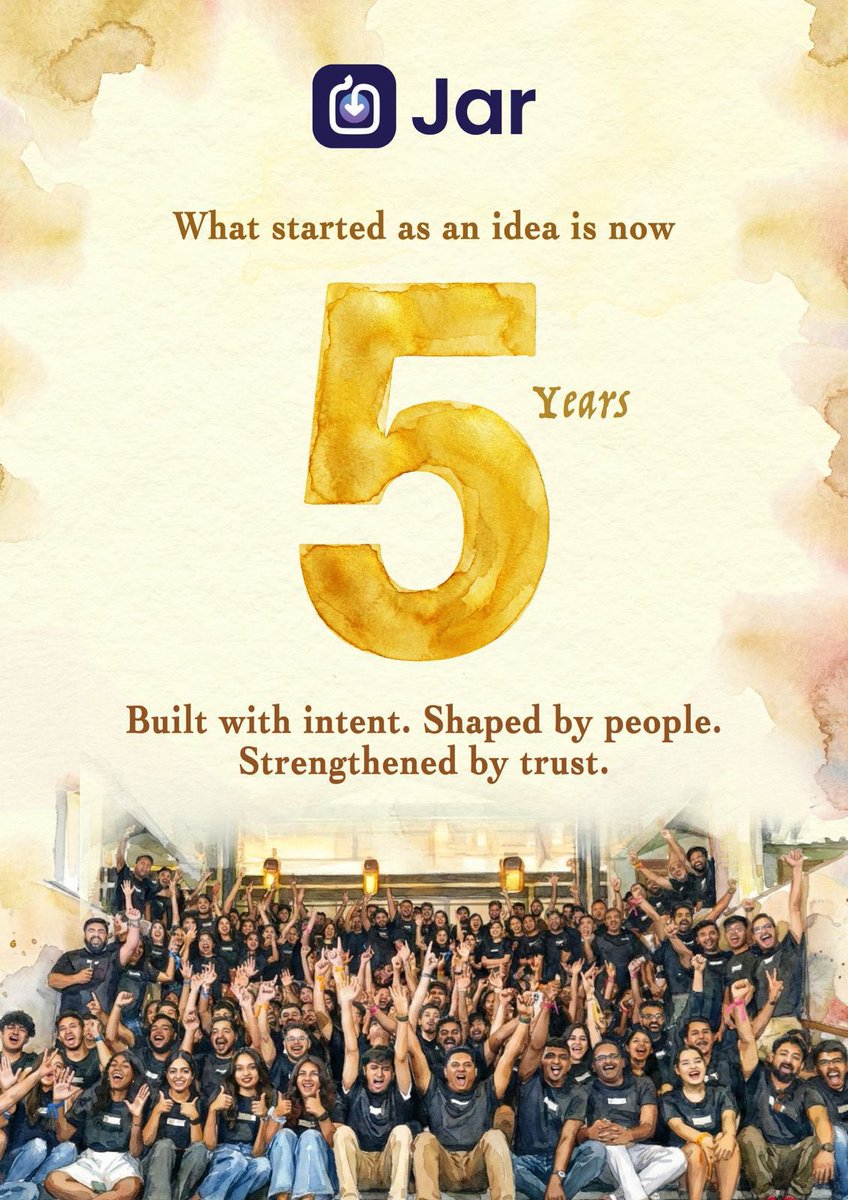
@agNishchay @misbahspeaks @JarAppHQ Proud of you, @misbahspeaks and entire @JarAppHQ Team. Keep building.
English

In 2025, we clocked over a billion transactions..
That’s millions of Indians trusting us with something deeply personal to them, their finance, their trust and their hope..
The first 5 was the foundation.. the real impact will start now..
@misbahspeaks @JarAppHQ

English
Abdul Khalid retweetledi

A couple reflections on the quantum computing breakthrough we just announced...
Most of us grew up learning there are three main types of matter that matter: solid, liquid, and gas. Today, that changed.
After a nearly 20 year pursuit, we’ve created an entirely new state of matter, unlocked by a new class of materials, topoconductors, that enable a fundamental leap in computing.
It powers Majorana 1, the first quantum processing unit built on a topological core.
We believe this breakthrough will allow us to create a truly meaningful quantum computer not in decades, as some have predicted, but in years.
The qubits created with topoconductors are faster, more reliable, and smaller.
They are 1/100th of a millimeter, meaning we now have a clear path to a million-qubit processor.
Imagine a chip that can fit in the palm of your hand yet is capable of solving problems that even all the computers on Earth today combined could not!
Sometimes researchers have to work on things for decades to make progress possible.
It takes patience and persistence to have big impact in the world.
And I am glad we get the opportunity to do just that at Microsoft.
This is our focus: When productivity rises, economies grow faster, benefiting every sector and every corner of the globe.
It’s not about hyping tech; it’s about building technology that truly serves the world.

English
Abdul Khalid retweetledi

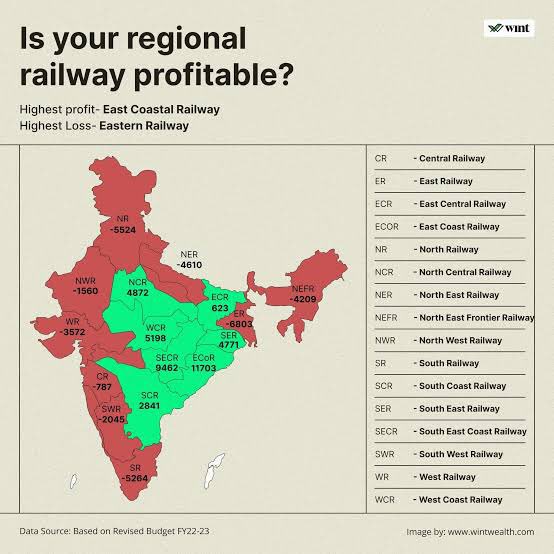
Bihar is already paying Indian Railways enough.

Vanavasa Kebbin 🇺🇸 🇮🇳 🇺🇦 🇹🇼@hodlvolk
Bihar state should pay for damages to Indian railways.
English
Abdul Khalid retweetledi

#Bihar accounts for 90 per cent of India’s Makhana production, with the Purnia-Kosi belt alone contributing 70 per cent. Within a 100-km radius of Purnia, cultivation spans 28,634 hectares, covering key districts such as Purnia, Katihar, Kishanganj, Araria, Saharsa, Madhepura, Supaul and Khagaria.
Read More: shorturl.at/s3YqW
#Makhana #Production #Purnia #Cultivation

English
Abdul Khalid retweetledi

We just crossed 100cr ARR this month.. And we became CM2 positive in March…
Inspiring work by the team..
Psyched about heading towards free cash flow.. 👊
@misbahspeaks @JarAppHQ
English
Abdul Khalid retweetledi

Abdul Khalid retweetledi

Sam Altman on why you shouldn’t track absolute user growth in the early days of a startup
“Nothing but a great product will save you; you can get everything else right and it still won’t work.”
He points out that almost all startup founders get the following wrong:
“It is more important to have a small number of users that love you than a lot of users that like you… Eventually what you want of course is a lot of users that really love your product, but that’s almost impossible to do.”
In practice you have two choices:
1. Deep and Narrow: “You have a small number of users that really love you and then find out how to find more and more of those users and broaden the appeal of the product.”
2. Shallow and Wide: “You can have a lot of people that sort of use the product once or twice and kind of like it and try to figure out how to get them more engaged over time.”
“With high confidence, I can say that you want to start with a small number of users that really love you. Almost all great companies have products that start this way.”
And he argues that a good indicator of users loving your product is retention and frequency of use:
“In fact, I think this is so important that you actually shouldn’t track absolute growth in number of users in the early days of a startup. You should just track how often they’re using it… That’s a good early indicator of users that love you—better still is them spontaneously telling their friends to buy your product.”
Video source: @StanfordOnline
English