Amrita Yadav

288 posts

Amrita Yadav banner
Amrita Yadav

Amrita Yadav

@amrita4AI

AI & Tech Content Creator | Simplifying AI, automation & future tech Sharing tools, trends & practical insights | 📩 [email protected]

Delhi Katılım Şubat 2026
80 Takip Edilen284 Takipçiler
Rishi
Rishi@RishiUvaach·
@narendramodi Media's credibility has fallen to its lowest level today. The PM himself has to fact-check fake news peddlers.
English
13
37
1K
27.8K
Narendra Modi
Narendra Modi@narendramodi·
This is totally false. Not an iota of truth in this. There is no question of putting such restrictions on foreign travel. We remain committed to improving ‘Ease of Doing Business’ and ‘Ease of Living’ for our people.
CNBC-TV18@CNBCTV18Live

#CNBCTV18Exclusive | Govt considering tax/cess/surcharge on foreign travel’ no final decision yet. Proposal to levy cess/tax/surcharge on foreign travel being discussed at highest levels, sources to @TimsyJaipuria

English
2.1K
5.1K
16.9K
1.1M
Amrita Yadav
Amrita Yadav@amrita4AI·
@Sia_TechAi The opportunity online in 2026 is no longer just about “working harder” — it’s about leveraging skills, AI, and distribution smartly.
English
0
0
0
4
Sia
Sia@Sia_TechAi·
Making Money Online 2026
Sia tweet media
English
21
35
58
501
Iqra
Iqra@AiWithIqra·
Last week, I spent 6 hours with Claude wiping my digital footprint. Result: 47 data broker listings removed. 12 dead accounts deleted. 3 search results suppressed. How I did it, step by step. Thread.
Iqra tweet mediaIqra tweet media
English
43
68
110
905
Amrita Yadav
Amrita Yadav@amrita4AI·
@ElsaSofia__AI Crazy how accessible high-level learning has become Skills that companies pay massive salaries for are now being taught openly online by top institutions.
English
0
0
0
26
Elsa Ai
Elsa Ai@ElsaSofia__AI·
Anthropic pays $750,000+ a year for engineers who can build LLM architectures from scratch. Stanford taught the entire thing in 1 hour lecture & released it for free. Bookmark & watch this today before someone takes it down.
English
47
94
158
3.4K
Mohit Mishra
Mohit Mishra@mohitmishr93531·
Home is no longer “just a place” — it’s a memory. Open doors. Laughter outside. Evenings that lasted longer. No rush. No screens. This is what growing up looked like. Simple. But unforgettable. Made with Kling 3.0 on @yapper_so 🚀
English
16
20
53
397
Amrita Yadav
Amrita Yadav@amrita4AI·
@Dharmikpawar31 This is a huge shift The barrier between “having an idea” and “shipping a product” is getting smaller every month
English
0
0
0
5
Dharmik Harinkhede
Dharmik Harinkhede@Dharmikpawar31·
BREAKING: AI can now create mobile apps like a Silicon Valley dev team (for free). Here are 12 insane Replit + Claude prompts that ship $50K apps in a weekend (Save for later):
Dharmik Harinkhede tweet media
English
16
38
79
553
Amrita Yadav
Amrita Yadav@amrita4AI·
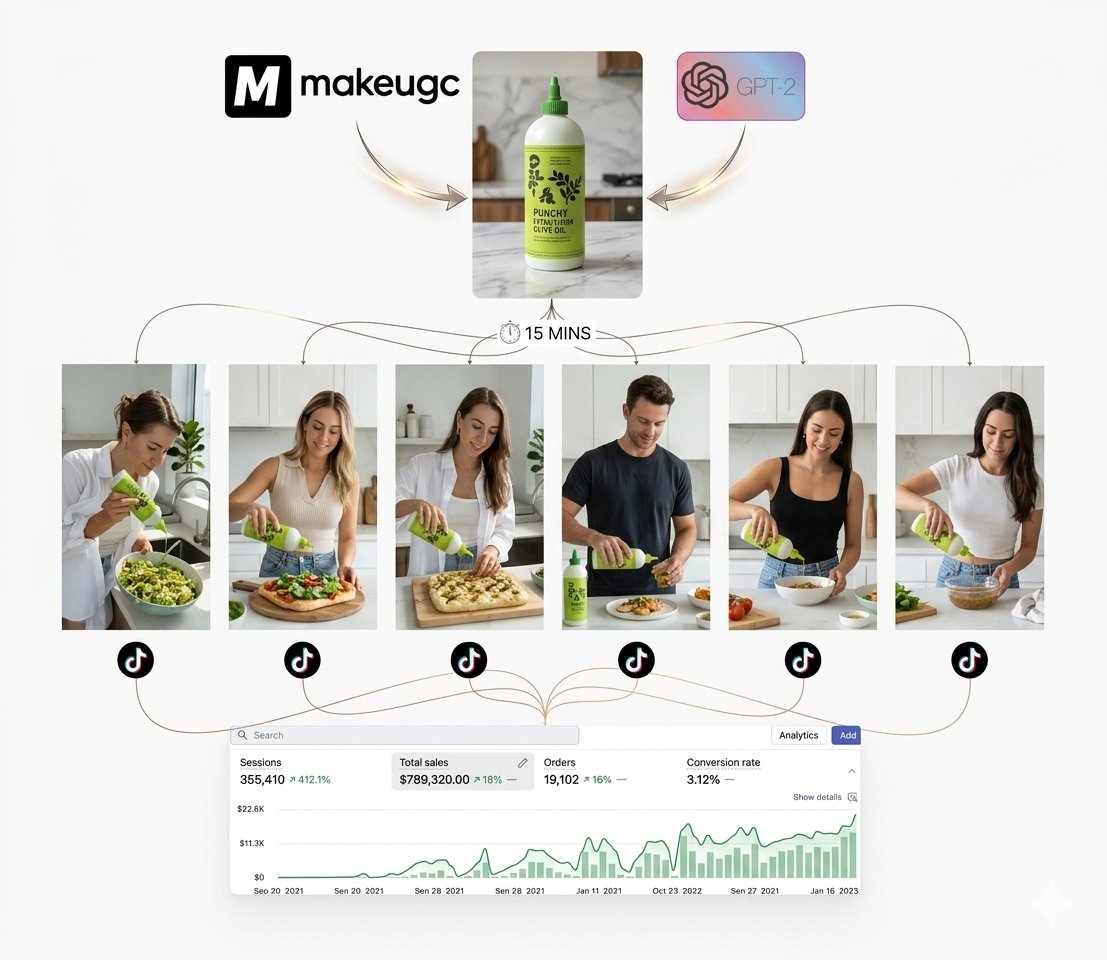
@rony_gain When automation, prompting, and consistency come together, content production changes completely.
English
1
0
1
22
Rony Gain
Rony Gain@rony_gain·
200+ high-quality videos in 24 hours? Yes, it’s possible! 🚀 Combining GPT-2 with my secret prompting system is giving me insane results. 1 Tool. 1 Prompt. Zero Editing. 100% Automated Workflow. This is the future of AI UGC. If you want the full setup for free, comment "UGC"
Rony Gain tweet mediaRony Gain tweet media
English
22
27
47
541
Amrita Yadav
Amrita Yadav@amrita4AI·
@sumitdoriya21 @renoiseai Love this vision 👏✨ Connecting characters, scenes, and stories in one reusable creative system feels much more scalable than isolated generation tools.
English
0
0
0
4
Sumit Doriya
Sumit Doriya@sumitdoriya21·
One canvas. Infinite creations. ✨ Build your AI world in one place. Characters, scenes, images, and stories — connected. 🎬 Create once. Reuse forever. The future of content starts on a single canvas. @renoiseai #RenoiseCanvas
Renoise@renoiseai

Renoise Canvas is LIVE. One canvas for your entire AI asset library. Generate, organize, and reuse: characters, scenes, images, videos, references, and versions — all in one place. 40% Off + Free Gift. Big launch, bigger rewards. ↓

English
8
10
26
210
Amrita Yadav
Amrita Yadav@amrita4AI·
@Faazsh Not just responding to prompts, but proactively managing workflows and reducing mental load.
English
0
0
0
1
Farhan Azad Shuvra
This morning, before I opened my laptop, Viktor had already organized tasks, tracked workflows, and queued up the next actions inside the workspace. Nobody asked it to. That's when I realized this isn't another AI chatbot. It's an AI coworker. Try it now: ref.getviktor.com/faazsh
Farhan Azad Shuvra tweet media
English
20
23
43
437
Amrita Yadav
Amrita Yadav@amrita4AI·
@iansh04_ A structured, long-form guide is honestly one of the best ways to properly understand tools like Claude instead of just using random prompts.
English
0
0
0
21
Ansh Bhatnagar
Ansh Bhatnagar@iansh04_·
COMPLETE CLAUDE CODE COURSE OF 4 HOURS This is the most comprehensive Claude guide I've seen on the internet. Bookmark it before you forget it. 4 hours. Build tools. Automate your work.
English
20
39
92
529
Priyanshu
Priyanshu@Priyanshu07_07·
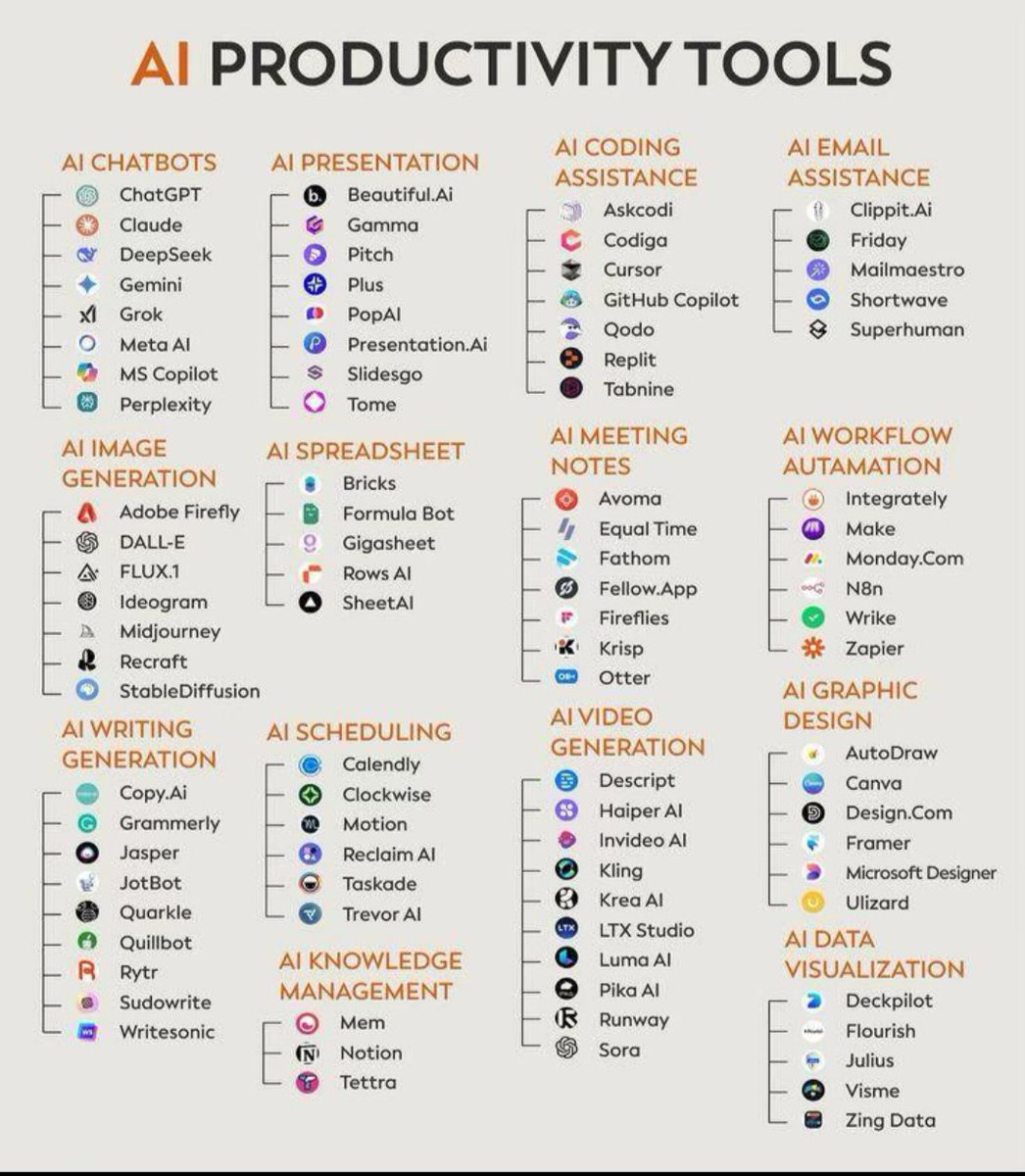
Most people use AI tools randomly Top professionals build an AI stack The real productivity edge in 2026 isn’t knowing one AI tool. It’s knowing which AI tool to use for each workflow • Writing • Research • Coding • Design • Meetings • Automation @Priyanshu07_07
Priyanshu tweet media
English
19
3
21
113
Amrita Yadav
Amrita Yadav@amrita4AI·
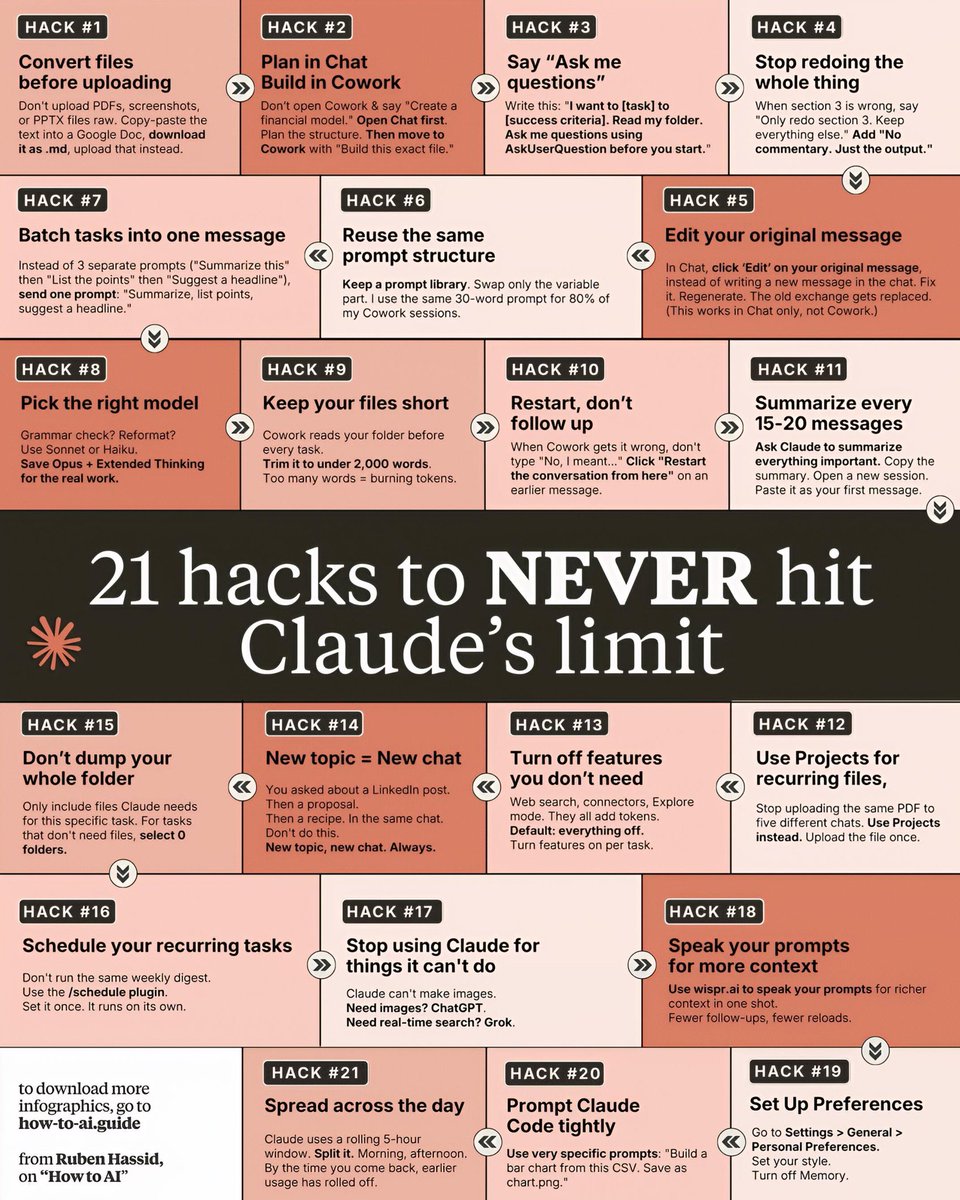
@sonalshukla3377 Really appreciate this detailed guide. Each hack feels practical and immediately usable. Thanks for taking the time to share this helpful content.
English
0
0
1
43
Sonal Shukla
Sonal Shukla@sonalshukla3377·
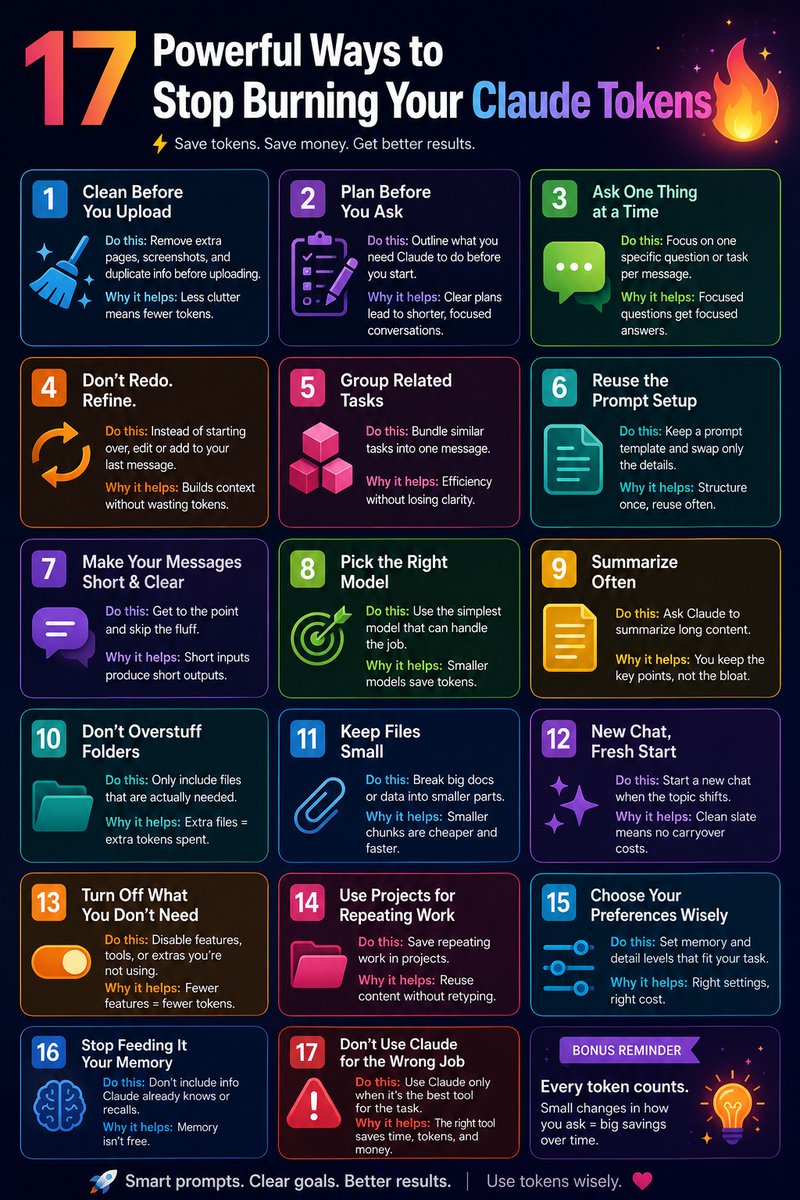
🎯21 hacks to never hit Claude's limit. ✨ Stop wasting your daily window and get maximum output with minimum tokens.Use these power-moves to make Claude faster, cheaper, and more accurate. 👉 HACK #1: Convert files before uploading Don’t upload PDFs, screenshots, or PPTX files raw. Copy-paste the text into a Google Doc, download it as .md, upload that instead. 👉 HACK #2: Plan in Chat, build in Cowork Don’t open Cowork & say “Create a financial model.” Open Chat first. Plan the structure. Then move to Cowork with “Build this exact file.” 👉 HACK #3: Say “Ask me questions” Write this: “I want you to [task] to accomplish [criteria]. Read my folder. Ask me questions using AskUserQuestion before you start.” 👉 HACK #4: Stop redoing the whole thing When section 3 is wrong, say “Only redo section 3. Keep everything else.” Add “No commentary. Just the output.” 👉 HACK #5: Edit your original message In Chat, click Edit on your original message instead of writing a new one. Change the text. Hit send. It regenerates. The old exchange gets replaced. (Works in Chat only, not Cowork.) 👉 HACK #6: Batch tasks into one message Instead of 3 separate prompts (“Summarize this” + “Then edit this” + “Suggest a headline”), send one prompt: “Summarize, list points, suggest a headline.” 👉 HACK #7: Reuse the same prompt structure I keep a prompt library. Swap only the variable part. I use the same 30-word prompt for 80% of my Cowork sessions. 👉 HACK #8: Pick the right model Grammar check? Reformat? Use Sonnet or Haiku. Save Opus + Extended Thinking for the real work. 👉 HACK #9: Keep your files short Cowork reads your folder before every task. Keep it under 2,000 words. Too many words = burning tokens. 👉 HACK #10: Restart, don’t follow up When Cowork gets it wrong, don’t type “No, I meant…” Click Restart the conversation from here on an earlier message. 👉 HACK #11: Summarize every 15–20 messages Ask Claude to summarize the conversation every 20 prompts. Copy the summary. Open a new session. Paste it as your first message. 👉 HACK #12: Use Projects for recurring files Stop uploading the same PDF to five different chats. Use Projects instead. Upload the file once. 👉 HACK #13: Turn off features you don’t need Web search, connectors, Explore mode — they all add tokens. Default: everything off. Turn features on per task. 👉 HACK #14: New topic = New chat You asked about a LinkedIn post. Then a proposal. Keep it clean. The same chat confuses the model. New topic, new chat. Always. 👉 HACK #15: Don’t dump your whole folder Only include files Claude needs for this specific task. For tasks that don’t need files, select 0 folders. 👉 HACK #16: Schedule your recurring tasks Don’t run the same weekly digest. Use the /schedule plugin. Set it once. It runs on its own. 👉 HACK #17: Stop using Claude for things it can’t do Claude can’t make images. Need images? ChatGPT. Need real-time search? Grok. 👉 HACK #18: Speak your prompts for more context Use wispr.ai to speak your prompts for richer context in one take. Fewer follow-ups, fewer reloads. 👉 HACK #19: Set Up Preferences Go to Settings → General → Personal Preferences. Turn off Memory. 👉 HACK #20: Prompt Claude Code tightly Use very specific prompts: “Build a chart from this CSV. Save as chart.png.” 👉 HACK #21: Spread across the day Claude uses a rolling 5-hour window. Split it. Morning, afternoon, night. Stop using all your window before usage has rolled off. ❤️ Like 🔁 Retweet 🔖 Bookmark Follow @sonalshukla3377 for more such posts
Sonal Shukla tweet media
English
26
30
98
1.1K
Amrita Yadav
Amrita Yadav@amrita4AI·
@RishiUvaach This is exactly why “the service is up” is no longer a sufficient health check. A system can be available on paper and still be failing users in practice.
English
1
0
1
31
Rishi
Rishi@RishiUvaach·
𝗧𝗵𝗲 𝟯 𝗣𝗶𝗹𝗹𝗮𝗿𝘀 𝗼𝗳 𝗢𝗯𝘀𝗲𝗿𝘃𝗮𝗯𝗶𝗹𝗶𝘁𝘆 Modern applications are no longer one simple server doing one simple job. A single user action — like placing an order — may pass through: API gateway → authentication service → payment service → database → notification service Now imagine the user says: “Checkout is slow.” Where exactly is the problem? Is traffic suddenly spiking? Is the database taking longer? Did one service start timing out? Did a connection pool get exhausted? This is where observability becomes critical. 𝗢𝗯𝘀𝗲𝗿𝘃𝗮𝗯𝗶𝗹𝗶𝘁𝘆 is the ability to understand what is happening inside a system by studying the signals it produces — so teams can detect issues faster, identify root causes, and fix problems before users feel the impact. Most junior engineers think monitoring means: “Is the server up?” That is like a doctor checking only: “Is the patient breathing?” Important? Yes. Enough to diagnose the illness? Absolutely not. Real observability stands on 3 pillars: 𝟭. 𝗠𝗲𝘁𝗿𝗶𝗰𝘀 — 𝗪𝗵𝗮𝘁 𝗶𝘀 𝗵𝗮𝗽𝗽𝗲𝗻𝗶𝗻𝗴? Metrics are numeric, time-series signals that show the health and behavior of a system. Examples: CPU usage Memory consumption Requests per second Error rate Response time If latency suddenly spikes at 3:45 PM, metrics tell you: “Something changed here.” They are great for: Detecting anomalies quickly Tracking system health over time Setting alerts and thresholds Spotting trends before they become outages Metrics tell you THAT something is wrong. 𝟮. 𝗟𝗼𝗴𝘀 — 𝗪𝗵𝗮𝘁 𝗲𝘅𝗮𝗰𝘁𝗹𝘆 𝗵𝗮𝗽𝗽𝗲𝗻𝗲𝗱? Logs are detailed event records generated by systems and applications. Examples: “User login successful” “Payment failed” “Timeout after 30 seconds” “Retry triggered” When a metric shows rising failures, logs help answer: “What exactly failed, and what was the system doing at that moment?” They are useful for: Debugging exact failures Understanding error messages Reviewing application behavior Investigating specific incidents Logs tell you EXACTLY what happened. 𝟯. 𝗧𝗿𝗮𝗰𝗲𝘀 — 𝗪𝗵𝗲𝗿𝗲 𝗱𝗶𝗱 𝗶𝘁 𝗵𝗮𝗽𝗽𝗲𝗻? Traces follow a single request as it moves across multiple services. For example: API Gateway: 5 ms Auth Service: 12 ms Database: 145 ms Email Service: 18 ms Now the problem becomes visible: The database call is the bottleneck. Traces are especially powerful in microservices and distributed systems, where a failure may not sit in one obvious place. They help with: Understanding request journeys Identifying slow services Locating bottlenecks Mapping cross-service dependencies Traces show WHERE the slowdown happened. 𝗛𝗼𝘄 𝘁𝗵𝗲𝘆 𝘄𝗼𝗿𝗸 𝘁𝗼𝗴𝗲𝘁𝗵𝗲𝗿 Let’s say: Checkout API is slow. A strong observability workflow looks like this: Metrics show: Response time spiked at 3:45 PM. Traces show: The database call is taking 145 ms. Logs show: The connection pool is exhausted. Fix: Increase or optimize the connection pool configuration. That is the full story: WHAT changed → WHERE it broke → WHY it happened → HOW to fix it Monitoring tells you whether the system is alive. Observability tells you whether the system is healthy, struggling, degrading, or about to fail. And in modern engineering, that difference matters. Because the best teams do not just react to outages. They detect earlier. Diagnose faster. Resolve smarter. And often fix problems before users even know something went wrong.
Rishi tweet media
English
13
31
107
1.7K
Meenakshi Yadav
Meenakshi Yadav@MeenakshiYACS·
Most people talk about Agentic AI. Very few can actually design it. Here’s a simple cheat sheet to design + explain Agentic AI architecture 👇 🎯 Start here ➡️ Define the goal What exactly should the agent achieve? 1️⃣ Orchestration Layer ➡️ The control panel Decides flow, logic, and coordination 2️⃣ Agents Layer ➡️ The workforce Single or multi-agents handling specialized tasks 3️⃣ Tools Layer ➡️ Execution power APIs, web search, databases, external systems 4️⃣ Memory ➡️ The brain Short-term + long-term context storage 5️⃣ Monitoring ➡️ The eyes Track every step, detect issues in real time 6️⃣ Reliability & Failure ➡️ The safety net Retries, fallbacks, human-in-the-loop 7️⃣ Governance & Security ➡️ The guardrails Auth, compliance, audit, data protection 💡 Real insight: Agents alone don’t make systems powerful. Architecture does. If you can explain this simply, you’re already ahead of 90% in AI. ❤️ Like 🔁 Retweet 🔖 Bookmark Follow @MeenakshiYACS for more such posts #AI #ArtificialIntelligence #GenerativeAI #CareerGrowth #Upskilling
Meenakshi Yadav tweet media
English
32
78
402
18.5K
Amrita Yadav
Amrita Yadav@amrita4AI·
@RishiUvaach This is not just a filter — it’s instant cultural participation.
English
0
0
0
23
Rishi
Rishi@RishiUvaach·
This is where consumer AI gets interesting. Not just “create content for me” — but let me instantly participate in a live internet trend. Buzzy’s Baseball Cam Filter turns a niche viral format into a one-click experience. That’s a sharp product instinct. 🔥 Awesome @Buzzy_now_AI
Buzzy Now@Buzzy_now_AI

Introducing Buzzy’s Baseball Cam Filter. Want to follow the Korean Baseball trend and be caught on camera? No more wondering how it’s done—it's all in one click with Buzzy. Your viral moment starts here: buzzy.now
English
18
24
73
10.5K
Amrita Yadav
Amrita Yadav@amrita4AI·
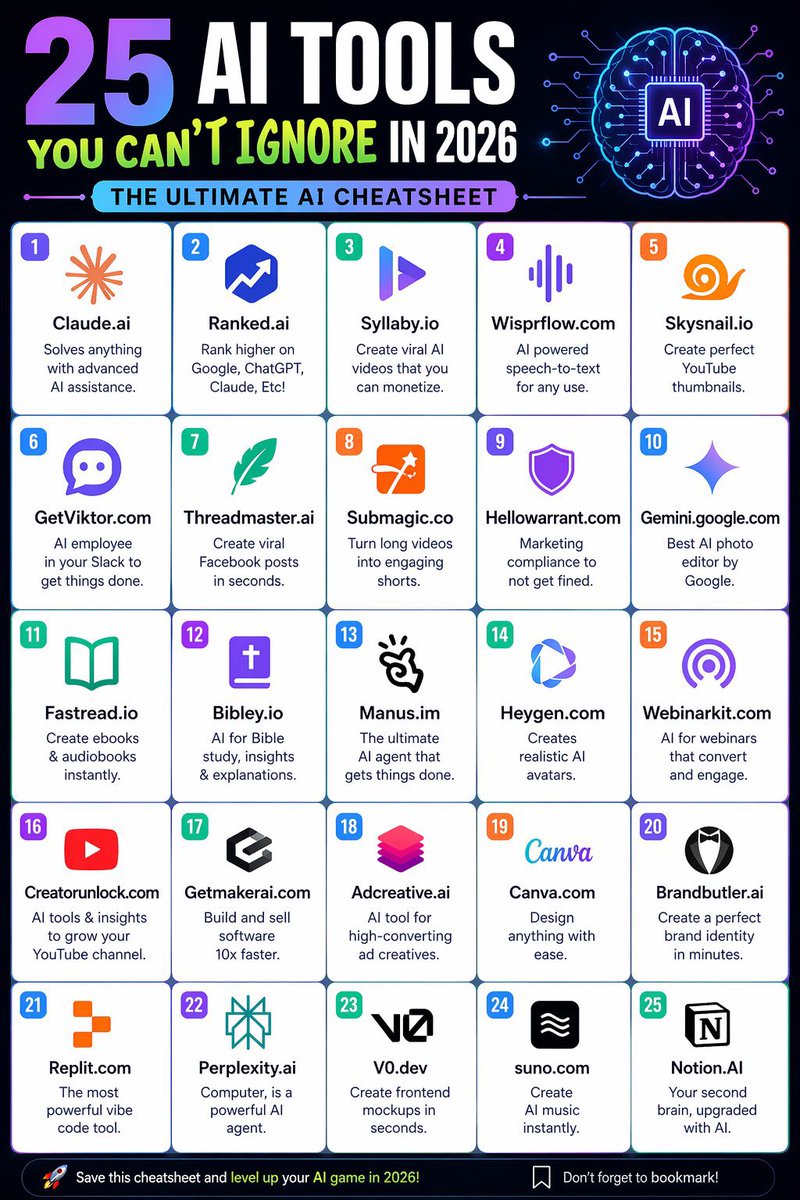
25 AI tools. Endless possibilities. 🤖 Create faster. Automate smarter. Learn quicker. The AI era belongs to people who adapt early. 🚀 Don’t ignore AI. Learn it. Use it. Leverage it. Follow @amrita4AI #AI #Productivity #FutureOfWork
Amrita Yadav tweet media
English
9
24
69
1K
Priyanshu
Priyanshu@Priyanshu07_07·
Most people use AI like a search engine. Smart professionals use it like a strategic partner. The quality of AI output depends less on the tool… These 15 Claude prompts can completely change how you work, think, research, write, and make decisions. Which one would you use?
Priyanshu tweet media
English
32
4
35
169