ariaupdated
3K posts

ariaupdated
@ariaupdated
Working to help IT Admins manage Windows updates with Autopatch / WSUS and AI (Agents, Connectors, models, etc.). My opinions are mine!

Katılım Mayıs 2020
98 Takip Edilen5.8K Takipçiler

@PJ_Marcum @Mister_MDM @ariaupdated A welcome improvement. It’d be great to see this extended to app deployments in the future.
English

Holy hell, this is the biggest Intune improvement that I have seen in years! And long overdue! Woot Woot!!! @ariaupdated
Rudy Ooms@Mister_MDM
Maintenance Window Settings for OS, Drivers, and Updates This new Settings Catalog policy lets you decide when update work is allowed to run for OS, drivers, and firmware, instead of only trying to avoid restarts during active hours. And even though the Settings Catalog entry is not there yet, you can already configure it with the Update CaSP. I had a look at what it does, how it works, and why it is more than just active hours. patchmypc.com/blog/windows-u… #Intune #WindowsUpdates #Windows11 #MSIntune
English

@PJ_Marcum I'm glad you like it! I'm definitely super excited we were finally able to bring Maintenance Windows to the cloud / Autopatch! :)
English

@RuneLystad Hi Rune, so you'd like to see user ID for the devices as well? (or users in multi-use devices)
English

@ariaupdated The Windows Autopatch Quality Update status looks great, but it has a fundamental flaw! It does not include the primary user of the devices. So you end up with a manual task to find the user that has a device with a problem. Why on earth do you include just the device name&ID?
English

You've asked for YEARS for better update reporting. Today is a step in that direction:
- Windows Autopatch management status report
- Quality update journey
- Update alerts and remediations
- Update Readiness Checker
techcommunity.microsoft.com/blog/windows-i…
English

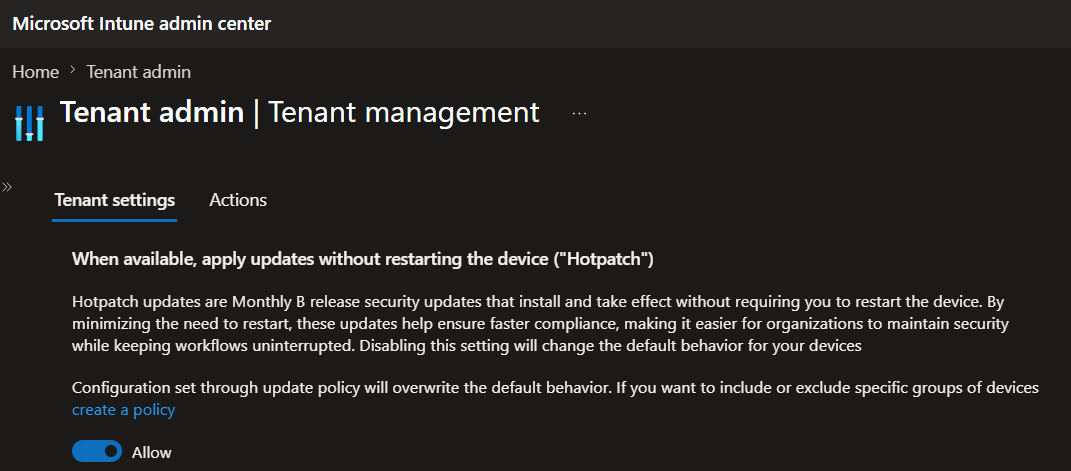
@ariaupdated so we keep the 1st setting to Allow and the second one to Block?
and apply to all devices where we don't want hotpatch for when it'll be enforced by default?

English

Say hello to fewer reboots and getting secure faster!
#Autopatch will now be enabling #Hotpatch by default - applying the security fixes without a reboot when available for applicable devices!! 🎉
techcommunity.microsoft.com/blog/windows-i… #WindowsUpdate
English

@SkipToEndpoint @zsattler Definitely good you're talking to your vendor. It's something we are also trying to work with security vendors to fix- since being secure is critical, but being able to validate such via reporting is just as important. For now, you can disable hotpatches till they support :)
English

@zsattler @ariaupdated Oh for sure, and it wasn't pointed at you. I just can't stand it when security products actively make you less secure, or security teams who don't understand when something is better 😉
English

@lalanc01 So if you want you can actually already disable hotpatching in Intune and that will continue to be respected even once we enable by default. :)
Can you share more on why you don't want hotpatching on in your environment?
English

@ariaupdated @ariaupdated will it be communicated in April we can enable the opt-out configuration? Maybe in the what's new in Intune?
thks
English

@Mirolus_LLC @jarwidmark @AndrewJNet Excited to join and chat about managing #Windows! (Epecially #WindowsUpdates and #Autopatch)
English

🚀Welcome @ariaupdated as our special guest on the next #ViaMonstraOfficeHours 👏! Come hang out, hear insights from the field, and bring your questions 👨💻 With hosts @jarwidmark & @AndrewJNet! #ConfigMgr #MSIntune #ViaMonstraAcademy
SUBSCRIBE and LIKE👍!
youtube.com/c/ViaMonstraOn…

English

@panusaukko @panusaukko did you file a support ticket? Can you message me the details / remind me your tenant ID in DM or Teams so I can get the team to dig into this?
English

And status breakdown/state trending shows 3 installed devices, but State point in time chart has 4 devices installed.
@ariaupdated

English

Great that Microsoft released new #MSIntune #Autopatch reports. Feature update journey has some confusing results:
Status breakdown has 6 total devices in my example. State trending has 12 devices, because it add request received + all other states. 🤦♂️ 1/2
@IntuneSuppTeam

English

@inthecloud_247 @IntuneSuppTeam That should be good. In that case for the device you are seeing incorrect info for, do you mind filing a support case or at least DMing me your tenant info? I'd love to dig in to see what's going on.
English

@ariaupdated @IntuneSuppTeam I see devices showing a correct status. But to be sure; Enable features that require Windows diagnostic data in processor configuration is switched on. Are other settings needed for this report like ?#diagnostic-data-requirements" target="_blank" rel="nofollow noopener">learn.microsoft.com/en-us/windows/…
English

Hi @ariaupdated @IntuneSuppTeam
I like the Feature update journey report, if it would be accurate and unfortunately, it seems not.
This device for example shows in the failed report, but we can see 25H2 is installed already 4 days ago.

English

@panusaukko @IntuneSuppTeam Thanks for the flag Panu! Taking a look now to ensure we make changes to ensure a consistent view across all of the reports..
English

@steverollins Great question! Today I don't believe we do (but I'm checking). In future, you will certainly be able to pull this data via Graph API which you could then import into PowerBI dashboards.
English

@ariaupdated Is there a way to pull this data so it can be displayed in PowerBI dashboards?
English

@inthecloud_247 Yes, this is still rolling out. That said, I see your notes on the "no data" devices, looking to see what is going on there.
Can you confirm you're sending telemetry for those devices?
English

@MatAitAzzouzene @AdamGell Not quite - Windows update client policies are the Group Policies / CSPs. Autopatch is the graph API service exposed by MDMs (ex. Intune).
That said, Autopatch doesn't automatically deploy things unless you ask it to -- it provides granular management controls over updates.
English

@AdamGell @ariaupdated Maybe I missed an episode, but the last time I noticed a change WUfB was renamed into Windows Update Client Policies, and autopatch remained the « automatic patch » feature managed by MS.
English

@AndSjb Does this work for you? techcommunity.microsoft.com/blog/windows-i…
English

@acjuelich They require E3+, A3+, F3, or M365 Business Premium licenses
English

@ariaupdated Will those Remediations be available for all license plans, or still E3/A3+?
English

@StevenKister1 @AdamGell Apologies what do you mean by extend? You can use Pause + Pause start date
For the ability to disable insiders in the Update Rings page - that is a good callout @UpdatedavidM just FYI on the UI limitation in update rings. I'll look at seeing if we can adjust that.
English

@AdamGell Hmmm...so extend is a feature of Pause? When the Jan LCU shutdown debacle started, used Pause and then extend in the WU profile but based on this article thinking the extend didn't work as it went 5+ weeks. The UI reported that 35 days was in play again. But maybe not?
English

@ariaupdated We raised this a few years ago, but can the Intune update ring profile include a disabled selection for "Enable pre-release builds". The current Enable and Not Configured options cause a policy conflict when using the Settings Catalog to prevent preview builds.

English

Happy #PatchTuesday @ariaupdated! Any chance filters will be added to feature update profile assignments in the future?
English