荒野之木

279 posts

荒野之木 banner
荒野之木

荒野之木

@beyondman5219

猿来是你

Katılım Haziran 2019
617 Takip Edilen14 Takipçiler
荒野之木 retweetledi
Viking
Viking@vikingmute·
居然现在还有人做这么精致的 Claude Code 的教程?claude.nagdy.me 很适合初学者,不用看文档,取而代之的是 11 个从入门到精通的交互式课程,最后还附有测验,很古早的感觉。 没有任何订阅也可以用它的模拟终端学习把玩一下,从最基本的 slash,到 skills 再到 MCP 再到 Sub Agents 和高级特性都有。 我觉得初学者和高手都能跑一遍都能学到一些新的知识。真的很棒。
Viking tweet media
中文
8
192
762
45K
荒野之木 retweetledi
陈成
陈成@chenchengpro·
Claude Skills 用得好不好,差距全在构建环节。8 条实战验证的高质量 Skill 构建心法: 1. 反向提问 — 别急着写指令,先让 Claude 问你 50 个问题。它比你更清楚该收集什么信息 2. 反向构建 — 让 Claude 根据对你的了解推荐该建什么 Skill,比自己拍脑袋想准得多 3. 疯狂喂上下文 — PDF、文档、笔记,能塞的全塞。上下文的厚度决定输出的上限 4. 历史对话即素材 — 跟 Claude 聊了仨月的写作偏好?直接转成 Skill,比从零写强十倍 5. 第一版永远是草稿 — 至少迭代三版,逐条读逐条改,别指望一步到位 6. 一个好范例 > 十条规则 — 在 Skill 里贴一段完美的输出示例,效果立竿见影 7. 结尾加自检清单 — 写 3-5 个问题让 Claude 输出前自我审查:语气对不对?踩没踩禁区?格式到位没? 8. 永远人工过一遍 — 花几分钟手动审核,换来的是此后每天省下的时间 核心逻辑:Skill 是「一次投入、持续复利」的资产。花 30 分钟构建,之后每次对话自动生效,再也不用重复解释上下文。 大多数人觉得 Skill 不好用,不是 Claude 的问题,是上下文没喂够、没给范例、没迭代。 完整指南:x.com/aiedge_/status…
AI Edge@aiedge_

x.com/i/article/2034…

中文
2
19
79
17.5K
荒野之木 retweetledi
meng shao
meng shao@shao__meng·
信息卡制作完整方法我做成了 Skill「infocard-skills」,开源在这里了: github.com/shaom/infocard… 支持 16/9、4/3、1/1、3/4、9/16 几种常见比例信息卡,和 2.35/1、3/1 等常见比例封面的适配性针对设计。 输入需要生成的内容和比例要求(默认 4/3),AI Agent 使用 这个 Skill 生成 HTML 并截图输出 PNG。 下面是这个 Skill 生成的样例 🔽 大家可以在使用中调整成最适合你的样式风格,并沉淀更新到 Skill 里。
meng shao tweet media
meng shao@shao__meng

x.com/i/article/2027…

中文
23
164
734
114.7K
荒野之木 retweetledi
阿蔺A-Lin
阿蔺A-Lin@alin_zone·
Obsidian 的同步一直是一个比较大的问题。如果说你是苹果全家桶的话,用 iCloud 是最简单方便、延迟又低的一个方式。那假如说你是不同系统混用的话,可以看一下使用 GitHub 的这个方式。
荒野饲养员@KtAIFeed

x.com/i/article/2035…

中文
6
26
127
23K
荒野之木 retweetledi
Vaishnavi
Vaishnavi@_vmlops·
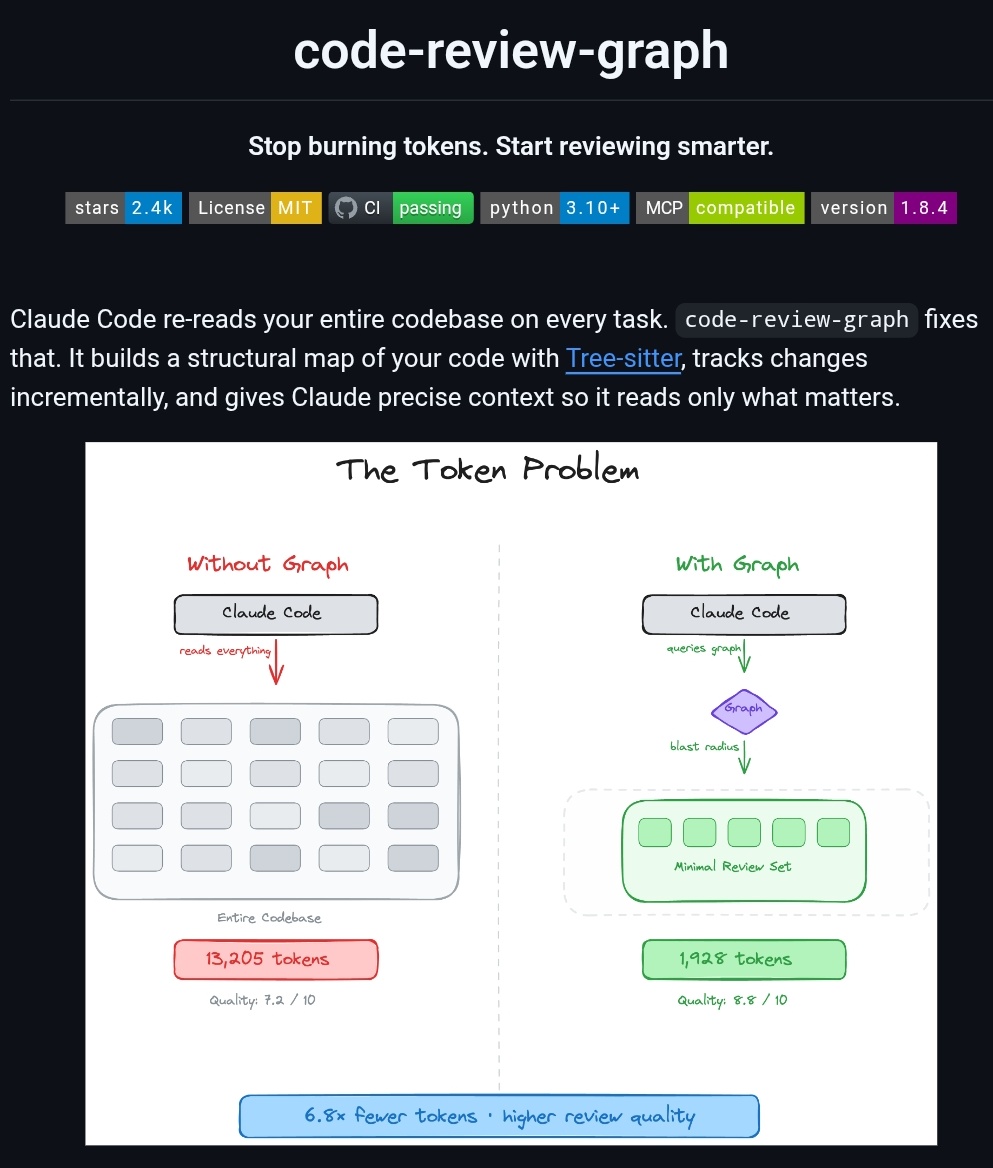
Claude Code re-reads your entire codebase on every task code-review-graph fixes that builds a persistent knowledge graph, tracks what changed, loads only what matters local SQLite. no cloud. no drama github.com/tirth8205/code…
Vaishnavi tweet media
English
32
122
1.2K
107.3K
荒野之木 retweetledi
ℏεsam
ℏεsam@Hesamation·
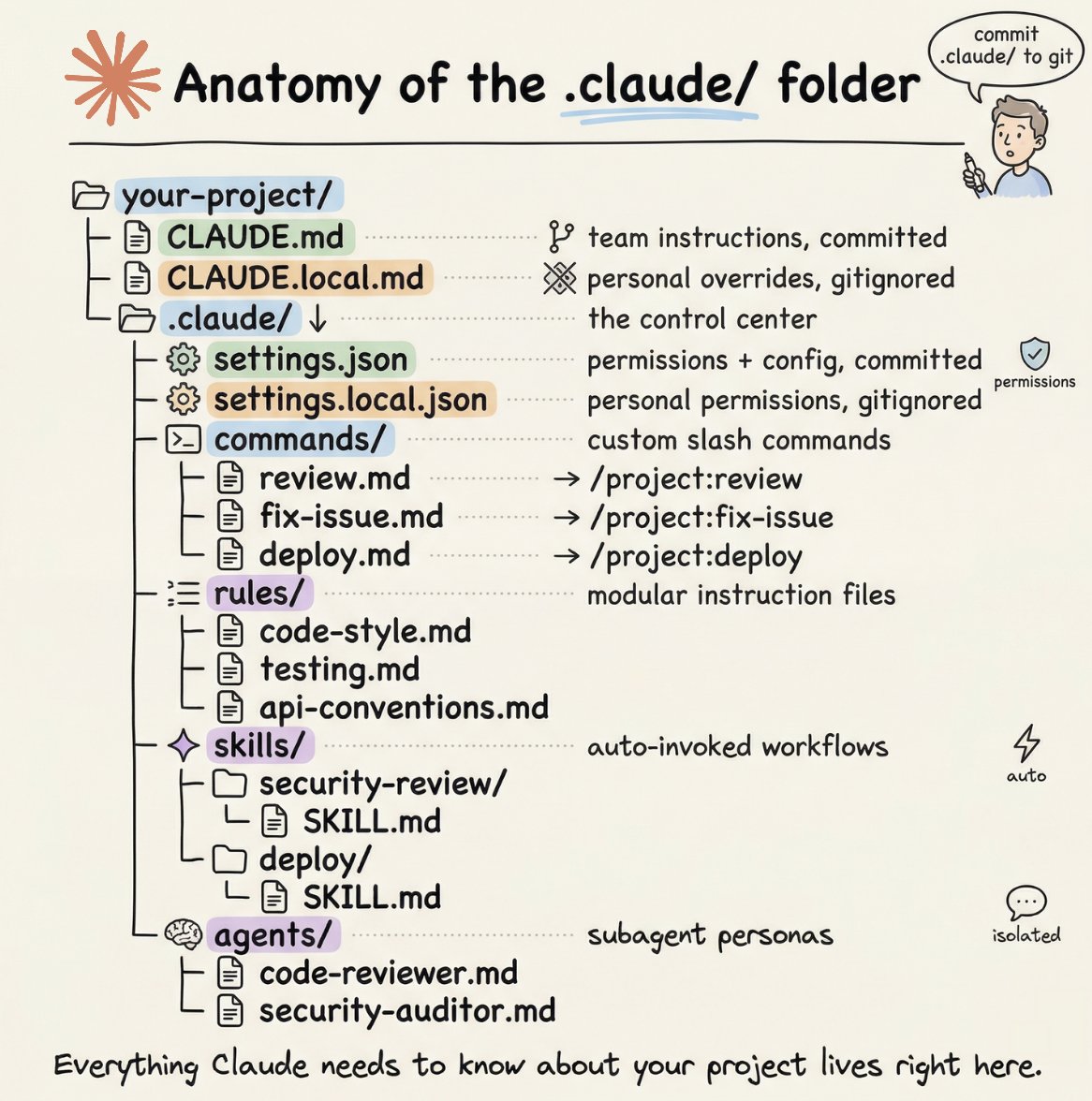
your .claude folder is what separates you from every other developer under the sun who uses Claude. it’s your taste, rules, skills, and workflows. this article is the most complete and simple explanation of all its components.
ℏεsam tweet media
Akshay 🚀@akshay_pachaar

x.com/i/article/2034…

English
29
105
941
161.6K
荒野之木 retweetledi
Akshay 🚀
Akshay 🚀@akshay_pachaar·
How to setup your Claude code project? TL;DR Most developers skip the setup and just start prompting. That's the mistake. A proper Claude Code project lives inside a .𝗰𝗹𝗮𝘂𝗱𝗲/ folder. Start with 𝗖𝗟𝗔𝗨𝗗𝗘.𝗺𝗱 as Claude's instruction manual. Split it into a 𝗿𝘂𝗹𝗲𝘀/ folder as it grows. Add 𝗰𝗼𝗺𝗺𝗮𝗻𝗱𝘀/ for repeatable workflows, 𝘀𝗸𝗶𝗹𝗹𝘀/ for context-triggered automation, and 𝗮𝗴𝗲𝗻𝘁𝘀/ for isolated subagents. Lock down permissions in 𝘀𝗲𝘁𝘁𝗶𝗻𝗴𝘀.𝗷𝘀𝗼𝗻. There are two .𝗰𝗹𝗮𝘂𝗱𝗲/ folders: one committed with your repo, one global at ~/.𝗰𝗹𝗮𝘂𝗱𝗲/ for personal preferences and auto-memory across projects. The .𝗰𝗹𝗮𝘂𝗱𝗲/ folder is infrastructure. Treat it like one. The article below is a complete guide to 𝗖𝗟𝗔𝗨𝗗𝗘.𝗺𝗱, custom commands, skills, agents, and permissions, and how to set them up properly.
Akshay 🚀 tweet media
Akshay 🚀@akshay_pachaar

x.com/i/article/2034…

English
212
1.5K
12.2K
2.1M
荒野之木 retweetledi
Piotr Mińkowski
Piotr Mińkowski@piotr_minkowski·
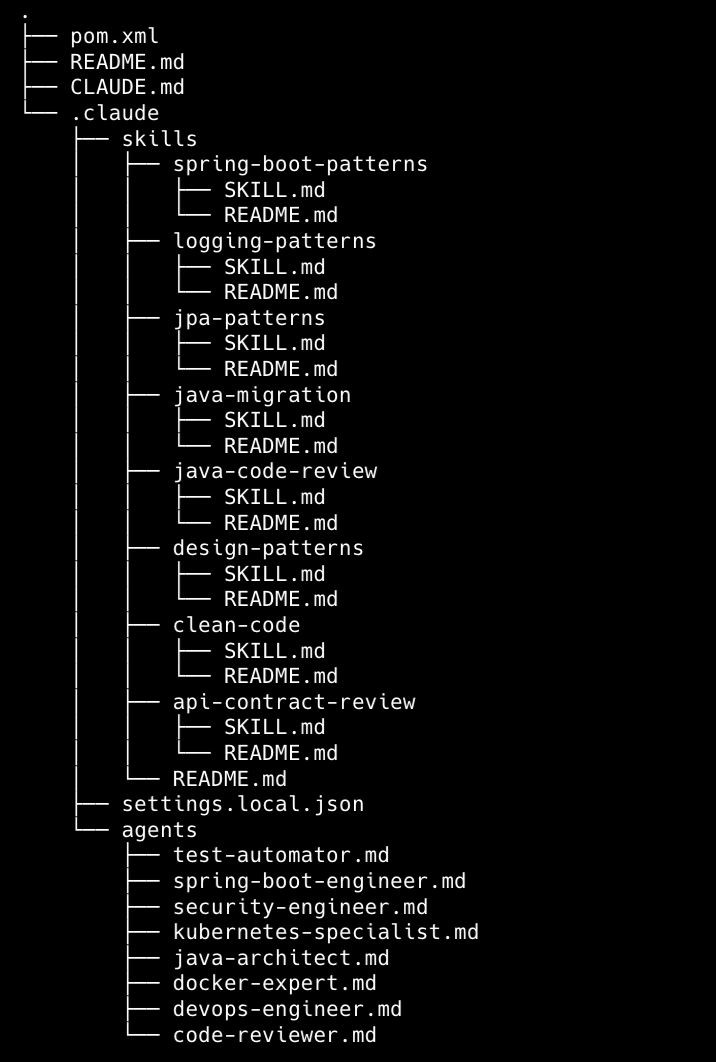
I created my Claude Code template repo for the Spring Boot app with instructions, skills, and subagents.💡 It is desired to create an app that connects to the DB, is deployed on Kubernetes, and runs tests with Testcontainers, and some others 👉github.com/piomin/claude-…
Piotr Mińkowski tweet media
English
29
170
1.1K
125.3K
荒野之木 retweetledi
Claude
Claude@claudeai·
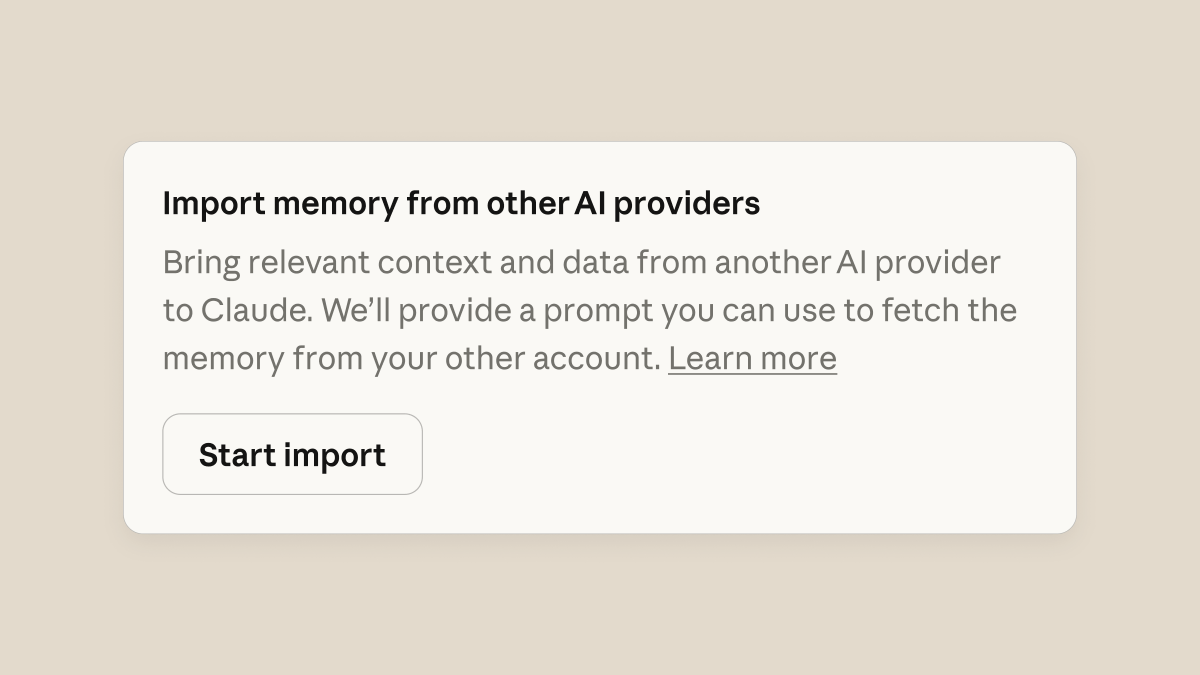
Memory is now available on the free plan. We've also made it easier to import saved memories into Claude. You can export them whenever you want.
Claude tweet media
English
1.2K
2.6K
37.9K
10.9M
荒野之木 retweetledi
Piotr Mińkowski
Piotr Mińkowski@piotr_minkowski·
I’m looking for a good repository with Claude skills for Java, Spring Boot etc. I found this one: github.com/decebals/claud…. Any other suggestions are highly appreciated.
English
15
91
668
53.5K
荒野之木 retweetledi
苏打白.Dev
苏打白.Dev@sodawhite_dev·
AI时代,世界就是一个巨大的markdown文件。 这个网站markdown.new 可以把文件转化成AI需要到markdown文件。无需注册,打开即用 这些类型到文件都可转换成Markdown文件 📄 PDF、DOCX、ODT 📊 Excel、Numbers、CSV 🖼图像(AI驱动的OCR+摘要)
中文
17
166
685
70.2K
荒野之木 retweetledi
老C@codedump.info
老[email protected]@lichuang·
《图解分布式系统原理》开始对外公开,总共七章,大概每周放一个章节的内容,部分章节如果内容太多会进行拆分。 另外需要说明,由于我的初稿是Latex,放到博客时用工具转成的Markdown格式,所以可能有些格式问题,请见谅。 第一章:分布式系统概述 (codedump.info/dist-system-cn…)
中文
3
16
66
5.4K
荒野之木 retweetledi
meng shao
meng shao@shao__meng·
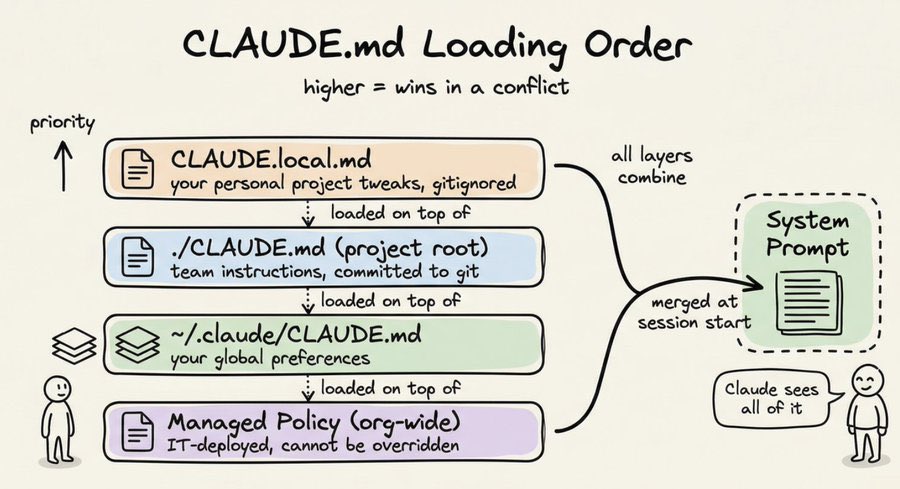
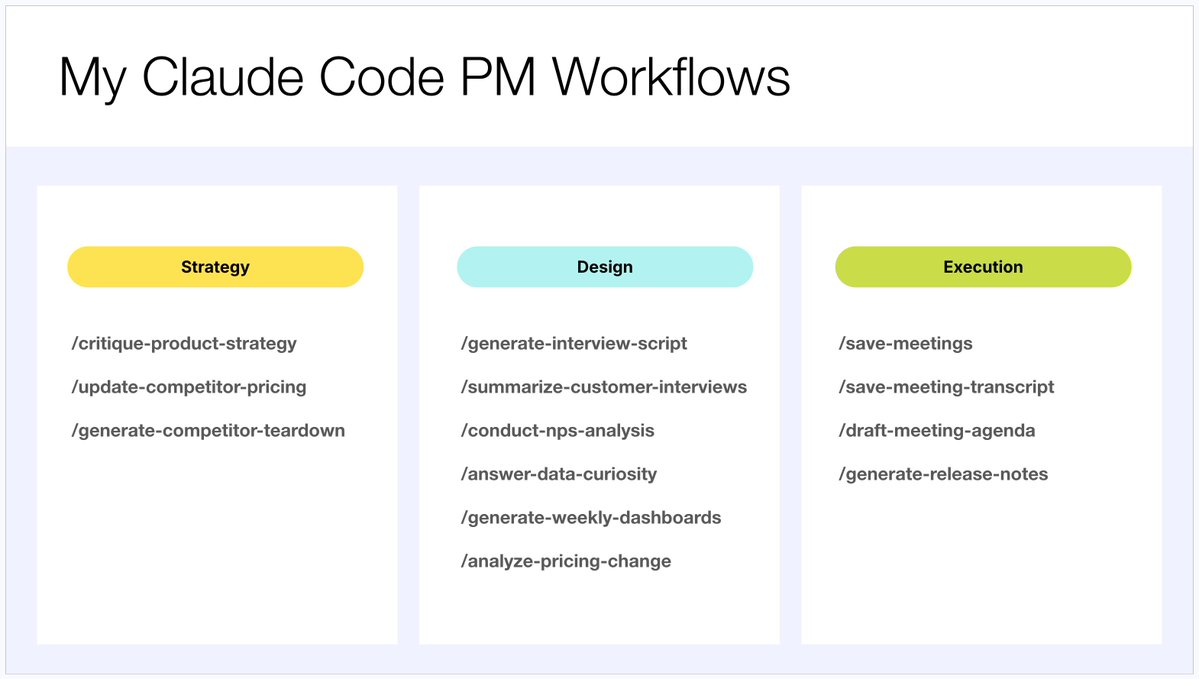
[开源推荐] Claude Code Best Practice 作者 @shanraisshan 开源的 Claude Code 工程化使用实战知识库,系统性地展示了如何配置、编排和优化 Claude Code 的各项能力,包括 Skills、Agents、Commands、Hooks、MCP Servers、Memory、Rules、Plugins、Sandbox 等核心机制。基于大量实际使用后提炼出的经验模式和反模式,帮助开发者避免在 Claude Code 的工程化使用中走弯路。 先解读 Claude Code 创建者 Boris Cherny 的 12 条定制技巧: · 终端配置:主题、通知、vim 模式、自定义状态栏(显示模型、目录、上下文、费用) ·扩展生态:通过 /plugin 安装插件、MCP、Skills,medium=平衡,high=深度) 扩展生态:通过 /plugin 安装插件、MCP、Skills · 权限管理:通配符语法预批准安全命令 + Sandbox 隔离 · 个性化:自定义快捷键、加载动画、输出风格(Explanatory 适合新项目,Learning 适合学习指导) · 团队协作:将 settings.json 纳入版本控制,团队共享配置 --- 核心概念 --- Command → Agent → Skills 架构 · Command 通过 Task 工具调用 Agent,而非直接用 Bash 命令 · Agent 通过 frontmatter 声明所需的 Skills、工具权限和模型 · Sub Agent 之间不能直接互相调用,必须通过 Task(subagent_type=...) 显式编排 · Skill 使用 context: fork 实现隔离执行,避免上下文污染 Memory 三层作用域 · User:个人跨项目知识(推荐默认) · Project:团队共享的项目知识 · Local:个人的项目特定知识 系统启动时注入 MEMORY. md 的前 200 行到 Agent 系统提示中。当记忆量增长后,Agent 会自动将内容拆分为主题文件进行组织。 Agent Memory 与 CLAUDE. md、/memory 命令是互补而非替代关系:CLAUDE. md 承载项目上下文,Agent Memory 承载特定 Agent 的领域知识。 CLAUDE. md 在 Monorepo 中的加载策略 · Ancestor Loading:从当前目录向上遍历到根目录,立即加载所有沿途的 CLAUDE. md · Descendant Loading:子目录中的 CLAUDE. md 采用懒加载,仅在会话中实际访问时才加入 · 兄弟隔离:同级目录的 CLAUDE. md 永远不会互相加载 在 /mymonorepo/frontend/ 启动 Claude Code 时,你会立即获得根目录和 frontend 的配置,而 backend 的配置只在你实际操作 backend 文件时才会加载。这避免了"数百 KB 无关指令"占用上下文窗口。 实践建议:根目录放通用编码规范,各子包放各自的框架和架构细节,个人偏好用 CLAUDE.local. md(加入 .gitignore)。 设置优先级体系(高 -> 低) · 命令行标志(仅当前会话) · .claude/settings.local.json(个人项目级) · .claude/settings.json(团队共享项目级) · ~/.claude/settings.local.json(个人全局) · ~/.claude/settings.json(全局默认) RPI 工作流:Research-Plan-Implement · Research:可行性分析,输出 GO/NO-GO,需求分析师、产品经理参与 · Plan:产品需求 + UX + 技术架构,架构师、UX 设计师参与 · Implement:分阶段执行与验证,高级工程师、代码审查者参与 --- 关键实践经验 --- 1. 上下文管理 · CLAUDE. md 控制在 150 行以内——超过后模型对指令的遵循度会下降 · 在上下文使用量约 50% 时手动执行 /compact——不要等到系统自动压缩 · 子任务的上下文消耗不超过 50%——为后续操作留出空间 · 任务完成后立即 commit——释放上下文,建立检查点 2. Agent 设计原则 · 优先使用 Command 驱动工作流,而非直接创建 Agent · 为特定功能创建专用子 Agent,而非万能 Agent · 采用"渐进式技能披露" —— Agent 只声明当前任务所需的 Skills · 简单任务直接用原生 Claude Code,不要过度工程化——"vanilla Claude Code is better than any workflows with smaller tasks" 3. 调试方法论 · 使用 /doctor 命令诊断环境问题 · 后台运行任务以获得终端日志可见性 · 使用 MCP(Chrome DevTools、Playwright)做真实的浏览器调试 · 报告问题时始终附带截图 4. 推荐的 MCP 配置 · Context7:获取当前版本的库文档,防止 API 幻觉 · Playwright:浏览器自动化、UI 测试 · Claude in Chrome:真实浏览器调试 · DeepWiki:获取开源仓库的结构化文档 5. 权限与安全 · 使用通配符语法预批准常用安全命令(/permissions),而非直接跳过所有权限检查 · 使用 /sandbox 做文件和网络隔离,减少权限弹窗的同时保持安全性 · 敏感文件(.env、凭证文件)不应加入 CLAUDE. md 或被 commit 高级 API 特性参考(依赖 Sonnet 4.6 和 Opus 4.6) · Programmatic Tool Calling:减少约 37% token 消耗 · Dynamic Filtering:减少约 24% 输入 token · Tool Search Tool:减少约 85% 工具定义 token · Tool Use Examples:准确率从 72% 提升至 90% 开源地址: github.com/shanraisshan/c…
meng shao tweet media
中文
4
76
326
23K