Machine Learning Community ⭐️

950 posts

Machine Learning Community ⭐️ banner
Machine Learning Community ⭐️

Machine Learning Community ⭐️

@c4ml_

Follow for Actionable tips, Best Resources and Daily content on Python, Data Science & Machine Learning. 🚀

Katılım Temmuz 2022
689 Takip Edilen12.8K Takipçiler
Machine Learning Community ⭐️ retweetledi
Sumanth
Sumanth@Sumanth_077·
Make your CLI 10x more powerful with custom subagents! Mistral Vibe is an open-source coding agent that runs in your terminal. Most terminal agents give you one assistant that does everything. With Vibe, you can build custom subagents for targeted tasks like deploy scripts, PR reviews, and test generation, then invoke them on demand. Here's how it works: Each subagent runs independently and handles its job without cluttering your main workflow. You might have one for PR reviews, another for testing, and another for deployment. The agent also has full access to your codebase. It scans your project structure and Git status automatically, so it understands context across multiple files, not just the one you're editing. Key capabilities: • Web search and fetching - query and fetch content from the web mid-session for documentation, or API references. • Multi-choice clarifications - when your instruction is ambiguous, Vibe prompts with options instead of guessing. You pick the right path before it acts. • Full skills support - slash commands for preconfigured workflows, custom subagents for specialized tasks, and extensibility through the Agent Skills standard. Vibe works in your terminal or connects to VS Code, JetBrains, and Zed through the Agent Client Protocol. Mistral Vibe is available through Le Chat Pro and Team plans. It's 100% open source Link to Mistral Vibe in the comments!
English
5
9
33
8.4K
Machine Learning Community ⭐️ retweetledi
Sumanth
Sumanth@Sumanth_077·
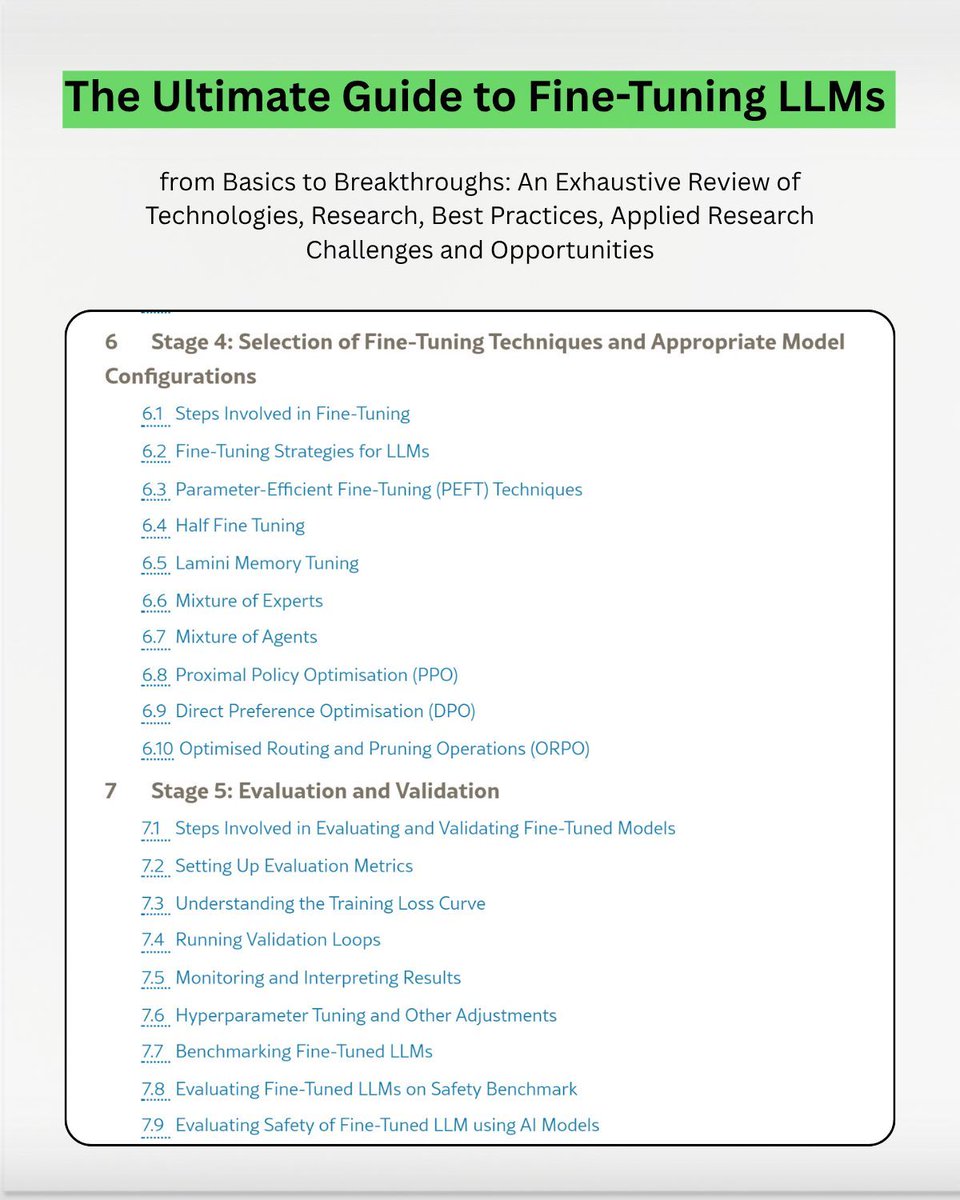
Ultimate Guide to LLM Fine-Tuning! This is a comprehensive 115-page guide to fine-tuning LLMs. If you are serious about learning LLM fine-tuning, this guide is a great read. It covers: • Task and domain-specific fine-tuning • Parameter-efficient methods (PEFT, LoRA, QLoRA, DoRA, HFT) • Expert-based architectures (MoE, Lamini Memory Tuning, MoA) • Alignment and optimization (PPO, DPO) • Model simplification (Pruning) Link to the guide in next tweet!
Sumanth tweet media
English
3
68
364
16.5K
Machine Learning Community ⭐️ retweetledi
Sumanth
Sumanth@Sumanth_077·
Train LLMs locally without writing a single line of code! @UnslothAI just released Unsloth Studio - an open-source web UI for training and running models. Here's how it works: You upload a PDF, CSV, or DOCX file. The Data Recipes feature automatically transforms it into a structured training dataset via a graph-node workflow. No manual formatting needed. Then you select a model from Hugging Face or your local files. Pick your training method - LoRA, QLoRA, or full fine-tuning. The UI pre-fills sensible defaults based on your model. Start training and watch live metrics - loss curves, GPU usage, gradient norms. Everything runs locally with 2x faster training and 70% less VRAM than standard setups. Here are the key capabilities: • Chat with GGUF and safetensor models - supports tool calling, web search, and code execution in a sandbox. • Compare models side-by-side - load your base model and fine-tuned version to see how outputs differ. • Export to any format - save your trained models as GGUF, safetensors, or LoRA adapters for use with llama.cpp, vLLM, Ollama, or LM Studio. • Multi-modal support - train text, vision, audio, and embedding models all in one interface. It runs 100% offline on your hardware.
English
4
22
66
4.2K
Machine Learning Community ⭐️ retweetledi
Sumanth
Sumanth@Sumanth_077·
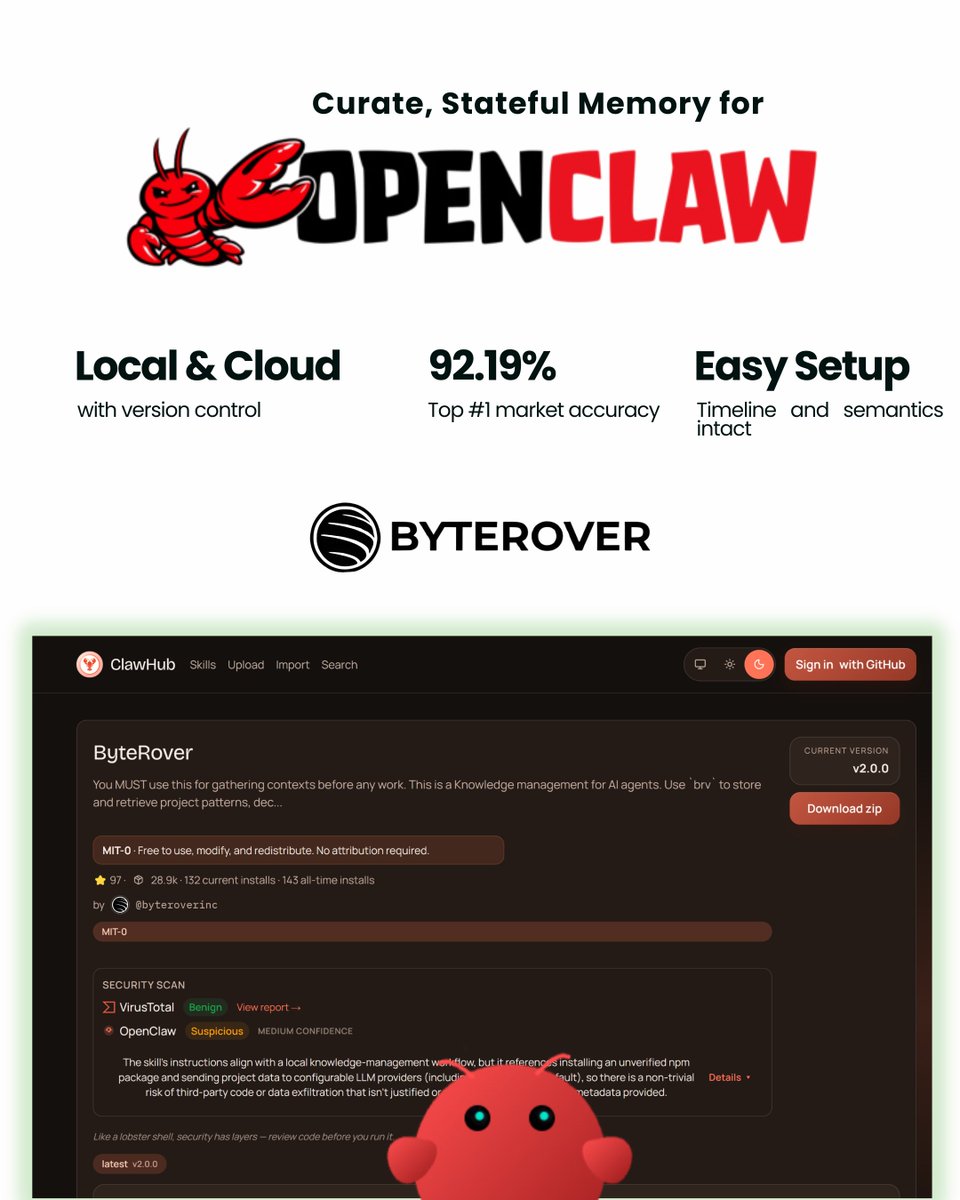
Give OpenClaw long-term memory that actually works! OpenClaw agents are powerful for dev work - scheduled workflows, automated testing, continuous monitoring of codebases. But there's a memory problem. Across sessions, OpenClaw's auto-memory gets stored by day in memory/YYYY-MM-DD. md files and rotates over time. If you want something to stick, you have to manually curate it into MEMORY. md, which becomes inefficient and bloated. Ask "How is authentication implemented?" and the agent reads 50+ files to piece together an answer. That's 10,000+ tokens when only 300-500 tokens of relevant context actually matter. The agent can't remember that your project uses JWT tokens with 24-hour expiration. It can't remember the auth logic is in `src/middleware/auth.ts`. It re-discovers the same patterns every session. The Solution: LLM-Powered Memory Curation ByteRover fixes this with intelligent memory curation. Instead of storing embeddings, it curates knowledge into a hierarchical tree structure organized as domain → topic → subtopic. Everything is stored as markdown files. When you tell OpenClaw something once, ByteRover's curation agent structures it, synthesizes it, and stores it in the context tree. Keeps the timeline, facts, and meaning perfectly in place. Days later, after multiple restarts, the agent pulls the exact knowledge without re-explanation. No. 1 Market Accuracy: 92.19% ByteRover hit 92.19% retrieval accuracy after 8+ months of architecture iteration. That's No. 1 in the market right now. Retrieval works through a tiered pipeline: cache lookup → full-text search → LLM-powered search. 83% Token Cost Savings A 1,000+ file project with 10 coding questions per day burns hundreds of thousands of tokens on redundant file reads. ByteRover cuts this by 83%. Fully Local with Cloud Sync Option The memory is local-first. When you need it elsewhere, push to ByteRover's cloud. Version control, team management, and shared memory across different OpenClaw agents or any autonomous agent setup. Multiple OpenClaw agents can share the same memory. Your home desktop agent and work laptop agent stay aligned without manual syncing. Super Simple Setup One command: "curl -fsSL byterover[.]dev/openclaw-setup .sh | sh" ByteRover works alongside OpenClaw's existing memory system. You control what gets curated. Edit, update, and restructure memory anytime through the CLI or web interface. Commands: 'brv query' for retrieval, 'brv curate' to add knowledge, 'brv push/pull' for cloud sync. Link to ByteRover Skill in the comments!
Sumanth tweet media
English
17
23
116
23.3K
Machine Learning Community ⭐️ retweetledi
LandingAI
LandingAI@LandingAI·
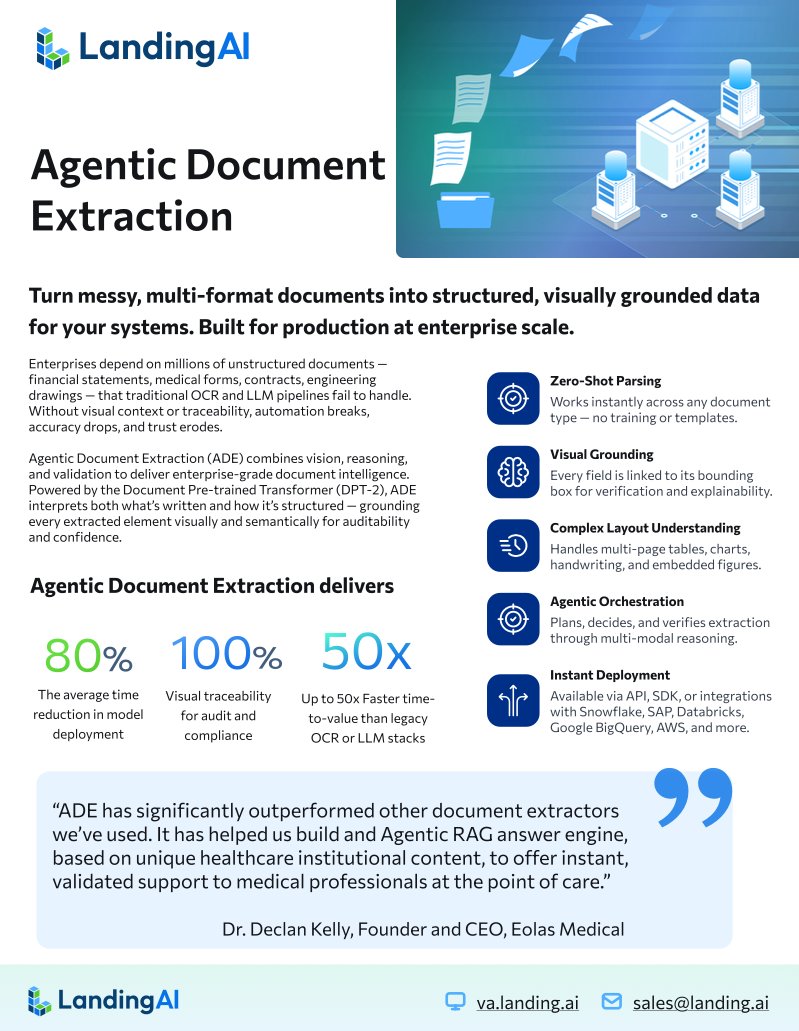
The complete guide to vision-first document extraction. We put together everything about Agentic Document Extraction (ADE) in one resource. ADE converts documents into reliable, structured data. Financial statements, medical records, contracts, insurance forms. Any document that needs to become intelligence your systems can act on. Three core APIs handle the work. Parse turns documents into structured data while preserving layout and visual context. Split separates mixed files into clean, classified subdocuments. Extract pulls specific fields you define with schemas. Everything is visually grounded. Every extracted value traces back to its exact location in the source document. Audit-ready by default. The guide covers how vision-first architecture works, real use cases across financial services and healthcare, performance benchmarks, and what makes ADE different from OCR and LLM-based extraction. If you're evaluating document extraction or building workflows that depend on getting this right, this breaks down what matters.
LandingAI tweet media
English
2
5
20
4.4K
Machine Learning Community ⭐️ retweetledi
Sumanth
Sumanth@Sumanth_077·
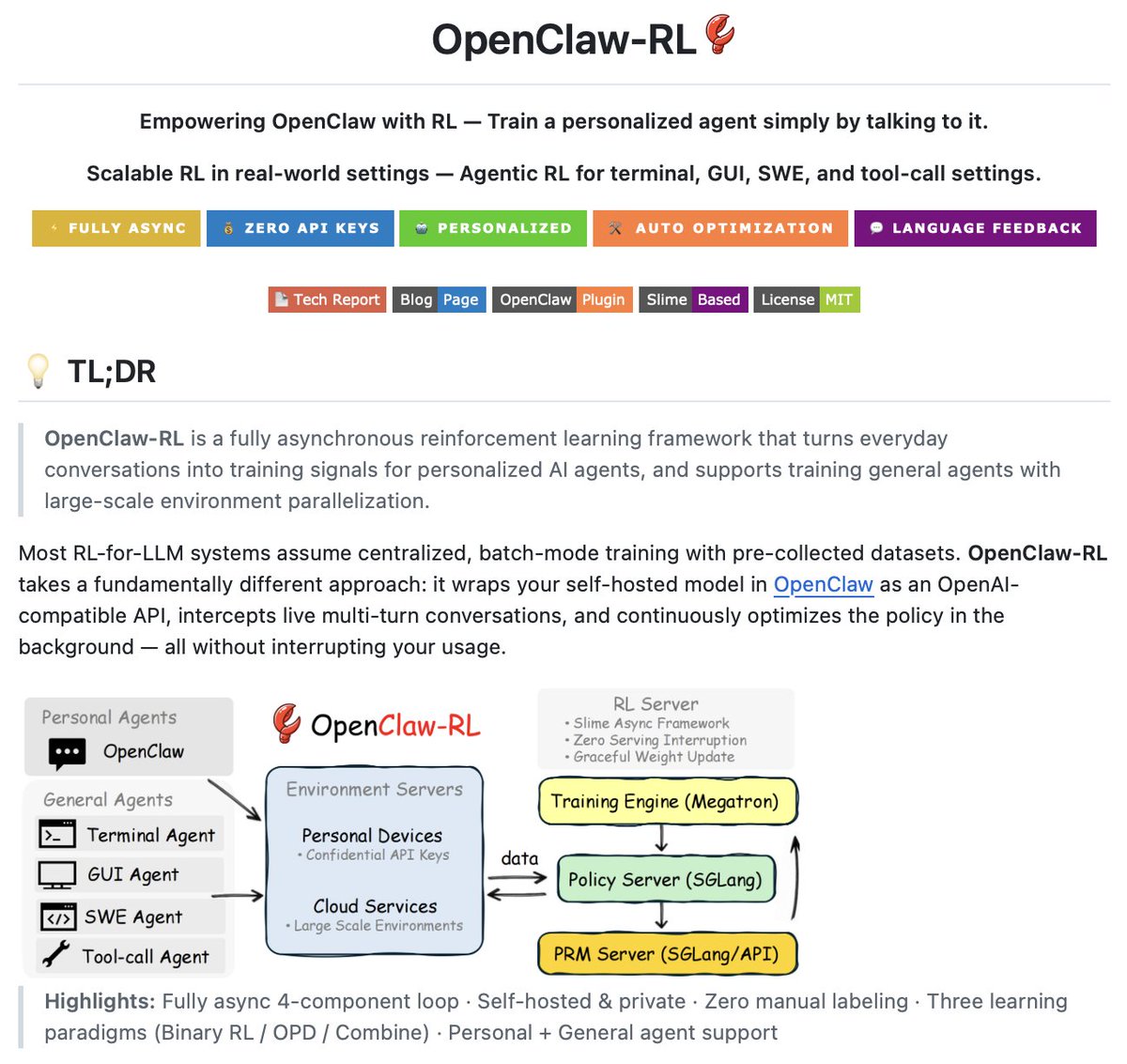
Train your OpenClaw agent by just talking to it! OpenClaw-RL is a reinforcement learning framework that turns everyday conversations into training signals for personalized AI agents. Most RL systems for LLMs assume batch-mode training with pre-collected datasets. You label data manually, train offline, deploy, and hope it works. OpenClaw-RL wraps your self-hosted model as an OpenAI-compatible API through OpenClaw, intercepts live conversations, and continuously optimizes the policy in the background while you use it. How it works: Four independent async loops run simultaneously - agent serving, rollout collection, reward judging, and policy training. The model serves your requests while training happens in the background. No manual labeling. The system automatically classifies messages, uses the next user message as a signal, runs reward evaluation asynchronously, and submits samples to the trainer. Two learning modes: 1. Binary RL (GRPO) - Reward model scores each turn as good/bad/neutral. Works with thumbs up/down or environment success/failure. 2. On-Policy Distillation (OPD) - Extracts textual hints from feedback like "you should have checked the file first." Creates an enhanced teacher for token-level training. Everything runs on your infrastructure. No external API keys required. Conversation data stays local. It's 100% open source Link to OpenClaw-RL in comments!
Sumanth tweet media
English
7
17
113
34.7K
Machine Learning Community ⭐️ retweetledi
Sumanth
Sumanth@Sumanth_077·
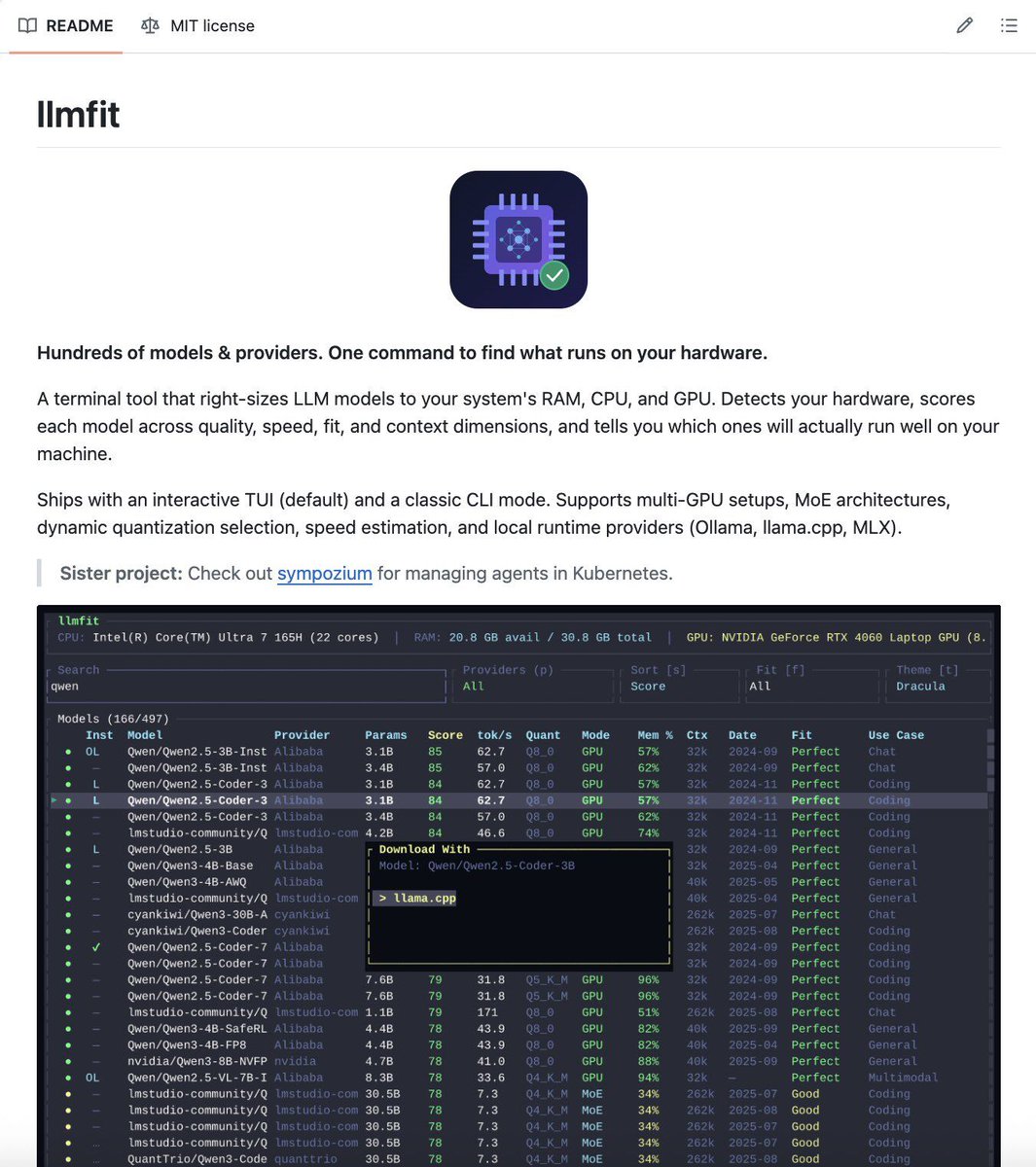
Stop guessing which models fit in your VRAM! llmfit is a CLI tool that auto-detects your hardware and ranks 206 models by what actually runs on your system. You download a 70B model and hope it fits. Or you estimate memory requirements across quantization levels and still end up with models that crash or run too slow. llmfit changes that. It detects your CPU, RAM, GPU, and VRAM, then scores every model in its database against your hardware. Instead of assuming one quantization level, it tries the best quality that fits. Starts with Q8_0, walks down to Q2_K if needed. If nothing fits at full context, it tries half context. You get the highest quality model that actually works. Each model gets scored on Quality, Speed, Context, and Capability. The weights shift based on what you're doing. Chat models prioritize speed, reasoning models prioritize quality. Run it as an interactive TUI to browse models, use CLI mode for a quick table, or get JSON output for scripts. There's a REST API for cluster schedulers. You can also run it in reverse. Give it a model you want to run and target performance, it tells you what hardware you need. The real value: you see ranked options before downloading anything. No more burning bandwidth on 50GB models that won't run. It's 100% open source.
Sumanth tweet media
English
10
32
160
13.2K
Machine Learning Community ⭐️ retweetledi
Sumanth
Sumanth@Sumanth_077·
Someone built a full operating system for autonomous AI agents! OpenFang is an agent OS that runs agents for you on schedules instead of waiting for you to prompt them. Written entirely in Rust, compiles to a single 32MB binary. Here's the key difference: Traditional agent frameworks wait for you to type something. OpenFang runs autonomous agents that work for you on schedules, 24/7, building knowledge graphs, monitoring targets, generating leads, managing social media, and reporting results to your dashboard. The core concept is Hands. These are pre-built autonomous agents that run independently without you prompting them. A Hand wakes up at 6 AM, researches your competitors, builds a knowledge graph, scores the findings, and delivers a report to your Telegram. Here are the 7 Hands: • Lead - Discovers prospects matching your ICP daily, enriches with web research, scores 0-100, delivers qualified contacts • Researcher - Cross-references multiple sources, evaluates credibility, generates fully cited reports •Twitter - Creates content in 7 rotating formats, schedules posts, responds to mentions. Everything goes through approval before posting • Clip - Takes YouTube videos, cuts vertical shorts with auto-captions, adds AI voice-over, publishes to WhatsApp/Telegram • Browser - Navigates sites, fills forms, handles multi-step workflows. Has mandatory approval before purchases • Collector - Monitors targets with change detection, sentiment tracking, sends critical alerts • Predictor - Makes predictions with confidence intervals, tracks its own accuracy over time Connects to 40 messaging platforms including Telegram, Discord, Slack, WhatsApp, Signal, Teams, LinkedIn, Reddit. Works with 27 LLM providers. OpenAI-compatible API. You can migrate from OpenClaw in one command. It's 100% open source. Link to OpenFang in comments!
Sumanth tweet media
English
19
27
90
7.7K
Machine Learning Community ⭐️ retweetledi
Sumanth
Sumanth@Sumanth_077·
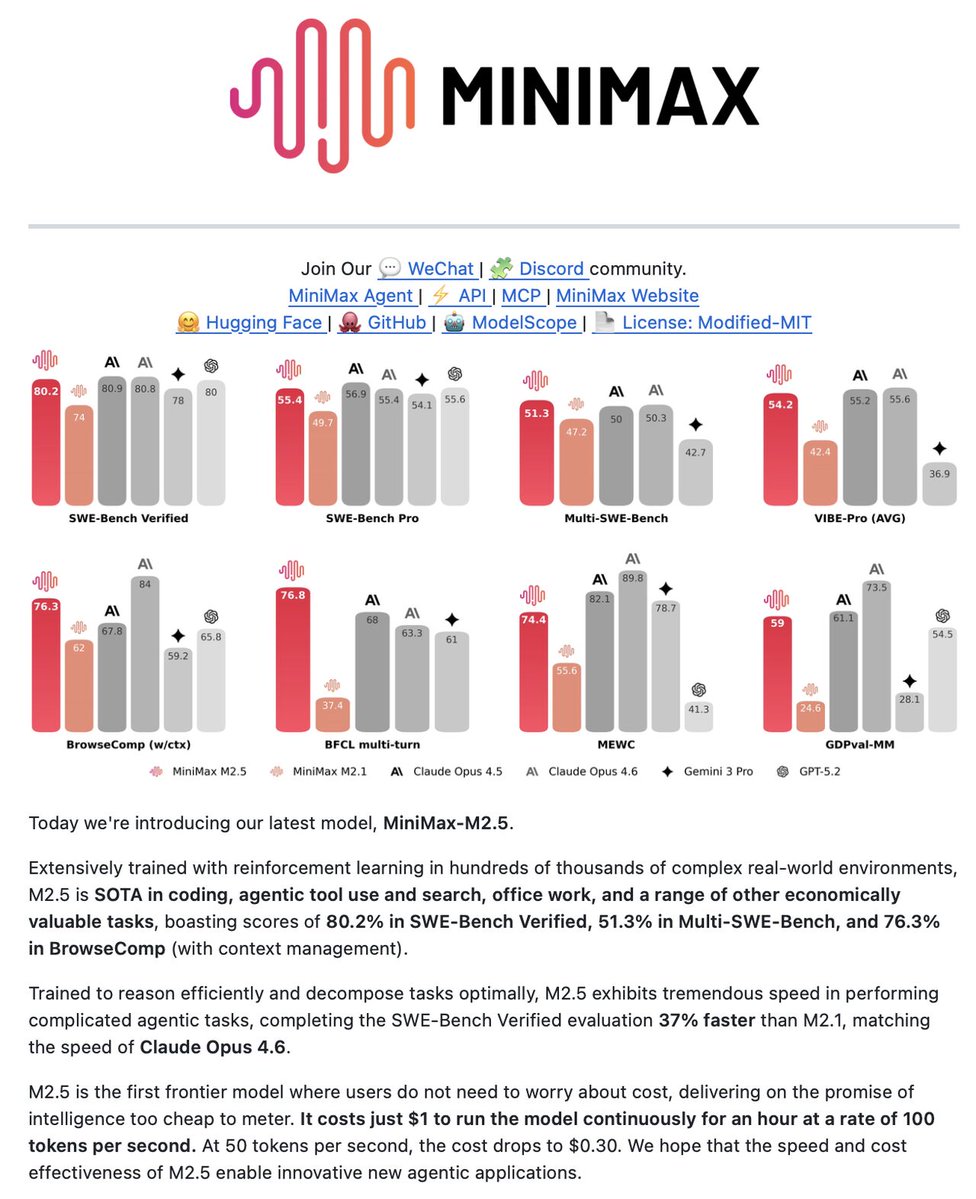
MiniMax M2.5 went fully open source. If you're running OpenClaw, this changes the game. It's basically Claude Opus performance but 95% cheaper. It scores 80.2% on SWE-Bench Verified. OpenClaw's been great for persistent AI agents with memory, tools, and messaging integrations. The problem is running it 24/7 with frontier models burns money fast. M2.5 solves that. 80.2% on SWE-Bench Verified versus Opus 4.6 at 80.8%. That's a 0.6% gap for a model that costs $0.15 per task versus $3. The architecture is what makes this work. 230B total parameters, only 10B active during inference. MoE model that gives you frontier performance without frontier compute costs. It was trained on 200K+ real-world RL environments across 10+ programming languages. During training, the model developed what MiniMax calls an "architect mindset." Before writing code, it plans structure, features, and UI design. This wasn't programmed - it emerged from RL. Tool calling is actually better than Opus. BFCL scores: 76.8% versus Opus at 63.3%. In practice, this means cleaner function calls and better multi-step workflows. Speed matches Opus too. M2.5 completes SWE-Bench tasks in 22.8 minutes versus Opus at 22.9 minutes. For OpenClaw users, the cost difference compounds. $1/hour for continuous operation at 100 TPS. Run agents 24/7 without burning your API budget. MiniMax also released MaxClaw - cloud-hosted OpenClaw + M2.5 with zero setup. One-click deploy, runs 24/7, no servers to manage. Same OpenClaw framework, same capabilities, powered by M2.5, running in the cloud. MiniMax M2.5 is fully open source. I wrote a full guide on setting up MaxClaw for automated research workflows. Link to the article in the replies.
Sumanth tweet media
English
7
19
117
9.7K
Machine Learning Community ⭐️ retweetledi
Sumanth
Sumanth@Sumanth_077·
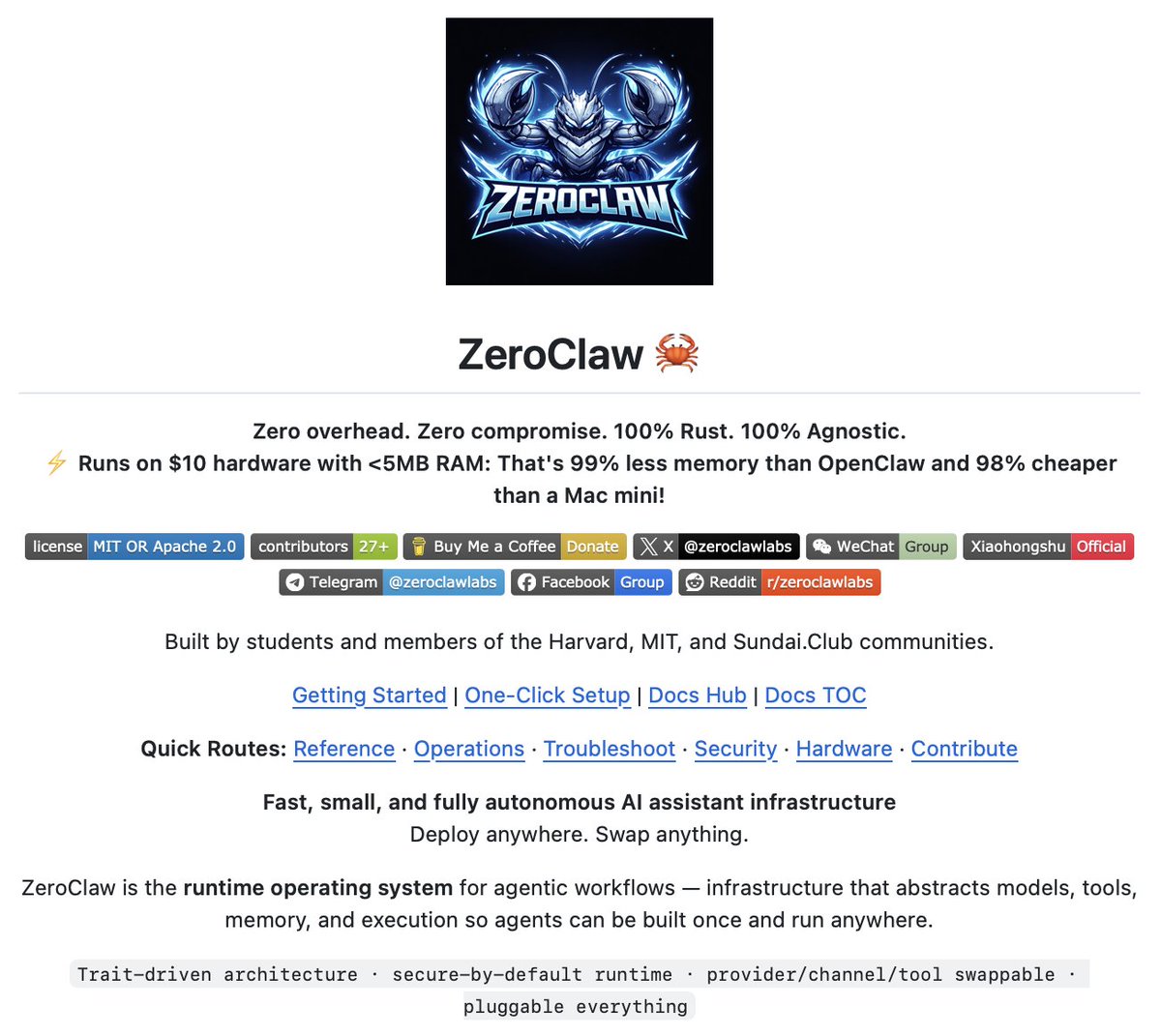
You can run a full AI agent on a $10 microcontroller. Under 5MB of RAM. ZeroClaw is an open-source agent runtime written entirely in Rust. Most AI agent frameworks assume you have a server or gigabytes of memory. ZeroClaw runs on hardware other frameworks can't touch. The runtime is trait-driven. Everything is swappable - providers, channels, tools, memory backends. Switch from OpenAI to Anthropic with one line. Swap memory systems by changing the trait. Common CLI workflows run in a few-megabyte memory envelope. That's why it works on microcontrollers, old Android phones via Termux, Raspberry Pi Zero, and cheap cloud instances. Already running OpenClaw? One command migrates everything: "zeroclaw migrate openclaw" Multi-channel support out of the box. Telegram, Discord, Slack, WhatsApp, Matrix. Your agent lives where you work. The architecture is secure-by-default. Built with Rust's memory safety and explicit permission boundaries for tool execution. When your agent runtime is under 5MB, deployment becomes trivial. Edge devices, constrained environments, places where multi-GB runtimes won't run. Already at 25k+ stars. It's fully open source Link to ZeroClaw in comments!
Sumanth tweet media
English
14
17
66
6.3K