Chris Whiting

526 posts

Chris Whiting

Chris Whiting

@chriswhiting84

Katılım Kasım 2011
330 Takip Edilen31 Takipçiler
Chris Whiting
Chris Whiting@chriswhiting84·
@MSFT365Status any incidents involving Azure in the UK ? Seeing power automate flows stuck for over an hour or failing to run
English
1
0
1
417
tdid
tdid@le_tdid·
@mkristensen Not just that, but prototyping has gotten so much simpler. 20-30 mins for a brainstorm and you can come back after an hour to a working prototype. I envision theres going to be a big shift to more tailored inhouse software solutions, even for non software companies.
English
1
0
1
116
Mads Kristensen
Mads Kristensen@mkristensen·
One thing I *really* love about Copilot and AI coding agents is that the ROI an almost anything I can think of is now positive. I'm revamping old projects, fixing bugs in legacy systems, tackling much larger projects, and enjoying it all every bit of the way
English
8
4
63
4.7K
Intune Support Team
Intune Support Team@IntuneSuppTeam·
Hi, that's a good question! Just a heads-up about how LAPS works on macOS devices: LAPS (Local Administrator Password Solution) only kicks in when the device is enrolled using Automated Device Enrollment (ADE). So, if the Mac was already enrolled in Intune before LAPS was set up, the device needs to be reenrolled using an ADE profile that has LAPS enabled. Once that’s done, LAPS will be good to go for managing the local admin password. Here’s a doc if you want to dive deeper: msft.it/6013sw5cW. Hope this helps! ^IH
English
1
0
6
602
Reclusive Elusive (GUI Rat)
Reclusive Elusive (GUI Rat)@guiratcom·
Ok but how do we do it without on devices that have been already provisioned?
Intune Support Team@IntuneSuppTeam

ICYMI: 🍎 @Apple macOS management with Microsoft Intune just levelled up! ✨ Now in general availability - @MSIntune brings support for local administrator account configuration with Microsoft Local Admin Password Solution (LAPS) password solution on macOS. 🔐 Securely rotate credentials, enforce compliance, and lockdown your Mac endpoints. ➡️ Learn more: msft.it/6012sOPwY #IntuneInspired #MSIntune #SecureByDesign


English
1
0
1
1K
Merill Fernando
Merill Fernando@merill·
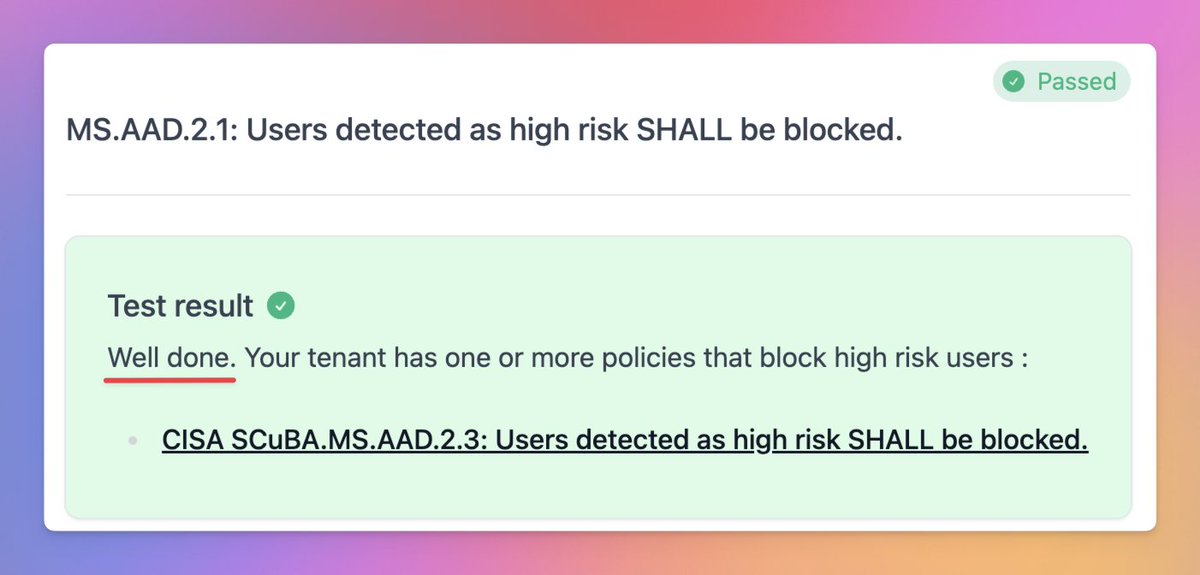
an that's why we love to reward good behavior in Maester 😎 👇
Merill Fernando tweet media
English
1
0
14
4.6K
Intune Support Team
Intune Support Team@IntuneSuppTeam·
@plasticlicker Hi Craig! 👋 we'd love to help! We had a quick look and nothing is currently flagged on our end. Could you please DM us more details, so we can assist you further? Thanks! 😊 ^MM
English
1
0
1
310
Craig Chambers
Craig Chambers@plasticlicker·
We are experiencing an issue where @MicrosoftTeams (new or old) is not installing as part of the @Office365 suite through @MSIntune Office policy. We’ve had E3 licenses for years; my understanding is the new licensing changes wouldn’t affect us. Is this a big or feature?
English
3
0
2
341
Brent Wegener
Brent Wegener@0xDADBAUD·
Microsoft Edge: AI Browser (126.2592.117) Released 7/23/2024 is crashing on iOS devices. If you’re running an MDM with automatic updates enabled for this application, I recommend you disable the auto updates for now. @MicrosoftEdge @Microsoft @MSIntune
English
4
0
9
1.4K
Chris Whiting retweetledi
Carol Vorderman
Carol Vorderman@carolvorders·
About last night 😂 Don’t think I’ll be on Nadine’s Xmas Card List do you? @Channel4
English
1.8K
2.9K
26.3K
1.3M
Chris Whiting retweetledi
Harry Eccles
Harry Eccles@Heccles94·
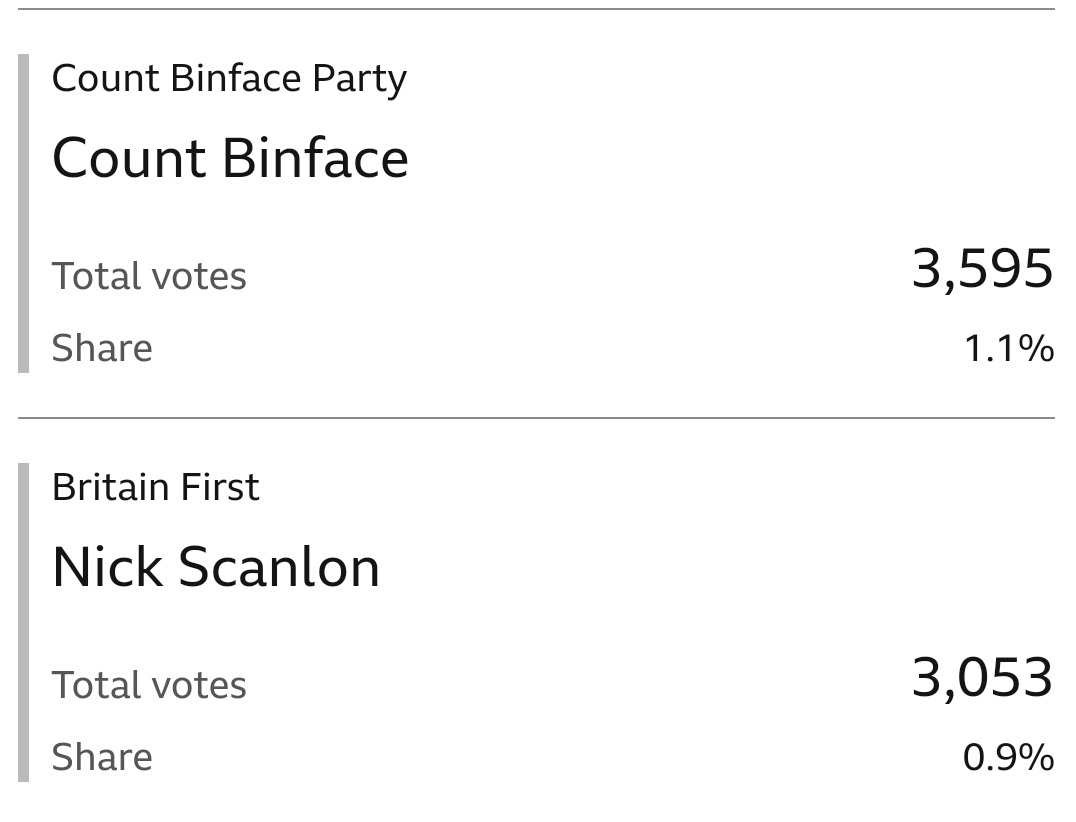
Good to see Count Binface beating the Facists!
Harry Eccles tweet media
English
45
947
14K
337.8K
Intune Support Team
Intune Support Team@IntuneSuppTeam·
@KiPos_info Hi! Thanks for sharing this with us. We're looking further into this, and we will keep you posted as soon as we have more info to share. Thanks! ^MR
English
1
0
1
581
boosted Bobby Tables
boosted Bobby Tables@KiPos_info·
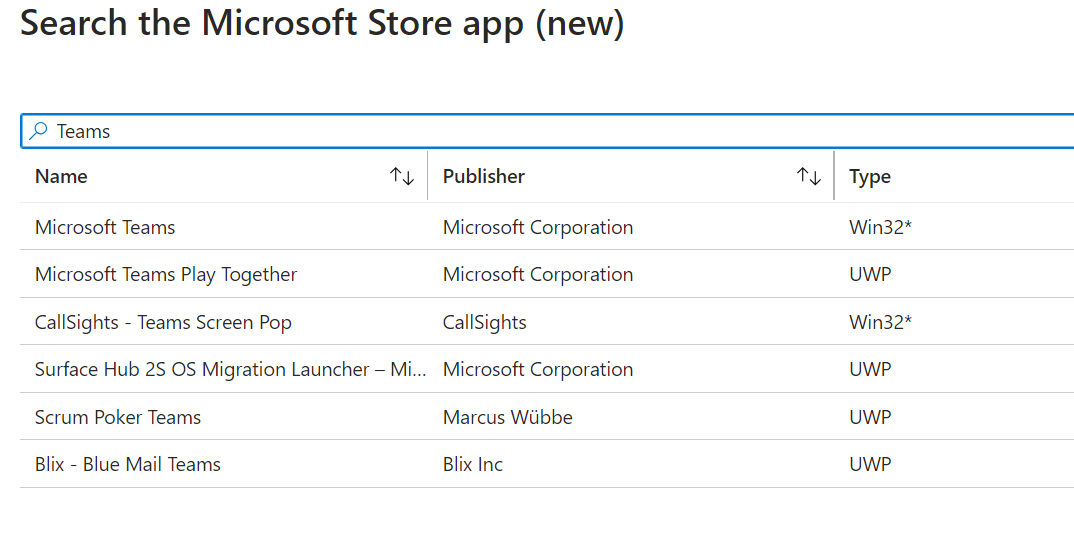
As my previous MSIX as LoB app fails on 100% of devices now, what is the expected way to deploy @MicrosoftTeams (for work) using @MSIntune in EU? "Office" doesnt install Teams in EU "Store (new)" only has Win32 package which doesnt work so?!
boosted Bobby Tables tweet mediaboosted Bobby Tables tweet media
English
4
0
0
842
Chris Whiting
Chris Whiting@chriswhiting84·
@IntuneSuppTeam Hi, yes read through that and confirmed nothing set that is on that list, nothing in event viewer , anything more to check?
English
1
0
0
25
Chris Whiting
Chris Whiting@chriswhiting84·
Hi @MSIntune @IntuneSuppTeam seeing a reboot on autopilot user setup AFTER white glove. User taken to login screen with no web login option (policy is set to enable this) Checked event logs and no coalesced reboot in there, all policies set to user. So frustrating after issuing a
English
2
0
0
466
Chris Whiting
Chris Whiting@chriswhiting84·
TAP to then have to then send the user their password every time. Windows 11 machines, but saw same thing with Windows 10
English
0
0
0
35
Chris Whiting
Chris Whiting@chriswhiting84·
@IntuneSuppTeam @Windows Still getting reboots during ESP with web login policy then not applying requiring a password rather than TAP - frustrating
English
0
0
1
147
Intune Support Team
Intune Support Team@IntuneSuppTeam·
We'd love to get your feedback on how you're using the Enrollment Status Page (ESP) for your @Windows Autopilot deployments. Let us know if you enable any of the below ⬇️ Option not listed? Please share! ⬇️ #MSIntune #WindowsAutopilot
English
10
2
4
7.8K
Peter Klapwijk | MVP
Peter Klapwijk | MVP@inthecloud_247·
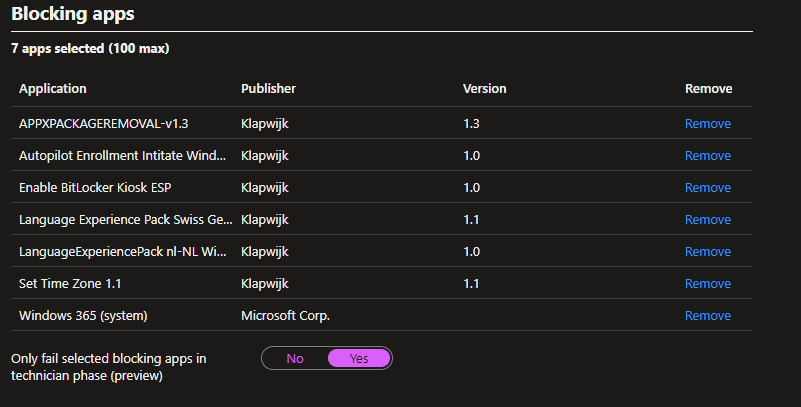
If I understand it correctly with this toggle all required assigned apps will be installed during pre-prov, but pre-prov will only fail when one of the listed apps fails? And during normal enrollment, only the listed apps will be installed? @IntuneSuppTeam
Peter Klapwijk | MVP tweet media
English
5
2
22
6.3K