
Sabitlenmiş Tweet
codemarch
15K posts


codemarch
@codemarch
Tech, reimagined with AI 🤖 Daily AI tools, workflows & use-cases 🎯 Turn AI into income 💰
Katılım Mart 2022
261 Takip Edilen60.3K Takipçiler

Everyone is talking about AI.
Almost nobody knows how to actually make money from it.
After 100+ hours of research and experimenting,
My team and I mapped 200+ real ways to make money with AI.
In this guide, we cover:
- 200+ strategies tailored for creators, entrepreneurs, and forward-thinking professionals
- Profitable ideas in industries such as content creation, e-commerce, gaming, and more
- Insights into cutting-edge AI applications for sustainable growth
- Easy-to-start strategies
- Future-proofing your skills
And a lot more
To get it for FREE,
1. Like
2. Comment 'AI'
And I'll send it to you ASAP
♻️ Repost to get priority access

English

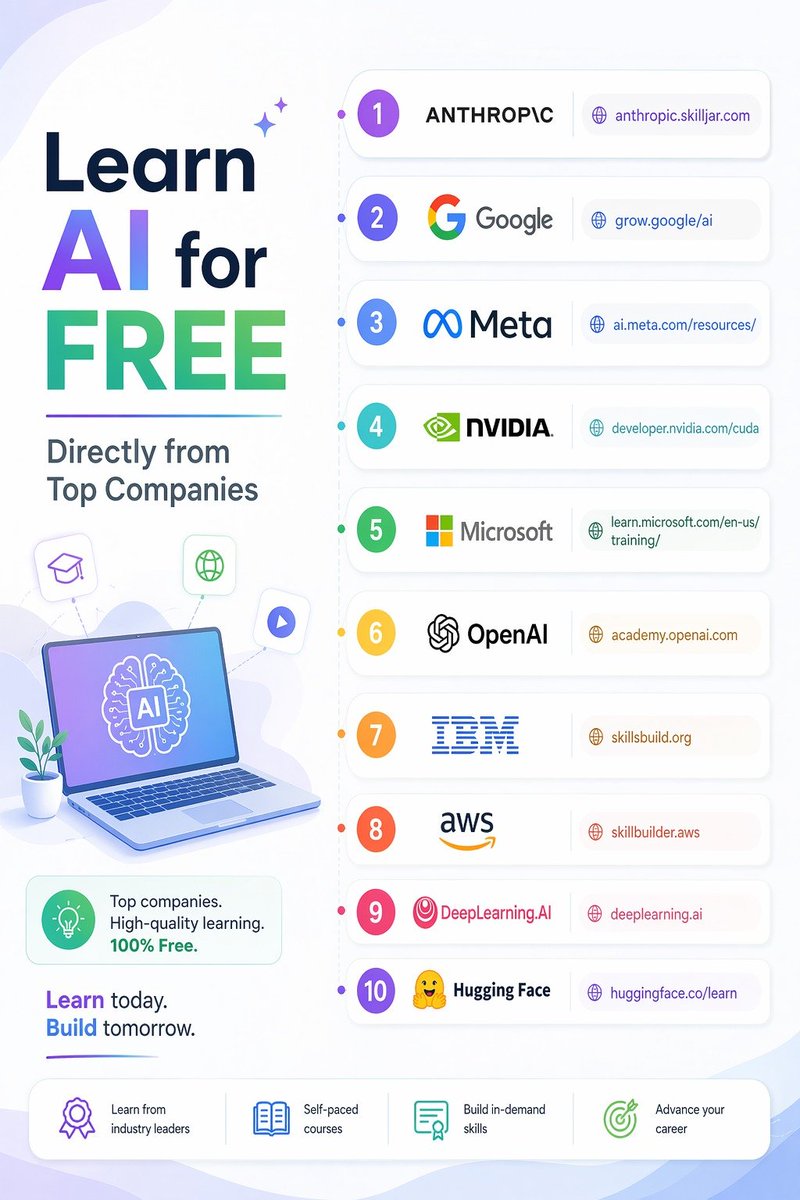
Learn AI for free directly from top companies
𝟭 - 𝗔𝗻𝘁𝗵𝗿𝗼𝗽𝗶𝗰:
anthropic.skilljar.com
𝟮 - 𝗚𝗼𝗼𝗴𝗹𝗲:
grow.google/ai
𝟯 - 𝗠𝗲𝘁𝗮:
ai.meta.com/resources/
𝟰 - 𝗡𝗩𝗜𝗗𝗜𝗔:
developer.nvidia.com/cuda
𝟱 - 𝗠𝗶𝗰𝗿𝗼𝘀𝗼𝗳𝘁:
learn.microsoft.com/en-us/training/
𝟲 - 𝗢𝗽𝗲𝗻𝗔𝗜:
academy.openai.com
𝟳 - 𝗜𝗕𝗠:
skillsbuild.org
𝟴 - 𝗔𝗪𝗦:
skillbuilder.aws
𝟵 - 𝗗𝗲𝗲𝗽𝗟𝗲𝗮𝗿𝗻𝗶𝗻𝗴𝗔𝗜:
deeplearning.ai
𝟭𝟬 - 𝗛𝘂𝗴𝗴𝗶𝗻𝗴 𝗙𝗮𝗰𝗲:
huggingface.co/learn
Like
Retweet
Bookmark
Follow @anujcodes_21 for more AI Posts
English
Everyone defaults to RAG. There are 8 ways to connect an LLM to your data. Most engineers only know one.
Your data shape, query pattern, and cost constraints should pick the method. Not habit.
Here are all eight.
1. Long Context (brute force)
↳ Put everything in the prompt. No retrieval, no infra.
↳ Works for: small, static datasets under 200K tokens. Prototypes. One-off analysis.
↳ Breaks at: scale. $0.10-$15 per query. 20-60s latency. Accuracy drops 20%+ for information buried in the middle.
2. CAG (Cache-Augmented Generation)
↳ Load all docs into context once,
↳ persist the model's internal state across queries.
↳ Every subsequent query skips both retrieval and re-processing.
↳ Works for: static knowledge bases with high query volume.
↳ Breaks at: frequently changing data. Anything too large.
3. RAG (Retrieval-Augmented Generation)
↳ Chunk, embed, store in vector DB, retrieve by semantic similarity at query time.
↳ Works for: large, evolving knowledge bases. 100K+ documents. ~$0.00008 per query.
↳ Variations that all build on vectors at the core:
→ Agentic RAG: agent orchestrates multiple retrieval strategies dynamically
→ GraphRAG: extracts entities and relationships into a knowledge graph for multi-hop reasoning
→ Hybrid search: combines keyword (BM25) with semantic (vector) retrieval
4. Text-to-SQL
↳ LLM generates SQL from natural language, executes against your database.
↳ Works for: structured, tabular data. Analytics. Aggregations. Joins.
↳ Breaks at: unstructured text. Complex schemas without documentation.
↳ Needs query sandboxing for security.
5. Agentic File Search
↳ LLM uses tools (grep, file read, glob) to iteratively search your file system.
↳ Works for: codebases. Structured directories. Multi-step search that requires reasoning.
↳ Breaks at: millions of unstructured documents. Speed-critical applications.
↳ This is how Claude Code works.
6. Vectorless Reasoning RAG
↳ Documents become hierarchical JSON trees. LLM navigates the structure using reasoning, not similarity.
↳ Works for: long structured documents. Financial reports, legal contracts, academic papers.
↳ Breaks at: flat unstructured text. Large corpora. Speed-critical applications.
7. Tool Use / Function Calling
↳ LLM calls external APIs to fetch real-time data as part of its reasoning.
↳ Works for: live data (stock prices, weather, CRM records). Data behind existing APIs.
↳ Breaks at: unstructured text search. When no API exists.
↳ MCP standardises this
8. Fine-tuning
↳ Train the model on your domain data.
↳ Knowledge lives in the weights, not retrieved at inference.
↳ Works for: stable domain knowledge.
↳ Breaks at: changing information. Source attribution.
No single method wins everywhere.
Most production systems combine two or three.
The question is not "should I use RAG?" It is "which pattern fits my data, my queries, and my constraints?"
♻️ Repost to help an engineer pick the right pattern.

English

Get your HONOR 600 Series today and enjoy free gifts worth AED 99.
English

Most people use Claude Code like a basic AI assistant.
But power users know the real advantage comes from mastering the commands behind the workflow.
Here are 26 essential Claude Code commands every developer, builder, and AI workflow operator should know 👇
━━━━━━━━━━━━━━━
SESSION & WORKFLOW CONTROL
━━━━━━━━━━━━━━━
🔹 /clear → Reset conversation history instantly
🔹 /resume → Continue previous coding sessions without losing context
🔹 /branch → Create alternate conversation paths for experiments
🔹 /rewind → Jump back to earlier checkpoints in your workflow
🔹 /rename → Organize sessions with custom names
🔹 /export → Save chats, outputs, and project discussions
These commands make long AI-assisted projects far easier to manage.
━━━━━━━━━━━━━━━
MODEL & TOKEN MANAGEMENT
━━━━━━━━━━━━━━━
🔹 /model → Switch between Claude models depending on task complexity
🔹 /cost → Estimate current session spending
🔹 /usage → Track model and token usage
🔹 /extra-usage → Detailed analytics for optimization
Small monitoring habits can dramatically reduce wasted tokens and API costs.
━━━━━━━━━━━━━━━
PROJECT INITIALIZATION
━━━━━━━━━━━━━━━
🔹 /init → Start Claude Code inside a project directory
🔹 /memory → Store persistent project instructions and context
🔹 /add-dir → Include extra folders in the working environment
🔹 /config → Modify project-level settings and preferences
This is where Claude starts behaving more like an actual coding teammate.
━━━━━━━━━━━━━━━
CODE OPERATIONS & REVIEW
━━━━━━━━━━━━━━━
🔹 /diff → Compare generated changes against your codebase
🔹 /security-review → Scan code for vulnerabilities and risky patterns
🔹 /plan → Generate structured implementation roadmaps
🔹 /permissions → Control file access permissions safely
🔹 /compact → Compress project context for better efficiency
These commands help maintain clean, scalable AI-assisted development workflows.
━━━━━━━━━━━━━━━
AGENTS & EXTENSIONS
━━━━━━━━━━━━━━━
🔹 /agents → View specialized AI agents
🔹 /skills → Add or manage agent capabilities
🔹 /plugin → Manage installed plugins
🔹 /reload-plugins → Refresh plugin configurations
🔹 /mcp → Connect external tools using Model Context Protocol
This layer unlocks automation beyond simple prompting.
━━━━━━━━━━━━━━━
INTERFACE CUSTOMIZATION
━━━━━━━━━━━━━━━
🔹 /theme → Change terminal appearance
🔹 /color → Customize terminal color schemes
Because developer experience matters too.
The biggest productivity jump in AI coding doesn’t come from better prompts alone.
It comes from learning how to control the entire workflow system around the model.
❤️ Like
🔁 Retweet
🔖 Bookmark
Follow @akhilesh9235 for more such posts
#AI #ArtificialIntelligence #AISkills #AIAgents #RAG #LLM #PromptEngineering

English

This is the kind of support AI builders actually care about.
Not hype. Not waitlists.
Just real credits, early access, and the freedom to test ideas fast enough to turn them into products.
Checkout: gmicloud.ai/en/company/amb…
GMI Cloud@gmi_cloud
Applications are open for our Ambassador Program, aka the Clouders. If you're obsessed with building with AI, from LLMs to multimodal, we want you 🫵 Apply now in comment👇 Questions? Find us in Discord or drop them below.
English
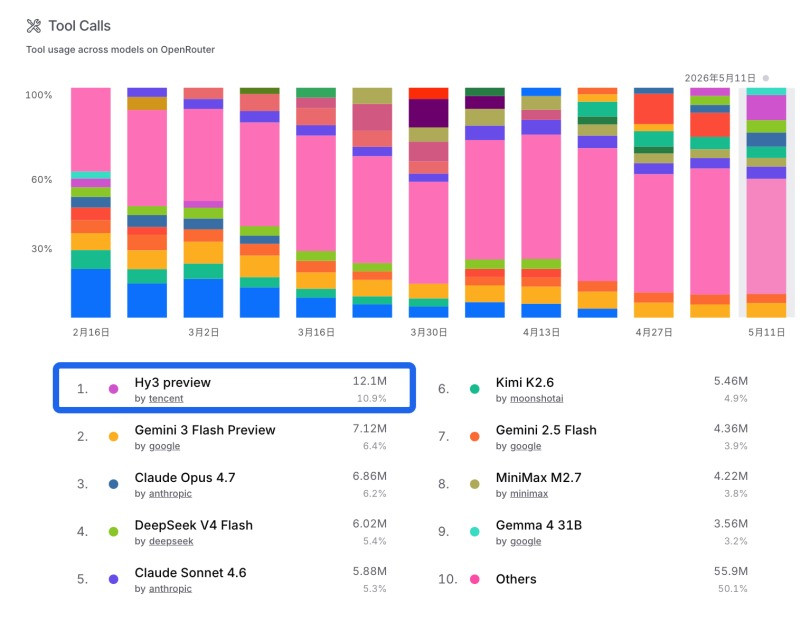
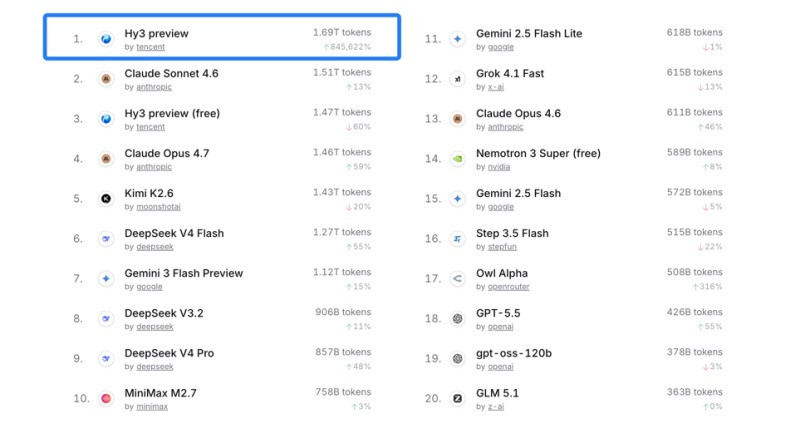
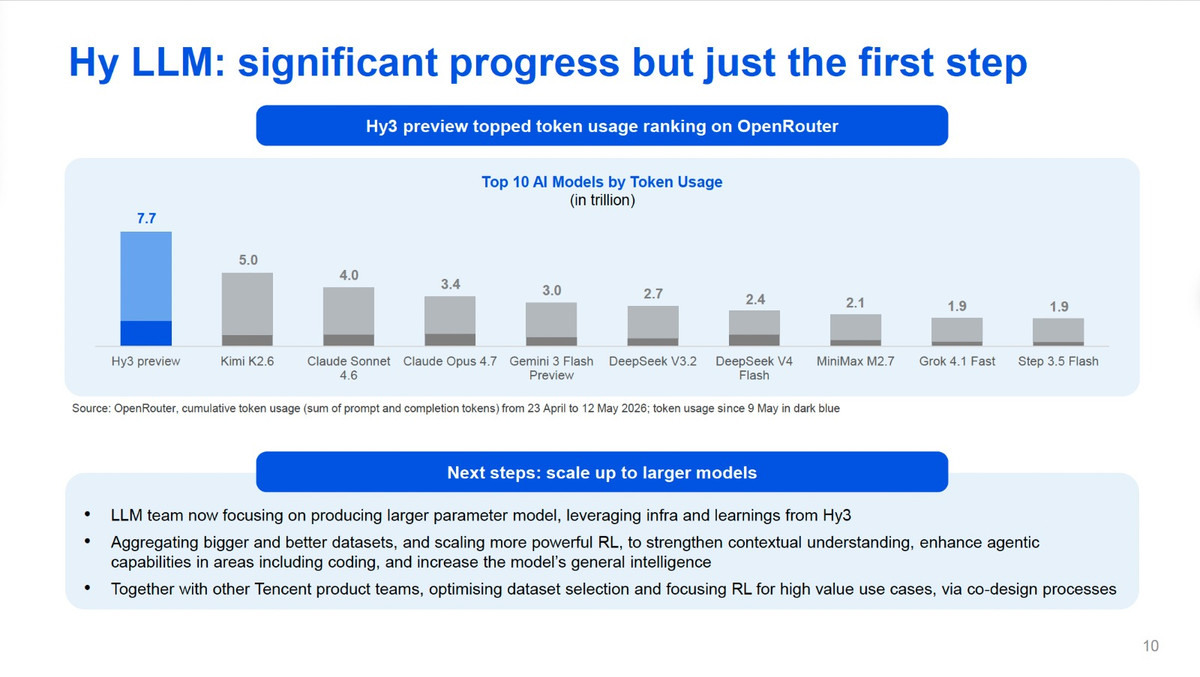
The most bullish signal for Hy3 preview isn’t benchmarks.
It’s retention.
Free-tier traffic can always be questioned. Developers experiment with everything.
But once payment starts, behavior becomes brutally honest.
And Hy3 barely flinched.
Only ~20% call-volume pullback after monetization from a 530B+ token peak is honestly kind of insane.
Translation: developers tested it, evaluated alternatives, saw the pricing, and still stayed.
At the same time:
• #1 overall on OpenRouter
• #1 in tool-calling
• massive pricing advantage vs Claude Sonnet 4 and GPT-4.1
This is what happens when capability and cost-efficiency align at the same time.
The interesting part is that Hy3 isn’t winning solely because it’s cheap. If that were true, volume would evaporate after monetization. Instead, paid demand stayed extremely resilient.
That suggests developers see genuine workflow value here.
@TencentHunyuan @TencentAI_News

English

All Paid Courses (Free for First 4500 People)
𝗣𝗮𝗶𝗱 𝗖𝗼𝘂𝗿𝘀𝗲 𝗙𝗥𝗘𝗘 (PART - 1)
1. Artificial Intelligence
2. Machine Learning
3. Prompt Engineering
4. Claude,Chatgpt,Grok
5. Data Analytics
6. AWS Certified
7. Data Science
8. BIG DATA
9. Python
10. Ethical Hacking
(72 Hours only )
Like + RT + comment ' Drive '
Must Follow me so I can DM you.

English

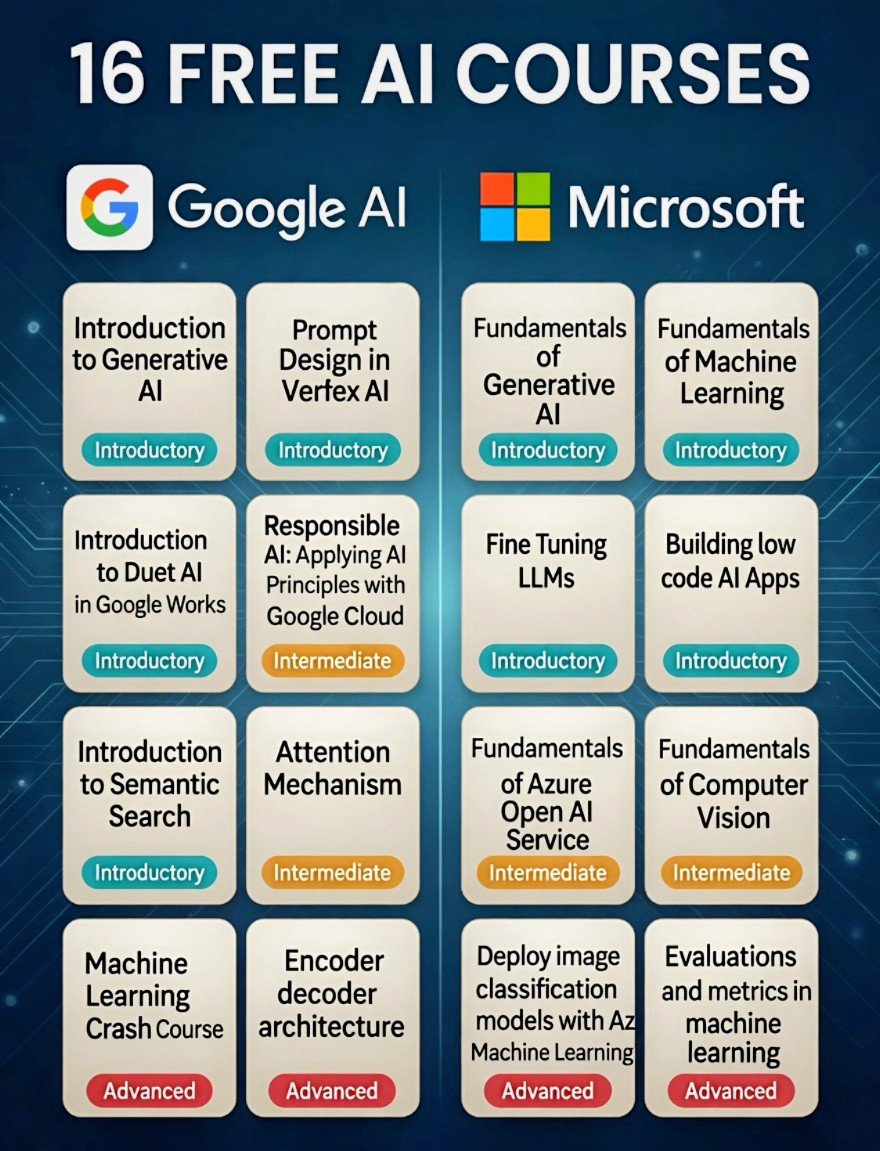
Most people are paying for AI skills that Google & Microsoft are teaching for free
16 free AI courses covering
•Generative AI
•Prompt Engineering
•Fine-Tuning LLMs
•Computer Vision
•Machine Learning
Best part? 100% FREE
Want the full list+links?
👉Reply“AI”and check DM
English

Love seeing programs that actually support builders instead of just asking for promo posts.
Free credits, early access to upcoming models/features, referral rewards, and even funding for community meetups is a pretty solid combo.
If you’re deep into AI right now, this is worth applying for 👇
gmicloud.ai/en/company/amb…
GMI Cloud@gmi_cloud
Applications are open for our Ambassador Program, aka the Clouders. If you're obsessed with building with AI, from LLMs to multimodal, we want you 🫵 Apply now in comment👇 Questions? Find us in Discord or drop them below.
English
@RishiUvaach @akhilesh9235 @MeenakshiYACS @sonalshukla3377 @hrswatigupta @amrita4AI @gurpreet671 @pushkersoni72 Presented very well.
English

🎯 𝗖𝗹𝗮𝘂𝗱𝗲 𝗶𝘀 𝗻𝗼 𝗹𝗼𝗻𝗴𝗲𝗿 𝗷𝘂𝘀𝘁 𝗮 𝗰𝗵𝗮𝘁𝗯𝗼𝘁.
It can build, automate, research, operate tools, create deliverables, and increasingly work like a digital teammate.
Here are 𝗟𝟮 𝗽𝗼𝘄𝗲𝗿𝗳𝘂𝗹 𝘁𝗵𝗶𝗻𝗴𝘀 𝗖𝗹𝗮𝘂𝗱𝗲 𝗰𝗮𝗻 𝗱𝗼 𝘁𝗼𝗱𝗮𝘆:
01 — 𝗕𝘂𝗶𝗹𝗱 𝘄𝗲𝗯𝘀𝗶𝘁𝗲𝘀 𝘄𝗶𝘁𝗵𝗼𝘂𝘁 𝗰𝗼𝗱𝗶𝗻𝗴
Use Claude Code to create full websites in plain English.
Connect GitHub, describe what you want, and push it live.
02 — 𝗟𝗲𝘁 𝗖𝗹𝗮𝘂𝗱𝗲 𝘂𝘀𝗲 𝘆𝗼𝘂𝗿 𝗰𝗼𝗺𝗽𝘂𝘁𝗲𝗿
Claude can click, browse, and complete tasks on your Mac.
With Dispatch, you can even control it remotely from your phone.
03 — 𝗖𝗿𝗲𝗮𝘁𝗲 𝗿𝗲𝘂𝘀𝗮𝗯𝗹𝗲 𝘄𝗼𝗿𝗸𝗳𝗹𝗼𝘄𝘀 𝘄𝗶𝘁𝗵 /𝗰𝗼𝗺𝗺𝗮𝗻𝗱𝘀
Teach Claude repeatable tasks once.
Type /linkedin, /brief, or /proposal and it runs the workflow automatically.
You can also share these skills with your team.
04 — 𝗚𝗲𝗻𝗲𝗿𝗮𝘁𝗲 𝗿𝗲𝘀𝗲𝗮𝗿𝗰𝗵-𝗯𝗮𝗰𝗸𝗲𝗱 𝘀𝗹𝗶𝗱𝗲 𝗱𝗲𝗰𝗸𝘀
Claude can research a topic, structure the narrative, build a strong brief, and generate a polished Gamma presentation — all from one prompt.
05 — 𝗔𝘂𝘁𝗼𝗺𝗮𝘁𝗲 𝗿𝗲𝗰𝘂𝗿𝗿𝗶𝗻𝗴 𝘁𝗮𝘀𝗸𝘀
Set scheduled workflows like:
Weekly competitor scans
Monday market briefings
Daily research summaries
Claude runs them automatically at the defined time.
06 — 𝗖𝗿𝗲𝗮𝘁𝗲 𝗘𝘅𝗰𝗲𝗹 𝗳𝗶𝗹𝗲𝘀 𝗳𝗿𝗼𝗺 𝗽𝗿𝗼𝗺𝗽𝘁𝘀
Describe the spreadsheet you need.
Claude can build financial models, trackers, dashboards, and analysis sheets in seconds.
07 — 𝗖𝗼𝗻𝗻𝗲𝗰𝘁 𝗖𝗹𝗮𝘂𝗱𝗲 𝘁𝗼 𝘆𝗼𝘂𝗿 𝘄𝗼𝗿𝗸 𝗮𝗽𝗽𝘀
Use Connectors to plug Claude into Slack, Gmail, Google Drive, Notion, and 50+ tools.
It can read, write, retrieve, and act inside your existing workflows.
08 — 𝗨𝘀𝗲 𝗖𝗼𝘄𝗼𝗿𝗸 𝗹𝗶𝗸𝗲 𝗮𝗻 𝗔𝗜 𝗲𝗺𝗽𝗹𝗼𝘆𝗲𝗲
Point Cowork to a folder.
It studies the files, asks clarifying questions, and produces real deliverables — reports, summaries, decks, documents, and more.
09 — 𝗥𝘂𝗻 𝗹𝗼𝗻𝗴-𝘁𝗲𝗿𝗺 𝗣𝗿𝗼𝗷𝗲𝗰𝘁𝘀 𝘄𝗶𝘁𝗵 𝗺𝗲𝗺𝗼𝗿𝘆
Cowork Projects remember prior work.
Say, “Build on last week’s report,” and Claude understands the context without starting from zero.
10 — 𝗜𝗻𝘀𝘁𝗮𝗹𝗹 𝗿𝗼𝗹𝗲-𝘀𝗽𝗲𝗰𝗶𝗳𝗶𝗰 𝗽𝗹𝘂𝗴𝗶𝗻𝘀
Claude offers plugins for Sales, Marketing, Legal, Finance, and Data.
Each plugin brings specialized workflows, templates, and /commands for that function.
11 — 𝗟𝗲𝘁 𝗖𝗹𝗮𝘂𝗱𝗲 𝗮𝘀𝗸 𝘆𝗼𝘂 𝘁𝗵𝗲 𝗿𝗶𝗴𝗵𝘁 𝗾𝘂𝗲𝘀𝘁𝗶𝗼𝗻𝘀
With AskUserQuestion, Claude creates clickable forms and structured inputs.
Instead of writing long prompts, it asks exactly what it needs to deliver better output.
12 — 𝗗𝗲𝘀𝗶𝗴𝗻 𝗮𝗻𝘆𝘁𝗵𝗶𝗻𝗴 𝘄𝗶𝘁𝗵 𝗖𝗹𝗮𝘂𝗱𝗲 𝗗𝗲𝘀𝗶𝗴𝗻
Describe a landing page, pitch deck, or app prototype and Claude builds it live.
You can export to Canva, PDF, or Claude Code.
𝗧𝗵𝗲 𝗯𝗶𝗴𝗴𝗲𝗿 𝘀𝗵𝗶𝗳𝘁 𝗶𝘀 𝗰𝗹𝗲𝗮𝗿:
𝗔𝗜 𝘁𝗼𝗼𝗹𝘀 𝗮𝗿𝗲 𝗺𝗼𝘃𝗶𝗻𝗴 𝗳𝗿𝗼𝗺 “𝗮𝗻𝘀𝘄𝗲𝗿𝗶𝗻𝗴 𝗾𝘂𝗲𝘀𝘁𝗶𝗼𝗻𝘀” 𝘁𝗼 𝗮𝗰𝘁𝘂𝗮𝗹𝗹𝘆 𝗲𝘅𝗲𝗰𝘂𝘁𝗶𝗻𝗴 𝘄𝗼𝗿𝗸.
And Claude is pushing aggressively into that territory.

English
Wait… how are people ending up on stadium screens like this??
been seeing these viral stadium cam clips everywhere and finally found out it’s made with Buzzy.
the zoom, the crowd, the timing… it honestly looks like a real broadcast
this trend is getting out of hand...
#StadiumTrend #BuzzyAI #BigScreen #AIGC #TrendingNow
SARAH@SarahAnnabels
Buzzy really turned the Korean baseball stadium cam trend into one of the funniest AI effects on the internet 😭⚾ Those viral KBO crowd videos all over your timeline? A lot of them were made with Buzzy using GPT Image 2 + Seedance 2. Thread 👇
English
codemarch retweetledi


I created this video in 5 minutes for just $1.
And no, I didn’t edit it manually.
This was made using Buzzy, an AI video Photoshop that recreates viral videos in your own style.
Buzzy is a proactive video agent that captures your ideas and turns them into a finished video anytime, anywhere.
Here’s how it works 👇
English

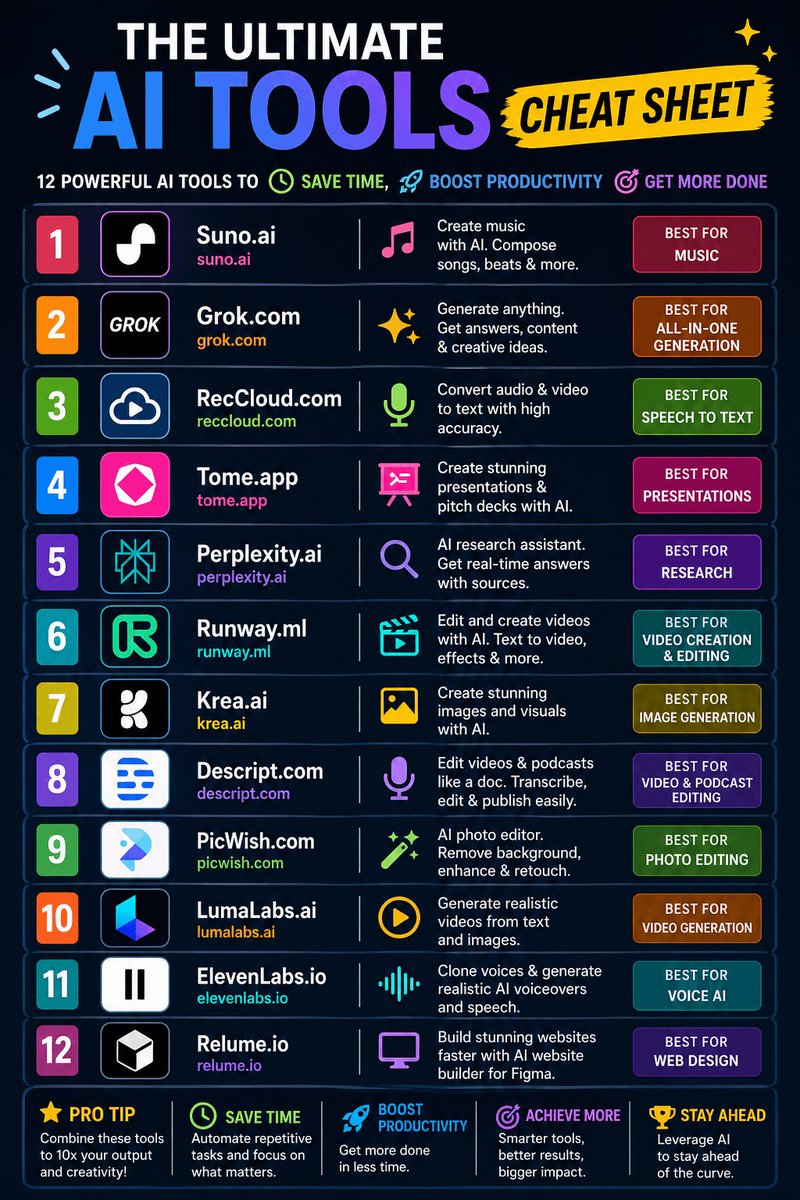
These AI Tools save me 15+ hours per week:
1. Suno.ai – Create music
2. Grok.com – Generate anything
3. RecCloud.com – Speech to text
4. Tome.app – Create presentations
5. Perplexity.ai – AI research assistant
6. Runway.ml – Edit and create videos
7. Krea.ai – Create images
8. Descript.com – Edit videos & podcasts
9. PicWish.com – Photo editor
10. LumaLabs.ai – Generate videos
11. ElevenLabs.io – Clone & generate voice
12. Relume.io – Web design
Keep this! It could be extremely useful.
English
Skills, Subagents, MCP, and Hooks are not four versions of the same thing.
They solve four different problems. Mix them up, and your Claude Code setup starts breaking in ways no one can explain.
Here’s the decision tree I use:
SKILLS → “Load knowledge only when needed”
• Markdown file + helper code
• Loaded per task, not always on
• Best for: specialized knowledge, file formats, repeat workflows
Use when the same knowledge appears often but would bloat context.
SUBAGENTS → “Give a side task its own workspace”
• Separate session with its own memory
• Returns clean output, not the mess
• Best for: deep research, parallel work, messy exploration
Use when the main thread would get cluttered.
MCP → “Connect to external systems”
• Persistent server exposing tools/data
• Handles auth, state, multi-language
• Best for: APIs, databases, SaaS, internal tools
Use when the agent needs to reach something, not just know it.
HOOKS → “Enforce behavior every time”
• Triggered on lifecycle events
• Runs automatically, no exceptions
• Best for: validation, formatting, security, logging
Use when you can’t rely on the model to remember.
Mental model:
• Skills = what the agent knows
• Subagents = where it thinks
• MCP = what it can reach
• Hooks = what it must obey
They don’t compete. They stack.
Common mistakes:
• Building MCP when a Skill was enough
• Overloading main context instead of using Subagents
• Trusting the model instead of enforcing with Hooks
• Treating Skills like docs instead of tools
Hot take:
Most MCP servers should’ve been Skills.
People build connections when they need knowledge—and pay for it with latency, auth issues, and brittle systems.
Where do you draw the line between Skill vs MCP?

English
I've rage-quit more AI agents than I can count.
Not because they were dumb. Because they treated me like a yes/no button. Every. Single. Step.
Jacq is the first one that actually respects my time. Autopilot handles the decisions it can, flags only what truly needs me, runs in the cloud while I sleep, and remembers every thread I've ever had — full context, instantly.
Built by the team that trained models for Lovable and Figma. The pedigree shows.
Eitan Borgnia@EBorgnia
Today we're launching Jacq. A coding agent built together with the small models we've been training at @relace_ai for the past 1.5 years. It runs entirely in the cloud, and decides when to pull context from any of your connected devices. It uses all the software you already live in: Slack, Linear, GitHub, email, etc. Plus, threads are now durable — a real record of how work happened. Just drag them into a new chat to get context for your next task.
English
@shedntcare_ OpenSquilla is taking the game to the next great level.
English
AI agents aren’t expensive because they’re too intelligent.
They’re expensive because most systems run max reasoning on everything.
That falls apart the moment workflows scale.
I’ve been testing OpenSquilla, and their routing logic is the real deal: each message gets evaluated locally before it picks the right model tier.
Simple prompts don’t waste tokens.
Heavy workflows still get deep reasoning when it matters.
Way more efficient than the “always use the biggest model” approach most tools default to.
And something you almost never see: long-session stability.
The agent keeps key context intact with smart compression instead of letting long runs drift into chaos halfway through.
This feels built for serious agent workflows, not a short-lived hype cycle.
The 10M Token Bill Challenge makes a lot more sense once you see it running.
#10MTokenChallenge @OpenSquilla 😭
If you want to try it, you can find it on GitHub: github.com/opensquilla/op…
OpenSquilla@OpenSquilla
Long-running agents shouldn’t pay frontier-model prices for every turn. We‘ve been quietly building our agent with content-aware model routing, memory consolidation, and adaptive token compression. Today, it goes public as OpenSquilla — an open-source Python agent. Public benchmark: up to 60%-80% lower model cost on mixed long-running tasks. Open source. Local first. Python based. opensquilla.ai Don’t take our word for it — Verify the savings yourself. #10M Token Bill Challenge: post side-by-side bills vs. any agent (the best performing models). 30 winners × 10M OpenRouter credits each, Three categories: 🥇 10 Faithful Reproduction · 💰 10 Best Savings Case · 🐛 10 Quality Bug Report #10MTokenChallenge
English

The best creative tools feel natural to use.
With HyperFrames Inspector, you can quickly change fonts, colors, and motion in one smooth workflow.
No more endless prompting just fast and easy AI video editing.
HeyGen@HeyGen
Every edit was a round-trip through the model Font swap. Color change. Nudge 20 pixels. Adjust an easing curve. Now they're a click in the Inspector panel @HyperFrames_ Inspector is live npx hyperframes preview Full source code for this video in the replies ↓
English