Elastic Dev

514 posts

Elastic Dev banner
Elastic Dev

Elastic Dev

@elastic_devs

Where developers learn, build, and share. Elastic Dev is your source for hands-on demos, cheat sheets, explainers and more. Check out: @elastic

United States Katılım Ekim 2025
51 Takip Edilen3.3K Takipçiler
Sabitlenmiş Tweet
Elastic Dev
Elastic Dev@elastic_devs·
👋 Welcome to Elastic Dev — your new go-to for hands-on demos, cheat sheets, concept explainers and more. Get the latest on search, data, and GenAI straight from the source. Expect: - Practical demos and how-tos - Posts and technical deep dives from our Labs - Open source updates & more For anyone who loves building, learning and experimenting: let's get started. Hello, world.
English
14
13
77
50K
Elastic Dev
Elastic Dev@elastic_devs·
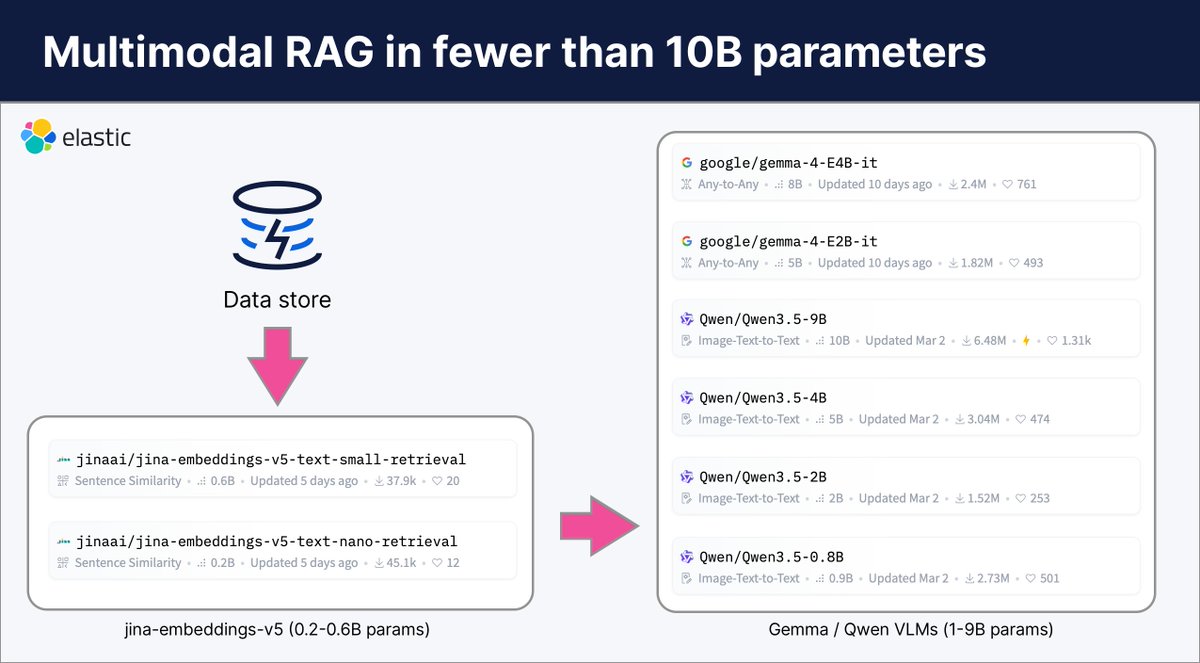
A competent RAG pipeline with a billion parameters? It’s no longer just a pipe dream. The recent release of Gemma and Qwen models give developers access to models as small as under 1B parameters that can run on not just your computer, but edge devices. Combine them with Jina AI’s v5 text embedding models, and you can have a competent RAG pipeline for around 1B parameters, or an even better one for only 5-10B parameters. What’s even better is that these Gemma and Qwen models are multimodal, so they can understand images as well as text. You can combine these with Elasticsearch (running on your machine or in the cloud) and you’ll have an efficient RAG pipeline at a fraction of the compute you used to need.
Elastic Dev tweet media
English
0
1
5
128
Elastic Dev
Elastic Dev@elastic_devs·
Explore how OpenTelemetry Content Packages in Elastic provide instant dashboards: go.es.io/4diyb1K
English
0
0
1
86
Elastic Dev
Elastic Dev@elastic_devs·
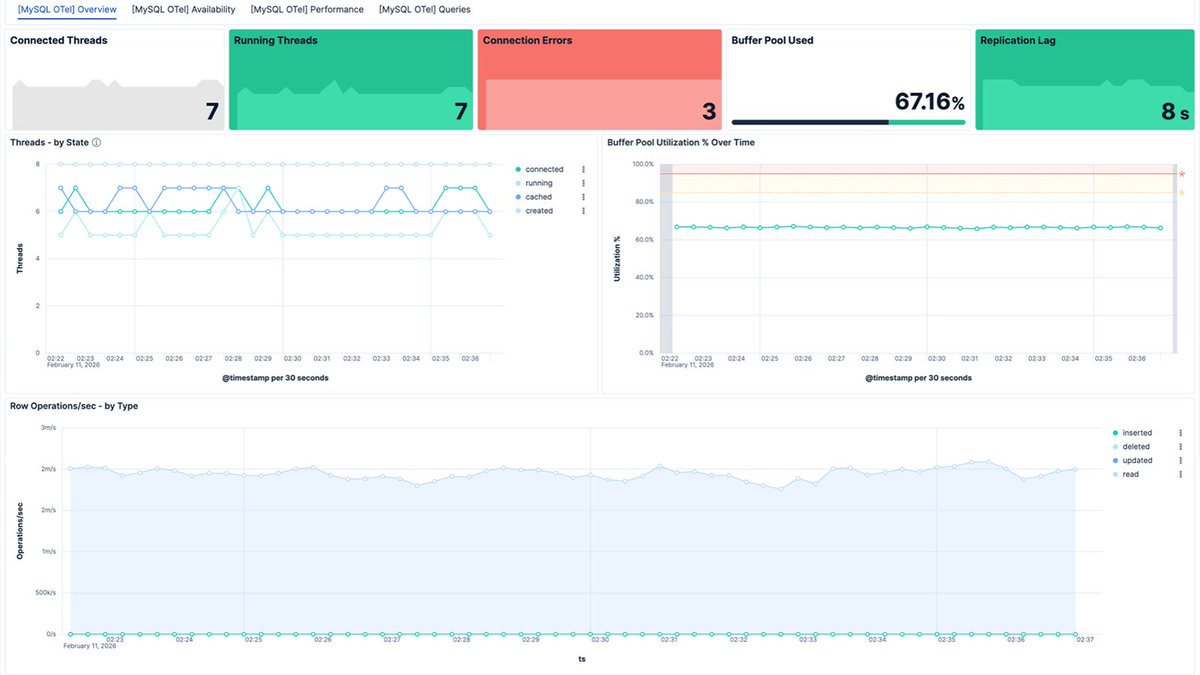
You got your OTel collector running. Data's flowing into Elasticsearch. You open Kibana and... nothing. No dashboards, no alerts, no SLOs. Just raw metrics. That blank-screen moment is where most OTel adoption stalls. Collection is solved. Visualization isn't. OTel Content Packages fix the gap. They auto-install the moment your data arrives: pre-built Kibana dashboards, alert rules with real thresholds, SLO templates with 30-day rolling windows. The MySQL package ships with 6 alert rules (connection errors, slow queries, thread saturation, replication lag, buffer pool, row locks) and 4 SLO templates, ready to tune or use as-is. No YAML for dashboards. No guessing which metrics matter. Data in, observability out.
Elastic Dev tweet media
English
1
0
5
181
Elastic Dev
Elastic Dev@elastic_devs·
Here's the decision tree: 1. For most cases: Start with semantic_text 2. For production: Add hybrid search with RRF for comprehensive coverage 3. Layer in a reranker for maximum relevance 4. Use vectors directly: Only when you need custom similarity algorithms All in a single, clean API call.
English
0
0
0
58
Elastic Dev
Elastic Dev@elastic_devs·
SQL folks, you're covered too. ES|QL lets you write SQL-style queries that automatically detect semantic_text fields and run semantic search under the hood. Perfect for: • analytics, • reporting, • or teams more comfortable with SQL than query DSL.
Elastic Dev tweet media
English
1
0
0
63
Elastic Dev
Elastic Dev@elastic_devs·
What if semantic search in Elasticsearch was as simple as writing a regular text query? It is now. - Thread below: Here's the full evolution of search: from BM25 to hybrid AI-powered retrieval 🧵 - Video explainer: go.es.io/48weUHt
Elastic Dev tweet media
English
2
1
9
904
Elastic Dev
Elastic Dev@elastic_devs·
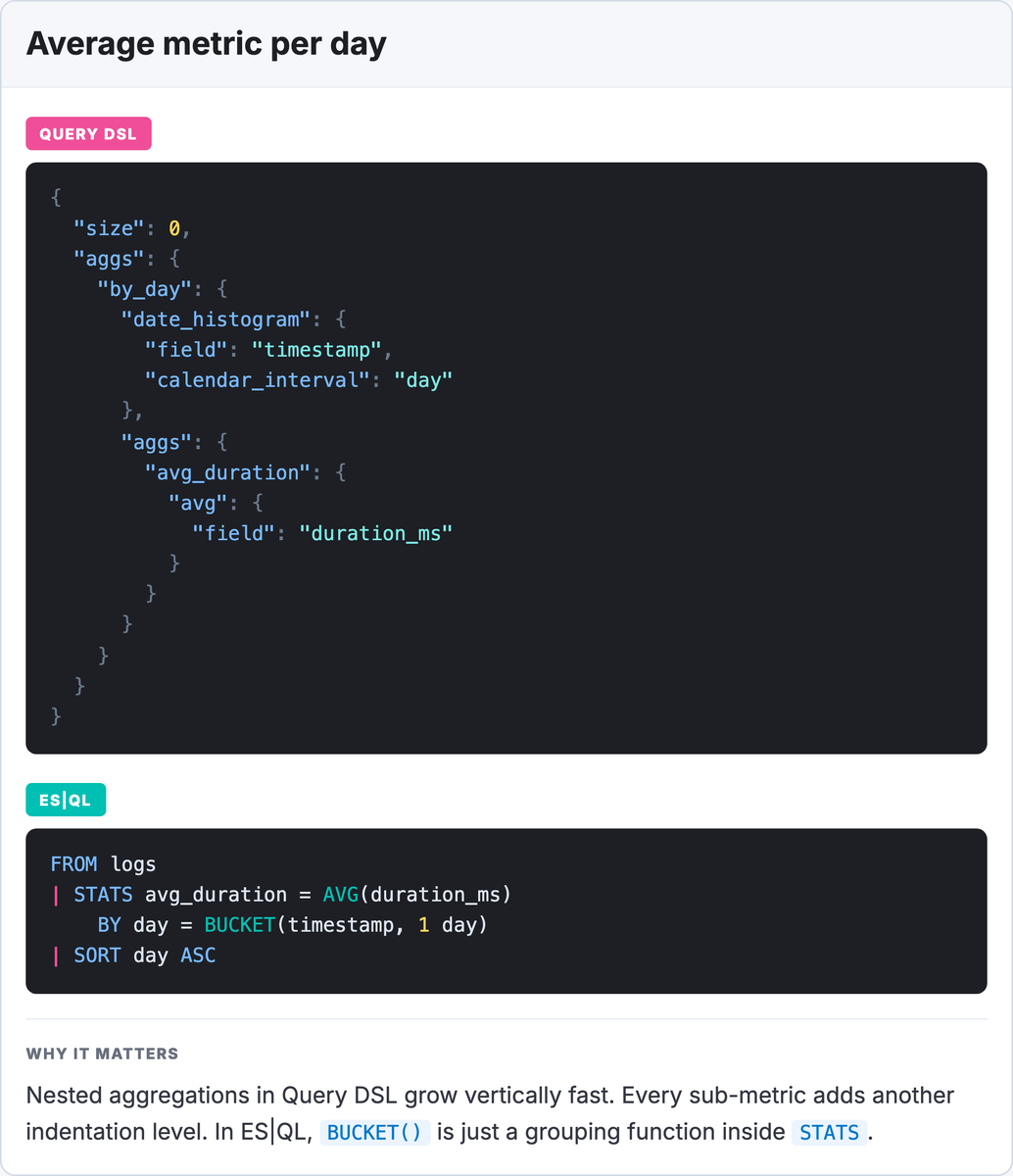
Have you ever tried to add a second metric to a Query DSL aggregation that someone else wrote? You're not writing a query, you're navigating a structure. - Find the right nesting level. - Check you're inside the right parent aggregation. - Don't forget to close all the brackets. ES|QL's STATS command is flat by design. - Multiple metrics, multiple groupings - they all go on one line. - The query grows sideways, not downwards.
Elastic Dev tweet media
English
2
0
8
186
Elastic Dev
Elastic Dev@elastic_devs·
🎵 Multimodal Gemini 2 embeddings for audio search This notebook shows how you can build cross-modal audio search: - Multimodal embeddings using Gemini 2 embeddings via @GoogleAIStudio API - Vector search via Elasticsearch vector database Now you can find audio files via: - Text-to-audio: Search "Jazz music", find "jazz.wav" - Audio-to-audio: Search "acapella.wav", find "cappella-remix.wav" Check out the notebook: go.es.io/4t1NDEh
Elastic Dev tweet media
English
1
4
12
895
Elastic Dev
Elastic Dev@elastic_devs·
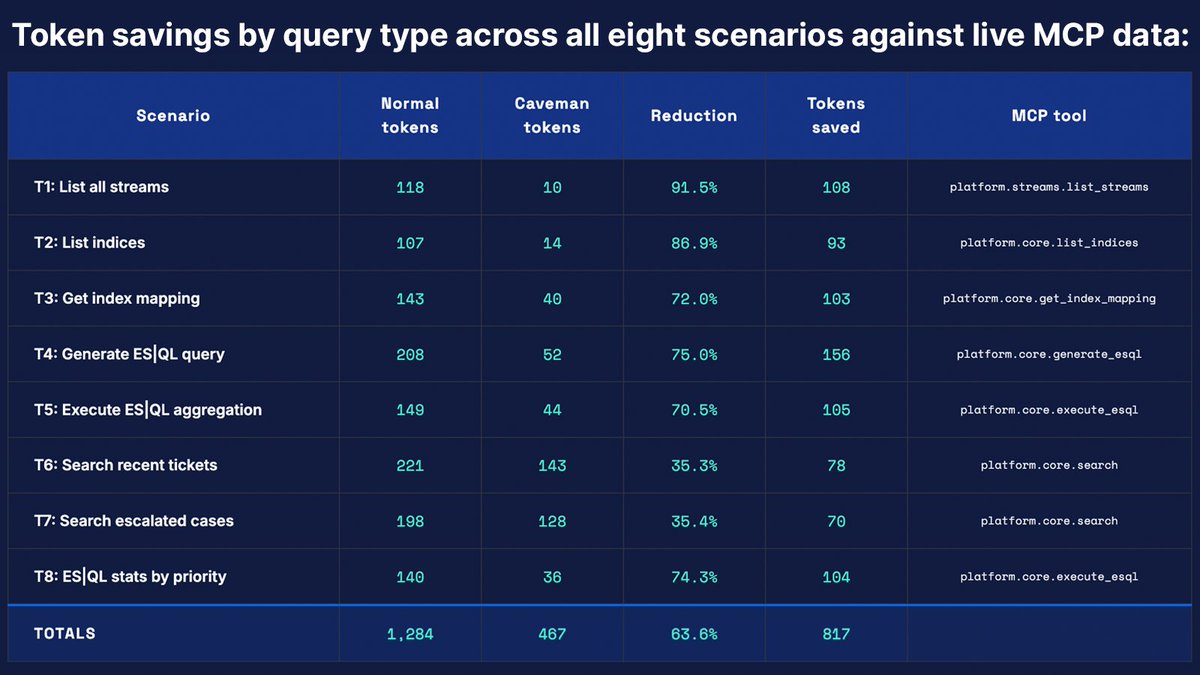
Sri Kolagani ran elastic-caveman across 8 live MCP scenarios against Elasticsearch and stripped the speech. 63.6% average token reduction. 817 tokens saved. ES|QL syntax, field names, case IDs. All preserved exactly. "Show me my indices" → 107 tokens normal mode. Caveman mode: 14. Same data. npx skills add srikolag/elastic-caveman go.es.io/423sjmQ
English
0
0
2
155
Elastic Dev
Elastic Dev@elastic_devs·
🧵 "Of course! I'd be happy to help you..." "This should give you a good overview..." "Feel free to let me know if you need anything else!" You're paying for every one of those tokens.
Elastic Dev tweet media
English
1
0
7
368
Elastic Dev
Elastic Dev@elastic_devs·
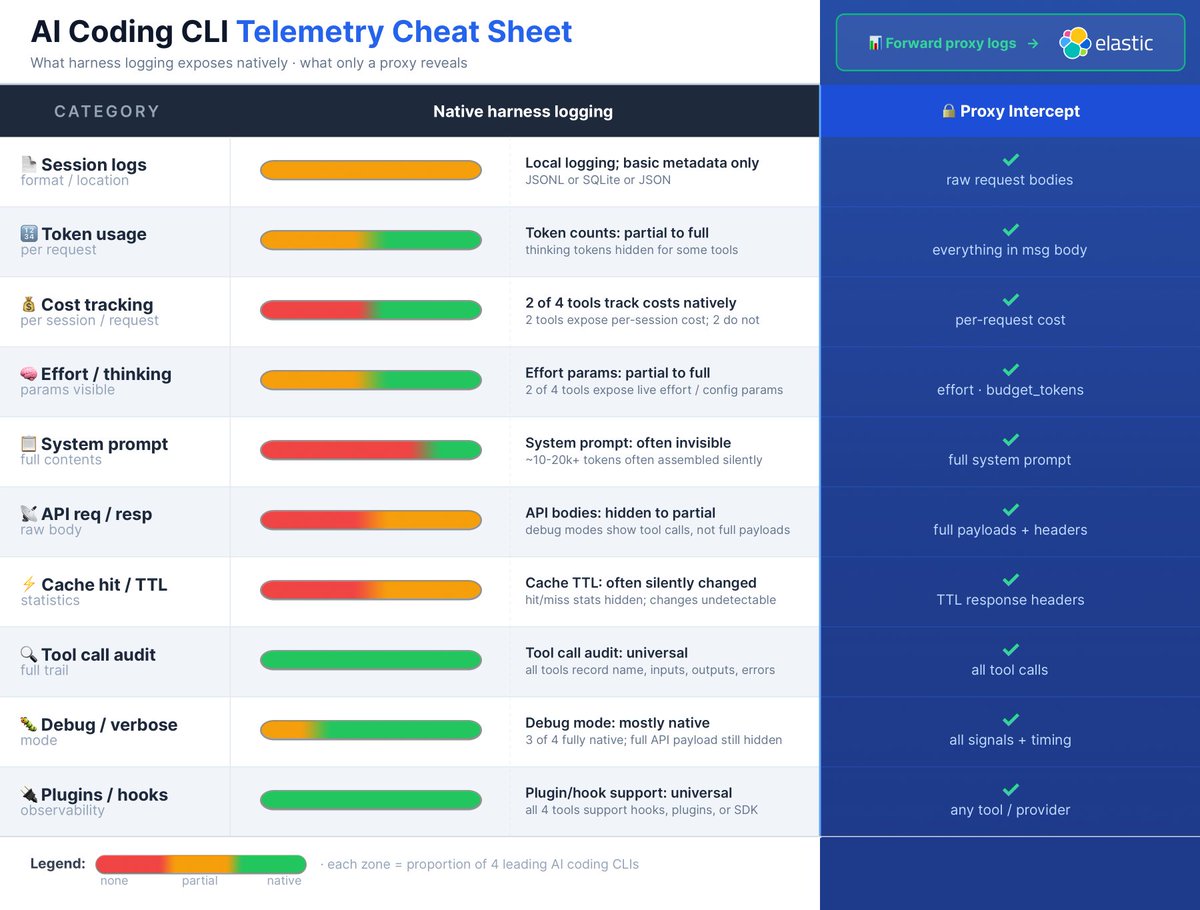
The easiest way to see the full picture is a proxy between the CLI and the API. Raw API payloads, effort params, real cache TTL headers, true token costs: you can be sure you’re getting everything. Forward those logs into Elasticsearch and you get cross-session, cross-tool observability in one place: latency patterns, token trends, cost attribution, tool call failure rates. Flying blind is fine for prototyping. Not for prod.
English
0
0
4
140
Elastic Dev
Elastic Dev@elastic_devs·
🧵 Are you flying your AI coding CLI blind? @_jphwang mapped what the major AI coding tools actually expose natively against what you could be capturing. The gaps are bigger than you'd expect. Some highlights: - System prompt? Not exposed in most cases. That's ~10-20K tokens assembled silently per request, invisible without API-layer interception. - Cache TTL? Silent. Hit/miss stats hidden, changes undetectable from CLI logs alone. - Thinking tokens? Billed but hidden. - Tool call audit trail? All 4 tools handle this well. Session logs too. That's roughly where the good news ends. The easiest way to see the full picture is a proxy between the CLI and the API. Raw API payloads, effort params, real cache TTL headers, true token costs: you can be sure you’re getting everything. Forward those logs into Elasticsearch and you get cross-session, cross-tool observability in one place: latency patterns, token trends, cost attribution, tool call failure rates. Flying blind is fine for prototyping. Not for prod.
Elastic Dev tweet media
English
1
4
12
1.3K
Elastic Dev
Elastic Dev@elastic_devs·
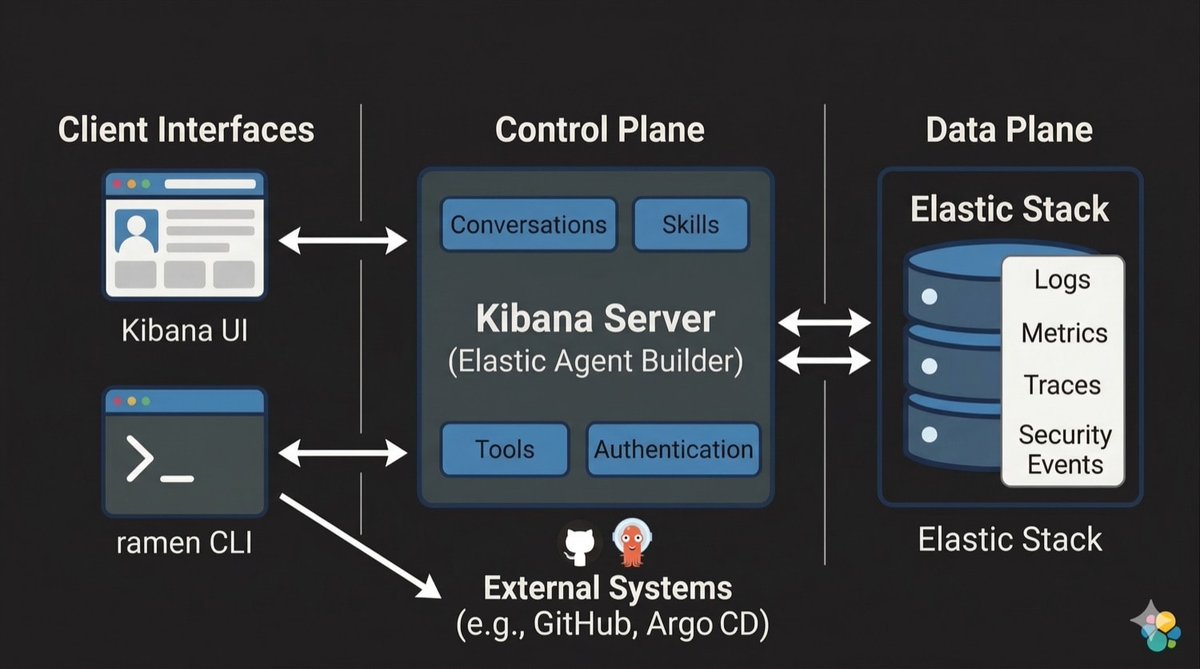
Your observability tool told you what broke. Then you opened a terminal, lost your AI context, and started the investigation over from scratch. That context drop is the actual problem. Ramen fixes it. It is a CLI agent that connects directly to Elastic Agent Builder, carrying the same conversation, skills, and context into the terminal where the fix actually happens. No handoff. No re-auth. No translation layer. kubectl, gcloud, git, your internal scripts — all available in the same thread as your investigation. Terminal interactions sync back automatically, building a searchable record for the team. Open source. Install in one line.
Elastic Dev tweet media
English
3
0
7
215