H.L. Mencken hated modernity, opposed the New Deal, and was against American entry into WW-II
His productivity was legendary: he wrote more than 10 million words over his lifetime...
Mencken's most powerful idea:
Democracy is not a solution but a PROBLEM
A thread👇🏻
Esta mañana ha fallecido Francisco Ibáñez, creador de Mortadelo y Filemón, Pepe Gotera y Otilio, el botones Sacarino, Rompetechos y tantos otros.
Tenía 87 años.
Esta pérdida duele mucho.
Descanse en paz.
Just hired a 21yo for their first job. What basic professional advice do they need? Here's what I tell all my new staff, but perhaps you can add. I'll start small.
1/ Use an online calendar. Have a foolproof system of reminders, so you never forget a deadline or obligation.
Amazon enseña a escribir a sus empleados de forma excelente.
Y lo hace con tan solo 7 normas de escritura.
Que son una maravilla.
He pasado horas resumiéndolas, te las enseño en 2 minutos:
𝗦𝗼𝗺𝗲 𝗶𝗺𝗽𝗼𝗿𝘁𝗮𝗻𝘁 𝗹𝗲𝗮𝗿𝗻𝗶𝗻𝗴𝘀 𝗳𝗿𝗼𝗺 𝗺𝘆 𝟮𝟬 𝘆𝗲𝗮𝗿𝘀 𝗼𝗳 𝗲𝗻𝗴𝗶𝗻𝗲𝗲𝗿𝗶𝗻𝗴 𝗹𝗶𝗳𝗲
𝟭. 𝗗𝗼𝗻'𝘁 𝗱𝗼 𝗽𝗿𝗲𝗺𝗮𝘁𝘂𝗿𝗲 𝗼𝗽𝘁𝗶𝗺𝗶𝘇𝗮𝘁𝗶𝗼𝗻
You will not replace that component with another one in the future, so that you won't need an abstraction now.
𝟮. 𝗧𝗵𝗶𝗻𝗸 𝘁𝘄𝗶𝗰𝗲 𝗯𝗲𝗳𝗼𝗿𝗲 𝘄𝗿𝗶𝘁𝗶𝗻𝗴 𝗰𝗼𝗱𝗲
Only write if you're sure you need that code line. The best code is no code.
𝟯. 𝗟𝗲𝗮𝗿𝗻 𝗴𝗼𝗼𝗱 𝗽𝗿𝗮𝗰𝘁𝗶𝗰𝗲𝘀
- Clean Code.
- Design patterns.
- SOLID Principles.
- Different software architectures.
- Algorithms.
𝟰. 𝗠𝗮𝗸𝗲 𝘁𝗵𝗶𝗻𝗴𝘀 𝘀𝗶𝗺𝗽𝗹𝗲, 𝗮𝗻𝗱 𝗲𝘃𝗲𝗻 𝘀𝗶𝗺𝗽𝗹𝗲𝗿 𝘁𝗵𝗮𝗻 𝘁𝗵𝗮𝘁
Make sure to complete everything correctly. Go with simple and easy-to-understand solutions. We are anyway in a very complex space here.
𝟱. 𝗡𝗮𝗺𝗲 𝘁𝗵𝗶𝗻𝗴𝘀 𝗽𝗿𝗼𝗽𝗲𝗿𝗹𝘆
One of the hardest things. Try to look at it from the reader's perspective.
𝟲. 𝗧𝗲𝘀𝘁 𝘆𝗼𝘂𝗿 𝗰𝗼𝗱𝗲
Unit, integration, e2e, and all others which are needed. You cannot afford a non-tested code. Try to design things by writing tests, TDD, for example.
𝟳. 𝗞𝗲𝗲𝗽 𝘆𝗼𝘂𝗿 𝘁𝗶𝗺𝗲 𝘄𝗶𝘀𝗲𝗹𝘆. 𝗜𝘁 𝗶𝘀 𝘁𝗵𝗲 𝗺𝗼𝘀𝘁 𝗲𝘅𝗽𝗲𝗻𝘀𝗶𝘃𝗲 𝘁𝗵𝗶𝗻𝗴 𝘆𝗼𝘂 𝗵𝗮𝘃𝗲.
Try to avoid being interrupted for deep focus. Hide your notifications. Made one day in a week a non-meeting day. Prioritize tasks (learn Eisenhower matrix)
𝟴. 𝗖𝗼𝗺𝗺𝘂𝗻𝗶𝗰𝗮𝘁𝗲, 𝗰𝗼𝗺𝗺𝘂𝗻𝗶𝗰𝗮𝘁𝗲, 𝗰𝗼𝗺𝗺𝘂𝗻𝗶𝗰𝗮𝘁𝗲
Try pair and mob programming. Then you don't need code reviews; you're collaboratively writing code with the same goal.
𝟵. 𝗗𝗼𝗻'𝘁 𝗷𝘂𝘀𝘁 𝗹𝗲𝗮𝗿𝗻, 𝗱𝗼
When you learn something, try to understand it when you need it or a bit before (be intentional). You will forget most of it if you don't do it.
And, of course, remember to enjoy coding!
_______
If you like my posts, please follow me, @milan_milanovic, and hit the 🔔 on my profile to get a notification for all my new posts.
Grow with me 🚀!
#technology#softwareengineering#programming#techworldwithmilan#careers
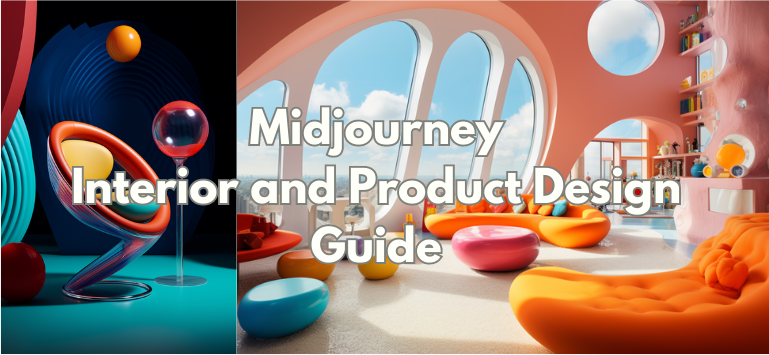
MidJourney Interior and Product Design Guide
Create SPECTACULAR interiors and products by referencing these AMAZING architects and designers
Prompts inside!
You may not know them...
But MidJourney does, and distills their style perfectly
If you liked it, please RT 🥰
Existe una receta para tener motivación infinita.
Se la robé a Andrew Tate, 4x campeón mundial de kickboxing.
Fue borrada completamente de Internet. Hoy te la revelo 👇🏼🧵
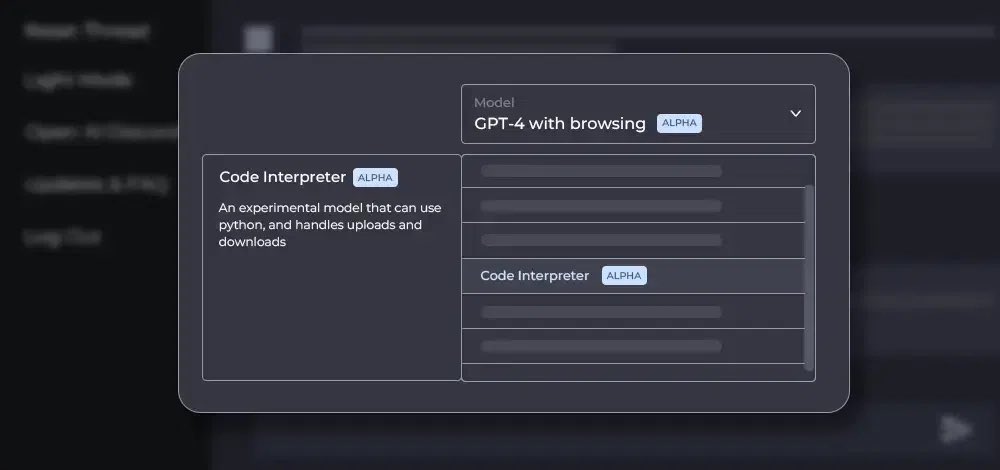
BREAKING: Code Interpreter will be available to all ChatGPT Plus users over the next week!
It can analyze data, create charts, edit files, perform math & much more.
Here are 10 mind-blowing examples of what is possible:
In Jan 2022, I wasted 3 months no-life grinding @LeetCode and ended up with 3 decent offers (all software eng):
- $250k+ from @Uber
- $270k+ from @Affirm
- $260k+ from @gopuff
and then a bunch more 200k+ offers.
5 lessons i learned:
🥁Introducing YouTube-to-chatbot — train a chatbot on an ENTIRE YouTube channel 💬
90% of my dev friends are telling me to pay wall it.
A VC told me to patten it.
But I’m giving it away to everyone who comments & follows in the next 72 hours 😉
Make me regret this…
Getting started in Midjourney can be intimidating.
Staring at an empty chat box where you can prompt pretty much anything you can imagine, where do you begin?
Here's 15 prompts & step-by-step tutorials you can use to help jumpstart your creative explorations:
GPT-Engineer is BLOWING UP on GitHub right now 🔥
Prompt an AI agent to write an entire codebase 🤯
+2k stars today alone. I'll be experimenting with it this weekend to improve my workflow.
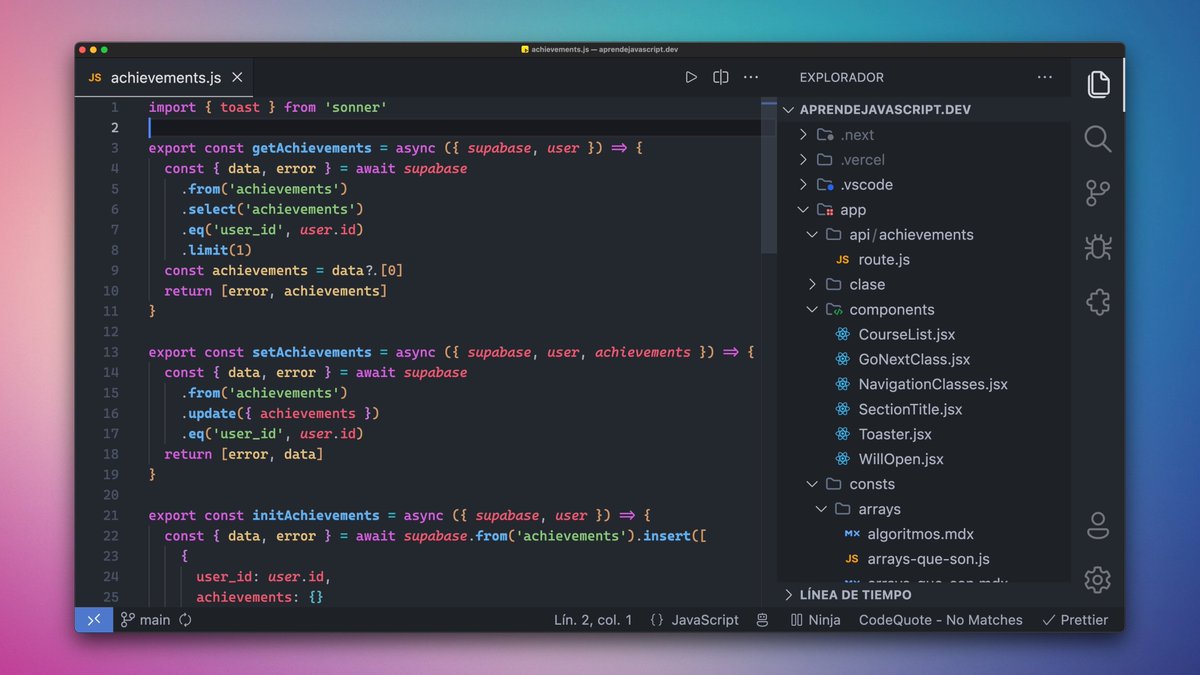
¡Configura tu VISUAL STUDIO CODE como un PRO!
Te comparto todas mis configuraciones, temas, fuentes, trucos y extensiones.
✭ TEMA:
El tema y colores que estoy usando es One Dark Pro en su variante Darker.
Para conseguir el mismo estilo debes activar las itálicas, las negritas y que los colores sean vívidos.
Es mi preferencia personal pero a mi me gusta mucho cómo queda. ❤️
✭ FUENTE:
La fuente es Cascadia Code, una fuente de Microsoft de código abierto.
Hay que instalar la versión Cascadia Code PL (trae ligaduras y Power Symbols).
Activa las ligaduras en Code con la opción "editor.fontLigatures": true.
✭ BARRA a la DERECHA:
Pongo la barra lateral a la derecha para mis streams.
Así no molesta y puedo ocultarlo sin dar saltos el código.
Si te gusta, puedes moverlo a la derecha haciendo clic encima y seleccionando: "Move Primary Side Bar Right"
✭ ICONOS:
Para cambiar los iconos necesitas dos extensiones
- Symbols, iconos del explorador
- Fluent, los iconos de la barra de actividades
✭ STATUS BAR:
La barra de estado de abajo del todo se puede llenar de mucho ruido al instalar extensiones.
Puedes hacer clic al botón derecho sobre ella y seleccionar sólo aquella información que realmente te añade valor.
✭ EXTENSIONES:
Además de las extensiones típicas de soporte de lenguajes, idiomas y linter (Eslint y Prettier)...
Uso una colección que me hace ser mucho más productivo.
Te dejo la lista completa en este hilo:
x.com/midudev/status…
✭ VENTANAS + PESTAÑAS:
Al usar macOS, puedes activar un modo para usar las ventanas nativas del sistema.
Además de que ocupan menos espacio y se integran mejor, también puedes tener pestañas en las ventanas para trabajar en diferentes proyectos.
Busca "macos native tabs" en las preferencias y actívalo.
✭ OCULTAR EDITORES ABIERTOS:
Con las pestañas de macOS y las del propio editor, tengo suficiente para saber qué tengo abierto.
Así que en el explorador de archivos tengo oculta la parte de "Open Editors" para que no ocupe espacio.
Dale clic a los tres puntos que hay al lado del icono de crear archivo y ocúltalo.